Page 65 of 560

353
Safety system of your vehicle
The side impact air bags are designedto deploy only during certain side-
impact collisions, depending on the
crash severity, angle, speed and pointof impact.
The side impact air bags do not only deploy on the side of the impact but
also on the opposite side.(Continued)
Use of seat covers could reduceor prevent the effectiveness of the system.
Do not install any accessories on the side or near the side impact
air bag.
Do not place any objects over the air bag or between the air bag
and yourself.
Do not place any objects (an umbrella, bag, etc.) between the
front door and the front seat.
Such objects may become dan-
gerous projectiles and cause
injury if the supplemental side
impact air bag inflates.
To prevent unexpected deploy- ment of the side impact air bag
that may result in personal injury,
avoid impact to the side impact
sensor when the ignition key ison.
If the seat or seat cover is dam- aged, have the vehicle checked
and repaired by a HYUNDAI
authorised repairer. Inform that
your vehicle is equipped with
side impact air bags.WARNING
The side impact air bag is sup- plemental to the driver's and the
passenger's seat belt systems
and is not a substitute for them.
Therefore your seat belts must be
worn at all times whilst the vehi-
cle is in motion. The air bags
deploy only in certain side impact
conditions severe enough to
cause significant injury to the
vehicle occupants.
For best protection from the side impact air bag system and to
avoid being injured by the
deploying side impact air bag,
both front seat occupants shouldsit in an upright position with the
seat belt properly fastened. Thedriver's hands should be placedon the steering wheel at the 9:00
and 3:00 positions. The passen-
ger's arms and hands should beplaced on their laps.
Do not use any accessory seat covers.
(Continued)
EL UK 3.QXP 1/12/2010 2:58 PM Page 53
Page 70 of 560

Safety system of your vehicle
58
3
Side impact and curtain air bags (if equipped)
Side impact and/or curtain air bags are designed to inflate when an impact is
detected by side collision sensorsdepending on the strength, speed orangles of impact resulting from a sideimpact collision. Although the front air bags (driver’s and
front passenger’s air bags) are designed
to inflate only in frontal collisions, they
also may inflate in other types of colli-sions if the front impact sensors detect a
sufficient impact. Side air bags (side
impact and/or curtain air bags) aredesigned to inflate only in side impact
collisions, but they may inflate in othercollisions if the side impact sensorsdetect a sufficient impact.
If the vehicle chassis is impacted by
bumps or objects on unimproved roads
or sidewalks, air bags may deploy. Drive
carefully on unimproved roads or on sur-
faces not designed for vehicle traffic to
prevent unintended air bag deployment.
Air bag non-inflation conditions
In certain low-speed collisions the air
bags may not deploy. The air bags are
designed not to deploy in such cases
because they may not provide benefits
beyond the protection of the seat belts
in such collisions.
1VQA2086/H
OVQ036018N
OXM039057
EL UK 3.QXP 1/12/2010 2:58 PM Page 58
Page 72 of 560
Safety system of your vehicle
60
3
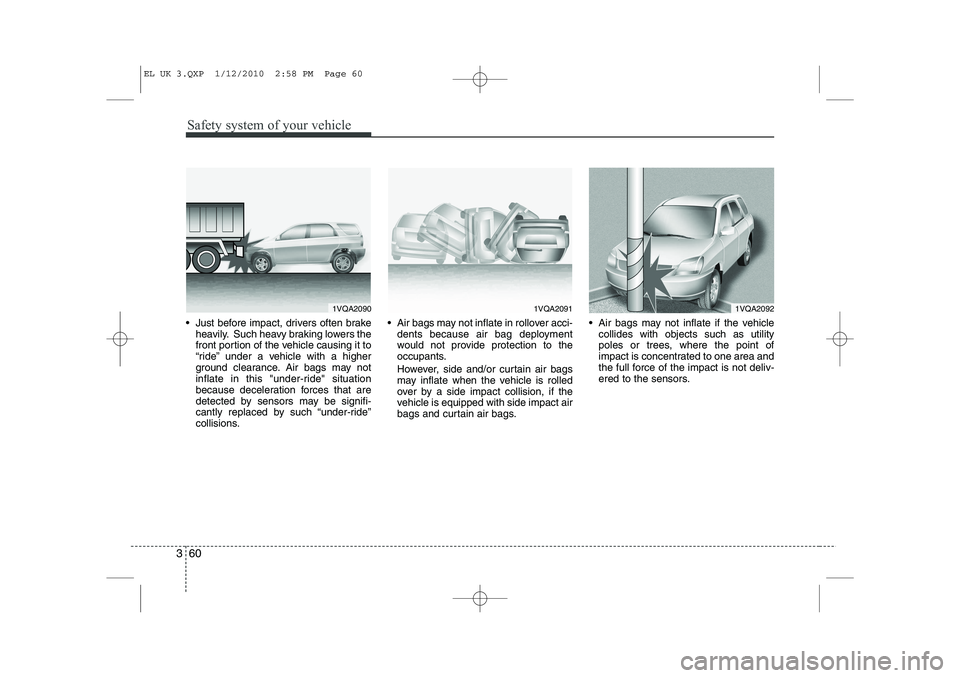
Just before impact, drivers often brake
heavily. Such heavy braking lowers the
front portion of the vehicle causing it to
“ride” under a vehicle with a higher
ground clearance. Air bags may not
inflate in this "under-ride" situation
because deceleration forces that are
detected by sensors may be signifi-
cantly replaced by such “under-ride”
collisions. Air bags may not inflate in rollover acci-
dents because air bag deployment
would not provide protection to the
occupants.
However, side and/or curtain air bags may inflate when the vehicle is rolled
over by a side impact collision, if the
vehicle is equipped with side impact air
bags and curtain air bags. Air bags may not inflate if the vehicle
collides with objects such as utility
poles or trees, where the point of
impact is concentrated to one area and
the full force of the impact is not deliv-
ered to the sensors.
1VQA20901VQA20911VQA2092
EL UK 3.QXP 1/12/2010 2:58 PM Page 60
Page 75 of 560
363
Safety system of your vehicle
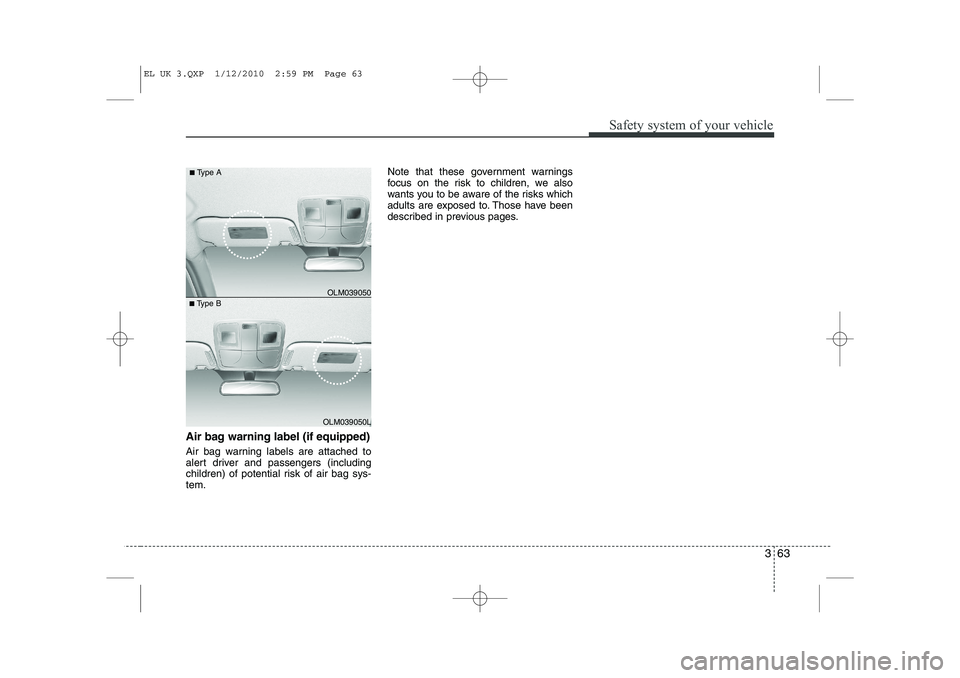
Air bag warning label (if equipped)
Air bag warning labels are attached to
alert driver and passengers (including
children) of potential risk of air bag sys-tem.Note that these government warnings
focus on the risk to children, we also
wants you to be aware of the risks which
adults are exposed to. Those have been
described in previous pages.
■
Type B OLM039050
■
Type A
OLM039050L
EL UK 3.QXP 1/12/2010 2:59 PM Page 63
Page 89 of 560
Features of your vehicle
14
4
Operating door locks from inside
the vehicle
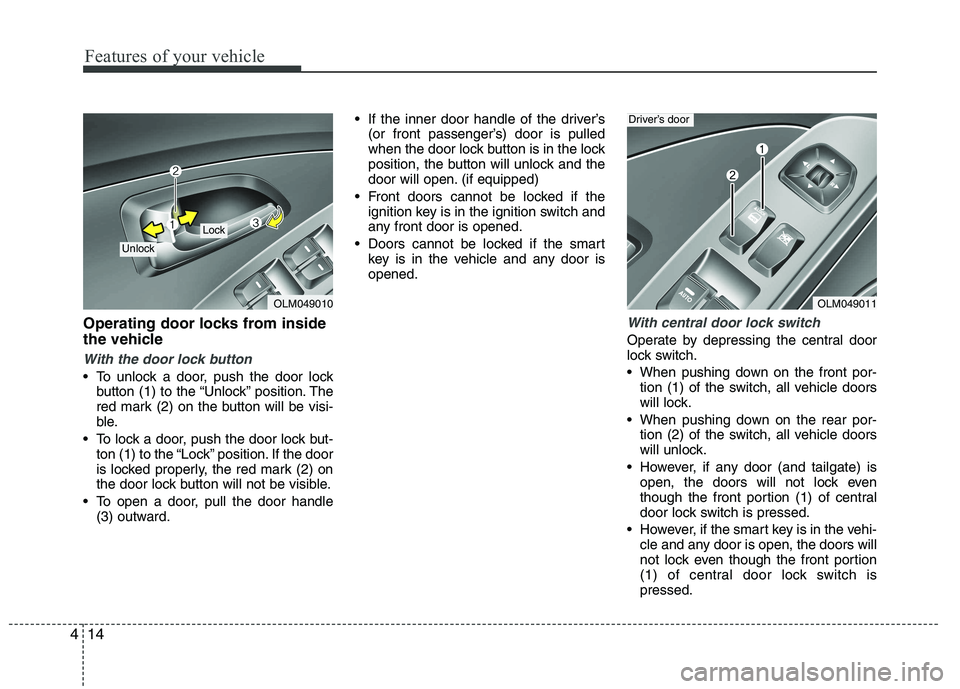
With the door lock button
To unlock a door, push the door lock
button (1) to the “Unlock” position. The
red mark (2) on the button will be visi-
ble.
To lock a door, push the door lock but- ton (1) to the “Lock” position. If the door
is locked properly, the red mark (2) on
the door lock button will not be visible.
To open a door, pull the door handle (3) outward. If the inner door handle of the driver’s
(or front passenger’s) door is pulled
when the door lock button is in the lock
position, the button will unlock and the
door will open. (if equipped)
Front doors cannot be locked if the ignition key is in the ignition switch and
any front door is opened.
Doors cannot be locked if the smart key is in the vehicle and any door isopened.
With central door lock switch
Operate by depressing the central door
lock switch.
When pushing down on the front por-tion (1) of the switch, all vehicle doors
will lock.
When pushing down on the rear por- tion (2) of the switch, all vehicle doors
will unlock.
However, if any door (and tailgate) is open, the doors will not lock even
though the front portion (1) of central
door lock switch is pressed.
However, if the smart key is in the vehi- cle and any door is open, the doors will
not lock even though the front portion
(1) of central door lock switch ispressed.
OLM049010
Lock
Unlock
OLM049011
Driver’s door
Page 94 of 560
419
Features of your vehicle
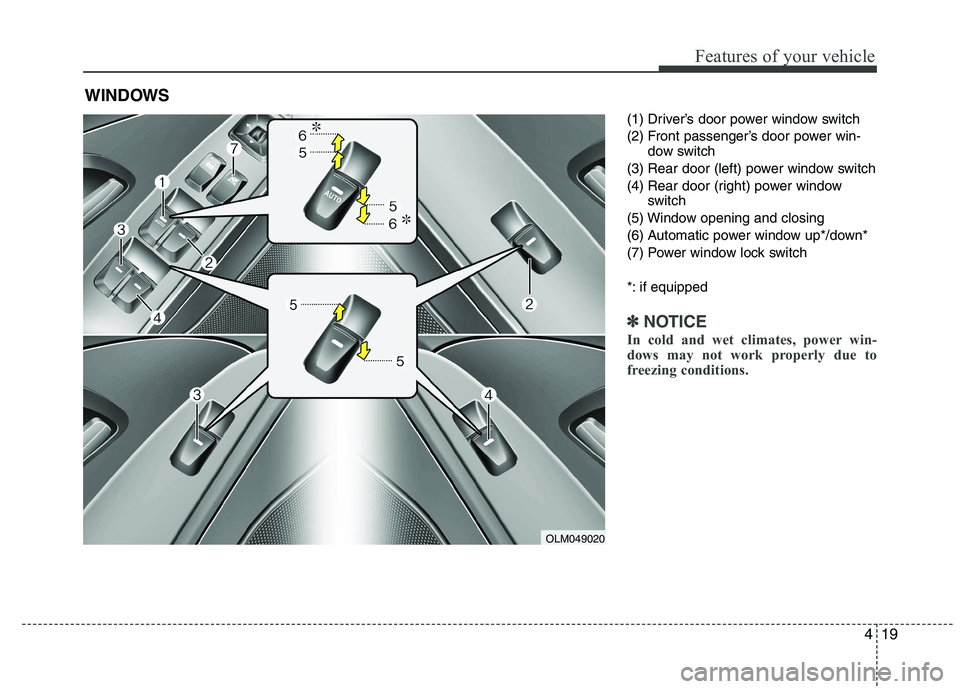
(1) Driver’s door power window switch
(2) Front passenger’s door power win-dow switch
(3) Rear door (left) power window switch
(4) Rear door (right) power window switch
(5) Window opening and closing
(6) Automatic power window up*/down*
(7) Power window lock switch
*: if equipped
✽✽ NOTICE
In cold and wet climates, power win-
dows may not work properly due to
freezing conditions.
WINDOWS
OLM049020
Page 95 of 560
Features of your vehicle
20
4
Power windows
The ignition switch must be in the ON
position for power windows to operate.
Each door has a power window switch
that controls the door’s window. The driv-
er has a power window lock switch which
can block the operation of rear (or front)
passenger windows.
The power windows can be operated for
approximately 30 seconds after the igni-
tion key is removed or turned to the ACC
or LOCK position. However, if the front
doors are opened, the power windows
cannot be operated even within the 30
seconds period. The driver’s door has a
master power window switch that con-
trols all the windows in the vehicle✽✽
NOTICE
While driving with the rear windows
down or with the sunroof (if equipped)
in an open (or partially open position),
your vehicle may demonstrate a wind
buffeting or pulsation noise. This
noise is a normal occurrence and can be
reduced or eliminated by taking the fol-
lowing actions. If the noise occurs with
one or both of the rear windows down,
partially lower both front windows
approximately one inch. If you experi-
ence the noise with the sunroof open,
slightly reduce the size of the sunroof
opening.
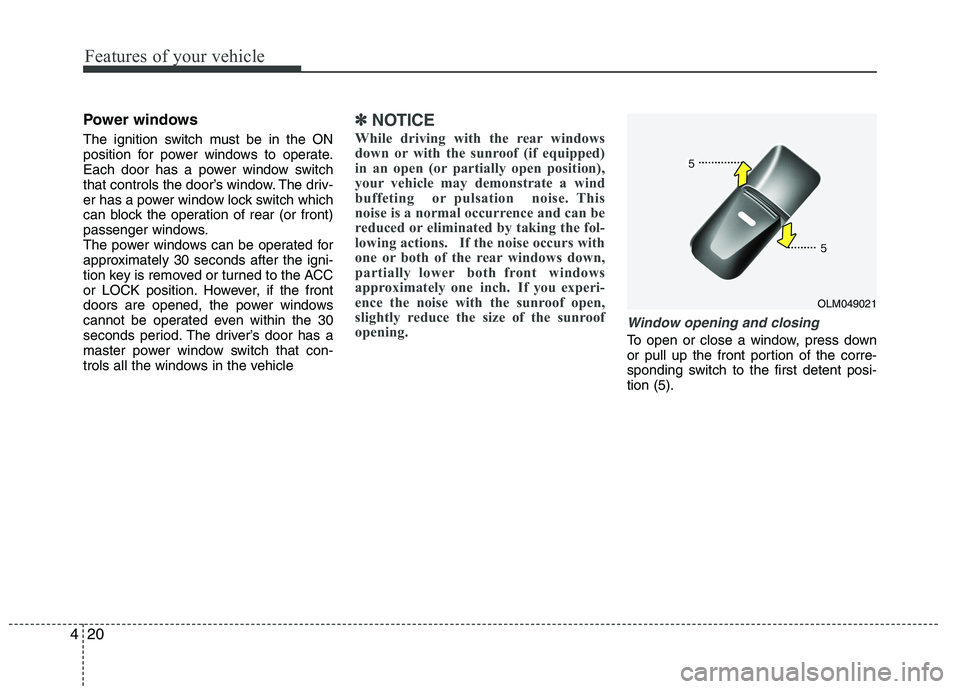
Window opening and closing
To open or close a window, press down
or pull up the front portion of the corre-
sponding switch to the first detent posi-tion (5).
OLM049021
Page 96 of 560
421
Features of your vehicle
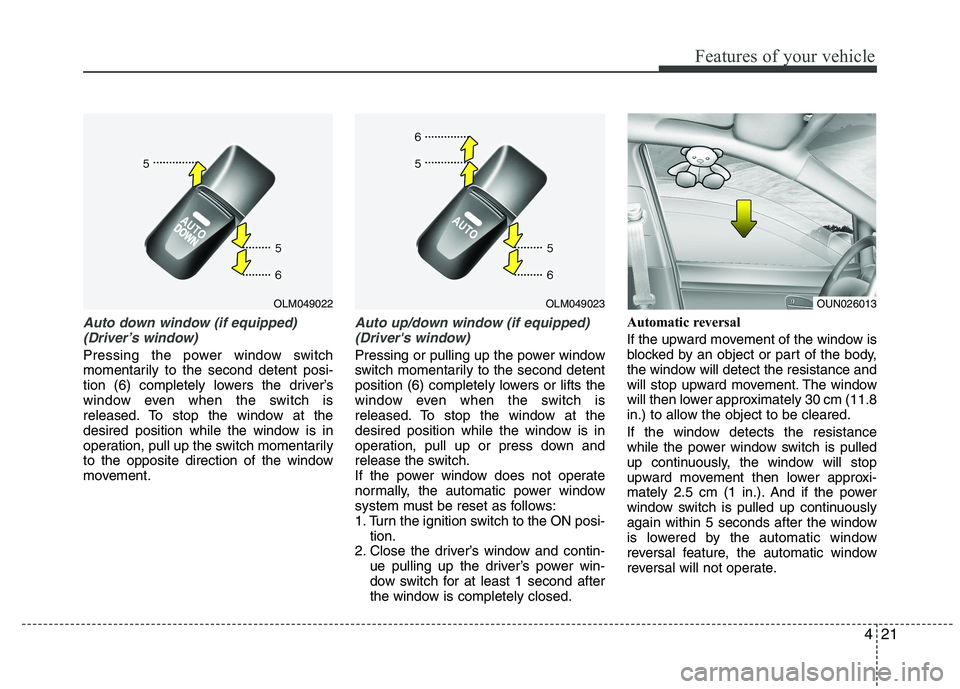
Auto down window (if equipped) (Driver’s window)
Pressing the power window switch
momentarily to the second detent posi-
tion (6) completely lowers the driver’s
window even when the switch is
released. To stop the window at the
desired position while the window is in
operation, pull up the switch momentarily
to the opposite direction of the window
movement.
Auto up/down window (if equipped)(Driver's window)
Pressing or pulling up the power window
switch momentarily to the second detent
position (6) completely lowers or lifts the
window even when the switch is
released. To stop the window at the
desired position while the window is in
operation, pull up or press down and
release the switch.
If the power window does not operate
normally, the automatic power window
system must be reset as follows:
1. Turn the ignition switch to the ON posi- tion.
2. Close the driver’s window and contin-
ue pulling up the driver’s power win-
dow switch for at least 1 second after
the window is completely closed. Automatic reversal
If the upward movement of the window is
blocked by an object or part of the body,
the window will detect the resistance and
will stop upward movement. The window
will then lower approximately 30 cm (11.8
in.) to allow the object to be cleared.
If the window detects the resistance
while the power window switch is pulled
up continuously, the window will stop
upward movement then lower approxi-
mately 2.5 cm (1 in.). And if the power
window switch is pulled up continuously
again within 5 seconds after the window
is lowered by the automatic window
reversal feature, the automatic window
reversal will not operate.
OLM049023OLM049022OUN026013