2011 HYUNDAI IX35 Driver
[x] Cancel search: DriverPage 472 of 560
Features of your vehicle
60
4
DBC (Downhill brake con-
trol) indicator (if equipped)
The DBC indicator will illuminate when
the DBC button is pressed and the sys-tem is on.
When driving down a steep hill at a speed under 22 mph (35 km/h), the DBC
will operate and the DBC indicator will
blink to indicate the DBC is operating.
If the red indicator illuminates, the DBC
system may have malfunctioned. Take
your vehicle to a HYUNDAI authorised
repairer and have the system checked.
KEY OUT indicator (if equipped)
When the ENGINE START/STOP button
is in the ACC or ON position, if any door
is open, the system checks for the smart
key. If the smart key is not in the vehicle,
the indicator will blink, and if all doors are
closed, the chime will also sound for
about 5 seconds. The indicator will go off
whilst the vehicle is moving. Keep the
smart key in the vehicle or insert it in the
smart key holder.
Key reminder warning chime (if equipped)
If the driver’s door is opened whilst the
ignition key is left in the ignition switch
(ACC or LOCK position), the key
reminder warning chime will sound. This
is to prevent you from locking your keys
in the vehicle. The chime sounds until the
key is removed from the ignition switch or
the driver’s door is closed.
KEY
OUT
EL UK 4A.QXP 1/25/2010 9:47 AM Page 60
Page 479 of 560
467
Features of your vehicle
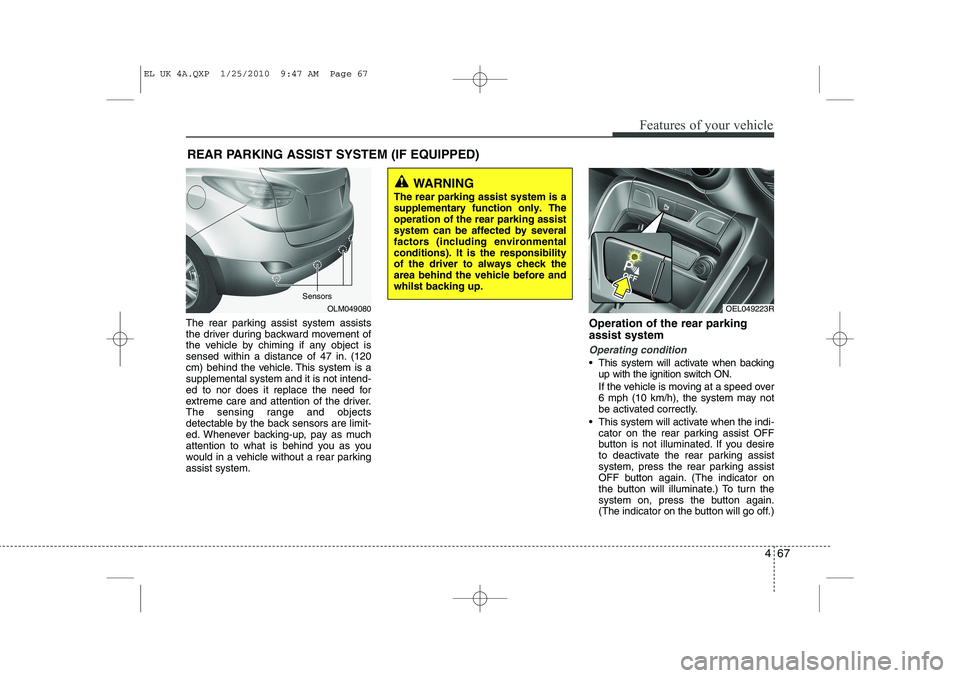
The rear parking assist system assists
the driver during backward movement of
the vehicle by chiming if any object is
sensed within a distance of 47 in. (120
cm) behind the vehicle. This system is asupplemental system and it is not intend-
ed to nor does it replace the need for
extreme care and attention of the driver.
The sensing range and objects
detectable by the back sensors are limit-
ed. Whenever backing-up, pay as much
attention to what is behind you as you
would in a vehicle without a rear parkingassist system.Operation of the rear parking assist system
Operating condition
This system will activate when backing
up with the ignition switch ON.
If the vehicle is moving at a speed over
6 mph (10 km/h), the system may not
be activated correctly.
This system will activate when the indi- cator on the rear parking assist OFF
button is not illuminated. If you desire
to deactivate the rear parking assist
system, press the rear parking assist
OFF button again. (The indicator on
the button will illuminate.) To turn the
system on, press the button again.
(The indicator on the button will go off.)
REAR PARKING ASSIST SYSTEM (IF EQUIPPED)
OLM049080
WARNING
The rear parking assist system is a supplementary function only. Theoperation of the rear parking assistsystem can be affected by severalfactors (including environmentalconditions). It is the responsibilityof the driver to always check thearea behind the vehicle before andwhilst backing up.
Sensors
OEL049223R
EL UK 4A.QXP 1/25/2010 9:47 AM Page 67
Page 481 of 560
469
Features of your vehicle
The detecting range may decrease when:
1. The sensor is stained with foreign mat-ter such as snow or water. (The sens-
ing range will return to normal when
removed.)
2. Outside air temperature is extremely hot or cold.
The following objects may not be rec-ognized by the sensor:
1. Sharp or slim objects such as ropes, chains or small poles.
2. Objects which tend to absorb the sen- sor frequency such as clothes, spongy
material or snow.
3. Undetectable objects smaller than 40 in. (1 m) in height and narrower than 6 in.
(14 cm) in diameter. Rear parking assist system pre- cautions
The rear parking assist system may
not sound sequentially depending on the speed and shapes of the objectsdetected.
The rear parking assist system may malfunction if the vehicle bumperheight or sensor installation has been
modified or damaged. Any non-factory
installed equipment or accessories
may also interfere with the sensor per-
formance.
The sensor may not recognize objects less than 15 in. (40 cm) from the sen-
sor, or it may sense an incorrect dis-
tance. Use caution.
When the sensor is frozen or stained with snow, dirt, or water, the sensor
may be inoperative until the stains are
removed using a soft cloth.
Do not push, scratch or strike the sen- sor. Sensor damage could occur.✽✽ NOTICE
This system can only sense objects with- in the range and location of the sensors;
It can not detect objects in other areas
where sensors are not installed. Also,
small or slim objects, such as poles orobjects located between sensors may notbe detected by the sensors.Always visually check behind the vehi-cle when backing up.
Be sure to inform any drivers of the
vehicle that may be unfamiliar with the
system regarding the systems capabili-ties and limitations.
WARNING
Pay close attention when the vehi- cle is driven close to objects on theroad, particularly pedestrians, andespecially children. Be aware thatsome objects may not be detectedby the sensors, due to the object’sdistance, size or material, all ofwhich can limit the effectiveness ofthe sensor. Always perform a visu-al inspection to make sure the vehi-cle is clear of all obstructionsbefore moving the vehicle in anydirection.
EL UK 4A.QXP 1/25/2010 9:47 AM Page 69
Page 483 of 560
471
Features of your vehicle
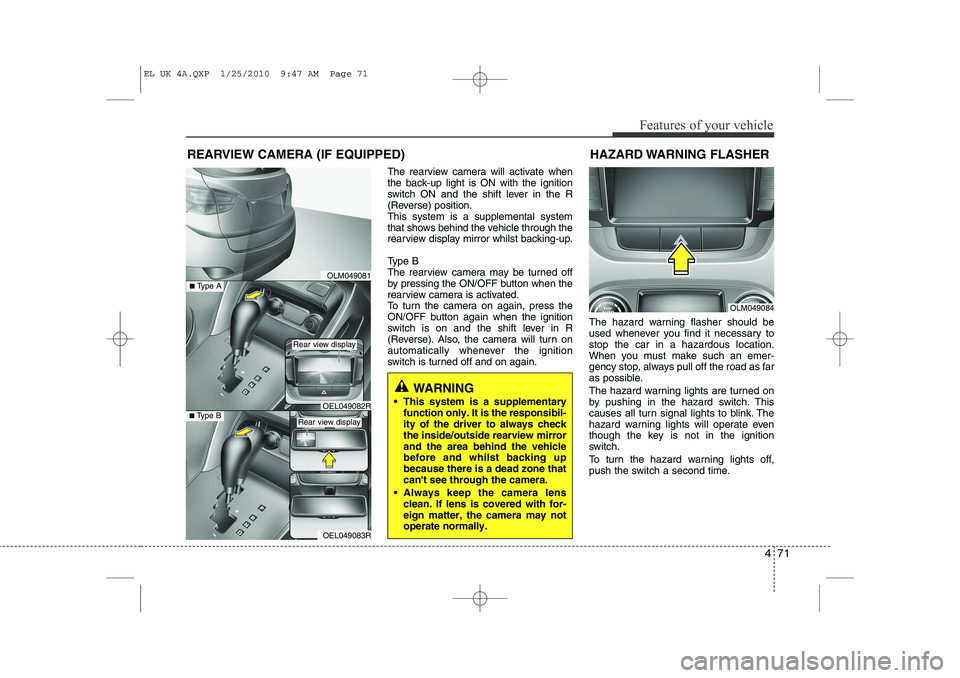
The rearview camera will activate when
the back-up light is ON with the ignition
switch ON and the shift lever in the R
(Reverse) position.This system is a supplemental system
that shows behind the vehicle through the
rearview display mirror whilst backing-up.
Type B
The rearview camera may be turned off
by pressing the ON/OFF button when the
rearview camera is activated.
To turn the camera on again, press the
ON/OFF button again when the ignition
switch is on and the shift lever in R
(Reverse). Also, the camera will turn on
automatically whenever the ignition
switch is turned off and on again.The hazard warning flasher should be
used whenever you find it necessary tostop the car in a hazardous location.
When you must make such an emer-
gency stop, always pull off the road as far
as possible.
The hazard warning lights are turned on
by pushing in the hazard switch. This
causes all turn signal lights to blink. The
hazard warning lights will operate even
though the key is not in the ignition
switch.
To turn the hazard warning lights off,
push the switch a second time.
REARVIEW CAMERA (IF EQUIPPED)
WARNING
This system is a supplementary function only. It is the responsibil- ity of the driver to always checkthe inside/outside rearview mirrorand the area behind the vehiclebefore and whilst backing upbecause there is a dead zone thatcan't see through the camera.
Always keep the camera lens clean. If lens is covered with for-eign matter, the camera may notoperate normally.
OLM049081
OLM049084
HAZARD WARNING FLASHER
OEL049083R
■
Type BOEL049082R
■Type A
Rear view display
Rear view display
EL UK 4A.QXP 1/25/2010 9:47 AM Page 71
Page 484 of 560
Features of your vehicle
72
4
LIGHTING
Battery saver function
The purpose of this feature is to pre-
vent the battery from being dis-
charged. The system automatically
turns off the parking lights when the
driver removes the ignition key and
opens the driver- side door.
With this feature, the parking lights will be turned off automatically if the driver
parks on the side of road at night.
If necessary, to keep the lights on
when the ignition key is removed, per-
form the following :
1) Open the driver-side door.
2) Turn the parking lights OFF and ON
again using the light switch on the
steering column. Headlight escort function (if equipped)
If you turn the ignition switch to the ACC or OFF position with the headlights ON,the headlights (and/or tail lights) remain
on for about 20 minutes. However, if the
driver’s door is opened and closed, the
headlights are turned off after 30 sec-
onds.
The headlights can be turned off by
pressing the lock button on the transmit-
ter (or smart key) twice or turning the
light switch to the OFF or Auto position.
However, if you turn the light switch to the
Auto position when it is dark outside, the
headlights will not be turned off.
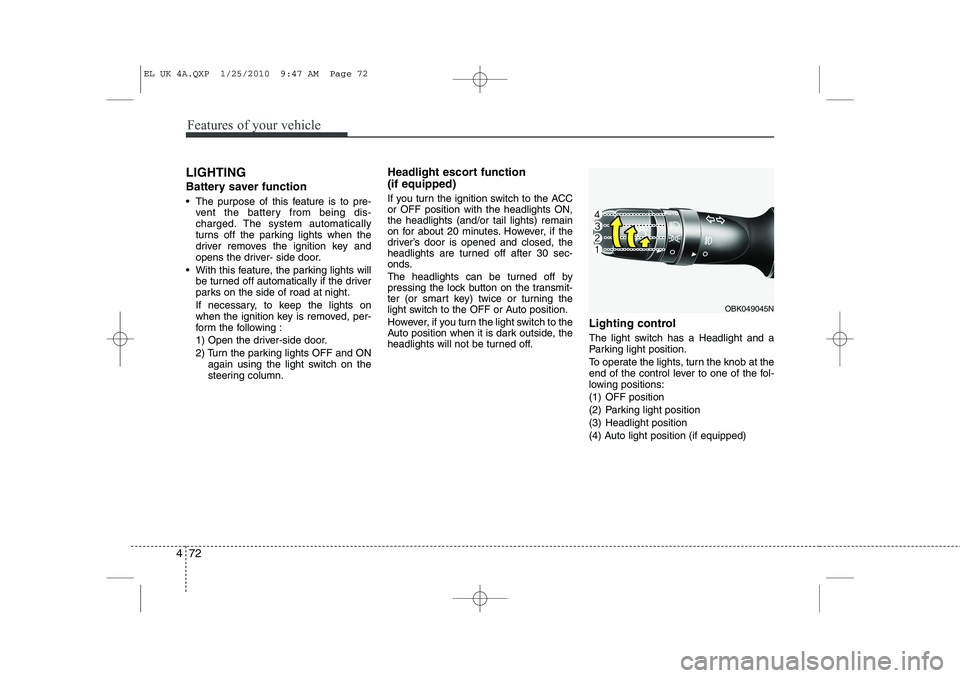
Lighting control
The light switch has a Headlight and a
Parking light position.
To operate the lights, turn the knob at the
end of the control lever to one of the fol-
lowing positions:
(1) OFF position
(2) Parking light position
(3) Headlight position
(4) Auto light position (if equipped)
OBK049045N
EL UK 4A.QXP 1/25/2010 9:47 AM Page 72
Page 489 of 560
477
Features of your vehicle
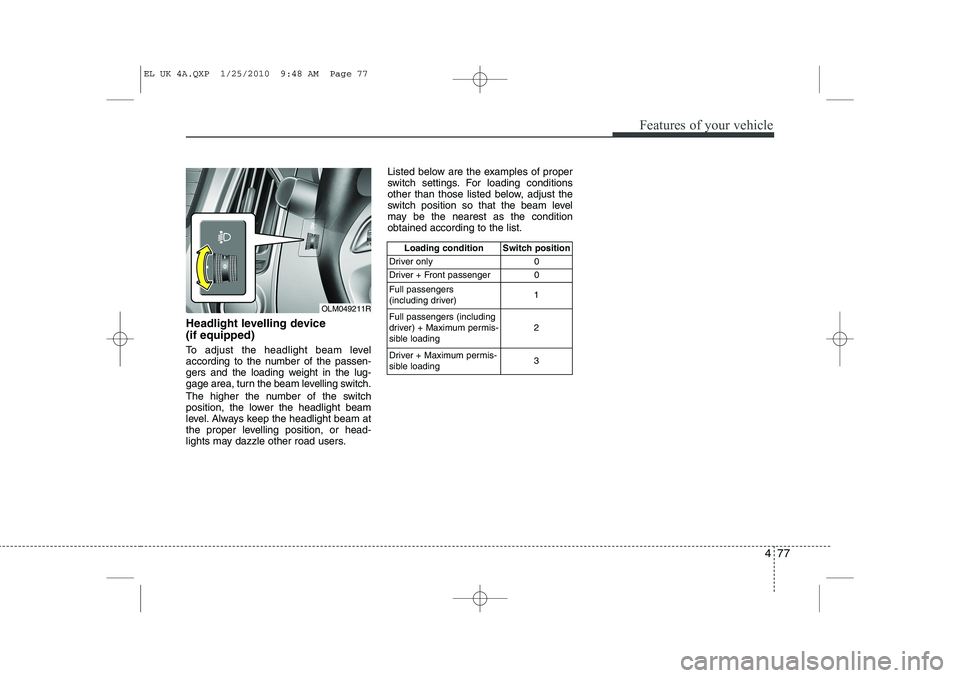
Headlight levelling device (if equipped)
To adjust the headlight beam level
according to the number of the passen-
gers and the loading weight in the lug-
gage area, turn the beam levelling switch.
The higher the number of the switch
position, the lower the headlight beam
level. Always keep the headlight beam at
the proper levelling position, or head-
lights may dazzle other road users.Listed below are the examples of proper
switch settings. For loading conditions
other than those listed below, adjust the
switch position so that the beam level
may be the nearest as the conditionobtained according to the list.
Loading condition Switch position
Driver only 0
Driver + Front passenger 0 Full passengers
(including driver) 1
Full passengers (including
driver) + Maximum permis-
sible loading 2
Driver + Maximum permis-
sible loading 3
OLM049211R
EL UK 4A.QXP 1/25/2010 9:48 AM Page 77
Page 492 of 560
Features of your vehicle
80
4
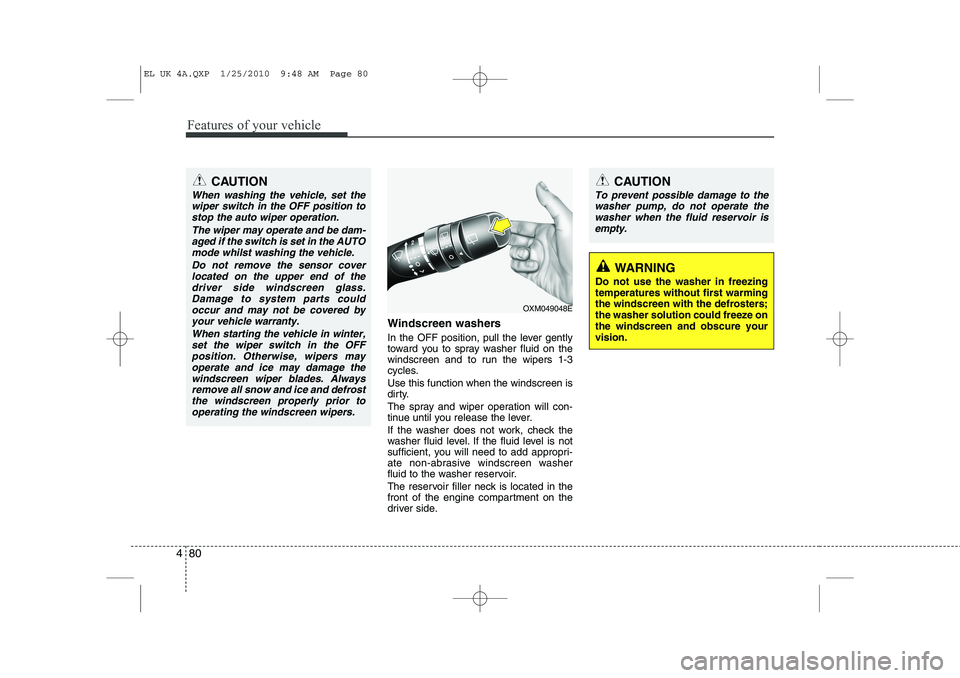
Windscreen washers
In the OFF position, pull the lever gently
toward you to spray washer fluid on the
windscreen and to run the wipers 1-3
cycles. Use this function when the windscreen is
dirty.
The spray and wiper operation will con-
tinue until you release the lever.
If the washer does not work, check the
washer fluid level. If the fluid level is not
sufficient, you will need to add appropri-
ate non-abrasive windscreen washer
fluid to the washer reservoir.
The reservoir filler neck is located in the
front of the engine compartment on the
driver side.
CAUTION
To prevent possible damage to the
washer pump, do not operate the
washer when the fluid reservoir isempty.
WARNING
Do not use the washer in freezing temperatures without first warmingthe windscreen with the defrosters;the washer solution could freeze onthe windscreen and obscure yourvision.
CAUTION
When washing the vehicle, set the wiper switch in the OFF position to
stop the auto wiper operation.
The wiper may operate and be dam-aged if the switch is set in the AUTOmode whilst washing the vehicle.
Do not remove the sensor coverlocated on the upper end of thedriver side windscreen glass. Damage to system parts couldoccur and may not be covered by
your vehicle warranty.
When starting the vehicle in winter,set the wiper switch in the OFFposition. Otherwise, wipers may
operate and ice may damage thewindscreen wiper blades. Always remove all snow and ice and defrostthe windscreen properly prior to
operating the windscreen wipers.
OXM049048E
EL UK 4A.QXP 1/25/2010 9:48 AM Page 80
Page 505 of 560
493
Features of your vehicle
Operation Tips
To keep dust or unpleasant fumes fromentering the vehicle through the venti-
lation system, temporarily set the air
intake control to the recirculated air
position. Be sure to return the control
to the fresh air position when the irrita-
tion has passed to keep fresh air in the
vehicle. This will help keep the driver
alert and comfortable.
Air for the heating/cooling system is drawn in through the grilles just ahead
of the windscreen. Care should be
taken that these are not blocked by
leaves, snow, ice or other obstructions.
To prevent interior fog on the wind- screen, set the air intake control to the
fresh air position and fan speed to the
desired position, turn on the air condi-tioning system, and adjust the temper-
ature control to desired temperature.Air conditioning (if equipped)
All HYUNDAI Air Conditioning Systems
are filled with environmentally friendly
R-134a refrigerant which does not dam-
age to the ozone layer.
1. Start the engine. Push the air condi- tioning button.
2. Set the mode to the position.
3. Set the air intake control to the outside air or recirculated air position.
4. Adjust the fan speed control and tem- perature control to maintain maximum
comfort.
When maximum cooling is desired, set the temperature control to the extremeleft position (press the MAX A/C posi-
tion selection button (if equipped)) then
set the fan speed control to the highestspeed.✽✽ NOTICE