2011 HYUNDAI IX35 Driver
[x] Cancel search: DriverPage 376 of 560
Maintenance
56
7
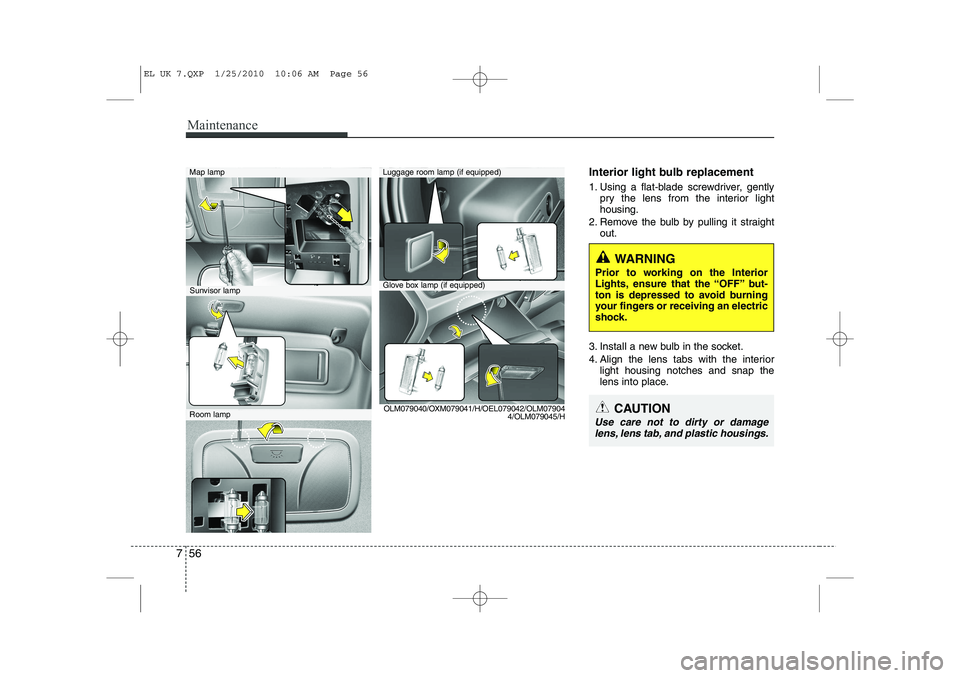
Interior light bulb replacement
1. Using a flat-blade screwdriver, gently
pry the lens from the interior light housing.
2. Remove the bulb by pulling it straight out.
3. Install a new bulb in the socket.
4. Align the lens tabs with the interior light housing notches and snap the
lens into place.
WARNING
Prior to working on the Interior
Lights, ensure that the “OFF” but-
ton is depressed to avoid burning
your fingers or receiving an electric
shock.
CAUTION
Use care not to dirty or damage lens, lens tab, and plastic housings.
Map lamp
Glove box lamp (if equipped)
Luggage room lamp (if equipped)
Sunvisor lamp
Room lamp OLM079040/OXM079041/H/OEL079042/OLM07904
4/OLM079045/H
EL UK 7.QXP 1/25/2010 10:06 AM Page 56
Page 393 of 560
87
Specifications & Consumer information
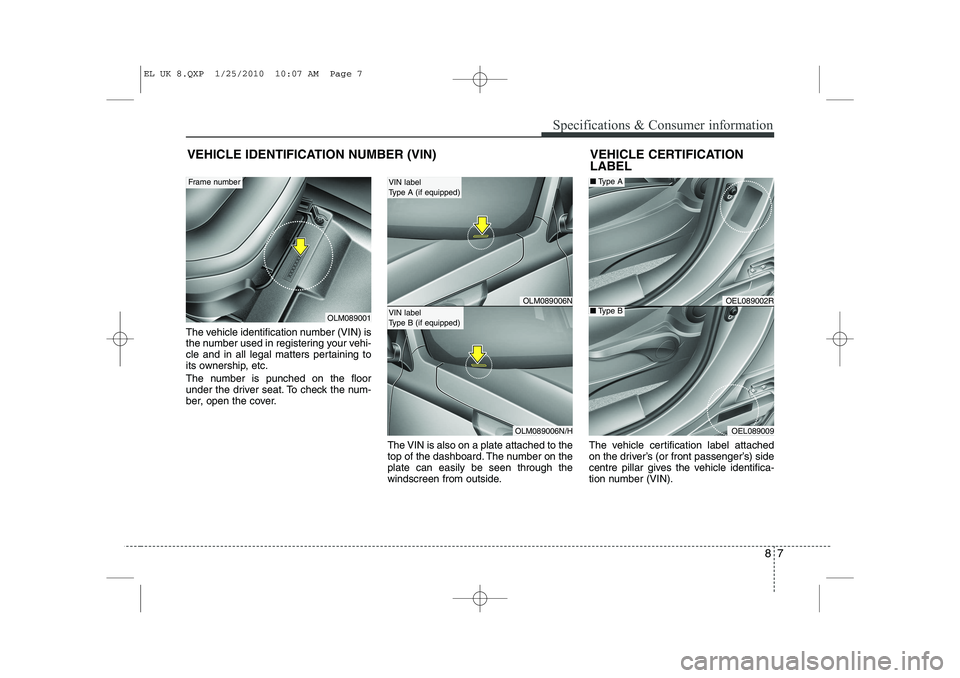
The vehicle identification number (VIN) is
the number used in registering your vehi-
cle and in all legal matters pertaining to
its ownership, etc.
The number is punched on the floor
under the driver seat. To check the num-
ber, open the cover.The VIN is also on a plate attached to the
top of the dashboard. The number on theplate can easily be seen through the
windscreen from outside.The vehicle certification label attached
on the driver’s (or front passenger’s) side
centre pillar gives the vehicle identifica-
tion number (VIN).
VEHICLE IDENTIFICATION NUMBER (VIN)
OLM089001
Frame number
VEHICLE CERTIFICATION LABEL
OEL089002R
OEL089009
■
Type A
■Type BOLM089006N
OLM089006N/H
VIN label
Type A (if equipped)
VIN label
Type B (if equipped)
EL UK 8.QXP 1/25/2010 10:07 AM Page 7
Page 394 of 560
Specifications & Consumer information
8
8
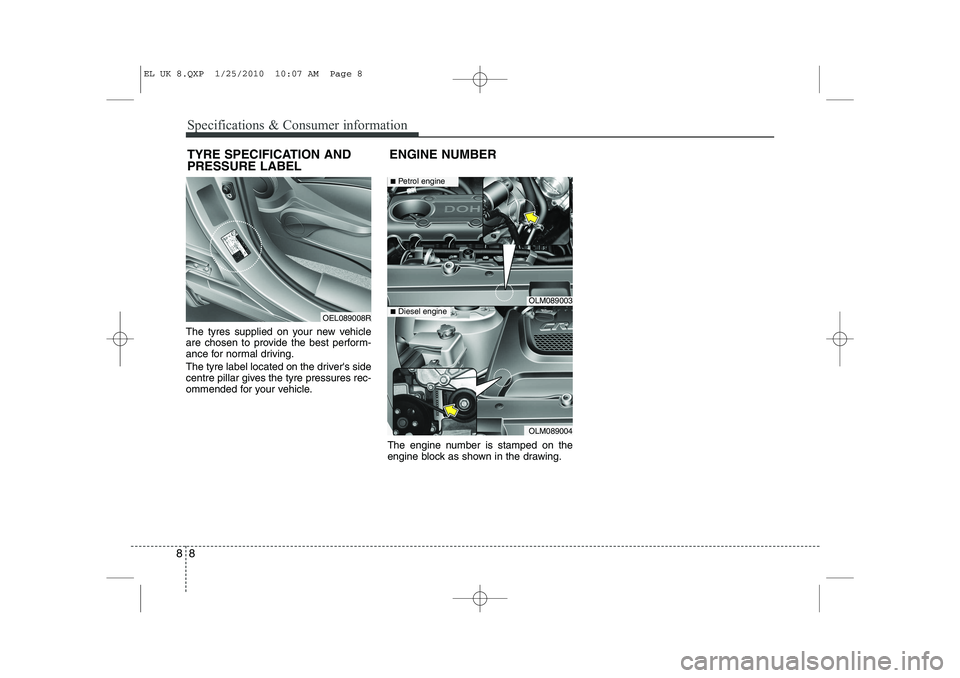
The tyres supplied on your new vehicle
are chosen to provide the best perform-
ance for normal driving.
The tyre label located on the driver's side
centre pillar gives the tyre pressures rec-
ommended for your vehicle.
The engine number is stamped on the
engine block as shown in the drawing.
TYRE SPECIFICATION AND PRESSURE LABEL
ENGINE NUMBER
OEL089008R
OLM089003
OLM089004
■
Petrol engine
■Diesel engine
EL UK 8.QXP 1/25/2010 10:07 AM Page 8
Page 403 of 560

Index
2
I
Active ECO system·························································5-47
Air bags ···········································································3-40
Air bag warning label................................................3-63
Air bag warning light ................................................3-43
Curtain air bag ..........................................................3-54
Driver's and passenger's front air bag ......................3-47
Passenger’s front air bag ON/OFF indicator ............3-44
Passenger’s front air bag ON/OFF switch ................3-50
Side impact air bag....................................................3-52
Air cleaner·······································································7-19
Alarm system ··································································4-11All wheel drive (AWD), see four wheel drive (4WD)·································································5-23
Antenna ·········································································4-116
Anti-lock brake system (ABS) ·······································5-33
Appearance care······························································7-57 Exterior care ······························································7-57
Interior care ·······························································7-62
Armrest ···········································································3-11
Ashtray ··········································································4-108
Audio system ································································4-116 Antenna ···································································4-116
Aux, USB and iPod ·················································4-111
Audio remote control ·············································4-117
Automatic climate control system ··································4-96 Air conditioning ······················································4-102
Automatic heating and air conditioning····················4-97
Manual heating and air conditioning ························4-98
Automatic transaxle ························································5-17 Ignition key interlock system ····································5-21
Shift lock system ·······················································5-20
Sports mode·······························································5-20
Battery ·············································································7-26
Battery saver function ·····················································4-72
Before driving ···································································5-3
Bonnet ·············································································4-24
Bottle holders, see cup holders ·····································4-109
Brake system ···································································5-30 Anti-lock brake system (ABS) ··································5-33
Downhill brake control (DBC) ·································5-39
Electronic stability program (ESP) ···························5-36
Emergency Stop Signal (ESS) ··································5-42
Hill-start assist control (HAC) ··································5-39
Parking brake ····························································5-31
Power brakes ·····························································5-30
Brakes/clutch fluid ··························································7-16
Bulb replacement ····························································7-49 Front fog light bulb replacement ······························7-52
Headlight bulb replacement ······································7-50
High mounted stop light replacement ·······················7-55
A
B
EL UK INDEX.QXP 1/12/2010 3:27 PM Page 2
Page 405 of 560
Index
4
I
Dashboard, see instrument cluster ·································4-42 Dashboard illumination, see instrument
panel illumination ·······················································4-43
Daytime running light ·····················································4-76
Defogging (Windscreen) ·············································4-103
Defroster ·········································································4-85 Outside mirror defroster ············································4-86
Rear window defroster ··············································4-85
Wiper deicer ······························································4-86
Defrosting (Windscreen) ·············································4-103
Digital clock ·································································4-111Dimensions ······································································8-2
Displays, see instrument cluster ····································4-42Display illumination, see instrument panel illumination ·······················································4-43
Door locks ·······································································4-13 Central door lock switch ··········································4-14
Child-protector rear door lock ·································4-16
Downhill brake control (DBC) ······································5-39
Drinks holders, see cup holders ···································4-109
Driver's air bag ·······························································3-47
Driving at night ······························································5-51
Driving in flooded areas ················································5-52
Driving in the rain ·························································5-52 Economical operation ····················································5-48
ECO ON/OFF mode ·······················································4-49
Electric chromic mirror (ECM) ·····································4-35
Electric chromic mirror (ECM) with compass ··············4-36
Electric power steering ··················································4-33
Emergency starting ··························································6-5
Jump starting ······························································6-5
Push starting ·······························································6-6
Emergency Stop Signal (ESS) ········································5-42Emergency tailgate safety release ··································4-18
Emergency towing ·························································6-26
Emergency whilst driving ················································6-3
Emission control system ················································7-63 Crankcase emission control system ·························7-63
Evaporative emission control system ······················7-63
Exhaust emission control system ·····························7-64
Engine compartment ················································2-6, 7-2
Engine coolant ·······························································7-13
Engine number ·································································8-8
Engine oil ·······································································7-12
Engine overheats ······························································6-7
Engine start/stop button ···················································5-8
Engine temperature gauge ·············································4-44
Engine will not start ·························································6-4
Evaporative emission control system ····························7-63
Exhaust emission control system ···································7-64
ED
EL UK INDEX.QXP 1/12/2010 3:27 PM Page 4
Page 426 of 560
Features of your vehicle
14
4
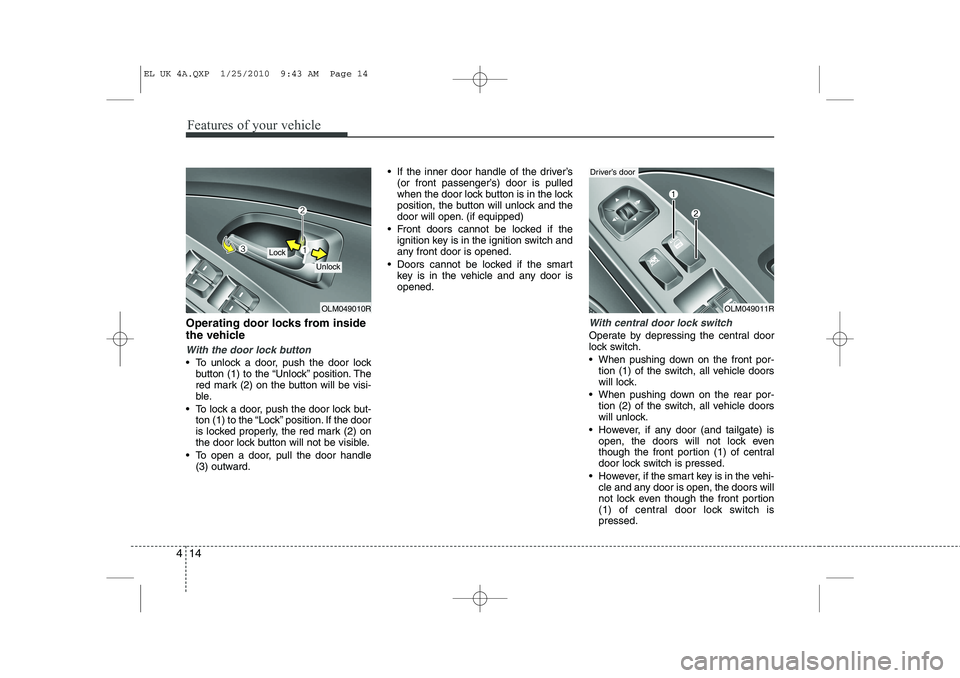
Operating door locks from inside
the vehicle
With the door lock button
To unlock a door, push the door lock
button (1) to the “Unlock” position. The
red mark (2) on the button will be visi-
ble.
To lock a door, push the door lock but- ton (1) to the “Lock” position. If the door
is locked properly, the red mark (2) on
the door lock button will not be visible.
To open a door, pull the door handle (3) outward. If the inner door handle of the driver’s
(or front passenger’s) door is pulled
when the door lock button is in the lock
position, the button will unlock and the
door will open. (if equipped)
Front doors cannot be locked if the ignition key is in the ignition switch and
any front door is opened.
Doors cannot be locked if the smart key is in the vehicle and any door isopened.
With central door lock switch
Operate by depressing the central door
lock switch.
When pushing down on the front por-tion (1) of the switch, all vehicle doors
will lock.
When pushing down on the rear por- tion (2) of the switch, all vehicle doors
will unlock.
However, if any door (and tailgate) is open, the doors will not lock even
though the front portion (1) of central
door lock switch is pressed.
However, if the smart key is in the vehi- cle and any door is open, the doors will
not lock even though the front portion
(1) of central door lock switch ispressed.
OLM049010R
Lock
Unlock
OLM049011R
Driver’s door
EL UK 4A.QXP 1/25/2010 9:43 AM Page 14
Page 431 of 560
419
Features of your vehicle
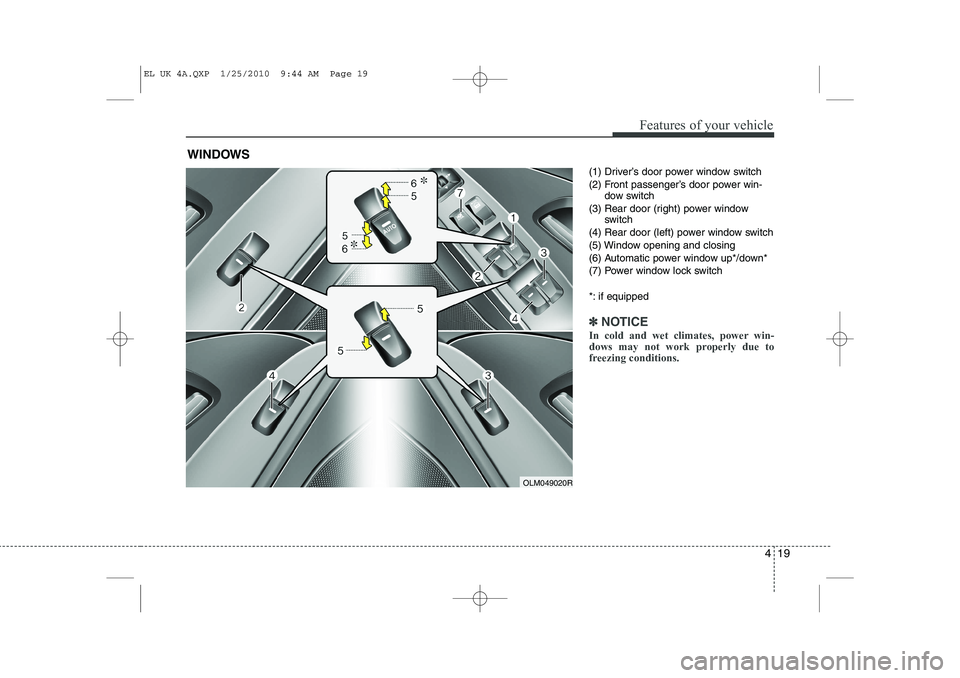
(1) Driver’s door power window switch
(2) Front passenger’s door power win-dow switch
(3) Rear door (right) power window switch
(4) Rear door (left) power window switch
(5) Window opening and closing
(6) Automatic power window up*/down*
(7) Power window lock switch
*: if equipped
✽✽ NOTICE
In cold and wet climates, power win-
dows may not work properly due to
freezing conditions.
WINDOWS
OLM049020R
EL UK 4A.QXP 1/25/2010 9:44 AM Page 19
Page 432 of 560
Features of your vehicle
20
4
Power windows
The ignition switch must be in the ON
position for power windows to operate.
Each door has a power window switch
that controls the door’s window. The driv-
er has a power window lock switch which
can block the operation of rear (or front)
passenger windows.
The power windows can be operated for
approximately 30 seconds after the igni-
tion key is removed or turned to the ACC
or LOCK position. However, if the front
doors are opened, the power windows
cannot be operated even within the 30
seconds period. The driver’s door has a
master power window switch that con-
trols all the windows in the vehicle.✽✽
NOTICE
Whilst driving with the rear windows
down or with the sunroof (if equipped)
in an open (or partially open position),
your vehicle may demonstrate a wind
buffeting or pulsation noise. This
noise is a normal occurrence and can be
reduced or eliminated by taking the fol-
lowing actions. If the noise occurs with
one or both of the rear windows down,
partially lower both front windows
approximately one inch. If you experi-
ence the noise with the sunroof open,
slightly reduce the size of the sunroofopening.
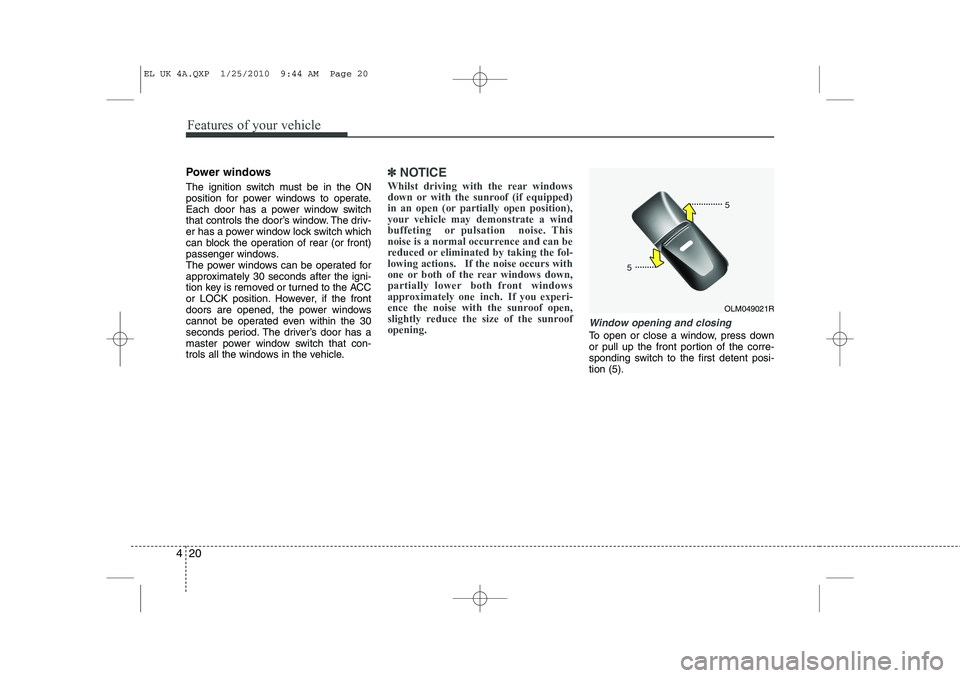
Window opening and closing
To open or close a window, press down
or pull up the front portion of the corre-
sponding switch to the first detent posi-tion (5).
OLM049021R
EL UK 4A.QXP 1/25/2010 9:44 AM Page 20