Page 131 of 534

Downloaded from www.Manualslib.com manuals search engine Features of your vehicle
44
4
Inside rearview mirror
Adjust the rearview mirror so that the
center view through the rear window is
seen. Make this adjustment before you
start driving.
Day/night rearview mirror (if equipped)
Make this adjustment before you start
driving and while the day/night lever is in
the day position.
Pull the day/night lever toward you to
reduce glare from the headlights of vehi-
cles behind you during night driving.
Remember that you lose some rearview
clarity in the night position. Electric chromic mirror (ECM)
(if equipped)
The electric rearview mirror automatical-
ly controls the glare from the headlights
of the car behind you in nighttime or low
light driving conditions. The sensor
mounted in the mirror senses the light
level around the vehicle, and automati-
cally controls the headlight glare from
vehicles behind you.
When the engine is running, the glare is
automatically controlled by the sensor
mounted in the rearview mirror.
Whenever the shift lever is shifted into R
(Reverse), the mirror will automatically
go to the brightest setting in order to
improve the drivers view behind the vehi-
cle.
MIRRORS
WARNING - Rear visibility
Do not place objects in the rear
seat or cargo area which would
interfere with your vision out the
rear window.
OVF041034
CAUTION
When cleaning the mirror, use a paper towel or similar materialdampened with glass cleaner. Donot spray glass cleaner directly onthe mirror as that may cause the liq- uid cleaner to enter the mirror hous-ing.
Day
Night
WARNING
Do not adjust the rearview mirror
while the vehicle is moving. This
could result in loss of control, and
an accident which could cause
death, serious injury or property
damage.
WARNING
Do not modify the inside mirror and
do not install a wide mirror. It could
result in injury, during an accident
or deployment of the air bag.
Page 140 of 534
Downloaded from www.Manualslib.com manuals search engine 453
Features of your vehicle
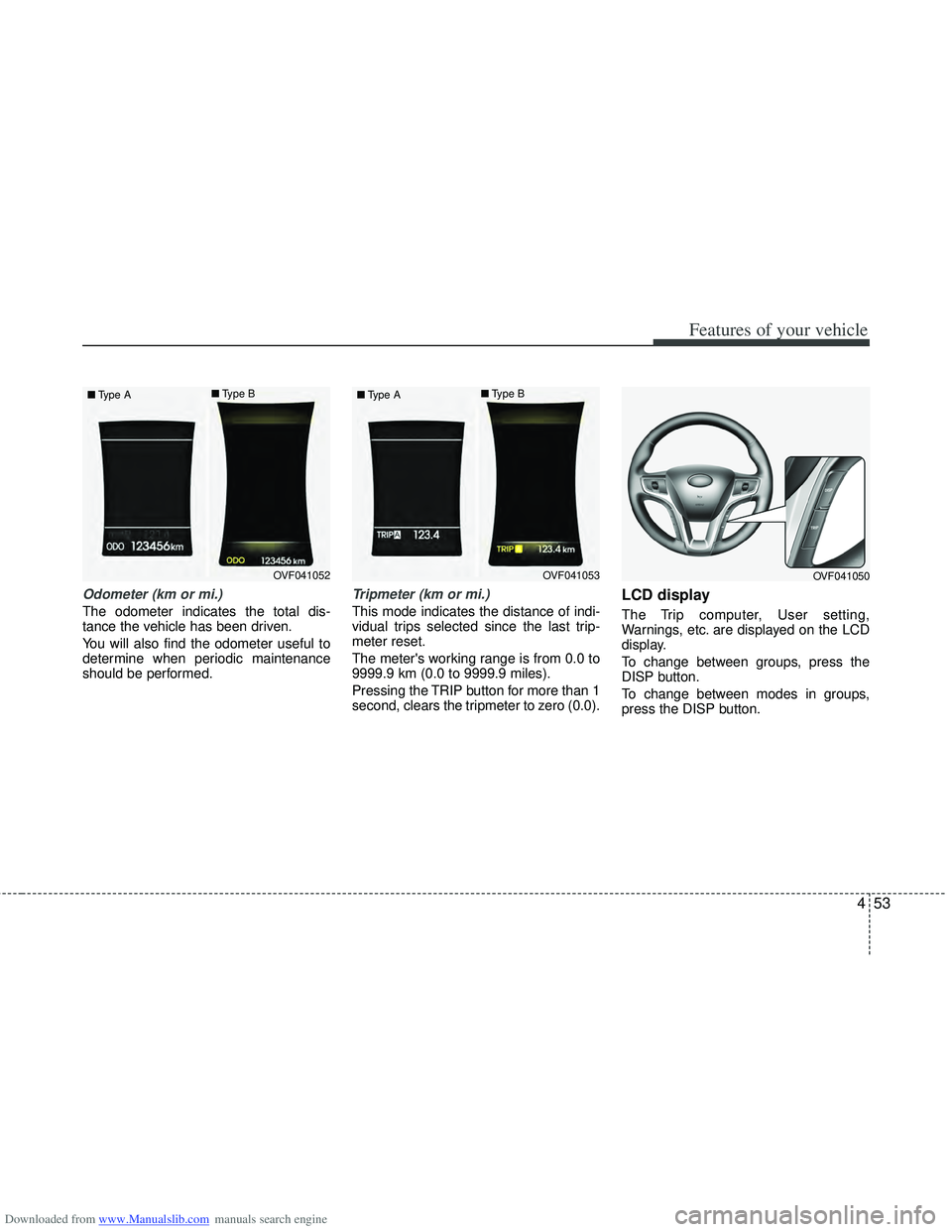
Odometer (km or mi.)
The odometer indicates the total dis-
tance the vehicle has been driven.
You will also find the odometer useful to
determine when periodic maintenance
should be performed.
Tripmeter (km or mi.)
This mode indicates the distance of indi-
vidual trips selected since the last trip-
meter reset.
The meter's working range is from 0.0 to
9999.9 km (0.0 to 9999.9 miles).
Pressing the TRIP button for more than 1
second, clears the tripmeter to zero (0.0).
LCD display
The Trip computer, User setting,
Warnings, etc. are displayed on the LCD
display.
To change between groups, press the
DISP button.
To change between modes in groups,
press the DISP button.
OVF041052
■
Type A ■
Type BOVF041053
■
Type A ■
Type BOVF041050
Page 142 of 534
Downloaded from www.Manualslib.com manuals search engine 455
Features of your vehicle
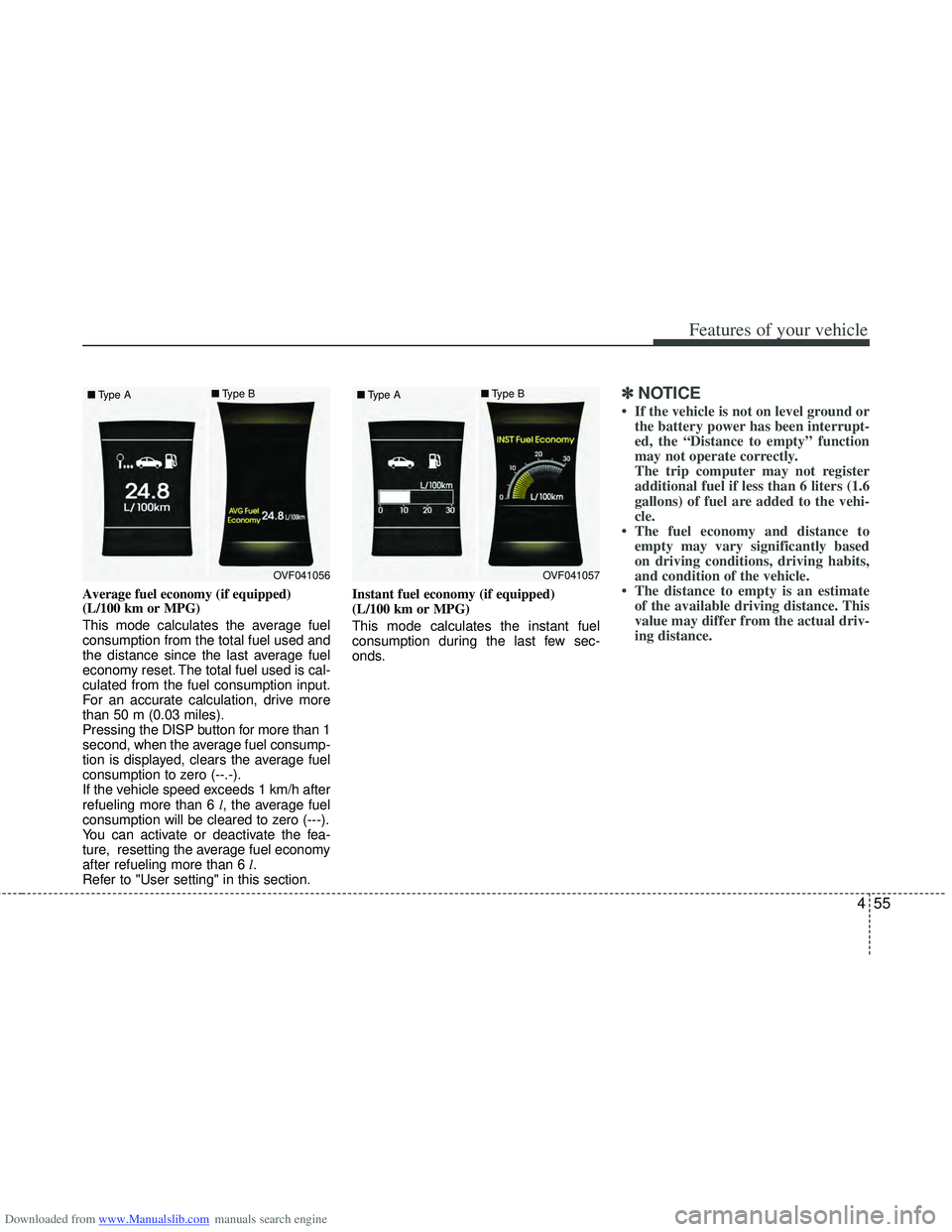
Average fuel economy (if equipped)
(L/100 km or MPG)
This mode calculates the average fuel
consumption from the total fuel used and
the distance since the last average fuel
economy reset. The total fuel used is cal-
culated from the fuel consumption input.
For an accurate calculation, drive more
than 50 m (0.03 miles).
Pressing the DISP button for more than 1
second, when the average fuel consump-
tion is displayed, clears the average fuel
consumption to zero (--.-).
If the vehicle speed exceeds 1 km/h after
refueling more than 6 l, the average fuel
consumption will be cleared to zero (---).
You can activate or deactivate the fea-
ture, resetting the average fuel economy
after refueling more than 6 l.
Refer to "User setting" in this section. Instant fuel economy (if equipped)
(L/100 km or MPG)
This mode calculates the instant fuel
consumption during the last few sec-
onds.
✽ ✽
NOTICE
• If the vehicle is not on level ground or
the battery power has been interrupt-
ed, the “Distance to empty” function
may not operate correctly.
The trip computer may not register
additional fuel if less than 6 liters (1.6
gallons) of fuel are added to the vehi-
cle.
• The fuel economy and distance to empty may vary significantly based
on driving conditions, driving habits,
and condition of the vehicle.
• The distance to empty is an estimate of the available driving distance. This
value may differ from the actual driv-
ing distance.
OVF041056
■
Type A ■
Type BOVF041057
■
Type A ■
Type B
Page 143 of 534
Downloaded from www.Manualslib.com manuals search engine Features of your vehicle
56
4
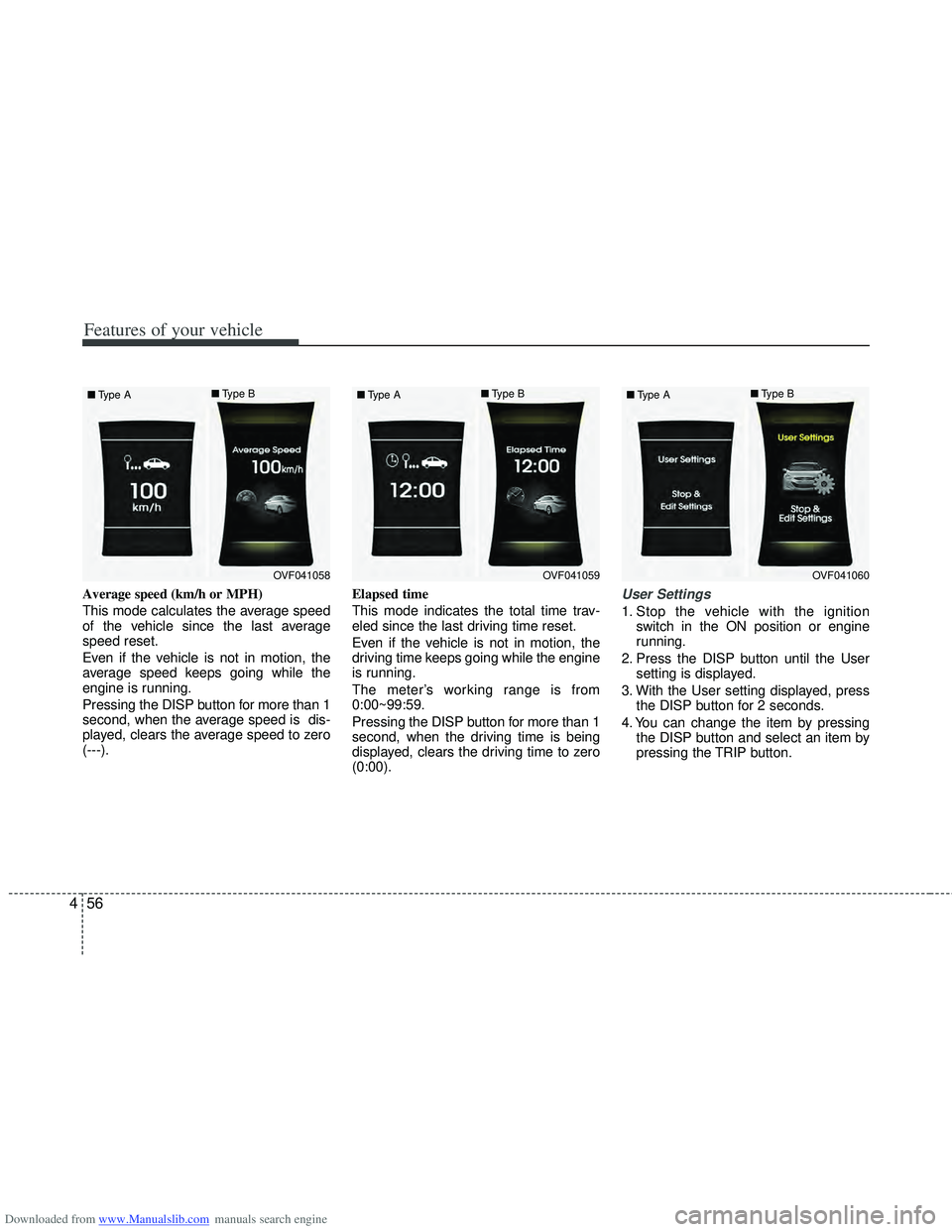
Average speed (km/h or MPH)
This mode calculates the average speed
of the vehicle since the last average
speed reset.
Even if the vehicle is not in motion, the
average speed keeps going while the
engine is running.
Pressing the DISP button for more than 1
second, when the average speed is dis-
played, clears the average speed to zero
(---). Elapsed time
This mode indicates the total time trav-
eled since the last driving time reset.
Even if the vehicle is not in motion, the
driving time keeps going while the engine
is running.
The meter’s working range is from
0:00~99:59.
Pressing the DISP button for more than 1
second, when the driving time is being
displayed, clears the driving time to zero
(0:00).User Settings
1. Stop the vehicle with the ignition
switch in the ON position or engine
running.
2. Press the DISP button until the User setting is displayed.
3. With the User setting displayed, press the DISP button for 2 seconds.
4. You can change the item by pressing the DISP button and select an item by
pressing the TRIP button.
OVF041058
■
Type A ■
Type BOVF041059
■
Type A ■
Type BOVF041060
■
Type A ■
Type B
Page 145 of 534

Downloaded from www.Manualslib.com manuals search engine Features of your vehicle
58
4
Settings
Language
Choose a language you prefer within the
LCD display.
AVG Fuel Economy
Auto Reset - The average fuel economy
will reset automatically
when you drive after refuel-
ing.
Alarm Function
If the Alarm Function is checked:
The Alarm function on the transmitter
and smart key will be activated.
Welcome Sound
(for instrument cluster type B)
On - The Welcome Sound function will be activated.
Off - The Welcome Sound function will be inactivated.
Maintenance
If the Maintenance is checked:
A message will appear to notify the driv-
er maintenance service is required.
Seat Easy Access (for Driver Position
Memory System equipped vehicle)
If the Seat Easy Access is chcked:
The driver's seat will automatically move
forward or rearward for the driver to enter
or exit the vehicle comfortably. LKAS Mode (for instrument cluster type B)
(if equipped)
LKA -
The Lane Keeping Assistance
System (LKAS) will be activated.
LDW - The Lane Departure Warning System (LDWS) will be activated.
For more details, refer to LKAS in section 5.
OVF041063
■
Type A ■
Type BOVF041064
Page 189 of 534
Downloaded from www.Manualslib.com manuals search engine Features of your vehicle
102
4
Daytime running light
(if equipped)
Daytime Running Lights (DRL) can make
it easier for others to see the front of your
vehicle during the day. DRL can be help-
ful in many different driving conditions,
and it is especially helpful after dawn and
before sunset.
The DRL system will turn off the dedicat-
ed lamp when:
1. The parklight or headlight (low beam)
switch is ON.
2. The engine is OFF.
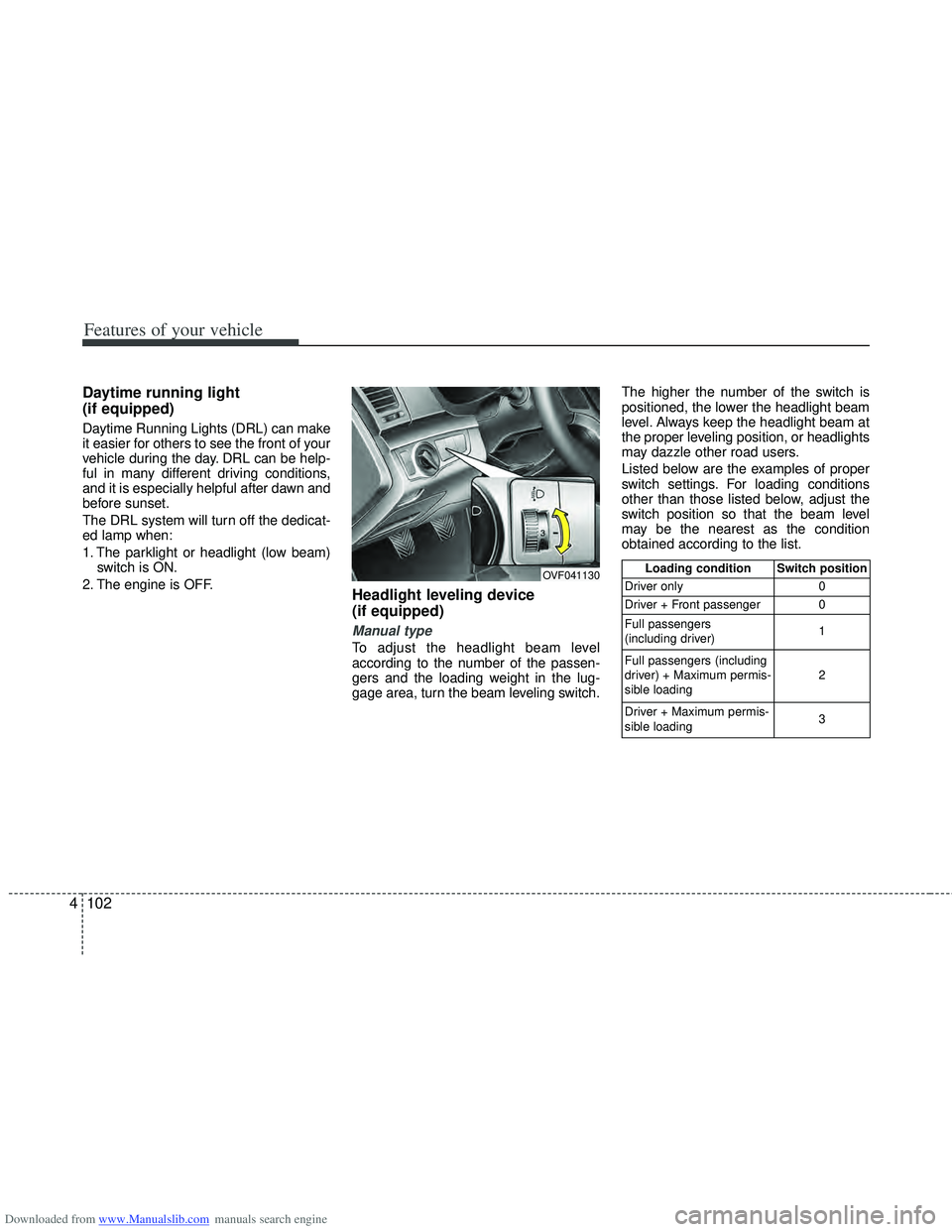
Headlight leveling device
(if equipped)
Manual type
To adjust the headlight beam level
according to the number of the passen-
gers and the loading weight in the lug-
gage area, turn the beam leveling switch. The higher the number of the switch is
positioned, the lower the headlight beam
level. Always keep the headlight beam at
the proper leveling position, or headlights
may dazzle other road users.
Listed below are the examples of proper
switch settings. For loading conditions
other than those listed below, adjust the
switch position so that the beam level
may be the nearest as the condition
obtained according to the list.
OVF041130Loading condition Switch position
Driver only 0
Driver + Front passenger 0
Full passengers
(including driver) 1
Full passengers (including
driver) + Maximum permis-
sible loading 2
Driver + Maximum permis-
sible loading 3
Page 192 of 534

Downloaded from www.Manualslib.com manuals search engine 4105
Features of your vehicle
Windshield wipers
Operates as follows when the ignition
switch is turned ON./ MIST : For a single wiping cycle, move the lever to this ( /
MIST) position and release
it. The wipers will operate
continuously if the lever is
held in this position.
O / OFF : Wiper is not in operation
--- / INT : Wiper operates intermittently at the same wiping intervals. Use
this mode in light rain or mist.
To vary the speed setting, turn
the speed control knob.
1 / LO : Normal wiper speed
2 / HI : Fast wiper speed
✽ ✽ NOTICE
If there is heavy accumulation of snow
or ice on the windshield, defrost the
windshield for about 10 minutes, or
until the snow and/or ice is removed
before using the windshield wipers to
ensure proper operation.
Auto control (if equipped)
The rain sensor located on the upper end
of the windshield glass senses the
amount of rainfall and controls the wiping
cycle for the proper interval. The more it
rains, the faster the wiper operates. When
the rain stops, the wiper stops. To vary the speed setting, turn the speed
control knob (1).
If the wiper switch is set in AUTO mode
when the ignition switch is ON, the wiper
will operate once to perform a self-check
of the system. Set the wiper to OFF posi-
tion when the wiper is not in use.
CAUTION
When the ignition switch is ON and
the windshield wiper switch isplaced in the AUTO mode, use cau- tion in the following situations toavoid any injury to the hands orother parts of the body:
Do not touch the upper end of the windshield glass facing the rainsensor.
Do not wipe the upper end of the windshield glass with a damp orwet cloth.
Do not put pressure on the wind- shield glass.OEL049900
OXM049123
■Type A
■Type B
Rain sensor
Rain sensor
Page 209 of 534

Downloaded from www.Manualslib.com manuals search engine Features of your vehicle
122
4
Automatic heating and air condi-
tioning
The automatic climate control system is
controlled by simply setting the desired
temperature.
The Full Automatic Temperature Control
(FATC) system automatically controls the
heating and cooling system as follows: 1. Press the AUTO button. The modes,
fan speeds, air intake and air-condi-
tioning will be controlled automatically
by setting the temperature.
2. Set the temperature to the desired temperature.
3. To turn the automatic operation off, select any button of the following:
The selected function will be controlled manually while other functions operate
automatically.
For your convenience and to improve the
effectiveness of the climate control, use
the AUTO button and set the temperature
to 22°C/71°F (23°C/73°F-Except Europe).
✽ ✽ NOTICE
Placing any object over the sensor on
the instrument panel may interfere with
the heating and cooling system.
OVF041153OVF041152