Page 260 of 427
�µ�µ
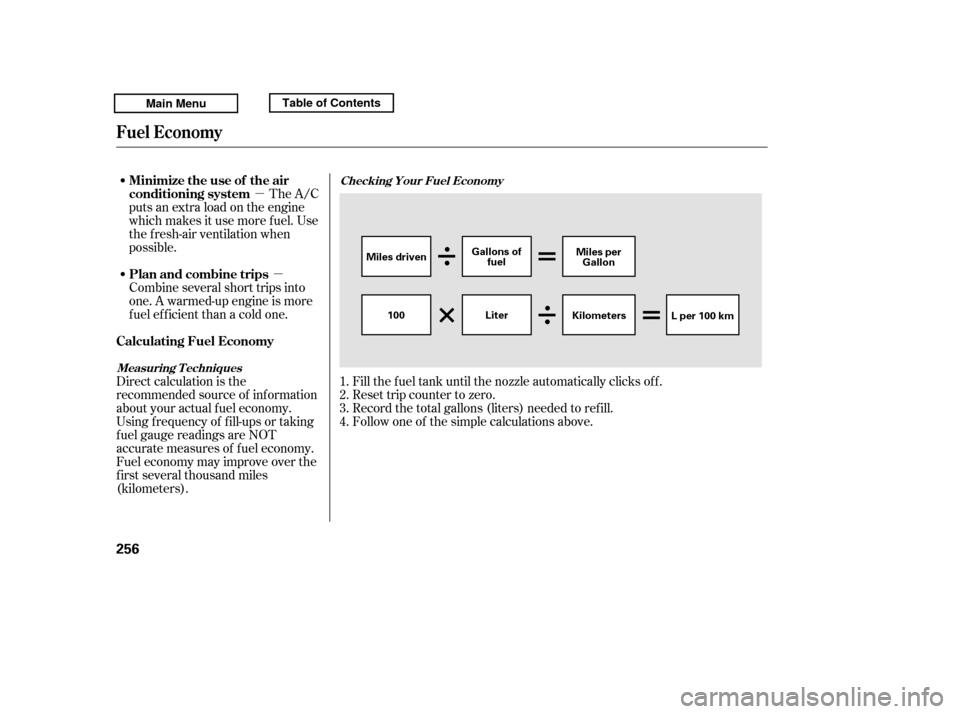
Fill the f uel tank until the nozzle automatically clicks of f .
Reset trip counter to zero.
Record the total gallons (liters) needed to ref ill.
Follow one of the simple calculations above.
The A/C
puts an extra load on the engine
which makes it use more f uel. Use
the f resh-air ventilation when
possible.
Combine several short trips into
one. A warmed-up engine is more
f uel ef f icient than a cold one.
Direct calculation is the
recommended source of inf ormation
about your actual f uel economy.
Using f requency of f ill-ups or taking
f uel gauge readings are NOT
accurate measures of f uel economy.
Fuel economy may improve over the
f irst several thousand miles
(kilometers). 1.2.3.4.
Checking Your Fuel Economy
Measuring T echniques
Fuel Economy
Minimize the use of the air
conditioning system
Plan and combine trips
Calculating Fuel Economy
256
Miles driven Gallons of
fuel Miles per
Gallon
100 KilometersL per 100 km
Liter
Main MenuTable of Contents
Page 287 of 427
CONT INUED
To see the inf lation pressures of all
f our tires, press the SEL/RESET
button. The display changes as
shown above.Each tire pressure is shown in PSI
(U.S. models) or in kPa (Canadian
models).
Each tire has its own pressure
sensor. If the air pressure of a tire
becomes signif icantly low, the
sensor in that tire immediately sends
a signal that causes the low tire
pressure/TPMS indicator in the
instrument panel to come on. If this
happens, you will see which tire is
losing pressure on the multi-
inf ormation display along with a
‘‘CHECK TIRE PRESSURE’’
message.
Tire Pressure Monitoring System (TPMS)
Driving
283
U.S. models
Canadian models
Main MenuTable of Contents
Page 295 of 427

The vehicle stability assist (VSA)
system helps to stabilize the vehicle
during cornering if the vehicle turns
more or less than desired. It also
assists you in maintaining traction
while accelerating on loose or
slippery road surf aces. It does this
by regulating the engine’s output and
by selectively applying the brakes.
The VSA system cannot enhance the
vehicle’s driving stability in all
situations and does not control your
vehicle’s entire braking system. It is
still your responsibility to drive and
corner at reasonable speeds and to
leave a sufficient margin of safety.
When VSA activates, you may notice
that the engine does not respond to
the accelerator in the same way it
does at other times. There may also
be some noise f rom the VSA
hydraulic system. You will also see
the VSA activation indicator blink. When VSA activates, you will see the
VSA Activation indicator blink.
If this indicator comes on while
driving, pull to the side of the road
when it is saf e, and turn of f the
engine. Reset the system by
restarting the engine. If the VSA
system indicator stays on or comes
back on while driving, have the VSA
system inspected by your dealer.
If the indicator does not come on
when the ignition switch is turned to
the ON (II) position, there may be a
problem with the VSA system. Have
your dealer inspect your vehicle as
soon as possible.You will also see a ‘‘CHECK VSA
SYSTEM’’ message on the multi-
inf ormation display if there is a
problem with the VSA system.
If the low tire pressure indicator or
TPMS indicator comes on, see
page .
If the low tire pressure/TPMS
indicator comes on, see page .
Or, if the multi-inf ormation display
shows a ‘‘CHECK TPMS
SYSTEM’’ message with the
indicator f lashing, see page .
Without VSA, your vehicle will have
normal braking and cornering ability,
but it will not have VSA traction and
stability enhancement.
In this case, you cannot turn of f the
VSA using the OFF switch again.
91281
278On models with navigation system
On models with navigation system
On models without navigation systemVSA A ctivation Indicator
Vehicle Stability Assist
(VSA ) System Indicator
Vehicle Stability A ssist (VSA), aka Electronic Stability Control (ESC), System
Driving
291
Main MenuTable of Contents
Page 320 of 427

Immediately have the service
perf ormed, and make sure to reset
the display as described as f ollows.
When the engine oil lif e is 0 percent
or negative distance traveled, the
maintenance minder indicator
( )remainsonevenif you
change the inf ormation display.
All maintenance items displayed on
the inf ormation display are in code.
For an explanation of these
maintenance codes, see page .Your dealer will reset the display
af ter completing the required
maintenance service. You will see
‘‘OIL LIFE 100%’’ on the inf ormation
display the next time you turn the
ignition switch to the ON (II)
position.
If maintenance service is done by
someone other than your dealer,
reset the maintenance minder as
f ollows:
Turn the ignition switch to the ON
(II) position.
To change the inf ormation display
f rom the engine oil lif e display to the
odometer or the trip meter, press
and release the SELECT button.
Press the SELECT button
repeatedly until the engine oil lif e
is displayed.
1. 2.
324
On models without navigation system On models without navigation system
Maintenance Main Items and Sub
Items Resetting the Engine Oil Lif e
Display
Maintenance Minder
316
MAINTENANCE MAIN ITEMMAINTENANCE SUB ITEM(S)
TM
Main MenuTable of Contents
Page 321 of 427
CONT INUED
Press the TRIP/RESET button f or
about 10 seconds. The engine oil
lif e and the maintenance item
code(s) will blink.Press the TRIP/RESET button f or
another 5 seconds. The
maintenance item code(s) will
disappear, and the engine oil lif e
will reset to ‘‘100.’’To see the current engine oil lif e,
turn the ignition switch to the ON
(II) position, and push and release
the SEL/RESET button on the
dashboard repeatedly, until the
engine oil lif e is displayed (see page
).
3.
4.
83
On models with navigation system
Maintenance Minder
Maint enance
317
U.S. model is shown.
ENGINE OIL LIFE DISPLAY SEL/RESET BUTTON
TM
Main MenuTable of Contents
Page 324 of 427
�Û�Ý
�Û�Ý
Negative distance traveled means
your vehicle has passed the
maintenance required point.
The system message will appear
again by pressing the INFO ( / )
button after canceling it.
You will also see the system
message every time you turn the
ignition switch to the ON (II)
position until you have the indicated
maintenance perf ormed by your
dealer.
Immediately have the service
perf ormed, and make sure to reset
the display as described on page .
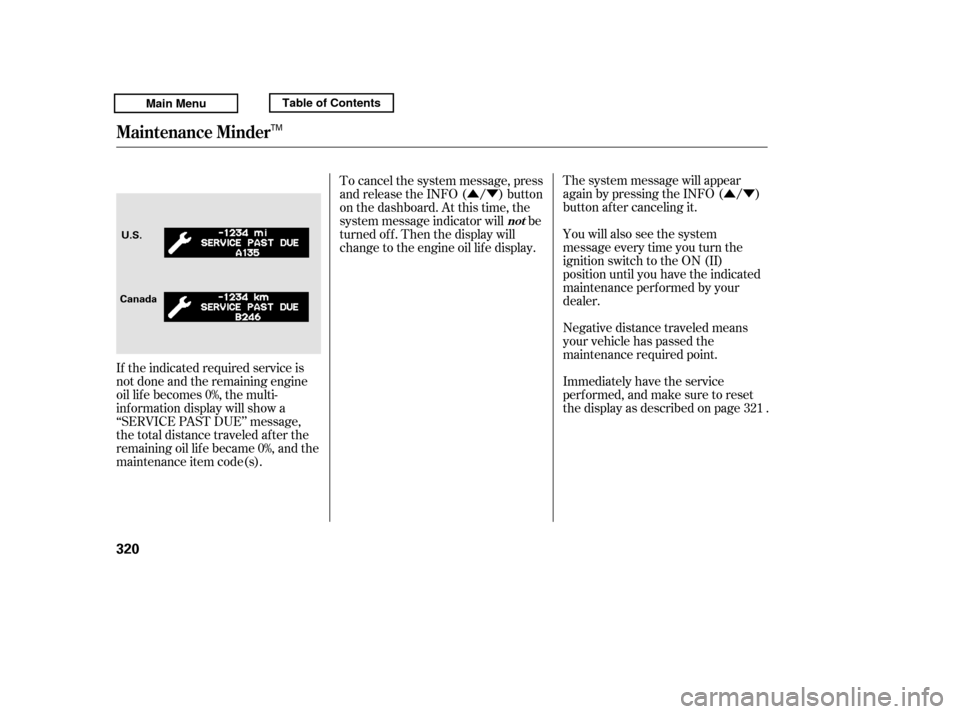
If the indicated required service is
not done and the remaining engine
oil lif e becomes 0%, the multi-
inf ormation display will show a
‘‘SERVICE PAST DUE’’ message,
the total distance traveled after the
remaining oil lif e became 0%, and the
maintenance item code(s). To cancel the system message, press
and release the INFO ( / ) button
on the dashboard. At this time, the
system message indicator will be
turned of f . Then the display will
change to the engine oil lif e display.
321
Maintenance Minder
not
320
CanadaU.S.
TM
Main MenuTable of Contents
Page 325 of 427

�Û�Ý
All maintenance items displayed on
the inf ormation display are in code.
For an explanation of these
maintenance codes, see page . Your dealer will reset the display
af ter completing the required
maintenance service. You will see
‘‘OIL LIFE 100%’’ on the display the
next time you turn the ignition
switch to the ON (II) position.
If maintenance service is done by
someone other than your dealer,
reset the maintenance minder as
f ollows:
Turn the ignition switch to the ON
(II) position.
Press the SEL/RESET button on
the dashboard until you see the
engine oil lif e display. Press and hold the SEL/RESET
button f or 10 seconds. The multi-
inf ormation display will ask f or a
conf irmation.
If you are sure you want to reset
the display, press the SEL/
RESET button to select ‘‘OK.’’
If you do not want to reset the
display, press the INFO ( / )
button to select ‘‘Cancel.’’
1. 2.
3.
324
On models with navigation system On models with navigation system
Maintenance Main Items and Sub
Items Resetting the Engine Oil Lif e
Display
Maintenance Minder
Maint enance
321
MAINTENANCE
MAIN ITEM
MAINTENANCE SUB ITEM(S)
TM
Main MenuTable of Contents
Page 326 of 427

If you have the required service
done but do not reset the display, or
reset the display without doing the
service, the system will not show the
correct maintenance intervals. This
canleadtoseriousmechanical
problems because you will no longer
have an accurate record of when
maintenance is needed.We recommend the use of Honda
parts and f luids whenever you have
maintenance done. These are
manuf actured to the same high-
quality standards as the original
components, so you can be conf ident
of their performance and durability.
Your authorized Honda dealer
knows your vehicle best and can
provide competent, ef f icient service.
However, service at a dealer is not
mandatory to keep your warranties
in effect. Maintenance may be done
by any qualif ied service f acility or
person who is skilled in this type of
automotive service. Make sure to
have the service f acility or person
reset the display as previously
described. Keep all receipts as proof
of completion, and have the person
who does the work f ill out your
Honda Service History or Canadian
Maintenance Log. Check your
warranty booklet f or more
inf ormation.
Maintenance Minder
Important Maintenance
Precautions
322
TM
Main MenuTable of Contents