Page 310 of 574
You can disconnect the USB f lash
memory device at any time even if
the USB mode is selected on the
audio system. Make sure to f ollow
the USB f lash memory device’s
instructions when you remove it.
When you disconnect the USB f lash
memory device while it is playing,
the center display and the audio
screen (if selected) show NO DATA.If you see an error message in the
center display, see page .
To play the radio, press the AM, FM,
or XM button. Press the CD or CD/
AUX button to switch to the disc
mode (if a disc is loaded).
If you reconnect the same USB f lash
memory device, the system will
begin playing where it lef t of f . 307
To Stop Playing a USB Flash
Memory Device
USB Flash Memory Device Error
Messages
Disconnect ing a USB Flash Memory
Device
Playing a USB Flash Memory Device (Models with navigation system)
306
10/01/26 19:15:27 31SZA620_311
2011 Pilot
Page 314 of 574
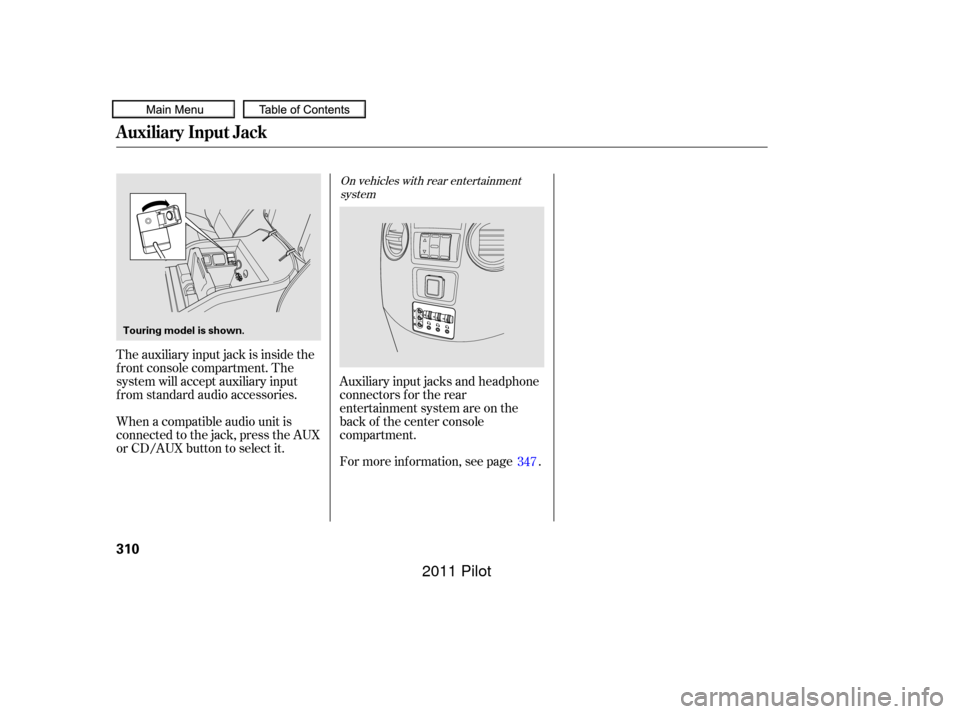
For more inf ormation, see page . Auxiliary input jacks and headphone
connectors f or the rear
entertainment system are on the
back of the center console
compartment.
The auxiliary input jack is inside the
f ront console compartment. The
system will accept auxiliary input
f rom standard audio accessories.
When a compatible audio unit is
connected to the jack, press the AUX
or CD/AUX button to select it.
347
On vehicles with rear entertainment
system
Auxiliary Input Jack
310
Touring model is shown.
10/01/26 19:15:58 31SZA620_315
2011 Pilot
Page 323 of 574
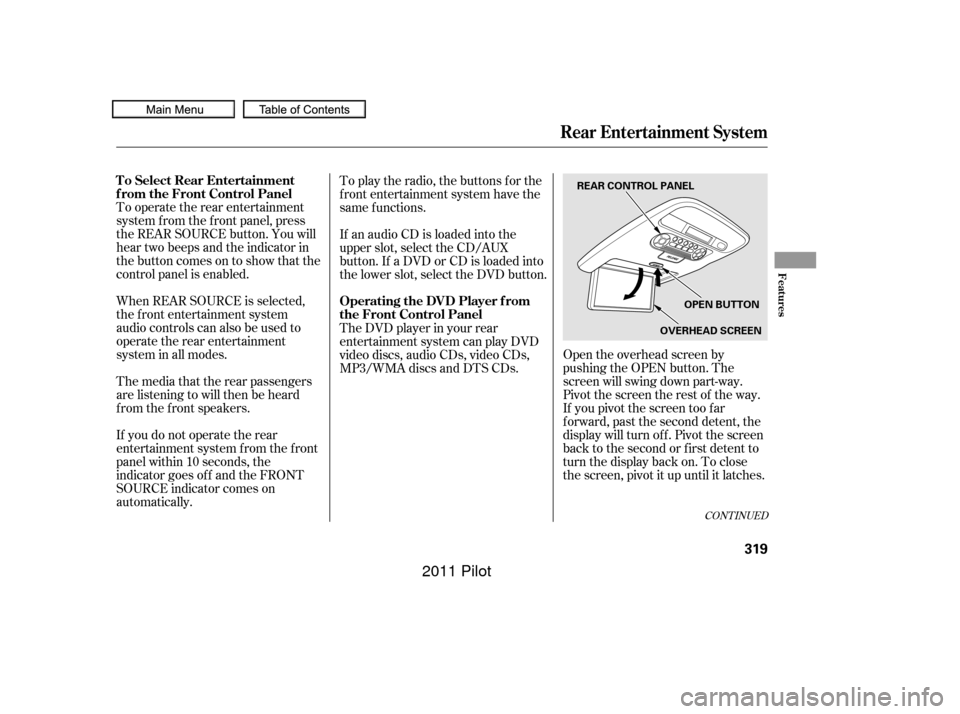
Open the overhead screen by
pushing the OPEN button. The
screen will swing down part-way.
Pivot the screen the rest of the way.
If you pivot the screen too f ar
f orward, past the second detent, the
display will turn of f . Pivot the screen
back to the second or first detent to
turn the display back on. To close
the screen, pivot it up until it latches.
To operate the rear entertainment
system f rom the f ront panel, press
the REAR SOURCE button. You will
hear two beeps and the indicator in
the button comes on to show that the
control panel is enabled.
When REAR SOURCE is selected,
the f ront entertainment system
audio controls can also be used to
operate the rear entertainment
system in all modes.
If an audio CD is loaded into the
upper slot, select the CD/AUX
button. If a DVD or CD is loaded into
the lower slot, select the DVD button. To play the radio, the buttons for the
f ront entertainment system have the
same f unctions.
The media that the rear passengers
are listening to will then be heard
f rom the f ront speakers.
If you do not operate the rear
entertainment system f rom the f ront
panel within 10 seconds, the
indicator goes of f and the FRONT
SOURCE indicator comes on
automatically. The DVD player in your rear
entertainment system can play DVD
video discs, audio CDs, video CDs,
MP3/WMA discs and DTS CDs.
CONT INUED
To Select Rear Entertainment
f rom the Front Control Panel
Operating the DVD Player f rom
the Front Control Panel
Rear Entertainment System
Features
319
REAR CONTROL PANEL
OPEN BUTTON
OVERHEAD SCREEN
10/01/26 19:17:33 31SZA620_324
2011 Pilot
Page 325 of 574
�µ
�µ Press the eject button to
remove the DVD from the drive.
To return f ront panel control to the
f ront audio system, press the
FRONT SOURCE button. You will
hear a beep and the indicator in the
button comes on. The indicator also
comes on automatically when you do
not operate the rear entertainment
system f or 10 seconds. To turn on the rear entertainment
system f rom the rear control panel,
press the PWR button. Use the AM/
FM button, XM button, CD button,
or DVD/AUX button to select the
entertainment source. The selected
source will be shown in the display.
Make sure the rear control operation
has not been disabled with the REAR
CTRLbuttononthefrontpanel.
When the audio system is off or the
f ront side rear power is of f , the rear
control panel cannot be turned on.
Press and hold the
side of the SKIP bar to move
f orward; you will see the time
elapsed shown in the overhead
screen advances rapidly. Press and
hold the side of the SKIP bar to
move backward; you will see the
time elapsed shown in the overhead
screen decreases. Release the bar
when the system reaches the point
you want.
Each time you press the side of
the SKIP bar and release it, the
system skips f orward to the
beginning of the next track or
chapter. Press and release the side of the SKIP bar to skip
backward to the beginning of the
current track. Press and release it
again to skip to the beginning of the
previous track or chapter. EJECT
To Return to Front Audio
Controls
Using the Rear Control Panel
SEEK /SK IP
Rear Entertainment System
Features
321
10/01/26 19:17:53 31SZA620_326
2011 Pilot
Page 351 of 574
CONT INUED
Auxiliary input jacks and headphone
connectors f or the rear
entertainment system are on the
back of the center console
compartment.
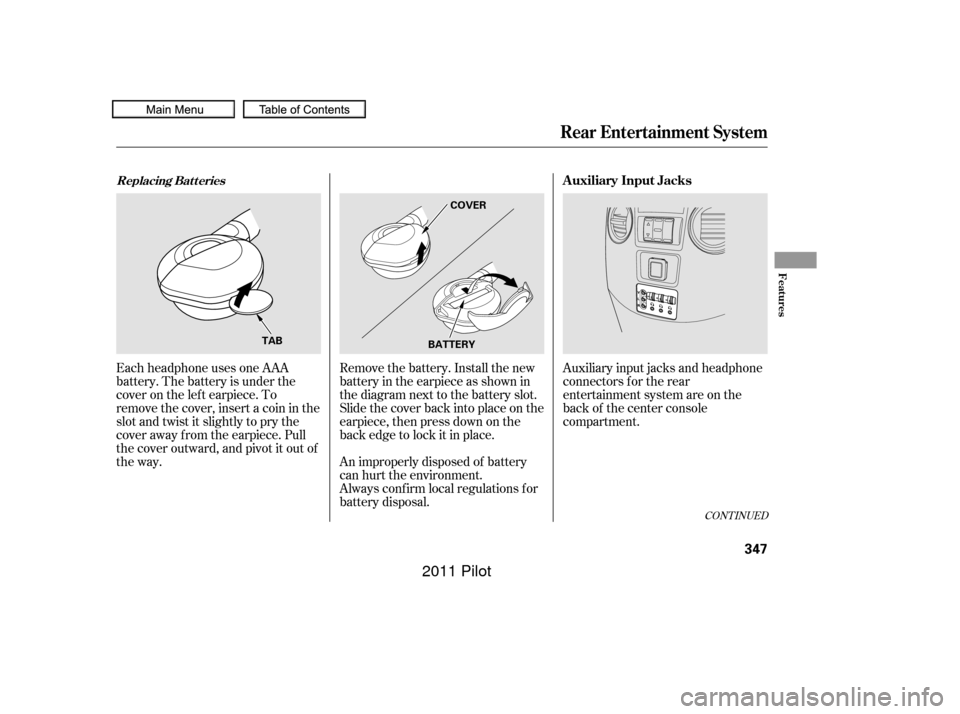
Remove the battery. Install the new
battery in the earpiece as shown in
the diagram next to the battery slot.
Slide the cover back into place on the
earpiece, then press down on the
back edge to lock it in place.
Each headphone uses one AAA
battery. The battery is under the
cover on the lef t earpiece. To
remove the cover, insert a coin in the
slot and twist it slightly to pry the
cover away f rom the earpiece. Pull
the cover outward, and pivot it out of
the way.
An improperly disposed of battery
can hurt the environment.
Always conf irm local regulations f or
battery disposal.
Rear Entertainment System
Replacing Bat t eriesAuxiliary Input Jacks
Features
347
COVER
BATTERY
TAB
10/01/26 19:22:12 31SZA620_352
2011 Pilot
Page 352 of 574
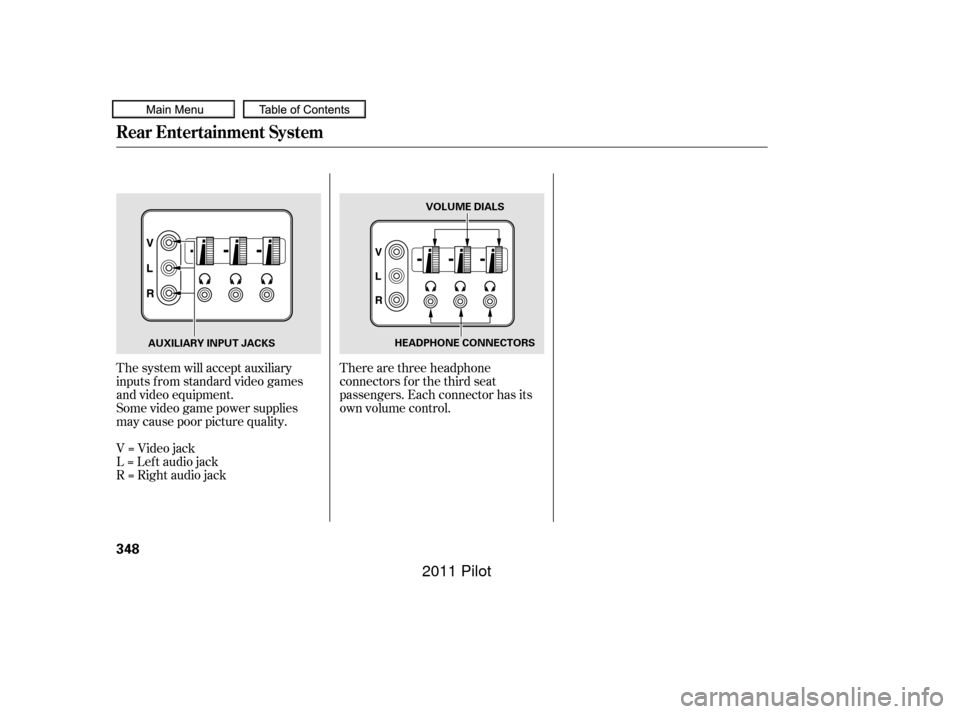
There are three headphone
connectors f or the third seat
passengers. Each connector has its
own volume control.
The system will accept auxiliary
inputs f rom standard video games
and video equipment.
Some video game power supplies
may cause poor picture quality.
V=Videojack
L = Lef t audio jack
R = Right audio jack
Rear Entertainment System
348
AUXILIARY INPUT JACKS VOLUME DIALS
HEADPHONE CONNECTORS
10/01/26 19:22:20 31SZA620_353
2011 Pilot
Page 562 of 574

CONT INUED
................................................
AAC .300
...
Accessories and Modif ications . 402
ACCESSORY (Ignition Key .....................................
Position) .137
............
Accessory Power Sockets . 186
...........................
AC Power Outlet .187
................
Active Head Restraints . 158
....................
Additives, Engine Oil . 473
...........................
Advanced Airbags .31
.............................
Airbag (SRS) .11, 26
..........
Airbag System Components . 26
......
Air Conditioning System . 192,199
.............
Rear A/C Control . 197,204
.......................
Air Outlets (Vents) .206
.......................
Air Pressure, Tires .496
......................................
Antif reeze .475
Anti-lock Brakes (ABS) ....................
Indicator Light .72, 430
...................................
Operation .429
..............
Anti-thef t, Audio System . 313
Anti-thef t Steering Column ............................................
Lock .137
........
Audio System . 208,210,226,252 Auto Control Mode, Starting
........................................
Engine .411
............................
Auto Door Lock .116
...
Auto Door Locking/Unlocking . 139
.........................
Auto Door Unlock .117
..........
Automatic Climate Control . 199
.......................
Automatic Lighting .127
...
Automatic Seat Belt Tensioners . 24
.............
Automatic Speed Control . 350
..............
Automatic Transmission . 413
..........................
Capacity, Fluid .538
...............
Checking Fluid Level . 478
.......................................
Shif ting .413
Shif t Lever Position ...............................
Indicators .413
................
Shif t Lever Positions . 414
....................
Shif t Lock Release . 416
......................
Auxiliary Input Jack .310
Battery Charging System ...........................
Indicator .70, 521
............................
Jump Starting .517
..............................
Maintenance .504 ............................
Specif ications . 539
..............................
Bef ore Driving .393
....................................
Belts,Seat .9,22
.........................
Beverage Holders .181
........
HandsFreeLink. 361
..................................
Booster Seats .58
Brakes ...........
Anti-lock System (ABS) . 429
.............
Break-in, New Linings . 394
............
Bulb Replacement . 486,488
...........................................
Fluid .481
.......................................
Parking .169
.................
System Indicator . 71,523
........................
Wear Indicators .429
.............................
Braking System .428
.................
Break-in, New Vehicle . 394
Brightness Control, ...............................
Instruments .131Bluetooth
Index
A
B
INDEX
I
10/01/26 19:59:14 31SZA620_564
2011 Pilot
Page:
< prev 1-8 9-16 17-24