Page 315 of 574
�Û�Ý�´
�µ
�´�µ
�´
�µ
CONT INUED
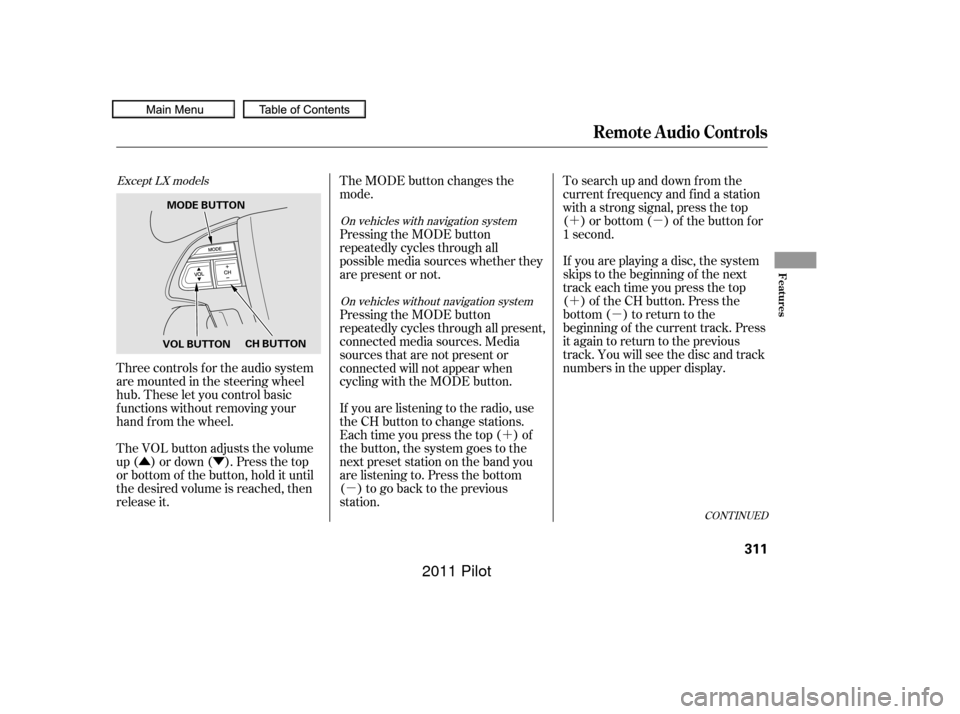
Three controls f or the audio system
are mounted in the steering wheel
hub. These let you control basic
f unctions without removing your
hand f rom the wheel.
The VOL button adjusts the volume
up ( ) or down ( ). Press the top
or bottom of the button, hold it until
the desired volume is reached, then
release it. If you are playing a disc, the system
skips to the beginning of the next
track each time you press the top
( ) of the CH button. Press the
bottom ( ) to return to the
beginning of the current track. Press
it again to return to the previous
track. You will see the disc and track
numbers in the upper display. To search up and down from the
current f requency and f ind a station
with a strong signal, press the top
( ) or bottom ( ) of the button for
1 second.
The MODE button changes the
mode.
If you are listening to the radio, use
the CH button to change stations.
Each time you press the top ( ) of
the button, the system goes to the
next preset station on the band you
are listening to. Press the bottom
( ) to go back to the previous
station. Pressing the MODE button
repeatedly cycles through all present,
connected media sources. Media
sources that are not present or
connected will not appear when
cycling with the MODE button. Pressing the MODE button
repeatedly cycles through all
possible media sources whether they
are present or not.
Except LX models
On vehicles with navigation system
On vehicles without navigation system
Remote Audio Controls
Features
311
VOL BUTTON CH BUTTON
MODE BUTTON
10/01/27 17:26:10 31SZA620_316
2011 Pilot
Page 316 of 574
�´�µ
�´
�µ
�´
�µ
�´
�µ
�´ �µ �´
�µ
If youareplayingaDVDvideo,use
the channel button to change
chapters. Each time you press the
top ( ) of the button, the system
goes to the next chapter. Press the
bottom ( ) to return to the
beginning of the current chapter.
Press it again to return to the
previous chapter.
To go to the next disc, press the top
( ) of the button for 1 second.
Press the bottom ( ) f or 1 second
to go back to the previous disc.
When you play an MP3/WMA disc,
press the top ( ) of the button for 1
second to go to the next folder. Press
the bottom ( ) for 1 second to go
back to the previous folder.
If you are listening to XM Radio, use
the CH button to change channels.
Each time you press the top ( ) of
the button, the system goes to the
next preset channel. Press the
bottom( )togobacktothe
previous preset channel.
To go to the next channel of the
category you are listening to, press
the top ( ) of the button for 1
second. Press the bottom ( ) f or 1
second to go back to the previous
channel. If youareplayingaUSBflash
memory device or iPod with the USB
adapter cable, press and release the
top ( ) of the CH button to skip
f orward to the beginning of the next
file. Press the bottom ( ) to skip
backward to the beginning to the
current f ile. Press it twice to return
to the previous file.
On vehicles with rear entertainment
system On vehicles with navigation system
Remote Audio Controls
312
10/01/26 19:16:15 31SZA620_317
2011 Pilot
Page 323 of 574
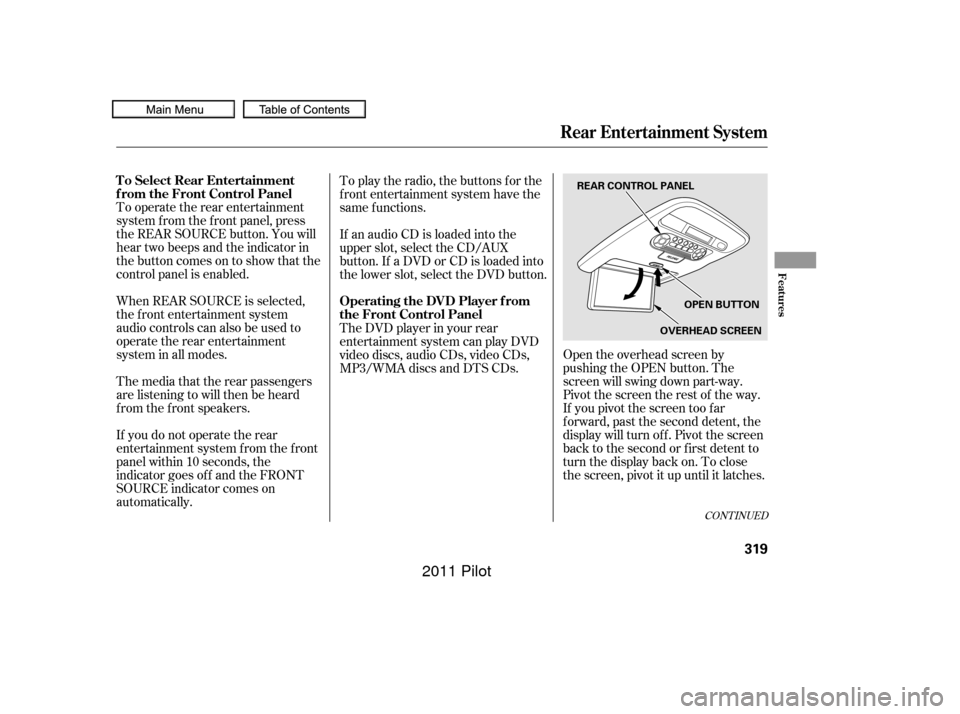
Open the overhead screen by
pushing the OPEN button. The
screen will swing down part-way.
Pivot the screen the rest of the way.
If you pivot the screen too f ar
f orward, past the second detent, the
display will turn of f . Pivot the screen
back to the second or first detent to
turn the display back on. To close
the screen, pivot it up until it latches.
To operate the rear entertainment
system f rom the f ront panel, press
the REAR SOURCE button. You will
hear two beeps and the indicator in
the button comes on to show that the
control panel is enabled.
When REAR SOURCE is selected,
the f ront entertainment system
audio controls can also be used to
operate the rear entertainment
system in all modes.
If an audio CD is loaded into the
upper slot, select the CD/AUX
button. If a DVD or CD is loaded into
the lower slot, select the DVD button. To play the radio, the buttons for the
f ront entertainment system have the
same f unctions.
The media that the rear passengers
are listening to will then be heard
f rom the f ront speakers.
If you do not operate the rear
entertainment system f rom the f ront
panel within 10 seconds, the
indicator goes of f and the FRONT
SOURCE indicator comes on
automatically. The DVD player in your rear
entertainment system can play DVD
video discs, audio CDs, video CDs,
MP3/WMA discs and DTS CDs.
CONT INUED
To Select Rear Entertainment
f rom the Front Control Panel
Operating the DVD Player f rom
the Front Control Panel
Rear Entertainment System
Features
319
REAR CONTROL PANEL
OPEN BUTTON
OVERHEAD SCREEN
10/01/26 19:17:33 31SZA620_324
2011 Pilot
Page 568 of 574

CONT INUED
............
Panel Brightness Control . 131
........................
Park Gear Position .414
...........................................
Parking .419
...............................
Parking Brake .169
Parking Brake and Brake .................
System Indicator . 71,523
...............................
Parking Lights .126
..
Parking Over Things that Burn . 419
....
Passenger Airbag Of f Indicator . 36.............................
PGM-FI System .548
...................................
Pollen Filter .490
........................
Power Door Locks .138
..............
Power Seat Adjustments . 154
...............
Power Socket Locations . 179
............................
Power Windows .165
.........
Pregnancy, Using Seat Belts . 20
.........
Protecting Adults and Teens . 13
...
Additional Safety Precautions . 21
.....
Advice f or Pregnant Women . 20
........................
Protecting Children .39
.....................
General Guidelines .39
.......................
Protecting Inf ants .44
.......
Protecting Larger Children . 57
.........
Protecting Small Children . 45
Using Child Seats with .....................................
Tethers .54
.............................
Using LATCH .49
...................
Radiator Overheating . 519
Radio/Disc Sound .......................
System .210, 227,253
.................
Radio Thef t Protection . 313
................................
RDS .213, 230,257 ...........................
Readiness Codes .550
.......................
Rear A/C Unit .197, 204
............
Rear Audio Control Panel . 321
........
Rear Entertainment System . 317
..
Rear Lights, Bulb Replacement . 486
...
Rearview Camera and Monitor . 390
...........................
Rearview Mirror .170
.......
Rear Window Def ogger . 194,203
Rear Window Wiper and .......................................
Washer .125
.....
Reclining the Seat Backs . 154,155
.........
Reclining the Second Seats . 159
.......................
Reminder Indicators .69
................
Remote Audio Controls . 311
.................
Remote Control (RES) . 322
.....................
Remote Transmitter .150
Replacement Inf ormation ................
Engine Oil and Filter . 473
..........................................
Fuses .525
................................
Light Bulbs .483
....................................
Schedule .469
................................
Timing Belt .482
...........................................
Tires .499
.............................
Wiper Blades .492
Oil
........................
Change, How to .473
......................
Change, When to .455
......................
Checking Engine .398
...............................
Lif e, Engine .455
..............
Pressure Indicator . 70,521
Selecting Proper Viscosity ......................................
Chart .472
.........
ON (Ignition Key Position) . 137
............................
Outside Mirrors .171
...............
Outside Temperature . 85, 90
....................
Overheating, Engine .519
....
Owner’s Maintenance Checks . 467
.........................
Oxygenated Fuels .394
Index
INDEX
P
R
VII
10/01/26 19:59:51 31SZA620_570
2011 Pilot