Page 303 of 574
�Î
�ΠThis audio system can operate the
audio f iles on a USB f lash memory
device with the same controls used
f or the in-dash disc changer. To play
a USB f lash memory device, connect
it to the USB adapter cable in the
console compartment, then press the
AUX button. The ignition switch
must be in the ACCESSORY (I) or
ON (II) position.Only AAC f ormat f iles recorded
with iTunes are playable on this
audio unit. Do not keep a USB f lash memory
device in the vehicle. Direct
sunlight and high heat will damage
it.
We recommend backing up your
data bef ore playing a USB f lash
memory device.
Depending on the type and
number of f iles, it may take some
time bef ore they begin to play.
Depending on the sof tware the
f iles were made with, it may not be
possibletoplaysomefiles,or
display some text data.
You can select the AUX mode by
using the navigation system voice
control buttons, but cannot operate
theplaymodefunctions.
The recommended USB f lash
memory devices are 256 MB or
higher, and f ormatted with the FAT
f ile system. Some digital audio
players may be compatible as well.
The audio system reads and plays
the audio f iles on the USB f lash
memory device in MP3, WMA or
AAC f ormats. Depending on the
f ormat, the display shows MP3,
WMA or AAC when a USB flash
memory device is playing. The USB
f lash memory device limit is up to
700 f olders or up to 65535 f iles. Some USB f lash memory devices
(such as devices with security lock-
out f eatures, etc.) will not work in
this audio unit.
Do not use a device such as a card
reader or hard drive as the device
or your f iles may be damaged.
Do not connect your USB f lash
memory device using a hub.
Do not use an extension cable to
the USB adapter cable equipped
with your vehicle.
:
CONT INUED
To Play a USB Flash Memory
Device
Voice Cont rol Syst em
Playing a USB Flash Memory Device (Models with navigation system)
Features
299
NOTE:
10/01/26 19:14:14 31SZA620_304
2011 Pilot
Page 318 of 574
You can quickly set the time to the
nearest hour. If the displayed time is
bef ore the half hour, press and hold
the CLOCK button, then press the R
(reset) button to set the time back to
the previous hour. If the displayed
time is af ter the half hour, the same
procedure sets the time f orward to
the beginning of the next hour.
For example: 1:06 will reset to 1:001:52 will reset to 2:00
The navigation system receives
signals f rom the global positioning
system (GPS), and the displayed
time is updated automatically by the
GPS. Ref er to the navigation system
manual f or how to adjust the time.
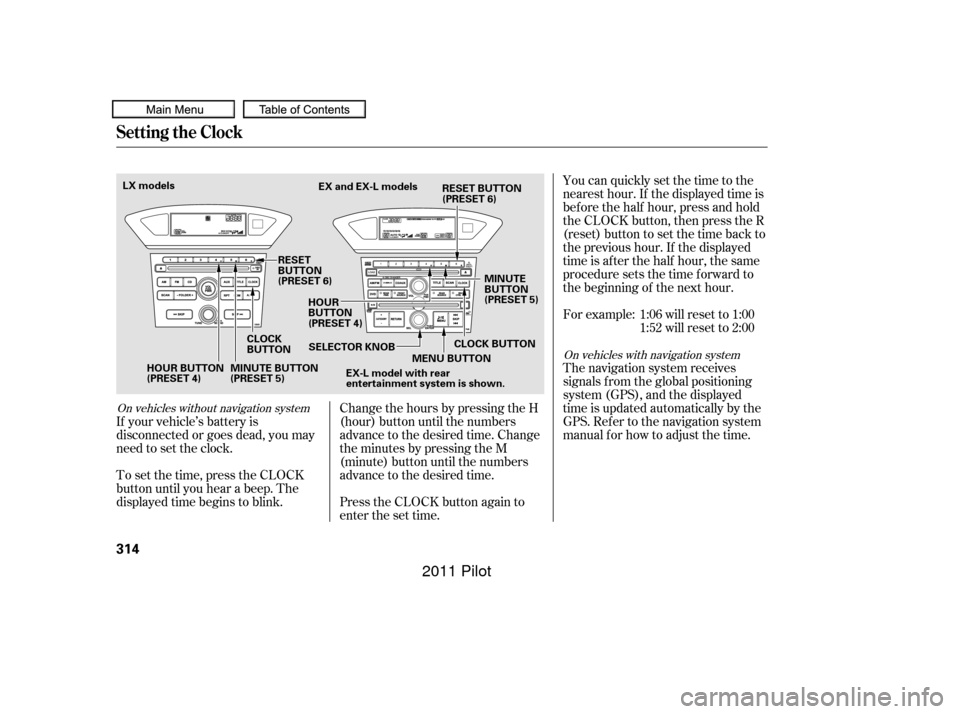
If your vehicle’s battery is
disconnected or goes dead, you may
need to set the clock.
To set the time, press the CLOCK
button until you hear a beep. The
displayed time begins to blink. Change the hours by pressing the H
(hour) button until the numbers
advance to the desired time. Change
the minutes by pressing the M
(minute) button until the numbers
advance to the desired time.
Press the CLOCK button again to
enter the set time.
On vehicles without navigation system
On vehicles with navigation system
Setting the Clock
314
HOUR BUTTON
(PRESET 4)
CLOCK
BUTTONEX and EX-L models
RESET
BUTTON
(PRESET 6) HOUR
BUTTON
(PRESET 4) MINUTE
BUTTON
(PRESET 5)
MINUTE BUTTON
(PRESET 5) SELECTOR KNOB
MENU BUTTON
EX-L model with rear
entertainment system is shown.
LX models
CLOCK BUTTON
RESET BUTTON
(PRESET 6)
10/01/26 19:16:39 31SZA620_319
2011 Pilot
Page 319 of 574
�Ú
Turn the selector knob to select
‘‘CLOCK ADJUST.’’
Press the selector knob (ENTER)
to enter your selection. The
display changes to the clock
adjusting display. Turn the selector knob to select
the item which you want to adjust.
Turning the selector knob will
change the selected item between
the clock display setting, hours,
minutes, and SET. The selected
item is indicated with in the
display.
You can also adjust the clock and
switch the clock display between
24-hours and 12-hours in the menu
mode.
To adjust the clock setting:
Press and release the MENU
button. The display shows you the
menu items.
You can adjust the clock setting
with the ignition switch in the
ACCESSORY (I) or ON (II)
position.
1.
2.
3.4.
CONT INUED
On EX and EX-L models
Setting the Clock
Adjusting the Clock with MENU
Button
Features
315
10/01/26 19:16:50 31SZA620_320
2011 Pilot
Page 320 of 574
Turn the selector knob to count
the numbers up or down.While setting the clock, pressing
the RETURN button will go back
to the previous display.
Pressing the MENU button again
will cancel this setting mode.
Press either the RETURN or
MENUbuttontogobacktothe
normal display.
To set the time, turn the selector
knob and select the hours or the
minutes, then press the knob to
enter your selection. The display
changes to the setting display.
Press the selector knob (ENTER)
to enter your selection. The
display will return to the clock
adjusting display.
Turn the selector knob to change
the setting between 12H and 24H.
Press the selector knob (ENTER)
to enter your selection. The
display will return to the clock
adjusting display.
To enter the clock setting, turn
the selector knob to select ‘‘SET,’’
then press the knob. The display
will return to the menu item
display.
5.
6.
7.
8.
9.
11. 10.
Setting the Clock
316
MINUTE SETTING
10/01/26 19:17:03 31SZA620_321
2011 Pilot
Page 351 of 574
CONT INUED
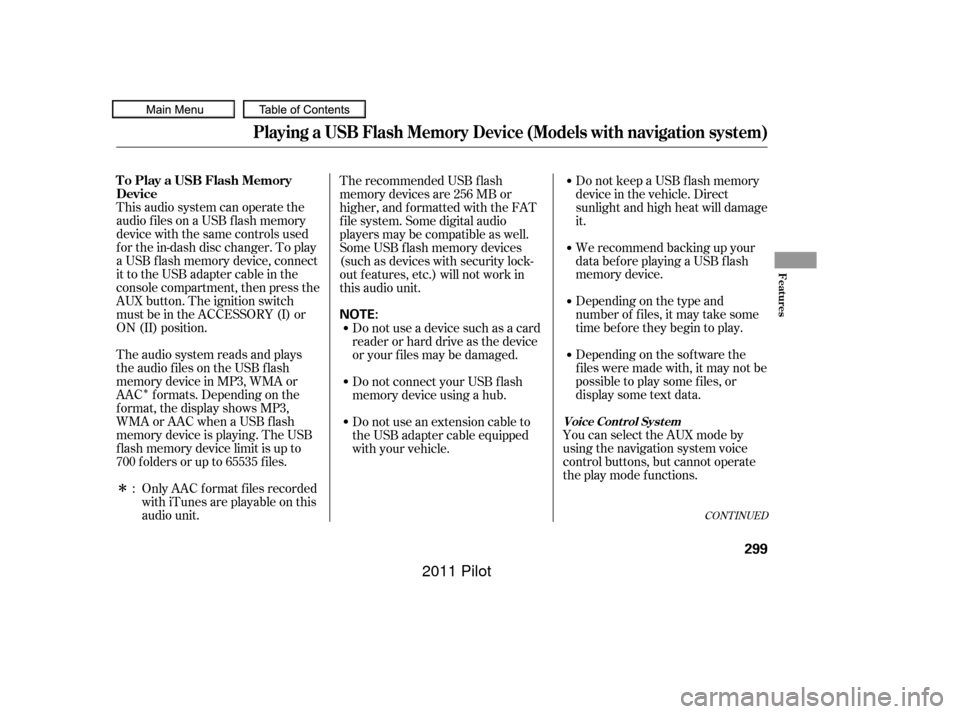
Auxiliary input jacks and headphone
connectors f or the rear
entertainment system are on the
back of the center console
compartment.
Remove the battery. Install the new
battery in the earpiece as shown in
the diagram next to the battery slot.
Slide the cover back into place on the
earpiece, then press down on the
back edge to lock it in place.
Each headphone uses one AAA
battery. The battery is under the
cover on the lef t earpiece. To
remove the cover, insert a coin in the
slot and twist it slightly to pry the
cover away f rom the earpiece. Pull
the cover outward, and pivot it out of
the way.
An improperly disposed of battery
can hurt the environment.
Always conf irm local regulations f or
battery disposal.
Rear Entertainment System
Replacing Bat t eriesAuxiliary Input Jacks
Features
347
COVER
BATTERY
TAB
10/01/26 19:22:12 31SZA620_352
2011 Pilot
Page 353 of 574

The security system automatically
sets 15 seconds after you lock the
doors, the hood, the tailgate, and the
glass hatch. For the system to
activate, you must lock the doors,
thetailgateandtheglasshatchfrom
the outside with the key, driver’s
lock tab, door lock master switch, or
remote transmitter. The security
system indicator on the instrument
panel starts blinking immediately to
show you the system is setting itself . The security system helps to protect
your vehicle and valuables f rom thef t.
The horn sounds and a combination
of headlights, parking lights, side
marker lights and taillights f lashes if
someone attempts to break into your
vehicle or remove the audio unit.
This alarm continues for two
minutes, then the system resets. To
reset an activated system bef ore the
two minutes have elapsed, unlock
the driver’s door with the key or the
remote transmitter.Once the security system is set,
opening any door, the tailgate, the
glass hatch, or the hood without
using the key or the remote
transmitter will cause the alarm to
activate. It will also activate if the
radio is removed f rom the dashboard
or the wiring is cut.The security system will not set if
the hood, the tailgate, the glass
hatch, or any door is not f ully closed.
If the system will not set, check that
thedoors,thetailgateandthehood
are f ully closed.
Do not attempt to alter this system
or add other devices to it.
Except LX models
Security System
Features
349
SECURITY SYSTEM INDICATOR
10/01/26 19:22:28 31SZA620_354
2011 Pilot
Page 385 of 574
This command group allows you to
change or customize HFL basic
settings.Press and release the HFL Talk
button bef ore a command.
Say ‘‘ .’’ Once a passcode is set, you
will need to enter it to use HFL each
time you start the vehicle. If you
f orget the code, your dealer will have
toresetitforyou,oryouwillhaveto
clear the entire system (see page ).
Follow the HFL prompts to
conf irm the number. Follow the HFL prompts and say
the 4-digit passcode you want to
set. Say‘‘ ’’aftertheprompts.
1.
2.
3.
4. 383
CONT INUED
System Setup
System setup
Security
BluetoothHandsFreeL ink
T o set a 4-digit passcode t o lock t heHFL system f or security purposes:
Features
381
NOTE:
10/01/26 19:28:43 31SZA620_386
2011 Pilot
Page 395 of 574
Monitor brightness is adjusted
automatically by sensors. If you use
the monitor continuously at high
temperature, the monitor will
gradually dim.
The inside mirror will be hot when
you use the monitor f or an extended
period of time.
If a bright light (such as sunlight) is
shining on the inside mirror, the
image may be dif f icult to see.
When in reverse, the navigation
buttons are locked out, except the
interf ace dial on the dashboard. Turn
the knob clockwise to make the
camera image brighter, and counter-
clockwise to darken the image.
You can turn the monitor on and of f
by pressing the monitor of f button
when the shif t lever is in reverse.
The monitor turns on everytime you
shif t to reverse, even if you turned it
of f the last time.On vehicles with navigation system On EX-L models without navigation system
Rearview Camera and Monitor
Features
391
REARVIEW MONITOR
SENSORSENSOR
MONITOR OFF BUTTON
10/01/26 19:30:32 31SZA620_396
2011 Pilot