Page 153 of 722
�µ
�µ �µ
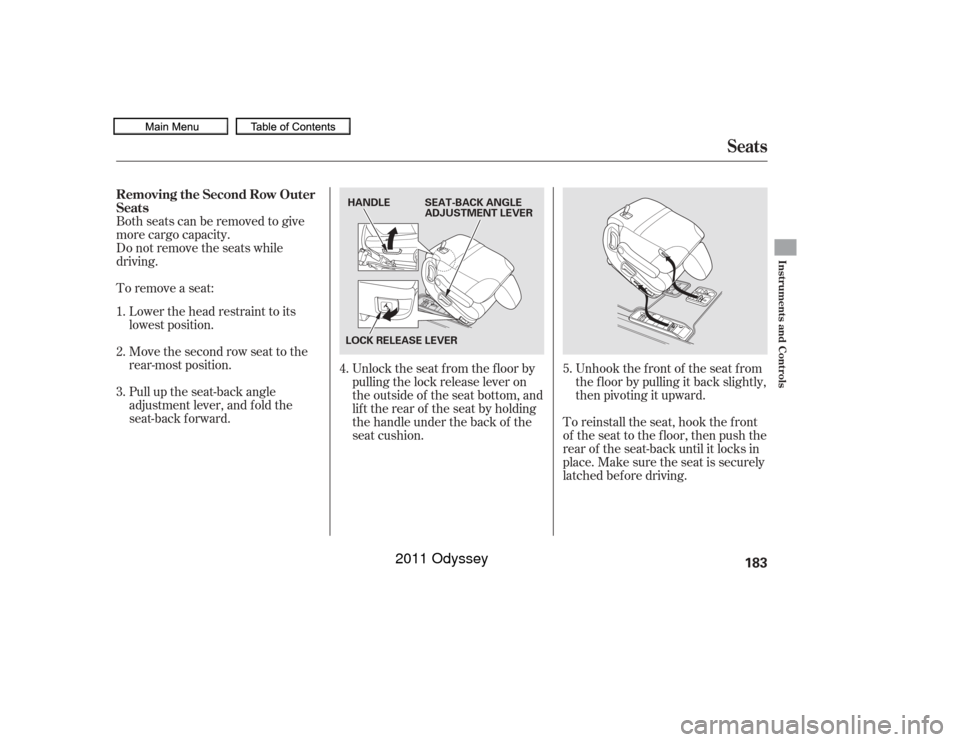
To change the ‘‘SECURITY
RELOCK TIMER’’ setting, see page .Press this button once
to unlock the driver’s door. Press it
twice to unlock the other doors and
the tailgate. Some exterior lights will
f lash twice each time you press the
button.
If you do not open any doors or the
tailgate within 30 seconds, they will
automatically relock and the security
system sets.
To change the ‘‘KEY AND REMOTE
UNLOCK MODE’’ setting, see page .
Press this button once to
lock all doors and the tailgate. Some
exterior lights will f lash once. When
you push LOCK twice within 5
seconds, you will hear a beep to
verify that the security system has
set. You cannot lock the doors and
thetailgateif anydoororthetailgate
is not f ully closed or the key is in the
ignition switch. To change the ‘‘KEYLESS LOCK
ACKNOWLEDGMENT’’ setting, see
page .
When you press the UNLOCK
button, the f ront and rear individual
map lights and the cargo area light,
depending on their switch positions,
will come on (see page ). If you
do not open any door or the tailgate,
the lights stay on for about 30
seconds, then go out. If you relock
thedoorsandthetailgatewiththe
remote transmitter before 30
seconds have elapsed, the lights will
go of f immediately.
Pressthisbuttonfor
about 1 second to attract attention;
thehornwillsoundandtheexterior
lights will f lash f or about 30 seconds.
To cancel panic mode, press any
other button on the remote
transmitter, or turn the ignition
switch to the ON (II) position.
130
124 132 213
On EX, EX-L, Touring models
On Touring models
On Touring models
UNL OCK
LOCK PA NIC
Remote Transmitter150Touring model is shown. UNLOCK
BUTTON
PANIC
BUTTON LOCK
BUTTON
LED
10/07/17 09:53:52 31TK8600_155
2011 Odyssey
Page 154 of 722
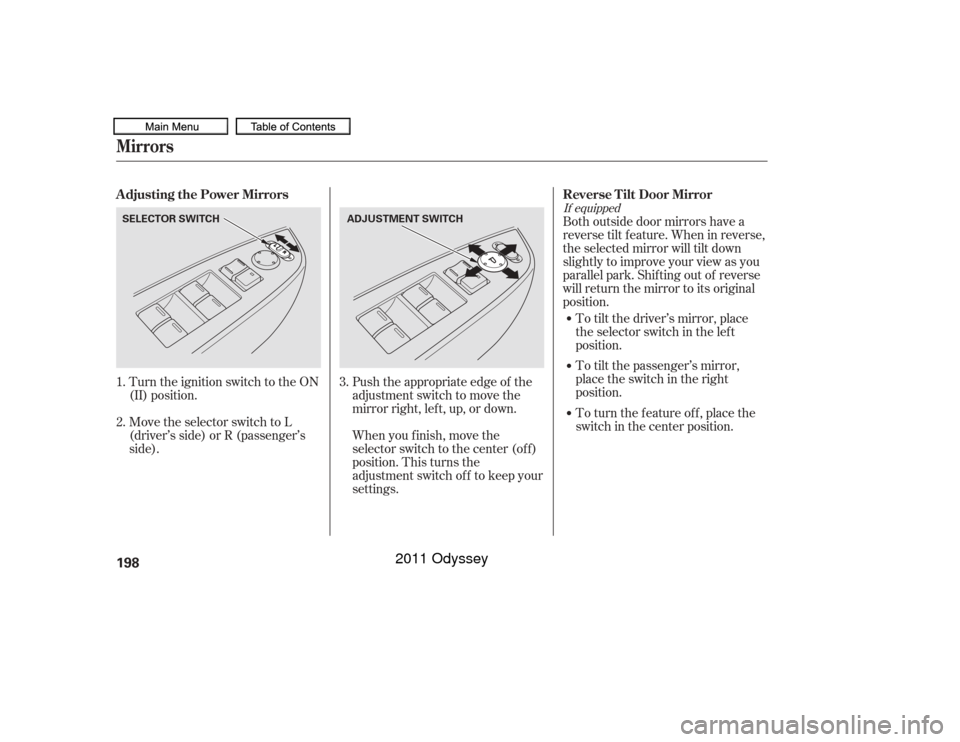
If the power sliding door MAIN
switch on the dashboard is in the
OFF position, you cannot open or
close the sliding doors with the
remote transmitter.
Press and hold the right button for
about 1 second to open or close the
passenger’s side door, and the lef t
button to open or close the driver’s
side door.
You can customize the power sliding
doors keyless unlock mode setting
(see page or ). You can open or close the power
tailgate with the remote transmitter.
Press and hold the TAILGATE
button to open or close the power
tailgate. When the tailgate begins to
move, you will hear a beep, and some
f ront and rear lights will f lash.
171126
CONT INUED
On EX-L and Touring models
Remote Transmitter
Opening or Closing t he Power Sliding
Doors Opening or Closing t he Power
Tailgate
Instruments and Controls
151
TAILGATE
BUTTON
LED
PASSENGER’S SIDE
SLIDING DOOR BUTTON MAIN SWITCH
POWER SLIDING DOOR SWITCHES
DRIVER’S SIDE SLIDING
DOOR BUTTON
Touring model is shown.
10/07/17 09:54:01 31TK8600_156
2011 Odyssey
Page 166 of 722
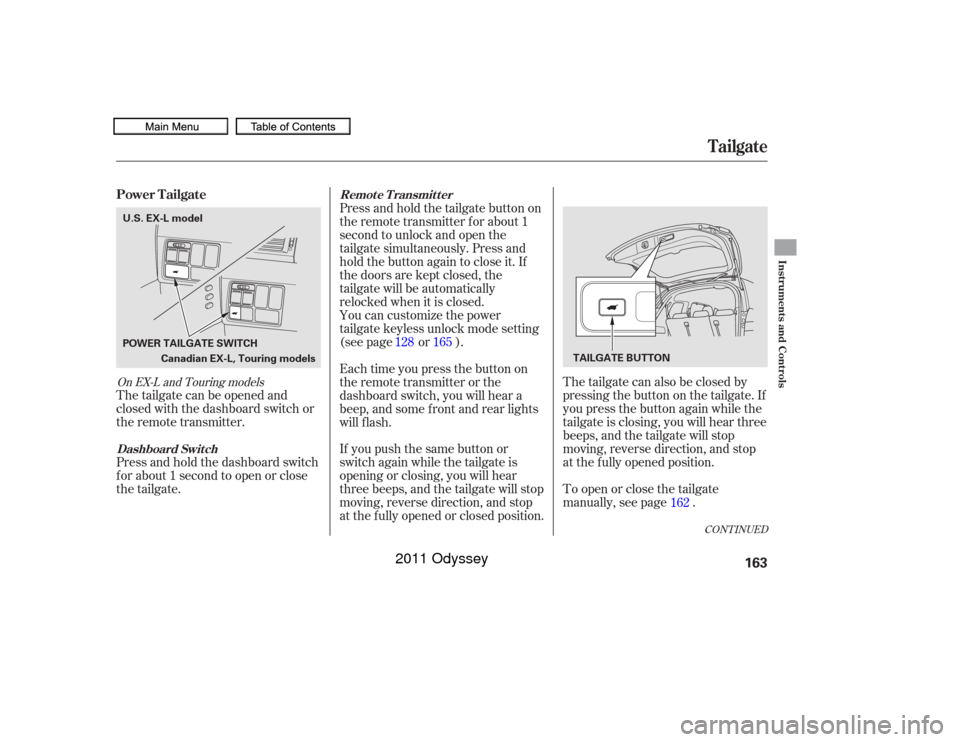
The tailgate can also be closed by
pressing the button on the tailgate. If
you press the button again while the
tailgate is closing, you will hear three
beeps, and the tailgate will stop
moving, reverse direction, and stop
at the f ully opened position.
To open or close the tailgate
manually, see page .
The tailgate can be opened and
closed with the dashboard switch or
the remote transmitter.
Press and hold the dashboard switch
f or about 1 second to open or close
the tailgate. Press and hold the tailgate button on
the remote transmitter f or about 1
second to unlock and open the
tailgate simultaneously. Press and
hold the button again to close it. If
the doors are kept closed, the
tailgate will be automatically
relocked when it is closed.
If you push the same button or
switch again while the tailgate is
opening or closing, you will hear
three beeps, and the tailgate will stop
moving, reverse direction, and stop
at the f ully opened or closed position. You can customize the power
tailgate keyless unlock mode setting
(see page or ).
Each time you press the button on
the remote transmitter or the
dashboard switch, you will hear a
beep, and some f ront and rear lights
will f lash.
162
128 165
CONT INUED
On EX-L and Touring modelsPower Tailgate
Tailgate
Dashboard Switch Remote Transmitter
Instruments and Controls
163
Canadian EX-L, Touring models
POWER TAILGATE SWITCH
TAILGATE BUTTON
U.S. EX-L model
10/07/19 15:51:06 31TK8600_168
2011 Odyssey
Page 186 of 722
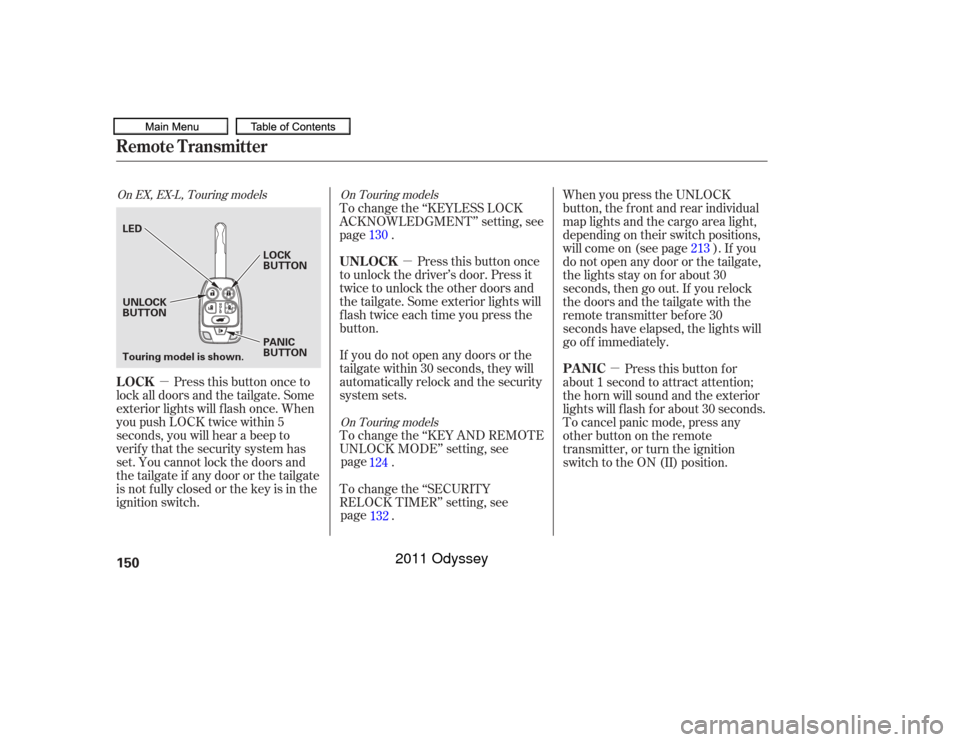
Both seats can be removed to give
more cargo capacity.
Do not remove the seats while
driving.
To remove a seat:Lower the head restraint to its
lowest position.
Pull up the seat-back angle
adjustment lever, and fold the
seat-back forward. Unlock the seat f rom the f loor by
pulling the lock release lever on
the outside of the seat bottom, and
lifttherearoftheseatbyholding
the handle under the back of the
seat cushion.Unhook the f ront of the seat f rom
the f loor by pulling it back slightly,
then pivoting it upward.
To reinstall the seat, hook the front
of the seat to the f loor, then push the
rear of the seat-back until it locks in
place. Make sure the seat is securely
latched bef ore driving.
Move the second row seat to the
rear-most position.
1.
5.
4.
2.
3.
Seats
Removing the Second Row Outer
Seats
Instruments and Controls
183
LOCK RELEASE LEVER HANDLE SEAT-BACK ANGLE
ADJUSTMENT LEVER
10/07/17 09:58:47 31TK8600_188
2011 Odyssey
Page 188 of 722
CONT INUED
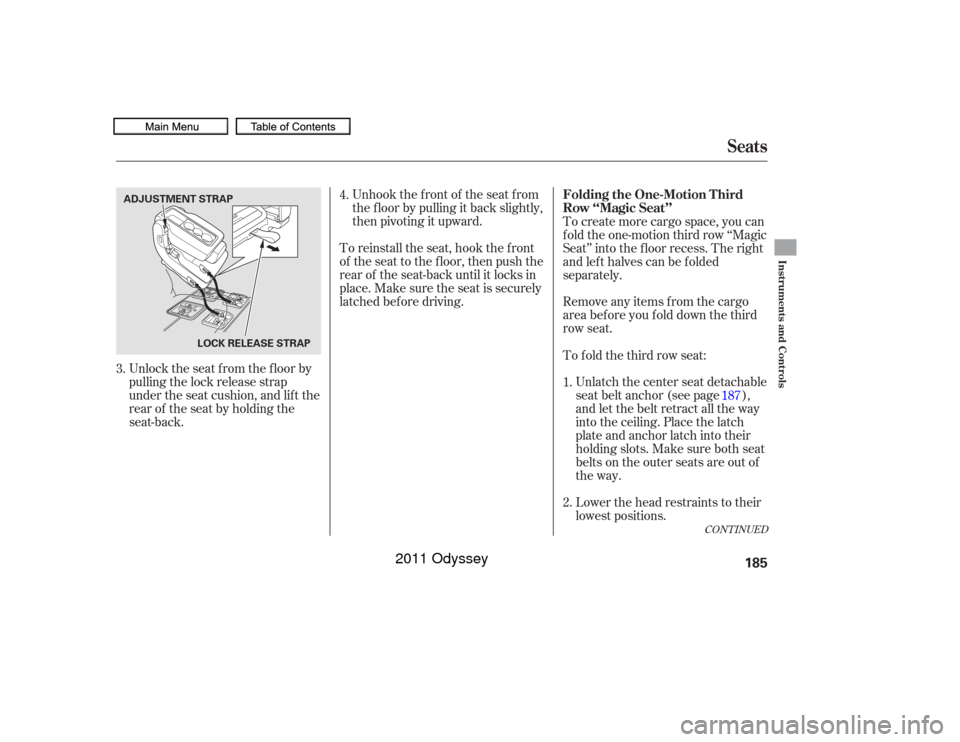
Unlock the seat f rom the f loor by
pulling the lock release strap
under the seat cushion, and lif t the
rearof theseatbyholdingthe
seat-back.Unhook the f ront of the seat f rom
the f loor by pulling it back slightly,
then pivoting it upward.
To reinstall the seat, hook the f ront
of the seat to the f loor, then push the
rear of the seat-back until it locks in
place. Make sure the seat is securely
latched bef ore driving. To create more cargo space, you can
f old the one-motion third row ‘‘Magic
Seat’’ into the floor recess. The right
and left halves can be folded
separately.
Remove any items from the cargo
areabeforeyoufolddownthethird
row seat.
Unlatch the center seat detachable
seat belt anchor (see page ),
and let the belt retract all the way
into the ceiling. Place the latch
plate and anchor latch into their
holding slots. Make sure both seat
belts on the outer seats are out of
the way.
To f old the third row seat:
Lower the head restraints to their
lowest positions.
3. 4.
1.
2.187
Seats
Folding the One-Motion T hird
Row ‘‘Magic Seat’’
Instruments and Controls
185
LOCK RELEASE STRAP
ADJUSTMENT STRAP
10/07/17 09:59:06 31TK8600_190
2011 Odyssey
Page 199 of 722
�µ
To tilt up the moonroof , push on the
center of the moonroof switch. To
stop the moonroof f rom tilting up
f ully, push the switch brief ly.
To close the moonroof f ully, f irmly
push the moonroof switch f orward,
then release it. The moonroof
automatically closes all the way. To
stop the moonroof f rom closing,
push the switch briefly.
To open or close the moonroof
partially, pull back or push f orward
the moonroof switch lightly and hold
it. The moonroof will stop when you
release the switch. If the
moonroof runs into any obstacle
while it is closing automatically, it
will reverse direction and then stop.
To close the moonroof , remove the
obstacle, then use the moonroof
switch again.
Auto reverse stops sensing when the
moonroof is almost closed. You
should always check that all
passengers and objects are away
f rom the moonroof bef ore closing it. You can open and close the
moonroof f or up to 10 minutes af ter
you turn of f the ignition switch.
Opening either f ront door cancels
this function.
You can use the remote transmitter
or the key to operate the moonroof
f rom the outside. Ref er to page
f or details.
194
AUTO REVERSE
Operating the Moonroof with the
Remote Transmitter or the Key
Moonroof196
Opening or closing the
moonroof on someone’s hands
or fingers can cause serious
injury.
Make sure all hands and fingers
are clear of the moonroof
before opening or closing it.If you try to open the moonroof in
below-f reezing temperatures, or when
it is covered with snow or ice, you can
damage the moonroof panel or its
motor.
10/07/17 10:00:36 31TK8600_201
2011 Odyssey
Page 200 of 722
Keeptheinsideandoutsidemirrors
clean and adjusted f or best visibility.
Be sure to adjust the mirrors bef ore
you start driving.
The inside mirror has day and night
positions. The night position reduces
glare f rom headlights behind you.
Flip the tab on the bottom edge of
the mirror to select the day or night
position.The inside mirror can automatically
darken to reduce glare. To turn on
this feature, press the button on the
bottom of the mirror. The AUTO
indicator comes on as a reminder.
When it is on, the mirror darkens
when it senses the headlights of a
vehicle behind you, then returns to
normal visibility when the lights are
gone. Press the button again to turn
of f this f eature.
On EX-L and Touring models
On LX, EX models
Mirrors
Instruments and Controls
197
There is also a sensor on the back of
the mirror. Items hung on the mirror
may block this sensor and af f ect its
perf ormance.
10/07/17 10:00:41 31TK8600_202
2011 Odyssey
Page 201 of 722
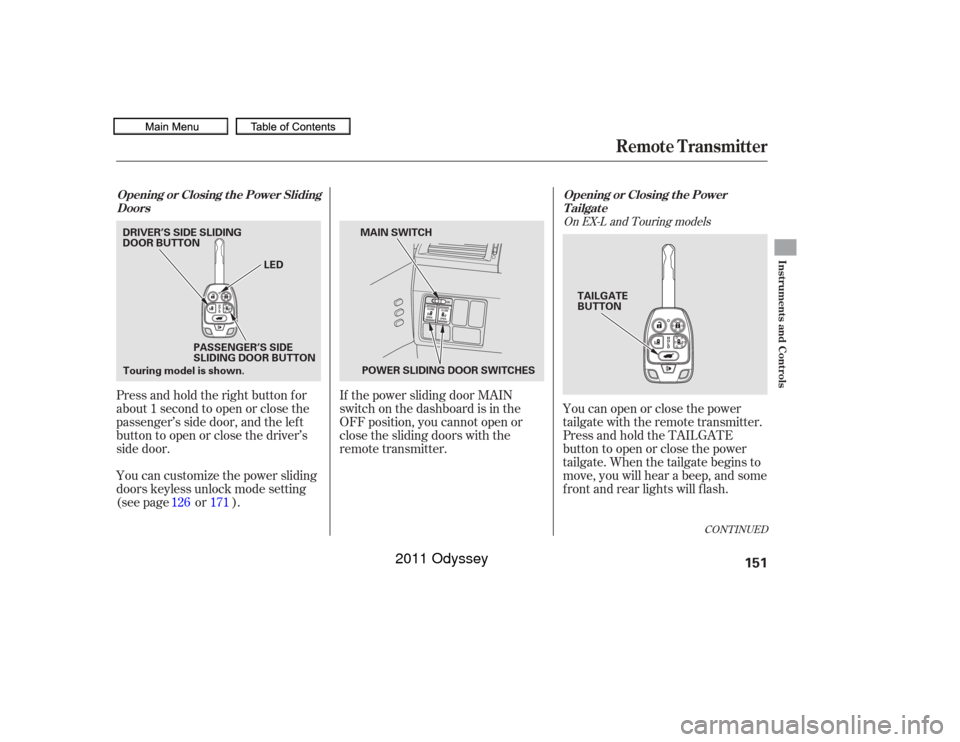
Move the selector switch to L
(driver’s side) or R (passenger’s
side). Turn the ignition switch to the ON
(II) position.When you f inish, move the
selector switch to the center (off)
position. This turns the
adjustment switch of f to keep your
settings. Push the appropriate edge of the
adjustment switch to move the
mirrorright,left,up,ordown.To turn the feature off, place the
switch in the center position. To tilt the passenger’s mirror,
place the switch in the right
position. To tilt the driver’s mirror, place
the selector switch in the left
position.
Both outside door mirrors have a
reverse tilt f eature. When in reverse,
the selected mirror will tilt down
slightly to improve your view as you
parallel park. Shif ting out of reverse
will return the mirror to its original
position.
1.
2. 3.
If equipped
Adjusting the Power Mirrors
Reverse Tilt Door MirrorMirrors198
ADJUSTMENT SWITCH
SELECTOR SWITCH
10/07/17 10:00:51 31TK8600_203
2011 Odyssey