Page 223 of 722
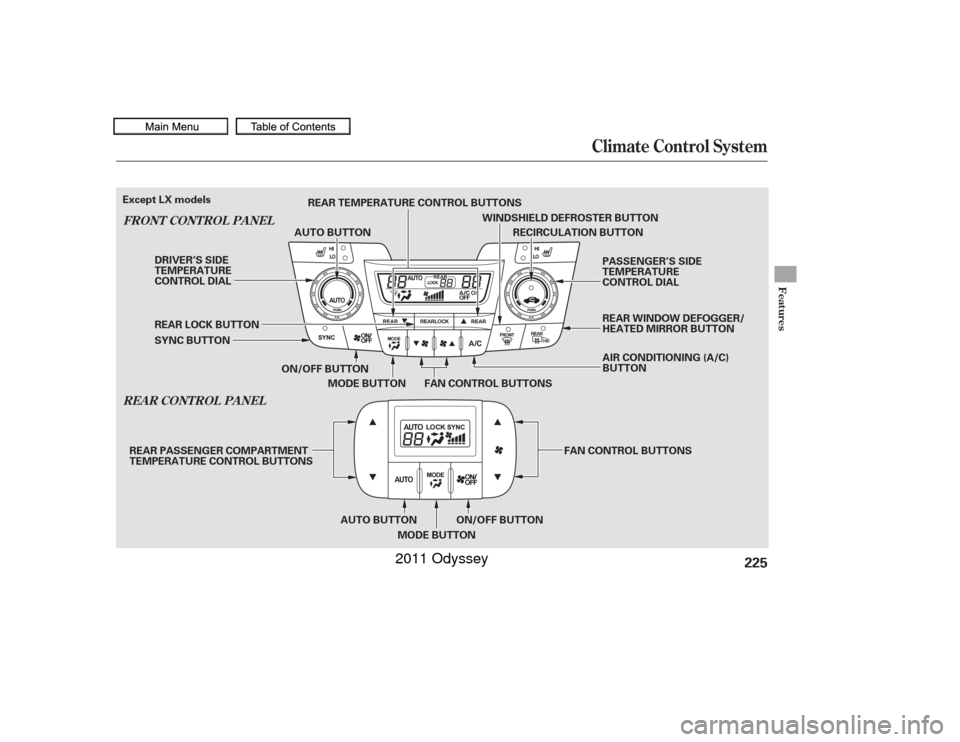
Air f lows f rom the def roster
vents at the base of the windshield. Airf low is divided between
the f loor vents and def roster vents at
the base of the windshield. Air f lows f rom the f loor
vents. When you select , the
system automatically switches to
f resh air mode.
Airf low is divided between
the vents in the dashboard and the
f loor vents. Air flows from the center
and corner vents in the dashboard. Use the mode control buttons to
select the vents air flows from. Some
air will f low f rom the dashboard
corner vents in all modes. Pushing this button also turns the
power mirror heaters on and of f . This button turns the rear window
def ogger on and of f (see page ). When you select , the system
automatically switches to f resh air
mode and turns on the A/C. For
f aster def rosting, manually set the
fanspeedtohigh.Youcanalso
increase airf low to the windshield by
closing the corner vents on the
dashboard.
When you turn of f by
pressing the button again, the
system returns to its former settings.
For your saf ety, make sure you have
a clear view through all the windows
bef ore driving.
When you select or ,
the system automatically switches to
Fresh Air mode and turns on the
A/C. In these modes, the A/C stays
on with the indicator off.
This button directs the main airflow
to the windshield for faster
def rosting. It also overrides any
mode selection you may have made.
/
142
If equippedVents, Heating, and A/CMode Control Rear Window Def ogger
Button
Windshield Def rost er But t on
220
10/07/17 10:03:34 31TK8600_225
2011 Odyssey
Page 228 of 722
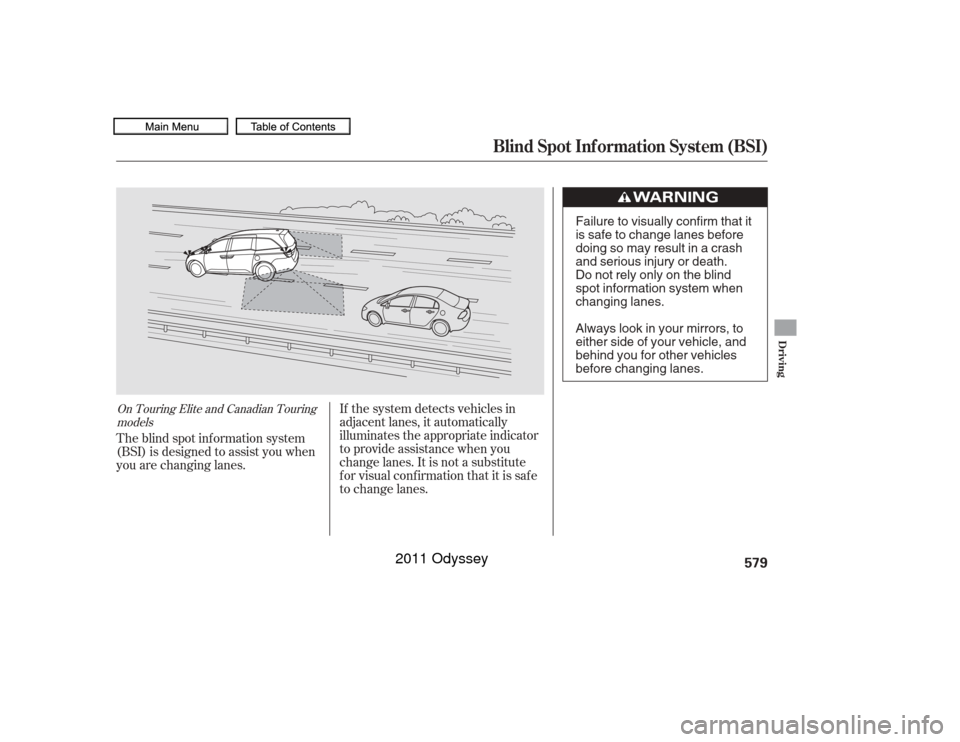
Climate Control System
REA R CONT ROL PA NEL
FRONT CONT ROL PA NEL
Features
225
RECIRCULATION BUTTON
ON/OFF BUTTON FAN CONTROL BUTTONS
MODE BUTTON
SYNC BUTTON REAR LOCK BUTTON AUTO BUTTON
WINDSHIELD DEFROSTER BUTTON
DRIVER’S SIDE
TEMPERATURE
CONTROL DIAL PASSENGER’S SIDE
TEMPERATURE
CONTROL DIAL
AIR CONDITIONING (A/C)
BUTTON
ON/OFF BUTTON
AUTO BUTTON
MODE BUTTON FAN CONTROL BUTTONS
REAR TEMPERATURE CONTROL BUTTONS
REAR PASSENGER COMPARTMENT
TEMPERATURE CONTROL BUTTONS
Except LX models
REAR WINDOW DEFOGGER/
HEATED MIRROR BUTTON
10/07/17 10:04:23 31TK8600_230
2011 Odyssey
Page 232 of 722
For your saf ety, make sure you have
a clear view through all the windows
bef ore driving.
This button turns the rear window
def ogger of f and on (see page ).
Pushing this button also turns the
power mirror heaters on and of f .
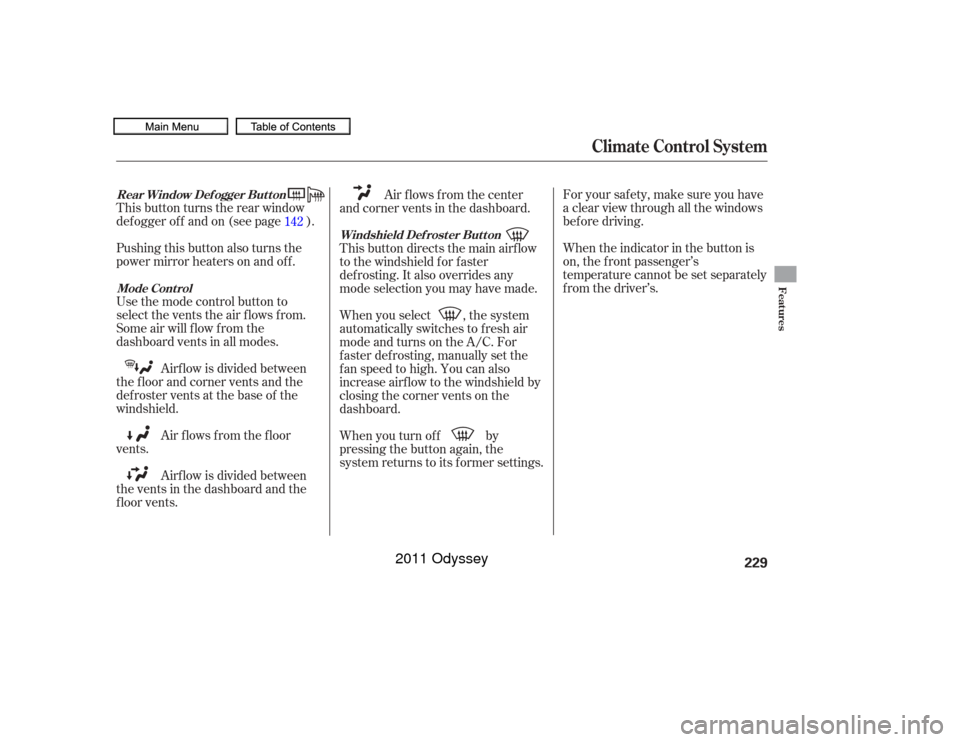
Use the mode control button to
select the vents the air flows from.
Some air will flow from the
dashboard vents in all modes. When the indicator in the button is
on, the f ront passenger’s
temperature cannot be set separately
f rom the driver’s.
Airf low is divided between
the f loor and corner vents and the
defroster vents at the base of the
windshield.
Air f lows f rom the f loor
vents.
Airf low is divided between
the vents in the dashboard and the
f loor vents. Air flows from the center
and corner vents in the dashboard.
This button directs the main airflow
to the windshield for faster
def rosting. It also overrides any
mode selection you may have made.
When you select , the system
automatically switches to f resh air
mode and turns on the A/C. For
f aster def rosting, manually set the
fanspeedtohigh.Youcanalso
increase airf low to the windshield by
closing the corner vents on the
dashboard.
When you turn of f by
pressing the button again, the
system returns to its former settings.
142
Rear Window Def ogger But t on
Mode Cont rol Windshield Def rost er But t on
Climate Control System
Features
229
10/07/17 10:05:04 31TK8600_234
2011 Odyssey
Page 561 of 722

Youshoulddothefollowingchecks
and adjustments bef ore you drive
your vehicle.Make sure all windows, mirrors,
and outside lights are clean and
unobstructed. Remove f rost, snow,
or ice.
Check that the hood is f ully closed.
Check that any items you may be
carrying are stored properly or
f astened down securely. Check the steering wheel
adjustment (see page ).
Make sure the doors and the
tailgate are securely closed and
locked.Fasten your seat belt. Check that
your passengers have f astened
their seat belts (see page ).
When you start the engine, check
the gauges and indicators in the
instrument panel, and the
messages on the inf ormation
display or multi-inf ormation
display (depending on models)
(seepages,,,and
).
Visually check the tires. If a tire
looks low, use a gauge to check its
pressure. Check the seat adjustment (see
pages and ).
Check the adjustment of the
inside and outside mirrors (see
pages and ).
3. 2.
1.
4. 5.
6.
7.
8. 9.
10. 15
176
175
198
197
63 64 77
90
143Preparing to Drive558
10/07/17 10:49:39 31TK8600_563
2011 Odyssey
Page 582 of 722
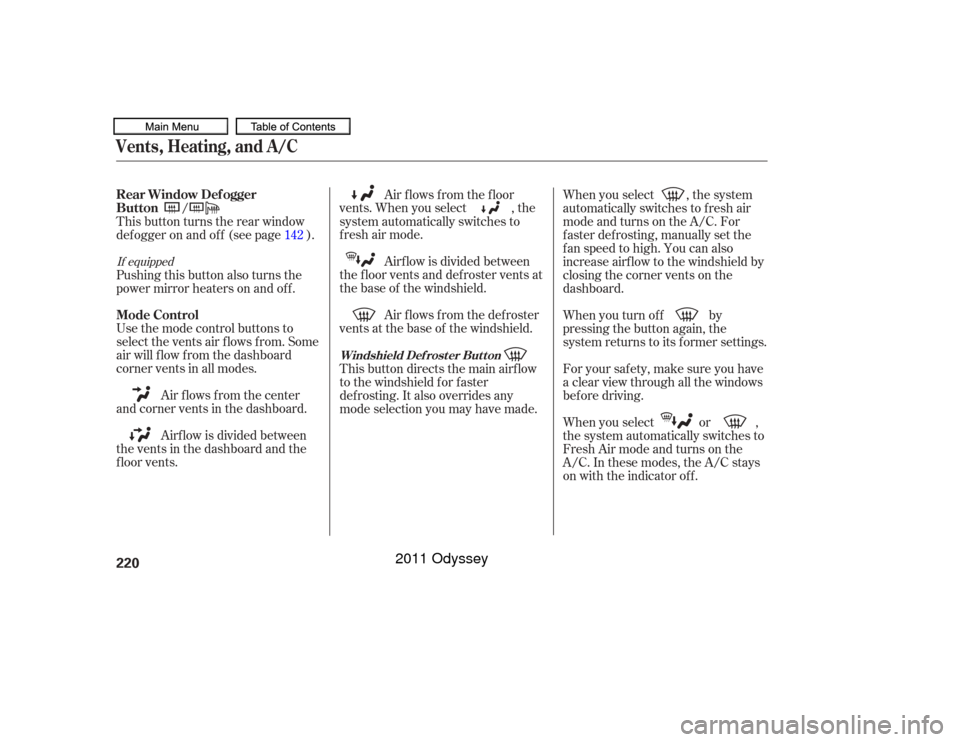
If the system detects vehicles in
adjacent lanes, it automatically
illuminates the appropriate indicator
to provide assistance when you
change lanes. It is not a substitute
for visual confirmation that it is safe
to change lanes.
The blind spot inf ormation system
(BSI) is designed to assist you when
you are changing lanes.
On Touring Elite and Canadian Touring
models
Blind Spot Inf ormation System (BSI)
Driving
579
Failure to visually confirm that it
is safe to change lanes before
doing so may result in a crash
and serious injury or death.
Do not rely only on the blind
spot information system when
changing lanes.
Always look in your mirrors, to
either side of your vehicle, and
behind you for other vehicles
before changing lanes.
10/07/17 10:52:11 31TK8600_584
2011 Odyssey
Page 583 of 722

A: Approximately 1.6 f t. (0.5 m)
B: Approximately 10 f t. (3 m)
C: Approximately 10 f t. (3 m)
BSI system is designed to detect
vehicles in specif ied alert zones
adjacent to your vehicle, particularly
in harder to see areas commonly
known as ‘‘blind spots.’’When BSI detects a vehicle in an
alert zone, a BSI alert indicator
comes on near the corresponding
outside rearview mirror.
While your vehicle is moving
f orward at a speed between 6 mph
(10 km/h) and 100 mph (160 km/h),
the BSI alert indicator comes on
under either of the f ollowing
conditions:
The system will not alert you to all
vehicles in blind spot zones (such as
vehicles you have just passed which
youshouldalreadybeawareof)
unless it remains in the alert zone f or
approximately 2 or more seconds.
While the system is on, BSI is active
whenever the shif t lever is in the D
or D4 position.
Another vehicle overtakes you,
entering the alert zone from
behind, at a speed that dif f ers
f rom your vehicle’s speed by no
more than 31 mph (50 km/h).
You pass a vehicle at a speed that
differs from that vehicle’s speed
by no more than 12 mph (20
km/h). The indicator comes on
approximately 2 seconds af ter the
vehicle enters the alert zone.Blind Spot Inf ormation System (BSI)BSI System Operation580A B
CALERT
ZONE
10/07/17 10:52:19 31TK8600_585
2011 Odyssey
Page 586 of 722

Like all assistance systems, BSI has
limitations. Over-reliance on BSI may
result in a collision. Always look in
your mirrors, to either side of your
vehicle, and behind you f or other
vehicles bef ore changing lanes.The system should be turned of f
when towing a trailer. Due to the
added mass and resulting changes in
radar coverage, the system cannot
operate as intended, and detection of
the trailer itself by the radar sensors
may cause the BSI alert indicators to
illuminate.
The speed dif f erence between
your vehicle and a vehicle
approaching f rom behind is
greaterthan31mph(50km/h).
A vehicle is parked in a side lane.
The speed dif f erence between
your vehicle and the vehicle you
are passing is greater than 6 mph
(10 km/h).
An object not detected by the
radar sensors approaches or
passes your vehicle.
The BSI alert indicators may not
illuminate under the f ollowing
circumstances:
CONT INUED
Blind Spot Inf ormation System (BSI)
Important Precautions
Limitations
Driving
583
10/07/17 10:52:37 31TK8600_588
2011 Odyssey
Page 587 of 722

BSI may be adversely af f ected under
the f ollowing circumstances:When objects such as guard rails,
poles, trees, etc., are detected.
When an object that doesn’t
reflect radio waves well, such as a
motorcycle, is in the alert zone.
A vehicle is behind or approaching
your vehicle while on a curved
road.
When towing a trailer.
A vehicle is moving f rom a f ar lane
to the adjacent lane.
The system picks up external
electrical interf erence.
The rear bumper has been
def ormed, or improperly repaired. The system is f or your convenience.
Even if an object is within the alert
zone, the system may not detect it,
depending on its shape.
Always look in your mirrors, to
either side of your vehicle, and
behind you f or other vehicles bef ore
changing lanes.
The orientation of the sensors has
been changed.
Bad weather conditions, such as
heavy rain, snow and f og.Blind Spot Inf ormation System (BSI)584
EXAMPLES
GUARD RAILPOLE OR TREE
MOTORCYCLE
: BSIAlertindicatorison BSIAlertindicatorisoff
:
10/07/19 14:54:53 31TK8600_589
2011 Odyssey