Page 483 of 722

Cruise control allows you to maintain
asetspeedabove25mph(40km/h)
without keeping your f oot on the
accelerator pedal. It should be used
f or cruising on straight, open
highways. It is not recommended f or
city driving, winding roads, slippery
roads, heavy rain, or bad weather.Accelerate to the desired cruising
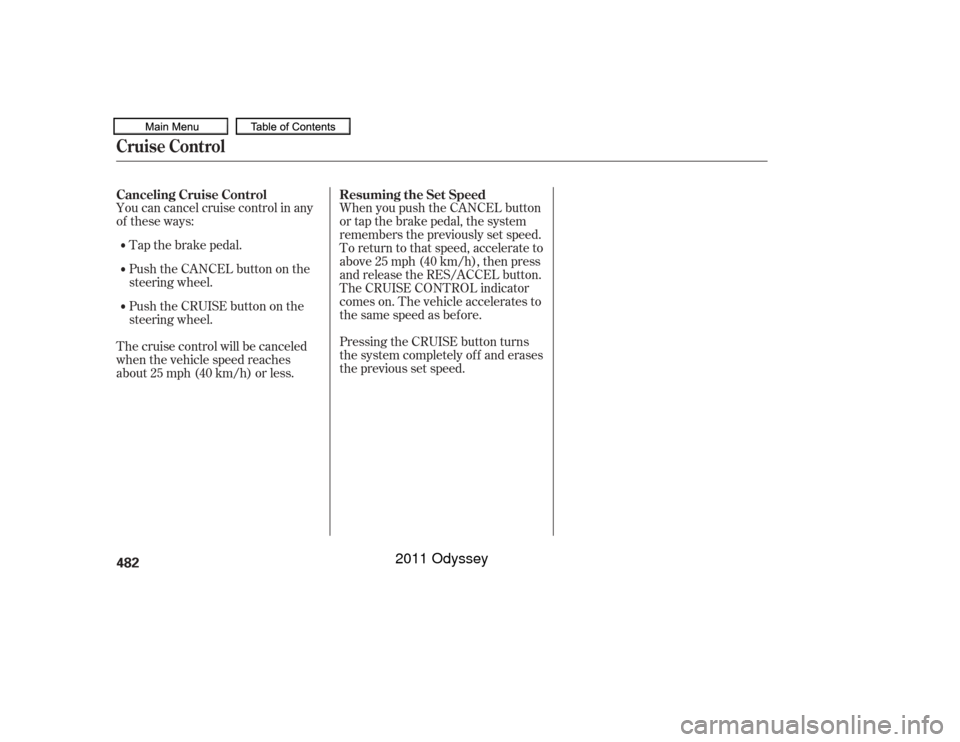
speedabove25mph(40km/h). Push the CRUISE button on the
steering wheel. The CRUISE
MAIN indicator on the instrument
panel comes on.Press and release the SET/
DECELbuttononthesteering
wheel. The CRUISE CONTROL
indicator on the instrument panel
comes on to show the system is
now activated.
Cruise control may not hold the set
speed when you are going up and
down hills. If your vehicle speed
increases going down a hill, use the
brakes to slow down. This will cancel
thecruisecontrol.Toresumetheset
speed, press the RES/ACCEL button.
The CRUISE CONTROL indicator
on the instrument panel will come
back on.
1.
2. 3.
Using Cruise ControlCruise Control480
CRUISE BUTTON RES/ACCEL
BUTTON
SET/DECEL
BUTTON
CANCEL BUTTON
Improper use of the cruise
control can lead to a crash.
Use the cruise control only
when traveling on open
highways in good weather.
10/07/17 10:38:46 31TK8600_485
2011 Odyssey
Page 484 of 722

Resting your f oot on the brake pedal
causes cruise control to cancel.
You can increase the set speed in
any of these ways:
Press and hold the RES/ACCEL
button. When you reach the
desired speed, release the button. You can decrease the set speed in
any of these ways:
Even with cruise control turned on,
you can still use the accelerator
pedal to speed up f or passing. Af ter
completing the pass, take your foot
of f the accelerator pedal. The vehicle
will return to the set speed.
Push on the accelerator pedal.
Accelerate to the desired cruising
speed, then press the SET/
DECEL button.
To increase the speed in very
small amounts, tap the RES/
ACCEL button. Each time you do
this, your vehicle will speed up
about 1 mph (1.6 km/h). Tap the brake pedal lightly with
your f oot. The CRUISE
CONTROL indicator on the
instrument panel will go out.
When the vehicle slows to the
desired speed, press the SET/
DECEL button. To slow down in very small
amounts, tap the SET/DECEL
button. Each time you do this,
your vehicle will slow down about
1 mph (1.6 km/h). Press and hold the SET/DECEL
button. Release the button when
you reach the desired speed. If you need to decrease your
speed quickly, use the brakes as you
normally would.
Changing the Set Speed
Cruise Control
Features
481
NOTE:
10/07/17 10:38:55 31TK8600_486
2011 Odyssey
Page 485 of 722
You can cancel cruise control in any
of these ways:Tap the brake pedal.
Push the CANCEL button on the
steering wheel.
Push the CRUISE button on the
steering wheel.
The cruise control will be canceled
when the vehicle speed reaches
about 25 mph (40 km/h) or less. When you push the CANCEL button
or tap the brake pedal, the system
remembers the previously set speed.
To return to that speed, accelerate to
above25mph(40km/h),thenpress
and release the RES/ACCEL button.
The CRUISE CONTROL indicator
comes on. The vehicle accelerates to
thesamespeedasbefore.
Pressing the CRUISE button turns
the system completely of f and erases
the previous set speed.
Canceling Cruise Control
Resuming the Set SpeedCruise Control482
10/07/17 10:39:02 31TK8600_487
2011 Odyssey
Page 486 of 722
�·�µ
If your garage door was
manuf actured bef ore April 1, 1982,
you may not be able to program
HomeLink to operate it. These units
do not have safety features that
cause the motor to stop and reverse
it if an obstacle is detected during
closing, increasing the risk of injury. Do not use HomeLink with any
garage door opener that lacks saf ety
stop and reverse f eatures.
Units manuf actured between April 1,
1982 and January 1, 1993 may be
equipped with saf ety stop and
reverse f eatures. If your unit does
not have an external entrapment
protection system, an easy test to
conf irm the f unction and
perf ormance of the saf ety stop and
reverse f eature is to lay a 2 4
under the closing door. The door
should stop and reverse upon
contacting the piece of wood.
As an additional safety feature,
garage door openers manuf actured
af ter January 1, 1993 are required to
have external entrapment protection
systems, such as an electronic eye,
which detect an object obstructing
the door.
Refer to the safety information thatcame with your garage door opener
to test that the safety features are
f unctioning properly. If you do not
have this information, contact the
manuf acturer of the equipment.
Bef ore programming HomeLink to a
garage door or gate opener, make
sure that people and objects are out
of thewayof thedevicetoprevent
potential injury or damage.
When programming a garage door
opener, park just outside the garage.
If you just
received your vehicle and have not
trained any of the buttons in
HomeLink bef ore, you should erase
any previously learned codes bef ore
training the first button. To do this,
press and hold the two outside
buttons on the HomeLink
transceiver for about 20 seconds,
until the red indicator f lashes.
Release the buttons, then proceed to
step 1.
The HomeLink
Universal
Transceiver built into your vehicle
canbeprogrammedtooperateupto
three remote controlled devices
around your home, such as garage
doors, lighting, or home security
systems.
Bef ore programming your
HomeLink to operate a garage door
opener, conf irm that the opener has
an external entrapment protection
system, such as an ‘‘electronic eye,’’
or other saf ety and reverse stop
f eatures.
On all models except LX
CONT INUED
Important Saf ety Precautions T raining HomeL ink
General Inf ormation
Bef ore you begin
HomeL ink
Universal Transceiver
Features
483
10/07/17 10:39:12 31TK8600_488
2011 Odyssey
Page 488 of 722
As required by the FCC:This device complies with Part 15 of theFCC rules. Operation is subject to thef ollowing two conditions: (1) This devicemay not cause harmf ul interf erence, and(2) this device must accept anyinterf erence received, includinginterf erence that may cause undesiredoperation.
Changes or modif ications not expresslyapproved by the party responsible f orcompliance could void the user’sauthority to operate the equipment.
This device complies with IndustryCanada Standard RSS-210.Operation is subject to the f ollowing twoconditions: (1) this device may not causeinterf erence, and (2) this device mustaccept any interf erence that may causeundesired operation of the device.
HomeLink
is a registered
trademark of Johnson Controls, Inc.
HomeL ink
Universal Transceiver
Features
485
10/07/17 10:39:29 31TK8600_490
2011 Odyssey
Page 499 of 722
�µ�µ
�µ
�µ To change the volume level of
HFL, use the audio system volume
knob or the steering wheel volume
controls. Try to reduce all background
noise. If the microphone picks up
voices other than yours,
commands may be misinterpreted.
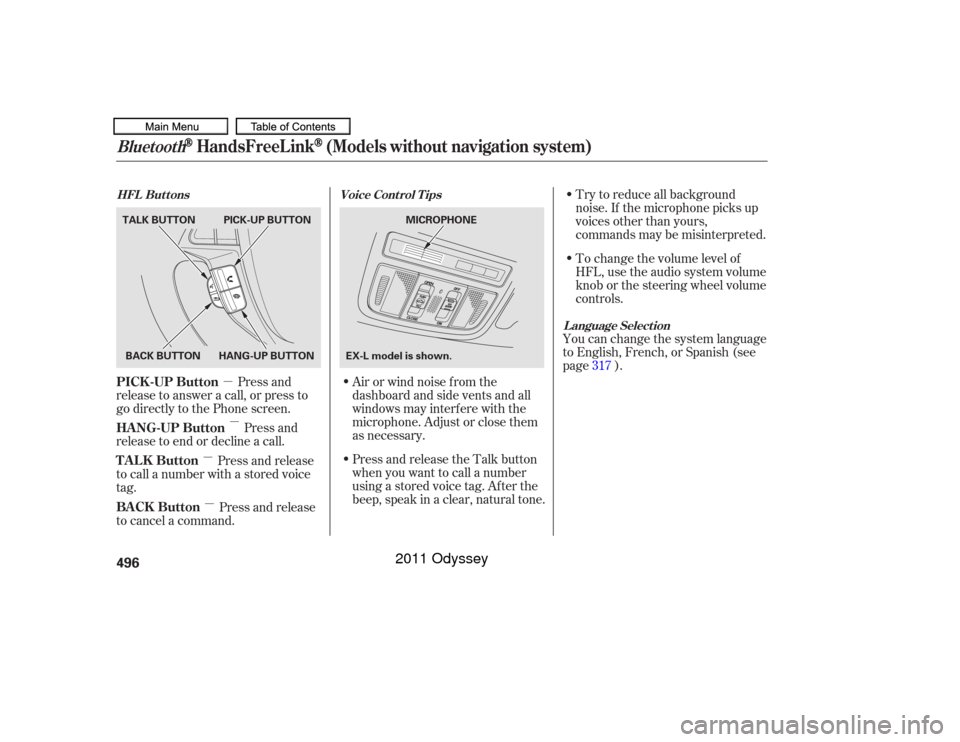
Press and
release to answer a call, or press to
go directly to the Phone screen.
Press and
release to end or decline a call. Airorwindnoisefromthe
dashboard and side vents and all
windows may interfere with the
microphone. Adjust or close them
as necessary.You can change the system language
to English, French, or Spanish (see
page ).
Press and release
to call a number with a stored voice
tag.
Press and release
to cancel a command. Press and release the Talk button
when you want to call a number
using a stored voice tag. Af ter the
beep, speak in a clear, natural tone. 317
Voice Cont rol T ips
HFL Buttons
L anguage Select ion
Bluetooth
HandsFreeL ink
(Models without navigation system)
PICK -UP Button
HANG-UP Button
TALK Button
BACK Button496BACK BUTTON
TALK BUTTON PICK-UP BUTTON
HANG-UP BUTTON MICROPHONE
EX-L model is shown.
10/07/17 10:40:57 31TK8600_501
2011 Odyssey
Page 519 of 722
Bluetoothhandsf reelink.honda.
com
www.handsfreelink.ca,
HandsFreeLink
(HFL)
allows you to place and receive
phone calls using either the
navigation system controls or voice
commands without the distraction of
handling your cell phone.
To use HFL, you need a Bluetooth-
compatible cell phone. For a list of
compatible phones, pairing
procedures, and special f eature
capabilities:
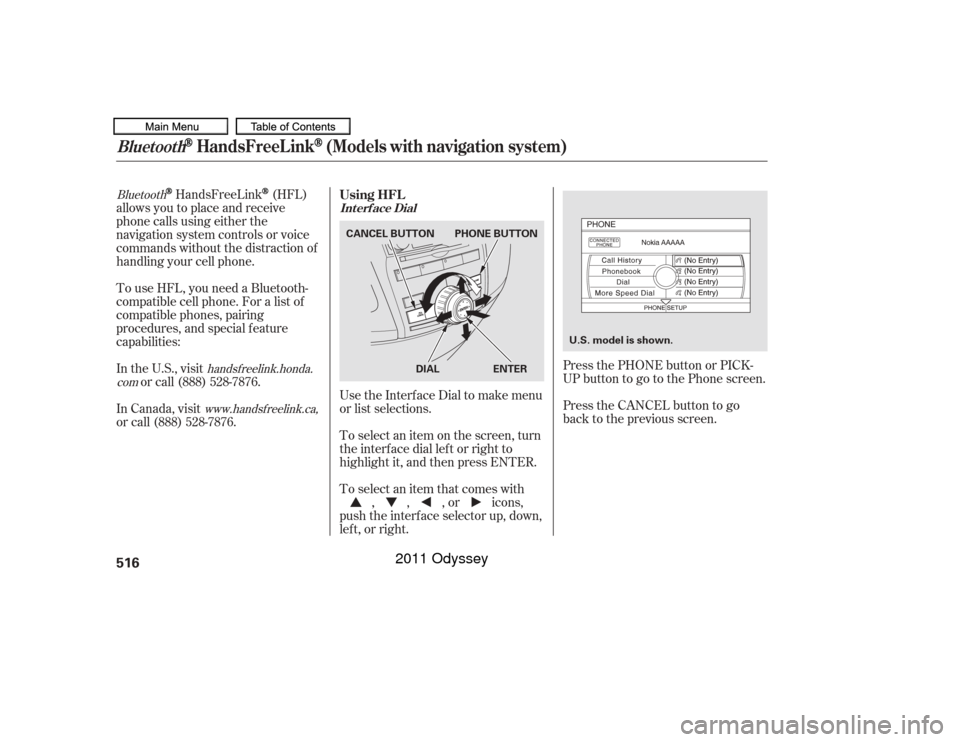
UsetheInterfaceDialtomakemenu
or list selections.
To select an item on the screen, turn
the interf ace dial lef t or right to
highlight it, and then press ENTER.
To select an item that comes with, , , or icons,
push the interf ace selector up, down,
lef t, or right. Press the CANCEL button to go
back to the previous screen.
In the U.S., visit
or call (888) 528-7876. Press the PHONE button or PICK-
UPbuttontogotothePhonescreen.
In Canada, visit
or call (888) 528-7876. Using HFL
Int erf ace Dial
Bluetooth
HandsFreeL ink
(Models with navigation system)
516
U.S. model is shown.
PHONE BUTTON
CANCEL BUTTON
DIAL ENTER
10/07/17 10:43:48 31TK8600_521
2011 Odyssey
Page 520 of 722
�µ�µ
�µ �µ To change the volume level of
HFL, use the audio system volume
knob or the steering wheel volume
controls. Try to reduce all background
noise. If the microphone picks up
voices other than yours,
commands may be misinterpreted.
For help at any time, including a list
of available options, say ‘‘Help.’’
Refer to the navigation system
manual f or how to change the
system’s language between English,
French, and Spanish.
Press and release the Talk button
each time you want to make a
command. Af ter the beep, speak in
a clear, natural tone.
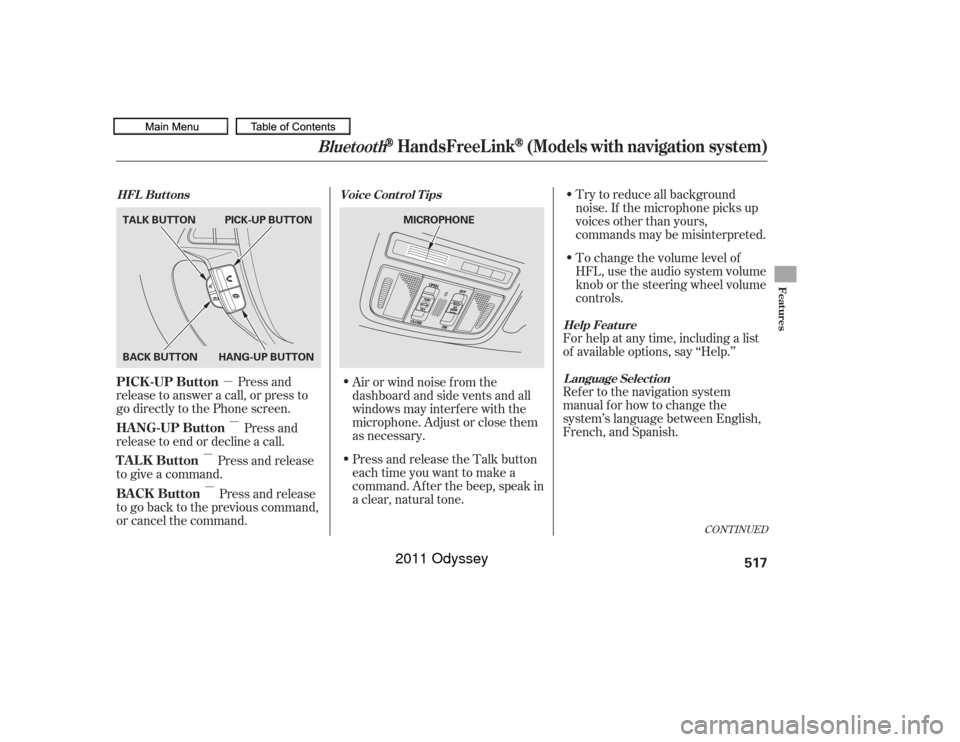
Press and
release to answer a call, or press to
go directly to the Phone screen.
Press and
release to end or decline a call.
Press and release
to give a command.
Press and release
to go back to the previous command,
or cancel the command. Airorwindnoisefromthe
dashboard and side vents and all
windows may interfere with the
microphone. Adjust or close them
as necessary.
CONT INUED
Help Feature
L anguage Select ion
Voice Cont rol T ips
HFL Buttons
PICK -UP Button
HANG-UP Button
TALK Button
BACK Button
Bluetooth
HandsFreeL ink
(Models with navigation system)
Features
517
MICROPHONE
TALK BUTTON
BACK BUTTON
HANG-UP BUTTONPICK-UP BUTTON
10/07/17 10:44:00 31TK8600_522
2011 Odyssey