Page 228 of 434

�µ�µ
�Û �Ý
Use the SKIP bar while a USB f lash
memory device is playing to select
passages and change f iles.
Each time you press and
releasethe sideof theSKIPbar,
the system skips forward to the
beginning of the next f ile. Press and
releasethe sideof thebarto
skip backward to the beginning of
the current f ile. Press it again to skip
to the beginning of the previous file.
To move rapidly within a f ile, press
andholdeitherside( or )
of the SKIP bar. You can also change files with the
interf ace dial. Press the AUDIO
button to show the audio control
display on the navigation screen.
Push the selector knob to the right
side to skip to the beginning of the
next f ile, and to the lef t side to skip
to the beginning of the current f ile.
Pushing it to the lef t again skips to
the beginning of the previous f ile. To select a
dif f erent f older, press and release
either side of the CATEGORY bar.
Press the side to skip to the next
f older, and press the side to skip
to the beginning of the previous
f older.
CONT INUED
Playing a USB Flash Memory Device (Models with navigation system)
T o Change or Select Files
SK IP Folder Selection
Features
225
SKIP DIRECTION SKIP DIRECTION
10/08/27 14:43:40 31TP6610_230
2011 Accord Crosstour
Page 239 of 434

�Û�Ý�´
�µ �´�µ
The VOL button adjusts the volume
up ( ) or down ( ). Press the top
or bottom of the button, hold it until
the desired volume is reached, then
release it.
Three controls f or the audio system
are mounted in the steering wheel
hub. These let you control basic
f unctions without removing your
hand f rom the wheel. If you are listening to the radio, use
the CH button to change stations.
Each time you press the top ( ) of
the button, the system goes to the
next preset station on the band you
are listening to. Press the bottom
( ) to go back to the previous
preset station. If you press and hold
the CH button ( ) or ( ), the
system goes into the skip (seek)
mode. It stops when it f inds a station
with a strong signal.
The MODE button changes the
mode.
Pressing the MODE button
repeatedly cycles through all
possible media sources whether they
are present or not.
Pressing the MODE button
repeatedly cycles through all present,
connected media sources. Media
sources that are not present or
connected will not appear when
cycling with the MODE button.
On vehicles without navigation system
On vehicles with navigation system
Remote Audio Controls
236
MODE BUTTON
VOL BUTTON CH BUTTON
10/08/27 14:45:09 31TP6610_241
2011 Accord Crosstour
Page 243 of 434

To set the time, press the CLOCK
button until you hear a beep. The
displayed time begins to blink.
Change the hours by pressing the H
(hour) button until the numbers
advance to the desired time. Change
the minutes by pressing the M
(minute) button until the numbers
advance to the desired time.
Press the CLOCK button again to
enter the set time.
You can quickly set the time to the
nearest hour. If the displayed time is
bef ore the half hour, press and hold
the CLOCK button, then press the R
(reset) button to set the time back to
the previous hour. If the displayed
time is af ter the half hour, the same
procedure sets the time f orward to
the beginning of the next hour.The navigation system receives
signals f rom the global positioning
system (GPS), and the displayed
time is updated automatically by the
GPS. Ref er to the navigation system
manual f or how to adjust the time.
1:06 would RESET to 1:00.
1:52 would RESET to 2:00.
For example:
On models with navigation system
On models without navigation system
Setting the Clock
240
On models without navigation system
CLOCK BUTTON
U.S. model is shown. R (RESET)
BUTTON
H (HOUR) BUTTON M (MINUTE) BUTTON
10/08/27 14:45:35 31TP6610_245
2011 Accord Crosstour
Page 245 of 434
To set the time, turn the selector
knob and select the hours or the
minutes, then press the knob to
enter your selection. The display
changes to the setting display.
Turn the selector knob to count
the numbers up or down.
Press the selector knob (ENTER)
to enter your selection. The
display will return to the clock
adjusting display.While setting the clock, pressing
the RETURN button will go back
to the previous display.
Pressing the MENU button again
will cancel this setting mode.
Turn the selector knob to change
the setting between 12H and 24H.
Press the selector knob (ENTER)
to enter your selection. The
display will return to the clock
adjusting display. To enter the clock setting, turn
the selector knob to select ‘‘SET,’’
then press the knob. The display
will return to the menu item
display.
Press either the RETURN or
MENUbuttontogobacktothe
normal display.
5.
6.
7.
8.
9.10.
11.
Setting the Clock
242
MINUTE SETTING
10/08/27 14:45:56 31TP6610_247
2011 Accord Crosstour
Page 260 of 434
�Ì�Ì�Ì�Ì
Try to reduce all background
noise. If the microphone picks up
voices other than yours,
commands may be misinterpreted. Many commands can be spoken
together. For example, you can
say ‘‘Call 123-456- ’’ or
‘‘Dial Peter.’’
Press and release the HFL Talk
button each time you want to
make a command. Af ter the beep,
speak in a clear, natural tone.
When HFL is in use, navigation
voice commands cannot be
recognized.
To change the volume level of
HFL, use the audio system volume
knob or the steering wheel volume
controls.
Airorwindnoisefromthe
dashboard and side vents and all
windows may interfere with the
microphone. Adjust or close them
as necessary.
CONT INUED
Voice Cont rol T ips
BluetoothHandsFreeL ink
Features
257
MICROPHONE
10/08/27 14:47:48 31TP6610_262
2011 Accord Crosstour
Page 264 of 434

�Î
�Î
CONT INUED
BluetoothHandsFreeL ink
Features
261
‘‘Change Language’’‘‘Hands Free Help’’
‘‘System
Set up’’
‘‘Tutorial’’ ‘‘Clear’’
‘‘Auto Transfer’’ ‘‘Call Notification’’ ‘‘Security’’
‘‘Change Passcode’’
Press HFL
Talk button
Press and release the HFL Talk button each time you give a command.
: Canadian models (See page
277)
Apply a security passcode to the system that must be input at each key
cycle to access the system
(See page278)
Change your security passcode
(See page 278)
Set how you would like to be notified of an incoming call
(See page279)
Change language from English to French
(See page258)
Hear a tutorial for general rules on using the system
Hear a list of available commands and additional information describing each command
(See page
258) (See page
279)
Clear the system of all paired phones, phonebook entries and security
passcode (See page
278)
Set calls to automatically transfer from your phone to HFL when you
enter the vehicle
10/08/27 14:48:20 31TP6610_266
2011 Accord Crosstour
Page 267 of 434
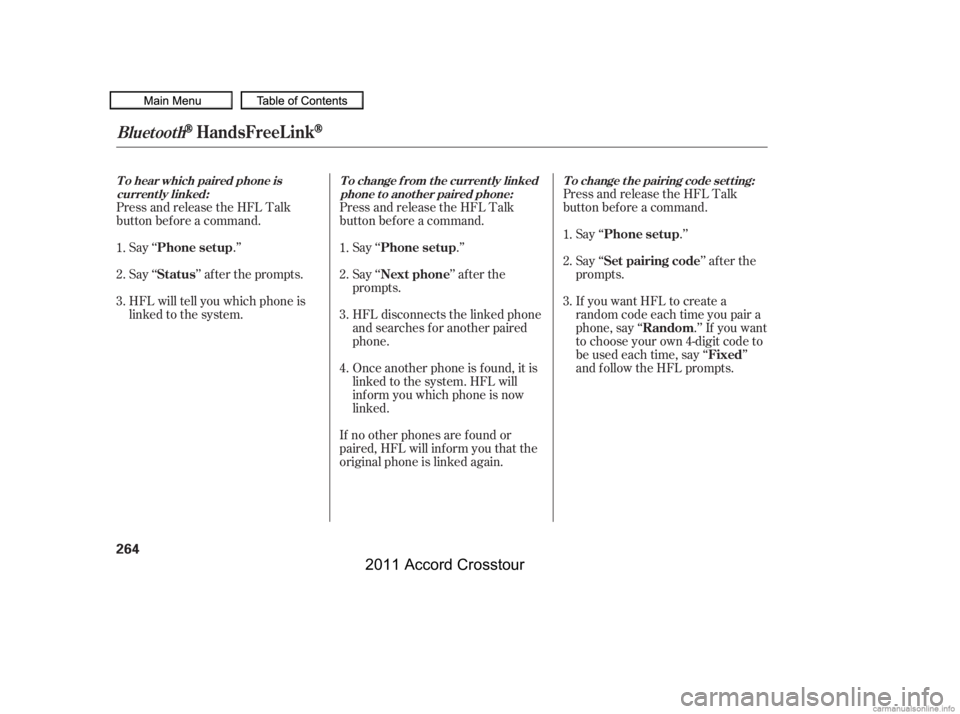
Press and release the HFL Talk
button bef ore a command.Say ‘‘ .’’
Say‘‘ ’’aftertheprompts.
HFL will tell you which phone is
linked to the system. Press and release the HFL Talk
button bef ore a command.
Say ‘‘ .’’ Say ‘‘
.’’
Press and release the HFL Talk
button bef ore a command.
Say ‘‘ ’’ af ter the
prompts.
HFL disconnects the linked phone
and searches for another paired
phone.
Once another phone is f ound, it is
linked to the system. HFL will
inf orm you which phone is now
linked.
If no other phones are f ound or
paired, HFL will inf orm you that the
original phone is linked again. Say ‘‘
’’ af ter the
prompts.
If you want HFL to create a
random code each time you pair a
phone, say ‘‘ .’’ If you want
to choose your own 4-digit code to
be used each time, say ‘‘ ’’
and f ollow the HFL prompts.
1.
2.
3.
1.
2.
3.1.
2.
3.
4.
BluetoothHandsFreeL ink
T o hear which paired phone is current ly linked: To change f rom the currently linked
phone t o anot her paired phone: T o change t he pairing code set t ing:
Phone setup
StatusPhone setup
Phone setup
Next phone Set pairing code
Random Fixed
264
10/08/27 14:48:55 31TP6610_269
2011 Accord Crosstour
Page 280 of 434
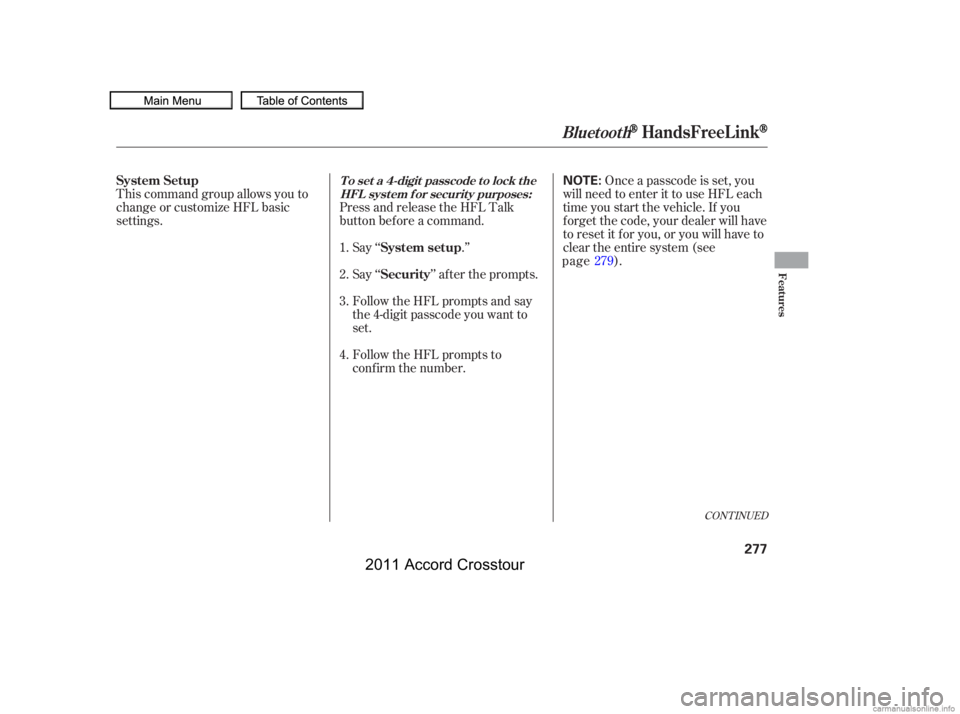
This command group allows you to
change or customize HFL basic
settings.Press and release the HFL Talk
button bef ore a command.
Say ‘‘ .’’ Once a passcode is set, you
will need to enter it to use HFL each
time you start the vehicle. If you
f orget the code, your dealer will have
toresetitforyou,oryouwillhaveto
clear the entire system (see ).
Follow the HFL prompts and say
the 4-digit passcode you want to
set. Say‘‘ ’’aftertheprompts.
Follow the HFL prompts to
conf irm the number.
1.
2.
3.
4.
CONT INUED
System Setup
System setup
SecurityT o set a 4-digit passcode t o lock t heHFL system f or security purposes:
BluetoothHandsFreeL ink
Features
277
NOTE:
10/08/27 14:51:06 31TP6610_282
page 279
2011 Accord Crosstour