Page 245 of 445

�µ�Î
�Î
This feature
plays all available albums f rom the
selected items in the iPod menu list
(playlists, artists, albums or songs)
in random order. The f iles in each
album are played in the recorded
order. To activate the album random
f eature, press and hold the RDM
button (Preset 2 button). You will
see ‘‘ALBUM RANDOM’’ in the
display. To turn it of f , press and hold
the RDM button (Preset 2 button).
You can also select another list from
theiPodmenuwhilekeepingthe
random f unction.
Available operating f unctions vary on
models or versions. Some f unctions
may not be available on the vehicle’s
audio system. To play the radio, press the AM/FM
button or touch the FM1, FM2, AM,
XM1, or XM2 icon. Touch the CD
icon to switch to the disc mode (if a
disc is loaded). Each time you press
the CD/XM button, the audio mode
switches between iPod, disc and XM
Radio.
If a PC card is in the audio unit,
touch the CARD icon to play the PC
card.
TouchtheUSBicontoswitchback
to the iPod.
You can disconnect the iPod at any
time when you see the ‘‘OK to
disconnect’’ message in the iPod
display. Always make sure you see‘‘OK to disconnect’’ message in the
iPod display bef ore you disconnect it.
Make sure to f ollow the iPod’s
instructions on how to disconnect
the dock connector f rom the USB
adapter cable.
You can also press the MODE
buttononthesteeringwheelto
change modes. If you see an error message in the
screen, see page .
If you reconnect the same iPod, the
system may begin playing where it
lef t of f , depending on what mode the
iPod is in when it is reconnected.
When you disconnect the iPod while
it is playing, the navigation screen
shows ‘‘NO DATA.’’ The displayed message may
vary on models or versions. On
some models, there is no
message to disconnect.
:
241
ALBUM RANDOM To Stop Playing Your iPod
iPod
Error Messages
Playing an iPod(EX-L model with navigation system)
Disconnect ing an iPod
240
NOTE:
Main MenuTable of Contents
Page 253 of 445

�µ�µ If you see an error message in the
screen, see page .
You can disconnect the USB f lash
memory device at any time even if
the USB mode is selected on the
audio system. Always f ollow the USB
f lash memory device’s instructions
when you remove it.
When you disconnect the USB f lash
memory device while it is playing,
the navigation screen shows ‘‘NO
DATA.’’
If you reconnect the same USB f lash
memory device, the system will
begin playing where it lef t of f .
You can also press the MODE
buttononthesteeringwheelto
change modes.
TouchtheUSBicontoswitchback
to the USB f lash memory device.
If a PC card is in the audio unit,
touch the CARD icon to play the PC
card.
To play the radio, press the AM/FM
button or touch the FM1, FM2, AM,
XM1, or XM2 icon. Touch the CD
icon to switch to the disc mode (if a
disc is loaded). Each time you press
the CD/XM button, the audio mode
switches between the USB, disc and
XM Radio.
This feature
samples all f iles in the selected
f older in the order they are stored.
To activate the scan feature, press
the SCAN button. You will see
‘‘TRACK SCAN’’ in the display. You
will also see the f ile number blinking.
You will get a 10 second sampling of
each f ile in the f older. Press the
SCAN button to get out of the scan
mode. The system plays the last f ile
sampled.
This feature
samples the f irst f ile in each f older in
the order they are stored. To
activate the folder scan feature,
press and hold the SCAN button.
You will see ‘‘FOLDER SCAN’’ in the
display. You will also see the f older
number blinking. You will get a 10
second sampling of the f irst f ile in
each folder. Press the SCAN button
to get out of the scan mode. The
system plays the last f ile sampled. 249
Playing a USB Flash Memory Device (EX-L model with navigat ion system)
USB Flash Memory Device Error
Messages
To Stop Playing a USB Flash
Memory Device
TRACK SCAN
FOLDER SCAN
Disconnect ing a USB Flash Memory
Device
248
Main MenuTable of Contents
Page 260 of 445

�Û�Ý�´
�µ �´�µ
Three controls f or the audio system
are mounted in the steering wheel
hub. These let you control basic
f unctions without removing your
hand f rom the wheel. The VOL button adjusts the volume
up ( ) or down ( ). Press the top
or bottom of the button and hold it
until the desired volume is reached,
then release it.
The MODE button changes the
mode.
Pressing the MODE button
repeatedly cycles through all
possible media sources whether they
are present or not.
Pressing the MODE button
repeatedly cycles through all present,
connected media sources. Media
sources that are not present or
connected will not appear when
cycling with the MODE button.If you are listening to the radio, use
the CH button to change stations.
Each time you press the top ( ) of
the button, the system goes to the
next preset station on the band you
are listening to. Press the bottom
( ) to go back to the previous
station.If youpressandholdtheCH
button ( ) or ( ), the system goes
into the seek mode. It finds a station
with a strong signal.
If equipped
On models with navigation system
On models without navigation system
CONT INUED
Remote Audio Controls
Features
255
CH BUTTON
MODE BUTTON
VOL BUTTON
Main MenuTable of Contents
Page 271 of 445
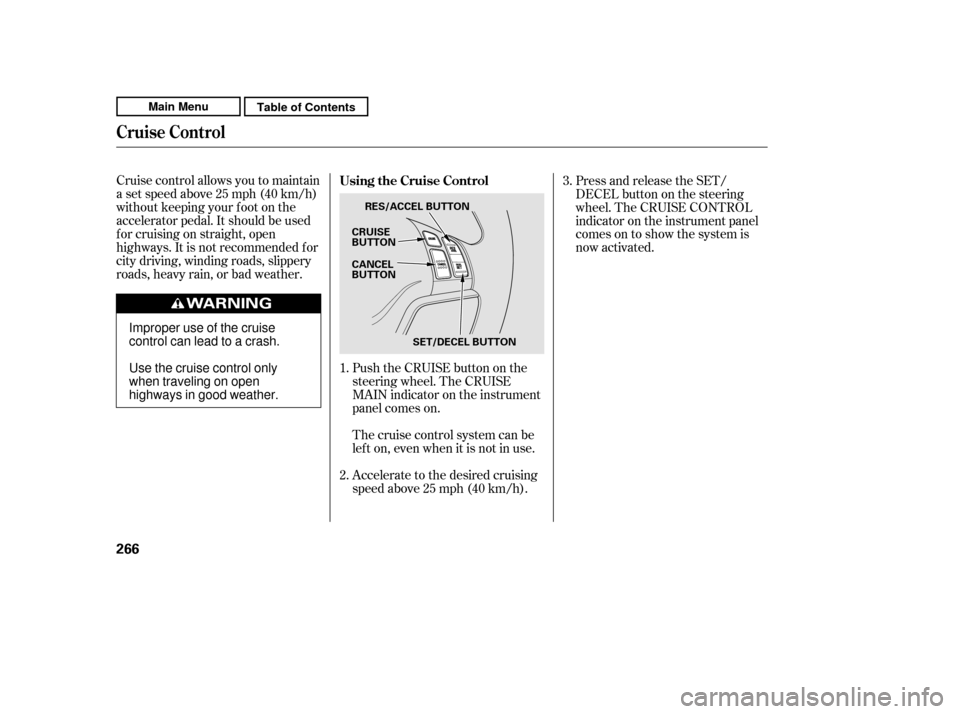
Cruise control allows you to maintain
asetspeedabove25mph(40km/h)
without keeping your f oot on the
accelerator pedal. It should be used
f or cruising on straight, open
highways. It is not recommended f or
city driving, winding roads, slippery
roads, heavy rain, or bad weather.Push the CRUISE button on the
steering wheel. The CRUISE
MAIN indicator on the instrument
panel comes on.Press and release the SET/
DECELbuttononthesteering
wheel. The CRUISE CONTROL
indicator on the instrument panel
comes on to show the system is
now activated.
Thecruisecontrolsystemcanbe
lefton,evenwhenitisnotinuse.
Accelerate to the desired cruising
speedabove25mph(40km/h).
1. 2. 3.
Using the Cruise Control
Cruise Control
266
CRUISE
BUTTON RES/ACCEL BUTTON
CANCEL
BUTTON
SET/DECEL BUTTON
Improper use of the cruise
control can lead to a crash.
Use the cruise control only
when traveling on open
highways in good weather.
Main MenuTable of Contents
Page 273 of 445
Even with the cruise control turned
on, you can still use the accelerator
pedal to speed up f or passing. Af ter
completing the pass, take your foot
of f the accelerator pedal. The vehicle
will return to the set cruising speed.You can cancel cruise control in any
of these ways:
Push the CANCEL button on the
steering wheel.
Resting your f oot on the brake pedal
causes cruise control to cancel. Tap the brake pedal.
Push the CRUISE button on the
steering wheel.
Pressing the CRUISE button turns
the system off and erases the
previous cruising speed.
When you push the CANCEL button,
or tap the brake pedal, the system
remembers the previously set speed.
To return to that speed, accelerate to
above25mph(40km/h),andthen
press and release the RES/ACCEL
button. The CRUISE CONTROL
indicator comes on. The vehicle
accelerates to the same speed as
bef ore.
Resuming the Set Speed
Canceling Cruise Control
Cruise Control
268
Main MenuTable of Contents
Page 275 of 445
�Ì�Ì�Ì�Ì
Try to reduce all background
noise. If the microphone picks up
voices other than yours,
commands may be misinterpreted.
Press and release the HFL Talk
button each time you want to
make a command. Af ter the beep,
speak in a clear, natural tone.
Airorwindnoisefromthe
dashboard and side vents and all
windows may interfere with the
microphone. Adjust or close them
as necessary. Many commands can be spoken
together. For example, you can
say ‘‘Call 123-456- ’’ or
‘‘Dial Peter.’’
When HFL is in use, navigation
voice commands cannot be
recognized.
To change the volume level of
HFL, use the audio system volume
knob or the steering wheel volume
controls.For help at any time, including a
list of available commands, say
‘‘Hands f ree help.’’
To hear general HFL inf ormation,
including help on using HFL
buttons, Voice control, or making
a call, say ‘‘Tutorial.’’
BluetoothHandsFreeL ink
Voice Cont rol T ips
Help Feat ures
270
MICROPHONE
Main MenuTable of Contents
Page 308 of 445

Raising your vehicle with a
non-Honda suspension kit can
af f ect the handling, stability, and
reliability.
Removing parts f rom your vehicle,
or replacing components, with
non-Honda components could
seriously af f ect your vehicle’s
handling, stability, and reliability.
Herearesomeexamples:
Lowering the vehicle with a non-
Honda suspension kit that
signif icantly reduces ground
clearance can allow the
undercarriage to hit speed bumps
or other raised objects, which
could cause the airbags to deploy. Non-Honda wheels, because they
are a universal design, can cause
excessive stress on suspension
components, and are not
compatible with the tire pressure
monitoring system (TPMS).
Larger or smaller wheels and tires
can interf ere with the operation of
your vehicle’s anti-lock brakes and
other systems.
Modif ying your steering wheel or
any other part of your vehicle’s
safety features can make the
systems inef f ective.
If you plan to modif y your vehicle,
consult your dealer.
A ccessories and Modif icat ions
Modif ying Your Vehicle
Bef ore Driving
303
Main MenuTable of Contents
Page 317 of 445

Because your vehicle rides higher
of f the ground, it has a high center
of gravity that can cause it to roll
over if you make abrupt turns. Utility
vehicles have a signif icantly higher
roll over rate than other types of
vehicles.
To prevent rollovers or loss of
control:Take corners at slower speeds
than you would with a passenger
vehicle.
Avoid sharp turns and abrupt
maneuvers whenever possible. Do not carry heavy cargo on the
roof .
Do not modif y your vehicle in any
way that would raise the center of
gravity.
You still need to exercise the same
care when accelerating, steering, and
brakingthatyouwouldinatwo-
wheel drive vehicle.
Your vehicle has higher ground
clearance that allows you to travel
over bumps, obstacles, and rough
terrain. It also provides good
visibility so you can anticipate
problems earlier.
Your vehicle is equipped with a f our-
wheel drive (4WD) system. When
the system senses a loss of front-
wheel traction, it automatically
transf ers some power to the rear
wheels. This gives you better
traction and mobility.
Four-wheel drive models
See page f or of f -highway drivingguidelines. 336
Driving Guidelines
312
Main MenuTable of Contents