Page 8 of 388
�Î�Î
�Î
�Î �Î
�Î
�Î
�Î
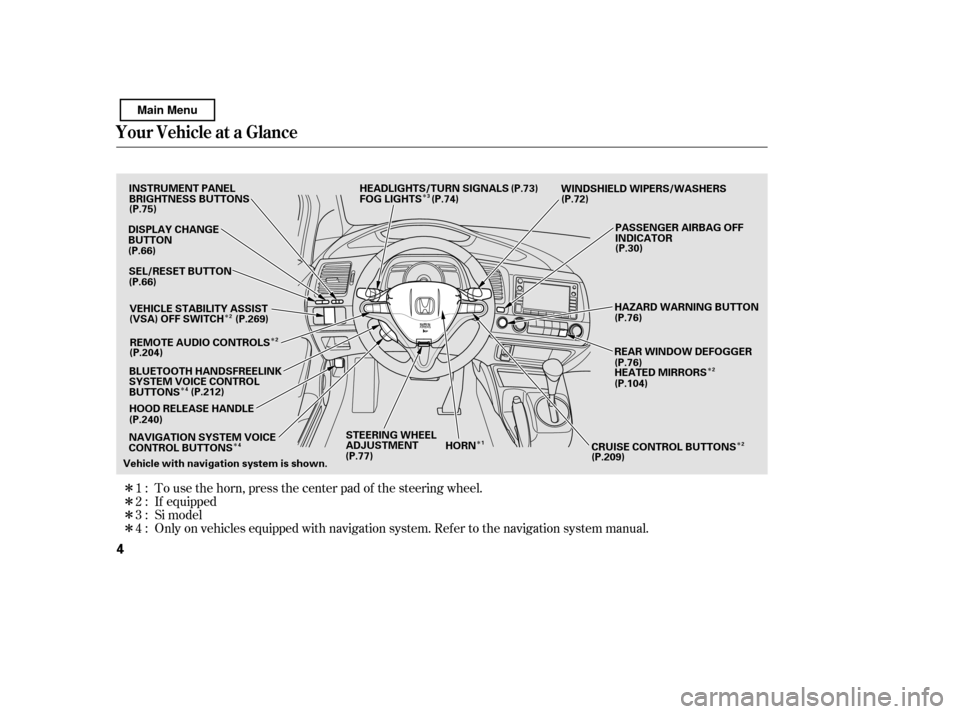
�Π���ΠOnly on vehicles equipped with navigation system. Ref er to the navigati on system manual.
To use the horn, press the center pad of the steering wheel.
If equipped
1:2:3:4: Si model
Your Vehicle at a Glance
4
STEERING WHEEL
ADJUSTMENT WINDSHIELD WIPERS/WASHERS
Vehicle with navigation system is shown. HORN
CRUISE CONTROL BUTTONSPASSENGER AIRBAG OFF
INDICATOR
HAZARD WARNING BUTTON
REAR WINDOW DEFOGGER
HEATED MIRRORS
INSTRUMENT PANEL
BRIGHTNESS BUTTONS
DISPLAY CHANGE
BUTTON
HOOD RELEASE HANDLE
SEL/RESET BUTTON
(P.75)
(P.66) (P.66)
(P.77) (P.76)
(P.76) (P.30)
(P.72)
REMOTE AUDIO CONTROLS HEADLIGHTS/TURN SIGNALS
(P.73)
FOG LIGHTS (P.74)
NAVIGATION SYSTEM VOICE
CONTROL BUTTONS VEHICLE STABILITY ASSIST
(VSA) OFF SWITCH
(P.269)
(P.204)
(P.212)
BLUETOOTH HANDSFREELINK
SYSTEM VOICE CONTROL
BUTTONS
(P.240)
(P.209)(P.104)
1 2
2
2 3
4
2
4
Main Menu
Page 75 of 388
�Î�Î
�Î
�Î �Î
�Î
�Î
�Î
�Î �Î�Î�Î
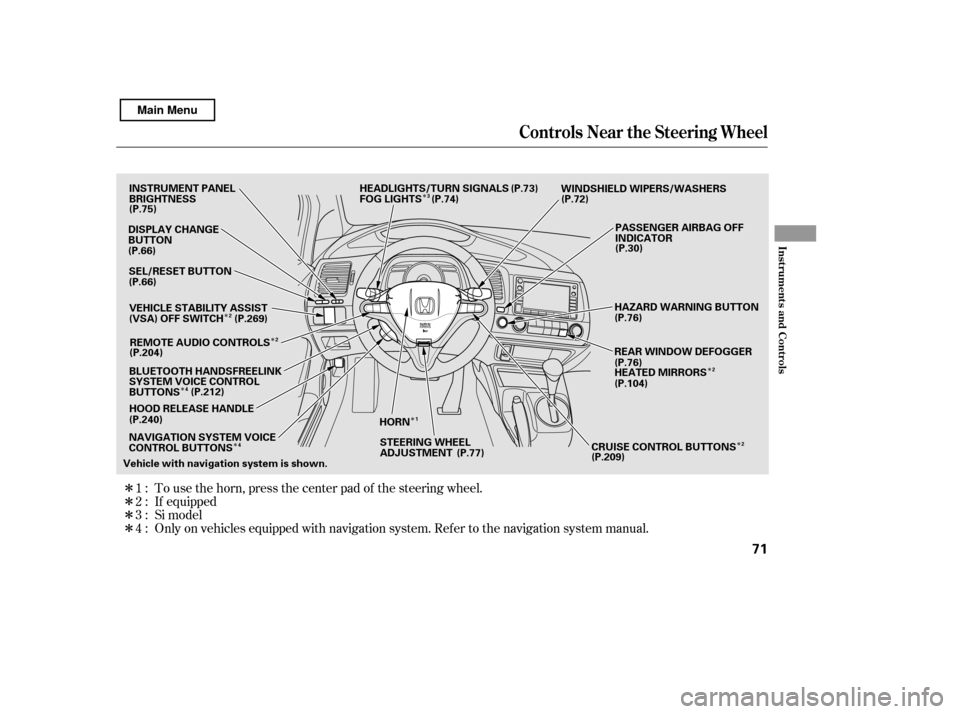
Only on vehicles equipped with navigation system. Ref er to the navigati on system manual.
To use the horn, press the center pad of the steering wheel.
If equipped
1:2:3:4: Si model
Controls Near the Steering Wheel
Inst rument s and Cont rols
71
STEERING WHEEL
ADJUSTMENT WINDSHIELD WIPERS/WASHERS
Vehicle with navigation system is shown. HORN
CRUISE CONTROL BUTTONSPASSENGER AIRBAG OFF
INDICATOR
HAZARD WARNING BUTTON
REAR WINDOW DEFOGGER
HEATED MIRRORS
DISPLAY CHANGE
BUTTON
HOOD RELEASE HANDLE
SEL/RESET BUTTON
(P.75)
(P.66) (P.66)
(P.76)
(P.76) (P.30)
(P.72)
REMOTE AUDIO CONTROLS HEADLIGHTS/TURN SIGNALS
(P.73)
FOG LIGHTS (P.74)
INSTRUMENT PANEL
BRIGHTNESS
(P.77)
VEHICLE STABILITY ASSIST
(VSA) OFF SWITCH
NAVIGATION SYSTEM VOICE
CONTROL BUTTONS (P.269)
(P.204)
BLUETOOTH HANDSFREELINK
SYSTEM VOICE CONTROL
BUTTONS (P.212)
(P.240)
(P.209)(P.104)
1 2
2
2 3
2
4
4
Main Menu
Page 113 of 388

�Î
�Î
The heating and air conditioning
systems in your vehicle provide a
comf ortable driving environment in
all weather conditions.
The security system helps to dis-
courage vandalism and thef t of your
vehicle.
Your vehicle has an anti-theft audio
system that requires a code number
to enable it.
The standard audio system has
many f eatures. This section
describes those f eatures and how to
use them. (If you have an optional
audio system, ref er to the operating
instructions that came with it.)
Air conditioning is optional on DX
model. .............
Vents, Heating, and A/C . 110
................................
Audio System . 114
Audio System (Models without
...............
navigation system) . 115
......................
Playing the Radio . 116
Playing the XM
Radio
..............................
(Optional) . 120
............................
Playing a Disc . 125
...
Disc Player Error Messages . 131
.......................
PlayinganiPod
. 133
.............
iPod
Error Messages . 140
Playing a USB Flash Memory ....................................
Device . 141
USB Flash Memory Device ....................
Error Messages . 148
Audio System (Models with ...............
navigation system) . 149
......
Playing the AM/FM Radio . 149
............
Playing the XM
Radio . 153
............................
Playing a Disc . 162
...
Disc Player Error Messages . 170
.....................
Playing a PC Card . 171
........
PC Card Error Messages . 183
.......................
PlayinganiPod
. 184
.............
iPod
Error Messages . 190 Playing a USB Flash Memory
....................................
Device . 191
USB Flash Memory Device
....................
Error Messages . 198
............
AM/FM Radio Reception . 199
..................
Protecting Your Discs . 201
................
Remote Audio Controls . 204
......................
Auxiliary Input Jack . 205
.................
Radio Thef t Protection . 206
..........................
Setting the Clock . 207
............................
Security System . 208
...............................
Cruise Control . 209
........
HandsFreeLink
. 212Bluetooth
All U.S. models except DX
If equipped
Features
Features
109
Main Menu
Page 172 of 388

�Û�Ý�Î�Î
�ΠTo remove a disc f rom the audio unit,
f old back the screen by pressing the
OPEN button (see page ). Press
the disc eject button ( ) to
remove the disc. If you eject the disc,
but do not remove it f rom the slot,
the system will automatically reload
it af ter 10 seconds and put it in pause
mode. To begin playing, press the
CD button.
To return the screen to the upright
position, press the CLOSE button.
When playing a CD recorded with
text data, each track name is shown
on the audio display. With a disc
recorded in MP3 or WMA, the f older
number and the location are also
displayed.
You cannot close the screen if a disc
is partially inserted into its slot.
You can also eject the disc when the
ignition switch is of f .
If the disc was not recorded with text
data, only the track number is shown.
To scroll through the display, touch
the or icononthesideof the
screen.Togobacktotheprevious
display, touch the Return icon on the
screen.
Select the desired track/f ile by
touching the icon on the display. The
selected icon will be highlighted in
blue. The system begins to play the
selected track/f ile. With a disc in
MP3 or WMA, touch the f older icon
on the upper lef t of the screen to
move to the parent folder. The
current f older is highlighted in blue. To play the radio when a disc is
playing, press the AM/FM button or
touch the FM1, FM2, AM, XM1 , or
XM2 icon.If aPCcardisinthe
audio unit, touch the CARD icon to
play the PC card. Press the CD
button again or touch the CD icon to
switch back to the disc player.
If you turn the system of f while a
disc is playing, either with the
power/volume knob or by turning
of f the ignition switch, the disc will
stay in the drive. When you turn the
system back on, the disc will begin
playing where it lef t of f .
If equipped
: 164
Removing a DiscTo Stop Playing a Disc
Audio System (Models with navigation system)
168
Main Menu
Page 178 of 388
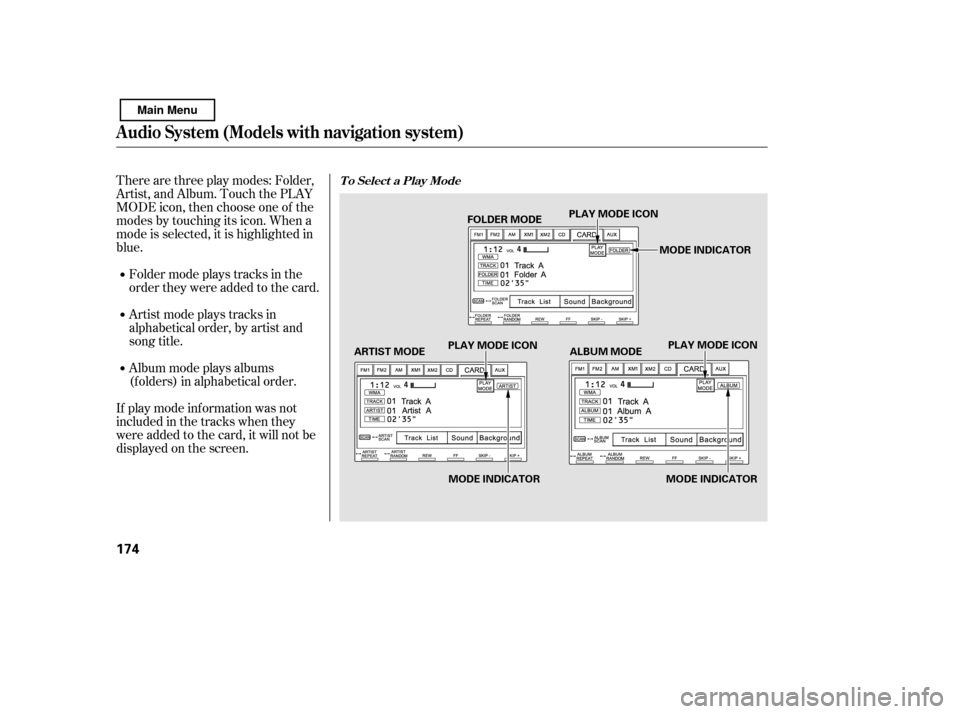
Therearethreeplaymodes:Folder,
Artist, and Album. Touch the PLAY
MODE icon, then choose one of the
modes by touching its icon. When a
mode is selected, it is highlighted in
blue.
If play mode information was not
includedinthetrackswhenthey
were added to the card, it will not be
displayed on the screen.Foldermodeplaystracksinthe
order they were added to the card.
Artistmodeplaystracksin
alphabetical order, by artist and
song title.
Album mode plays albums
(f olders) in alphabetical order.T o Select a Play Mode
Audio System (Models with navigation system)
174
FOLDER MODE
MODE INDICATOR
PLAY MODE ICON
PLAY MODE ICON PLAY MODE ICON
MODE INDICATOR MODE INDICATOR
ARTIST MODE ALBUM MODE
Main Menu
Page 183 of 388
�Û�Ý
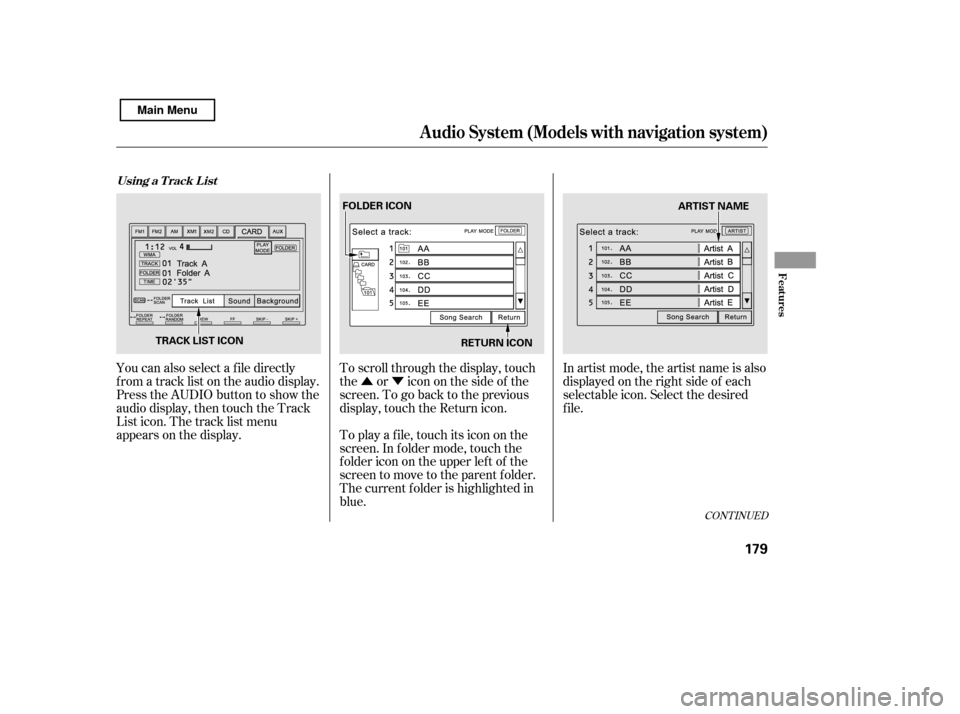
You can also select a f ile directly
f rom a track list on the audio display.
Press the AUDIO button to show the
audio display, then touch the Track
List icon. The track list menu
appears on the display. To scroll through the display, touch
the or icononthesideof the
screen.Togobacktotheprevious
display, touch the Return icon.
To play a f ile, touch its icon on the
screen. In f older mode, touch the
f older icon on the upper lef t of the
screen to move to the parent folder.
The current f older is highlighted in
blue.In artist mode, the artist name is also
displayed on the right side of each
selectable icon. Select the desired
f ile.
CONT INUED
Using a T rack L ist
Audio System (Models with navigation system)
Features
179
RETURN ICON
FOLDER ICON
ARTIST NAME
TRACK LIST ICON
Main Menu
Page 192 of 388
�Û�Ý�µ
�µ
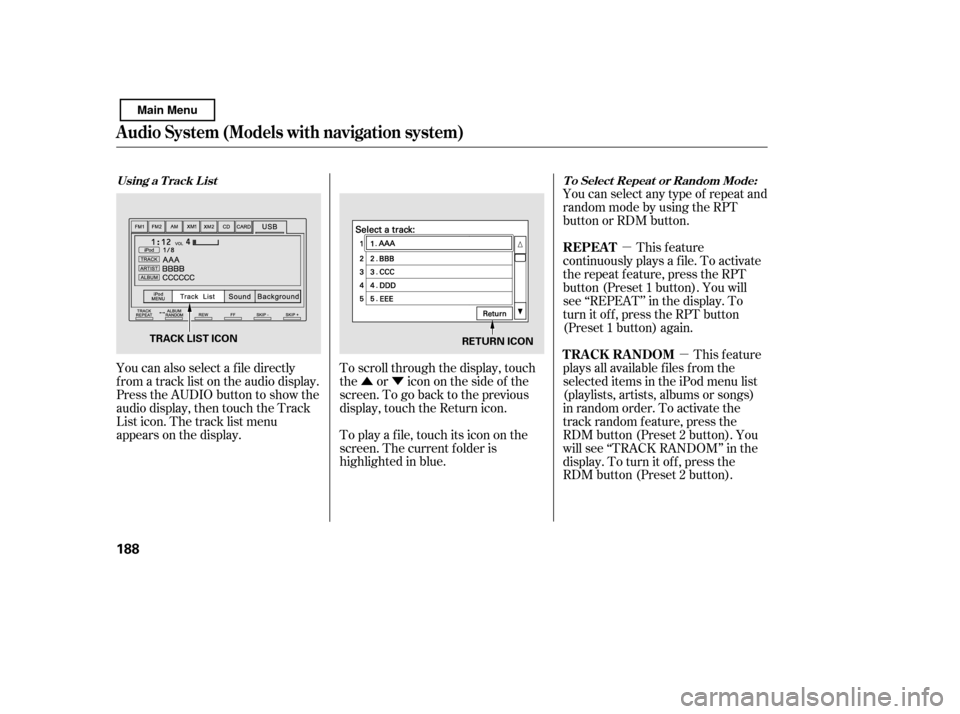
You can also select a f ile directly
f rom a track list on the audio display.
Press the AUDIO button to show the
audio display, then touch the Track
List icon. The track list menu
appears on the display. To scroll through the display, touch
the or icononthesideof the
screen.Togobacktotheprevious
display, touch the Return icon.
To play a f ile, touch its icon on the
screen. The current f older is
highlighted in blue.You can select any type of repeat and
random mode by using the RPT
button or RDM button.
This feature
continuously plays a f ile. To activate
the repeat f eature, press the RPT
button (Preset 1 button). You will
see ‘‘REPEAT’’ in the display. To
turn it off, press the RPT button
(Preset 1 button) again.
This feature
plays all available f iles f rom the
selected items in the iPod menu list
(playlists, artists, albums or songs)
in random order. To activate the
track random feature, press the
RDM button (Preset 2 button). You
will see ‘‘TRACK RANDOM’’ in the
display. To turn it of f , press the
RDM button (Preset 2 button).
Using a T rack L ist T o Select Repeat or Random Mode:
REPEAT
TRACK RANDOM
Audio System (Models with navigation system)
188
RETURN ICON
TRACK LIST ICON
Main Menu
Page 199 of 388
�Û�Ý
�µ
�µ �µ
�Ý
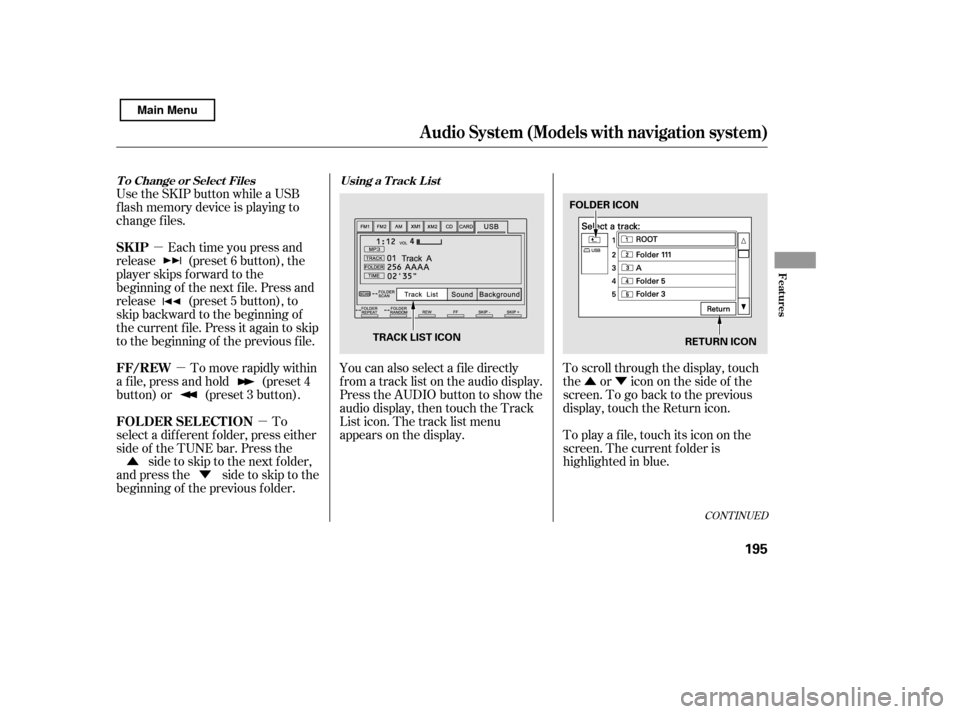
�Û You can also select a f ile directly
f rom a track list on the audio display.
Press the AUDIO button to show the
audio display, then touch the Track
List icon. The track list menu
appears on the display.
To scroll through the display, touch
the or icononthesideof the
screen.Togobacktotheprevious
display, touch the Return icon.
To play a f ile, touch its icon on the
screen. The current f older is
highlighted in blue.
Each time you press and
release (preset 6 button), the
player skips f orward to the
beginning of the next f ile. Press and
release (preset 5 button), to
skip backward to the beginning of
the current f ile. Press it again to skip
to the beginning of the previous file.
To move rapidly within
a f ile, press and hold (preset 4
button) or (preset 3 button).
To
select a dif f erent f older, press either
side of the TUNE bar. Press the side to skip to the next folder,
andpressthe sidetoskiptothe
beginning of the previous f older.
Use the SKIP button while a USB
f lash memory device is playing to
change f iles.
CONT INUED
Using a T rack L ist
T o Change or Select Files
SK IP
FF/REW
FOLDER SELECTION
Audio System (Models with navigation system)
Features
195
RETURN ICON
FOLDER ICON
TRACK LIST ICON
Main Menu