Page 135 of 388

�Î
�Î
Insert a dif f erent disc. If the new
disc plays, there is a problem with
the f irst disc. If the error message
cycle repeats and you cannot clear it,
take your vehicle to a dealer.
Theaudiosystemwilltrytoplaythe
disc. If there is still a problem, the
error message will reappear. Press
the eject button, and pull out the disc.
For additional information on
damaged discs, see page .
If you see an error message in the
display while playing a disc, press
the eject button. After ejecting the
disc, check it for damage or
deformation. If there is no damage,
insert the disc again.
Thechartontherightexplainsthe
error messages you may see in the
display while playing a disc.
Error Message Cause Solution
: Except Si model
202
High Temperature
Track/File format not
supported
Mechanical Error
Servo Error Will disappear when the temperature returns to
normal.
Current track will be skipped. The next
supported track or file plays automatically.
Press the EJECT button and pull out the disc(s).
Check the disc f or serious damage, signs of
deformation, excessive scratches, and/or dirt
(see page 202 ). Insert the disc again. If the
code does not disappear, or the disc(s) cannot
be removed, consult your dealer. Do not try to
f orce the disc out of the player.
Disc Player Error Messages
Audio System (Models without navigation system)
Features
131
HEAT ERROR
UNSUPPORT FORMAT
BAD DISC
PLEASE CHECK
OWNER’S
MANUAL PUSH
EJECT
BAD DISC
PLEASE CHECK
OWNER’SMANUAL
Main Menu
Page 136 of 388

Thechartontherightexplainsthe
error messages you may see in the
display while playing a disc.
If you see an error message in the
display while playing a disc, press
the eject button. After ejecting the
disc, check it for damage or
deformation. If there is no damage,
insert the disc again.
If there is still a problem, the error
message will appear again. Press the
eject button, and pull out the disc.
Insert a dif f erent disc. If the new
disc plays, there is a problem with
the f irst disc. If the error message
cycle repeats and you cannot clear it,
take your vehicle to a dealer.Solution
Error Message CausePress the magazine eject button, and pull the
magazine out. If the message does not
disappear or the magazine cannot be pulled out,
see your dealer.
Insert disc.
Press the magazine eject button, pull the
magazine out, check for an error message, then
insert the magazine again. If the message does
not disappear, or the magazine cannot be pulled
out, see your dealer.
Insert disc magazine.
Will disappear when the temperature returns to
normal.
FOCUS Error
No disc in the disc magazine
Mechanical Error
No disc magazine in
the disc changer
High Temperature
Optional Disc Changer Error
Messages
Audio System (Models without navigation system)
132
Main Menu
Page 140 of 388
�¼
Each time you press the DISP button,
the display mode switches between
the album name, the song/track
name, the artist name, or name of f
(which turns off the text display).
The display shows up to 16
characters of the selected data. If the
text data has more than 17
characters, you will see the f irst 15
characters and the indicator in
the display. Press and hold the DISP
button until the next 16 characters
are shown.
If the iPod indicator does not appear
in the audio display, check the
connections, and try to reconnect the
iPod a f ew times.
If the audio system still does not
recognize the iPod, the iPod may
need to be reset. Follow the
instructions that came with your
iPod, or you can f ind reset
instructions online at
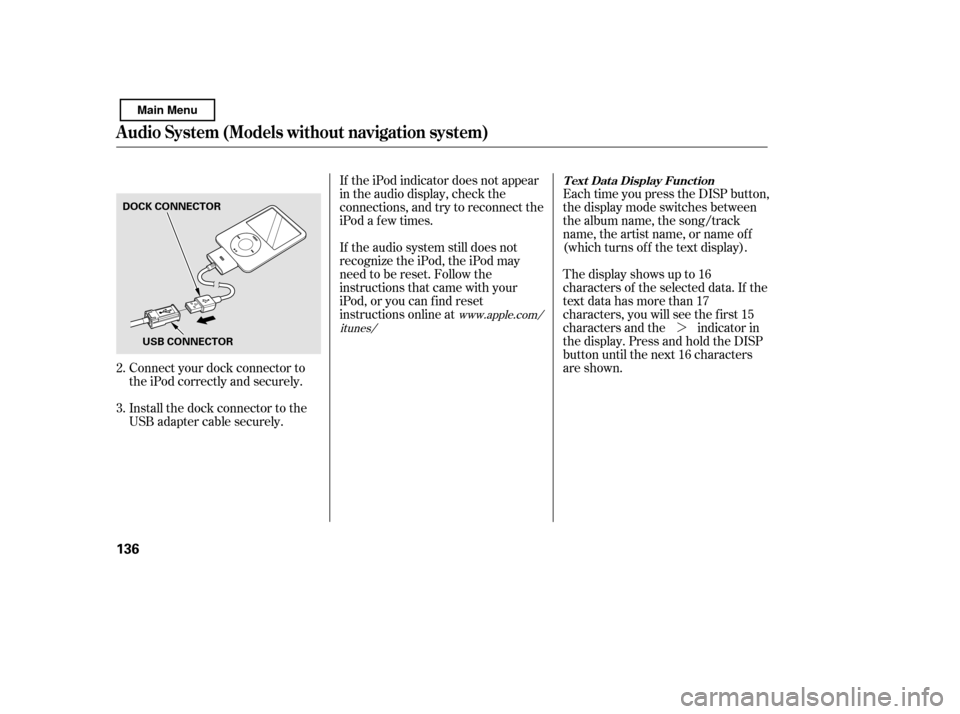
Connect your dock connector to
the iPod correctly and securely.
Install the dock connector to the
USB adapter cable securely.
2. 3.
www.apple.com/
itunes/ T ext Data Display Function
Audio System (Models without navigation system)
136
DOCK CONNECTOR
USB CONNECTOR
Main Menu
Page 144 of 388

If you see an error message on the
audio display while playing an iPod,
f ind the solution in the chart to the
right. If you cannot clear the error
message, take your vehicle to your
dealer.Cause Solution
Error Message
USB ROM Error
Appears when an
incompatible device is
connected
No files in iPod
Use of unsupported
iPod
Recognition f ailure of
iPod There is a problem with the USB adapter unit.
Disconnect the device. Then, turn the audio
systemoff,andturnitonagain.Donot
reconnect the device that caused the error.
Appears when the iPod is empty. Store some
f iles in the iPod.
Appears when an unsupported iPod is
connected. See page 134 for the specification
information for iPods. If it appears when a
supported iPod is connected, update the iPod
software to the newer version.
Appears when the system does not
acknowledge the iPod. Reconnect the iPod.
Audio System (Models without navigation system)
iPodError Messages
140
USB ERROR
BAD USBDEVICE
PLEASE CHECK
OWNERSMANUAL
iPod NO SONG
UNSUPPORTED VER.
CONNECT RETRY
Main Menu
Page 152 of 388

If you see an error message on the
audio display while playing a USB
f lash memory device, f ind the
solution in the chart to the right. If
you cannot clear the error message,
take your vehicle to your dealer.Cause Solution
Error MessageUSB ROM Error
Appears when an
incompatible device is
connected
Use of unsupported
files
No files in USB flash
memory device
Use of unsupported
USB f lash memory
device There is a problem with the USB adapter unit.
Disconnect the device. Then, turn the audio
systemoff,andturnitonagain.Donot
reconnect the device that caused the error.
Appears when the files in the USB flash
memory device are DRM or an unsupported
format. This error message appears for about 3
seconds, then plays the next song.
Appears when the USB f lash memory device is
emptyortherearenoMP3,WMA,orAACfiles
in the USB flash memory device. Save some
MP3, WMA, or AAC files in the USB flash
memory device.
Appears when an unsupported device is
connected. See page 142 for the specification
information for the USB flash memory device.
If it appears when the supported device is
connected, reconnect the device.
Audio System (Models without navigation system)
USB Flash Memory Device Error
Messages
148
USB ERROR
BAD USBDEVICE
PLEASE CHECK
OWNERSMANUAL
UNPLAYABLE FILE
USB NO SONG
UNSUPPORTED
Main Menu
Page 174 of 388

Thechartontherightexplainsthe
error messages you may see in the
display while playing a disc.
If you see an error message in the
display while playing a disc, press
the eject button. After ejecting the
disc, check it for damage or
deformation. If there is no damage,
insert the disc again.
If there is still a problem, the error
message will appear again. Press the
eject button, and pull out the disc.
Insert a dif f erent disc. If the new
disc plays, there is a problem with
the f irst disc. If the error message
cycle repeats and you cannot clear it,
take your vehicle to a dealer.Error Message Solution
Cause
Press the eject button, and pull out the disc.
Make sure it is inserted correctly in the disc
player.Makesurethediscisnotscratchedor
damaged. For more information, see page 202.
Press the eject button, and pull out the disc.
Check the disc f or damage or def ormation. For
more information, see page 202.
If the disc cannot be pulled out, or the error
message does not disappear after the disc is
ejected, see your dealer.
Press the eject button, and pull out the disc.
Check the disc f or damage or def ormation. For
more information, see page 202.
Will disappear when the temperature returns to
normal.
FOCUS Error
Mechanical Error
TOC Error
High Temperature
Disc Player Error Messages
Audio System (Models with navigation system)
170
Main Menu
Page 187 of 388
If you see an error message in the
display while playing a PC card, f ind
thesolutioninthecharttotheright.
If you cannot clear the error
message, take your vehicle to your
dealer.Error Message Solution
The system cannot read the file(s). Check the files on the PC card.
There is a possibility that the files have been damaged.
It appears when the PC card is empty or there are no MP3 or WMA
filesinthePCcard.SavetheMP3orWMAfilesinthePCcard.
It appears when an unsupported PC card is inserted. The system
supports CF card, Flash ATA card, and SanDisk 6-in-1 Card Adapter.
PC Card Error Messages
Audio System (Models with navigation system)
Features
183
FILE ERROR
NO MUSIC
MEDIA ERROR
Main Menu
Page 194 of 388

If you see an error message on the
screen while playing an iPod, f ind
thesolutioninthecharttotheright.
If you cannot clear the error
message, take your vehicle to your
dealer.Cause
Error Message Solution
USB ROM Error
Appears when an
incompatible device is
connected
No files in iPod
Use of unsupported
iPod
Recognition f ailure of
iPod There is a problem with the USB adapter unit.
Disconnect the device. Then, turn the audio
systemoff,andturnitonagain.Donot
reconnect the device that caused the error.
Appears when the iPod is empty. Store some
f iles in the iPod.
Appears when an unsupported iPod is
connected. See page 185 for the specification
information for iPods. If it appears when a
supported iPod is connected, update the iPod
software to the newer version.
Appears when the system does not
acknowledge the iPod. Reconnect the iPod.
iPodError Messages
Audio System (Models with navigation system)
190
USB ERROR
BAD USBDEVICE
PLEASE CHECK
OWNERSMANUAL
iPod NO SONG
UNSUPPORTED VER.
CONNECT RETRY
Main Menu