Page 229 of 388

�Ì
CONT INUED
Youcanstoreupto50nameswith
their associated numbers in HFL.
The numbers you store can be not
only phone numbers but other types,
such as account numbers or
passwords, which can be sent during
a menu-driven call.
You can mute your voice to the
person you are talking to during a
call.
To mute your voice during a call,
press and release the HFL Talk
button and say ‘‘ .’’
To unmute your voice, press and
release the HFL Talk button and say
‘‘ ’’ again. HFL allows you to send numbers or
names during a call. This is usef ul
when you call a menu-driven phone
system.
Press and release the HFL Talk
button bef ore a command.
Say ‘‘ .’’
Follow the HFL prompts and say
the name or number you want to
send.
Follow the HFL prompts to send
the tones and continue the call. To send a pound ( ), say
‘‘pound.’’ To send a star (*), say ‘‘star.’’
1. 2. 3.
BluetoothHandsFreeL ink
Phonebook
Muting a Call
Mute
Mute Send Numbers or Names During
aCall
Send
T o send a name or number during acall:Features
225
NOTE:
Main Menu
Page 230 of 388
Avoid using duplicate name
entries.
Avoid using ‘‘home’’ as a name
entry.
It is easier f or HFL to recognize a
multisyllabic or longer name. For
example, use ‘‘Peter’’ instead of
‘‘Pete,’’ or ‘‘John Smith’’ instead of
‘‘John.’’Press and release the HFL Talk
button bef ore a command.
Say ‘‘ .’’
Say‘‘ ’’aftertheprompts.
Follow the HFL prompts and say
thenameentryyouwanttoedit.
When asked, say the new number
for that name.
Follow the HFL prompts to
complete the edit.
Press and release the HFL Talk
button bef ore a command.
Say ‘‘ .’’
Say‘‘ ’’aftertheprompts.
Say a name you want to list as your
phonebook entry.
Say the number you want to store
f or the name entry.
Follow the HFL prompts and say
‘‘ ’’ to store the entry.
1. 2.3. 4.5.
1. 2.3. 4.5.Phonebook Edit
Phonebook
Store
Enter
To edit the number stored in a name:
T o st ore a phonebook ent ry:
BluetoothHandsFreeL ink
226
NOTE:
Main Menu
Page 231 of 388

Press and release the HFL Talk
button bef ore a command.Press and release the HFL Talk
button bef ore a command.
Say ‘‘ .’’
Say‘‘ ’’aftertheprompts.
Say the name you want to delete
and follow the HFL prompts to
complete the deletion. Say ‘‘ .’’
Say‘‘ ’’aftertheprompts.
HFL begins reading the names in
the order they were stored.
If you hear a name you want to call,
immediatelypresstheHFLTalk
button and say ‘‘ .’’Press and release the HFL Talk
button bef ore a command.
Follow the HFL prompts, select a
number f rom your cell phone, and
send it to HFL.
Say ‘‘ ’’ af ter the
prompts.
Say ‘‘ .’’
Follow the HFL prompts and
name the number, or say
‘‘ ’’ if it is not the number
you want to store.
Follow the HFL prompts if you
want to store another number.
1. 2.3.
4.
1.2.3.
4.
1.2. 3. 5.
Phonebook
Delete
Phonebook
List
Call Receive contact
Phonebook
Discard
T o delet e a name: T o list all names in t he phonebook: T o st ore a specif ic phone number f rom your cell phone direct ly t o t heHFL phonebook (available on some
phones):
BluetoothHandsFreeL ink
Features
227
Main Menu
Page 232 of 388
(available on some phones)handsf reelink.honda.
com
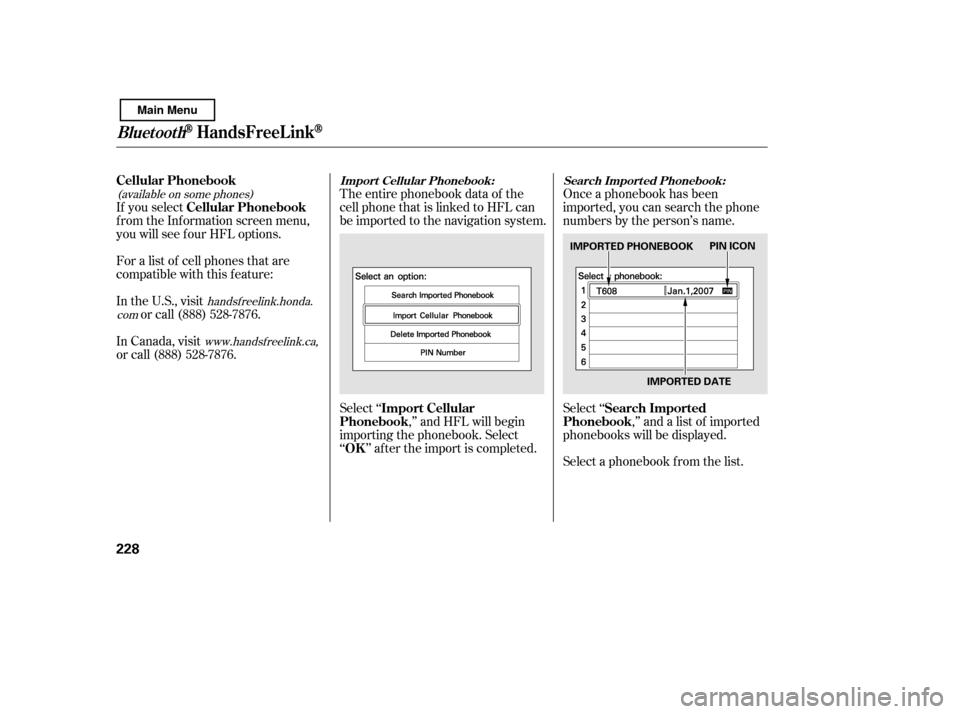
www.handsfreelink.ca,The entire phonebook data of the
cell phone that is linked to HFL can
be imported to the navigation system.
Select ‘‘
,’’ and HFL will begin
importing the phonebook. Select
‘‘ ’’ af ter the import is completed. Once a phonebook has been
imported, you can search the phone
numbers by the person’s name.
Select ‘‘
,’’ and a list of imported
phonebooks will be displayed.
Select a phonebook f rom the list.
If you select
f rom the Inf ormation screen menu,
you will see f our HFL options.
For a list of cell phones that are
compatible with this f eature:
In the U.S., visit
or call (888) 528-7876.
In Canada, visit
or call (888) 528-7876.
Import Cellular
Phonebook
OK Search Imported
Phonebook
Cellular Phonebook
Cellular Phonebook
Import Cellular Phonebook: Search Import ed Phonebook:
BluetoothHandsFreeL ink
228
IMPORTED PHONEBOOK
IMPORTED DATEPIN ICON
Main Menu
Page 233 of 388
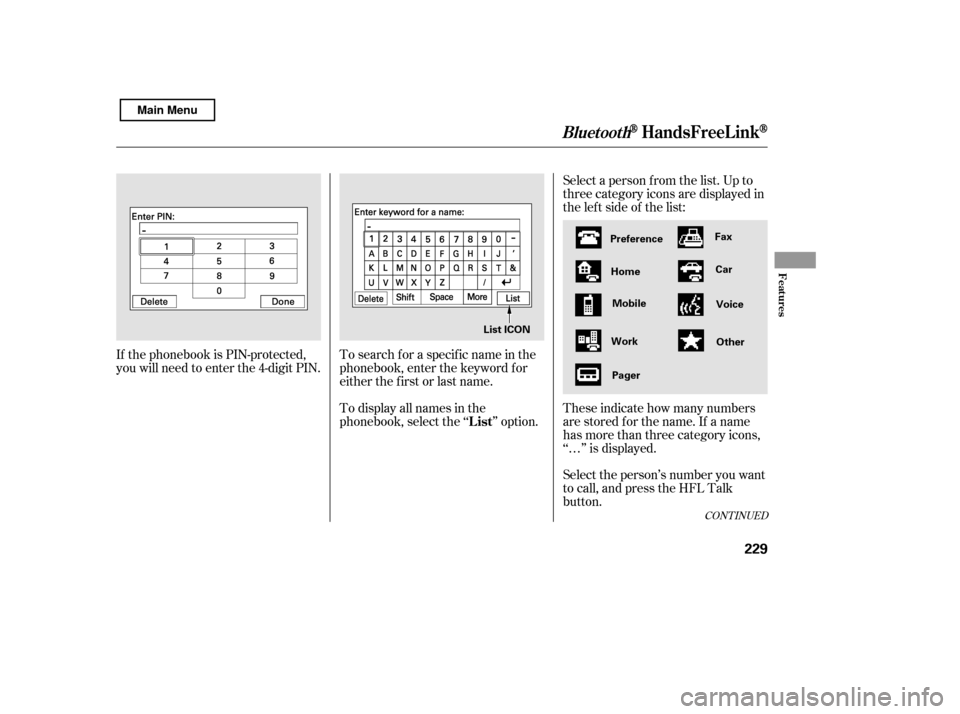
Select a person f rom the list. Up to
three category icons are displayed in
the lef t side of the list:
Select the person’s number you want
to call, and press the HFL Talk
button.
These indicate how many numbers
are stored for the name. If a name
has more than three category icons,
‘‘…’’ is displayed.
If the phonebook is PIN-protected,
you will need to enter the 4-digit PIN.
To search f or a specif ic name in the
phonebook, enter the keyword f or
either the f irst or last name.
To display all names in the
phonebook, select the ‘‘ ’’ option.
CONT INUED
List
BluetoothHandsFreeL ink
Features
229
Preference
Home Mobile
Work Pager Fax
Car
Voice
Other
List ICON
Main Menu
Page 234 of 388
Select ‘‘,’’ and a list of imported
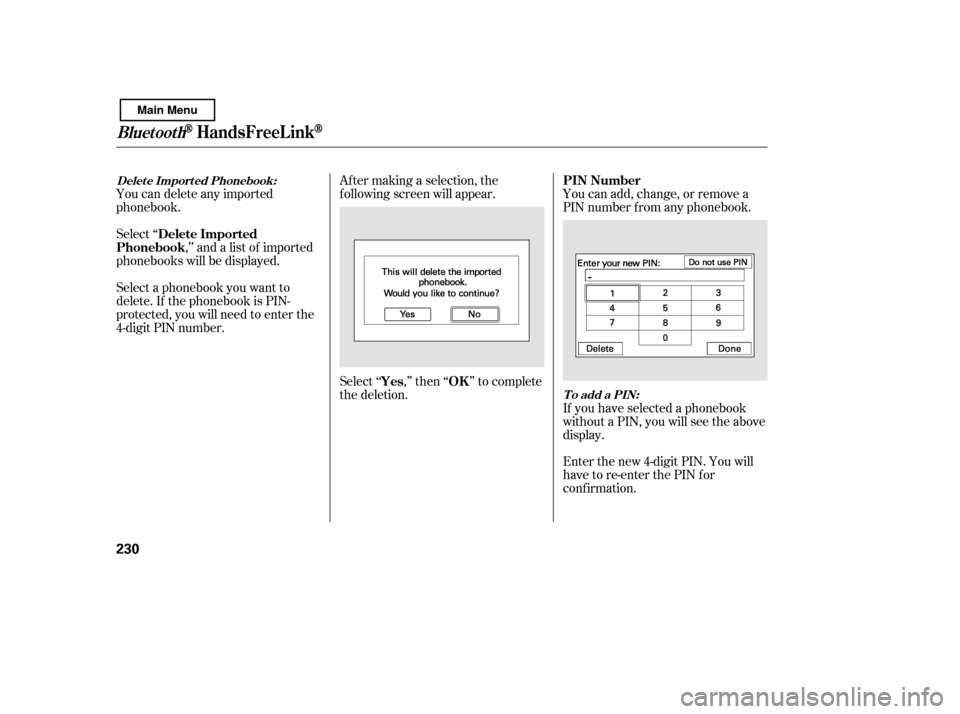
phonebooks will be displayed. Af ter making a selection, the
f ollowing screen will appear.
Select‘‘ ,’’then‘‘ ’’tocomplete
the deletion.You can add, change, or remove a
PIN number f rom any phonebook.
You can delete any imported
phonebook.
Select a phonebook you want to
delete. If the phonebook is PIN-
protected, you will need to enter the
4-digit PIN number.
If you have selected a phonebook
without a PIN, you will see the above
display.
Enter the new 4-digit PIN. You will
have to re-enter the PIN for
conf irmation.
Delete Imported
Phonebook
Yes OKPIN Number
Delet e Import ed Phonebook:
To add a PIN:
BluetoothHandsFreeL ink
230
Main Menu
Page 235 of 388
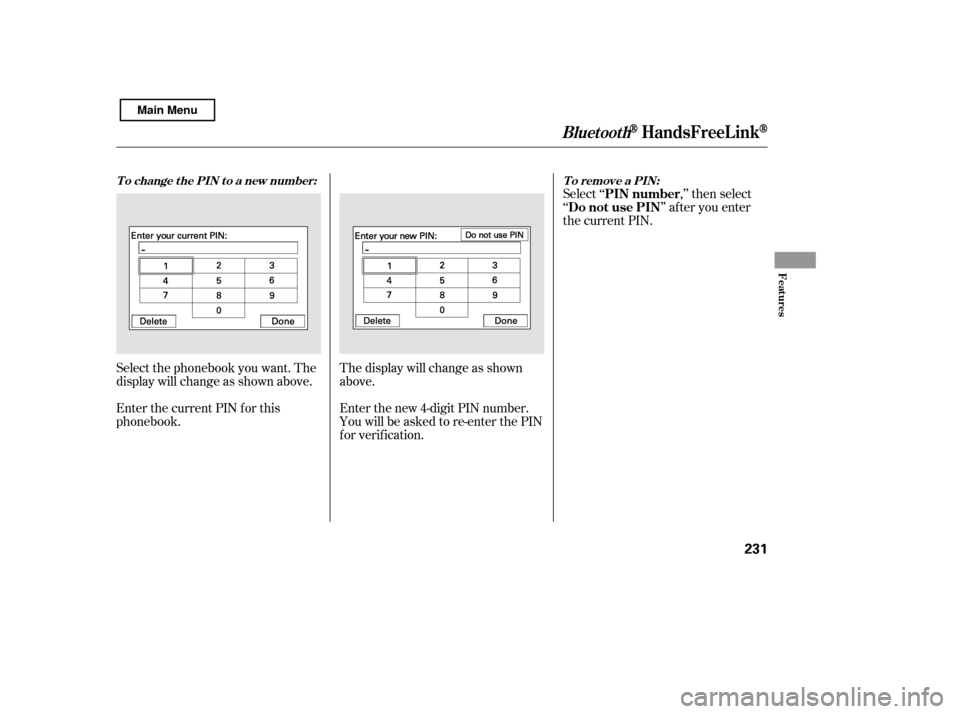
Select ‘‘ ,’’ then select
‘‘ ’’ af ter you enter
the current PIN.
Enter the new 4-digit PIN number.
You will be asked to re-enter the PIN
f or verif ication.
The display will change as shown
above.
Select the phonebook you want. The
display will change as shown above.
Enter the current PIN for this
phonebook.
To remove a PIN:
T o change t he PIN t o a new number:
PIN number
Do not use PIN
BluetoothHandsFreeL ink
Features
231
Main Menu
Page 236 of 388
This command group allows you to
change or customize HFL basic
settings.Press and release the HFL Talk
button bef ore a command.
Say ‘‘ .’’ Once a passcode is set, you
will need to enter it to use HFL each
time you start the vehicle. If you
f orget the code, your dealer will have
toresetitforyou,oryouwillhaveto
clear the entire system (see page ).
Follow the HFL prompts to
conf irm the number.
Follow the HFL prompts and say
the 4-digit passcode you want to
set.
Say‘‘ ’’aftertheprompts.
1. 2.3. 4. 234
System Setup
System setup
Security
T o set a 4-digit passcode t o lock t heHFL syst em f or securit y purposes:
BluetoothHandsFreeL ink
232
NOTE:
Main Menu