Page 196 of 388

�Î
�Î
This audio system can select and
play the audio f iles f rom a USB f lash
memory device with the same
controls used f or the in-dash disc
player. To play a USB f lash memory
device, connect it to the USB adapter
cable in the console compartment.
The ignition switch must be in the
ACCESSORY (I) or ON (II) position.
Press the AUDIO button beside the
screen to show the audio display and
touch the AUX icon. The recommended USB f lash
memory devices are 256 MB or
higher, and f ormatted with the FAT
f ile system. Some digital audio
players may be compatible as well.
Some USB f lash memory devices
(such as devices with security lock-
out f eatures, etc.) will not work in
this audio unit.
Do not use a device such as a card
reader or hard drive as the device
or your f iles may be damaged.
Do not connect your USB f lash
memory device using a hub.
The audio system reads and plays
the audio f iles on the USB f lash
memory device in MP3, WMA or
AAC f ormats. Depending on the
f ormat, the display shows MP3,
WMA or AAC when a USB flash
memory device is playing. The USB
f lash memory device limit is up to
700 f olders or up to 65535 f iles.
Only AAC f ormat f iles recorded
with iTunes are playable on this
audio unit.
:
To Play a USB Flash Memory
Device
Audio System (Models with navigation system)
192
NOTE:
Main Menu
Page 197 of 388

CONT INUED
The order of f iles in USB playback
maybedifferentfromtheorderof
f iles displayed in PC or other
devices etc. Files are played in the
orderstoredinUSBflashmemory
device.
Depending on the type of
encoding and writing sof tware
used, there may be cases where
character inf ormation does not
display properly.
You can select the AUX mode by
using the navigation system voice
control buttons, but cannot operate
theplaymodefunctions.
Do not use an extension cable to
the USB adapter cable equipped
with your vehicle.
Depending on the sof tware the
f iles were made with, it may not be
possibletoplaysomefiles,or
displaysometextdata.
Do not keep a USB f lash memory
device in the vehicle. Direct
sunlight and high heat will damage
it.
We recommend backing up your
data bef ore playing a USB f lash
memory device.
Some devices cannot be powered
or charged via the USB adapter. If
this is the case, use the accessory
adapter to supply power to your
device.
Depending on the type and
number of f iles, it may take some
time bef ore they begin to play.
Audio System (Models with navigation system)
Voice Cont rol Syst em
Features
193
Main Menu
Page 209 of 388
�´�µ
�´�µ
�´
�µ
If you are playing a PC card, press
the top ( ) of the CH button to
advance to the next file. Press the
bottom( )togobacktothe
previous f ile.
In MP3 or WMA mode, you can use
the seek function to select folders.
Press and hold the top ( ) of the
CH button until you hear a beep to
skip f orward to the f irst f ile of the
next folder. Press the bottom ( ) to
skip backward to the previous f older.
If youareplayingaUSBflash
memory device or iPod with the USB
adapter cable (if equipped), press
and release the top ( ) of the CH
button to skip forward to the
beginning of the next f ile. Press the
bottom( )toskipbackwardtothe
beginning of the current f ile. Press it
twice to return to the previous f ile.
When a compatible audio unit is
connected to the jack, press the AUX
button to select it.
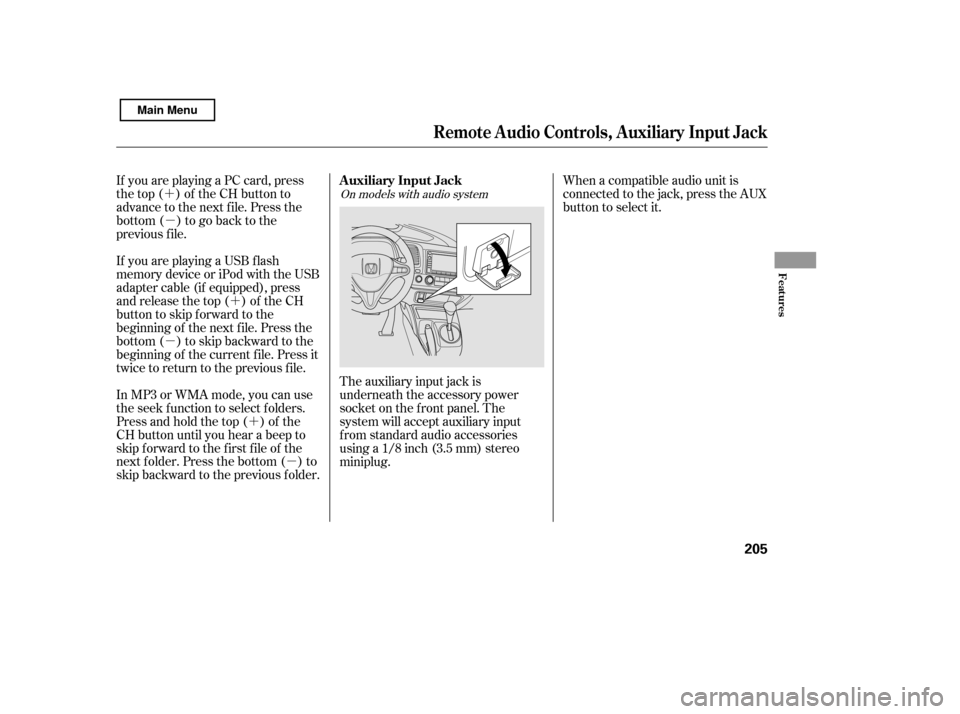
The auxiliary input jack is
underneath the accessory power
socket on the f ront panel. The
system will accept auxiliary input
f rom standard audio accessories
using a 1/8 inch (3.5 mm) stereominiplug.On models with audio system
Auxiliary Input Jack
Remote Audio Controls, Auxiliary Input Jack
Features
205
Main Menu
Page 379 of 388

CONT INUED
...
Accessories and Modif ications . 247
ACCESSORY (Ignition Key
.......................................
Position) . 80
.............
Accessory Power Socket . 108
..................
Active Head Restraints . 96
....................
Additives, Engine Oil . 291
...............................
Airbag (SRS) . 9, 21
...
Airbags, Additional Information . 21
...
Additional Safety Precautions . 32
..........
AdvancedAirbagSystem .26
.............................
Airbag Service . 31
How the Passenger Airbag Of f
......................
Indicator Works . 30
How the Side Airbag Of f ......................
Indicator Works . 30
..
How the SRS Indicator Works . 29
How Your Front Airbags
.........................................
Work . 24
...
How Your Side Airbags Work . 27
How Your Side Curtain Airbags
.........................................
Work . 29
........................
SRS Components . 21
..............
Air Conditioning System . 110
.......................
Air Pressure, Tires . 315 ......................................
Antif reeze . 294
Anti-lock Brakes (ABS)
...............................
Indicator . 60, 266
...................................
Operation . 266
..............
Anti-thef t, Audio System . 206
Anti-thef t Steering Column
..............................................
Lock . 80
............................................
Armrest . 97
................................
Audio System . 114
.....
Auto Door Locking/Unlocking . 83
.........................
Auto Door Locking . 83
.....................
Auto Door Unlocking . 85
...
Automatic Seat Belt Tensioners . 19
.............
Automatic Speed Control . 209
..............
Automatic Transmission . 260
..........................
Capacity, Fluid . 355
...............
Checking Fluid Level . 298
.......................................
Shif ting . 260
Shif t Lever Position
...............................
Indicators . 260
................
Shif t Lever Positions . 261
....................
Shif t Lock Release . 263
......................
Auxiliary Input Jack . 205 Battery
Charging System ...........................
Indicator . 65, 340
............................
Jump Starting . 336
..............................
Maintenance . 322
............................
Specif ications . 356
..............................
Bef ore Driving . 237
....................................
Belts,Seat .8,18
.........................
Beverage Holders . 108
........
HandsFreeLink. 212
Brakes ...........
Anti-lock System (ABS) . 266
.............
Break-in, New Linings . 238
....................
Bulb Replacement . 305
...........................................
Fluid . 300
.................
Pad Wear Indicators . 265
.......................................
Parking . 105
.................
System Indicator . 59, 342
.............................
Braking System . 265
.................
Break-in, New Vehicle . 238
..
Brightness Control, Instruments . 75Bluetooth
Index
A B
INDEX
I
Main Menu
Page:
< prev 1-8 9-16 17-24