Page 104 of 388
Follow these precautions whenever
you use the seat heaters:Use the HI setting only to heat the
seats quickly, because it draws
large amounts of current f rom the
battery.
If the engine is lef t idling f or an
extended period, do not use the
seat heaters, even on the LO
setting. It can weaken the battery,
causing hard starting.
In the LO setting, the heater runs
continuously. It does not cycle with
temperature changes.
In the HI setting, the heater turns off
when the seat gets warm, and turns
back on after the seat’s temperature
drops.
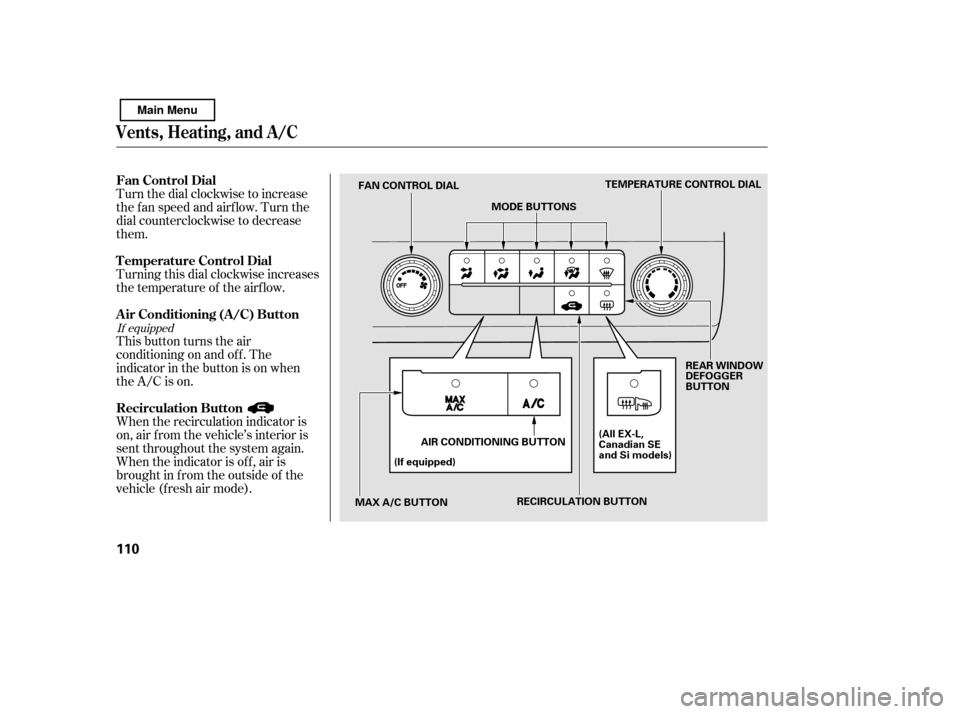
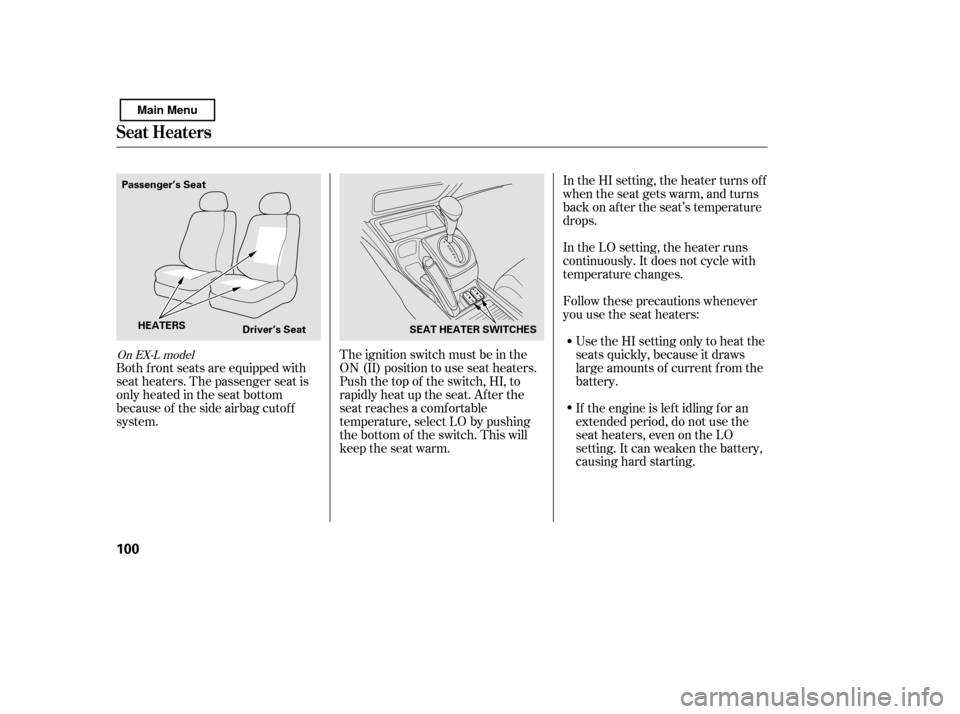
The ignition switch must be in the
ON (II) position to use seat heaters.
Push the top of the switch, HI, to
rapidly heat up the seat. Af ter the
seat reaches a comfortable
temperature, select LO by pushing
the bottom of the switch. This will
keep the seat warm.
Both f ront seats are equipped with
seat heaters. The passenger seat is
only heated in the seat bottom
because of the side airbag cutof f
system.
On EX-L model
Seat Heaters
100
Passenger’s Seat
Driver’s Seat SEAT HEATER SWITCHES
HEATERS
Main Menu
Page 107 of 388
The moonroof has a key-of f delay.
You can open and close the
moonroof f or up to 10 minutes af ter
you turn of f the ignition switch. The
key-of f delay cancels as soon as you
open either f ront door. You must
then turn the ignition switch to the
ON (II) position f or the moonroof to
operate.If the moonroof runs into any
obstacle while it is closing
automatically, it will reverse
direction, and then stop. To close the
moonroof , remove the obstacle, then
use the moonroof switch again.
Auto reverse stops sensing when the
moonroof is almost closed. You
should always check that all
passengers and objects are away
f rom the moonroof bef ore closing it.
Keeptheinsideandoutsidemirrors
clean and adjusted f or best visibility.
Be sure to adjust the mirrors bef ore
you start driving.
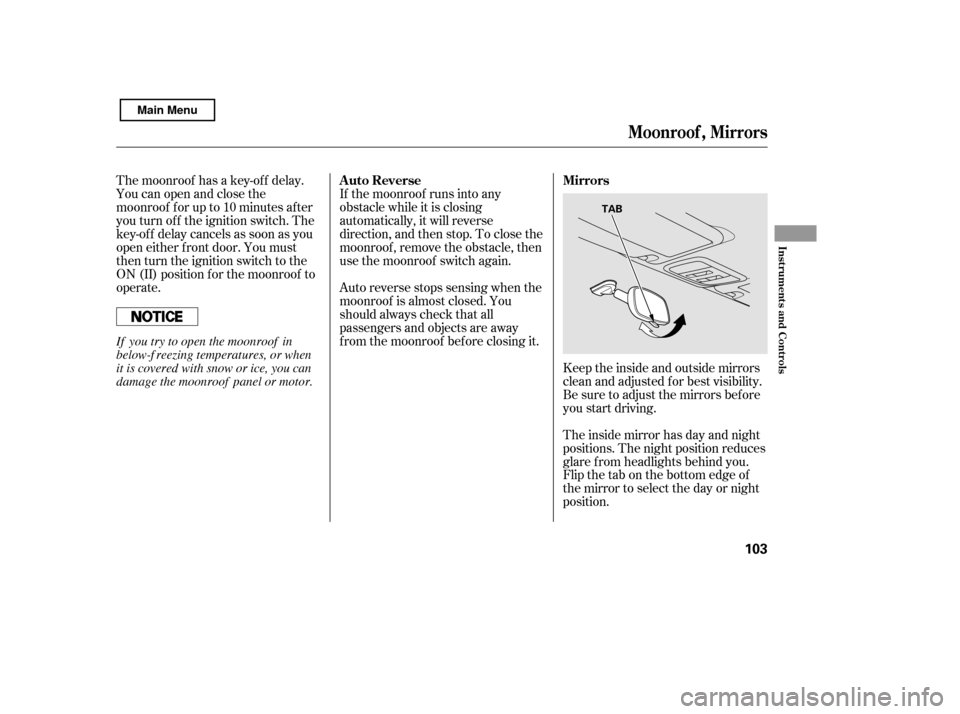
The inside mirror has day and night
positions. The night position reduces
glare f rom headlights behind you.
Flip the tab on the bottom edge of
the mirror to select the day or night
position.
Auto Reverse Mirrors
Moonroof , Mirrors
Inst rument s and Cont rols
103
TAB
If you try to open the moonroof in
below-f reezing temperatures, or when
it is covered with snow or ice, you can
damage the moonroof panel or motor.
Main Menu
Page 114 of 388
Turn the dial clockwise to increase
the fan speed and airflow. Turn the
dial counterclockwise to decrease
them.
This button turns the air
conditioning on and of f . The
indicatorinthebuttonisonwhen
the A/C is on.
When the recirculation indicator is
on, air f rom the vehicle’s interior is
sent throughout the system again.
When the indicator is off, air is
brought in f rom the outside of the
vehicle (fresh air mode).
Turning this dial clockwise increases
the temperature of the airflow.
If equipped
Vents, Heating, and A/C
Fan Control Dial
Recirculation Button
Air Conditioning (A/C) Button
T emperature Control Dial
110
TEMPERATURE CONTROL DIAL
MODE BUTTONS
FAN CONTROL DIAL
MAX A/C BUTTON (If equipped)
AIR CONDITIONING BUTTON REAR WINDOW
DEFOGGER
BUTTON
RECIRCULATION BUTTON (All EX-L,
Canadian SE
and Si models)
Main Menu
Page 115 of 388

The outside air intakes f or the
heating and cooling system are at
the base of the windshield. Keep this
area clear of leaves and other debris.
Thesystemshouldbeleftinfresh
air mode under almost all conditions.
Keeping the system in recirculation
mode, particularly with the A/C of f ,
can cause the windows to fog up.
Switch to recirculation mode when
driving through dusty or smoky
conditions, then return to fresh air
mode.
This button turns the rear window
def ogger of f and on (see page ).
Use the mode control buttons to
select the vents air flows from. Some
air will f low f rom the dashboard
corner vents in all modes.Air flows from the center
and corner vents in the dashboard.
Airf low is divided between
the vents in the dashboard and the
f loor vents.
Air f lows f rom the f loor
vents. When you select , the
system automatically switches to
f resh air mode.
Airf low is divided between
the f loor vents and def roster vents at
the base of the windshield.
Air f lows f rom the def roster
vents at the base of the windshield.
When you select or ,
the system automatically switches to
f resh air mode and turns on the A/C
(if equipped). The system automatically
turns on the A/C and switches to
recirculation mode (see page to
use this setting). Air f lows f rom the
center and side vents in the
dashboard. Pressing the , A/C,
or any of the mode buttons cancels
MAX A/C, but the A/C stays on.
The ventilation system draws in
outside air, circulates it through the
interior, then exhausts it through
vents near the rear side panels.
Set the temperature to the lower
limit.
Make sure the A/C is of f .
Select and fresh air mode.
Set the f an to the desired speed.
1. 2. 3.4.
76 112
If equipped
Vents, Heating, and A/C
Rear Window Def ogger Button
Mode Control MAX A/C Button
Ventilation
Features
111
Main Menu
Page 116 of 388

The heater uses engine coolant to
warm the air. If the engine is cold, it
will be several minutes bef ore you
f eel warm air coming f rom the
system.Select .
Set the f an to the desired speed.
Adjust the warmth of the air with
the temperature control dial.
Air conditioning places an extra load
on the engine. Watch the engine
coolant temperature gauge (see page ). If it moves near the red zone,
turn of f the A/C until the gauge
reading returns to normal.
Turn on the A/C by pressing the
button. The indicator in the button
comesonwhenafanspeedis
selected.
Make sure the temperature is set to maximum cool.
Select .
If the outside air is humid, select
recirculation mode. If the outside
air is dry, select f resh air mode.
Set the f an to the desired speed.
If the interior is very warm, you can
cool it down more rapidly by partially
opening the windows, turning on the
A/C, and setting the fan to
maximum speed in f resh air mode.
To cool the interior with MAX A/C: Set the f an to the desired speed.
Select MAX A/C.
The system automatically turns on
the A/C, selects , and
switches to recirculation mode.
Make sure the temperature is set
to maximum cool. Turn the fan on.
If the A/C is of f , turn it on (if
equipped).
Select and fresh air mode.
Adjust the temperature to your
pref erence.
Air conditioning, as it cools, removes
moisture from the air. When used in
combination with the heater, it
makes the interior warm and dry and
can prevent the windows f rom
f ogging up.
This setting is suitable f or all driving
conditions whenever the outside
temperature is above 32°F (0°C).
1.2.3.
3.4. 5.
1. 2. 1. 2. 3.1. 2. 3. 4.
70
If equipped
Vents, Heating, and A/C
Using the Heater
Using the A /C Dehumidif y the Interior
112
Main Menu
Page 117 of 388
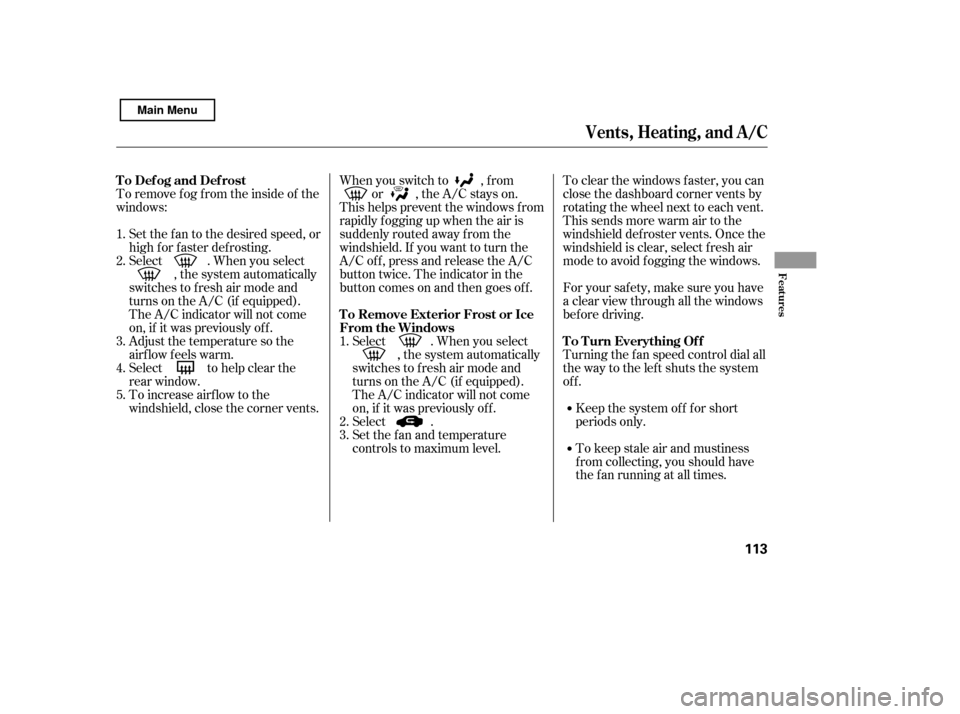
To remove f og f rom the inside of the
windows:Set the f an to the desired speed, or
high f or f aster def rosting.
Select . When you select , the system automatically
switches to f resh air mode and
turns on the A/C (if equipped).
The A/C indicator will not come
on, if it was previously of f .
Adjust the temperature so the
airf low f eels warm.
Select to help clear the
rear window.
To increase airf low to the
windshield, close the corner vents. To clear the windows f aster, you can
close the dashboard corner vents by
rotating the wheel next to each vent.
This sends more warm air to the
windshield def roster vents. Once the
windshield is clear, select f resh air
mode to avoid f ogging the windows.
For your saf ety, make sure you have
a clear view through all the windows
bef ore driving.
Turning the f an speed control dial all
the way to the left shuts the system
of f .
Keep the system of f f or short
periods only.
To keep stale air and mustiness
f rom collecting, you should have
the f an running at all times.
When you switch to , f rom
or , the A/C stays on.
This helps prevent the windows f rom
rapidly f ogging up when the air is
suddenly routed away f rom the
windshield. If you want to turn the
A/C off, press and release the A/C
button twice. The indicator in the
buttoncomesonandthengoesoff.
Select . When you select , the system automatically
switches to f resh air mode and
turns on the A/C (if equipped).
The A/C indicator will not come
on, if it was previously of f .
Select .
Set the f an and temperature
controls to maximum level.
5.
1. 2. 3.
1. 2. 3. 4.
Vents, Heating, and A/C
T o Def og and Def rost
T o Remove Exterior Frost or Ice
From the WindowsTo Turn Everything Of f
Features
113
Main Menu
Page 135 of 388

�Î
�Î
Insert a dif f erent disc. If the new
disc plays, there is a problem with
the f irst disc. If the error message
cycle repeats and you cannot clear it,
take your vehicle to a dealer.
Theaudiosystemwilltrytoplaythe
disc. If there is still a problem, the
error message will reappear. Press
the eject button, and pull out the disc.
For additional information on
damaged discs, see page .
If you see an error message in the
display while playing a disc, press
the eject button. After ejecting the
disc, check it for damage or
deformation. If there is no damage,
insert the disc again.
Thechartontherightexplainsthe
error messages you may see in the
display while playing a disc.
Error Message Cause Solution
: Except Si model
202
High Temperature
Track/File format not
supported
Mechanical Error
Servo Error Will disappear when the temperature returns to
normal.
Current track will be skipped. The next
supported track or file plays automatically.
Press the EJECT button and pull out the disc(s).
Check the disc f or serious damage, signs of
deformation, excessive scratches, and/or dirt
(see page 202 ). Insert the disc again. If the
code does not disappear, or the disc(s) cannot
be removed, consult your dealer. Do not try to
f orce the disc out of the player.
Disc Player Error Messages
Audio System (Models without navigation system)
Features
131
HEAT ERROR
UNSUPPORT FORMAT
BAD DISC
PLEASE CHECK
OWNER’S
MANUAL PUSH
EJECT
BAD DISC
PLEASE CHECK
OWNER’SMANUAL
Main Menu
Page 136 of 388

Thechartontherightexplainsthe
error messages you may see in the
display while playing a disc.
If you see an error message in the
display while playing a disc, press
the eject button. After ejecting the
disc, check it for damage or
deformation. If there is no damage,
insert the disc again.
If there is still a problem, the error
message will appear again. Press the
eject button, and pull out the disc.
Insert a dif f erent disc. If the new
disc plays, there is a problem with
the f irst disc. If the error message
cycle repeats and you cannot clear it,
take your vehicle to a dealer.Solution
Error Message CausePress the magazine eject button, and pull the
magazine out. If the message does not
disappear or the magazine cannot be pulled out,
see your dealer.
Insert disc.
Press the magazine eject button, pull the
magazine out, check for an error message, then
insert the magazine again. If the message does
not disappear, or the magazine cannot be pulled
out, see your dealer.
Insert disc magazine.
Will disappear when the temperature returns to
normal.
FOCUS Error
No disc in the disc magazine
Mechanical Error
No disc magazine in
the disc changer
High Temperature
Optional Disc Changer Error
Messages
Audio System (Models without navigation system)
132
Main Menu