Page 7 of 400
�Î
�Î�Î
�Î�Î
�Î
�Î
�Î �Î
If equipped
:
Your Vehicle at a Glance
Your Vehicle at a Glance
3
(P.9, 23)
DRIVER’S FRONT AIRBAG
MIRROR CONTROLS MOONROOF SWITCH
A/T model without navigation system is shown. (P.106)
HAZARD WARNING BUTTON
AUDIO SYSTEM
HEATING/COOLING
CONTROLS
(P.118)(P.123)
POWER DOOR LOCK
MASTER SWITCH
(P.108)
(P.83)
AUTOMATIC TRANSMISSION
(P.274)
MANUAL TRANSMISSION
(P.271)
FUEL FILL DOOR/
TRUNK RELEASE
HANDLE
(P.144, 153, 196, 207)
USB ADAPTER CABLE
(P.57, 58)
INSTRUMENT PANEL INDICATORS
GAUGES
(P.67)
POWER WINDOW
SWITCHES
(P.104)
HOOD RELEASE
HANDLE
(P.254)
(P.253, 93) SEAT HEATER
SWITCHES
(P.103) ACCESSORY POWER
SOCKETSCLOCK
PASSENGER’S
FRONT AIRBAG
(P.9, 23)
(P.77)
(P.112) (P.222)
Main Menu
Page 59 of 400

This section gives inf ormation about
the controls and displays that
contribute to the daily operation of
your vehicle. All the essential
controls are within easy reach............................
Control Locations . 56
............................
Instrument Panel . 57
..........
Instrument Panel Indicators . 59
.............................................
Gauges . 67
..............
Display Change Button . 68
.....................................
Odometer . 68
...................................
Trip Meter . 68
Outside Temperature
...................................
Indicator . 69
..................................
Fuel Gauge . 70
...................
Temperature Gauge . 70
..........
Check Fuel Cap Message . 70
...............
Maintenance Minder . 71
Controls Near the Steering
...........................................
Wheel . 72
.
Windshield Wipers and Washers . 73
.........
Turn Signals and Headlights . 74
........................................
Fog Lights . 75
........
Instrument Panel Brightness . 76
.................
Hazard Warning Button . 77
.................
Rear Window Def ogger . 77
........
Steering Wheel Adjustments . 78
...............................
Keys and Locks . 79
........................
Immobilizer System . 80
................................
Ignition Switch . 81 ......................................
Door Locks . 82
......................
Power Door Locks . 83
.
Auto Door Locking/Unlocking . 84
.......................
Remote Transmitter . 89
................................................
Trunk . 93
........
Emergency Trunk Opener . 94
.................................................
Seats . 95
..................................
Seat Heaters . 103
............................
Power Windows . 104
.......................................
Moonroof . 106
...........................................
Mirrors . 108
...............................
Parking Brake . 109
.........
Interior Convenience Items . 110
.....................
Beverage Holders . 111
.............
Console Compartment . 111
..................................
Glove Box . 111
..................................
Coat Hook . 112
........
Accessory Power Sockets . 112
............................
Vanity Mirror . 113
...................................
Sun Visor . 114
...............................
Interior Lights . 114
..............................
Ceiling Light . 114
...................................
Spotlights . 115
..........................
Courtesy Light . 116
Instruments and Controls
Inst rument s and Cont rols
55
TM
Main Menu
Page 60 of 400
�Î
�Î
�Î
�Î
�Î�Î �Î�Î
�Î
�Î
If equipped
:
Control L ocations
56
HEATING/COOLING
CONTROLS
(P.118)
A/T model without navigation system is shown. INSTRUMENT PANEL INDICATORS
MOONROOF SWITCH
HAZARD WARNING BUTTON (P.77) (P.106)
(P.57, 58)
GAUGES
(P.67)
MIRROR CONTROLS
(P.108)
POWER DOOR LOCK
MASTER SWITCH
(P.83)
POWER WINDOW
SWITCHES
(P.104)
(P.144, 153, 196, 207)
SEAT HEATER SWITCHES
(P.103) USB ADAPTER CABLE ACCESSORY POWER
SOCKETS
AUDIO SYSTEM
CLOCK
(P.222)
(P.123)
(P.112)
FUEL FILL DOOR/
TRUNK RELEASE HANDLE
(P.253, 93)
HOOD RELEASE
HANDLE
(P.254)
Main Menu
Page 110 of 400
�µ
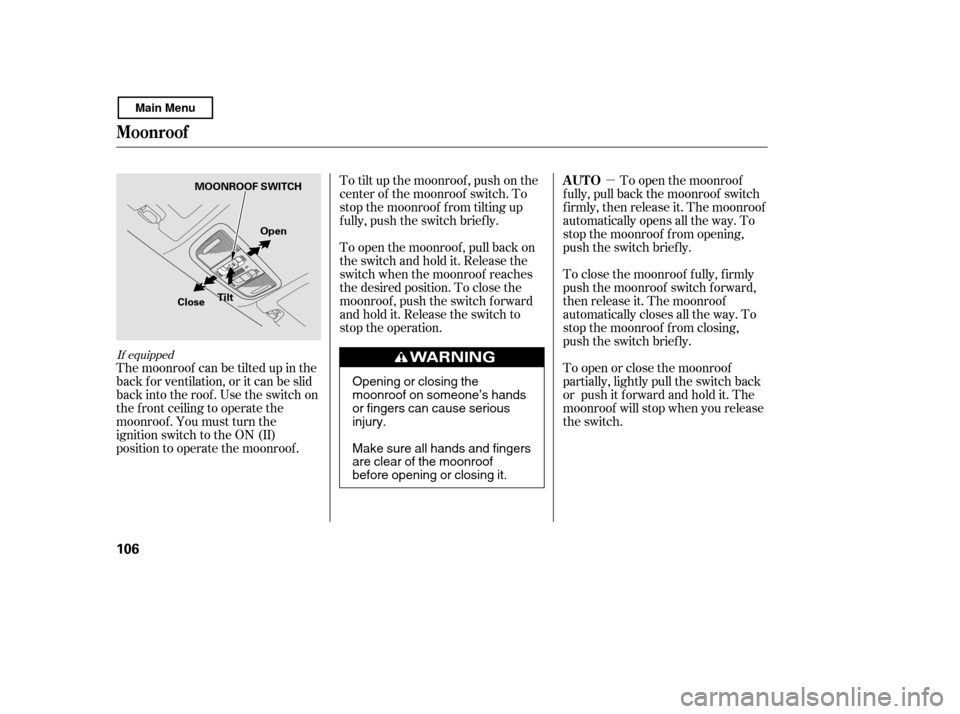
The moonroof can be tilted up in the
back f or ventilation, or it can be slid
back into the roof. Use the switch on
the f ront ceiling to operate the
moonroof . You must turn the
ignition switch to the ON (II)
position to operate the moonroof . To tilt up the moonroof , push on the
center of the moonroof switch. To
stop the moonroof f rom tilting up
f ully, push the switch brief ly.
To open the moonroof
f ully, pull back the moonroof switch
f irmly, then release it. The moonroof
automatically opens all the way. To
stop the moonroof f rom opening,
push the switch briefly.
To close the moonroof f ully, f irmly
push the moonroof switch f orward,
then release it. The moonroof
automatically closes all the way. To
stop the moonroof f rom closing,
push the switch briefly.
To open or close the moonroof
partially, lightly pull the switch back
or push it f orward and hold it. The
moonroof will stop when you release
the switch.
To open the moonroof , pull back on
the switch and hold it. Release the
switch when the moonroof reaches
the desired position. To close the
moonroof , push the switch f orward
andholdit.Releasetheswitchto
stop the operation.
If equipped
AUTO
Moonroof
106
MOONROOF SWITCH
Open
Close Tilt
Opening or closing the
moonroof on someone’s hands
or fingers can cause seriousinjury.
Make sure all hands and fingers
are clear of the moonroof
before opening or closing it.
Main Menu
Page 111 of 400
�µIf the
moonroof runs into any obstacle
while it is closing automatically, it
will reverse direction and then stop.
To close the moonroof , remove the
obstacle, then use the moonroof
switch again.
Auto reverse stops sensing when the
moonroof is almost closed. You
should always check that all
passengers and objects are away
f rom the moonroof bef ore closing it. The moonroof has a key-of f delay.
You can open and close the
moonroof f or up to 10 minutes af ter
you turn of f the ignition switch. The
key-of f delay cancels as soon as you
open either door.
AUTO REVERSE
Moonroof
Inst rument s and Cont rols
107
If you try to open the moonroof in
below-f reezing temperatures, or when
it is covered with snow or ice, you can
damage the moonroof panel or motor.
Main Menu
Page 119 of 400
If equipped On models with moonroof
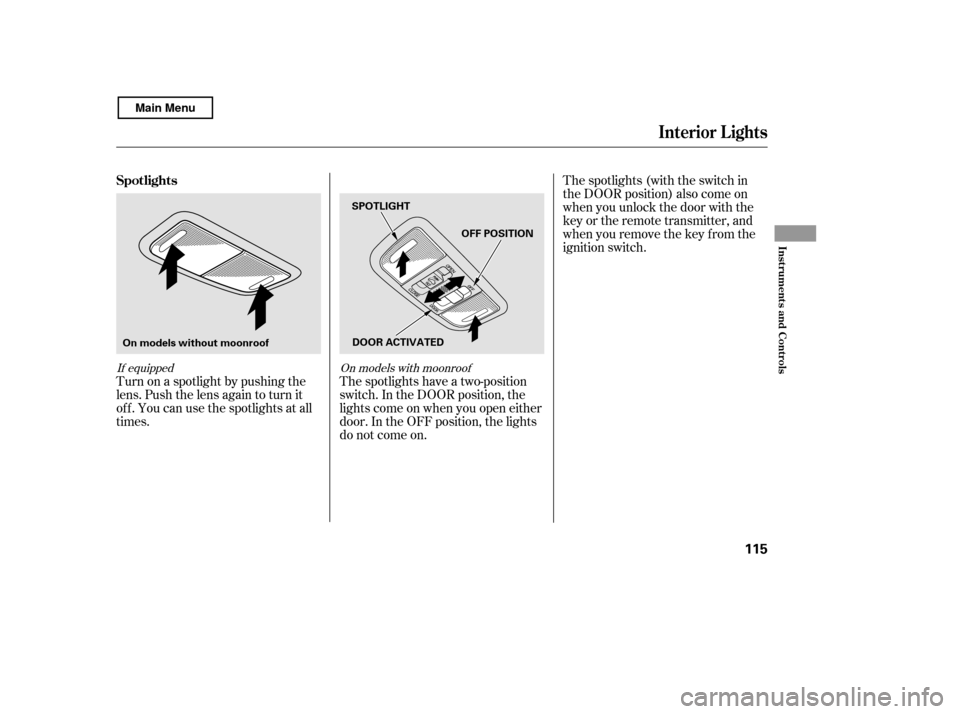
Turn on a spotlight by pushing the
lens. Push the lens again to turn it
of f . You can use the spotlights at all
times.The spotlights (with the switch in
the DOOR position) also come on
when you unlock the door with the
key or the remote transmitter, and
when you remove the key f rom the
ignition switch.
The spotlights have a two-position
switch. In the DOOR position, the
lights come on when you open either
door. In the OFF position, the lights
do not come on.
Interior Lights
Spotlights
Inst rument s and Cont rols
115
DOOR ACTIVATED
SPOTLIGHT
OFF POSITION
On models without moonroof
Main Menu
Page 136 of 400
�µ�µ
�µ
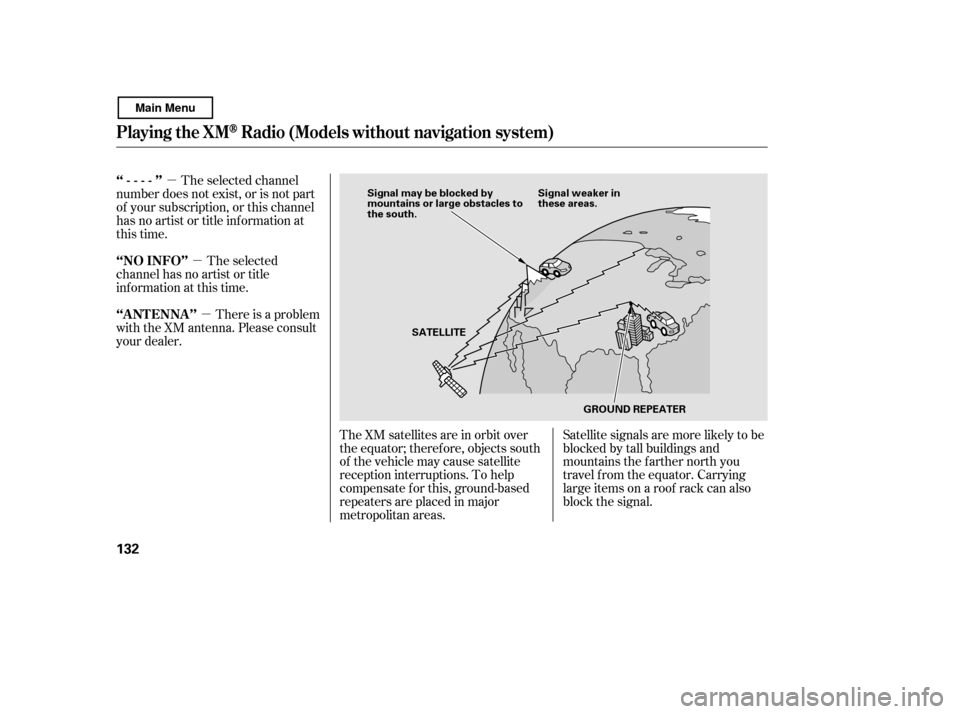
The XM satellites are in orbit over
the equator; therefore, objects south
of the vehicle may cause satellite
reception interruptions. To help
compensate f or this, ground-based
repeaters are placed in major
metropolitan areas. Satellite signals are more likely to be
blocked by tall buildings and
mountains the f arther north you
travel f rom the equator. Carrying
large items on a roof rack can also
block the signal.
The selected channel
number does not exist, or is not part
of your subscription, or this channel
has no artist or title inf ormation at
this time.
There is a problem
with the XM antenna. Please consult
your dealer. The selected
channel has no artist or title
inf ormation at this time.
‘‘----’’
‘‘A NT ENNA ’’
‘‘NO INFO’’
Playing t he XMRadio (Models without navigation system)
132
Signal may be blocked by
mountains or large obstacles to
the south.
Signal weaker in
these areas.
SATELLITE GROUND REPEATER
Main Menu
Page 137 of 400

Depending on where you drive, you
may experience reception problems.
Interf erence can be caused by any of
these conditions:Driving on the north side of a
large commercial truck on an
east/west road.
Driving in tunnels.
Driving on a road beside a vertical
wall, steep clif f , or hill to the south
of you.
Driving on the lower level of a
multi-tiered road.
Driving on a single lane road
alongside dense trees taller than
50 ft. (15 m) to the south of you.
Driving on the north side of an
east/west mountain road.
Large items carried on a roof rack.
There may be other geographic
situations that could af f ect XM Radio
reception. If your XM Radio service has expired
or you purchased your vehicle f rom
a previous owner, you can listen to a
sampling of the broadcasts available
on XM Radio. With the ignition
switch in the ACCESSORY (I) or ON
(II) position, push the power/volume
knob to turn on the audio system and
press the AUX button. A variety of
music types and styles will play.
If you decide to purchase XM Radio
service, contact XM Radio at
,orat
1-800-852-9696. You will need to give
them your radio I.D. number and
your credit card number. To get your
radio I.D. number, turn the TUNE
knob until ‘‘0’’ appears in the display. Your I.D. will appear in the display.
While waiting f or activation, make
sure your vehicle remains in an open
area with good reception. Once your
audio system is activated, you’ll be
able to listen to XM Radio broadcasts.
XM Radio will continue to send an
activation signal to your vehicle f or
at least 12 hours from the activation
request. If the service has not been
activated after 36 hours, contactXM
Radio. In Canada, contact XM
CANADA
.
After you’ve registered with XM
Radio, keep your audio system in the
XM Radio mode while you wait f or
activation. This should take about 30
minutes.
As required by the FCC:
Changes or modif ications not expresslyapproved by the party responsible f or
compliance could void the user’sauthority to operate the equipment.
www.xmradio.com
Receiving XM Radio Service
Playing t he XMRadio (Models without navigation system)
Features
133
Main Menu