Page 278 of 454

�Î
�Î
CONT INUED
BluetoothHandsFreeL ink
Features
275
‘‘Change Language’’
‘‘System
Set up’’
‘‘Tutorial’’ ‘‘Clear’’
‘‘Auto Transfer’’ ‘‘Call Notification’’ ‘‘Security’’
‘‘Change Passcode’’
Press HFL
Talk button
Press and release the HFL Talk button each time you give a command.
: Canadian models Apply a security passcode to the system that must be input at each key
cycle to access the system (See page
291)
Change your security passcode (See page292)
Set how you would like to be notified of an incoming call
(See page 292)
(See page 292)
Set calls to automatically transfer from your phone to HFL when you
enter the vehicle
Clear the system of all paired phones, phonebook entries and security
passcode (See page 293)
Change language from English to French (See page293)
Hear a tutorial for general rules on using the system (See page 272)
‘‘Hands Free Help’’ Hear a list of available commands and additional information describing each command
(See page
272)
10/06/18 16:17:28 31TA5630_280
2011 Accord Sedan
Page 279 of 454

To use HFL, you need to pair your
Bluetooth-compatible cell phone to
the system.This command group is available f or
paired cell phones.
You cannot pair your phone while
the vehicle is moving.
Your phone must be in discovery
or search mode to pair. Ref er to
your phone’s manual.
Up to six phones can be paired.
Your phone’s battery may drain
f aster when it is paired to HFL.
If af ter three minutes your phone
is not ready to pair or a phone is
not f ound, the system will time out
andreturntoidle. Press and release the HFL Talk
button. If you are pairing a phone
f or the f irst time, HFL will give
you inf ormation about the pairing
process. If it is not the f irst phone
you are pairing, say ‘‘
’’ and say ‘‘ .’’
Follow the HFL prompts and put
your phone in discovery or search
mode. HFL will give you a 4-digit
pairing code and begin searching
foryourphone.
When your phone f inds a
Bluetooth device, select HFL f rom
the options and enter the 4-digit
code f rom the previous step.
Follow the HFL prompts and
name the newly paired phone.
1.
2.
3.
4.
Phone Setup
Phone
setup Pair
Phone pairing tips T o pair a cell phone:
BluetoothHandsFreeL ink
276
10/06/18 16:17:37 31TA5630_281
2011 Accord Sedan
Page 280 of 454
Say ‘‘.’’
Say‘‘ ’’aftertheprompts.
If there is more than one phone
paired to the system, HFL will ask
you which phone’s name you want
to change. Follow the HFL
prompts and rename the phone.
Press and release the HFL Talk
button bef ore a command.
Press and release the HFL Talk
button bef ore a command.
Say ‘‘ .’’
Say‘‘ ’’aftertheprompts.
HFL will ask you which phone you
want to delete. Follow the HFL
prompts to continue with the
deletion. Press and release the HFL Talk
button bef ore a command.
HFL will read out all the paired
phone’s names. Say‘‘ ’’aftertheprompts. Say ‘‘ .’’
1.
2.
3.
3. 1.
2.1.
2.
3.
CONT INUED
Phone setup
EditPhone setup
Delete
List Phone setup
To hear the names of all paired
phones:
T o rename a paired phone:
T o delet e a paired phone:
BluetoothHandsFreeL ink
Features
277
10/06/18 16:17:48 31TA5630_282
2011 Accord Sedan
Page 281 of 454

Press and release the HFL Talk
button bef ore a command.Say ‘‘ .’’
Say‘‘ ’’aftertheprompts.
HFL will tell you which phone is
linked to the system. Press and release the HFL Talk
button bef ore a command.
Say ‘‘ .’’ Say ‘‘
.’’
Press and release the HFL Talk
button bef ore a command.
Say ‘‘ ’’ af ter the
prompts.
HFL disconnects the linked phone
and searches for another paired
phone.
Once another phone is f ound, it is
linked to the system. HFL will
inf orm you which phone is now
linked.
If no other phones are f ound or
paired, HFL will inf orm you that the
original phone is linked again. Say ‘‘
’’ af ter the
prompts.
If you want HFL to create a
random code each time you pair a
phone, say ‘‘ .’’ If you want
to choose your own 4-digit code to
be used each time, say ‘‘ ’’
and f ollow the HFL prompts.
1.
2.
3.
1.
2.
3.1.
2.
3.
4.
BluetoothHandsFreeL ink
T o hear which paired phone is current ly linked: To change f rom the currently linked
phone t o anot her paired phone: T o change t he pairing code set t ing:
Phone setup
StatusPhone setup
Phone setup
Next phone Set pairing code
Random Fixed
278
10/06/18 16:18:00 31TA5630_283
2011 Accord Sedan
Page 282 of 454

CONT INUED
You can make calls using any phone
number or a name in the HFL
phonebook. You can also redial the
last number called.Press and release the HFL Talk
button bef ore a command.
Say ‘‘ ’’ or ‘‘ .’’
Follow the HFL prompts and say
the phone number you want to dial.
Follow the HFL prompts to
conf irm the number and say
‘‘ ’’ or ‘‘ .’’
Once connected, you will hear the
person you called through the audio
speakers. Press and release the HFL Talk
button bef ore a command.
Follow the HFL prompts to
confirm the name and make Follow the HFL prompts and say
thenamestoredintheHFL
phonebook that you want to call. Say ‘‘ ’’ or ‘‘ .’’
Bluetooth is the wireless technology
that links your phone to HFL. HFL
uses a Class 2 Bluetooth, which
means the maximum range between
yourphoneandvehicleis30feet(10
meters).
During a call, HFL allows you to talk
up to 30 minutes af ter you remove
the key from the ignition switch.
However, this may weaken the
vehicle’s battery. 1.
2.
3.
1.
2.
3.
BluetoothHandsFreeL ink
Making a Call
Call Dial
Call Dial Call DialT o make a call using a phone
number: Tomakeacallusinganameinthe
HFL phonebook:
Features
279
10/06/18 16:18:11 31TA5630_284
the call.
2011 Accord Sedan
Page 283 of 454
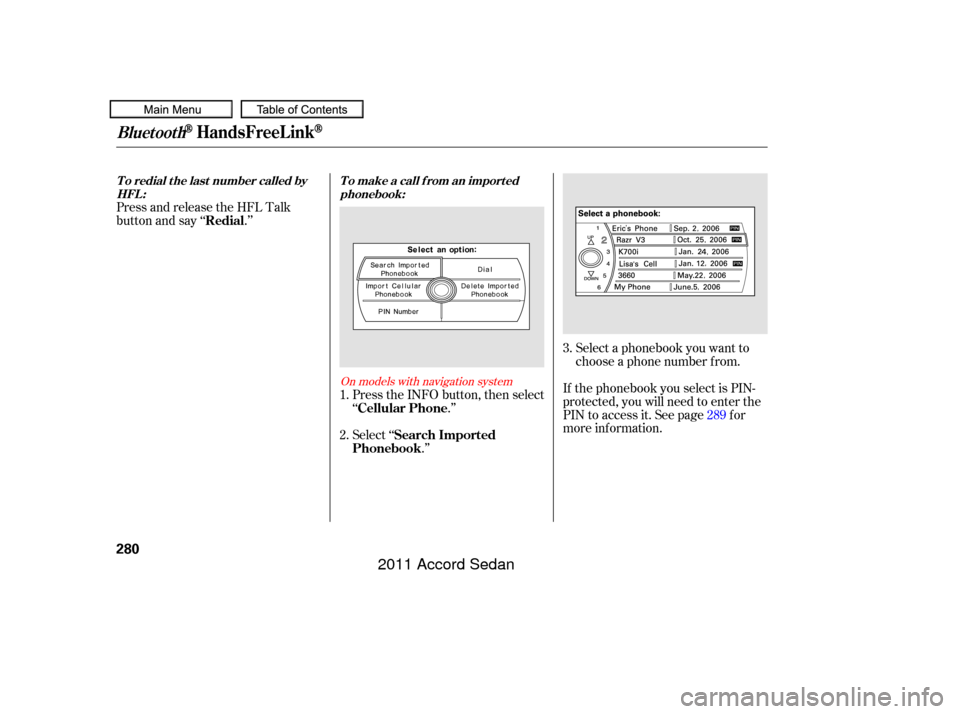
Select a phonebook you want to
choose a phone number f rom.
If the phonebook you select is PIN-
protected, you will need to enter the
PIN to access it. See page f or
more inf ormation.
Press and release the HFL Talk
button and say ‘‘ .’’
Select ‘‘.’’
Press the INFO button, then select
‘‘
.’’
1.
2. 3.
289
On models with navigation system
BluetoothHandsFreeL ink
To redial the last number called byHFL : T o make a call f rom an import ed
phonebook:
Redial
Search Imported
Phonebook Cellular Phone
280
10/06/18 16:18:20 31TA5630_285
2011 Accord Sedan
Page 284 of 454
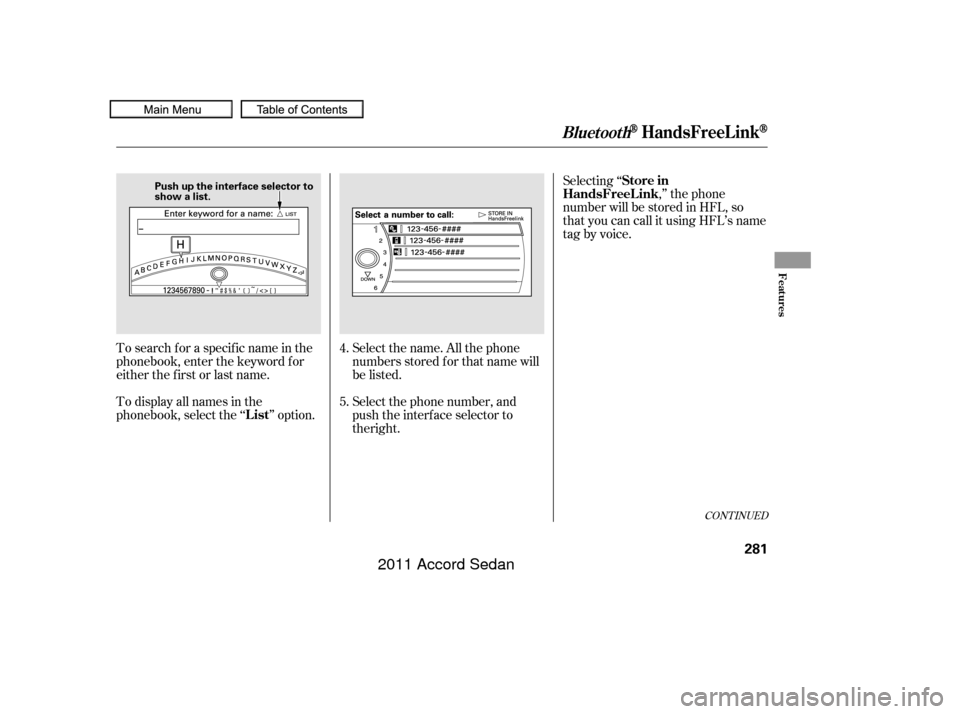
Select the name. All the phone
numbers stored f or that name will
be listed.
To search f or a specif ic name in the
phonebook, enter the keyword f or
either the f irst or last name.
To display all names in the
phonebook, select the ‘‘ ’’ option. Selecting ‘‘
,’’ the phone
number will be stored in HFL, so
that you can call it using HFL’s name
tag by voice.
Select the phone number, and
push the interface selector to
4.
5.
CONT INUED
BluetoothHandsFreeL ink
List Store in
HandsFreeL ink
Features
281
Push up the interface selector to
show a list.
10/06/18 16:18:27 31TA5630_286
the right.
2011 Accord Sedan
Page 285 of 454
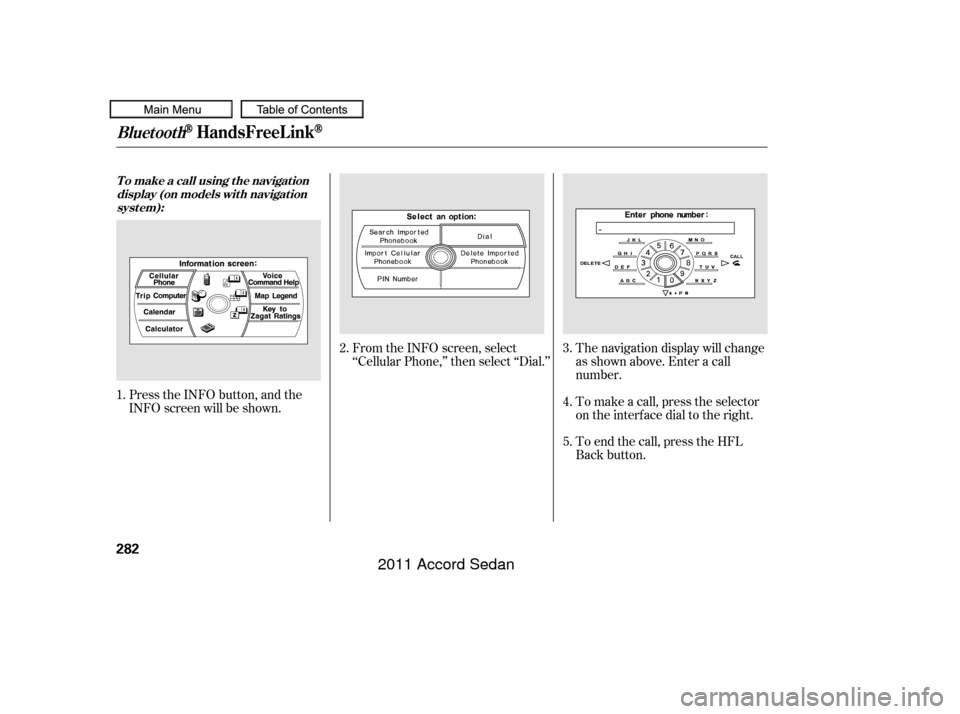
Press the INFO button, and the
INFO screen will be shown.From the INFO screen, select
‘‘Cellular Phone,’’ then select ‘‘Dial.’’
The navigation display will change
as shown above. Enter a call
number.
To make a call, press the selector
on the interface dial to the right.
To end the call, press the HFL
Back button.
1.
2.
3.
4.
5.
BluetoothHandsFreeL ink
T o make a call using t he navigat ion display (on models wit h navigat ionsyst em):
282
10/06/18 16:18:36 31TA5630_287
2011 Accord Sedan