2011 GMC SIERRA 1500 ABS
[x] Cancel search: ABSPage 259 of 594
Black plate (33,1)GMC Sierra Owner Manual - 2011
Infotainment System 7-33
e(Audio Stream):Press to cycle
through audio stream formats
located on the DVD-A disc.
The video screen shows the
audio stream changing.
The rear seat passenger can
navigate the DVD-V and DVD-A
menus and controls through the
remote control. See “Remote
Control” underRear Seat
Entertainment (RSE) System on
page 7‑39 for more information.
The video screen automatically
turns on when the DVD-V is
inserted into the DVD slot, and
does not automatically power on
when the DVD-A is inserted into
the DVD slot. It must be manually
turned on by the rear seat occupant
through the remote control power
button.Stopping and Resuming
Playback
To stop playing a DVD without
turning off the system, press
the
cbutton on the remote control,
or press the softkey located under
the
cor ther/jtabs displayed
on the radio. If the radio is sourced
to something other than DVD-V,
press the DVD/CD AUX button to
make DVD-V the active source.
To resume DVD playback, press the
r/jbutton on the remote control,
or press the softkey located under
the
r/jtab on the radio. The DVD
should resume play from where it
last stopped if the disc has not been
ejected and the stop button has not
been pressed twice on the remote
control. If the disc has been ejected
or the stop button has been pressed
twice on the remote control, the disc
resumes playing at the beginning of
the disc.
CD/DVD Player Messages
Disc Format Error: This message
displays if the disc is inserted with
the disc label wrong side up, or if
the disc is damaged.
Disc Region Error: This message
displays if the disc is not from a
correct region.
No Disc Inserted: This message
displays if no disc is present when
the
Zor DVD/CD AUX button is
pressed on the radio.
Optical Error: This message
displays if the disc was inserted
upside down.
Disk Read Error: This message
displays if a disc was inserted with
an invalid or unknown format.
Page 295 of 594

Black plate (1,1)GMC Sierra Owner Manual - 2011
Driving and Operating 9-1
Driving and
Operating
Driving Information
Defensive Driving . . . . . . . . . . . . . 9-2
Drunk Driving . . . . . . . . . . . . . . . . . 9-2
Control of a Vehicle . . . . . . . . . . . 9-3
Braking . . . . . . . . . . . . . . . . . . . . . . . 9-3
Steering . . . . . . . . . . . . . . . . . . . . . . . 9-4
Off-Road Recovery . . . . . . . . . . . . 9-5
Loss of Control . . . . . . . . . . . . . . . . 9-6
Off-Road Driving . . . . . . . . . . . . . . 9-7
Driving on Wet Roads . . . . . . . 9-19
Highway Hypnosis . . . . . . . . . . . 9-20
Hill and Mountain Roads . . . . . 9-20
Winter Driving . . . . . . . . . . . . . . . 9-21
If the Vehicle is Stuck . . . . . . . . 9-23
Vehicle Load Limits . . . . . . . . . . 9-25
Truck-Camper LoadingInformation . . . . . . . . . . . . . . . . . 9-32
Starting and Operating
New Vehicle Break-In . . . . . . . . 9-34
Adjustable Throttle and BrakePedal . . . . . . . . . . . . . . . . . . . . . . . 9-35
Ignition Positions . . . . . . . . . . . . 9-35
Starting the Engine . . . . . . . . . . 9-37 Fast Idle System . . . . . . . . . . . . . 9-39
Retained Accessory
Power (RAP) . . . . . . . . . . . . . . . 9-40
Engine Coolant Heater . . . . . . . 9-40
Shifting Into Park . . . . . . . . . . . . 9-41
Shifting Out of Park . . . . . . . . . . 9-43
Parking Over Things That Burn . . . . . . . . . . . . . . . . . . 9-43
Active Fuel Management
®. . . 9-44
Engine Exhaust
Engine Exhaust . . . . . . . . . . . . . . 9-44
Running the Vehicle While Parked . . . . . . . . . . . . . . . . . . . . . 9-45
Automatic Transmission
Automatic Transmission . . . . . 9-46
Manual Mode . . . . . . . . . . . . . . . . 9-50
Tow/Haul Mode . . . . . . . . . . . . . . 9-51
Drive Systems
Four-Wheel Drive . . . . . . . . . . . . 9-54
Brakes
Antilock BrakeSystem (ABS) . . . . . . . . . . . . . . 9-68
Parking Brake . . . . . . . . . . . . . . . 9-69
Brake Assist (Except With 4.3L V6 Engine) . . . . . . . . . . . . 9-69
Hill Start Assist (HSA) . . . . . . . 9-70
Ride Control Systems
StabiliTrak®System . . . . . . . . . 9-70
Locking Rear Axle . . . . . . . . . . . 9-73
Cruise Control
Cruise Control . . . . . . . . . . . . . . . 9-73
Object Detection Systems
Ultrasonic Parking Assist . . . . 9-76
Rear Vision Camera (RVC) . . . . . . . . . . . . . 9-78
Fuel
Fuel . . . . . . . . . . . . . . . . . . . . . . . . . 9-84
Recommended Fuel . . . . . . . . . 9-84
Gasoline Specifications(U.S. and Canada Only) . . . . 9-85
California Fuel Requirements . . . . . . . . . . . . . . 9-85
Fuels in Foreign Countries . . . 9-86
Fuel Additives . . . . . . . . . . . . . . . 9-86
Fuel E85 (85% Ethanol) . . . . . 9-87
Filling the Tank . . . . . . . . . . . . . . 9-88
Filling a Portable Fuel Container . . . . . . . . . . . . . . . . . . . 9-90
Page 315 of 594
Black plate (21,1)GMC Sierra Owner Manual - 2011
Driving and Operating 9-21
{WARNING
Coasting downhill in N (Neutral)
or with the ignition off is
dangerous. The brakes will
have to do all the work of slowing
down and they could get so hot
that they would not work well.
You would then have poor braking
or even none going down a hill.
You could crash. Always have the
engine running and the vehicle in
gear when going downhill.
.Stay in your own lane. Do not
swing wide or cut across the
center of the road. Drive at
speeds that let you stay in
your own lane.
.Top of hills: Be alert—
something could be in your
lane (stalled car, accident).
.Pay attention to special road
signs (falling rocks area, winding
roads, long grades, passing or
no-passing zones) and take
appropriate action.
Winter Driving
Driving on Snow or Ice
Drive carefully when there is snow
or ice between the tires and the
road, creating less traction or grip.
Wet ice can occur at about 0°C
(32°F) when freezing rain begins to
fall, resulting in even less traction.
Avoid driving on wet ice or in
freezing rain until roads can be
treated with salt or sand.
Drive with caution, whatever the
condition. Accelerate gently so
traction is not lost. Accelerating too
quickly causes the wheels to spin
and makes the surface under the
tires slick, so there is even less
traction. Try not to break the fragile traction.
If you accelerate too fast, the drive
wheels will spin and polish the
surface under the tires even more.
The
Antilock Brake System (ABS)
on page 9‑68 improves vehicle
stability during hard stops on
slippery roads, but apply the brakes
sooner than when on dry pavement.
Allow greater following distance on
any slippery road and watch for
slippery spots. Icy patches can
occur on otherwise clear roads in
shaded areas. The surface of a
curve or an overpass can remain
icy when the surrounding roads
are clear. Avoid sudden steering
maneuvers and braking while
on ice.
Turn off cruise control on slippery
surfaces.
Page 362 of 594
Black plate (68,1)GMC Sierra Owner Manual - 2011
9-68 Driving and Operating
Brakes
Antilock Brake
System (ABS)
This vehicle has the Antilock
Brake System (ABS), an advanced
electronic braking system that helps
prevent a braking skid.
When the engine is started and the
vehicle begins to drive away, ABS
checks itself. A momentary motor
or clicking noise might be heard
while this test is going on, and
it might even be noticed that
the brake pedal moves a little.
This is normal.If there is a problem with ABS, this
warning light stays on. SeeAntilock
Brake System (ABS) Warning Light
on page 5‑28.
If driving safely on a wet road
and it becomes necessary to
slam on the brakes and continue
braking to avoid a sudden obstacle,
a computer senses that the wheels
are slowing down. If one of the
wheels is about to stop rolling,
the computer will separately
work the brakes at each wheel.
ABS can change the brake pressure
to each wheel, as required, faster
than any driver could. This can help
the driver steer around the obstacle
while braking hard. As the brakes are applied, the
computer keeps receiving updates
on wheel speed and controls
braking pressure accordingly.
Remember: ABS does not change
the time needed to get a foot up to
the brake pedal or always decrease
stopping distance. If you get too
close to the vehicle in front of you,
there will not be enough time to
apply the brakes if that vehicle
suddenly slows or stops. Always
leave enough room up ahead to
stop, even with ABS.
Using ABS
Do not pump the brakes. Just hold
the brake pedal down firmly and let
ABS work. You might hear the ABS
pump or motor operating and feel
the brake pedal pulsate, but this is
normal.
Page 363 of 594
Black plate (69,1)GMC Sierra Owner Manual - 2011
Driving and Operating 9-69
Braking in Emergencies
ABS allows the driver to steer and
brake at the same time. In many
emergencies, steering can help
more than even the very best
braking.
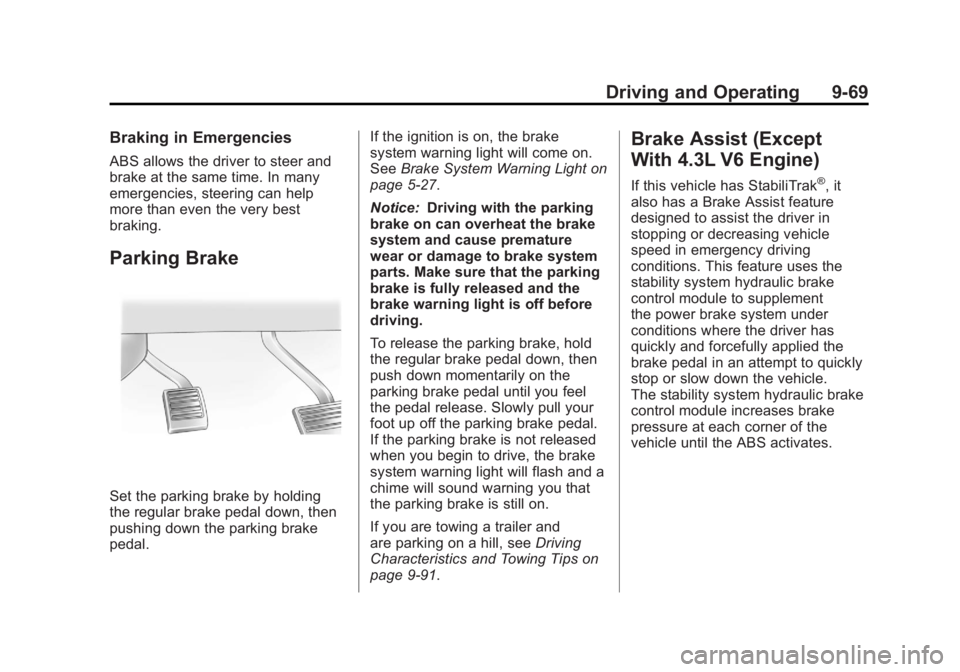
Parking Brake
Set the parking brake by holding
the regular brake pedal down, then
pushing down the parking brake
pedal.If the ignition is on, the brake
system warning light will come on.
See
Brake System Warning Light on
page 5‑27.
Notice: Driving with the parking
brake on can overheat the brake
system and cause premature
wear or damage to brake system
parts. Make sure that the parking
brake is fully released and the
brake warning light is off before
driving.
To release the parking brake, hold
the regular brake pedal down, then
push down momentarily on the
parking brake pedal until you feel
the pedal release. Slowly pull your
foot up off the parking brake pedal.
If the parking brake is not released
when you begin to drive, the brake
system warning light will flash and a
chime will sound warning you that
the parking brake is still on.
If you are towing a trailer and
are parking on a hill, see Driving
Characteristics and Towing Tips on
page 9‑91.
Brake Assist (Except
With 4.3L V6 Engine)
If this vehicle has StabiliTrak®, it
also has a Brake Assist feature
designed to assist the driver in
stopping or decreasing vehicle
speed in emergency driving
conditions. This feature uses the
stability system hydraulic brake
control module to supplement
the power brake system under
conditions where the driver has
quickly and forcefully applied the
brake pedal in an attempt to quickly
stop or slow down the vehicle.
The stability system hydraulic brake
control module increases brake
pressure at each corner of the
vehicle until the ABS activates.
Page 366 of 594
Black plate (72,1)GMC Sierra Owner Manual - 2011
9-72 Driving and Operating
When TCS or StabiliTrak is
turned off, the StabiliTrak light
and the appropriate message
will be displayed on the DIC to
warn the driver. The vehicle will
still have brake-traction control
when traction control is off, but will
not be able to use the engine speed
management system. See“Traction
Control Operation” next for more
information.
When the traction control system
has been turned off, system noises
may still be heard as a result of the
brake-traction control coming on.
It is recommended to leave the
system on for normal driving
conditions, but it may be necessary
to turn the system off if the vehicle
is stuck in sand, mud, ice or snow,
and you want to “rock”the vehicle
to attempt to free it. It may also be
necessary to turn off the system
when driving in extreme off-road
conditions where high wheel spin
is required. See If the Vehicle is
Stuck on page 9‑23. When the transfer case is in 4LO,
the stability system is automatically
disabled, the StabiliTrak light comes
on, and the STABILITRAK OFF
message will appear on the DIC.
Both traction control and StabiliTrak
are automatically disabled in this
condition.
Traction Control Operation
The traction control system is part
of the StabiliTrak system. Traction
control limits wheel spin by reducing
engine power to the wheels (engine
speed management) and by
applying brakes to each individual
wheel (brake-traction control) as
necessary.
The traction control system is
enabled automatically when the
vehicle is started. It will activate
and the StabiliTrak light will flash
if it senses that any of the wheels
are spinning or beginning to lose
traction while driving. If traction
control is turned off, only the
brake-traction control portion
of traction control will work.
The engine speed management
will be disabled. In this mode,
engine power is not reduced
automatically and the driven
wheels can spin more freely.
This can cause the brake-traction
control to activate constantly.
Notice:
If the wheel(s) of one axle
is allowed to spin excessively
while the StabiliTrak
®, ABS, brake
warning lights, and any relevant
DIC messages are displayed, the
transfer case could be damaged.
The repairs would not be covered
by the vehicle warranty. Reduce
engine power and do not spin
the wheel(s) excessively while
these lights and messages are
displayed.
Page 388 of 594
Black plate (94,1)GMC Sierra Owner Manual - 2011
9-94 Driving and Operating
To avoid this, let the engine
run while parked, preferably on
level ground, with the automatic
transmission in P (Park) for a few
minutes before turning the engine
off. If the overheat warning comes
on, seeEngine Overheating on
page 10‑25.
Parking on Hills
{WARNING
Parking the vehicle on a hill
with the trailer attached can be
dangerous. If something goes
wrong, the rig could start to move.
People can be injured, and both
the vehicle and the trailer can be
damaged. When possible, always
park the rig on a flat surface. If parking the rig on a hill:
1. Press the brake pedal, but
do not shift into P (Park) yet.
Turn the wheels into the curb if
facing downhill or into traffic if
facing uphill.
2. Have someone place chocks under the trailer wheels.
3. When the wheel chocks are in place, release the regular brakes
until the chocks absorb the load.
4. Reapply the brake pedal. Then apply the parking brake and shift
into P (Park).
5. If the vehicle is four-wheel-drive, be sure the transfer case is in a
drive gear and not in N (Neutral).
6. Release the brake pedal.
{WARNING
It can be dangerous to get out of
the vehicle if the shift lever is not
fully in P (Park) with the parking
brake firmly set. The vehicle
can roll.
If the engine has been left
running, the vehicle can move
suddenly. You or others could be
injured. To be sure the vehicle will
not move, even when on fairly
level ground, use the steps that
follow.
Always put the shift lever fully in
P (Park) with the parking brake
firmly set.
If the transfer case on a
four-wheel-drive vehicle is in
N (Neutral), the vehicle will be
free to roll, even if the shift lever
is in P (Park). Be sure the transfer
case is in a drive gear —not in
N (Neutral).
Page 514 of 594
Black plate (90,1)GMC Sierra Owner Manual - 2011
10-90 Vehicle Care
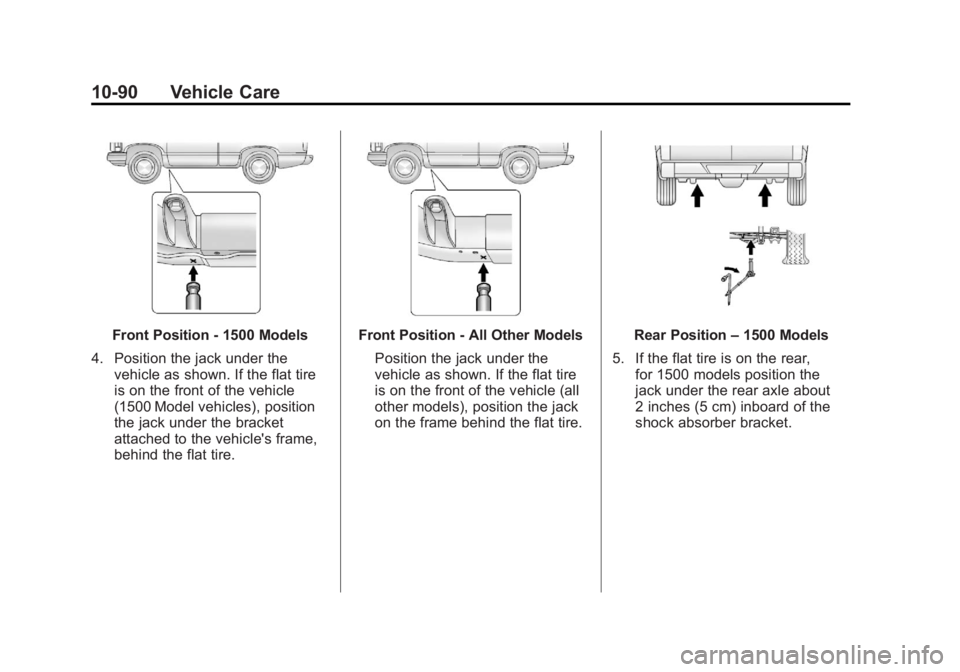
Front Position - 1500 Models
4. Position the jack under the vehicle as shown. If the flat tire
is on the front of the vehicle
(1500 Model vehicles), position
the jack under the bracket
attached to the vehicle's frame,
behind the flat tire.Front Position - All Other Models
Position the jack under the
vehicle as shown. If the flat tire
is on the front of the vehicle (all
other models), position the jack
on the frame behind the flat tire.Rear Position –1500 Models
5. If the flat tire is on the rear, for 1500 models position the
jack under the rear axle about
2 inches (5 cm) inboard of the
shock absorber bracket.