2011 GMC ACADIA flat tire
[x] Cancel search: flat tirePage 401 of 478
Black plate (73,1)GMC Acadia/Acadia Denali Owner Manual - 2011
Vehicle Care 10-73
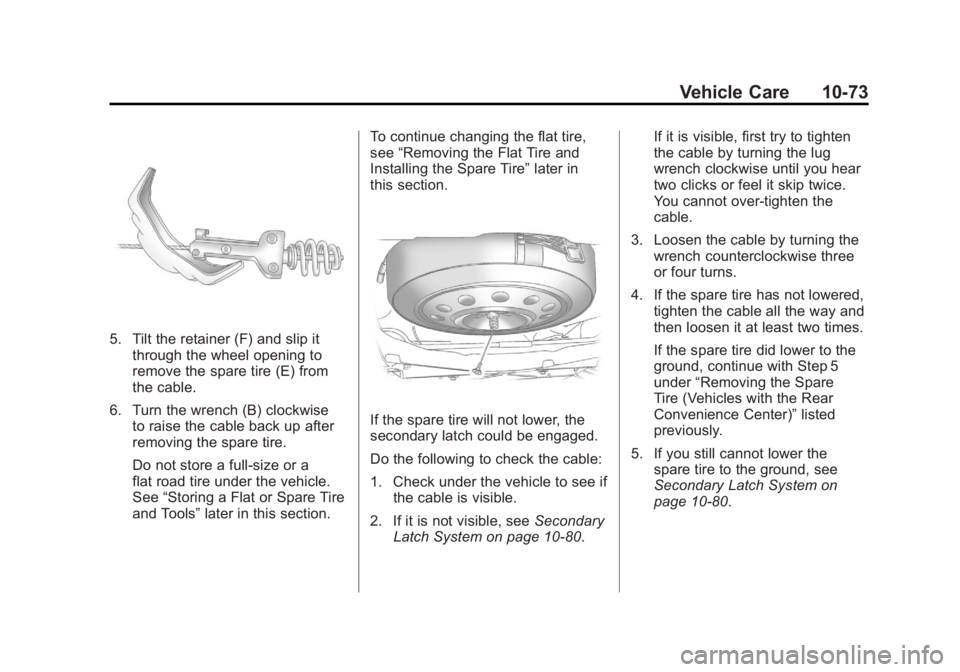
5. Tilt the retainer (F) and slip itthrough the wheel opening to
remove the spare tire (E) from
the cable.
6. Turn the wrench (B) clockwise to raise the cable back up after
removing the spare tire.
Do not store a full‐size or a
flat road tire under the vehicle.
See “Storing a Flat or Spare Tire
and Tools” later in this section. To continue changing the flat tire,
see
“Removing the Flat Tire and
Installing the Spare Tire” later in
this section.
If the spare tire will not lower, the
secondary latch could be engaged.
Do the following to check the cable:
1. Check under the vehicle to see if the cable is visible.
2. If it is not visible, see Secondary
Latch System on page 10‑80. If it is visible, first try to tighten
the cable by turning the lug
wrench clockwise until you hear
two clicks or feel it skip twice.
You cannot over‐tighten the
cable.
3. Loosen the cable by turning the wrench counterclockwise three
or four turns.
4. If the spare tire has not lowered, tighten the cable all the way and
then loosen it at least two times.
If the spare tire did lower to the
ground, continue with Step 5
under “Removing the Spare
Tire (Vehicles with the Rear
Convenience Center)” listed
previously.
5. If you still cannot lower the spare tire to the ground, see
Secondary Latch System on
page 10‑80.
Page 402 of 478

Black plate (74,1)GMC Acadia/Acadia Denali Owner Manual - 2011
10-74 Vehicle Care
Removing the Flat Tire and
Installing the Spare Tire
1. Do a safety check beforeproceeding. See If a Tire Goes
Flat on page 10‑61 for more
information.
2. If the vehicle has a wheel cover, loosen the plastic nut caps with
the wheel wrench. They will
not come off. Then, using the
flat end of the wheel wrench,
pry along the edge of the cover
until it comes off. Be careful; the
edges may be sharp. Do not try
to remove the cover with your
bare hands.
Store the wheel cover securely
in the rear of the vehicle until
you have the flat tire repaired
or replaced.
If the vehicle has aluminum
wheels, remove the wheel nut
caps using the wheel wrench.
3. Loosen the wheel nuts —but do
not remove them —using the
lug wrench. For wheels with a
wheel lock key, use the wheel
lock key between the lock nut
and lug wrench. The key is
supplied in the front passenger
door pocket.
Notice: If this vehicle has wheel
locks and an impact wrench is
used to remove the wheel nuts,
the lock nut or wheel lock key
could be damaged. Do not use
an impact wrench to remove the
wheel nuts if this vehicle has
wheel locks.
4. To identify the appropriate
jacking location, find the
triangle (A) about 12 inches
(30.5 cm) from the front tire
or (B) about 10.5 inches (27 cm)
from the rear tire.
The triangle is located near each
wheel on the vehicle's exterior.
Page 403 of 478
Black plate (75,1)GMC Acadia/Acadia Denali Owner Manual - 2011
Vehicle Care 10-75
Notice:If a jack is used to raise
the vehicle without positioning
it correctly, the vehicle could
be damaged. When raising the
vehicle on a jack, avoid contact
with the rear axle control arms.
5. Attach the lug wrench to the
jack, and turn the wrench
clockwise to raise the jack
head 3 inches (7.6 cm).
6. Do not raise the vehicle yet. Put the compact spare tire near you.
{WARNING
Getting under a vehicle when it
is jacked up is dangerous. If the
vehicle slips off the jack, you
could be badly injured or killed.
Never get under a vehicle when
it is supported only by a jack.
{WARNING
Raising the vehicle with the
jack improperly positioned can
damage the vehicle and even
make the vehicle fall. To help
avoid personal injury and vehicle
damage, be sure to fit the jack lift
head into the proper location
before raising the vehicle.
7. Raise the vehicle by turning the lug wrench clockwise in the jack.
Raise the vehicle far enough
off the ground so that there is
enough room for the spare tire
to fit under the wheel well.
8. Remove all the wheel nuts and the flat tire.
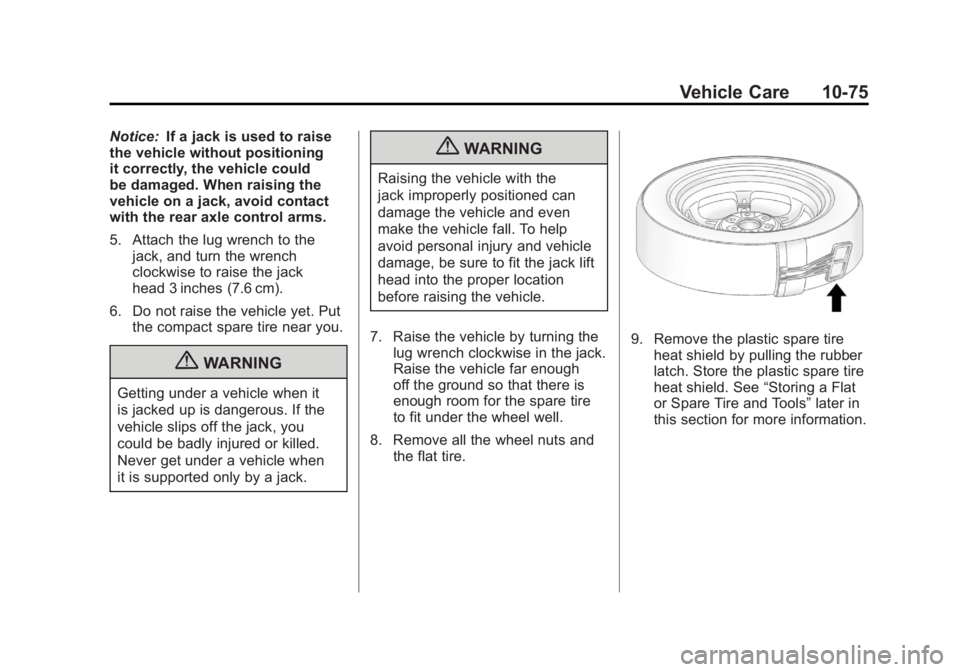
9. Remove the plastic spare tire
heat shield by pulling the rubber
latch. Store the plastic spare tire
heat shield. See “Storing a Flat
or Spare Tire and Tools” later in
this section for more information.
Page 404 of 478

Black plate (76,1)GMC Acadia/Acadia Denali Owner Manual - 2011
10-76 Vehicle Care
{WARNING
Rust or dirt on a wheel, or on the
parts to which it is fastened, can
make wheel nuts become loose
after time. The wheel could come
off and cause an accident. When
changing a wheel, remove any
rust or dirt from places where the
wheel attaches to the vehicle.
In an emergency, use a cloth or
a paper towel to do this; but be
sure to use a scraper or wire
brush later, if needed, to get all
the rust or dirt off. SeeIf a Tire
Goes Flat on page 10‑61.
{WARNING
Never use oil or grease on bolts
or nuts because the nuts might
come loose. The vehicle's wheel
could fall off, causing a crash. 10. Remove any rust or dirt from
the wheel bolts, mounting
surfaces, and spare wheel.
11. Place the spare tire on the wheel mounting surface.
12. Put the nuts on by hand by turning them clockwise until
the wheel is held against the
mounting surface. Make sure
the rounded end is toward the
wheel.
13. Lower the vehicle by attaching the lug wrench to the jack
and turning the wrench
counterclockwise. Lower
the jack completely.
{WARNING
Wheel nuts that are improperly or
incorrectly tightened can cause
the wheels to become loose or
come off. The wheel nuts should
be tightened with a torque wrench
(Continued)
WARNING (Continued)
to the proper torque specification
after replacing. Follow the torque
specification supplied by the
aftermarket manufacturer when
using accessory locking wheel
nuts. SeeCapacities and
Specifications on page 12‑2
for original equipment wheel
nut torque specifications.
Notice: Improperly tightened
wheel nuts can lead to brake
pulsation and rotor damage.
To avoid expensive brake repairs,
evenly tighten the wheel nuts
in the proper sequence and to
the proper torque specification.
See Capacities and Specifications
on page 12‑2 for the wheel nut
torque specification.
Page 406 of 478
Black plate (78,1)GMC Acadia/Acadia Denali Owner Manual - 2011
10-78 Vehicle Care
3. Slide the cable retainer throughthe center of the wheel and start
to raise the compact spare tire.
Make sure the retainer is fully
seated across the underside of
the wheel.
4. When the compact spare tire is almost in the stored position,
turn the tire so the valve is
toward the rear of the vehicle.
This position helps when
checking the air pressure
in the compact spare tire.
5. Raise the tire fully against the underside of the vehicle.
Continue turning the lug wrench
until you feel more than two
clicks. This indicates that the
compact spare tire is secure and
the cable is tight. The spare tire
hoist cannot be overtightened.
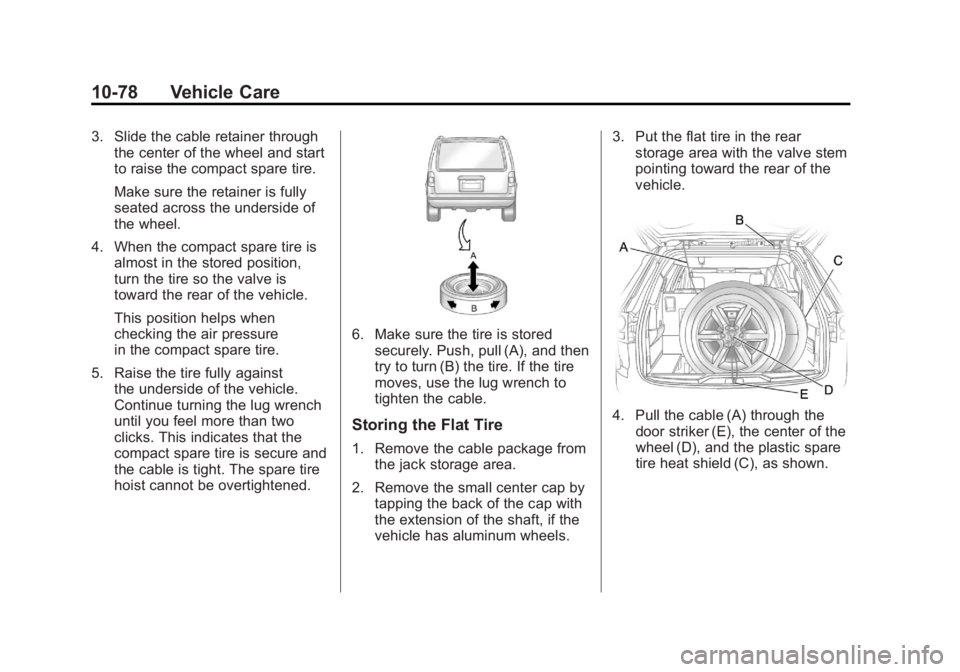
6. Make sure the tire is storedsecurely. Push, pull (A), and then
try to turn (B) the tire. If the tire
moves, use the lug wrench to
tighten the cable.
Storing the Flat Tire
1. Remove the cable package fromthe jack storage area.
2. Remove the small center cap by tapping the back of the cap with
the extension of the shaft, if the
vehicle has aluminum wheels. 3. Put the flat tire in the rear
storage area with the valve stem
pointing toward the rear of the
vehicle.
4. Pull the cable (A) through the
door striker (E), the center of the
wheel (D), and the plastic spare
tire heat shield (C), as shown.
Page 410 of 478
Black plate (82,1)GMC Acadia/Acadia Denali Owner Manual - 2011
10-82 Vehicle Care
Have the hoist shaft assembly
inspected as soon as you can.
You will not be able to store a spare
tire using the hoist assembly until it
has been repaired or replaced.
Compact Spare Tire
{WARNING
Driving with more than one
compact spare tire at a time
could result in loss of braking
and handling. This could lead
to a crash and you or others
could be injured. Use only one
compact spare tire at a time.
The compact spare tire, if the
vehicle has one, was fully inflated
when the vehicle was new, however,
it can lose air after a time. Check
the inflation pressure regularly.
It should be 60 psi (420 kPa). After installing the compact
spare on the vehicle, stop as
soon as possible and make sure
the spare tire is correctly inflated.
The compact spare is made to
perform well at speeds up to
65 mph (105 km/h) for distances up
to 3,000 miles (5 000 km), so you
can finish your trip and have the
full-size tire repaired or replaced
at your convenience. Of course,
it is best to replace the spare with
a full-size tire as soon as possible.
The spare tire will last longer and be
in good shape in case it is needed
again.
Notice:
When the compact
spare is installed, do not take
the vehicle through an automatic
car wash with guide rails. The
compact spare can get caught on
the rails which can damage the
tire, wheel and other parts of the
vehicle. Do not use the compact spare on
other vehicles.
And do not mix the compact spare
tire or wheel with other wheels or
tires. They will not fit. Keep the
spare tire and its wheel together.
The All-Wheel Drive (AWD) system
will be automatically disabled
when you use the compact spare.
To restore the AWD and prevent
excessive wear on the clutch in
your AWD, replace the compact
spare tire with a full-size tire as
soon as possible.
Notice:
Tire chains will not fit the
compact spare. Using them can
damage the vehicle and can
damage the chains too. Do not
use tire chains on the compact
spare.
Page 431 of 478

Black plate (3,1)GMC Acadia/Acadia Denali Owner Manual - 2011
Service and Maintenance 11-3
If the engine oil life system is reset
accidentally, service the vehicle
within 5 000 km/3,000 miles since
the last service. Reset the oil life
system whenever the oil is changed.
SeeEngine Oil Life System on
page 10‑11.
Every Engine Oil Change
.Change engine oil and
filter. Reset oil life system.
See Engine Oil on page 10‑8
and Engine Oil Life System on
page 10‑11. An Emission Control
Service.
.Engine coolant level check.
See Engine Coolant on
page 10‑15.
.Engine cooling system
inspection. Visual inspection
of hoses, pipes, fittings, and
clamps and replacement,
if needed.
.Windshield washer fluid level
check. See Washer Fluid on
page 10‑23.
.Windshield wiper blade
inspection for wear, cracking,
or contamination and
windshield and wiper blade
cleaning, if contaminated. See
Exterior Care on page 10‑90.
Worn or damaged wiper blade
replacement. See Wiper Blade
Replacement on page 10‑29.
.Tire inflation pressures
check. See Tire Pressure on
page 10‑45.
.Tire wear inspection. See Tire
Inspection on page 10‑51.
.Rotate tires if necessary.
See Tire Rotation on
page 10‑52.
.Fluids visual leak check
(or every 12 months, whichever
occurs first). A leak in any
system must be repaired and
the fluid level checked.
.Engine air cleaner filter
inspection. See Engine Air
Cleaner/Filter on page 10‑13.
.Brake system inspection
(or every 12 months, whichever
occurs first).
.Steering and suspension
inspection. Visual inspection
for damaged, loose, or missing
parts or signs of wear.
Page 432 of 478

Black plate (4,1)GMC Acadia/Acadia Denali Owner Manual - 2011
11-4 Service and Maintenance
.Body hinges and latches, key
lock cylinders, hood latch
assemblies, secondary latches,
pivots, spring anchor and
release pawl, hood and door
hinges, rear folding seats,
and liftgate hinges lubrication.
SeeRecommended Fluids
and Lubricants on page 11‑7.
More frequent lubrication may
be required when the vehicle
is exposed to a corrosive
environment. Applying silicone
grease on weatherstrips with a
clean cloth makes them last
longer, seal better, and not
stick or squeak.
.Restraint system component
check. See Safety System
Check on page 3‑31.
.Fuel system inspection for
damage or leaks.
.Exhaust system and nearby heat
shields inspection for loose or
damaged components.
Additional Required Services
Every 12 000 km/7,500 Miles
.Rotate tires. Tires should
be rotated every 12 000 km/
7,500 miles. See Tire Rotation
on page 10‑52.
At Each Fuel Stop
.Engine oil level check.
See Engine Oil on page 10‑8.
.Engine coolant level check.
SeeEngine Coolant on
page 10‑15.
.Windshield washer fluid level
check. See Washer Fluid on
page 10‑23. Once a Month
.Tire inflation check. See
Tire
Pressure on page 10‑45.
.Tire wear inspection. See Tire
Inspection on page 10‑51.
.Sunroof track and seal
inspection, if equipped.
See Sunroof on page 2‑22.
Once a Year
.See Starter Switch Check on
page 10‑27.
.See Automatic Transmission
Shift Lock Control Function
Check on page 10‑28.
.See Ignition Transmission Lock
Check on page 10‑28.
.See Park Brake and P (Park)
Mechanism Check on
page 10‑28.