2011 GMC ACADIA service
[x] Cancel search: servicePage 99 of 478

Black plate (43,1)GMC Acadia/Acadia Denali Owner Manual - 2011
Seats and Restraints 3-43
For some children, including
children in child restraints, and for
very small adults, the passenger
sensing system may or may not
turn off the right front passenger
frontal airbag, depending upon
the person’s seating posture
and body build. Everyone in the
vehicle who has outgrown child
restraints should wear a safety
belt properly —whether or not
there is an airbag for that person.
{WARNING
If the airbag readiness light ever
comes on and stays on, it means
that something may be wrong
with the airbag system. To help
avoid injury to yourself or others,
have the vehicle serviced right
away. See Airbag Readiness
Light on page 5‑15 for more
information, including important
safety information.
If the On Indicator is Lit for a
Child Restraint
If a child restraint has been installed
and the on indicator is lit:
1. Turn the vehicle off.
2. Remove the child restraint from the vehicle.
3. Remove any additional items from the seat such as blankets,
cushions, seat covers, seat
heaters, or seat massagers.
4. Reinstall the child restraint following the directions
provided by the child restraint
manufacturer and refer to
Securing Child Restraints (Rear
Seat) on page 3‑65 orSecuring
Child Restraints (Right Front
Passenger Seat) on page 3‑67. 5. If, after reinstalling the child
restraint and restarting the
vehicle, the on indicator is
still lit, turn the vehicle off.
Then slightly recline the vehicle
seatback and adjust the seat
cushion, if adjustable, to make
sure that the vehicle seatback
is not pushing the child restraint
into the seat cushion.
Also make sure the child
restraint is not trapped under
the vehicle head restraint.
If this happens, adjust the head
restraint. See Head Restraints
on page 3‑2.
6. Restart the vehicle.
The passenger sensing system
may or may not turn off the
airbag for a child in a child
restraint depending upon the
child’s seating posture and body
build. It is better to secure the
child restraint in a rear seat.
Page 101 of 478

Black plate (45,1)GMC Acadia/Acadia Denali Owner Manual - 2011
Seats and Restraints 3-45
A wet seat can affect the
performance of the passenger
sensing system. Here is how:
.The passenger sensing system
may turn off the passenger
airbag when liquid is soaked
into the seat. If this happens,
the off indicator will be lit, and
the airbag readiness light on the
instrument panel will also be lit.
.Liquid pooled on the seat that
has not soaked in may make it
more likely that the passenger
sensing system will enable (turn
on) the passenger airbag while a
child restraint or child occupant
is on the seat. If the passenger
airbag is turned on, the on
indicator will be lit.
If the passenger seat gets wet, dry
the seat immediately. If the airbag
readiness light is lit, do not install
a child restraint or allow anyone
to occupy the seat. See Airbag
Readiness Light on page 5‑15
for important safety information. The on indicator may be lit if
an object, such as a briefcase,
handbag, grocery bag, laptop or
other electronic device, is put on
an unoccupied seat. If this is not
desired remove the object from
the seat.
{WARNING
Stowing of articles under the
passenger seat or between the
passenger seat cushion and
seatback may interfere with the
proper operation of the passenger
sensing system.
Servicing the
Airbag-Equipped Vehicle
Airbags affect how the vehicle
should be serviced. There are
parts of the airbag system in
several places around the vehicle.
Your dealer and the service manual
have information about servicing
the vehicle and the airbag system.
To purchase a service manual,
see
Service Publications Ordering
Information on page 13‑15.
{WARNING
For up to 10 seconds after the
ignition is turned off and the
battery is disconnected, an airbag
can still inflate during improper
service. You can be injured if you
are close to an airbag when it
inflates. Avoid yellow connectors.
They are probably part of the
airbag system. Be sure to follow
proper service procedures, and
make sure the person performing
work for you is qualified to do so.
Page 103 of 478

Black plate (47,1)GMC Acadia/Acadia Denali Owner Manual - 2011
Seats and Restraints 3-47
Q: Because I have a disability,I have to get my vehicle
modified. How can I find out
whether this will affect my
airbag system?
A: If you have questions,
call Customer Assistance.
The phone numbers and
addresses for Customer
Assistance are in Step Two
of the Customer Satisfaction
Procedure in this manual.
See Customer Satisfaction
Procedure (U.S. and Canada) on
page 13‑1 orCustomer
Satisfaction Procedure (Mexico)
on page 13‑3. In addition, the dealer and the
service manual have information
about the location of the airbag
sensors, sensing and diagnostic
module and airbag wiring.
Airbag System Check
The airbag system does not need
regularly scheduled maintenance
or replacement. Make sure the
airbag readiness light is working.
See
Airbag Readiness Light on
page 5‑15 for more information. Notice:
If an airbag covering is
damaged, opened, or broken,
the airbag may not work properly.
Do not open or break the airbag
coverings. If there are any
opened or broken airbag covers,
have the airbag covering and/or
airbag module replaced. For the
location of the airbag modules,
see What Makes an Airbag
Inflate? on page 3‑38.
See your dealer for service.
Page 104 of 478
Black plate (48,1)GMC Acadia/Acadia Denali Owner Manual - 2011
3-48 Seats and Restraints
Replacing Airbag System
Parts After a Crash
{WARNING
A crash can damage the
airbag systems in the vehicle.
A damaged airbag system
may not work properly and
may not protect you and your
passenger(s) in a crash, resulting
in serious injury or even death.
To help make sure the airbag
systems are working properly
after a crash, have them
inspected and any necessary
replacements made as soon
as possible.If an airbag inflates, you will need
to replace airbag system parts.
See your dealer for service.
If the airbag readiness light stays on
after the vehicle is started or comes
on when you are driving, the airbag
system may not work properly.
Have the vehicle serviced right
away. See
Airbag Readiness Light
on page 5‑15 for more information.
Child Restraints
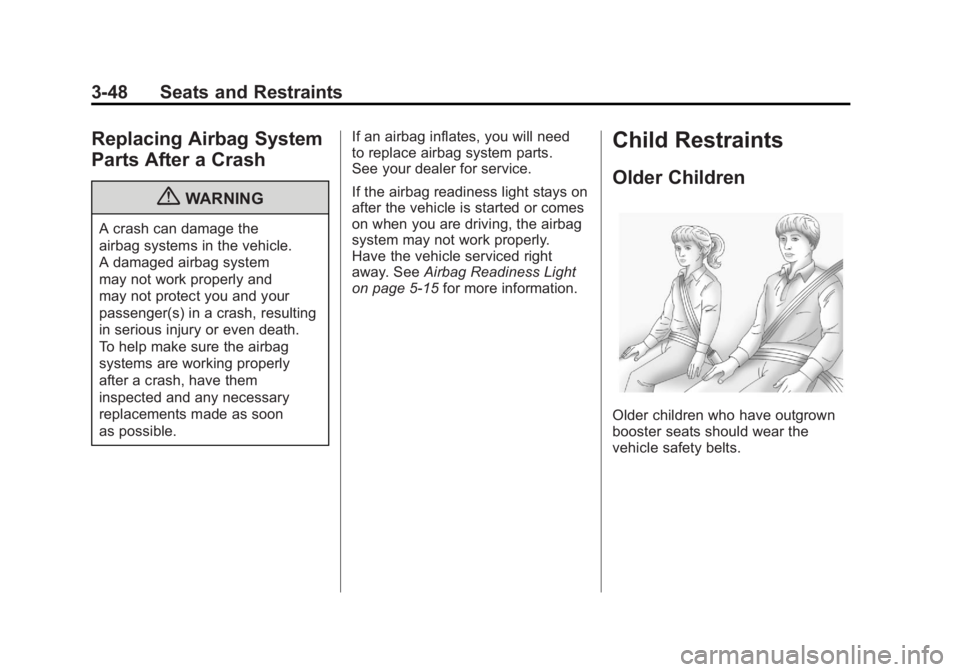
Older Children
Older children who have outgrown
booster seats should wear the
vehicle safety belts.
Page 134 of 478

Black plate (2,1)GMC Acadia/Acadia Denali Owner Manual - 2011
5-2 Instruments and Controls
Ride Control SystemMessages . . . . . . . . . . . . . . . . . . 5-42
Airbag System Messages . . . . 5-43
Anti-Theft Alarm System Messages . . . . . . . . . . . . . . . . . . 5-43
Service Vehicle Messages . . . 5-43
Tire Messages . . . . . . . . . . . . . . . 5-44
Transmission Messages . . . . . 5-45
Vehicle Reminder Messages . . . . . . . . . . . . . . . . . . 5-46
Vehicle Speed Messages . . . . 5-46
Washer Fluid Messages . . . . . 5-46
Vehicle Personalization
Vehicle Personalization (With DIC Buttons) . . . . . . . . . 5-47
Universal Remote System
Universal Remote System . . . 5-55
Universal Remote SystemProgramming . . . . . . . . . . . . . . . 5-55
Universal Remote System Operation . . . . . . . . . . . . . . . . . . 5-59
Controls
Steering Wheel
Adjustment
To adjust the steering wheel:
1. Pull the lever (A) down.
2. Move the steering wheel up
or down.
3. Pull or push the steering wheel closer or away from you.
4. Push the lever (A) up to lock the steering wheel in place.
Do not adjust the steering wheel
while driving.
Steering Wheel Controls
Vehicles with audio steering wheel
controls could differ depending on
the vehicle's options. Some audio
controls can be adjusted at the
steering wheel.
w/c x(Next / Previous):
Press to select preset or favorite
radio stations, select tracks on a
CD/DVD, or to select tracks and
navigate folders on an iPod
®or
USB device.
Page 146 of 478

Black plate (14,1)GMC Acadia/Acadia Denali Owner Manual - 2011
5-14 Instruments and Controls
Engine Coolant
Temperature Gauge
MetricEnglish
This gauge shows the engine
coolant temperature. Under normal
driving conditions the gauge will
read approximately 100 °C (210°F)
or less. If the gauge pointer is
near 125 °C (260°F), the engine
is too hot.
It means that the engine coolant
has overheated. If the vehicle has
been operating under normal driving
conditions, pull off the road, stop the
vehicle and turn off the engine as
soon as possible.
See Engine Overheating on
page 10‑19 for more information.
Voltmeter Gauge
When the engine is not running, but
the ignition is turned on, this gauge
shows the battery's state of charge
in DC volts.
When the engine is running, this
gauge shows the condition of the
charging system. The vehicle's
charging system regulates voltage
based on the state of charge of the
battery. The voltmeter may fluctuate.
This is normal. Readings between
the low and high warning zones
indicate the normal operating range. Readings in the low warning zone
may occur when a large number of
electrical accessories are operating
in the vehicle and the engine is left
idling for an extended period.
If there is a problem with the battery
charging system, a SERVICE
BATTERY CHARGING SYSTEM
message will appear in the Driver
Information Center (DIC) and/or
the charging system light comes on.
See
Battery Voltage and Charging
Messages on page 5‑37 for more
information.
However, readings in either warning
zone may indicate a possible
problem in the electrical system.
Have the vehicle serviced as soon
as possible.
Page 148 of 478

Black plate (16,1)GMC Acadia/Acadia Denali Owner Manual - 2011
5-16 Instruments and Controls
The airbag readiness light comes
on and stay on for several seconds
when the vehicle is started.
Then the light turns off.
{WARNING
If the airbag readiness light stays
on after the vehicle is started or
comes on while driving, it means
the airbag system might not be
working properly. The airbags in
the vehicle might not inflate in a
crash, or they could even inflate
without a crash. To help avoid
injury, have the vehicle serviced
right away.
Passenger Airbag Status
Indicator
The vehicle has a passenger
sensing system. SeePassenger
Sensing System on page 3‑41
for important safety information.
The instrument panel has a
passenger airbag status indicator.
United States
Canada and Mexico When the vehicle is started, the
passenger airbag status indicator
will light ON and OFF, or the symbol
for on and off, for several seconds
as a system check. If you are using
remote start to start the vehicle from
a distance, if equipped, you may not
see the system check. Then, after
several more seconds, the status
indicator will light either ON or OFF,
or either the on or off symbol to let
you know the status of the right front
passenger frontal airbag.
If the word ON or the on symbol is
lit on the passenger airbag status
indicator, it means that the right
front passenger frontal airbag is
enabled (may inflate).
If the word OFF or the off symbol
is lit on the passenger airbag
status indicator, it means that the
passenger sensing system has
turned off the right front passenger
frontal airbag.
Page 149 of 478

Black plate (17,1)GMC Acadia/Acadia Denali Owner Manual - 2011
Instruments and Controls 5-17
If, after several seconds, both status
indicator lights remain on, or if there
are no lights at all, there may be
a problem with the lights or the
passenger sensing system.
See your dealer for service.
{WARNING
If the airbag readiness light ever
comes on and stays on, it means
that something may be wrong
with the airbag system. To help
avoid injury to yourself or others,
have the vehicle serviced right
away. SeeAirbag Readiness
Light on page 5‑15 for more
information, including important
safety information.
Charging System Light
The charging system light comes
on briefly when the ignition is turned
on, but the engine is not running, as
a check to show the light is working.
It should go out when the engine is
started.
If the light stays on, or comes
on while driving, there may be a
problem with the electrical charging system. Have it checked by your
dealer. Driving while this light is on
could drain the battery.
When this light comes on, the
Driver Information Center (DIC) also
displays the SERVICE BATTERY
CHARGING SYSTEM message.
See
Vehicle Messages on
page 5‑37 for more information.
If a short distance must be driven
with the light on, be sure to turn off
all accessories, such as the radio
and air conditioner.