Page 54 of 478
Black plate (22,1)GMC Acadia/Acadia Denali Owner Manual - 2011
2-22 Keys, Doors and Windows
Window Lockout
o(Window Lockout): The window
lockout switch is located with the
power window switches on the
driver door armrest. This feature
prevents the rear windows from
being operated, except from the
driver position. Press the switch to
turn the lockout feature on or off.
An indicator light will come on to
show the lockout feature is on.
Sun Visors
Pull the sun visor down to block
glare. Detach the sun visor from
the center mount to pivot to the side
window, or to extend along the rod,
if available.
Roof
Sunroof
The ignition must be in ON/RUN
or ACC/ACCESSORY to operate
the sunroof and power sunshade.
See Retained Accessory Power
(RAP) on page 9‑21.
The vehicle may have a sunroof
over the front seats and a rear
sunroof over the second row seats.
The rear sunroof does not open.
The switch to operate the front
sunroof is on the headliner above
the rearview mirror.
Page 55 of 478

Black plate (23,1)GMC Acadia/Acadia Denali Owner Manual - 2011
Keys, Doors and Windows 2-23
Do not keep the sunroof open
for long periods of time while the
vehicle is not in use. Dirt and debris
may collect on the sunroof seal or
in the tracks that could cause an
issue with sunroof operation, noise
or plug the water drainage system.
Periodically open the sunroof and
remove any obstacles or loose
debris. Wipe the sunroof seal
and roof sealing area using a
clean cloth, mild soap, and water.
Do not remove grease from sunroof.
Vent:From the closed position,
press and hold the front of the
switch to vent the sunroof. Press
and hold the rear of the switch to
close the sunroof.
Express-open/Express-close:
From the closed position, press
and release the rear of the switch
to express-open the sunroof. Press
and release the front of the switch
to express-close the sunroof.
The front sunshade must be opened
and closed manually. Push up on
the sunshade handle to open the
sunshade.
Manual Sunshades
On a vehicle with only manual
sunshades, press the button on the
sunshade handle to release it and
guide it back. Pull the sunshade
forward until it latches to close it.
Rear Power SunshadeOn vehicles with a rear power
sunshade, the switch is on the
headliner above the rearview mirror.
Notice: The rear sunshade could
be damaged if you attempt to
open or close it manually. Do not
manually open or close the rear
sunshade.
To open the rear sunshade, located
over the second row seats, press
and release the rear of the switch.
Press and release the front of the
switch to close the sunshade.
Page 57 of 478

Black plate (1,1)GMC Acadia/Acadia Denali Owner Manual - 2011
Seats and Restraints 3-1
Seats and
Restraints
Head Restraints
Head Restraints . . . . . . . . . . . . . . . 3-2
Front Seats
Seat Adjustment . . . . . . . . . . . . . . 3-3
Power Seat Adjustment . . . . . . . 3-4
Lumbar Adjustment . . . . . . . . . . . 3-6
Reclining Seatbacks . . . . . . . . . . 3-7
Heated and Ventilated FrontSeats . . . . . . . . . . . . . . . . . . . . . . . . 3-9
Rear Seats
Rear Seats . . . . . . . . . . . . . . . . . . 3-10
Third Row Seats . . . . . . . . . . . . . 3-13
Safety Belts
Safety Belts . . . . . . . . . . . . . . . . . . 3-16
How to Wear Safety BeltsProperly . . . . . . . . . . . . . . . . . . . . 3-19
Lap-Shoulder Belt . . . . . . . . . . . 3-25 Safety Belt Use During
Pregnancy . . . . . . . . . . . . . . . . . . 3-30
Safety Belt Extender . . . . . . . . . 3-31
Safety System Check . . . . . . . . 3-31
Safety Belt Care . . . . . . . . . . . . . 3-32
Replacing Safety Belt System Parts After a Crash . . . . . . . . . 3-32
Airbag System
Airbag System . . . . . . . . . . . . . . . 3-33
Where Are the Airbags? . . . . . 3-35
When Should an AirbagInflate? . . . . . . . . . . . . . . . . . . . . . 3-36
What Makes an Airbag Inflate? . . . . . . . . . . . . . . . . . . . . . 3-38
How Does an Airbag Restrain? . . . . . . . . . . . . . . . . . . . 3-38
What Will You See After an Airbag Inflates? . . . . . . . . . . . . 3-39
Passenger Sensing System . . . . . . . . . . . . . . . . . . . . . 3-41
Servicing the Airbag-Equipped Vehicle . . . . . . . . . . . . . . . . . . . . . 3-45 Adding Equipment to the
Airbag-Equipped Vehicle . . . 3-46
Airbag System Check . . . . . . . . 3-47
Replacing Airbag System Parts After a Crash . . . . . . . . . 3-48
Child Restraints
Older Children . . . . . . . . . . . . . . . 3-48
Infants and Young
Children . . . . . . . . . . . . . . . . . . . . 3-51
Child Restraint Systems . . . . . 3-53
Where to Put the Restraint . . . 3-55
Lower Anchors and Tethers for Children
(LATCH System) . . . . . . . . . . . 3-57
Replacing LATCH System Parts After a Crash . . . . . . . . . 3-64
Securing Child Restraints (Rear Seat) . . . . . . . . . . . . . . . . . 3-65
Securing Child Restraints (Right Front
Passenger Seat) . . . . . . . . . . . 3-67
Page 58 of 478
Black plate (2,1)GMC Acadia/Acadia Denali Owner Manual - 2011
3-2 Seats and Restraints
Head Restraints
The vehicle's front seats have
adjustable head restraints in the
outboard seating positions.
{WARNING
With head restraints that are
not installed and adjusted
properly, there is a greater
chance that occupants will suffer
a neck/spinal injury in a crash.
Do not drive until the head
restraints for all occupants are
installed and adjusted properly.
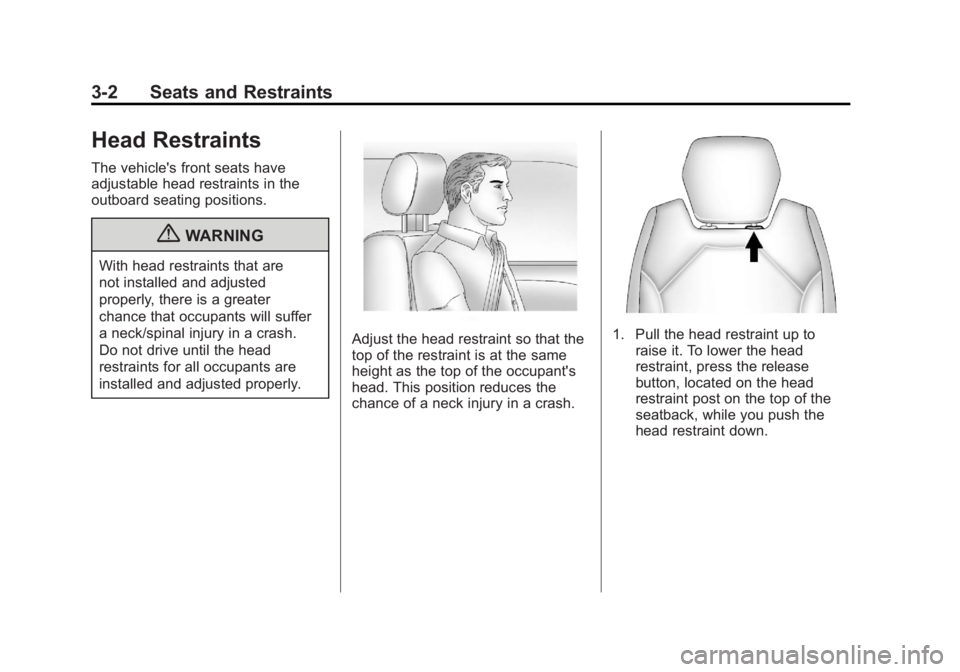
Adjust the head restraint so that the
top of the restraint is at the same
height as the top of the occupant's
head. This position reduces the
chance of a neck injury in a crash.1. Pull the head restraint up toraise it. To lower the head
restraint, press the release
button, located on the head
restraint post on the top of the
seatback, while you push the
head restraint down.
Page 59 of 478
Black plate (3,1)GMC Acadia/Acadia Denali Owner Manual - 2011
Seats and Restraints 3-3
2. Push down on the head restraintafter the button is released to
make sure that it is locked in
place.
The vehicle's second‐row seats
have head restraints in the outboard
seating positions that cannot be
adjusted.
The vehicle's third‐row seats have
headrests in the outboard seating
positions that cannot be adjusted.
The vehicle's head restraints and
headrests are not designed to be
removed.Front Seats
Seat Adjustment
{WARNING
You can lose control of the
vehicle if you try to adjust a
manual driver seat while the
vehicle is moving. The sudden
movement could startle and
confuse you, or make you push
a pedal when you do not want to.
Adjust the driver seat only when
the vehicle is not moving.
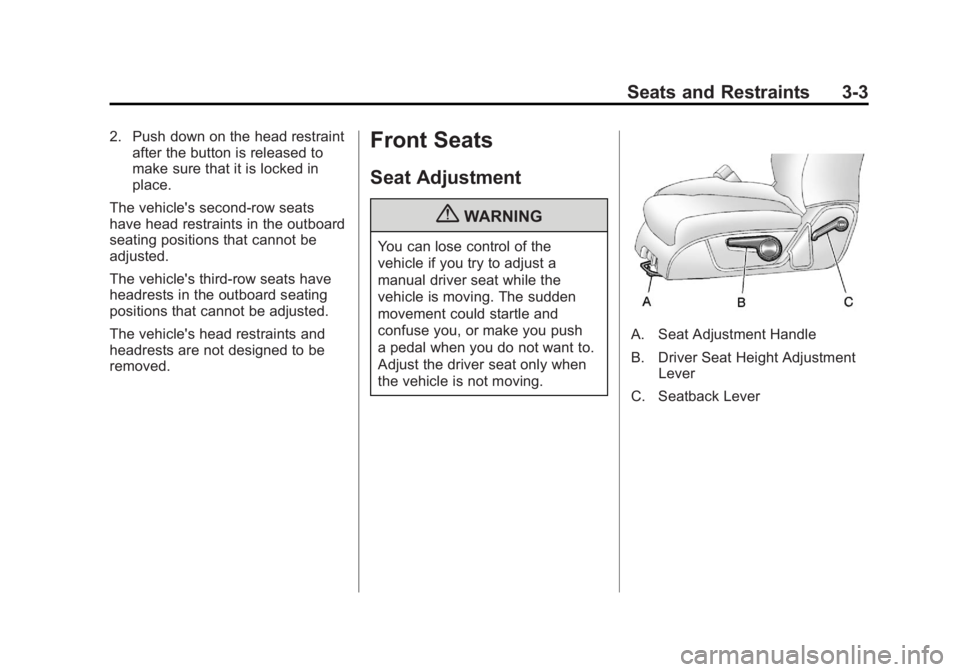
A. Seat Adjustment Handle
B. Driver Seat Height Adjustment Lever
C. Seatback Lever
Page 60 of 478
Black plate (4,1)GMC Acadia/Acadia Denali Owner Manual - 2011
3-4 Seats and Restraints
To adjust a manual seat:
1. Lift the handle (A) under the seatto unlock it.
2. Slide the seat to the desired position, and then release the
handle.
3. Try to move the seat back and forth to be sure it is locked in
place.
Move the lever (B) up or down to
raise or lower the seat.
Use the lever (C) to adjust the
seatback. See Reclining Seatbacks
on page 3‑7.Power Seat Adjustment
A. Seat Adjustment Control
B. Seatback Control
C. Lumbar Control To adjust a power seat, if equipped:
.Move the seat forward or
rearward by sliding the
control (A) forward or rearward.
.Raise or lower the entire seat
by moving the control (A) up
or down.
.Adjust the seatback by tilting the
top of the control (B) forward or
rearward.
See
Reclining Seatbacks on
page 3‑7.
.Increase or decrease lumbar
support by pressing the front
or rear of the control (C).
See Lumbar Adjustment on
page 3‑6.
Page 61 of 478

Black plate (5,1)GMC Acadia/Acadia Denali Owner Manual - 2011
Seats and Restraints 3-5
Memory Seat and Mirrors
On vehicles with the memory
feature, the controls on the driver
door are used to program and recall
memory settings for the driver seat
and outside mirrors.Storing Memory Positions
To save into memory:
1. Adjust the driver seat, seatback
recliner, and both outside
mirrors.
See Power Mirrors on page 2‑17
for more information.
Not all vehicles will have the
ability to save and recall the
mirror positions.
2. Press and hold “1”until
two beeps sound.
3. Repeat for a second driver position using “2.”
To recall, press and release “1”
or “2.” The vehicle must be in
P (Park). A single beep will sound.
The seat and outside mirrors will
move to the position previously
stored for the identified driver. Memory Remote Recall
The memory feature can recall the
driver seat and outside mirrors to
stored positions when entering the
vehicle.
To activate, unlock the driver
door with the Remote Keyless
Entry (RKE) transmitter. The driver
seat and outside mirrors will move
to the memory position associated
with the transmitter used to unlock
the vehicle.
This feature is turned on or off using
the vehicle personalization menu.
See
“Memory Seat Recall” under
Vehicle Personalization (With DIC
Buttons) on page 5‑47 for more
information.
To stop recall movement, press one
of the power seat controls, memory
buttons, or the power mirror buttons.
Page 62 of 478

Black plate (6,1)GMC Acadia/Acadia Denali Owner Manual - 2011
3-6 Seats and Restraints
If something has blocked the
driver seat while recalling a
memory position, the recall may
stop. Remove the obstruction; then
press and hold the appropriate
manual control for the memory item
that is not recalling for two seconds.
Try recalling the memory position
again by pressing the appropriate
memory button. If the memory
position is still not recalling,
see your dealer for service.
Easy Exit Driver Seat
This feature can move the seat
rearward to allow extra room to
exit the vehicle.
S(Easy Exit Driver Seat):Press
to recall the easy exit seat position.
The vehicle must be in P (Park).
If the easy exit seat feature is
programmed on in the vehicle
personalization menu, automatic
seat movement occurs when the
ignition key is removed. A single beep sounds. The driver
seat moves back approximately
8 cm (3 in). To move the seat back
farther, press the easy exit seat
button again until the seat is all
the way back.
If something has blocked the driver
seat while recalling the exit position,
the recall may stop. Remove the
obstruction; then press and hold
the power seat control rearward for
two seconds. Try recalling the exit
position again. If the exit position is
still not recalling, see your dealer
for service.
See
“Easy Exit Seat” underVehicle
Personalization (With DIC Buttons)
on page 5‑47 for more information.
Lumbar Adjustment
Manual Lumbar
If available, move the handle
forward or rearward to increase
or decrease lumbar support.