Page 1 of 441
Introduction 4
Instrument Cluster 14
Warning lights and chimes 14
Gauges 21
Message center 22
Entertainment Systems 60
AM/FM stereo 60
AM/FM stereo with CD 62
Auxiliary input jack 69
USB port 71
Satellite radio information 74
Navigation system 77
SYNC�77
Climate Controls 78
Manual heating and air conditioning 78
Dual electronic automatic temperature control 81
Rear window defroster 84
Lights 86
Headlamps 86
Turn signal control 90
Bulb replacement 91
Driver Controls 97
Windshield wiper/washer control 97
Steering wheel adjustment 98
Power windows 102
Mirrors 104
Speed control 109
Upfitter controls 112
Locks and Security 126
Keys 126
Locks 134
Anti-theft system 146
Table of Contents
1
2011 F-250/350/450/550(f23)
Owners Guide, 1st Printing
USA(fus)
Page 20 of 441
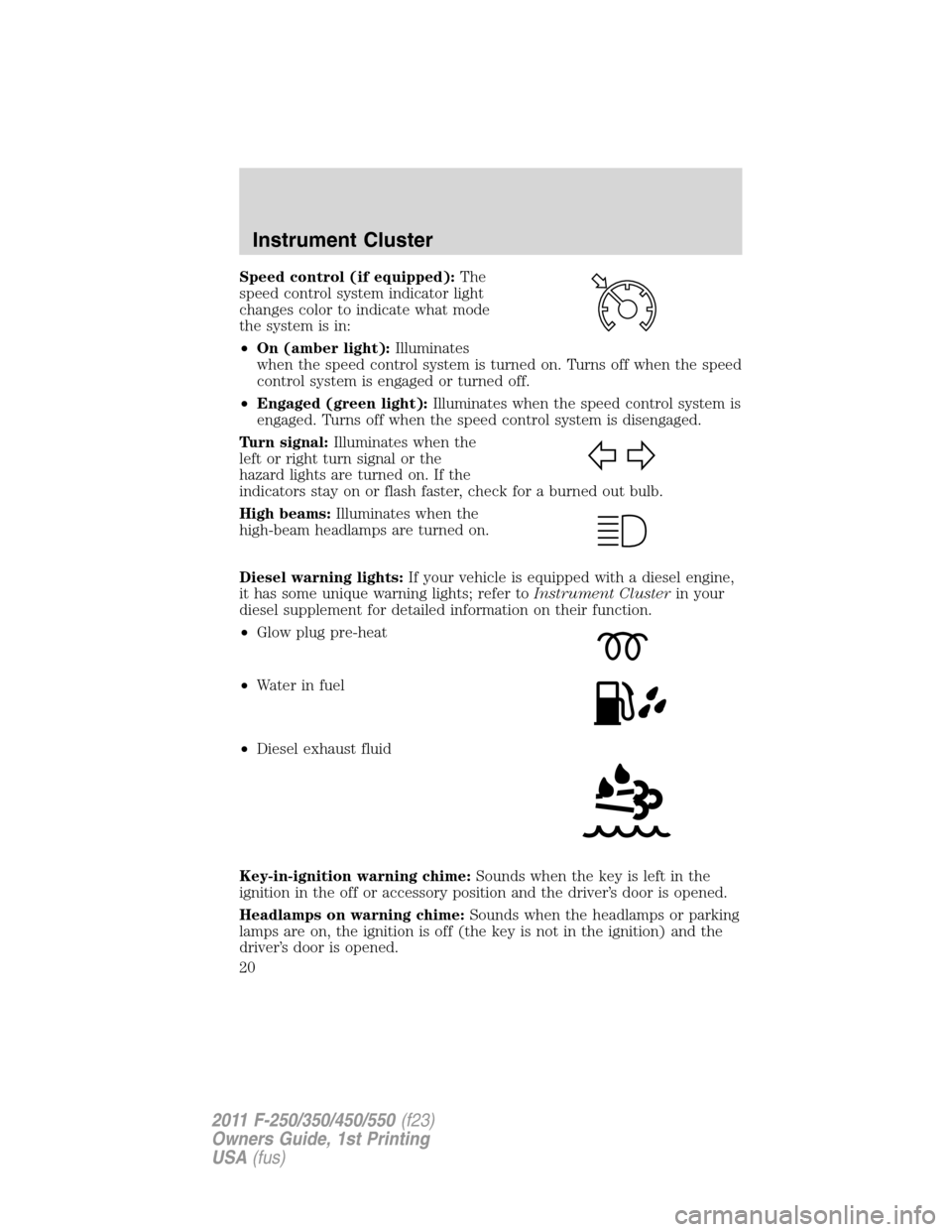
Speed control (if equipped):The
speed control system indicator light
changes color to indicate what mode
the system is in:
•On (amber light):Illuminates
when the speed control system is turned on. Turns off when the speed
control system is engaged or turned off.
•Engaged (green light):Illuminates when the speed control system is
engaged. Turns off when the speed control system is disengaged.
Turn signal:Illuminates when the
left or right turn signal or the
hazard lights are turned on. If the
indicators stay on or flash faster, check for a burned out bulb.
High beams:Illuminates when the
high-beam headlamps are turned on.
Diesel warning lights:If your vehicle is equipped with a diesel engine,
it has some unique warning lights; refer toInstrument Clusterin your
diesel supplement for detailed information on their function.
•Glow plug pre-heat
•Waterinfuel
•Diesel exhaust fluid
Key-in-ignition warning chime:Sounds when the key is left in the
ignition in the off or accessory position and the driver’s door is opened.
Headlamps on warning chime:Sounds when the headlamps or parking
lamps are on, the ignition is off (the key is not in the ignition) and the
driver’s door is opened.
Instrument Cluster
20
2011 F-250/350/450/550(f23)
Owners Guide, 1st Printing
USA(fus)
Page 77 of 441
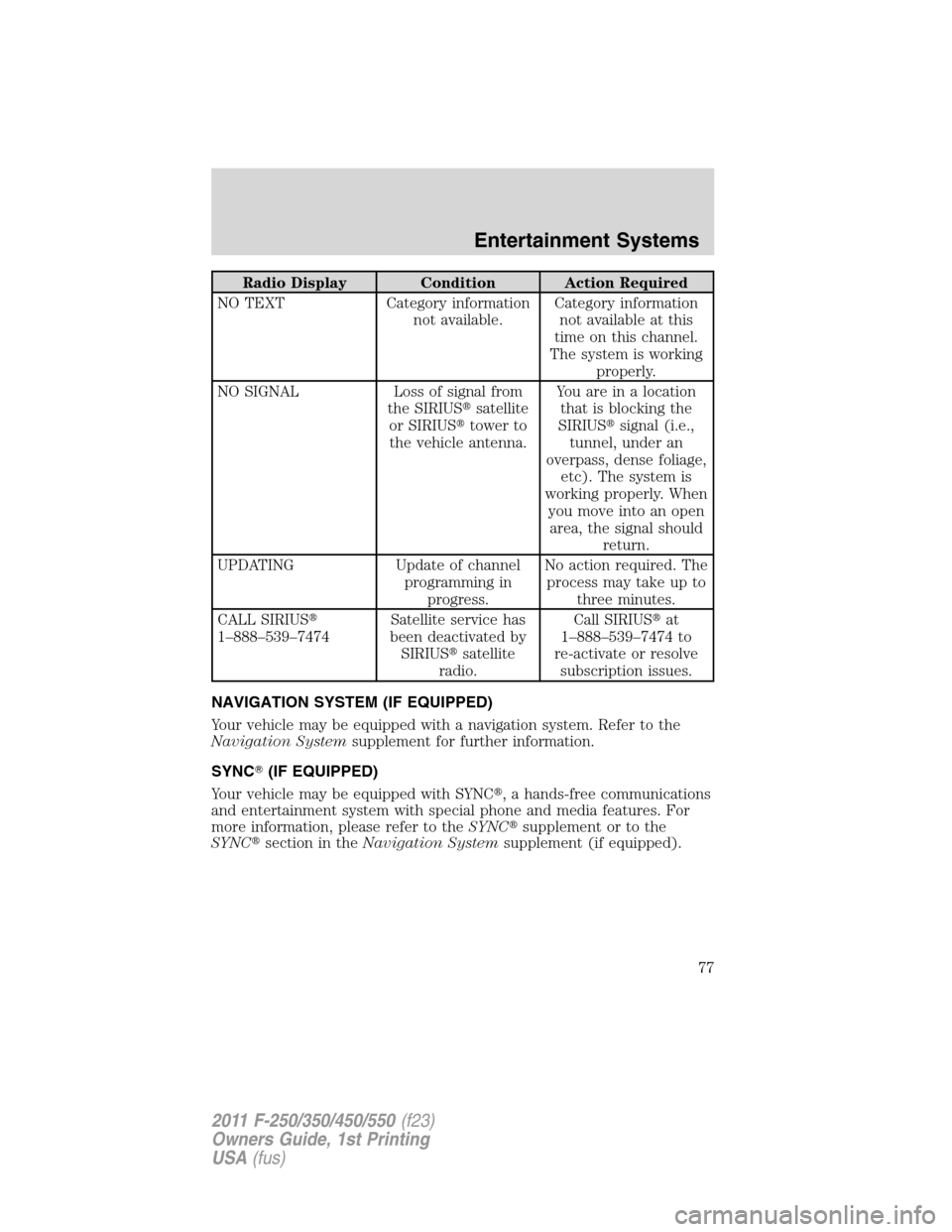
Radio Display Condition Action Required
NO TEXT Category information
not available.Category information
not available at this
time on this channel.
The system is working
properly.
NO SIGNAL Loss of signal from
the SIRIUS�satellite
or SIRIUS�tower to
the vehicle antenna.You are in a location
that is blocking the
SIRIUS�signal (i.e.,
tunnel, under an
overpass, dense foliage,
etc). The system is
working properly. When
you move into an open
area, the signal should
return.
UPDATING Update of channel
programming in
progress.No action required. The
process may take up to
three minutes.
CALL SIRIUS�
1–888–539–7474Satellite service has
been deactivated by
SIRIUS�satellite
radio.Call SIRIUS�at
1–888–539–7474 to
re-activate or resolve
subscription issues.
NAVIGATION SYSTEM (IF EQUIPPED)
Your vehicle may be equipped with a navigation system. Refer to the
Navigation Systemsupplement for further information.
SYNC�(IF EQUIPPED)
Your vehicle may be equipped with SYNC�, a hands-free communications
and entertainment system with special phone and media features. For
more information, please refer to theSYNC�supplement or to the
SYNC�section in theNavigation Systemsupplement (if equipped).
Entertainment Systems
77
2011 F-250/350/450/550(f23)
Owners Guide, 1st Printing
USA(fus)
Page 90 of 441
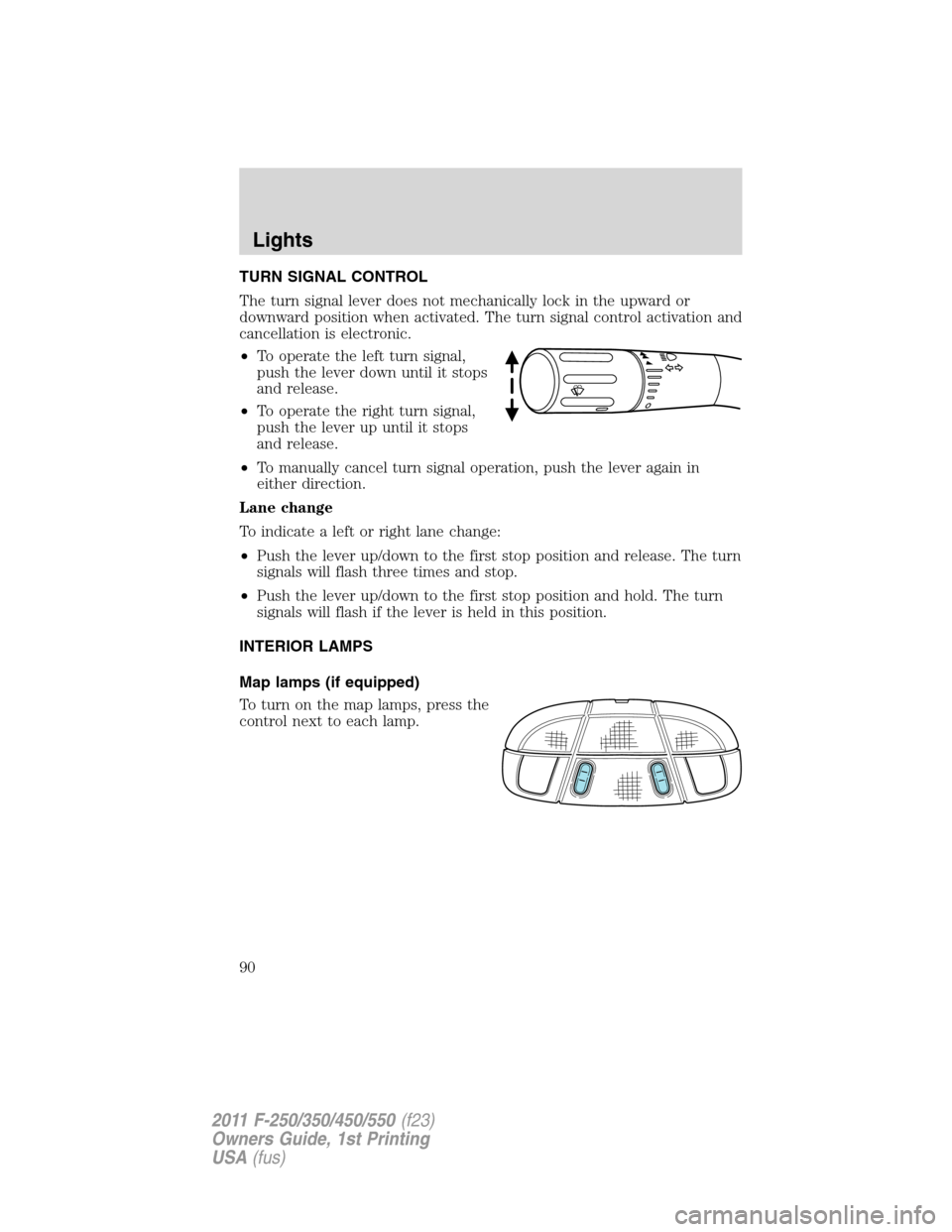
TURN SIGNAL CONTROL
The turn signal lever does not mechanically lock in the upward or
downward position when activated. The turn signal control activation and
cancellation is electronic.
•To operate the left turn signal,
push the lever down until it stops
and release.
•To operate the right turn signal,
push the lever up until it stops
and release.
•To manually cancel turn signal operation, push the lever again in
either direction.
Lane change
To indicate a left or right lane change:
•Push the lever up/down to the first stop position and release. The turn
signals will flash three times and stop.
•Push the lever up/down to the first stop position and hold. The turn
signals will flash if the lever is held in this position.
INTERIOR LAMPS
Map lamps (if equipped)
To turn on the map lamps, press the
control next to each lamp.
Lights
90
2011 F-250/350/450/550(f23)
Owners Guide, 1st Printing
USA(fus)
Page 92 of 441
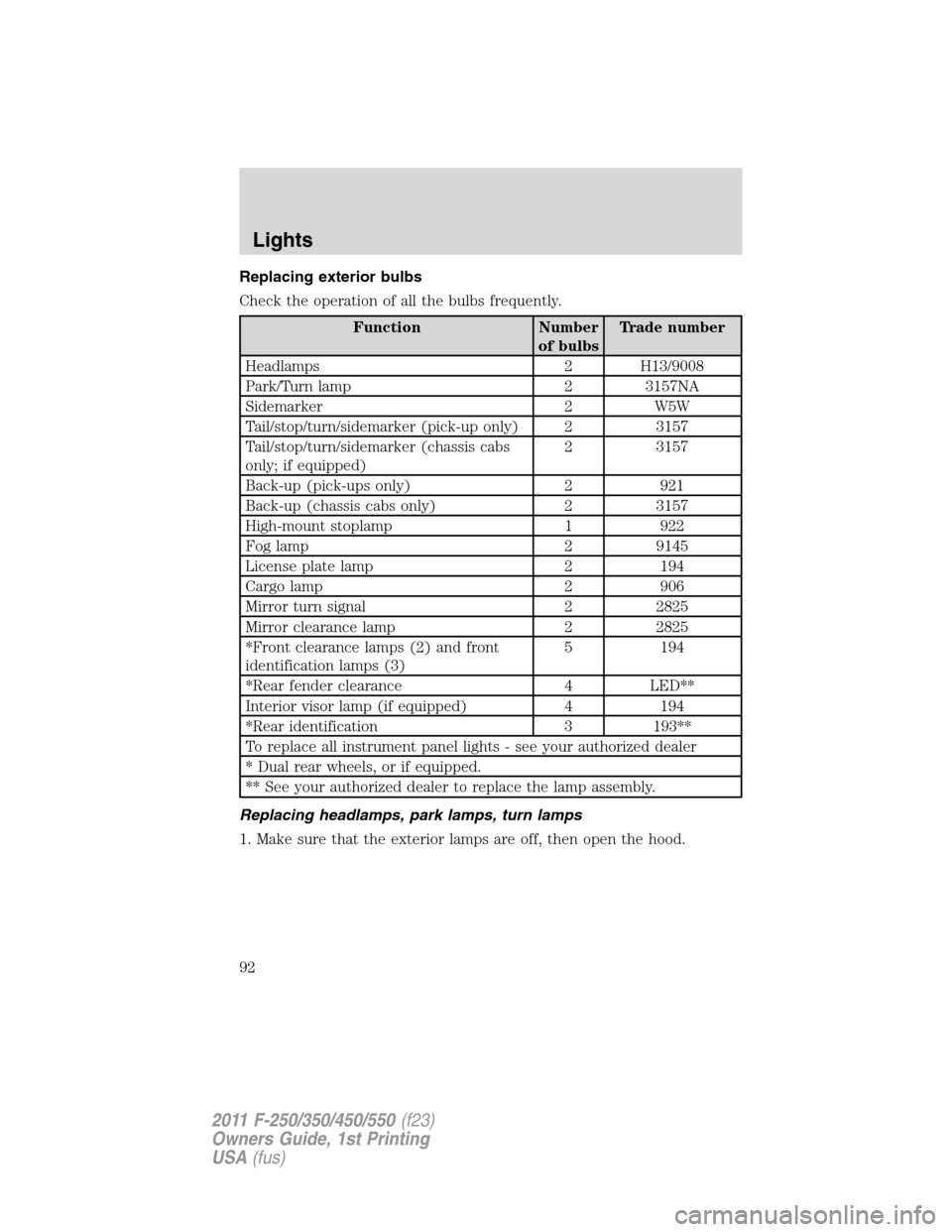
Replacing exterior bulbs
Check the operation of all the bulbs frequently.
Function Number
of bulbsTrade number
Headlamps 2 H13/9008
Park/Turn lamp 2 3157NA
Sidemarker 2 W5W
Tail/stop/turn/sidemarker (pick-up only) 2 3157
Tail/stop/turn/sidemarker (chassis cabs
only; if equipped)2 3157
Back-up (pick-ups only) 2 921
Back-up (chassis cabs only) 2 3157
High-mount stoplamp 1 922
Fog lamp 2 9145
License plate lamp 2 194
Cargo lamp 2 906
Mirror turn signal 2 2825
Mirror clearance lamp 2 2825
*Front clearance lamps (2) and front
identification lamps (3)5 194
*Rear fender clearance 4 LED**
Interior visor lamp (if equipped) 4 194
*Rear identification 3 193**
To replace all instrument panel lights - see your authorized dealer
* Dual rear wheels, or if equipped.
** See your authorized dealer to replace the lamp assembly.
Replacing headlamps, park lamps, turn lamps
1. Make sure that the exterior lamps are off, then open the hood.
Lights
92
2011 F-250/350/450/550(f23)
Owners Guide, 1st Printing
USA(fus)
Page 108 of 441
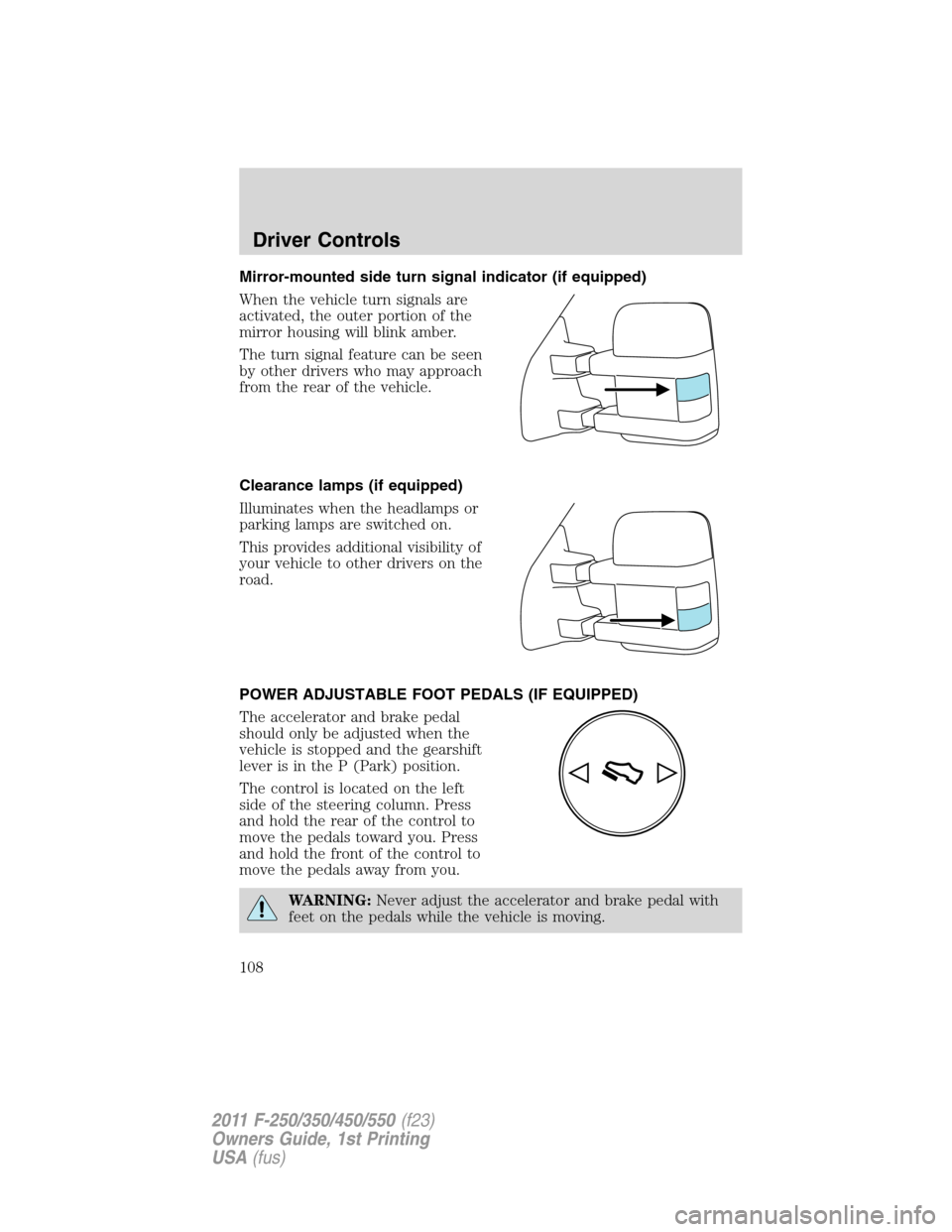
Mirror-mounted side turn signal indicator (if equipped)
When the vehicle turn signals are
activated, the outer portion of the
mirror housing will blink amber.
The turn signal feature can be seen
by other drivers who may approach
from the rear of the vehicle.
Clearance lamps (if equipped)
Illuminates when the headlamps or
parking lamps are switched on.
This provides additional visibility of
your vehicle to other drivers on the
road.
POWER ADJUSTABLE FOOT PEDALS (IF EQUIPPED)
The accelerator and brake pedal
should only be adjusted when the
vehicle is stopped and the gearshift
lever is in the P (Park) position.
The control is located on the left
side of the steering column. Press
and hold the rear of the control to
move the pedals toward you. Press
and hold the front of the control to
move the pedals away from you.
WARNING:Never adjust the accelerator and brake pedal with
feet on the pedals while the vehicle is moving.
Driver Controls
108
2011 F-250/350/450/550(f23)
Owners Guide, 1st Printing
USA(fus)
Page 149 of 441
Arming the system
When armed, this system will respond if unauthorized entry is
attempted. When unauthorized entry occurs, the system will flash the
park/turn lamps and will sound the horn.
The system is ready to arm whenever the key is removed from the
ignition. Either of the following actions will prearm the alarm system:
•Press the
control on the remote entry transmitter.
•Open a door and press the power door lock control to lock all the
doors, and then close the door.
•Press and hold the 7•8 and 9•0 controls on the keyless entry pad
at the same time to lock the doors (driver’s door must be closed).
There is a 20 second countdown when any of the above actions occur
before the vehicle becomes armed.
Each door and the hood is armed individually, and if any are open, they
must be closed before the open entry point can enter the 20 second
countdown.
The turn signal lamps will flash once when all doors and the hood are
closed indicating the vehicle is locked and entering the 20 second
countdown.
Disarming the system
You can disarm the system by any of the following actions:
•Unlock the doors by pressing the
control on your remote entry
transmitter.
•Turn the ignition to the on position with a programmed coded ignition
key.
•Unlock the doors by using your keyless entry pad.
•If using a key in the driver’s door to unlock the vehicle, a chime will
sound when you open the door and you will have 12 seconds to
disarm the alarm system using any of the actions above, otherwise the
alarm will trigger.
Pressing the power door unlock control within the 20 second prearmed
mode will return the vehicle to a disarmed state.
Triggering the anti-theft system
The armed system will be triggered if any door or hood is opened
without using the key or the remote entry transmitter.
Locks and Security
149
2011 F-250/350/450/550(f23)
Owners Guide, 1st Printing
USA(fus)
Page 185 of 441
Determining if the system is operational
The SRS uses a readiness light in the instrument cluster or a tone to
indicate the condition of the system. Refer toWarning lights and
chimesin theInstrument Clusterchapter. Routine maintenance of the
side airbag is not required.
A difficulty with the system is indicated by one or more of the following:
•The readiness light (same light as for front airbag system) will either
flash or stay lit.
•The readiness light will not illuminate immediately after ignition is
turned on.
•A series of five beeps will be heard. The tone pattern will repeat
periodically until the problem and/or light are repaired.
If any of these things happen, even intermittently, have the SRS serviced
at your authorized dealer immediately. Unless serviced, the system may
not function properly in the event of a collision.
SOS Post-Crash Alert System™
The system automatically flashes the turn signal lamps and sounds the
horn three times at four second intervals in the event of a serious impact
that deploys an airbag (front, side, side curtain or Safety Canopy�)or
the safety belt pretensioners.
The system can be turned off when any one of the following actions are
taken by the driver or any other person:
•pressing the hazard control button,
•or pressing the panic button on the remote entry transmitter.
The feature will continue to operate until the vehicle runs out of power.
Seating and Safety Restraints
185
2011 F-250/350/450/550(f23)
Owners Guide, 1st Printing
USA(fus)