Page 19 of 357

•Clock:Select Clock then move right to enter the menu. Scroll up or
down to select from to select from: The clock can also be set through
the audio system. SeeAudio systemsin theEntertainment Systems
chapter for more information.
•Set time:Move right to enter the menu and adjust the time.
•Set date:Move right to enter the menu and adjust the date.
•24 hour mode:Move right to enter the menu to choose 24-hour
mode.
•Display:Select Display then move right to enter the menu. Scroll up
or down to select from:
•Measure unit:Move right to enter the menu then move up or
down to select Fahrenheit or Celsius.
•Language:Move right to enter the menu then move up or down to
select the desired language.
•Messages:Select messages then move right to view stored messages.
Compass (if equipped):If your vehicle is equipped with SYNC�,the
compass heading is displayed to the left of the clock in the upper portion
of the multifunction display.
Information messages
: The message indicator will illuminate when there is a new message
stored in the multifunction display.
Message Warning Lamp at
Instrument ClusterSystem
ABS MALFUNCTION
SERVICE NOW
ABS
ESP OFF— ABS
ESP MALFUNCTION
NEXT SERVICE— ABS
BRAKE SYSTEM
MALFUNCTION
STOP SAFELY
Brakes
ALARM SYSTEM
MALFUNCTION
NEXT SERVICE—Anti-theft security
system
Instrument Cluster
19
2011 Fiesta(fie)
Owners Guide, 1st Printing
USA(fus)
Page 20 of 357
Message Warning Lamp at
Instrument ClusterSystem
INTERIOR SCAN
DEACTIVATED—Anti-theft security
system
IMMOBILIZER
MALFUNCTION
SERVICE NOW—Anti-theft security
system
ALARM TRIGGERED
CHECK VEHICLE—Anti-theft security
system
LEFT/RIGHT
INDICATOR
MALFUNCTION
CHANGE BULB— Lights
HILL START ASSIST
NOT AVAILABLE
Transmission
STEERING LOCK
ENGAGED TURN
STEERING WHEEL—Passive Entry/Passive
Start
STEERING
MALFUNCTION
SERVICE NOW—Passive Entry/Passive
Start
STEERING
MALFUNCTION
STOP SAFELY—Passive Entry/Passive
Start
POWER STEERING
MALFUNCTION
SERVICE NOW— Power Steering
KEY NOT
DETECTED—Passive entry/passive
start system
TURN IGNITION
OFF USE POWER
BUTTON—Passive entry/passive
start system
KEY OUTSIDE CAR
—Passive entry/passive
start system
Instrument Cluster
20
2011 Fiesta(fie)
Owners Guide, 1st Printing
USA(fus)
Page 21 of 357
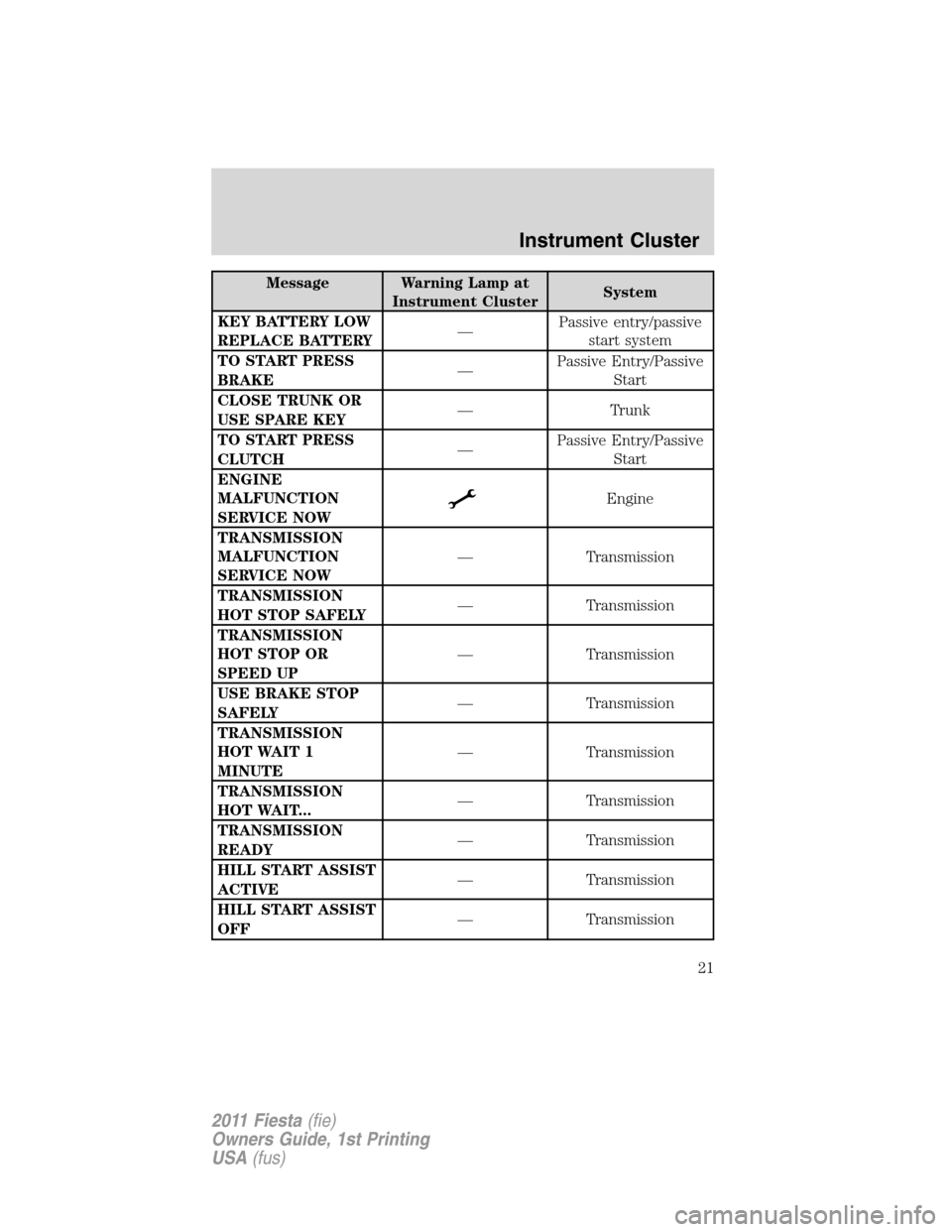
Message Warning Lamp at
Instrument ClusterSystem
KEY BATTERY LOW
REPLACE BATTERY—Passive entry/passive
start system
TO START PRESS
BRAKE—Passive Entry/Passive
Start
CLOSE TRUNK OR
USE SPARE KEY— Trunk
TO START PRESS
CLUTCH—Passive Entry/Passive
Start
ENGINE
MALFUNCTION
SERVICE NOW
Engine
TRANSMISSION
MALFUNCTION
SERVICE NOW— Transmission
TRANSMISSION
HOT STOP SAFELY— Transmission
TRANSMISSION
HOT STOP OR
SPEED UP— Transmission
USE BRAKE STOP
SAFELY— Transmission
TRANSMISSION
HOT WAIT 1
MINUTE— Transmission
TRANSMISSION
HOT WAIT...— Transmission
TRANSMISSION
READY— Transmission
HILL START ASSIST
ACTIVE— Transmission
HILL START ASSIST
OFF— Transmission
Instrument Cluster
21
2011 Fiesta(fie)
Owners Guide, 1st Printing
USA(fus)
Page 22 of 357
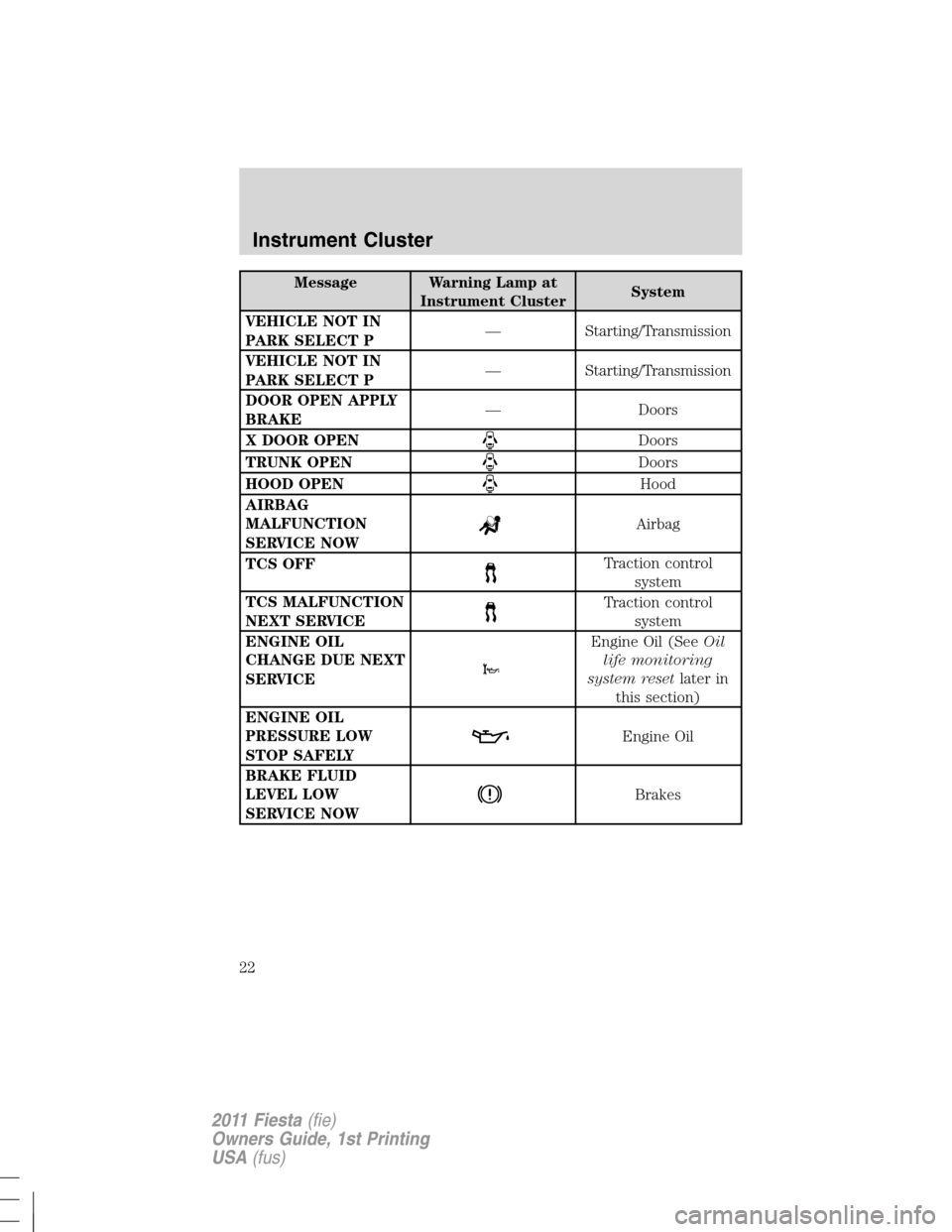
Message Warning Lamp at
Instrument ClusterSystem
VEHICLE NOT IN
PARK SELECT P— Starting/Transmission
VEHICLE NOT IN
PARK SELECT P— Starting/Transmission
DOOR OPEN APPLY
BRAKE— Doors
X DOOR OPEN
Doors
TRUNK OPEN
Doors
HOOD OPEN
Hood
AIRBAG
MALFUNCTION
SERVICE NOW
Airbag
TCS OFF
Traction control
system
TCS MALFUNCTION
NEXT SERVICE
Traction control
system
ENGINE OIL
CHANGE DUE NEXT
SERVICE
Engine Oil (SeeOil
life monitoring
system resetlater in
this section)
ENGINE OIL
PRESSURE LOW
STOP SAFELY
Engine Oil
BRAKE FLUID
LEVEL LOW
SERVICE NOW
Brakes
Instrument Cluster
22
2011 Fiesta(fie)
Owners Guide, 1st Printing
USA(fus)
Page 23 of 357
Oil life monitoring system reset
To reset the oil service light and clear the oil change message after
servicing use the following procedure:
1. With the ignition in the off position, press the brake and accelerator
pedals.
2. Turn the key to the accessory position for keyed vehicles and for push
button start vehicles press the Start/Stop button once quickly. DO NOT
attempt to start the engine.
3. Press the accelerator and brake pedals fully for 20 seconds.
4.ENGINE OIL CHANGE DUE NEXT SERVICEand
will display.
5. Turn the vehicle off. The message and lights will be cleared.
Instrument Cluster
23
2011 Fiesta(fie)
Owners Guide, 1st Printing
USA(fus)
Page 26 of 357
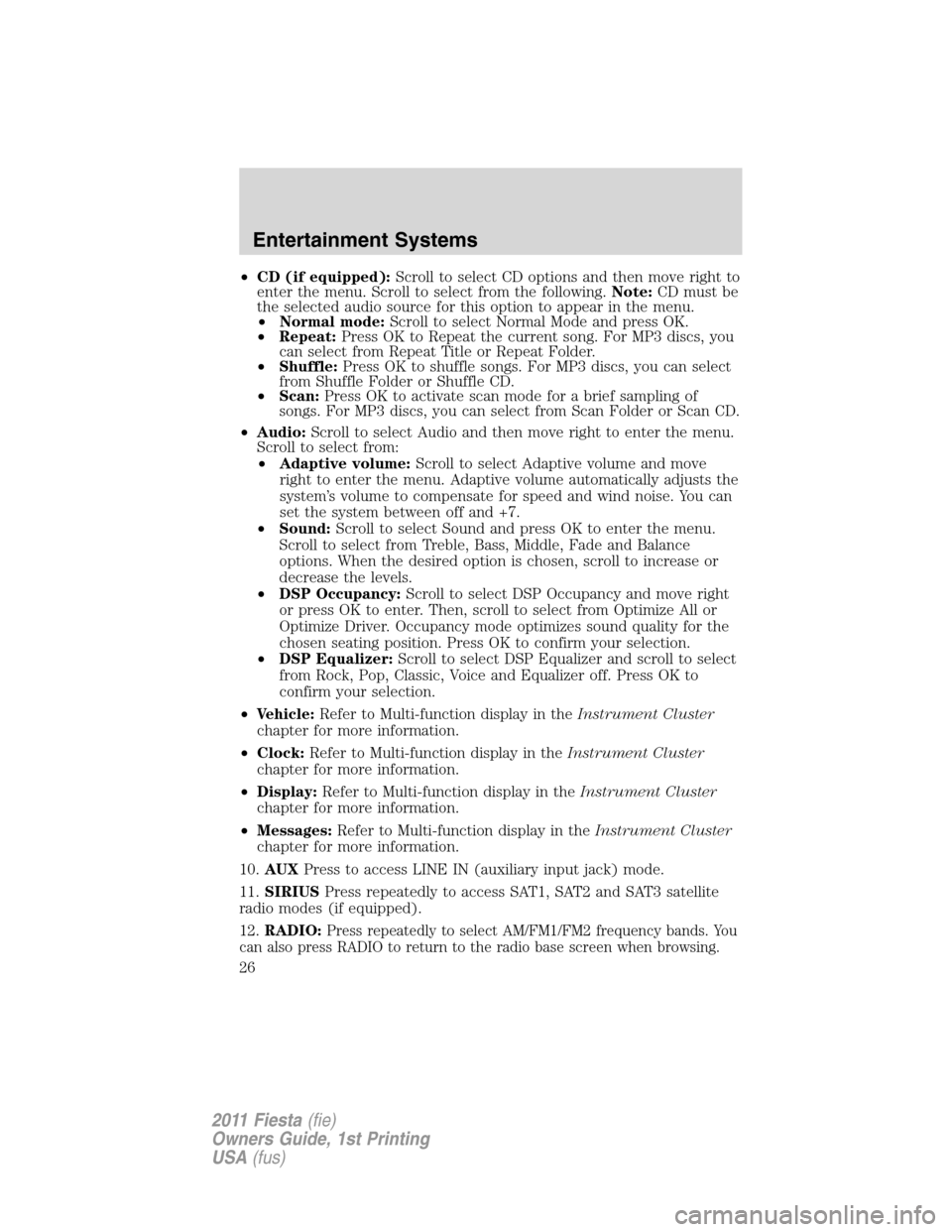
•CD (if equipped):Scroll to select CD options and then move right to
enter the menu. Scroll to select from the following.Note:CD must be
the selected audio source for this option to appear in the menu.
•Normal mode:Scroll to select Normal Mode and press OK.
•Repeat:Press OK to Repeat the current song. For MP3 discs, you
can select from Repeat Title or Repeat Folder.
•Shuffle:Press OK to shuffle songs. For MP3 discs, you can select
from Shuffle Folder or Shuffle CD.
•Scan:Press OK to activate scan mode for a brief sampling of
songs. For MP3 discs, you can select from Scan Folder or Scan CD.
•Audio:Scroll to select Audio and then move right to enter the menu.
Scroll to select from:
•Adaptive volume:Scroll to select Adaptive volume and move
right to enter the menu. Adaptive volume automatically adjusts the
system’s volume to compensate for speed and wind noise. You can
set the system between off and +7.
•Sound:Scroll to select Sound and press OK to enter the menu.
Scroll to select from Treble, Bass, Middle, Fade and Balance
options. When the desired option is chosen, scroll to increase or
decrease the levels.
•DSP Occupancy:Scroll to select DSP Occupancy and move right
or press OK to enter. Then, scroll to select from Optimize All or
Optimize Driver. Occupancy mode optimizes sound quality for the
chosen seating position. Press OK to confirm your selection.
•DSP Equalizer:Scroll to select DSP Equalizer and scroll to select
from Rock, Pop, Classic, Voice and Equalizer off. Press OK to
confirm your selection.
•Vehicle:Refer to Multi-function display in theInstrument Cluster
chapter for more information.
•Clock:Refer to Multi-function display in theInstrument Cluster
chapter for more information.
•Display:Refer to Multi-function display in theInstrument Cluster
chapter for more information.
•Messages:Refer to Multi-function display in theInstrument Cluster
chapter for more information.
10.AUXPress to access LINE IN (auxiliary input jack) mode.
11.SIRIUSPress repeatedly to access SAT1, SAT2 and SAT3 satellite
radio modes (if equipped).
12.RADIO:
Press repeatedly to select AM/FM1/FM2 frequency bands. You
can also press RADIO to return to the radio base screen when browsing.
Entertainment Systems
26
2011 Fiesta(fie)
Owners Guide, 1st Printing
USA(fus)
Page 29 of 357
•Adaptive volume:Scroll to select Adaptive volume and move
right to enter the menu. Adaptive volume automatically adjusts the
system’s volume to compensate for speed and wind noise. You can
set the system between off and +7.
•Sound:Scroll to select Sound and move right to enter the menu.
Scroll to select from Treble, Bass, Middle, Fade and Balance
options. When the desired option is chosen, scroll to increase or
decrease the levels.
•DSP Occupancy:Select DSP Occupancy and scroll to select from
Optimize all or Optimize Driver. Occupancy mode optimizes sound
quality for the chosen seating position. Press OK to confirm your
selection.
•DSP Equalizer:Scroll to select DSP Equalizer and scroll to select
from Rock, Pop, Classic, Voice and Equalizer off. Press OK to
confirm your selection. You can then select SEEK or SCAN to
initiate the search for the chosen category of music.
•Vehicle:Refer to Multi-function display in theInstrument Cluster
chapter for more information.
•Clock:Refer to Multi-function display in theInstrument Cluster
chapter for more information.
•Display:Refer to Multi-function display in theInstrument Cluster
chapter for more information.
MessagesPress
/to view the saved vehicle messages.
5.Memory presets:To save a station, tune to the desired station. Press
and hold a preset button until the information pop-up timer expires and
stored preset # pop-up appears.
6.
(Fast forward):Press to access the next track. Press and hold
to fast forward through track.
7.On/Off/Volume:Press to turn the system on or off. Turn to adjust the
volume.
8.
(Reverse):Press to access the previous track. Press and hold
for a fast reverse through the track.
9.PHONE:Press to access SYNC�phone features if available. Refer to
the SYNC�section for more information. If your vehicle is not equipped
with SYNC�. the display will read MUTE and will mute the playing
media.
Entertainment Systems
29
2011 Fiesta(fie)
Owners Guide, 1st Printing
USA(fus)
Page 108 of 357
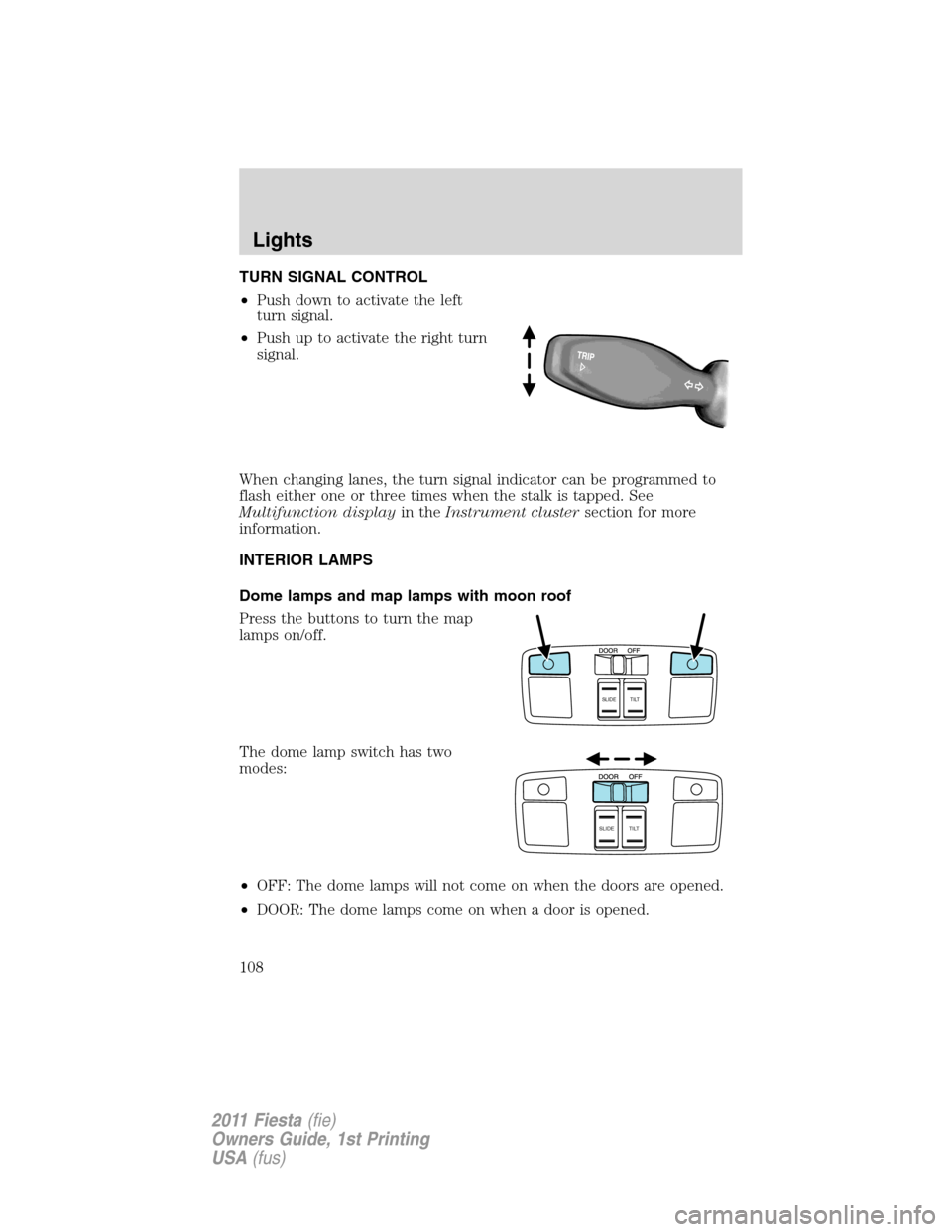
TURN SIGNAL CONTROL
•Push down to activate the left
turn signal.
•Push up to activate the right turn
signal.
When changing lanes, the turn signal indicator can be programmed to
flash either one or three times when the stalk is tapped. See
Multifunction displayin theInstrument clustersection for more
information.
INTERIOR LAMPS
Dome lamps and map lamps with moon roof
Press the buttons to turn the map
lamps on/off.
The dome lamp switch has two
modes:
•OFF: The dome lamps will not come on when the doors are opened.
•DOOR: The dome lamps come on when a door is opened.
SLIDE TILT
SLIDE TILT
Lights
108
2011 Fiesta(fie)
Owners Guide, 1st Printing
USA(fus)