2011 FORD F150 trailer
[x] Cancel search: trailerPage 36 of 461

Trailer
Rename Trailer Press the right arrow button when this is highlighted
to display saved or default trailers. Use the up/down
buttons to highlight a trailer and press OK to select
it. Use the up/down arrow buttons to change the
characters as needed. When done, press OK to
accept the change.
Reset Trailer
Mileage /
Kilometers (if
equipped)Press the right arrow button when this is highlighted
to display accumulated distance on a given trailer
within the list of trailer(s). Use the up/down buttons
to select a trailer, then press and hold OK to reset
the trailer mileage (kilometers).
Settings
In this mode, you can configure different driver setting choices (if
equipped). Press the right arrow key (when in the Settings menu) to
reach the Driver Assist menu:
Driver Assist
Rear Park Aid On/Off
Rear Video
CameraCamera Delay On/Off
Visual Park Aid On/Off
Guidelines Fixed/Off
Zoom Levels
(This will only
be shown when
Reverse (R) is
selected.Off, Level 1–3
Trailer Brake
ModeElectric or Elect. Over Hydraulic
Trailer Sway
ControlOn/Off
Instrument Cluster
36
2011 F-150(f12)
Owners Guide, 1st Printing
USA(fus)
Page 39 of 461

System Check
Oil Life
Doors
Brakes
Tire Pressure
Trailer Brake
Ctrl.Gain and Output (when trailer is connected)
No trailer (when no trailer is connected)
Trailer Sway
Park Aid Check Rear Park Aid
Fuel Level (distance to empty)
Some items will only display during a system check if a problem has
been detected. If an issue exists on one of the monitored systems, the
message center will display the number of warnings that need immediate
attention in red and the number of informational warnings will be listed
in amber. Use the up/down arrow buttons to scroll through the list; press
the right arrow button to display specific information on the highlighted
warning.
Transmission indicator display
The transmission gear indicator displays in the right side of the message
center when using the SelectShift Automatic™ transmission feature. This
display will not be shown in all screen modes. For example: when
programming certain vehicle features or in certain information menus.
System warnings and status messages
System warnings alert you to possible problems or malfunctions in your
vehicle’s operating systems.
In the event of a multiple warning situation, the message center will
cycle the display to show all warnings by displaying each one for four
seconds.
The message center will display the last selected feature if there are no
more warning messages.
Types of messages and warnings:
•Some messages will appear briefly to inform you of something you
may need to take action on or be informed of.
•Some messages will appear once and then again when the vehicle is
restarted.
•Some messages will reappear after clearing or being reset if a problem
or condition is still present and needs your attention.
Instrument Cluster
39
2011 F-150(f12)
Owners Guide, 1st Printing
USA(fus)
Page 44 of 461

MYKEY COULD NOT PROGRAM— Displayed when an attempt is
made to program a spare key using two existing MyKeys. Refer to
MyKey™in theLocks and Securitychapter for more information.
SECURITY SYSTEM FAULT (if equipped)— Displayed when the
security system has detected a fault. See your authorized dealer for
service.
SPEED LIMITED TO 130 KM/H— Displayed when starting the
vehicle and MyKey™ is in use and the MyKey speed limit is on. Refer to
MyKey™in theLocks and Securitychapter for more information.
SPEED LIMITED TO 80 MPH— Displayed when starting the vehicle
and MyKey™ is in use and the MyKey speed limit is on. Refer to
MyKey™in theLocks and Securitychapter for more information.
VEHICLE AT TOP SPEED - MYKEY SETTING— Displayed when a
MyKey™ is in use and the MyKey speed limit is on and the vehicle
speed is 80 mph (130 km/h). Refer toMyKey™in theLocks and
Securitychapter for more information.
VEHICLE NEAR TOP SPEED— Displayed when a MyKey™ is in use
and the MyKey speed limit is on and the vehicle speed is approaching
80 mph (130 km/h). Refer toMyKey™in theLocks and Security
chapter for more information.
CHECK REAR PARK AID (if equipped)— Displayed when the
transmission is in R (Reverse) and the park aid is disabled.
REAR PARK AID OFF (if equipped)— Displayed when the rear park
aid is disabled by the driver.
REAR PARK AID ON (if equipped)— Displayed when the rear park
aid is enabled.
TO STOP ALARM, START VEHICLE (if equipped)— Displayed
when the perimeter alarm system is armed and the vehicle is entered
using the key on the driver’s side door. In order to prevent the perimeter
alarm system from triggering, the ignition must be turned to start or on
before the 12 second chime expires. SeePerimeter alarm systemin the
Locks and securitychapter.
TRAILER BRAKE GAIN: XX.X [OUTPUT] (if equipped)— Displays
the current gain setting for the trailer brake. Refer toTrailer towingin
theTires, Wheels and Loadingchapter for more information.
TRAILER BRAKE GAIN: XX.X NO TRAILER (if equipped)—
Displays the current gain setting for the trailer brake when a trailer is
not connected. Refer toTrailer towingin theTires, Wheels and
Loadingchapter for more information.
Instrument Cluster
44
2011 F-150(f12)
Owners Guide, 1st Printing
USA(fus)
Page 45 of 461

TRAILER BRAKE MODULE FAULT (if equipped)— Displayed and
accompanied by a single chime, in response to faults sensed by the TBC.
Refer toTrailer towingin theTires, Wheels and Loadingchapter for
more information.
TRAILER CONNECTED (if equipped)— Displayed when a correct
trailer connection (a trailer with electric trailer brakes) is sensed during
a given ignition cycle. Refer toTrailer towingin theTires, Wheels and
Loadingchapter for more information.
TRAILER DISCONNECTED (if equipped)— Displayed when a
trailer connection becomes disconnected, either intentionally or
unintentionally, and has been sensed during a given ignition cycle.
Disregard this status if your vehicle is not equipped with a factory
installed trailer brake controller. This message may appear when an
aftermarket TBC is used even when the trailer is connected. Refer to
Trailer towingin theTires, Wheels and Loadingchapter for more
information.
TRAILER SWAY REDUCE SPEED (if equipped)— Displayed when
the trailer sway control has detected trailer sway. For more information,
refer to theDrivingchapter for more information.
WIRING FAULT ON TRAILER (if equipped)— Displayed if there
are certain faults in the vehicle wiring and trailer wiring/brake system.
Refer toTrailer towingin theTires, Wheels and Loadingchapter for
more information.
FOR OFF ROAD SLOW TO 5 MPH (if equipped)— Displayed when
the vehicle speed requirement for off-road mode entry has not been met.
OFF ROAD MODE ENABLED (if equipped)— Displayed when
off-road mode becomes active.
EXITING OFF ROAD MODE (if equipped)— Displayed when
off-road mode becomes inactive.
HILL DESCENT CONTROL ACTIVE (if equipped)— Displayed
when hill descent control mode becomes active.
HILL DESCENT CONTROL OFF (if equipped)— Displayed when hill
descent control mode becomes inactive.
DRIVER RESUME CONTROL (if equipped)— Displayed when the
hill control and off-road mode require the driver to resume control.
COAST DOWN MODE (if equipped)— Displayed when vehicle enters
coast down mode.
FOR HILL DESCENT REDUCE SPEED (if equipped)— Displayed
when the vehicle speed requirement for off-road mode entry has not
been met.
Instrument Cluster
45
2011 F-150(f12)
Owners Guide, 1st Printing
USA(fus)
Page 106 of 461
On vehicles not equipped with rear defrost, press the heated mirror
control
located on the climate control panel. For more information
refer to theClimate Controlschapter.
Note:If your vehicle is equipped with the Auto dimming feature, the
mirror glass is thicker and will take longer to defrost.
Do not remove ice from the mirrors with a scraper or attempt to
readjust the mirror glass if it is frozen in place. These actions
could cause damage to the glass and mirrors.
Do not clean the housing or glass of any mirror with harsh
abrasives, fuel or other petroleum-based cleaning products.
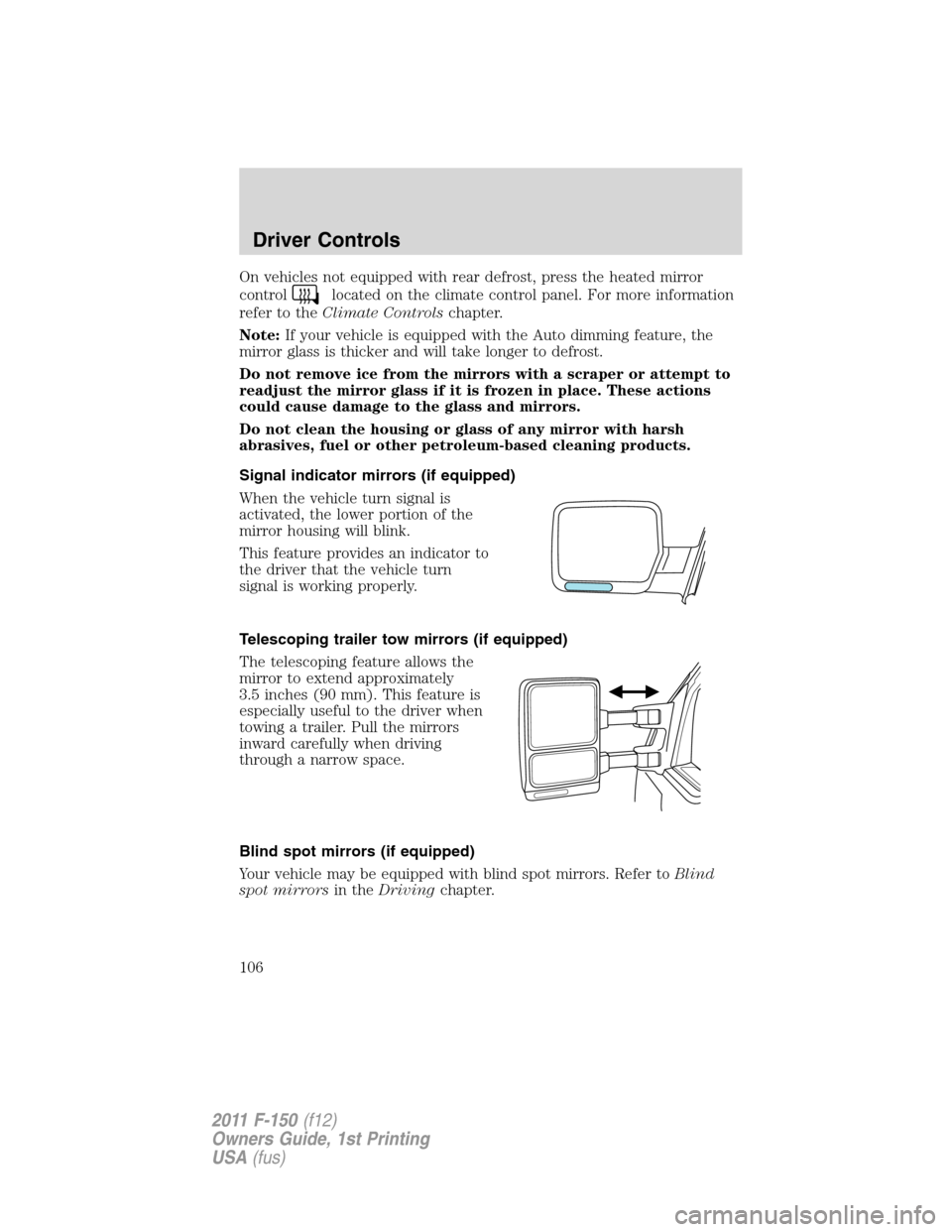
Signal indicator mirrors (if equipped)
When the vehicle turn signal is
activated, the lower portion of the
mirror housing will blink.
This feature provides an indicator to
the driver that the vehicle turn
signal is working properly.
Telescoping trailer tow mirrors (if equipped)
The telescoping feature allows the
mirror to extend approximately
3.5 inches (90 mm). This feature is
especially useful to the driver when
towing a trailer. Pull the mirrors
inward carefully when driving
through a narrow space.
Blind spot mirrors (if equipped)
Your vehicle may be equipped with blind spot mirrors. Refer toBlind
spot mirrorsin theDrivingchapter.
Driver Controls
106
2011 F-150(f12)
Owners Guide, 1st Printing
USA(fus)
Page 243 of 461

Information on “T” type tires
“T” type tires have some additional
information beyond those of “P”
type tires; these differences are
described below:
T145/80D16 is an example of a tire
size.
Note:The temporary tire size for
your vehicle may be different from
this example. Tire Quality Grades do
not apply to this type of tire.
1.T:Indicates a type of tire,
designated by the Tire and Rim
Association (T&RA), that is
intended for temporary service on
cars, SUVs, minivans and light
trucks.
2.145:Indicates the nominal width
of the tire in millimeters from sidewall edge to sidewall edge. In general,
the larger the number, the wider the tire.
3.80:Indicates the aspect ratio which gives the tire’s ratio of height to
width. Numbers of 70 or lower indicate a short sidewall.
4.D:Indicates a “diagonal” type tire.
R:Indicates a “radial” type tire.
5.16:Indicates the wheel or rim diameter in inches. If you change your
wheel size, you will have to purchase new tires to match the new wheel
diameter.
Location of the tire label
You will find a Tire Label containing tire inflation pressure by tire size
and other important information located on the B-Pillar or the edge of
the driver’s door. Refer to the payload description and graphic in the
Vehicle loading – with and without a trailersection.
Tires, Wheels and Loading
243
2011 F-150(f12)
Owners Guide, 1st Printing
USA(fus)
Page 248 of 461

TPMS reset procedure
The TPMS reset procedure needs to be performed after each tire
rotation on vehicles that require different recommended tire
pressures in the front tires as compared to the rear tires.
WARNING:To determine the required pressure(s) for your
vehicle, refer to the Safety Compliance Certification Label or
Tire Label located on the B-Pillar or the edge of the driver’s door. See
Vehicle loading - with and without a trailerin this chapter for more
information.
Overview
To provide the vehicle’s load carrying capability, some vehicles require
different recommended tire pressures in the front tires as compared to
the rear tires. The tire pressure monitoring system (TPMS) equipped on
these vehicles is designed to illuminate the low tire pressure warning
light at two different pressures; one for the front tires and one for the
rear tires.
Since tires need to be rotated to provide consistent performance and
maximum tire life, the tire pressure monitoring system needs to know
when the tires are rotated to determine which set of tires are on the
front and which are on the rear. With this information, the system can
detect and properly warn of low tire pressures.
TPMS reset tips:
•To reduce the chances of interference from another vehicle, the TPMS
reset procedure should be performed at least three feet (one meter)
away from another Ford Motor Company vehicle undergoing the TPMS
reset procedure at the same time.
•Do not wait more than two minutes between resetting each tire sensor
or the system will time-out and the entire procedure will have to be
repeated on all four wheels.
•A double horn chirp indicates the need to repeat the procedure.
Performing the TPMS reset procedure
It is recommended that you read the entire procedure before attempting.
1. Drive the vehicle above 20 mph (32 km/h) for at least two minutes
and then park in a safe location where you can easily get to all four tires
and have access to an air pump.
2. Place the ignition in the off position and keep the key in the ignition.
Tires, Wheels and Loading
248
2011 F-150(f12)
Owners Guide, 1st Printing
USA(fus)
Page 250 of 461

8. Remove the valve cap from the valve stem on the right rear tire;
decrease the air pressure until the horn sounds.
9. Remove the valve cap from the valve stem on the left rear tire;
decrease the air pressure until the horn sounds.
Training is complete after the horn sounds for the last tire trained
(driver’s side rear tire), the TPMS indicator stops flashing, and the
message center (if equipped) displays:
TRAINING COMPLETE.
10. Turn the ignition off. If two short horn beeps are heard, the reset
procedure was unsuccessful and must be repeated.
If after repeating the procedure and two short beeps are heard when the
ignition is turned to off, seek assistance from your authorized dealer.
11. Set all four tires to the recommended air pressure as indicated on
the Safety Compliance Certification Label or Tire Label located on the
B-Pillar or the edge of the driver’s door. SeeVehicle loading - with and
without a trailerin this chapter for more information.
SNOW TIRES AND CHAINS
WARNING:Snow tires must be the same size, load index, speed
rating as those originally provided by Ford. Use of any tire or
wheel not recommended by Ford can affect the safety and
performance of your vehicle, which could result in an increased risk of
loss of vehicle control, vehicle rollover, personal injury and death.
Additionally, the use of non-recommended tires and wheels could
cause steering, suspension, axle or transfer case/power transfer unit
failure.
The tires on your vehicle have all-weather treads to provide traction in
rain and snow. However, in some climates, you may need to use snow
tires and chains. If you need to use chains, it is recommended that steel
wheels (of the same size and specifications) be used, as chains may chip
aluminum wheels.
Note:The suspension insulation and bumpers will help prevent vehicle
damage. Do not remove these components from your vehicle when using
snow tires and chains.
Note:Do not place chains on the following tires sizes: P265/60R18,
P275/65R18, LT275/70R17, LT275/65R18, LT315/70R17, P275/55R20, and
P275/45R22.
Tires, Wheels and Loading
250
2011 F-150(f12)
Owners Guide, 1st Printing
USA(fus)