2011 FORD EXPLORER 4WD
[x] Cancel search: 4WDPage 16 of 449

Many lights will illuminate when you start your vehicle to make sure the
indicators work. If any light remains on after starting the vehicle, refer to
the respective system warning light for additional information.
Note:Some warning lights are reconfigurable telltale (RTT) indicators.
These indicators display in the lower line of the message center near the
odometer reading. They function the same as a warning light but do not
display on startup.
Service engine soon:The service
engine soon indicator light
illuminates when the ignition is first
turned to the on position to check
the bulb and to indicate whether the vehicle is ready for
Inspection/Maintenance (I/M) testing. Normally, the service engine soon
light will stay on until the engine is cranked, then turn itself off if no
malfunctions are present. However, if after 15 seconds the service engine
soon light blinks eight times, it means that the vehicle is not ready for
I/M testing. See theReadiness for Inspection/Maintenance (I/M)
testingin theMaintenance and Specificationschapter.
Solid illumination after the engine is started indicates the on-board
diagnostics system (OBD-II) has detected a malfunction. Refer to
On-board diagnostics (OBD-II)in theMaintenance and Specifications
chapter. If the light is blinking, engine misfire is occurring which could
damage your catalytic converter. Drive in a moderate fashion (avoid
heavy acceleration and deceleration) and contact your authorized dealer
as soon as possible.
WARNING:Under engine misfire conditions, excessive exhaust
temperatures could damage the catalytic converter, the fuel
system, interior floor coverings or other vehicle components, possibly
causing a fire.
Powertrain malfunction/reduced
power (RTT):Illuminates when a
powertrain or an 4WD fault has
been detected. Contact your
authorized dealer as soon as possible.
Instrument Cluster
15
2011 Explorer(exp)
Owners Guide, 1st Printing
USA(fus)
Page 22 of 449

GAUGES
Base cluster
Shown in standard measure. Metric similar.
1.Tachometer:Indicates the engine speed in revolutions per minute.
Driving with your tachometer pointer continuously at the top of the scale
may damage the engine.
2.Multifunction display:This displays the engine coolant temperature,
4WD gauge, odometer/trip meter and other vehicle features. This is also
used to configure different vehicle personalization options and display
the status of various vehicle functions. SeeStandard message centerin
this chapter for more information.
32
4
5
4
3
2
1
07
F
E
6
km/h
80
60
40
20
0
20
0 40 60 80
100120140160180
200
220
100120140
MPH
1
Instrument Cluster
21
2011 Explorer(exp)
Owners Guide, 1st Printing
USA(fus)
Page 23 of 449
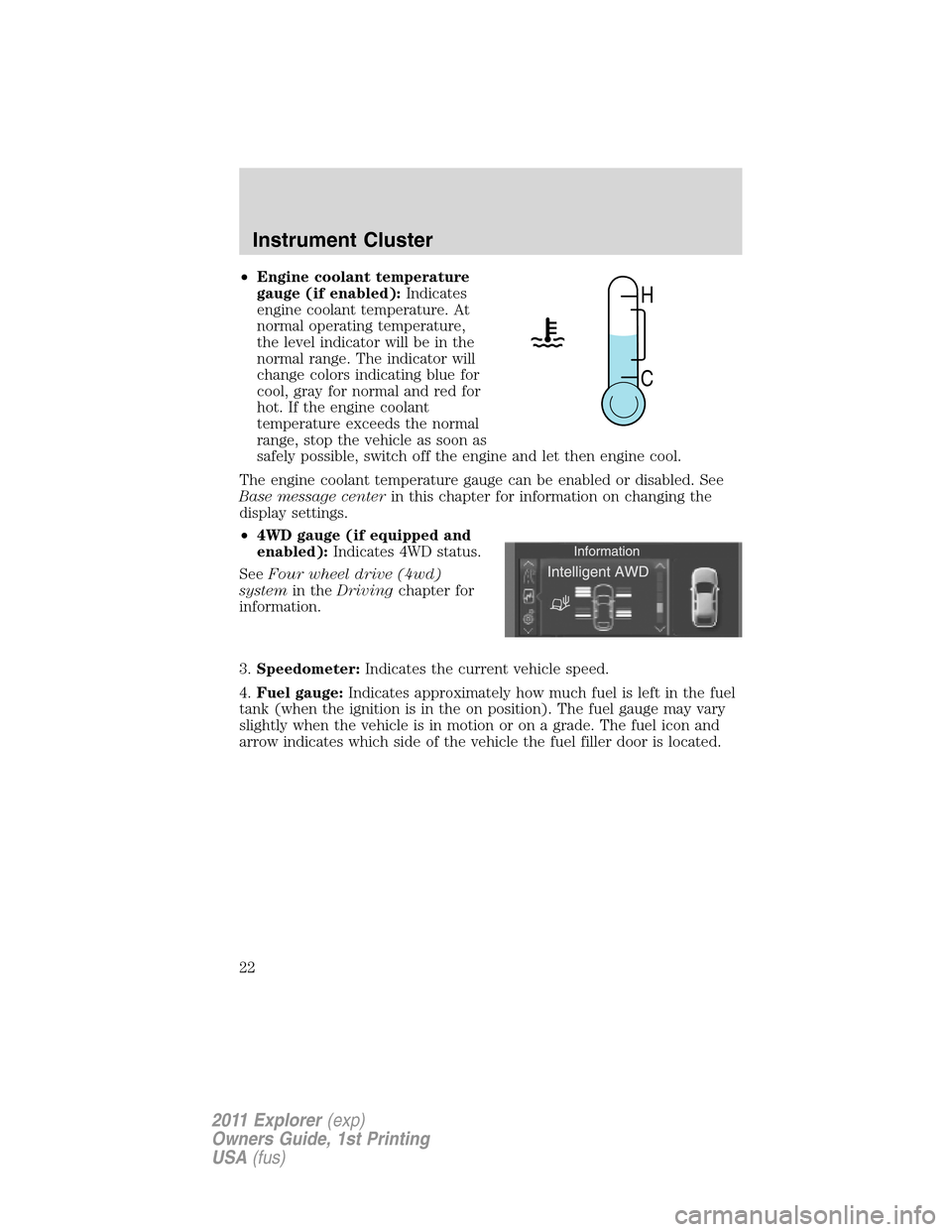
•Engine coolant temperature
gauge (if enabled):Indicates
engine coolant temperature. At
normal operating temperature,
the level indicator will be in the
normal range. The indicator will
change colors indicating blue for
cool, gray for normal and red for
hot. If the engine coolant
temperature exceeds the normal
range, stop the vehicle as soon as
safely possible, switch off the engine and let then engine cool.
The engine coolant temperature gauge can be enabled or disabled. See
Base message centerin this chapter for information on changing the
display settings.
•4WD gauge (if equipped and
enabled):Indicates 4WD status.
SeeFour wheel drive (4wd)
systemin theDrivingchapter for
information.
3.Speedometer:Indicates the current vehicle speed.
4.Fuel gauge:Indicates approximately how much fuel is left in the fuel
tank (when the ignition is in the on position). The fuel gauge may vary
slightly when the vehicle is in motion or on a grade. The fuel icon and
arrow indicates which side of the vehicle the fuel filler door is located.
H
C
Instrument Cluster
22
2011 Explorer(exp)
Owners Guide, 1st Printing
USA(fus)
Page 26 of 449

Scroll up/down to highlight one of the options, then press the right arrow
key or OK to enter into that menu option.
Information
4WD Gauge (if equipped)
MyKey™ Distance (if MyKey™ is programmed)
MyKey™ Information (number of MyKeys™ and admin keys programmed)
Coolant Temperature
In this mode, you can view vehicle information and configure different
vehicle settings. Press the right arrow key (when in the Settings menu)
to reach the different menus.
Settings
Driver Assist Traction Control
Blind Spot
Collision Warning Sensitivity
(if MyKey is
programmed)High, Normal or
Low
Chimes
Warning
Cross Traffic
Rear Park Aid
Trailer Sway
Display Language English, Español or Français
Units Distance Miles and
Gallons or Km
and Liters
Temperature Fahrenheit (°F)
or Celsius (°C)
Convenience Autolamp Delay Off or number of seconds
DTE Calculation Normal or Towing
Instrument Cluster
25
2011 Explorer(exp)
Owners Guide, 1st Printing
USA(fus)
Page 31 of 449

REMOVE OBJECTS NEAR PASS SEAT— Displayed when objects
are by the passenger seat. After the objects are moved away from the
seat, if the warning stays on or continues to come on contact your
authorized dealer as soon as possible.
TRACTION CONTROL OFF— Displayed when the traction control
has been disabled by the driver. Refer to theDrivingchapter for more
information.
AUTOMATIC BRAKING TURNED OFF (if equipped)— Displayed
when adaptive cruise control automatic braking is turned off.
AWD OFF (if equipped)— Displayed when the 4WD system has been
automatically disabled to protect itself. This is caused by operating the
vehicle with the compact spare tire installed or if the system is
overheating. The 4WD system will resume normal function and clear this
message after driving a short distance with the road tire re-installed or
after the system is allowed to cool.
CHECK AWD (if equipped)— Displayed in conjunction with the
throttle control/transmission/4WD
light when the 4WD system is
not operating properly. If the warning stays on or continues to come on,
contact your authorized dealer as soon as possible.
POWER STEERING ASSIST FAULT— The power steering system has
disabled power steering assist due to a system error, service is required.
SERVICE POWER STEERING— The power steering system has
detected a condition that requires service.
SERVICE POWER STEERING NOW— The power steering system
has detected a condition within the power steering system that requires
service immediately.
ACCESSORY POWER ACTIVE (if equipped)— Displayed when the
vehicle is in the accessory ignition state on keyless vehicles.
COULD NOT PROGRAM INTEGRATED KEY— Displayed when an
attempt is made to program a spare key using two existing MyKeys.
Refer toMyKey™in theLocks and Securitychapter for more
information.
KEY PROGRAMMED 3 KEYS TOTAL— Displayed during spare key
programming, when a third Intelligent Access Key is programmed to the
system.
KEY PROGRAMMED 4 KEYS TOTAL— Displayed during spare key
programming, when a fourth Intelligent Access Key is programmed to
the system.
Instrument Cluster
30
2011 Explorer(exp)
Owners Guide, 1st Printing
USA(fus)
Page 38 of 449

Intelligent Four-wheel drive
(4WD) (if equipped) + other
gauges
For a description of the other
gauges, see the descriptions listed
previously.
•Intelligent all-wheel drive: shows
the 4WD mode that the vehicle is
in. Refer toFour-Wheel Drive
(4WD) system and Terrain
managementin theDrivingchapter.
Trip1&2
Press the right arrow on the left steering wheel mounted button when
trip1&2isselected.Theboxes in the upper right corner of the screen
indicate that there are multiple screens that you can navigate through.
Each press of the right arrow will navigate to the next screen until the
last screen is reached. The white highlighted box indicates which of the
screens you are currently viewing:
Choose the standard or enhanced display. See theSettingschart
following to reach the trip display settings.
Standard trip display
•Trip distance — shows the accumulated trip distance
•Elapsed trip time — timer stops when the vehicle is turned off and
restarts when the vehicle is restarted.
F6
4
RPM
1000+2
0
E
F6
4 139.5 mi Trip 1
00:58:44
RPM
1000+
2
0
01234.5mi
E
Instrument Cluster
37
2011 Explorer(exp)
Owners Guide, 1st Printing
USA(fus)
Page 47 of 449

AWD OFF (if equipped)— Displayed when the 4WD system has been
automatically disabled to protect itself. This is caused by operating the
vehicle with the compact spare tire installed or if the system is
overheating. The 4WD system will resume normal function and clear this
message after driving a short distance with the road tire re-installed or
after the system is allowed to cool.
CHECK AWD (if equipped)— Displayed in conjunction with the
throttle control/transmission/4WD
light when the 4WD system is
not operating properly. If the warning stays on or continues to come on,
contact your authorized dealer as soon as possible.
EXITING OFF ROAD MODE (if equipped)— Displayed when off
road mode becomes inactive.
FOR HILL DESCENT REDUCE SPEED 20 MPH OR LESS (if
equipped)— Displayed when hill descent speed exceeds 20 MPH.
FOR HILL DESCENT REDUCE SPEED 32 KM/H OR LESS (if
equipped)— Displayed when hill descent speed exceeds 32 KM/H.
FOR HILL DESCENT SELECT GEAR (if equipped)— Displayed
when hill descent control mode requires driver shift transmission into
gear.
FOR OFF ROAD SLOW TO 5 MPH (if equipped)— Displayed when
the vehicle speed requirement for off road mode entry has not been met.
DRIVER RESUME CONTROL (if equipped)— Displayed when the
hill control and off road mode require the driver to resume control.
HILL DESCENT CONTROL ACTIVE (if equipped)— Displayed
when hill descent control mode becomes active.
HILL DESCENT CONTROL FAULT (if equipped)— Displayed when
a hill descent system fault is present.
HILL DESCENT CONTROL OFF (if equipped)— Displayed when hill
descent control mode becomes inactive.
HILL DESCENT CONTROL OFF SYSTEM COOLING (if equipped)
— Displayed when hill descent control mode is disabled to cool the
brake system.
HILL DESCENT CONTROL READY (if equipped)— Displayed
when hill descent control mode is ready.
Instrument Cluster
46
2011 Explorer(exp)
Owners Guide, 1st Printing
USA(fus)
Page 234 of 449
VEHICLE CHARACTERISTICS
Four-wheel drive (4WD) system (if equipped)
A vehicle equipped with 4WD (when selected) has the ability to use all
four wheels to power itself. This increases traction which may enable you
to safely drive over terrain and road conditions that a conventional
two-wheel drive vehicle cannot.
Power is supplied to all four wheels through a transfer case or power
transfer unit. 4WD vehicles allow you to select different drive modes as
necessary. Information on transfer case operation and shifting procedures
can be found in theDrivingchapter. Information on transfer case
maintenance can be found in theMaintenance and Specifications
chapter. You should become thoroughly familiar with this information
before you operate your vehicle.
On some 4WD models, the initial shift from two-wheel drive to 4WD
while the vehicle is moving can cause a momentary clunk and ratcheting
sound. These sounds are normal as the front drivetrain comes up to
speed and is not cause for concern.
WARNING:Do not become overconfident in the ability of 4WD
vehicles. Although a 4WD vehicle may accelerate better than
two-wheel drive vehicle in low traction situations, it won’t stop any
faster than two-wheel drive vehicles. Always drive at a safe speed.
Tires, Wheels and Loading
233
2011 Explorer(exp)
Owners Guide, 1st Printing
USA(fus)