Page 80 of 449

Daytime running lamps (DRL) (if equipped)
To activate DRL:
•the ignition must be in the on position and
•the headlamp control is in the
orposition
•the transmission is not in P (Park).
WARNING:Always remember to turn on your headlamps at
dusk or during inclement weather. The Daytime Running Light
(DRL) System does not activate your tail lamps and generally may not
provide adequate lighting during these conditions. Failure to activate
your headlamps under these conditions may result in a collision.
PANEL DIMMER CONTROL
Use to adjust the brightness of the
instrument panel and all applicable
lit components in the vehicle during
headlamp and parking lamp
operation.
•Tapthetoporbottomofthe
control to brighten/dim all interior
lit components incrementally, or
•Press and hold the top or bottom
of the control until the desired lighting level is reached.
Note:In the uplevel message center only, a message will pop up that will
show incrementally where the dimmer is in relation to the dimming
steps. These steps will also vary for daytime and night time dimming.
Note:If the battery is disconnected, discharged, or a new battery is
installed, the dimmer control requires re-calibration. Press the dimmer
control from the full dim position to the full on position to reset. This
will ensure that your displays are visible under all lighting conditions.
Lights
79
2011 Explorer(exp)
Owners Guide, 1st Printing
USA(fus)
Page 85 of 449

Third row cargo lamp
The dome lamp lights when:
•any door is opened.
•the instrument panel dimmer
button is pressed until the
courtesy lamp comes on.
•any of the remote entry controls
are pressed and the ignition is
off.
The courtesy lamp can also be
turned on and off manually by
pressing the control switch.
Battery saver
The battery saver will shut off the exterior lamps and interior lamps,
except the hazard warning lamps if activated, 10 minutes after the
ignition control has been turned off. The system will not turn off the
parking lamps if they are on.
BULB REPLACEMENT
Lamp assembly condensation
Exterior lamps are vented to accommodate normal changes in pressure.
Condensation can be a natural by-product of this design. When moist air
enters the lamp assembly through the vents, there is a possibility that
condensation can occur when the temperature is cold. When normal
condensation occurs, a thin film of mist can form on the interior of the
lens. The thin mist eventually clears and exits through the vents during
normal operation. Clearing time may take as long as 48 hours under dry
weather conditions.
Examples of acceptable condensation are:
•Presence of thin mist (no streaks, drip marks or droplets)
•Fine mist covers less than 50% of the lens
Examples of unacceptable moisture (usually caused by a lamp water
leak) are:
•Water puddle inside the lamp
•Large water droplets, drip marks or streaks present on the interior of
the lens
Take your vehicle to a dealer for service if any of the above conditions of
unacceptable moisture are present.
Lights
84
2011 Explorer(exp)
Owners Guide, 1st Printing
USA(fus)
Page 87 of 449
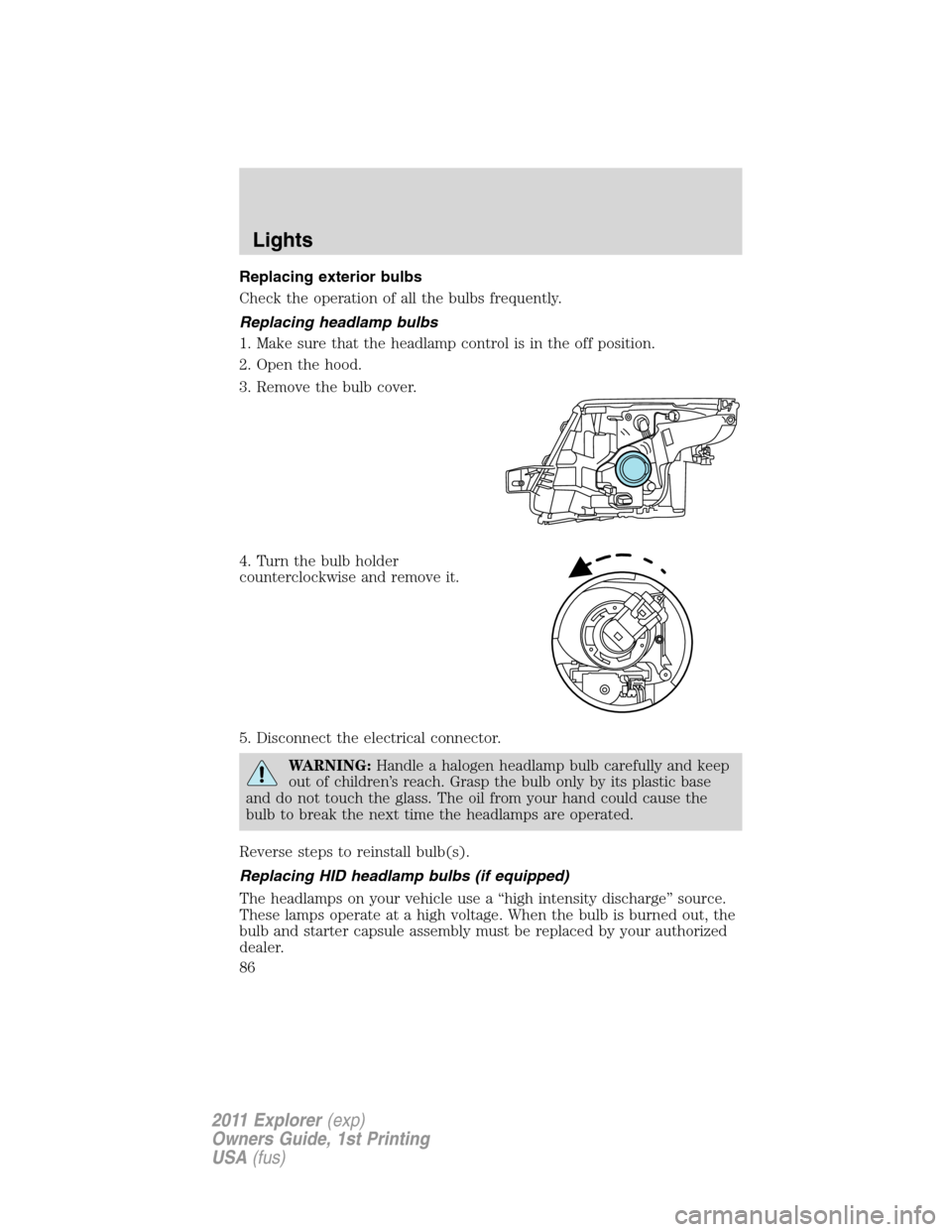
Replacing exterior bulbs
Check the operation of all the bulbs frequently.
Replacing headlamp bulbs
1. Make sure that the headlamp control is in the off position.
2. Open the hood.
3. Remove the bulb cover.
4. Turn the bulb holder
counterclockwise and remove it.
5. Disconnect the electrical connector.
WARNING:Handle a halogen headlamp bulb carefully and keep
out of children’s reach. Grasp the bulb only by its plastic base
and do not touch the glass. The oil from your hand could cause the
bulb to break the next time the headlamps are operated.
Reverse steps to reinstall bulb(s).
Replacing HID headlamp bulbs (if equipped)
The headlamps on your vehicle use a “high intensity discharge” source.
These lamps operate at a high voltage. When the bulb is burned out, the
bulb and starter capsule assembly must be replaced by your authorized
dealer.
Lights
86
2011 Explorer(exp)
Owners Guide, 1st Printing
USA(fus)
Page 95 of 449

Reverse wiper feature:The rear wiper will be automatically activated in
an intermittent setting when shifting into R (Reverse) if the front wipers
are activated. This feature may be enabled/disabled through the message
center. Refer toMessage centerin theInstrument Clusterchapter.
TILT/TELESCOPE STEERING WHEEL
To adjust the steering wheel:
1. Pull the lever down to unlock the
steering column.
2. While the lever is in the down
position, move the steering wheel
up or down and in or out until you
find the desired position.
3. While holding the steering wheel in
place, pull the lever up to its original
position to lock the steering column.
WARNING:Never adjust the steering wheel when the vehicle is
moving.
ILLUMINATED VISOR MIRROR (IF EQUIPPED)
Lift the mirror cover to turn on the
visor mirror lamp.
Slide-on-rod feature
Rotate the visor towards the side
window and extend it rearward for
additional sunlight coverage.
Note:To stow the visor back into
the headliner, visor must be
retracted before moving it back
towards the windshield.
Driver Controls
94
2011 Explorer(exp)
Owners Guide, 1st Printing
USA(fus)
Page 99 of 449

The power point can switch to a fault mode when it is overloaded,
overheated, or shorted. For overloading and shorting conditions, unplug
your device and turn the ignition key off then on. For an overheating
condition, let the system cool off, then turn the ignition key off then on.
The 110V AC power point can provide power whenever the vehicle
ignition is in the on position and the power point green indicator light
located in the top left corner is turned on. Refer to the indicator light
code below for the power point status.
Indicator light codes
Green light is on — Power point is ready to supply power
Green light is off — Power point power supply is off. Ignition is not in
the on position
Green light is blinking — Power point is in fault mode
Note:The 110V AC power point will turn off after 13 minutes if the
ignition is in the on position without the engine running. Keep the
engine running or cycle the ignition before the 13 minute time-out to
keep the inverter on.
POWER WINDOWS
WARNING:Do not leave children unattended in the vehicle and
do not let children play with the power windows. They may
seriously injure themselves.
WARNING:When closing the power windows, you should verify
they are free of obstructions and ensure that children and/or
pets are not in the proximity of the window openings.
Press and pull the window switches
to open and close windows.
•Press down (to the first detent)
and hold the switch to open.
•Pull up (to the first detent) and
hold the switch to close.
Rear Window Buffeting:When one or both of the rear windows are
open, the vehicle may demonstrate a wind throb or buffeting noise. This
noise can be alleviated by lowering a front window approximately
2–3 inches (5–8 cm).
AUTO
Driver Controls
98
2011 Explorer(exp)
Owners Guide, 1st Printing
USA(fus)
Page 101 of 449

INTERIOR MIRROR
The interior rear view mirror has two pivot points on the support arm
which lets you adjust the mirror up or down and from side to side.
WARNING:Do not adjust the mirror while the vehicle is in
motion.
Automatic dimming interior rear view mirror (if equipped)
The interior rear view mirror has an auto-dimming function. The
electronic day/night mirror will change from the normal (high reflective)
state to the non-glare (darkened) state when bright lights (glare) reach
the mirror. When the mirror detects bright light from behind the vehicle,
it will automatically adjust (darken) to minimize glare.
The mirror will automatically return to the normal state whenever the
vehicle is placed in R (Reverse) to ensure a bright clear view when
backing up.
Do not block the sensors on the front and back of the interior rear
view mirror since this may impair proper mirror performance.
Note:A rear center passenger and/or raised rear center headrest (if
equipped) may also block the light from reaching the sensor.
Do not clean the housing or glass of any mirror with harsh
abrasives, fuel or other petroleum-based cleaning products.
Driver Controls
100
2011 Explorer(exp)
Owners Guide, 1st Printing
USA(fus)
Page 102 of 449
EXTERIOR MIRRORS
Power side view mirrors
WARNING:Do not adjust the mirror while the vehicle is in
motion.
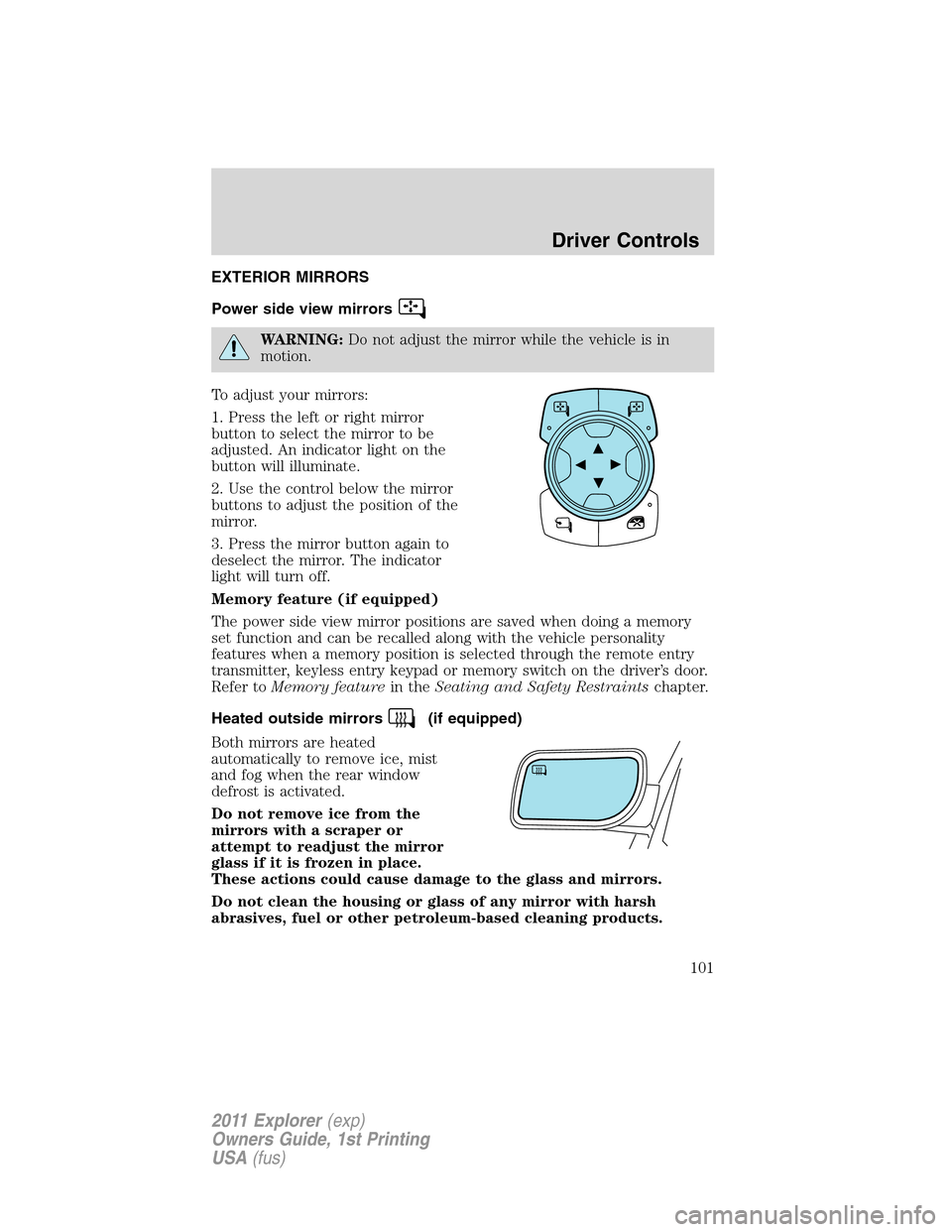
To adjust your mirrors:
1. Press the left or right mirror
button to select the mirror to be
adjusted. An indicator light on the
button will illuminate.
2. Use the control below the mirror
buttons to adjust the position of the
mirror.
3. Press the mirror button again to
deselect the mirror. The indicator
light will turn off.
Memory feature (if equipped)
The power side view mirror positions are saved when doing a memory
set function and can be recalled along with the vehicle personality
features when a memory position is selected through the remote entry
transmitter, keyless entry keypad or memory switch on the driver’s door.
Refer toMemory featurein theSeating and Safety Restraintschapter.
Heated outside mirrors
(if equipped)
Both mirrors are heated
automatically to remove ice, mist
and fog when the rear window
defrost is activated.
Do not remove ice from the
mirrors with a scraper or
attempt to readjust the mirror
glass if it is frozen in place.
These actions could cause damage to the glass and mirrors.
Do not clean the housing or glass of any mirror with harsh
abrasives, fuel or other petroleum-based cleaning products.
Driver Controls
101
2011 Explorer(exp)
Owners Guide, 1st Printing
USA(fus)
Page 109 of 449

Setting the gap distance
The distance between your vehicle
and the vehicle in front of you can
be decreased or increased by
pressing the GAP control up or
down. The selected gap will be
displayed in the message center as shown by the bars in the graphic.
Four gap distance settings are available.
Graphic
display (bars
between
vehicles)Following
distanceFollowing
distance at
60 mph
(100 km/h)Dynamic
behavior
1 bar 1 second 29 yards (28 m) Sporty
2 bars 1.5 seconds 44 yards (42 m) Normal
3 bars 1.9 seconds 56 yards (53 m) Normal
4 bars 2.3 seconds 66 yards (64 m) Comfort
Each time the vehicle is restarted, the last chosen gap for the current
driver will be automatically selected.
Note:It is the driver’s responsibility to select a gap appropriate to the
driving conditions.
Disengaging adaptive cruise control
Press the brake pedal or press CNCL to disengage the adaptive cruise
control. The last set speed will be displayed with a strikethrough.
Disengaging the adaptive cruise control will not erase your previous set
speed.
Overriding adaptive cruise control
WARNING:Whenever the driver is overriding the ACC by
pressing the accelerator pedal, the ACC will not automatically
apply the brakes to maintain separation from any vehicle ahead.
The set speed and gap distance can be overridden by pressing the
accelerator pedal.
When the driver is overriding ACC, the green
ACC light is
illuminated, and the follow vehicle is not displayed in the message
center. When the accelerator is released, the ACC function will operate
again and vehicle speed will decrease to the set speed, or a lower speed
if following a slower vehicle.
Driver Controls
108
2011 Explorer(exp)
Owners Guide, 1st Printing
USA(fus)