2011 FORD EXPEDITION side
[x] Cancel search: sidePage 80 of 395
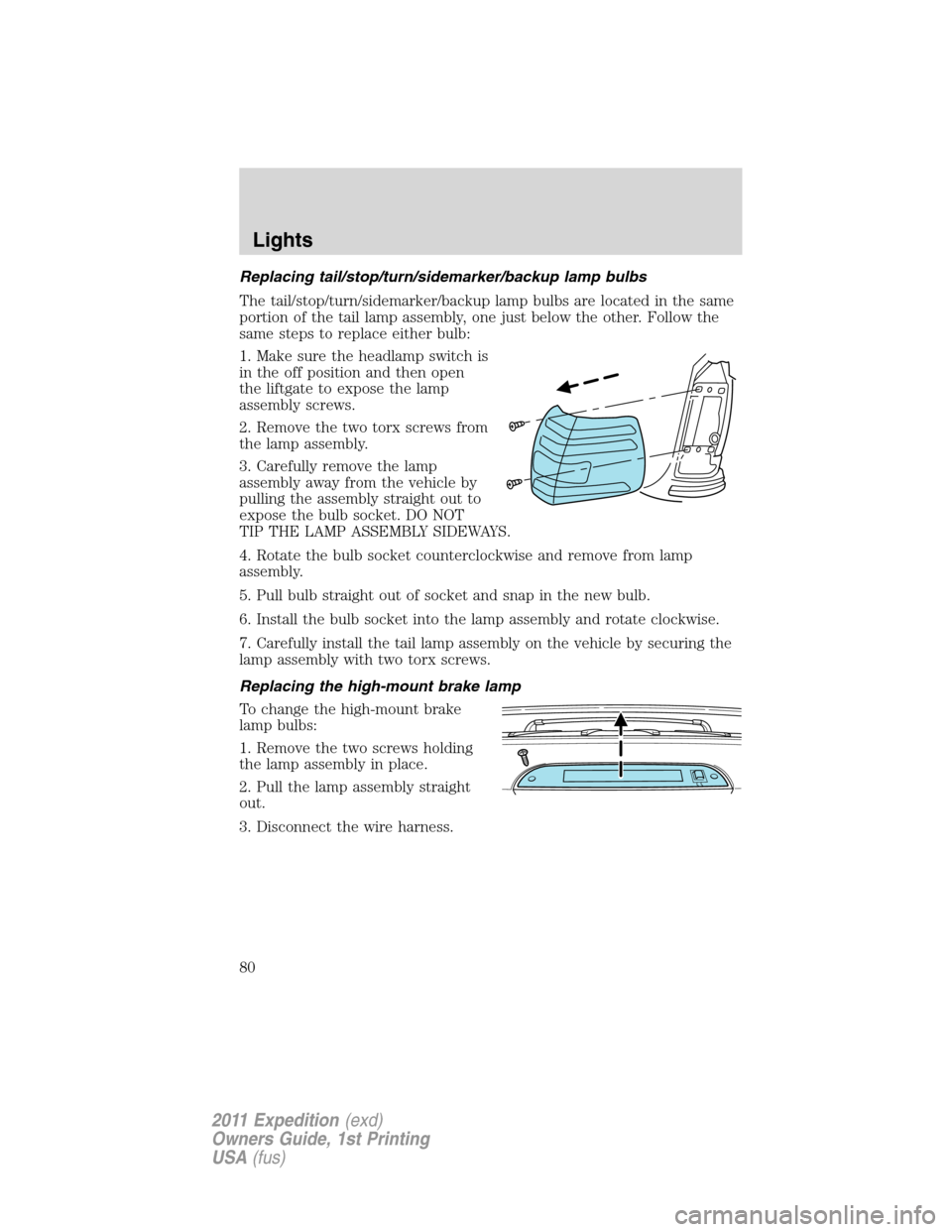
Replacing tail/stop/turn/sidemarker/backup lamp bulbs
The tail/stop/turn/sidemarker/backup lamp bulbs are located in the same
portion of the tail lamp assembly, one just below the other. Follow the
same steps to replace either bulb:
1. Make sure the headlamp switch is
in the off position and then open
the liftgate to expose the lamp
assembly screws.
2. Remove the two torx screws from
the lamp assembly.
3. Carefully remove the lamp
assembly away from the vehicle by
pulling the assembly straight out to
expose the bulb socket. DO NOT
TIP THE LAMP ASSEMBLY SIDEWAYS.
4. Rotate the bulb socket counterclockwise and remove from lamp
assembly.
5. Pull bulb straight out of socket and snap in the new bulb.
6. Install the bulb socket into the lamp assembly and rotate clockwise.
7. Carefully install the tail lamp assembly on the vehicle by securing the
lamp assembly with two torx screws.
Replacing the high-mount brake lamp
To change the high-mount brake
lamp bulbs:
1. Remove the two screws holding
the lamp assembly in place.
2. Pull the lamp assembly straight
out.
3. Disconnect the wire harness.
Lights
80
2011 Expedition(exd)
Owners Guide, 1st Printing
USA(fus)
Page 82 of 395
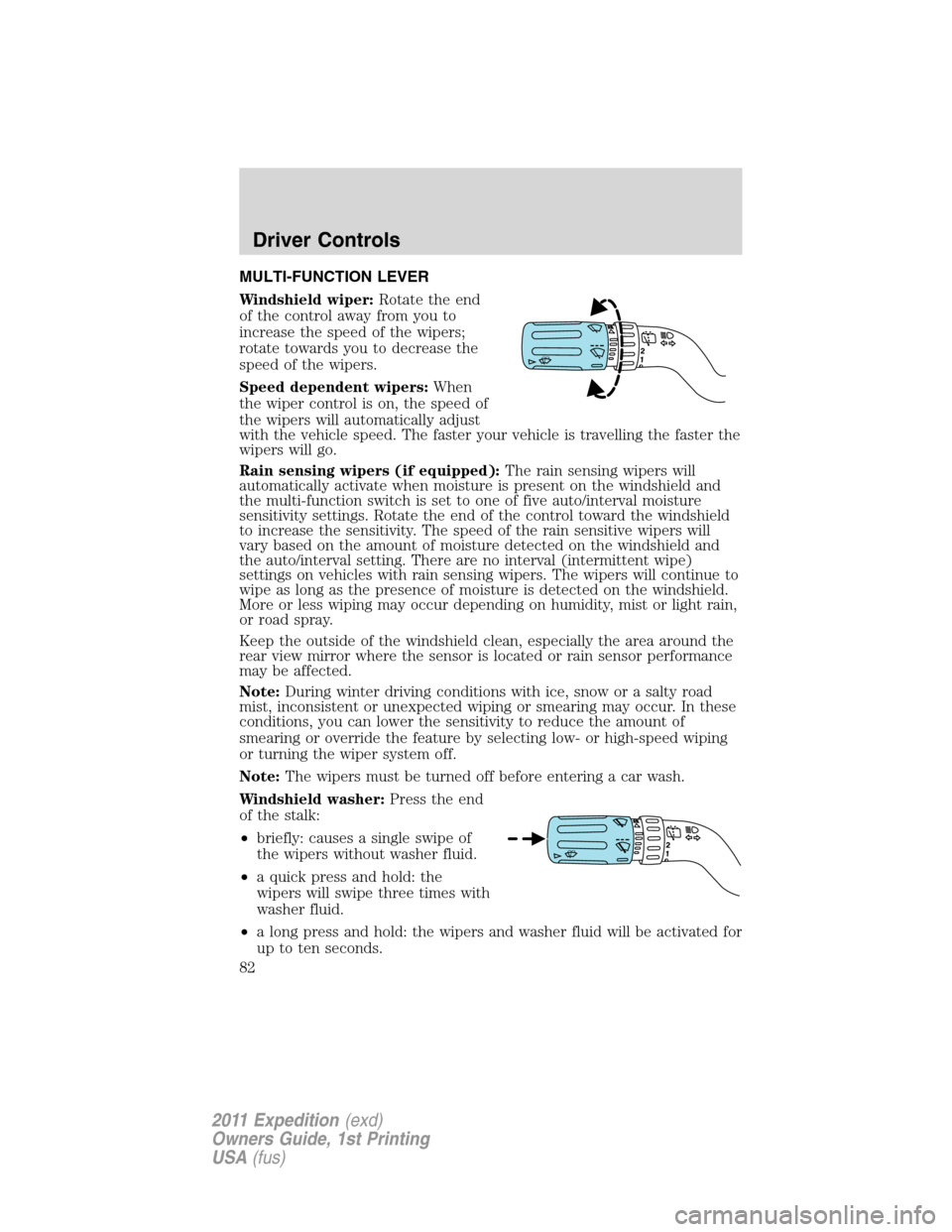
MULTI-FUNCTION LEVER
Windshield wiper:Rotate the end
of the control away from you to
increase the speed of the wipers;
rotate towards you to decrease the
speed of the wipers.
Speed dependent wipers:When
the wiper control is on, the speed of
the wipers will automatically adjust
with the vehicle speed. The faster your vehicle is travelling the faster the
wipers will go.
Rain sensing wipers (if equipped):The rain sensing wipers will
automatically activate when moisture is present on the windshield and
the multi-function switch is set to one of five auto/interval moisture
sensitivity settings. Rotate the end of the control toward the windshield
to increase the sensitivity. The speed of the rain sensitive wipers will
vary based on the amount of moisture detected on the windshield and
the auto/interval setting. There are no interval (intermittent wipe)
settings on vehicles with rain sensing wipers. The wipers will continue to
wipe as long as the presence of moisture is detected on the windshield.
More or less wiping may occur depending on humidity, mist or light rain,
or road spray.
Keep the outside of the windshield clean, especially the area around the
rear view mirror where the sensor is located or rain sensor performance
may be affected.
Note:During winter driving conditions with ice, snow or a salty road
mist, inconsistent or unexpected wiping or smearing may occur. In these
conditions, you can lower the sensitivity to reduce the amount of
smearing or override the feature by selecting low- or high-speed wiping
or turning the wiper system off.
Note:The wipers must be turned off before entering a car wash.
Windshield washer:Press the end
of the stalk:
•briefly: causes a single swipe of
the wipers without washer fluid.
•a quick press and hold: the
wipers will swipe three times with
washer fluid.
•a long press and hold: the wipers and washer fluid will be activated for
up to ten seconds.
Driver Controls
82
2011 Expedition(exd)
Owners Guide, 1st Printing
USA(fus)
Page 84 of 395
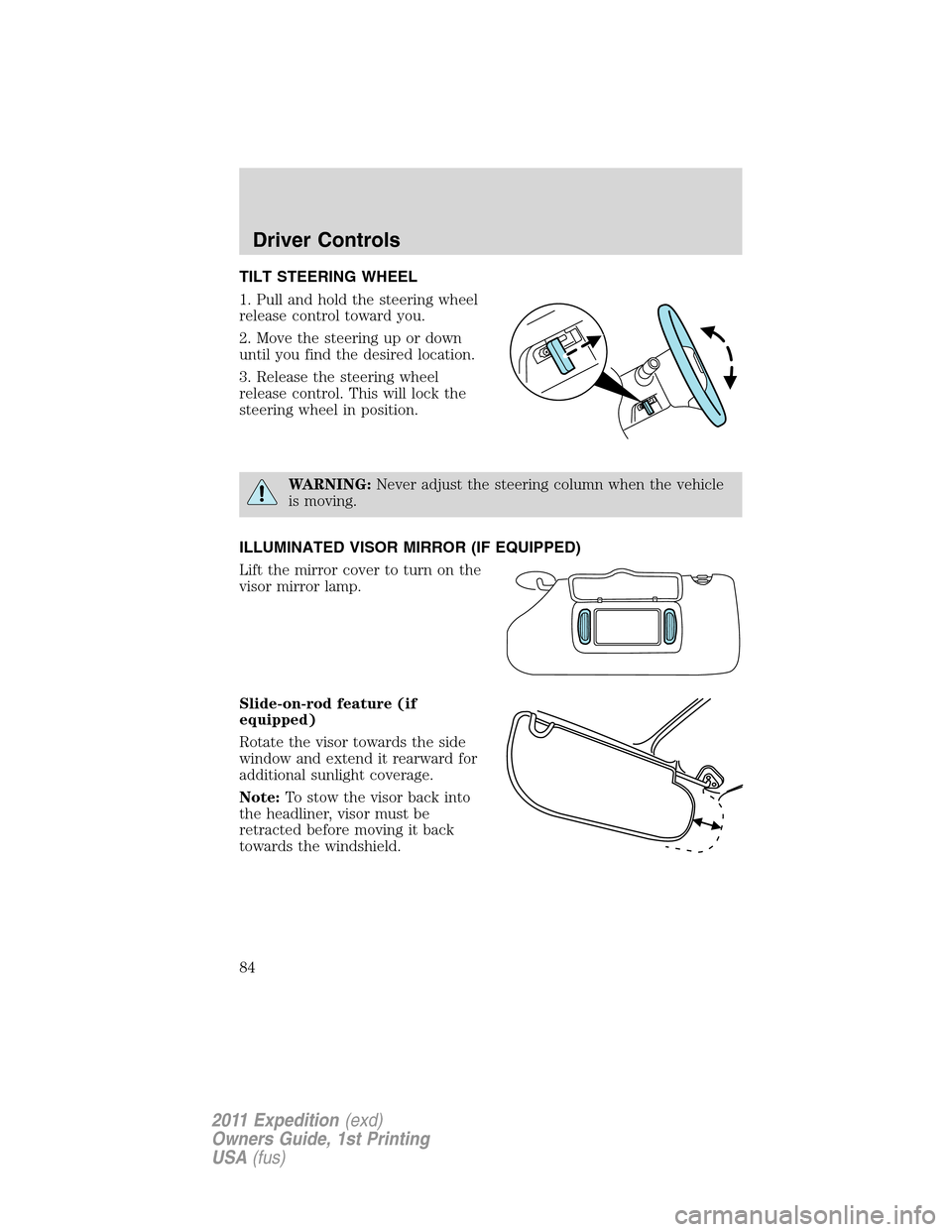
TILT STEERING WHEEL
1. Pull and hold the steering wheel
release control toward you.
2. Move the steering up or down
until you find the desired location.
3. Release the steering wheel
release control. This will lock the
steering wheel in position.
WARNING:Never adjust the steering column when the vehicle
is moving.
ILLUMINATED VISOR MIRROR (IF EQUIPPED)
Lift the mirror cover to turn on the
visor mirror lamp.
Slide-on-rod feature (if
equipped)
Rotate the visor towards the side
window and extend it rearward for
additional sunlight coverage.
Note:To stow the visor back into
the headliner, visor must be
retracted before moving it back
towards the windshield.
Driver Controls
84
2011 Expedition(exd)
Owners Guide, 1st Printing
USA(fus)
Page 87 of 395
AUXILIARY POWER POINT (12V DC)
Power outlets are designed for accessory plugs only. Do not insert
any other object in the power outlet as this will damage the
outlet and blow the fuse. Do not hang any type of accessory or
accessory bracket from the plug. Improper use of the power
outlet can cause damage not covered by your warranty.
Auxiliary power points can be found in the following locations:
•On the instrument panel
•On the rear of the center console, accessible from the rear seats
•On the right rear quarter panel, accessible from the liftgate or the
third row seat
Do not use the power point for operating the cigarette lighter element (if
equipped).
To prevent the fuse from being blown, do not use the power point(s)
over the vehicle capacity of 12V DC/180W. If the power point or cigar
lighter socket is not working, a fuse may have blown. Refer toFuses and
relaysin theRoadside Emergencieschapter for information on
checking and replacing fuses.
To have full capacity usage of your power point, the engine is required to
be running to avoid unintentional discharge of the battery. To prevent
the battery from being discharged:
•do not use the power point longer than necessary when the engine is
not running,
•do not leave battery chargers, video game adapters, computers and
other devices plugged in overnight or when the vehicle is parked for
extended periods.
Always keep the power point caps closed when not being used.
Driver Controls
87
2011 Expedition(exd)
Owners Guide, 1st Printing
USA(fus)
Page 91 of 395
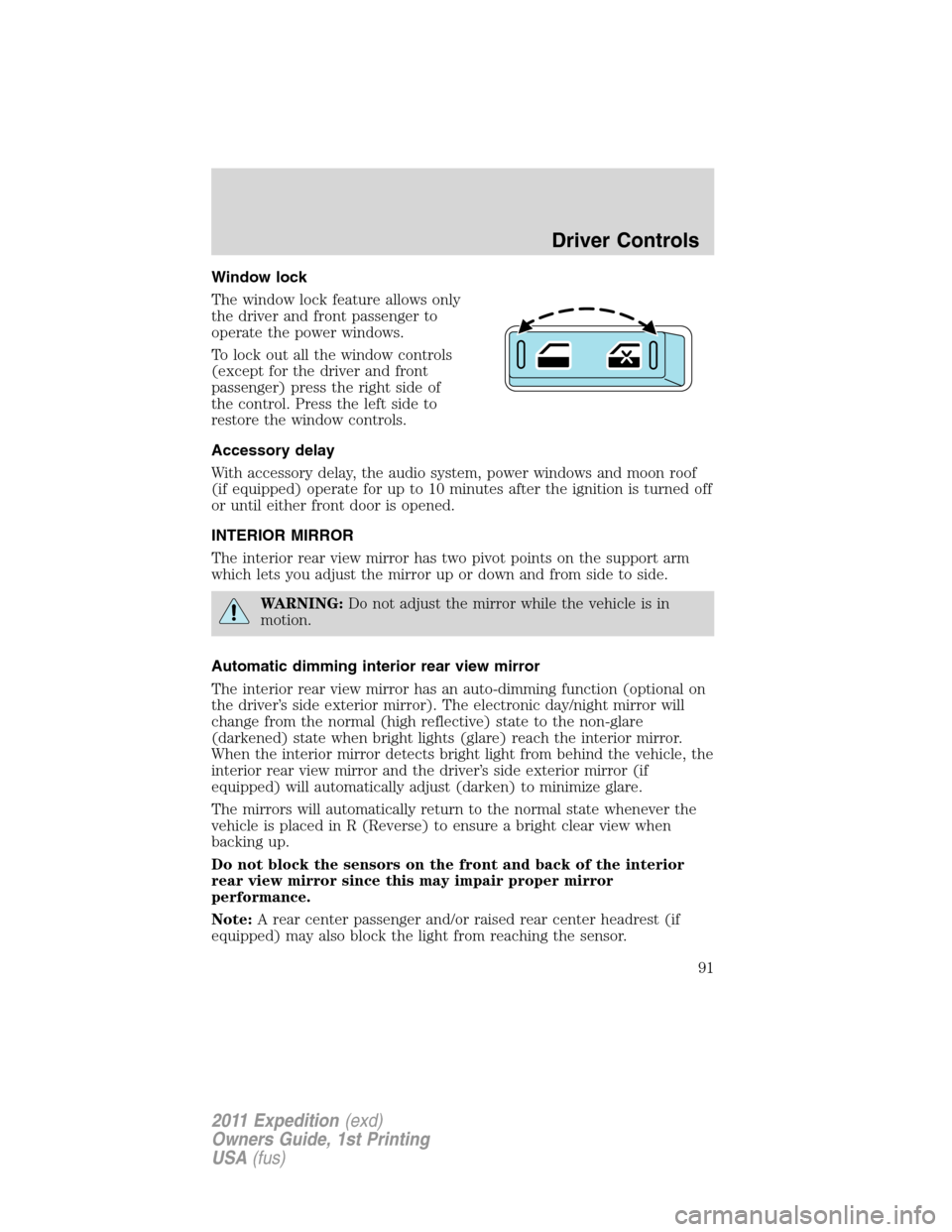
Window lock
The window lock feature allows only
the driver and front passenger to
operate the power windows.
To lock out all the window controls
(except for the driver and front
passenger) press the right side of
the control. Press the left side to
restore the window controls.
Accessory delay
With accessory delay, the audio system, power windows and moon roof
(if equipped) operate for up to 10 minutes after the ignition is turned off
or until either front door is opened.
INTERIOR MIRROR
The interior rear view mirror has two pivot points on the support arm
which lets you adjust the mirror up or down and from side to side.
WARNING:Do not adjust the mirror while the vehicle is in
motion.
Automatic dimming interior rear view mirror
The interior rear view mirror has an auto-dimming function (optional on
the driver’s side exterior mirror). The electronic day/night mirror will
change from the normal (high reflective) state to the non-glare
(darkened) state when bright lights (glare) reach the interior mirror.
When the interior mirror detects bright light from behind the vehicle, the
interior rear view mirror and the driver’s side exterior mirror (if
equipped) will automatically adjust (darken) to minimize glare.
The mirrors will automatically return to the normal state whenever the
vehicle is placed in R (Reverse) to ensure a bright clear view when
backing up.
Do not block the sensors on the front and back of the interior
rear view mirror since this may impair proper mirror
performance.
Note:A rear center passenger and/or raised rear center headrest (if
equipped) may also block the light from reaching the sensor.
Driver Controls
91
2011 Expedition(exd)
Owners Guide, 1st Printing
USA(fus)
Page 92 of 395

Do not clean the housing or glass of any mirror with harsh
abrasives, fuel or other petroleum-based cleaning products.
Note:If equipped with a rearview camera system, a video image will
display in the mirror or the navigation system display (if equipped) when
the vehicle is put in R (Reverse). As you shift into any other gear from R
(Reverse), the image will remain for a few seconds and then turn off.
Refer toRearview camera systemin theDrivingchapter.
EXTERIOR MIRRORS
Power side view mirrors
WARNING:Do not adjust the mirror while the vehicle is in
motion.
To adjust your mirrors:
1. Rotate the control clockwise to
adjust the right mirror and rotate
the control counterclockwise to
adjust the left mirror.
2. Move the control in the direction
you wish to tilt the mirror.
3. Return to the center position to
lock mirrors in place.
Memory feature (if equipped)
The power side view mirror positions are saved when doing a memory
set function and can be recalled along with the vehicle personality
features when a memory position is selected through the remote entry
transmitter, keyless entry keypad or memory switch on the driver’s door.
Refer toSeatingin theSeating and Safety Restraintschapter.
Automatic dimming feature (if equipped)
The driver’s side view mirror has an auto-dimming function. For more
information, refer toAutomatic dimming interior rear view mirrorin
this chapter.
Driver Controls
92
2011 Expedition(exd)
Owners Guide, 1st Printing
USA(fus)
Page 93 of 395
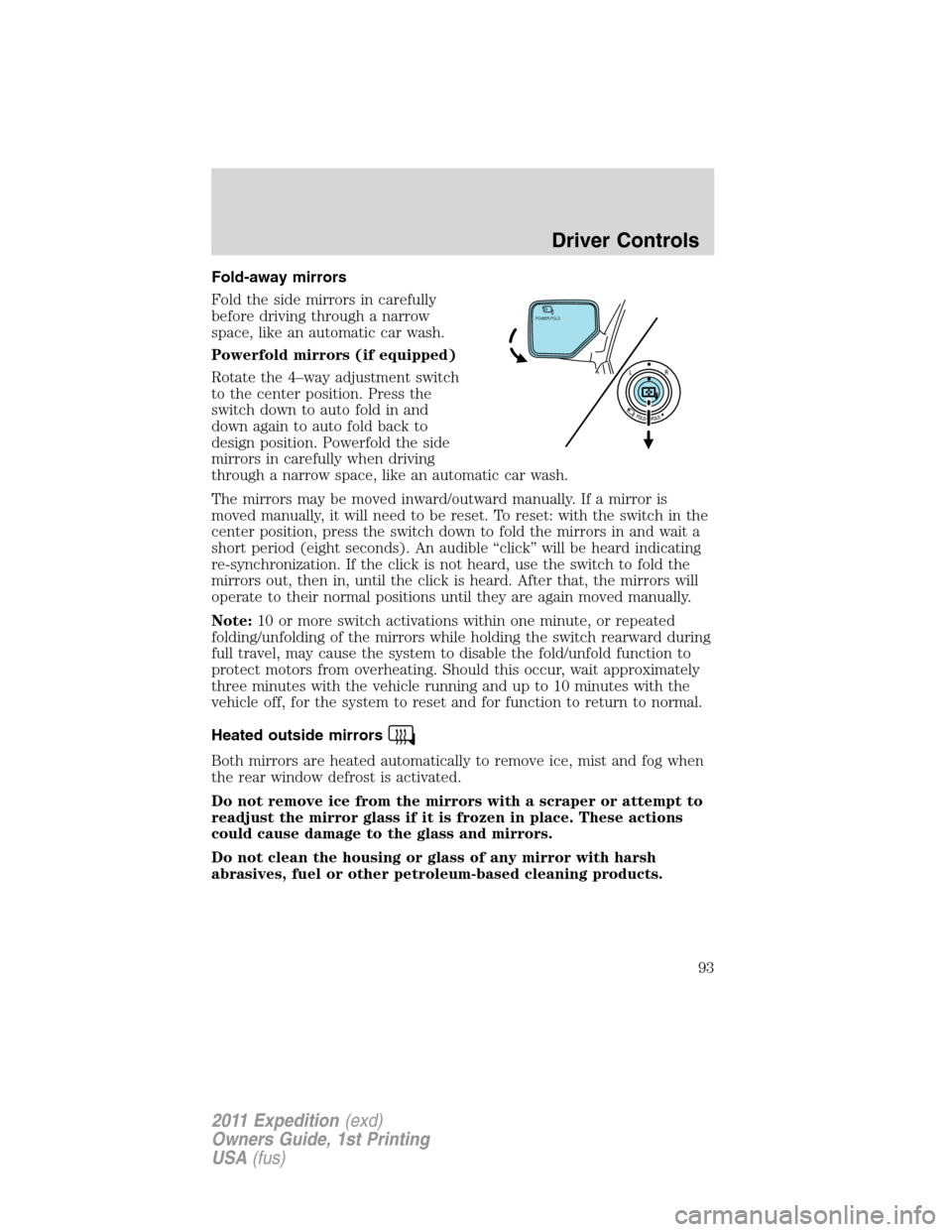
Fold-away mirrors
Fold the side mirrors in carefully
before driving through a narrow
space, like an automatic car wash.
Powerfold mirrors (if equipped)
Rotate the 4–way adjustment switch
to the center position. Press the
switch down to auto fold in and
down again to auto fold back to
design position. Powerfold the side
mirrors in carefully when driving
through a narrow space, like an automatic car wash.
The mirrors may be moved inward/outward manually. If a mirror is
moved manually, it will need to be reset. To reset: with the switch in the
center position, press the switch down to fold the mirrors in and wait a
short period (eight seconds). An audible “click” will be heard indicating
re-synchronization. If the click is not heard, use the switch to fold the
mirrors out, then in, until the click is heard. After that, the mirrors will
operate to their normal positions until they are again moved manually.
Note:10 or more switch activations within one minute, or repeated
folding/unfolding of the mirrors while holding the switch rearward during
full travel, may cause the system to disable the fold/unfold function to
protect motors from overheating. Should this occur, wait approximately
three minutes with the vehicle running and up to 10 minutes with the
vehicle off, for the system to reset and for function to return to normal.
Heated outside mirrors
Both mirrors are heated automatically to remove ice, mist and fog when
the rear window defrost is activated.
Do not remove ice from the mirrors with a scraper or attempt to
readjust the mirror glass if it is frozen in place. These actions
could cause damage to the glass and mirrors.
Do not clean the housing or glass of any mirror with harsh
abrasives, fuel or other petroleum-based cleaning products.
POWER FOLD
Driver Controls
93
2011 Expedition(exd)
Owners Guide, 1st Printing
USA(fus)
Page 96 of 395
position and flush the system (in particular the front and rear hinge
arms) with a high-pressure car wash wand.
Note:Do not use the running boards, front and rear hinge assemblies,
running board motors, or the running board under body mounts to lift
the vehicle when jacking. Please utilize proper jacking points. Refer to
Changing the tiresin theRoadside Emergencieschapter.
WARNING:In extreme climates, excessive ice buildup may
occur, causing the running boards not to deploy. Be sure that the
running boards have deployed, and have finished moving before
attempting to step on them. Note: The running boards will resume
normal function once the blockage is cleared.
WARNING:Turn off the running boards before jacking or
placing any object under the vehicle. Never place your hand
between the extended running board and the vehicle. A moving
running board may cause injury.
SPEED CONTROL (IF EQUIPPED)
With speed control set, you can maintain a set speed without keeping
your foot on the accelerator pedal.
WARNING:Do not use the speed control in heavy traffic or on
roads that are winding, slippery or unpaved.
Using speed control
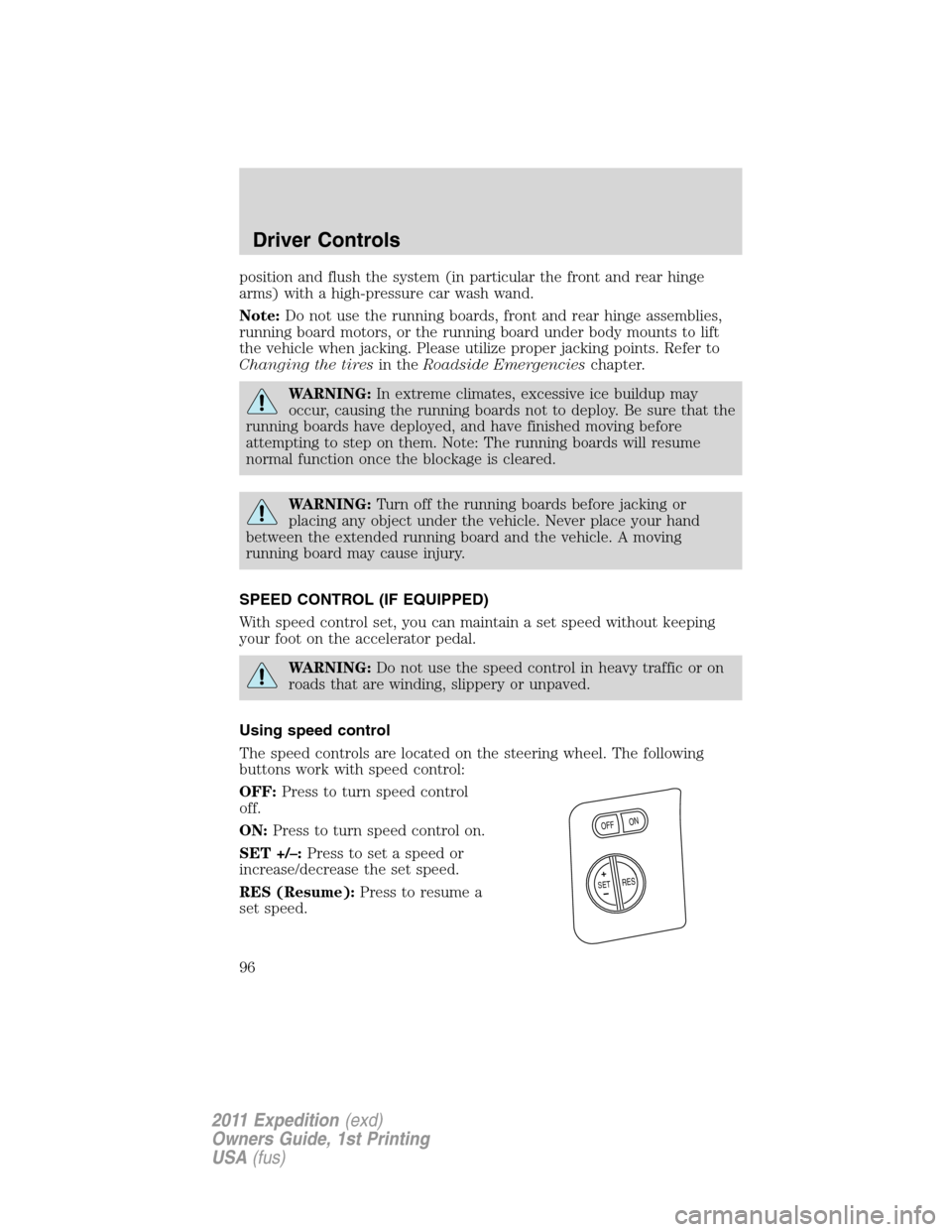
The speed controls are located on the steering wheel. The following
buttons work with speed control:
OFF:Press to turn speed control
off.
ON:Press to turn speed control on.
SET +/–:Press to set a speed or
increase/decrease the set speed.
RES (Resume):Press to resume a
set speed.
+
O
N
O
FF
RESS
E
T
Driver Controls
96
2011 Expedition(exd)
Owners Guide, 1st Printing
USA(fus)