Page 60 of 337
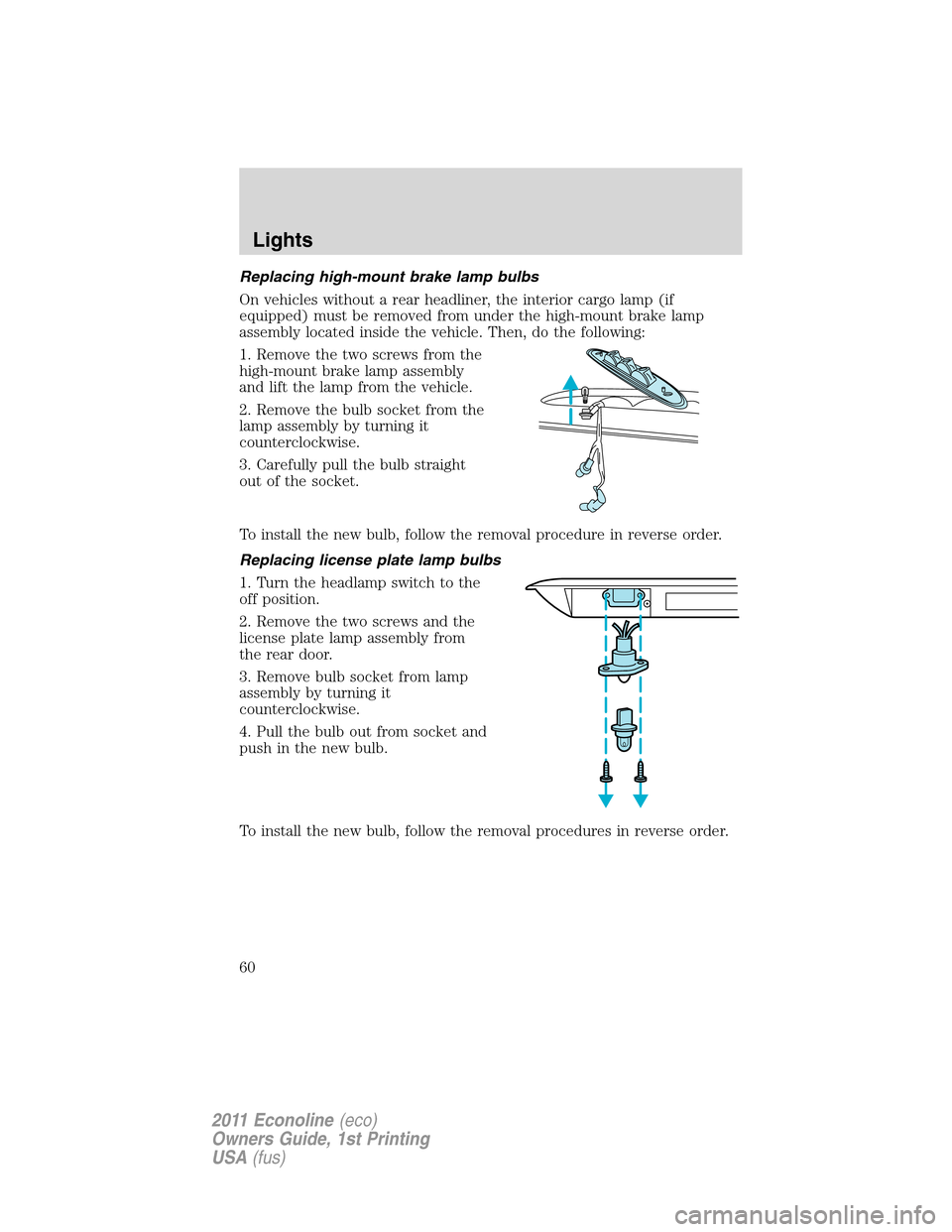
Replacing high-mount brake lamp bulbs
On vehicles without a rear headliner, the interior cargo lamp (if
equipped) must be removed from under the high-mount brake lamp
assembly located inside the vehicle. Then, do the following:
1. Remove the two screws from the
high-mount brake lamp assembly
and lift the lamp from the vehicle.
2. Remove the bulb socket from the
lamp assembly by turning it
counterclockwise.
3. Carefully pull the bulb straight
out of the socket.
To install the new bulb, follow the removal procedure in reverse order.
Replacing license plate lamp bulbs
1. Turn the headlamp switch to the
off position.
2. Remove the two screws and the
license plate lamp assembly from
the rear door.
3. Remove bulb socket from lamp
assembly by turning it
counterclockwise.
4. Pull the bulb out from socket and
push in the new bulb.
To install the new bulb, follow the removal procedures in reverse order.
Lights
60
2011 Econoline(eco)
Owners Guide, 1st Printing
USA(fus)
Page 61 of 337
Replacing stop/turn/tail/side marker/backup lamp bulbs
The stop/turn/tail/side marker/backup lamp bulbs are located in the tail
lamp assembly. Follow the same steps to replace any of the bulbs:
1. Turn the headlamp switch to the
off position, then remove the four
screws and the lamp assembly from
the vehicle.
2. Rotate the bulb socket
counterclockwise and remove it
from lamp assembly.
3. Carefully pull the bulb straight
out of the socket and push in the
new bulb.
To install the lamp, follow the removal procedures in reverse order.
Lights
61
2011 Econoline(eco)
Owners Guide, 1st Printing
USA(fus)
Page 63 of 337

TILT STEERING WHEEL
To adjust the steering wheel:
1. Pull and hold the steering wheel
release control toward you.
2. Move the steering wheel up or
down until you find the desired
location.
3. Release the steering wheel
release control. This will lock the
steering wheel in position.
WARNING:Never adjust the steering wheel when the vehicle is
moving.
ILLUMINATED VISOR MIRROR (IF EQUIPPED)
Lift the mirror cover to turn on the
visor mirror lamp.
AUXILIARY POWER POINT (12V DC)
Power outlets are designed for accessory plugs only. Do not insert
any other object in the power outlet as this will damage the
outlet and blow the fuse. Do not hang any type of accessory or
accessory bracket from the plug. Improper use of the power
outlet can cause damage not covered by your warranty.
Auxiliary power points can be found in the following locations:
•On the instrument panel, equipped with a cover or a cap plug
•Behind the driver’s seat on the upper trim panel (if equipped)
•In the glove box (if equipped)
Do not use the power point for operating the cigarette lighter element (if
equipped).
To prevent the fuse from being blown, do not use the power point(s)
over the vehicle capacity of 12V DC/180W. If the power point is not
Driver Controls
63
2011 Econoline(eco)
Owners Guide, 1st Printing
USA(fus)
Page 65 of 337

INTERIOR MIRROR
The interior rear view mirror has two pivot points on the support arm
which lets you adjust the mirror up or down and from side to side.
WARNING:Do not adjust the mirror while the vehicle is in
motion.
Automatic dimming interior rear view mirror (if equipped)
The interior rear view mirror has an auto-dimming function. The
electronic day/night mirror will change from the normal (high reflective)
state to the non-glare (darkened) state when bright lights (glare) reach
the mirror. When the mirror detects bright light from behind the vehicle,
it will automatically adjust (darken) to minimize glare.
The mirror will automatically return to the normal state whenever the
vehicle is placed in R (Reverse) to ensure a bright clear view when
backing up.
Do not block the sensors on the front and back of the interior
rear view mirror since this may impair proper mirror
performance.
Note:A rear center passenger and/or raised rear center headrest (if
equipped) may also block the light from reaching the sensor.
Do not clean the housing or glass of any mirror with harsh
abrasives, fuel or other petroleum-based cleaning products.
Note:If equipped with a rearview camera system, a video image will
display in the mirror or the navigation system display (if equipped) when
the vehicle is put in R (Reverse). As you shift into any other gear from R
(Reverse), the image will remain for a few seconds and then turn off.
Refer toRearview camera systemin theDrivingchapter.
EXTERIOR MIRRORS
Power side view mirrors (if equipped)
WARNING:Do not adjust the mirror while the vehicle is in
motion.
Driver Controls
65
2011 Econoline(eco)
Owners Guide, 1st Printing
USA(fus)
Page 68 of 337

ON:Press to turn on speed control.
OFF:Press to turn off speed
control.
RES (Resume):Press to resume a
set speed.
SET/ACCEL:Press to set a speed
or increase a set speed.
COAST:Press to reduce a set speed.
Setting speed control
1. Press and release ON.
2. Accelerate to the desired speed.
3. Press and release SET/ACCEL.
4. Take your foot off the accelerator pedal.
5. The indicator
light on the instrument cluster will turn on.
Note:
•Vehicle speed may vary momentarily when driving up and down a
steep hill.
•If the vehicle speed increases above the set speed on a downhill, you
may want to apply the brakes to reduce the speed.
•If the vehicle speed decreases more than 10 mph (16 km/h) below
your set speed on an uphill, your speed control will disengage.
Disengaging speed control
To disengage speed control, press the brake pedal. Disengaging speed
control will not erase the previous set speed.
Resuming a set speed
Press and release RES. This will automatically return the vehicle to the
previously set speed.
Increasing speed while using speed control
To increase the set speed:
•Press and hold SET/ACCEL until you get to the desired speed, then
release. You can also use SET/ACCEL to operate the tap-up function.
Press and release SET/ACCEL to increase the vehicle set speed in
1 mph (1.6 km/h) increments.
•Use the accelerator pedal to get to the desired speed. When the
vehicle reaches that speed, press and release SET/ACCEL.
Driver Controls
68
2011 Econoline(eco)
Owners Guide, 1st Printing
USA(fus)
Page 81 of 337

3. Cycle eight times rapidly (within 10 seconds) between the 3 (off)
position and 4 (on).Note:The eighth turn must end in the 4 (on) position.
4. The doors will lock, then unlock, to confirm that the programming
mode has been activated.
5. Within 20 seconds press any button on the remote entry transmitter.
Note:If more than 20 seconds have passed you will need to start the
procedure over again.
6. The doors will lock, then unlock, to confirm that this remote entry
transmitter has been programmed.
7. Repeat step 5 to program each additional remote entry transmitter
(up to four transmitters).
8. Turn the ignition to the 3 (off) position after you have finished
programming all of the remote entry transmitters.
9. The doors will lock, then unlock, to confirm that the programming
mode has been exited.
Illuminated entry
The interior lamps and parking lamps illuminate when the remote entry
system is used to unlock the door(s) or sound the personal alarm.
The illuminated entry system will turn off the lights if:
•the ignition switch is turned to the on or accessory position, or
•the remote transmitter lock control is pressed, or
•after 25 seconds of illumination.
The dome lamp control (if equipped) mustnotbe set to the off position
for the illuminated entry system to operate.
The lights will not turn off if:
•they have been turned on with the dimmer control, or
•any door is open.
SECURILOCK�PASSIVE ANTI-THEFT SYSTEM (IF EQUIPPED)
SecuriLock�passive anti-theft system is an engine immobilization
system. This system is designed to help prevent the engine from being
started unless acoded key programmed to your vehicleis used. The
use of the wrong type of coded key may lead to a “no-start” condition.
Your vehicle comes with two coded keys; additional coded keys may be
purchased from your authorized dealer. The authorized dealer can
program your spare keys to your vehicle or you can program the keys
yourself. Refer toProgramming spare keysfor instructions on how to
program the coded key.
Locks and Security
81
2011 Econoline(eco)
Owners Guide, 1st Printing
USA(fus)
Page 84 of 337

6. Turn the ignition to the 2 (lock) position, and remove the second key
from the ignition.
7. After three seconds but within 20 seconds of removing the previously
programmed coded key, insert the unprogrammed key (new/valet key)
into the ignition.
8. Turn the ignition from the 2 (lock) position to the 4 (on) position.
Keep the ignition in the 4 (on) position for at least one second.
9. Your new unprogrammed key is now programmed.
If the key has been successfully programmed it will start the vehicle’s
engine and the theft indicator light will illuminate for three seconds and
then go out. If the key was not successfully programmed, it will not start
your vehicle’s engine and the theft indicator light will flash on and off
rapidly. If failure repeats, bring your vehicle to your authorized dealer to
have the new key(s) programmed.
To program additional new unprogrammed key(s), repeat this procedure
from Step 1 for each additional key.
Locks and Security
84
2011 Econoline(eco)
Owners Guide, 1st Printing
USA(fus)
Page 96 of 337

Pregnant women should always
wear their safety belt. The lap belt
portion of a combination lap and
shoulder belt should be positioned
low across the hips below the belly
and worn as tight as comfort will
allow. The shoulder belt should be
positioned to cross the middle of
the shoulder and the center of the
chest.
Safety belt locking modes
All safety restraints in the vehicle are combination lap and shoulder
belts. The driver safety belt has the first locking mode and the passenger
safety belts have both types of locking modes described as follows:
Vehicle sensitive mode
This is the normal retractor mode, which allows free shoulder belt length
adjustment to your movements and locking in response to vehicle
movement. For example, if the driver brakes suddenly or turns a corner
sharply, or the vehicle receives an impact of approximately 5 mph
(8 km/h) or more, the combination safety belts will lock to help reduce
forward movement of the driver and passengers.
In addition, the retractor is designed to lock if the webbing is pulled out
too quickly. If this occurs, let the belt retract slightly and pull webbing
out again in a slow and controlled manner.
Automatic locking mode
In this mode, the shoulder belt is automatically pre-locked. The belt will
still retract to remove any slack in the shoulder belt. The automatic
locking mode is not available on the driver safety belt.
When to use the automatic locking mode
This mode should be usedany timea child safety seat, except a
booster, is installed in passenger front or rear seating positions. Children
12 years old and under should be properly restrained in a rear seating
position whenever possible. Refer toSafety restraints for childrenor
Safety seats for childrenlater in this chapter.
Seating and Safety Restraints
96
2011 Econoline(eco)
Owners Guide, 1st Printing
USA(fus)