2011 FORD C MAX wheel
[x] Cancel search: wheelPage 214 of 296

Downloaded from www.Manualslib.com manuals search engine Full load
Normal load
Tyre size
Variant Rear
Front
Rear
Front
bar (psi)
bar (psi)
bar (psi)
bar (psi)
2.8 (41)
2.5 (36)
2.3 (33)
2.1 (31)
215/55 R 16 *
Vehicles with a
petrol engine
2.8 (41)
2.5 (36)
2.3 (33)
2.3 (33)
215/55 R 16 *
Vehicles with a
diesel engine
2.9 (42)
2.5 (36)
2.3 (33)
2.1 (31)
215/50 R 17
Vehicles with a
petrol engine
2.9 (42)
2.5 (36)
2.3 (33)
2.3 (33)
215/50 R 17
1.6L Duratorq-TDCi
- DV
2.9 (42)
2.5 (36)
2.3 (33)
2.4 (35)
215/50 R 17
2.0L Duratorq-TDCi
- DW
2.9 (42)
2.6 (38)
2.1 (31)
2.1 (31)
235/40 R 18
Vehicles with a
petrol engine
2.9 (42)
2.6 (38)
2.1 (31)
2.1 (31)
235/40 R 18
1.6L Duratorq-TDCi
- DV
2.9 (42)
2.6 (38)
2.1 (31)
2.4 (35)
235/40 R 18
2.0L Duratorq-TDCi
- DW
* Only fit snow chains to specified tyres.
Continuous speed in excess of 160 km/h (100 mph) Full load
Normal load
Tyre size
Variant Rear
Front
Rear
Front
bar (psi)
bar (psi)
bar (psi)
bar (psi)
3 (44)
2.6 (38)
2.3 (33)
2.2 (32)
205/55 R 16
1.6L Duratec-16V Ti-
VCT - Sigma
3.2 (46)
2.6 (38)
2.3 (33)
2.4 (35)
205/55 R 16
1.6L EcoBoost -
Sigma
2.9 (42)
2.6 (38)
2.3 (33)
2.3 (33)
205/55 R 16
1.6L Duratorq-TDCi
- DV
3 (44)
2.6 (38)
2.3 (33)
2.2 (32)
215/55 R 16
Vehicles with a
petrol engine
212
Wheels and Tyres
Page 215 of 296
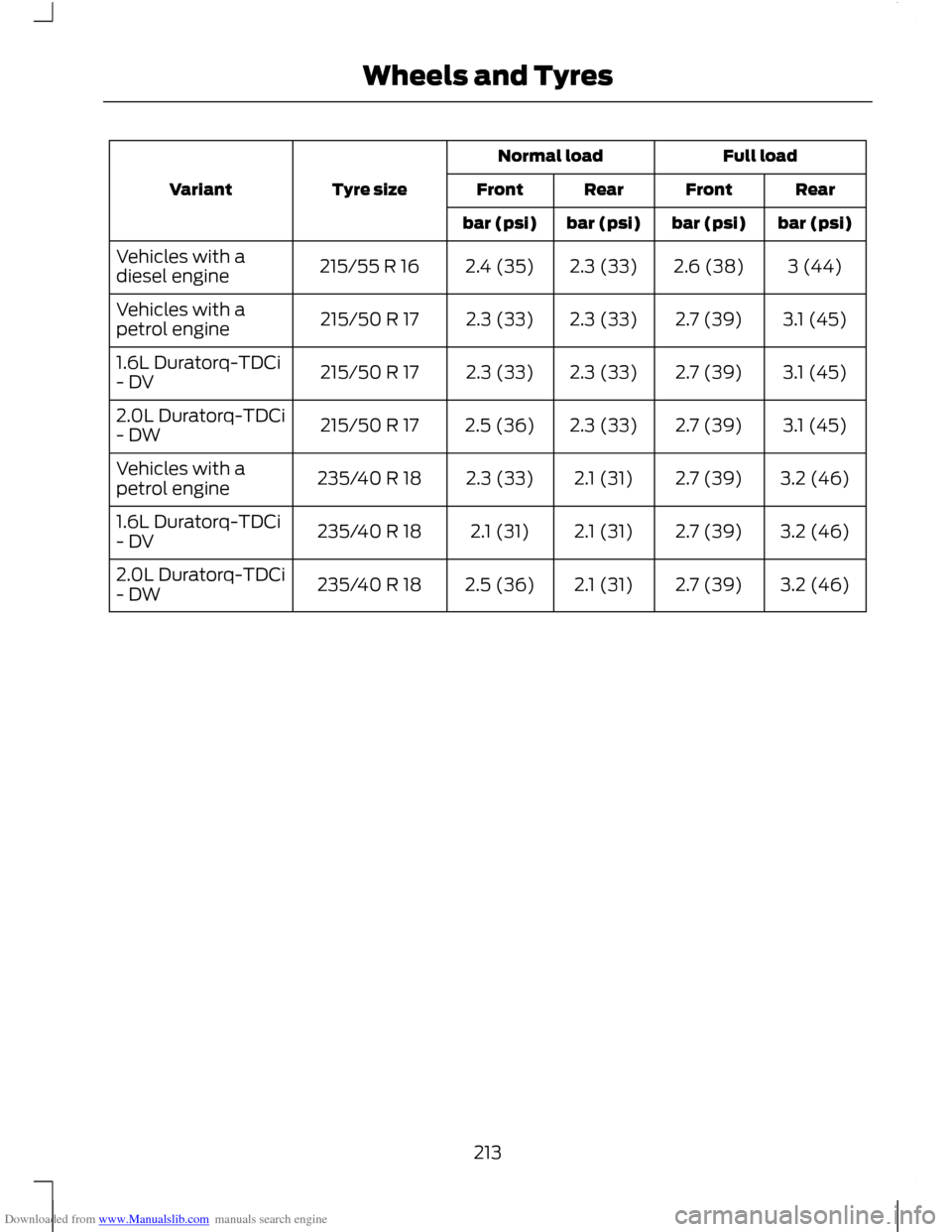
Downloaded from www.Manualslib.com manuals search engine Full load
Normal load
Tyre size
Variant Rear
Front
Rear
Front
bar (psi)
bar (psi)
bar (psi)
bar (psi)
3 (44)
2.6 (38)
2.3 (33)
2.4 (35)
215/55 R 16
Vehicles with a
diesel engine
3.1 (45)
2.7 (39)
2.3 (33)
2.3 (33)
215/50 R 17
Vehicles with a
petrol engine
3.1 (45)
2.7 (39)
2.3 (33)
2.3 (33)
215/50 R 17
1.6L Duratorq-TDCi
- DV
3.1 (45)
2.7 (39)
2.3 (33)
2.5 (36)
215/50 R 17
2.0L Duratorq-TDCi
- DW
3.2 (46)
2.7 (39)
2.1 (31)
2.3 (33)
235/40 R 18
Vehicles with a
petrol engine
3.2 (46)
2.7 (39)
2.1 (31)
2.1 (31)
235/40 R 18
1.6L Duratorq-TDCi
- DV
3.2 (46)
2.7 (39)
2.1 (31)
2.5 (36)
235/40 R 18
2.0L Duratorq-TDCi
- DW
213
Wheels and Tyres
Page 218 of 296

Downloaded from www.Manualslib.com manuals search engine TECHNICAL SPECIFICATIONS
Vehicle dimensions
C-MAX
Dimension in mm (inches)
Dimension description
4380 (172.4)
Maximum length
2067 (81.4)
Overall width including exterior mirrors
1595 - 1626 (62.8 - 64)
Overall height - EC kerb weight
2648 (104.2)
Wheelbase
1544 - 1559 (60.8 - 61.4)
Front track
1554 - 1569 (61.2 - 61.8)
Rear track
Grand C-MAX Dimension in mm (inches)
Dimension description
4520 (177.9)
Maximum length
2067 (81.4)
Overall width including exterior mirrors
1653 - 1684 (65 - 66.3)
Overall height - EC kerb weight without roof bars
1667 - 1698 (65.6 - 66.8)
Overall height - EC kerb weight including roof bars
2788 (109.8)
Wheelbase
1544 - 1559 (60.8 - 61.4)
Front track
1554 - 1569 (61.2 - 61.8)
Rear track
216
Capacities and Specifications
Page 220 of 296

Downloaded from www.Manualslib.com manuals search engine Dimension in mm (inches)
Dimension description
Item
111 (4.4)
Bumper – end of tow ball
A
4 (0.1)
Attachment point – centre of tow ball (C-
MAX)
B
5 (0.2)
Attachment point – centre of tow ball
(Grand C-MAX)
B
925 (36.4)
Wheel centre – centre of tow ball
C
518 (20.4)
Centre of tow ball – side member
D
1036 (40.8)
Distance between side members
E
426 (16.8)
Centre of tow ball – centre 1. attachment
point
F
726 (28.6)
Centre of tow ball – centre 2. attachment
point
G
218
Capacities and Specifications
Page 241 of 296

Downloaded from www.Manualslib.com manuals search engine Note:
You can exit the phone menu by
pressing any source button CD, RADIO or
AUX.
Note: When referred to, the use of the
up/down arrow buttons, seek up and seek
down buttons, and the OK button can be
used on either the steering wheel or the
audio unit.
This chapter describes the phone functions
of the audio unit.
An active phone must be present.
Even if connected to the audio unit, your
phone can still be used in the usual way.
Making a call
Dialling a number using voice control
Phone numbers can be dialled using voice
control. See Telephone commands
(page 249).
Dialling a number using the address
book
1. Press the PHONE button.
2. Press the up/down arrow buttons until
PHONEBOOK is shown.
3. Press the OK button.
Note: You can also use the telephone
keypad to select the first letter of the entry
you are looking for. Press the relevant
number that corresponds to the letter
repeatedly until the required letter is
displayed.
4. Press the up/down arrow buttons to select the desired phone number.
Note: Press and hold the up/down arrow
buttons to search forwards or backwards
within the phonebook.
5. Press the OK button to dial the selected phone number. Dialling a number using the telephone
keypad
1. Press the PHONE button.
2. Dial the number using the telephone
keypad on the audio unit.
3. Press the OK button.
Note: If you enter an incorrect digit whilst
entering a phone number, press function
button 3 to erase the last digit. A long press
will erase the complete string of digits.
Ending a call
Calls can be ended by:
• pressing the seek up button
• pressing the OK button
• pressing function button 4.
Redialling a number
1. Press the PHONE button.
2. Press the up/down arrow buttons until
CALL LISTS is displayed.
3. Press the OK button.
Note: If the active phone does not provide
a call out list, the last outgoing call
number/entry can be redialled.
4. Press the up/down buttons to select the desired call list.
5. Press the OK button.
6. Press the up/down buttons to select the desired phone number.
7. Press the OK button.
Redialling the last dialled number
1. Press the PHONE button.
2. Press the up/down arrow buttons until
REDIAL is displayed.
3. Press the OK button.
239
Telephone
Page 242 of 296

Downloaded from www.Manualslib.com manuals search engine Receiving an incoming call
Accepting an incoming call
Incoming calls can be accepted by pressing
the seek down button, or by pressing the
OK button.
Rejecting an incoming call
Incoming calls can be rejected by:
•
pressing the seek up button, or
• pressing the arrow down button to
highlight REJECT and then pressing
the OK button.
Receiving a second incoming call
Note: The second incoming call function
must be activated in your phone.
If there is an incoming call whilst there is
an ongoing call, a beep will be heard and
you will have the option to end the active
call and to accept the incoming call.
Accepting a second incoming call
Note: The first incoming call will be
disconnected and replaced by the second
incoming call.
Second incoming calls can be accepted
by pressing the seek down button on the
steering wheel or on the audio unit, or by
pressing the OK button on the audio unit.
Rejecting a second incoming call
Second incoming calls can be rejected by:
• pressing the seek up button, or
• pressing the arrow down button to
highlight REJECT and then pressing
the OK button.
Second incoming calls can be rejected by
pressing function button 4. Muting the microphone
Note:
During a call, it is possible to mute
the microphone. Whilst muted, confirmation
will appear in the display.
Press function button 1. Press the button
once again to turn this function off.
Changing the active phone
Note: Phones must be bonded to the
system before they can be made active.
Note: After bonding a phone to the system,
this becomes the active phone.
1. Press the PHONE button.
2. Press the up/down buttons until SELECT PHONE is shown.
3. Press the OK button.
4. Scroll through the different stored phones by using the up/down buttons
to display the bonded phones.
5. Press the OK button to select the phone which is to be the active phone.
Debonding a bonded phone
A bonded phone can be deleted from the
system at any time, unless a phone call is
in progress.
1. Press the PHONE button.
2. Press the up/down buttons until SELECT PHONE is shown.
3. Press the OK button.
4. Press the up/down buttons to highlight
the required phone.
5. Press function button 1.
240
Telephone
Page 261 of 296

Downloaded from www.Manualslib.com manuals search engine Bonding the device
To connect the device to the system follow
the same procedure as for Bluetooth hands
free phones. See Bluetooth setup (page
237).
Operating the device
Note:
The seek buttons and file information
will only work on certain phones and
devices.
Select Bluetooth audio as the active
source.
1. Select AUX.
2. Press the up and down arrow buttons to select the desired function.
3. Press the OK button.
Tracks can be accessed by skipping
forwards and backwards using the steering
wheel controls, or directly from the audio
unit controls.
Audio control
Press the seek up and down keys to skip
backwards and forwards through tracks.
Press and hold the seek keys to enable fast
rewind/fast forward through track content.
Press the INFO button or function button
4 to display the following:
• Title.
• Artist.
• Album.
• File name.
USING A USB DEVICE
Various icons are used to identify types of
audio file, folders etc. USB device is the active source Folder
Playlist
Album
Artist
Filename
Track title
Information not available
Operation
Select the USB device as the audio source
by repeatedly pressing the AUX button
until the USB screen appears in the display.
After first connecting the USB device, the
first track within the first folder will start
to play automatically. Subsequently,
following audio source switching, the
position of playback on the USB device is
remembered.
To browse the device contents, press the
up/down arrow key or the OK button once.
259
ConnectivityE100029 E100022 E100023 E100024 E100025 E100026 E100027 E100028
Page 285 of 296

Downloaded from www.Manualslib.com manuals search engine A
A/C
See: Climate Control........................................ 100
About This Manual...........................................7
ABS See: Brakes........................................................... 144
ABS driving hints See: Hints on Driving With Anti-Lock
Brakes................................................................ 144
Accessories See: Parts and Accessories................................. 7
Active Park Assist.........................................152 Principle of Operation....................................... 152
Adjusting the Headlamps - Vehicles With: Adaptive Front Lighting/Xenon
Headlamps....................................................59
Adjusting the Steering Wheel...................50
Air Conditioning See: Climate Control........................................ 100
Air Vents..........................................................100 Centre air vents................................................... 100
Second row air vents.......................................... 101
Side air vent........................................................... 101
Alarm..................................................................48 Principle of Operation........................................ 48
Alternative frequencies.............................230
Appendices....................................................279
Arming the alarm...........................................49
Arming the engine immobiliser.................47 At a Glance........................................................10
........................................................................\
.............. 16
Adjusting the steering wheel............................ 13
Autolamps............................................................... 14
Automatic climate control................................. 15
Automatic transmission...................................... 17
Autowipers............................................................... 14
Diesel particulate filter (DPF).......................... 16
Electric folding mirrors........................................ 15
Electric windows................................................... 14
Fuel filler flap.......................................................... 16
Information displays............................................ 15
Instrument panel overview............................... 10
Keyless entry........................................................... 13
Keyless starting...................................................... 16
Locking the vehicle............................................... 13
Manual climate control....................................... 15
Manual transmission............................................ 17
Power liftgate.......................................................... 13
Speed limiter........................................................... 17
Towing the vehicle on four wheels.................18
Unlocking the vehicle........................................... 13
Audible Warnings and Indicators..............81 Automatic transmission..................................... 81
Frost........................................................................\
... 81
Key-in-ignition........................................................ 81
Key outside car....................................................... 81
Lights on................................................................... 81
Low fuel................................................................... 82
Luggage compartment lid - power liftgate................................................................. 82
Seat belt reminder............................................... 82
Switching the chimes on and off.................... 81
Audio Control..................................................50 Type 1........................................................................\
50
Type 2........................................................................\
51
Audio introduction.......................................219
Audio system security................................226
Audio troubleshooting...............................236
Audio unit commands...............................242 Auxiliary input..................................................... 246
CD Player............................................................... 242
External devices - iPod.................................... 248
External devices - USB.................................... 246
Radio ....................................................................... 243
Audio unit menus........................................230
Audio unit operation...................................227
Audio unit overview....................................220
283
Index