Page 321 of 562
STEERING WHEEL AUDIO CONTROLS — IF
EQUIPPED
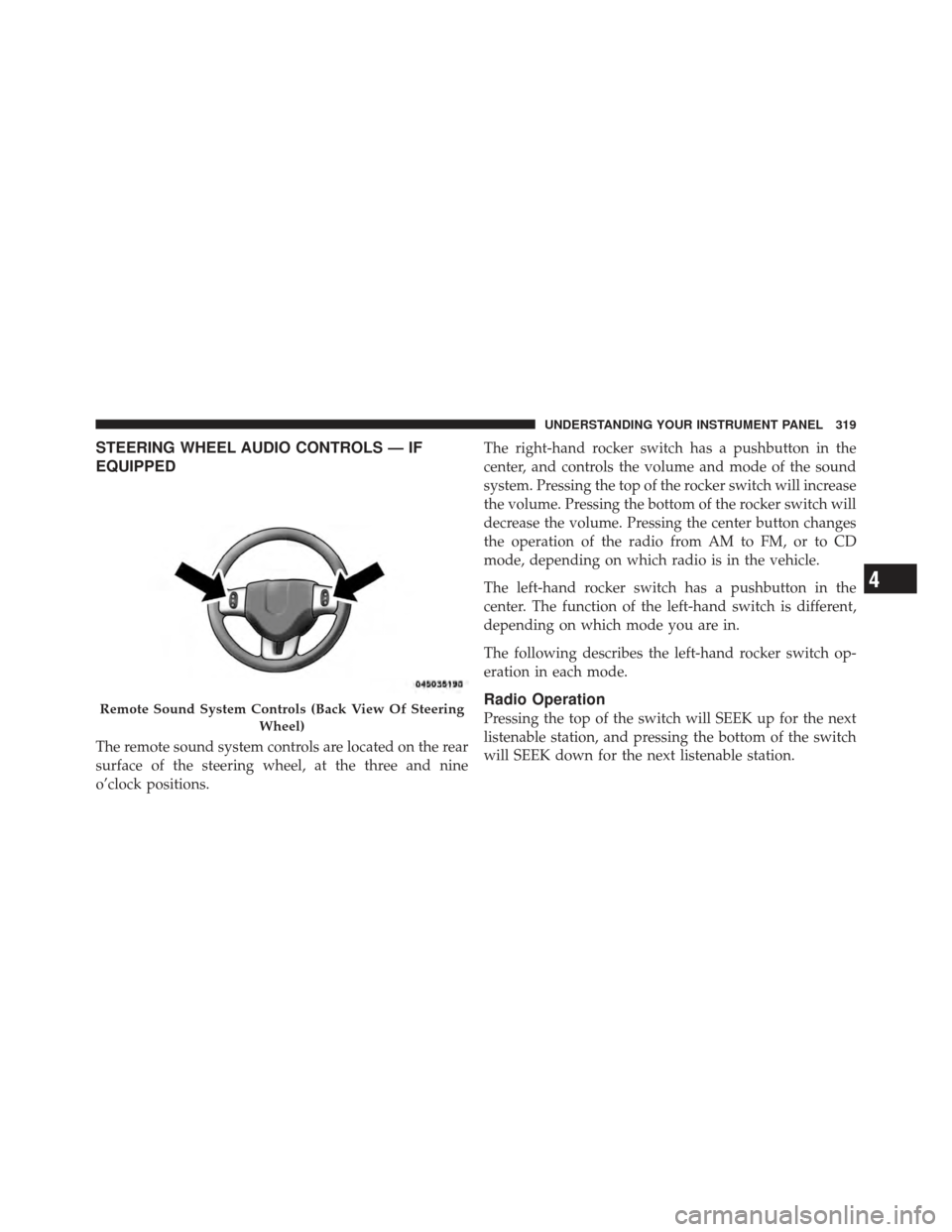
The remote sound system controls are located on the rear
surface of the steering wheel, at the three and nine
o’clock positions.The right-hand rocker switch has a pushbutton in the
center, and controls the volume and mode of the sound
system. Pressing the top of the rocker switch will increase
the volume. Pressing the bottom of the rocker switch will
decrease the volume. Pressing the center button changes
the operation of the radio from AM to FM, or to CD
mode, depending on which radio is in the vehicle.
The left-hand rocker switch has a pushbutton in the
center. The function of the left-hand switch is different,
depending on which mode you are in.
The following describes the left-hand rocker switch op-
eration in each mode.
Radio Operation
Pressing the top of the switch will SEEK up for the next
listenable station, and pressing the bottom of the switch
will SEEK down for the next listenable station.Remote Sound System Controls (Back View Of Steering
Wheel)
4
UNDERSTANDING YOUR INSTRUMENT PANEL 319
Page 326 of 562
RECIRCULATION mode. Only use the RECIRCULA-
TION mode to temporarily block out any outside odors,
smoke, or dust, and to cool the interior rapidly upon
initial start-up in very hot or humid weather.
NOTE:
•If the RECIRCULATION button is pressed when the
system is in MIX, DEFROST, or FLOOR mode the
RECIRCULATION LED indicator will flash 3 times to
indicate RECIRCULATION mode is not allowed.
•Continuous use of the RECIRCULATION mode may
make the inside air stuffy and window fogging may
occur. Extended use of this mode is not recommended.
•In cold or damp weather, the use of the RECIRCULA-
TION mode will cause windows to fog on the inside
because of moisture buildup inside the vehicle. For
maximum defogging, select the outside air position.
•In order to prevent fogging, when the RECIRCULA-
TION button is pressed and the mode control is set to
PANEL, the A/C will engage automatically.
•The A/C can be deselected manually without disturb-
ing the mode control selection.
8. Air Conditioning (A/C) Button Press and release to change the current setting.
The indicator illuminates when the A/C is ON.
NOTE: If your air conditioning performance seems
lower than expected, check the front of the A/C con-
denser (located in front of the radiator), for an accumu-
lation of dirt or insects. Clean with a gentle water spray
from behind the radiator and through the condenser.
Fabric front fascia protectors may reduce airflow to the
condenser, reducing air conditioning performance.
324 UNDERSTANDING YOUR INSTRUMENT PANEL
Page 331 of 562
CAUTION! (Continued)
•Do not use scrapers, sharp instruments, or abra-
sive window cleaners on the interior surface of the
window.
•Keep all objects a safe distance from the window.
9. Recirculation Control Button Press this button to choose between outside air
intake or recirculation of the air inside the
vehicle. A lamp will illuminate when you are in
RECIRCULATION mode. Only use the RECIR-
CULATION mode to temporarily block out any outside
odors, smoke, or dust, and to cool the interior rapidly
upon initial start-up in very hot or humid weather. NOTE:
•If the RECIRCULATION button is pressed when the
system is in MIX, DEFROST, or FLOOR mode the
RECIRCULATION LED indicator will flash 3 times to
indicate RECIRCULATION mode is not allowed.
•Continuous use of the RECIRCULATION mode may
make the inside air stuffy and window fogging may
occur. Extended use of this mode is not recommended.
•In cold or damp weather, the use of the RECIRCULA-
TION mode will cause windows to fog on the inside
because of moisture buildup inside the vehicle. For
maximum defogging, select the outside air position.
•In order to prevent fogging, when the RECIRCULA-
TION button is pressed and the mode control is set to
PANEL, the A/C will engage automatically.
•The A/C can be deselected manually without disturb-
ing the mode control selection.
4
UNDERSTANDING YOUR INSTRUMENT PANEL 329
Page 333 of 562
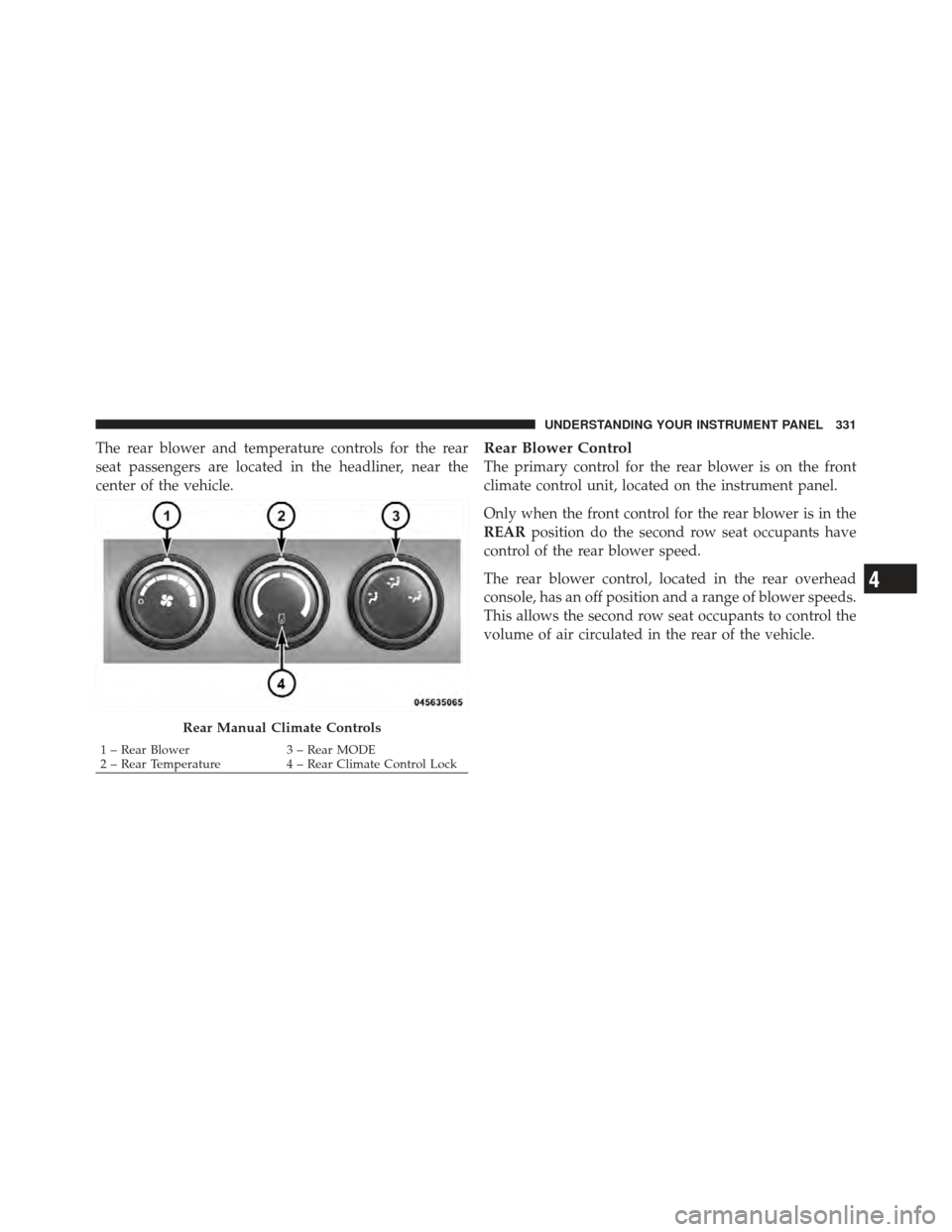
The rear blower and temperature controls for the rear
seat passengers are located in the headliner, near the
center of the vehicle.Rear Blower Control
The primary control for the rear blower is on the front
climate control unit, located on the instrument panel.
Only when the front control for the rear blower is in the
REARposition do the second row seat occupants have
control of the rear blower speed.
The rear blower control, located in the rear overhead
console, has an off position and a range of blower speeds.
This allows the second row seat occupants to control the
volume of air circulated in the rear of the vehicle.
Rear Manual Climate Controls
1 – Rear Blower 3 – Rear MODE
2 – Rear Temperature 4 – Rear Climate Control Lock
4
UNDERSTANDING YOUR INSTRUMENT PANEL 331
Page 334 of 562

CAUTION!
Interior air enters the Rear Manual Climate Control
system through an intake grille, located in the right
side trim panel behind the third row seats. The
heater outlets are located in the right side trim panel,
just behind the sliding door. Do not block or place
objects directly in front of the inlet grille or heater
outlets. The electrical system could overload, causing
damage to the blower motor.
Rear Temperature Control
The rear mode selectionREAR,allows the settings to be
controlled by the rear mode control knob.
To change the temperature in the rear of the vehicle,
rotate the temperature control knob counterclockwise for
cold air, and clockwise for heated air. When rear controls are locked by the front system, the
lock symbol on the temperature knob is illuminated, and
the rear overhead adjustments are inoperable.
Rear Mode Control
Headliner Mode
Air comes from the outlets in the headliner. Each of
these outlets can be individually adjusted to direct
the flow of air. Moving the air vanes of the outlets to one
side will shut off the airflow.
Bi-Level Mode Air comes from both the headliner outlets and the
floor outlets.
NOTE: In many temperature positions, the BI-LEVEL
mode is designed to provide cooler air out of the head-
liner outlets and warmer air from the floor outlets.
332 UNDERSTANDING YOUR INSTRUMENT PANEL
Page 337 of 562
10. Rear Control Button
Provides toggle operation between front control screen
and rear control screen. Push the button to activate the
rear climate control screen and allow the front seat
occupants control over the rear climate settings.
11. Rear Lock
Press and release the Rear Lock button on the front ATC
panel to lock and unlock the rear climate controls
12. Auto Temperature Control Button
Controls airflow temperature, distribution, volume, and
the amount of air recirculation automatically. Press and
release to select. Refer to “Automatic Operation” for
more information. Performing this function will cause
the ATC to switch between manual mode and automatic
modes.
13. Climate Control OFF Button
Press and release to turn the Climate Control OFF.14. Blower Control
There are seven blower speeds, the blower speed in-
creases as you move the control to the right from the
lowest blower setting. Performing this function will
cause the ATC to switch into manual mode.
15. Rear Off Indicator
This indicates when the Rear Temperature Control sys-
tem is in OFF.
16. Mode Control Button
Press and release to select between Modes (Panel, Bi-
Level, Floor, Mix). Performing this function will cause the
ATC to switch into manual mode.
17. Recirculation Control Button
Press and release to change the current setting, the
indicator illuminates when ON.
4
UNDERSTANDING YOUR INSTRUMENT PANEL 335
Page 339 of 562

To provide you with maximum comfort in the automatic
mode, during cold start-ups, the blower fan will remain
on low until the engine warms up. The fan will engage
immediately if the DEFROST mode is selected, or by
changing the front blower knob setting
Manual Operation
This system offers a full complement of manual override
features. The AUTO symbol in the front ATC display will
be turned off when the system is being used in the
manual mode.
NOTE:Each of these features operate independently
from each other. If any one feature is controlled manually,
the temperature doors will continue to operate automati-
cally. There are seven fixed blower speeds.
Use the outer dial control to regulate
the amount of air forced through the
system in any mode you select. The
blower speed increases as you move
the control clockwise and decreases
when you move the control counter-
clockwise.
The blower fan speed can be set to any fixed speed by
adjusting the blower control outer dial. The fan will now
operate at a fixed speed until additional speeds are
selected. This allows the front occupants to control the
volume of air circulated in the vehicle and cancel the
Auto mode.
The operator can also select the direction of the airflow
by selecting one of the following positions.Blower Control
4
UNDERSTANDING YOUR INSTRUMENT PANEL 337
Page 342 of 562
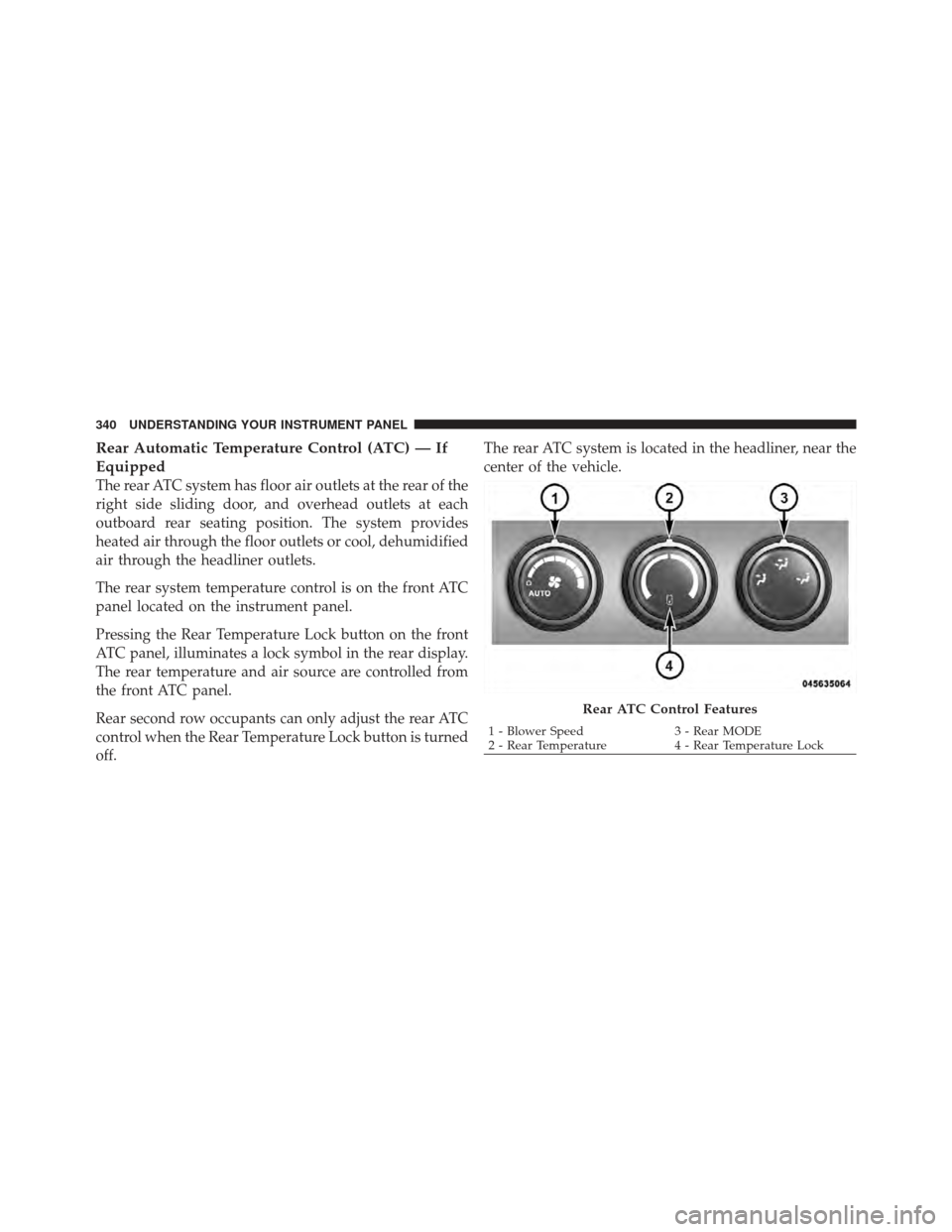
Rear Automatic Temperature Control (ATC) — If
Equipped
The rear ATC system has floor air outlets at the rear of the
right side sliding door, and overhead outlets at each
outboard rear seating position. The system provides
heated air through the floor outlets or cool, dehumidified
air through the headliner outlets.
The rear system temperature control is on the front ATC
panel located on the instrument panel.
Pressing the Rear Temperature Lock button on the front
ATC panel, illuminates a lock symbol in the rear display.
The rear temperature and air source are controlled from
the front ATC panel.
Rear second row occupants can only adjust the rear ATC
control when the Rear Temperature Lock button is turned
off.The rear ATC system is located in the headliner, near the
center of the vehicle.
Rear ATC Control Features
1 - Blower Speed
3 - Rear MODE
2 - Rear Temperature 4 - Rear Temperature Lock
340 UNDERSTANDING YOUR INSTRUMENT PANEL