Page 61 of 452
Enhanced Accident Response System
In the event of an impact causing air bag deployment, if
the communication network remains intact, and the
power remains intact, depending on the nature of the
event the ORC will determine whether to have the
Enhanced Accident Response System perform the follow-
ing functions:
•Cut off fuel to the engine.
•Flash hazard lights as long as the battery has power or
until the ignition key is turned off.
•Turn on the interior lights, which remain on as long as
the battery has power or until the ignition key is
removed.
•Unlock the doors automatically.
If A Deployment Occurs
The Advanced Front Air Bags are designed to deflate
immediately after deployment.NOTE:
Front and/or side air bags will not deploy in all
collisions. This does not mean something is wrong with
the air bag system.
If you do have a collision which deploys the air bags, any
or all of the following may occur:
•The nylon air bag material may sometimes cause
abrasions and/or skin reddening to the driver and
front passenger as the air bags deploy and unfold. The
abrasions are similar to friction rope burns or those
you might get sliding along a carpet or gymnasium
floor. They are not caused by contact with chemicals.
They are not permanent and normally heal quickly.
However, if you haven’t healed significantly within a
few days, or if you have any blistering, see your doctor
immediately.
•As the air bags deflate, you may see some smoke-like
particles. The particles are a normal by-product of the
process that generates the non-toxic gas used for air
2
THINGS TO KNOW BEFORE STARTING YOUR VEHICLE 59
Page 82 of 452
Periodic Safety Checks You Should Make Outside
The Vehicle
Tires
Examine tires for excessive tread wear and uneven wear
patterns. Check for stones, nails, glass, or other objects
lodged in the tread or sidewall. Inspect the tread for cuts
and cracks. Inspect sidewalls for cuts, cracks and bulges.
Check the wheel nuts for tightness. Check the tires
(including spare) for proper cold inflation pressure.
Lights
Have someone observe the operation of exterior lights
while you work the controls. Check turn signal and high
beam indicator lights on the instrument panel.
Door Latches
Check for positive closing, latching, and locking.
Fluid Leaks
Check area under vehicle after overnight parking for fuel,
engine coolant, oil, or other fluid leaks. Also, if gasoline
fumes are detected or if fuel, power steering fluid, or
brake fluid leaks are suspected, the cause should be
located and corrected immediately.
80 THINGS TO KNOW BEFORE STARTING YOUR VEHICLE
Page 85 of 452
▫To Set A Desired Speed ................ 144
▫ To Deactivate ....................... 144
▫ To Resume Speed .................... 144
▫ To Vary The Speed Setting .............. 145
▫ To Accelerate For Passing .............. 145
� Overhead Console ..................... 146
▫ Courtesy/Reading Lights .............. 147
� Compass/Temperature Mini-Trip Computer . . . 147
▫ US/M Button ....................... 148
▫ Reset Button ........................ 148
▫ Step Button ........................ 149
▫ Average Fuel Economy (AVG ECO) ....... 149
▫ Distance To Empty (DTE) .............. 149 ▫
Trip Odometer (ODO) ................. 150
▫ Elapsed Time (ET) ................... 150
▫ C/T Button ........................ 150
▫ Global Reset ........................ 151
▫ Compass/Temperature Display .......... 151
▫ Automatic Compass Calibration .......... 152
▫ Manual Compass Calibration ............ 152
▫ To Put Into A Calibration Mode .......... 152
▫ Outside Temperature .................. 153
� Garage Door Opener — If Equipped ........ 153
▫ Programming HomeLink� .............. 155
▫ Gate Operator/Canadian Programming .... 157
▫ Using HomeLink� ................... 158
3
UNDERSTANDING THE FEATURES OF YOUR VEHICLE 83
Page 150 of 452
US/M Button
Use the US/M button to change the display from U.S. to
metric measurement units.
RESET Button
Use the RESET button to reset the following displays:
•Average Fuel Economy
•Trip Odometer
•Elapsed time.
US/M Button
RESET Button
148 UNDERSTANDING THE FEATURES OF YOUR VEHICLE
Page 151 of 452
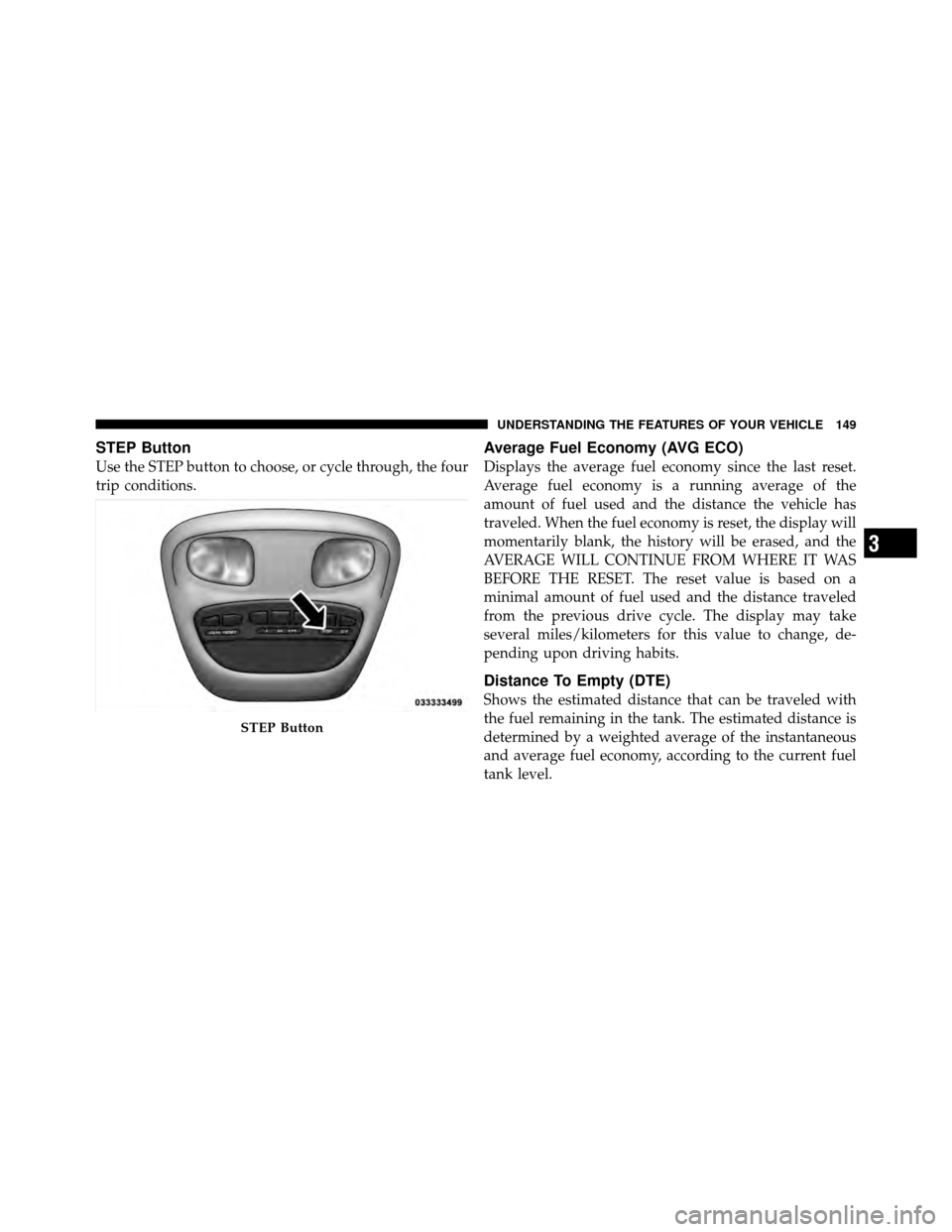
STEP Button
Use the STEP button to choose, or cycle through, the four
trip conditions.
Average Fuel Economy (AVG ECO)
Displays the average fuel economy since the last reset.
Average fuel economy is a running average of the
amount of fuel used and the distance the vehicle has
traveled. When the fuel economy is reset, the display will
momentarily blank, the history will be erased, and the
AVERAGE WILL CONTINUE FROM WHERE IT WAS
BEFORE THE RESET. The reset value is based on a
minimal amount of fuel used and the distance traveled
from the previous drive cycle. The display may take
several miles/kilometers for this value to change, de-
pending upon driving habits.
Distance To Empty (DTE)
Shows the estimated distance that can be traveled with
the fuel remaining in the tank. The estimated distance is
determined by a weighted average of the instantaneous
and average fuel economy, according to the current fuel
tank level.
STEP Button
3
UNDERSTANDING THE FEATURES OF YOUR VEHICLE 149
Page 152 of 452
NOTE:The DTE is not resettable.
When Distance To Empty = LOW FUEL, the fuel gauge
pointer will initially be on the red “E” marker. At this
point (fuel gauge pointer on the red “E” marker), there is
reserve fuel capacity, which corresponds to approxi-
mately 8% of tank volume. This reserve capacity was put
in place to prevent the likelihood of customers running
out of fuel when operating at maximum load conditions
in areas where there aren’t many gas stations.
NOTE: The Distance To Empty will remain equal to zero
until the vehicle runs out of fuel or is refueled.
Trip Odometer (ODO)
This display shows the distance traveled since the last
reset.
NOTE: The maximum value is approximately
6000 miles (9656 km). Resetting of this screen will cause the trip odometer to
change to zero. Then the trip odometer must be reset in
order to update the trip odometer miles.
Elapsed Time (ET)
This display shows the accumulated ignition ON time
since the last reset. Resetting the Elapsed Time will cause
the display to change to zero.
C/T Button
Use the C/T (Compass/Temperature) button to select a
readout of the outside temperature and one of eight
compass headings that indicate the direction in which the
vehicle is facing.
150 UNDERSTANDING THE FEATURES OF YOUR VEHICLE
Page 181 of 452
INSTRUMENT CLUSTER DESCRIPTIONS
1. Fuel Gauge
The fuel gauge shows the level of fuel in the fuel tank
when ignition switch is in the ON/RUN position.
2. Temperature Gauge
The temperature gauge shows engine coolant tempera-
ture. Any reading within the normal range indicates that
the engine cooling system is operating satisfactorily. The
gauge pointer will likely indicate a higher temperature
when driving in hot weather, up mountain grades, or
when towing a trailer. It should not be allowed to exceed
the upper limits of the normal operating range.
CAUTION!
Do not leave your vehicle unattended with the en-
gine running as you would not be able to react to the
temperature gauge if the engine overheats.3. Turn Signal Indicators
When a turn signal is activated, a right-pointing or
left-pointing arrow lights up and flashes to indicate
the direction of the turn. These indicators also indicate
proper operation of the front and rear turn signal lights.
If either indicator flashes at a faster rate than normal,
check for a defective bulb. If either indicator fails to light
up when the lever is moved, check for a defective fuse or
turn signal LED. A single chime is activated when the
left/right turn signal is left on, with the vehicle speed
greater than 15 mph (24 km/h) for more than 1 mile
(1.6 km).
4. Low Fuel Warning Light The low fuel warning light will illuminate when the
fuel gauge reads 1/8 of a tank or less. There is a
pointer on the side of this symbol that indicates the
side that your fuel filler door is located.
4
UNDERSTANDING YOUR INSTRUMENT PANEL 179
Page 185 of 452
16. Odometer Display
The odometer display shows the total distance the ve-
hicle has been driven.
U.S. Federal regulations require that upon transfer of
vehicle ownership, the seller certify to the purchaser the
correct mileage that the vehicle has been driven. If your
odometer needs to be repaired or serviced, the repair
technician should leave the odometer reading the same
as it was before the repair or service. If s/he cannot do so,
then the odometer must be set at zero, and a sticker must
be placed in the door jamb stating what the mileage was
before the repair or service. It is a good idea for you to
make a record of the odometer reading before the repair/
service, so that you can be sure that it is properly reset, or
that the door jamb sticker is accurate if the odometer
must be reset at zero.Vehicle Odometer Messages
When the appropriate conditions exist, the following
messages will display in the odometer:
door
............................. Door Ajar
gASCAP ....................... Fuel Cap Fault
LoW tirE ..................... LowTirePr essure
noFUSE .......................... Fuse Fault
CHAngE OIL ............... Oil Change Required
On vehicles equipped with a Overhead Console with
Compass/Temperature Mini-Trip Computer, some ve-
hicle messages may display in the Overhead Console
with Compass/Temperature Mini-Trip Computer when
the appropriate conditions exist. Refer to Overhead Con-
sole with Compass/Temperature Mini-Trip Computer in
“Understanding The Features Of Your Vehicle” for fur-
ther information.
4
UNDERSTANDING YOUR INSTRUMENT PANEL 183