Page 198 of 452
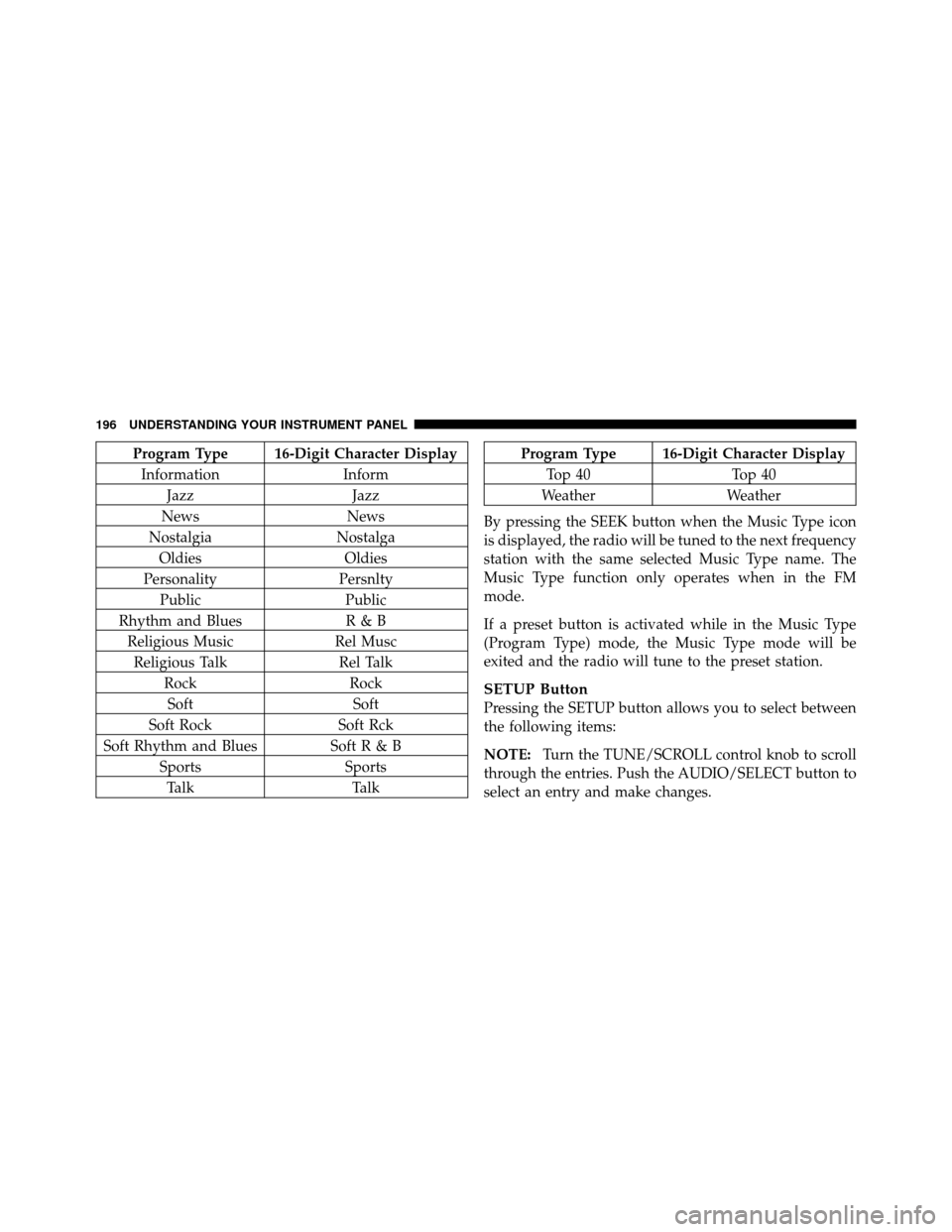
Program Type 16-Digit Character DisplayInformation Inform
Jazz Jazz
News News
Nostalgia Nostalga
Oldies Oldies
Personality Persnlty
Public Public
Rhythm and Blues R & B
Religious Music Rel Musc
Religious Talk Rel Talk
Rock Rock
Soft Soft
Soft Rock Soft Rck
Soft Rhythm and Blues SoftR&B Sports Sports
Talk TalkProgram Type 16-Digit Character Display
Top 40 Top 40
Weather Weather
By pressing the SEEK button when the Music Type icon
is displayed, the radio will be tuned to the next frequency
station with the same selected Music Type name. The
Music Type function only operates when in the FM
mode.
If a preset button is activated while in the Music Type
(Program Type) mode, the Music Type mode will be
exited and the radio will tune to the preset station.
SETUP Button
Pressing the SETUP button allows you to select between
the following items:
NOTE: Turn the TUNE/SCROLL control knob to scroll
through the entries. Push the AUDIO/SELECT button to
select an entry and make changes.
196 UNDERSTANDING YOUR INSTRUMENT PANEL
Page 226 of 452
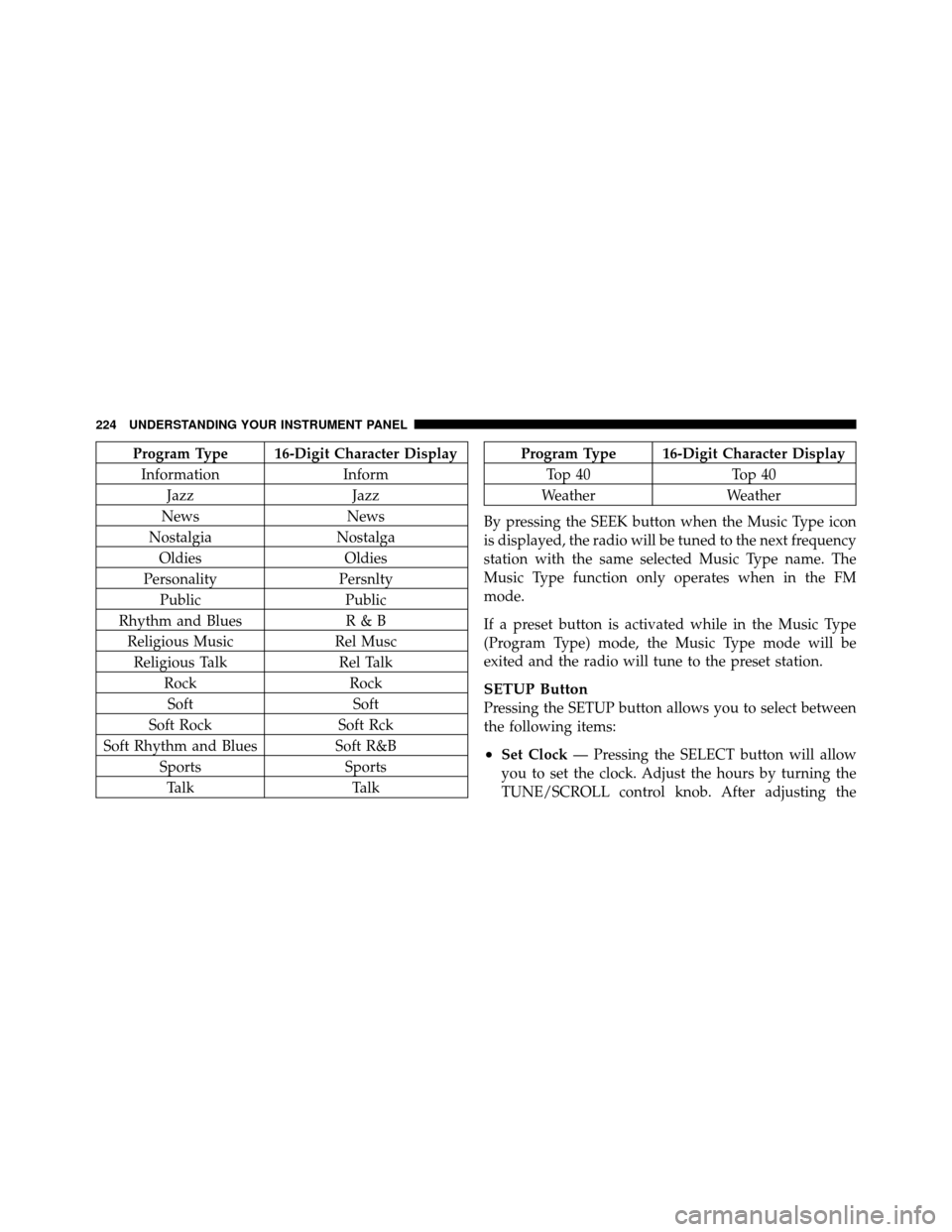
Program Type 16-Digit Character DisplayInformation Inform
Jazz Jazz
News News
Nostalgia Nostalga
Oldies Oldies
Personality Persnlty
Public Public
Rhythm and Blues R & B
Religious Music Rel Musc
Religious Talk Rel Talk
Rock Rock
Soft Soft
Soft Rock Soft Rck
Soft Rhythm and Blues Soft R&B
Sports Sports
Talk TalkProgram Type 16-Digit Character Display
Top 40 Top 40
Weather Weather
By pressing the SEEK button when the Music Type icon
is displayed, the radio will be tuned to the next frequency
station with the same selected Music Type name. The
Music Type function only operates when in the FM
mode.
If a preset button is activated while in the Music Type
(Program Type) mode, the Music Type mode will be
exited and the radio will tune to the preset station.
SETUP Button
Pressing the SETUP button allows you to select between
the following items:
•Set Clock — Pressing the SELECT button will allow
you to set the clock. Adjust the hours by turning the
TUNE/SCROLL control knob. After adjusting the
224 UNDERSTANDING YOUR INSTRUMENT PANEL
Page 243 of 452
NOTE:For vehicles equipped with Remote Start, the
climate controls will not function during Remote Start
operation if the blower control is left in the “O” (Off)
position.
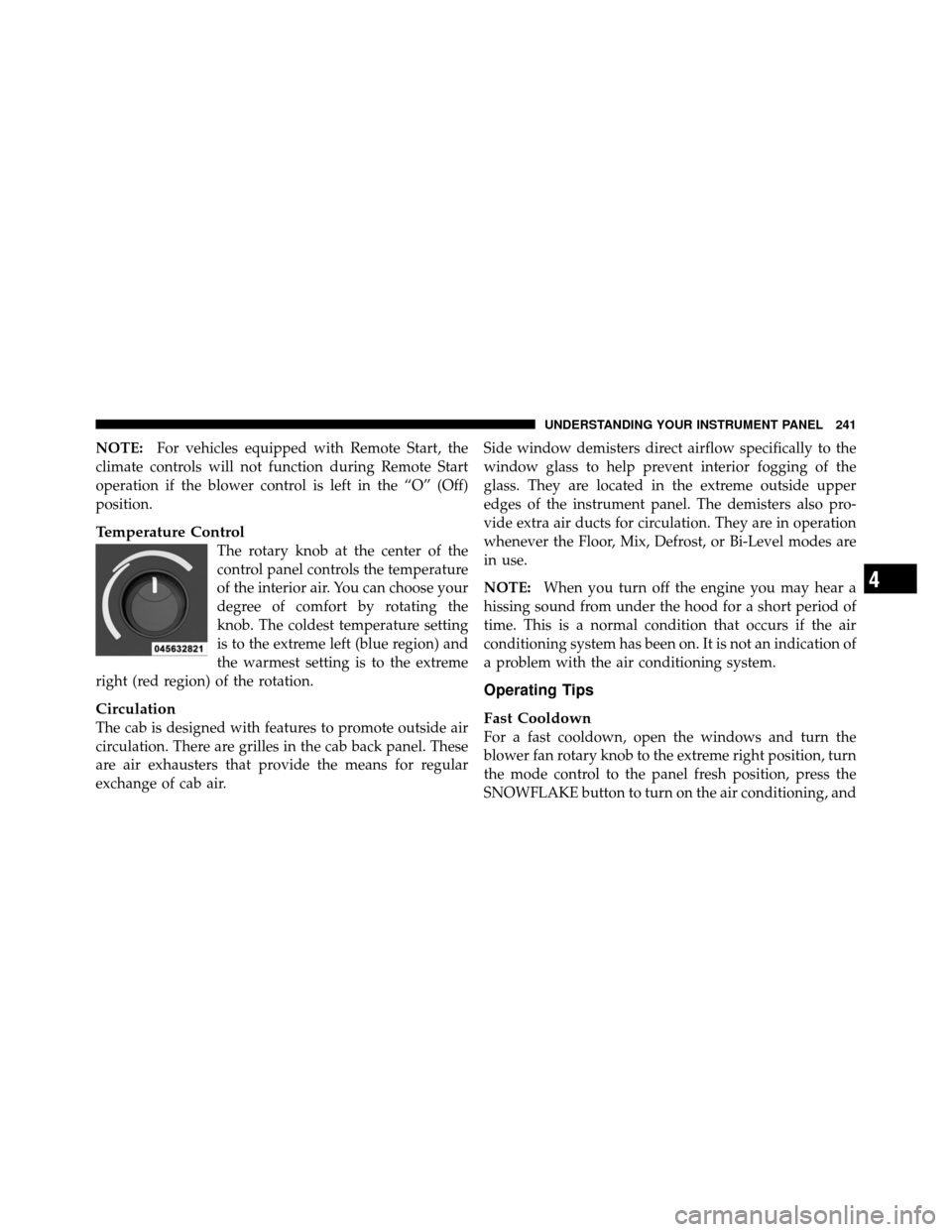
Temperature Control
The rotary knob at the center of the
control panel controls the temperature
of the interior air. You can choose your
degree of comfort by rotating the
knob. The coldest temperature setting
is to the extreme left (blue region) and
the warmest setting is to the extreme
right (red region) of the rotation.
Circulation
The cab is designed with features to promote outside air
circulation. There are grilles in the cab back panel. These
are air exhausters that provide the means for regular
exchange of cab air. Side window demisters direct airflow specifically to the
window glass to help prevent interior fogging of the
glass. They are located in the extreme outside upper
edges of the instrument panel. The demisters also pro-
vide extra air ducts for circulation. They are in operation
whenever the Floor, Mix, Defrost, or Bi-Level modes are
in use.
NOTE:
When you turn off the engine you may hear a
hissing sound from under the hood for a short period of
time. This is a normal condition that occurs if the air
conditioning system has been on. It is not an indication of
a problem with the air conditioning system.
Operating Tips
Fast Cooldown
For a fast cooldown, open the windows and turn the
blower fan rotary knob to the extreme right position, turn
the mode control to the panel fresh position, press the
SNOWFLAKE button to turn on the air conditioning, and
4
UNDERSTANDING YOUR INSTRUMENT PANEL 241
Page 390 of 452
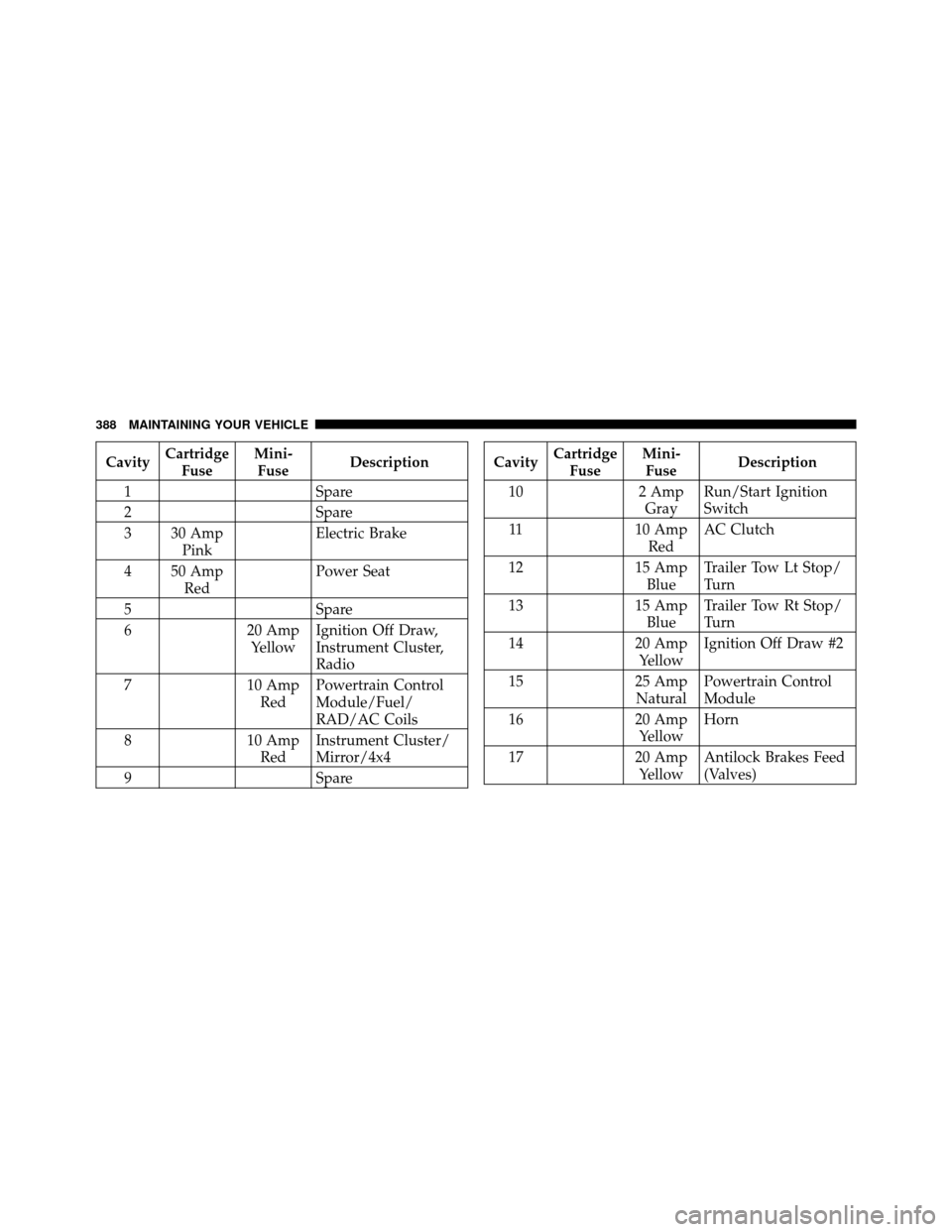
CavityCartridge
Fuse Mini-
Fuse Description
1 Spare
2 Spare
3 30 Amp Pink Electric Brake
4 50 Amp Red Power Seat
5 Spare
6 20 Amp
Yellow Ignition Off Draw,
Instrument Cluster,
Radio
7 10 Amp
Red Powertrain Control
Module/Fuel/
RAD/AC Coils
8 10 Amp
Red Instrument Cluster/
Mirror/4x4
9 SpareCavityCartridge
Fuse Mini-
Fuse Description
10 2 Amp
Gray Run/Start Ignition
Switch
11 10 Amp
Red AC Clutch
12 15 Amp
Blue Trailer Tow Lt Stop/
Turn
13 15 Amp
Blue Trailer Tow Rt Stop/
Turn
14 20 Amp
Yellow Ignition Off Draw #2
15 25 Amp
Natural Powertrain Control
Module
16 20 Amp
Yellow Horn
17 20 Amp
Yellow Antilock Brakes Feed
(Valves)
388 MAINTAINING YOUR VEHICLE
Page 391 of 452
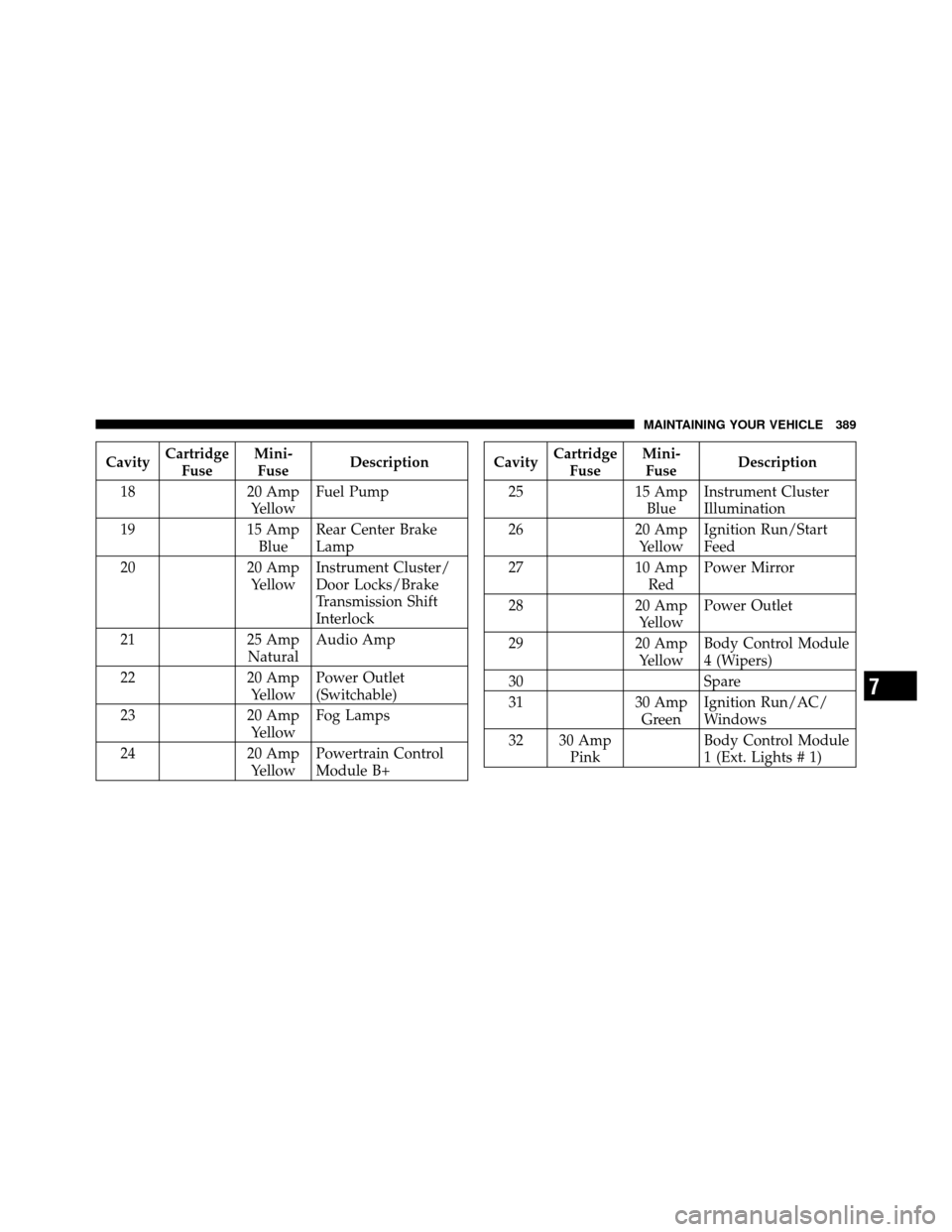
CavityCartridge
Fuse Mini-
Fuse Description
18 20 Amp
Yellow Fuel Pump
19 15 Amp
Blue Rear Center Brake
Lamp
20 20 Amp
Yellow Instrument Cluster/
Door Locks/Brake
Transmission Shift
Interlock
21 25 Amp
Natural Audio Amp
22 20 Amp
Yellow Power Outlet
(Switchable)
23 20 Amp
Yellow Fog Lamps
24 20 Amp
Yellow Powertrain Control
Module B+Cavity
Cartridge
Fuse Mini-
Fuse Description
25 15 Amp
Blue Instrument Cluster
Illumination
26 20 Amp
Yellow Ignition Run/Start
Feed
27 10 Amp
Red Power Mirror
28 20 Amp
Yellow Power Outlet
29 20 Amp
Yellow Body Control Module
4 (Wipers)
30 Spare
31 30 Amp
Green Ignition Run/AC/
Windows
32 30 Amp Pink Body Control Module
1 (Ext. Lights # 1)
7
MAINTAINING YOUR VEHICLE 389
Page 392 of 452
CavityCartridge
Fuse Mini-
Fuse Description
33 30 Amp Pink Automatic Shutdown
34 30 Amp Pink Body Control Module
2 (Ext. Light # 2)
35 40 Amp Green Climate Control Sys-
tem Blower Motor
36 Spare
37 Spare
38 20 Amp Blue Spare
39 30 Amp Pink Starter Solenoid
40 40 Amp Green Ignition Run Feeds
41 30 Amp Pink Wiper MotorCavity
Cartridge
Fuse Mini-
Fuse Description
42 25 Amp
Natural Body Control Module
5 (T-Case)
43 10 Amp
Red Lt Park Lamps
44 10 Amp
Red Rt Park Lamps
45 20 Amp
Yellow Trailer Tow Park
Lamps
46 10 Amp
Red Airbag System # 2
47 Spare
48 20 Amp Blue Sunroof/Sound Box
49 30 Amp Pink Trailer Tow B+
390 MAINTAINING YOUR VEHICLE