Page 153 of 566
•The Uconnect™ Phone does slightly lower your
chances of successfully making a phone call as to that
for the mobile phone directly.
WARNING!
Your phone must be turned on and connected to the
Uconnect™ Phone to allow use of this vehicle feature
in emergency situations, when the mobile phone has
network coverage and stays connected to the
Uconnect™ Phone.
Towing Assistance
If you need towing assistance:
•Press thebutton to begin.
•After the “Listening” prompt and the following beep,
say “Towing Assistance”.NOTE:
•The towing assistance call may also be initiated by
touch.
•The towing assistance number dialed is based on the
country where the vehicle is purchased (1-800-528-
2069 for the U.S., 1-877-213-4525 for Canada, 55-14-
3454 for Mexico City and 1-800-712-3040 for outside
Mexico City in Mexico). Please refer to the Chrysler
Group LLC 24-Hour “Towing Assistance” coverage
details in the Warranty Information Booklet and on the
24–Hour Towing Assistance Card.
Voice Mail Calling
To learn how to access your voice mail, refer to “Working
with Automated Systems”.
Working With Automated Systems
This method is used in instances where one generally has
to press numbers on the mobile phone keypad while
navigating through an automated telephone system.
3
UNDERSTANDING THE FEATURES OF YOUR VEHICLE 151
Page 154 of 566
You can use your Uconnect™ Phone to access a voice
mail system or an automated service, such as a paging
service or automated customer service line. Some ser-
vices require immediate response selection. In some
instances, that may be too quick for use of the
Uconnect™ Phone.
When calling a number with your Uconnect™ Phone that
normally requires you to enter in a touch-tone sequence on
your mobile phone keypad, you can utilize the touch-screen
or press the
button and say the word “Send” then
the sequence you wish to enter. For example, if required to
enter your PIN followed with a pound, (3746#),youcan
press the
button and say, “Send3746#”.Saying
“Send” followed by a number, or sequence of numbers, is
also to be used for navigating through an automated
customer service center menu structure, and to leave a
number on a pager.
You can also send stored mobile phonebook entries as
tones for fast and easy access to voice mail and pager
entries. For example, if you previously created a Phone-
book entry with First and/or Last Name as “Voicemail
Password”, then if you press the
button and say
“Send Voicemail Password” the Uconnect™ Phone will
then send the corresponding phone number associated
with the phonebook entry, as tones over the phone.
NOTE:
•The first number encountered for that contact will be
sent. All other numbers entered for that contact will be
ignored.
•You may not hear all of the tones due to mobile phone
network configurations. This is normal.
•Some paging and voice mail systems have system time
out settings that are too short and may not allow the
use of this feature.
152 UNDERSTANDING THE FEATURES OF YOUR VEHICLE
Page 155 of 566
•Pauses, wait or other characters that are supported by
some phones are not supported over Bluetooth�.
These additional symbols will be ignored in the dial-
ing a numbered sequence.
Barge In — Overriding Prompts
Thebutton can be used when you wish to skip
part of a prompt and issue your voice command imme-
diately. For example, if a prompt is asking “There are 2
numbers with the name John. Say the full name” you
could press the
button and say, “John Smith” to
select that option without having to listen to the rest of
the voice prompt.
Voice Response Length
It is possible for you to choose between Brief and
Detailed Voice Response Length.
•Touch the “More” soft-key, then touch the “Settings”
soft-key,
•Touch the “Display” soft-key, then scroll down to
Voice Response Length,
•Select either “Brief” or “Detailed” by touching the box
next to the selection. A check-mark will appear to
show your selection.
Phone And Network Status Indicators
Uconnect™ Phone will provide notification to inform
you of your phone and network status when you are
attempting to make a phone call using Uconnect™
Phone. The status is given for network signal strength
and phone battery strength.
Dialing Using The Mobile Phone Keypad
You can dial a phone number with your mobile phone
keypad and still use the Uconnect™ Phone (while dialing
via the mobile phone keypad, the user must exercise
caution and take precautionary safety measures). By
dialing a number with your paired Bluetooth� mobile
phone, the audio will be played through your vehicle’s
3
UNDERSTANDING THE FEATURES OF YOUR VEHICLE 153
Page 160 of 566
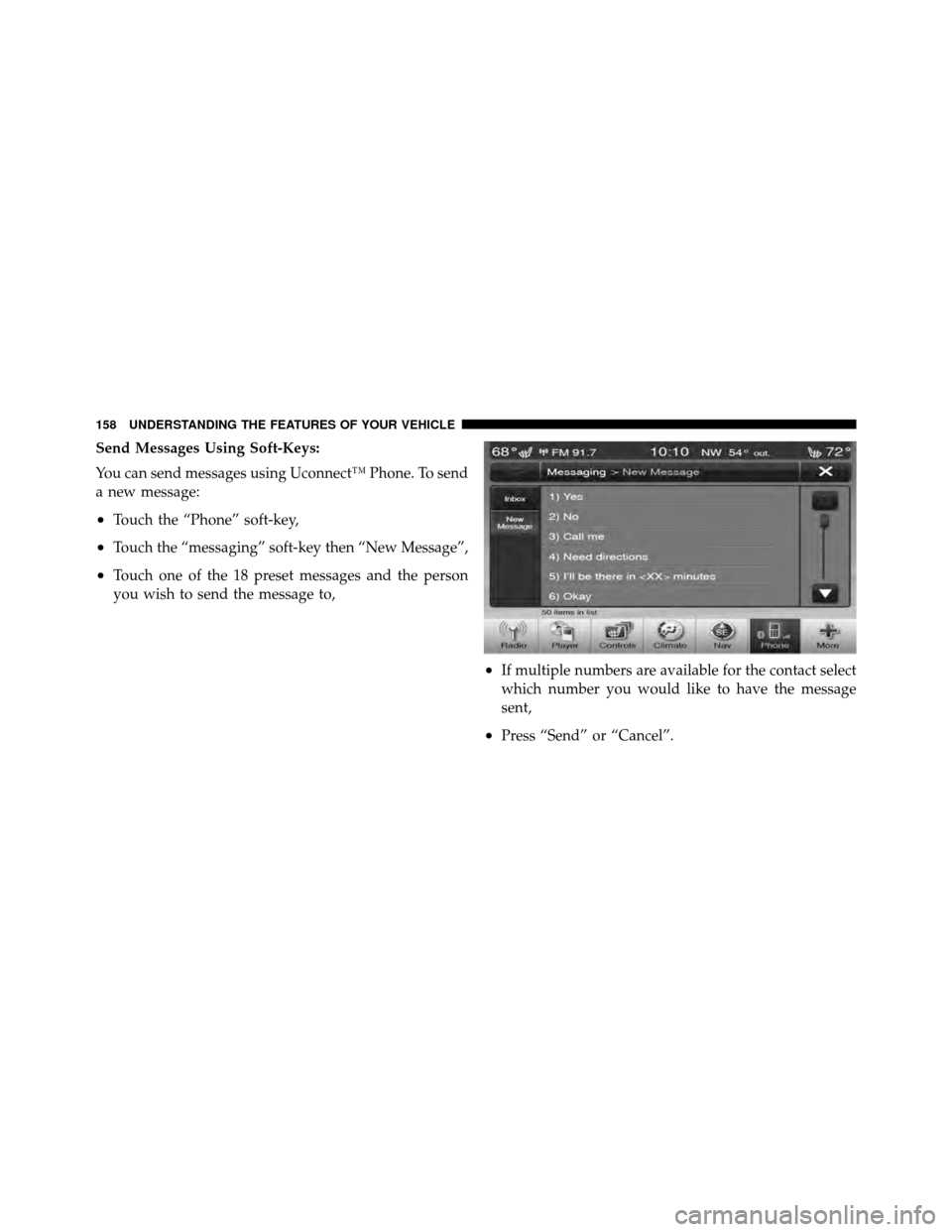
Send Messages Using Soft-Keys:
You can send messages using Uconnect™ Phone. To send
a new message:
•Touch the “Phone” soft-key,
•Touch the “messaging” soft-key then “New Message”,
•Touch one of the 18 preset messages and the person
you wish to send the message to,
•If multiple numbers are available for the contact select
which number you would like to have the message
sent,
•Press “Send” or “Cancel”.
158 UNDERSTANDING THE FEATURES OF YOUR VEHICLE
Page 162 of 566
5. Call me.
6. I’ll call you later.
7. I’m on my way.
8. Thanks.
9. I’ll be late.
10. I will be minutes late.
11. See you in minutes.
12. Stuck in traffic.
13. Start without me.
14. Where are you?
15. Are you there yet?
16. I need directions.
17. I’m lost.
18. See you later.Bluetooth�Communication Link
Mobile phones have been found to lose connection to the
Uconnect™ Phone. When this happens, the connection
can generally be reestablished by switching the phone
OFF/ON. Your mobile phone is recommended to remain
in Bluetooth� ON mode.
Power-Up
After switching the ignition key from OFF to either the
ON or ACC position, or after a language change, you
must wait at least 15 seconds prior to using the system.
160 UNDERSTANDING THE FEATURES OF YOUR VEHICLE
Page 176 of 566
Heated Seats — If Equipped
On some models, the front and rear seats may be
equipped with heaters in both the seat cushions and
seatbacks.
The front driver and passenger heated seats are operated
using the Uconnect Touch™ System.
WARNING!
•Persons who are unable to feel pain to the skin
because of advanced age, chronic illness, diabetes,
spinal cord injury, medication, alcohol use, ex-
haustion or other physical condition must exercise
care when using the seat heater. It may cause burns
even at low temperatures, especially if used for
long periods of time.(Continued)
WARNING! (Continued)
•Do not place anything on the seat that insulates
against heat, such as a blanket or cushion. This
may cause the seat heater to overheat. Sitting in a
seat that has been overheated could cause serious
burns due to the increased surface temperature of
the seat.
Front Heated Seat Operation — Vehicles Equipped
With Uconnect Touch™ 4.3:
Press the CLIMATE hard-key (located next to the Uconnect
Touch™ display) to enter the climate control screen.
Press the “Driver” or “Pass” seat soft-key (lo-
cated on the Uconnect Touch™ display) once to
select HI-level heating. Press the soft-key a
second time to select LO-level heating. Press
the soft-key a third time to shut the heating elements
OFF.
174 UNDERSTANDING THE FEATURES OF YOUR VEHICLE
Page 177 of 566
Front Heated Seat Operations — Vehicles
Equipped With Uconnect Touch™ 8.4 and 8.4 Nav:
Press the “Controls” soft-key located on the Uconnect
Touch™ display.Press the “Driver” or “Passenger” seat soft-key
once to select HI-level heating. Press the soft-
key a second time to select LO-level heating.
Press the soft-key a third time to shut the
heating elements OFF.
NOTE: Once a heat setting is selected, heat will be felt
within two to five minutes.
When the HI-level setting is selected, the heater will
provide a boosted heat level during the first four minutes
of operation. Then, the heat output will drop to the
normal HI-level. If the HI-level setting is selected, the system will automatically switch to LO-level after a
maximum of 60 minutes of continuous operation. At that
time, the display will change from HI to LO, indicating
the change. The LO-level setting will turn OFF automati-
cally after a maximum of 45 minutes.
Vehicle Equipped With Remote Start
On models that are equipped with remote start, the
driver ’s heated seat can be programmed to come on
during a remote start. Refer to “Remote Starting System
— If Equipped” in “Things To Know Before Starting Your
Vehicle” for further information.
Rear Heated Seats
On some models, the two outboard seats are equipped
with heated seats. The heated seat switches for these
seats are located on the rear of the center console.
3
UNDERSTANDING THE FEATURES OF YOUR VEHICLE 175
Page 185 of 566
WARNING!
•Be certain that the seatback is securely locked into
position. If the seatback is not securely locked into
position, the seat will not provide the proper
stability for child seats and/or passengers. An
improperly latched seat could cause serious injury.
•The cargo area in the rear of the vehicle (with the
rear seatbacks in the locked-up or folded down
position) should not be used as a play area by
children when the vehicle is in motion. They could
be seriously injured in a collision. Children
should be seated and using the proper restraint
system.
DRIVER MEMORY SEAT — IF EQUIPPED
This feature allows the driver to store up to two different
memory profiles for easy recall through a memory
switch. Each memory profile contains desired position
settings for the driver seat, side mirrors, adjustable
pedals (if equipped), and power tilt and telescopic steer-
ing column (if equipped) and a set of desired radio
station presets. Your Remote Keyless Entry (RKE) trans-
mitter can also be programmed to recall the same posi-
tions when the UNLOCK button is pressed.
NOTE:
•Only one RKE transmitter can be linked to each of the
memory positions.
•Passive Entry door handles cannot be linked to the
memory function. Use either the memory recall switch
or the RKE transmitter (if linked to the memory
feature) to recall memory positions 1 or 2.
3
UNDERSTANDING THE FEATURES OF YOUR VEHICLE 183