Page 324 of 566
•Passive Entry
This feature allows you to lock and unlock the vehicle’s
door(s) without having to press the Remote Keyless
Entry (RKE) transmitter lock or unlock buttons. To make
your selection, touch the Passive Entry soft-key, until a
check-mark appears next to setting, showing that setting
has been selected. Touch the back arrow soft-key to
return to the previous menu. Refer to “Keyless Enter-N-
Go” in “Things To Know Before Starting Your Vehicle”.
•Personal Settings Linked To FOB — If Equipped
This feature provides automatic driver seat positioning to
enhance driver mobility when entering and exiting the
vehicle. To make your selection, touch the Memory
Linked To FOB soft-key, until a check-mark appears next
to setting, showing that setting has been selected. Touch
the back arrow soft-key to return to the previous menu.
NOTE: The seat will return to the memorized seat
location (if Recall Memory with Remote Key Unlock is set to ON) when the Remote Keyless Entry (RKE) transmitter
is used to unlock the door. Refer to “Driver Memory
Seat” in “Understanding The Features Of Your Vehicle”
for further information.
Auto-On Comfort & Remote Start
After pressing the Auto-On Comfort & Remote Start
soft-key the following settings will be available.
•Horn With Remote Start
When this feature is selected, the horn will sound when
the remote start is activated. To make your selection,
touch the Sound Horn With Remote Start soft-key, until a
check-mark appears next to setting, showing that setting
has been selected. Touch the back arrow soft-key to
return to the previous menu.
•Auto-On Driver Heated/Ventilated Seat & Steering
Wheel With Vehicle Start — If Equipped
When this feature is selected the driver’s heated seat and
heated steering wheel will automatically turn on when
322 UNDERSTANDING YOUR INSTRUMENT PANEL
Page 329 of 566
iPod�/USB/MP3 CONTROL — IF EQUIPPED
This feature allows an iPod�or external USB device to be
plugged into the USB port.
iPod� control supports Mini, 4G, Photo, Nano, 5G iPod�
and iPhone� devices. Some iPod� software versions may
not fully support the iPod� control features. Please visit
Apple’s website for software updates.
For further information, refer to the Uconnect Touch™
User ’s Manual.
STEERING WHEEL AUDIO CONTROLS —
IF EQUIPPED
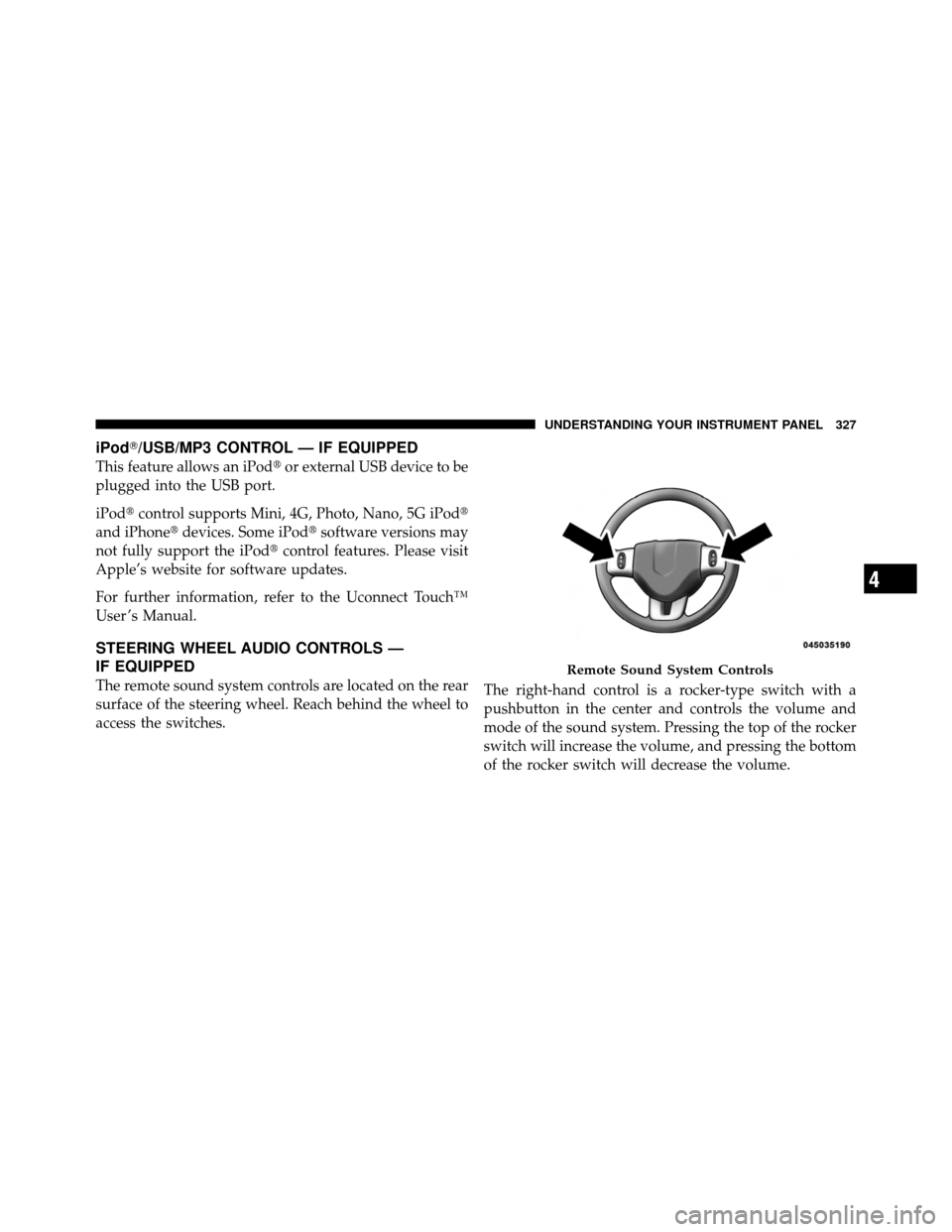
The remote sound system controls are located on the rear
surface of the steering wheel. Reach behind the wheel to
access the switches. The right-hand control is a rocker-type switch with a
pushbutton in the center and controls the volume and
mode of the sound system. Pressing the top of the rocker
switch will increase the volume, and pressing the bottom
of the rocker switch will decrease the volume.
Remote Sound System Controls
4
UNDERSTANDING YOUR INSTRUMENT PANEL 327
Page 346 of 566
�Driving On Slippery Surfaces ............. 361
▫ Acceleration ........................ 361
▫ Traction ........................... 362
� Driving Through Water ................. 362
▫ Flowing/Rising Water ................. 363
▫ Shallow Standing Water ............... 363
� Power Steering ....................... 365
� Multi-Displacement System (MDS)
(If Equipped) — 5.7L Engine Only .......... 366
� Parking Brake ........................ 366
� Anti-Lock Brake System ................. 369
� Electronic Brake Control System ........... 371
▫ Anti-Lock Brake System (ABS) ........... 371▫
Traction Control System (TCS) ........... 371
▫ Brake Assist System (BAS) .............. 372
▫ Electronic Stability Control (ESC) ......... 372
▫ Hill Start Assist (HSA) ................ 375
▫ Ready Alert Braking .................. 376
▫ Rain Brake Support ................... 377
▫ ESC Activation/Malfunction Indicator Light
And ESC Off Indicator Light ............ 377
▫ Synchronizing ESC ................... 378
� Tire Safety Information ................. 379
▫ Tire Markings ....................... 379
▫ Tire Identification Number (TIN) ......... 382
▫ Tire Terminology And Definitions ......... 383
344 STARTING AND OPERATING
Page 367 of 566
POWER STEERING
Your vehicle is equipped with an electro-hydraulic power
steering system that will give you good vehicle response
and increased ease of maneuverability in tight spaces.
The system will vary its assist to provide light efforts
while parking and good feel while driving. If the electro-
hydraulic power steering system experiences a fault that
prevents it from providing power steering assist, then the
system will provide mechanical steering capability.
CAUTION!
Extreme steering maneuvers may cause the electri-
cally driven pump to reduce or stop power steering
assistance in order to prevent damage to the system.
Normal operation will resume once the system is
allowed to cool.If the “SERVICE POWER STEERING SYSTEM”
message and a flashing icon are displayed on
the EVIC screen, it indicates that the vehicle
needs to be taken to the dealer for service. It is
likely the vehicle has lost power steering assistance. Refer
to “Electronic Vehicle Information (EVIC)” in “Under-
standing Your Instrument Panel” for further information.
If the “POWER STEERING SYSTEM OVER TEMP” mes-
sage and an icon are displayed on the EVIC screen, it
indicates that extreme steering maneuvers may have
occurred, which caused an over temperature condition in
the power steering system. You will lose power steering
assistance momentarily until the over temperature con-
dition no longer exists. Once driving conditions are safe,
then pull over and let vehicle idle for a few moments
until the light turns off. Refer to “Electronic Vehicle
Information (EVIC)” in “Understanding Your Instrument
Panel” for further information.
5
STARTING AND OPERATING 365
Page 368 of 566
NOTE:
•Even if power steering assistance is no longer opera-
tional, it is still possible to steer the vehicle. Under
these conditions there will be a substantial increase in
steering effort, especially at very low vehicle speeds
and during parking maneuvers.
•If the condition persists, see your authorized dealer for
service.
MULTI-DISPLACEMENT SYSTEM (MDS) (IF
EQUIPPED) — 5.7L ENGINE ONLY
This feature offers improved fuel economy by shutting
off four of the engine’s eight cylinders during light load
and cruise conditions. The system is automatic with no
driver inputs or additional driving skills required.
NOTE:The MDS system may take some time to return
to full functionality after a battery disconnect.
PARKING BRAKE
Before leaving the vehicle, make sure that the parking
brake is fully applied and place the shift lever in the
PARK position.
The foot operated parking brake is located below the
lower left corner of the instrument panel. To apply the
park brake, firmly push the park brake pedal fully. To
release the parking brake, press the park brake pedal a
second time and let your foot up as you feel the brake
disengage.
366 STARTING AND OPERATING
Page 372 of 566
•A slight drop or fall away of the brake pedal at the end
of the stop.
These are all normal characteristics of ABS.
WARNING!
•The ABS contains sophisticated electronic equip-
ment that may be susceptible to interference
caused by improperly installed or high output
radio transmitting equipment. This interference
can cause possible loss of anti-lock braking capa-
bility. Installation of such equipment should be
performed by qualified professionals.
•Pumping of the Anti-Lock Brakes will diminish
their effectiveness and may lead to a collision.
Pumping makes the stopping distance longer. Just
press firmly on your brake pedal when you need
to slow down or stop. (Continued)
WARNING! (Continued)
•The ABS cannot prevent the natural laws of phys-
ics from acting on the vehicle, nor can it increase
braking or steering efficiency beyond that af-
forded by the condition of the vehicle brakes and
tires or the traction afforded.
•The ABS cannot prevent collisions, including
those resulting from excessive speed in turns,
following another vehicle too closely, or hydro-
planing.
•The capabilities of an ABS equipped vehicle must
never be exploited in a reckless or dangerous
manner that could jeopardize the user’s safety or
the safety of others.
All vehicle wheels and tires must be the same size and
type and tires must be properly inflated to produce
accurate signals for the computer.
370 STARTING AND OPERATING
Page 374 of 566
Brake Assist System (BAS)
This system complements the ABS by optimizing the
vehicle braking capability during emergency brake ma-
neuvers. This system detects an emergency braking situ-
ation by sensing the rate and amount of brake application
and then applies optimum pressure to the brakes. This
can help reduce braking distances.
Applying the brakes very quickly results in the best BAS
assistance. To receive the benefits of this system, you
must apply continuous brake pedal pressure during the
stopping sequence. Do not reduce brake pedal pressure
unless braking is no longer desired. Once the brake pedal
is released, the BAS is deactivated.WARNING!
The BAS cannot prevent the natural laws of physics
from acting on the vehicle, nor can it increase the
traction afforded by prevailing road conditions. The
BAS cannot prevent collisions, including those re-
sulting from excessive speed in turns, driving on
very slippery surfaces, or hydroplaning. The capa-
bilities of a BAS-equipped vehicle must never be
exploited in a reckless or dangerous manner that
could jeopardize the user’s safety or the safety of
others.
Electronic Stability Control (ESC)
This system enhances directional control and stability of
the vehicle under various driving conditions. The ESC
corrects for oversteering and understeering the vehicle
by applying the brake of the appropriate wheel. Engine
372 STARTING AND OPERATING
Page 375 of 566

power may also be reduced to assist in counteracting the
condition of oversteer or understeer and help the vehicle
maintain the desired path.
The ESC uses sensors in the vehicle to determine the path
that the driver intends to steer the vehicle and compares
it to the actual path of the vehicle. When the actual path
does not match the intended path, the ESC applies the
brake of the appropriate wheel to assist in counteracting
the condition of oversteer or understeer.
•Oversteer - when the vehicle is turning more than
appropriate for the steering wheel position.
•Understeer - when the vehicle is turning less than
appropriate for the steering wheel position.
ESC Operating Modes
The ESC system has two available operating modes:ESC On
This is the normal operating mode for the ESC. When-
ever the vehicle is started, the ESC system will be in this
mode. This mode should be used for most driving
conditions. The ESC should only be turned OFF for
specific reasons as noted in the following paragraphs.
Partial Off
The “Partial Off” mode is intended for times when a
more spirited driving experience is desired. It is also
intended for driving in deep snow, sand, or gravel. This
mode disables the TCS portion of the ESC and raises the
threshold for ESC activation, which allows for more
wheel spin than what ESC normally allows.
5
STARTING AND OPERATING 373