Page 201 of 316

11
PRACTICAL INFORMATION
199
Do not disconnect the terminals
while the engine is running.
Do not charge the batteries without
disconnecting the terminals fi rst.
Do not push the vehicle to start the
engine if it is fi tted with the 6-speed
electronic gearbox system.
Before disconnecting the battery
Wait 2 minutes after switching off
the ignition before disconnecting
the battery.
Close the windows and the doors
before disconnecting the battery.
Following reconnection of
the battery
Following reconnection of the
battery, switch on the ignition
and wait 1 minute before start-
ing to permit initialisation of the
electronic systems. However, if
problems are encountered fol-
lowing this operation, contact a
CITROËN dealer or a qualifi ed
workshop.
Referring to the corresponding
section, you must yourself reini-
tialise:
- the remote control key,
- the panoramic sunroof blind,
- the GPS satellite navigation
system.
LOAD REDUCTION MODE
System which manages the use of cer-
tain functions according to the level of
charge remaining in the battery.
When the vehicle is being driven, the
load reduction function temporarily deac-
tivates certain functions, such as the air
conditioning, the heated rear screen...
The deactivated functions are reactivated
automatically as soon as conditions
permit.
ENERGY ECONOMY MODE
System which manages the period of
use of certain functions to conserve a
suffi cient level of charge in the battery.
After the engine has stopped, you can
still use functions such as the audio
equipment, windscreen wipers, dipped
beam headlamps, courtesy lamps, etc.
for a maximum combined period of
thirty minutes.
Switching to economy mode
Once this period has elapsed, a message
appears in the screen indicating that the ve-
hicle has switched to economy mode and
the active functions are put on standby.
If the telephone is being used at
the same time on the navigation
system, it will be interrupted af-
ter 10 minutes.
A fl at battery prevents the engine
from starting (refer to the corre-
sponding paragraph).
Exiting economy mode
These functions are reactivated auto-
matically the next time the vehicle is
driven.
)
In order to resume the use of these
functions immediately, start the engine
and let it run for a few minutes.
The time available to you will then be
double the period for which the engine
is left running. However, this period will
always be between fi ve and thirty minutes.
This period may be greatly re-
duced if the battery is not fully
charged.
Page 219 of 316
217
The system is protected in such a way that it will onlyoperate in your vehicle. If it is to be installed in another vehicle, contact a CITROËN dealer for confi guration of py
the system.
eMyWay
01 First steps - Control panel
For safety reasons, the driver must carry out operations
which require prolonged attention while the vehicle is stationary.
When the en
gine is switched off and to prevent
discharging of the battery, the system switches off following the activation of the energy economy mode.
CONTENTS
02 Steering mounted controls
03 General operation
04 Navigation - Guidance
05 Traffic information
06 Using the telephone
07 Radio
08 Music media players
09 Audio settings
10 Configuration
11 Screen menu map
Frequently asked questions p.
p.
p.
p.
p.
p.
p.
p.
p.
p.
p.
p.
218
220
221
223
236
239
249
252
258
259
260
263
SATELLITE NAVIGATION SYSTEM
MULTIMEDIA BLUETOOTH TELEPHONE AUDIO
SYSTEM
Page 221 of 316

219
01
1. Rotary control:
-
Short press engine not running: on/off.
-
Short press engine running: mute on/off.
- Rotation: volume ad
justment(each source is independant,
including TA messages and navigation
information).
2. Radio source
, access to the FM/AM band
menu and display the list of stations.
3. Access to the MEDIAmenu and display
the list of tracks.
4. A
ccess to the Navigation - guidancemenu and display the last destinations.
5. Access to the Traffi c informationmenuand display the current traffi c alerts.
6. Access to the "
Telephone " menu anddisplay the recent calls list.
2 - 3. Lon
g press: access to the Audio settings:music ambiance, bass, treble, loudness,left/right balance, front/rear fader, automatic volume adjustment. 7.
Access to the " Confi guration" menu.
Lon
g press: access to the GPS coverage and
the navigation demonstration mode.
8. MODE button:
Selection of the t
ype of permanent display.
Lon
g press: black screen (DARK).
9. ESC: abandon the operation in pro
gress,
up one level in the menu.
Long press: return to permanent display.
10.
CD eject.
Continuous press: reinitialisation of thesystem.
11. Accordin
g to context:
Selection of the previous/next line in a list or
menu.
Selection of the previous/next media folder.
Step by step selection of the previous/next
radio frequency.
Move up
/down in Move the map
mode.
12. Accordin
g to context:
Automatic selection o
f the next lower/higher radio frequency
Selection of the previous/next CD or media
track
Selection of left/ri
ght on the screen when a
menu is displayed.
Move left/ri
ght in Move the map mode.
1
3. Buttons 1 to 6:
Short press: selection of the stored radio station.
Lon
g press: store the current radio station.
14. Dial for selection and
OK confi rmation:
Selection of an item on the screen or in alist in a menu, then confi rmation with a shortpress.
Other than for menus and lists, a short press
displays a contextual menu depending on the
current screen.
Rotation with map displa
yed: zoom the mapscale in and out.
FIRST STEPS
Page 222 of 316
220
02 STEERING MOUNTED CONTROLS
- Change the audio source.
Long press: mute.
-
Volume increase.
- V
olume decrease.
- Radio: displa
y the list of stations.
Media: display the list o
f tracks.
-
Rotation
Radio - automatic selection of next/previous frequency.
Media: previous/next track.
- Pr
ess then rotation: access to 6 preset stations.
- TEL button:
Access to the telephone menu:
Call list/Contacts/Hands-freemode/Answer/Hang up.
Accept an incoming call/
Long press: reject an incoming callor end the current call.
-
Move in the menus.
Zoom the map in and out
Pr
ess: confi rmation
-
Abandon the current operation.
Page 223 of 316
221
03
For a detailed global view of the menus available, refer to the"Screen menu map" section.
For cleaning the screen, the use of a soft, non-abrasive cloth (spectacles cloth) is recommended, with no additional product. "RADIO
/MEDIA"
"
TELEPHONE"
(If conversation in progress)
SETUP
: PARAMETERS
date and time, display parameters, sound.
Changing the audio source:
RADIO:RADIObroadcasts.
MUSIC :playing MEDIA.
Press the MODE
button several times in succession for access to the following displays:
GENERAL OPERATION
"FULL SCREEN MAP"
"MAP IN WINDOW"
Page 224 of 316
222
03
A press on the OK dial gives access to
short-cut menus according to the display
in the screen.
RADIO:
Activate/Deactivate TA
Activate/Deactivate RDS
GENERAL OPERATION
DISPLAY ACCORDING TO CONTEXT
MUSIC MEDIA PLAYERS,
CD or USB (according
to media):
Play modes:
Normal
Random
Random on all media
Repetition
TELEPHONE (call in
progress):
Private mode
FULL SCREEN MAP OR
IN A NEW WINDOW:
Stop/Restore guidance
Select destination
Enter an address
Directory
GPS coordinates
Divert route
Move the map
Info. on location
Select as destination
Select as sta
ge
Save this place (contacts)
Quit map mode
Guidance criteria
Put call on hold
DTMF rin
g tones
Han
g up1
1
1
1
1
1
1
1
2
2
2
2
2
1
2
2
2
1
1
1
1
1
1
Page 227 of 316
225
1
2
04
1
2
3
SELECTING A DESTINATION
NAVIGATION - GUIDANCE
TO ONE OF THE RECENT DESTINATIONS
Press NAV
twice to open the list of
recent destinations.
Select the desired destination and confi rm to start guidance. TOWARDS A CONTACT IN THE CONTACTS DIRECTORY
Select " Select destination" andconfi rm, then select " Directory " and confi rm.
Selection the desired destination from your contacts and confi rm "OK
" to start
the guidance.
Pr
ess NAVto display the"Navigation - guidance
" menu. Navi
gation towards a contact imported from your telephone is only
possible if the address is compatible with the system.
Page 241 of 316
239
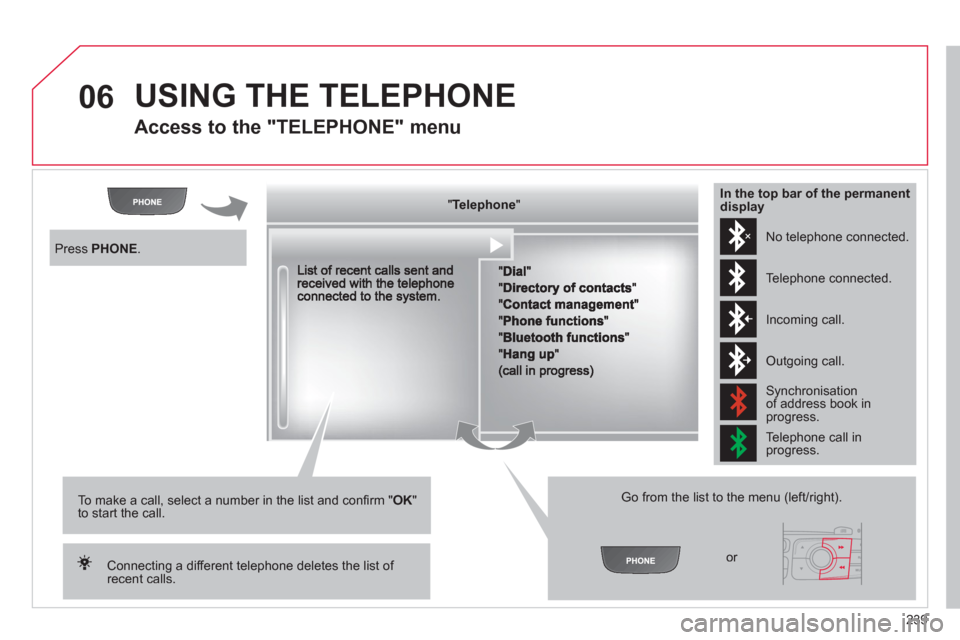
06 USING THE TELEPHONE
Access to the "TELEPHONE" menu
"""""""ppppeepoeTelephoneTelephoneTelephoneTelephoneTelephoneTelephoneTelephoneTelephoneTelephoneTelephoneTelephoneTelephoneTelephoneTelephoneTl hTl hTl hTl h"""""""
Go from the list to the menu (left/right).
or
Press PHONE.
To make a call, select a number in the list and confi rm "OK"to start the call.
Connecting a different telephone deletes the list of recent calls.
No telephone connected.
Telephone connected.
Incoming call.
Outgoing call.
Synchronisation of address book in progress.
Telephone call in progress.
In the top bar of the permanentdisplay