2011 CHRYSLER TOWN AND COUNTRY odometer
[x] Cancel search: odometerPage 173 of 573
Dimmer Control
With the parking lights or headlights on, rotating the
dimmer control for the interior lights on the instrument
panel upward will increase the brightness of the instru-
ment panel lights.
Parade Mode (Daytime Brightness Feature)
Rotate the dimmer control to the first detent. This feature
brightens the odometer, radio and overhead displays
when the parking lights or headlights are on.
Interior Lights On
Rotate the dimmer control completely upward to the
second detent (extreme top position) to turn on the
interior lights. The interior lights will remain on when the
dimmer control is in this position.
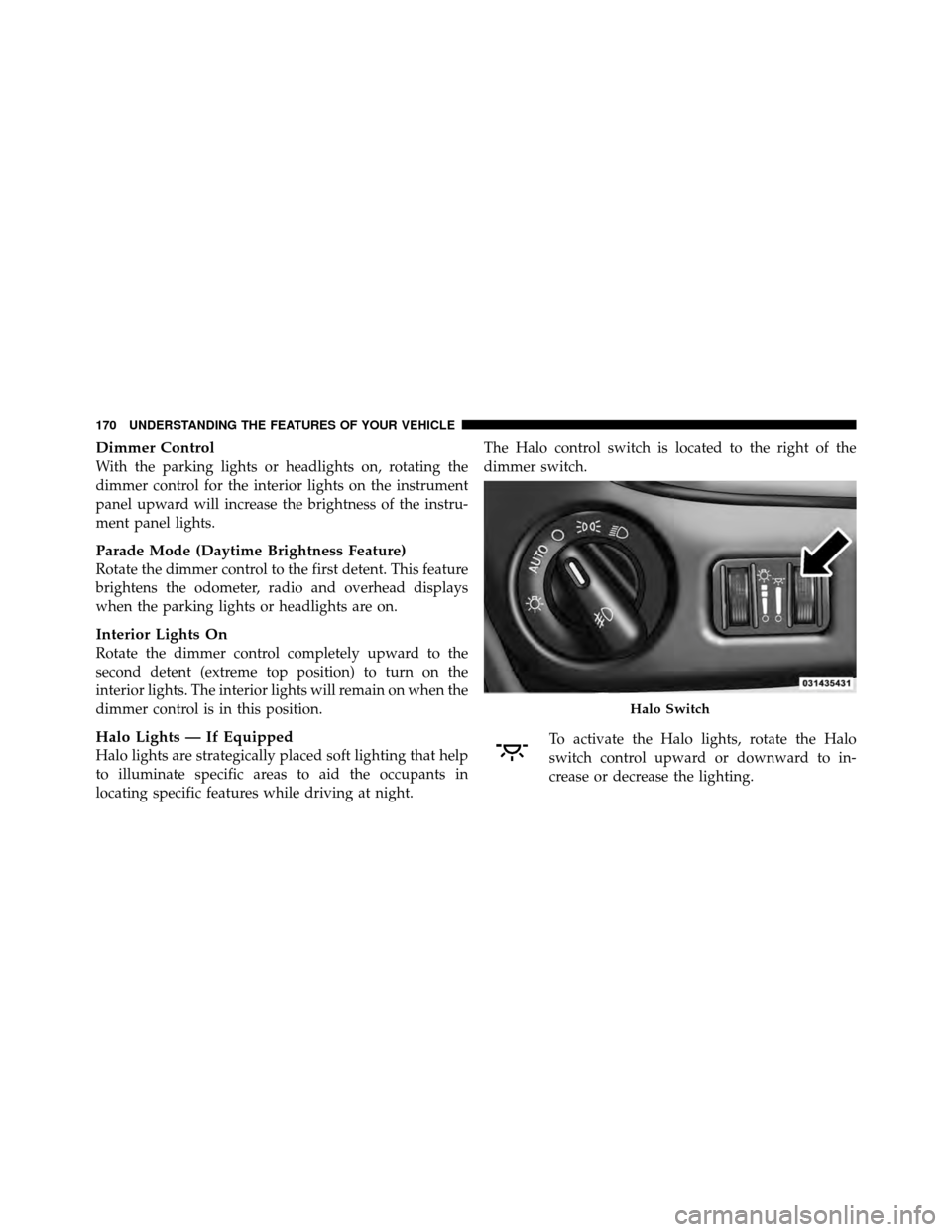
Halo Lights — If Equipped
Halo lights are strategically placed soft lighting that help
to illuminate specific areas to aid the occupants in
locating specific features while driving at night.The Halo control switch is located to the right of the
dimmer switch.
To activate the Halo lights, rotate the Halo
switch control upward or downward to in-
crease or decrease the lighting.
Halo Switch
170 UNDERSTANDING THE FEATURES OF YOUR VEHICLE
Page 258 of 573
6. Compass Mini-Trip Computer (CMTC) or Electronic
Vehicle Information Center (EVIC) Display —
If Equipped
Odometer
The odometer display shows the total distance the ve-
hicle has been driven.
U.S. Federal regulations require that upon transfer of
vehicle ownership, the seller certify to the purchaser the
correct mileage that the vehicle has been driven. If your
odometer needs to be repaired or serviced, the repair
technician should leave the odometer reading the same
as it was before the repair or service. If s/he cannot do so,
then the odometer must be set at zero, and a sticker must
be placed in the door jamb stating what the mileage was
before the repair or service. It is a good idea for you to
make a record of the odometer reading before the repair/
service, so that you can be sure that it is properly reset, or
that the door jamb sticker is accurate if the odometer
must be reset at zero.Message Display Area
When the appropriate conditions exist, the following
odometer messages will display:
door
............................. Door Ajar
gATE ........................... Liftgate Ajar
LoW tirE ..................... LowTirePr essure
gASCAP ....................... Fuel Cap Fault
noFUSE .......................... Fuse Fault
CHAngE OIL ............... Oil Change Required
CRUISE ..................... Cruise Control On
LoCOOL ........................ Low Coolant
LoWASH .................... LowW asher Fluid
NOTE: Some of the above warnings will be displayed in
the Electronic Vehicle Information Center Display Area
located in the instrument cluster.
Refer to ”Electronic Vehicle Information Center (EVIC)
Display — If Equipped” for further information.
4
UNDERSTANDING YOUR INSTRUMENT PANEL 255
Page 259 of 573
LoW tirE
When the appropriate condition exists, the odometer
display will toggle between LoW and tirE for three cycles.
gASCAP
If the vehicle diagnostic system determines that the fuel
filler cap is loose, improperly installed, or damaged, a
“gASCAP” message will display in the odometer display
area. Tighten the fuel filler cap properly and press the
TRIP ODOMETER button to turn off the message. If the
problem continues, the message will appear the next time
the vehicle is started.
noFUSE
If the vehicle diagnostic system determines that the
Ignition Off Draw (IOD) fuse is improperly installed, or
damaged, a “noFUSE” message will display in the odom-
eter display area. For further information on fuses and
fuse locations refer to “Fuses” in “Maintaining Your
Vehicle”.CHAngE OIL
Your vehicle is equipped with an engine oil change
indicator system. The
CHAngE OILmessage will flash in
the instrument cluster odometer for approximately
12 seconds, after a single chime has sounded, to indicate
the next scheduled oil change interval. The engine oil
change indicator system is duty cycle-based, which
means the engine oil change interval may fluctuate
dependent upon your personal driving style.
Unless reset, this message will continue to display each
time you turn the ignition switch to the ON/RUN
position. To turn off the message temporarily, press and
release the Trip / Odometer Display reset button on the
instrument cluster. To reset the oil change indicator
system (after performing the scheduled maintenance),
perform the following steps.
1. Turn the ignition switch to the ON/RUN position (do
not start the engine).
256 UNDERSTANDING YOUR INSTRUMENT PANEL
Page 271 of 573
NOTE:The system will display the last known outside
temperature when starting the vehicle and may need to
be driven several minutes before the updated tempera-
ture is displayed. Engine temperature can also affect the
displayed temperature; therefore, temperature readings
are not updated when the vehicle is not moving.
CMTC Reset Buttons
CMTC Reset Button
Press the STEP button located on the steering wheel to
scroll through sub menus (i.e., Trip Functions: AVG Fuel
Economy, DTE, Elapsed Time, and Units).
To reset the display shown, turn the ignition switch to the
ON position, then press and hold the RESET button for
approximately two seconds. When the appropriate conditions exist, the following
messages will display:
NE
.............. Eight-point compass headings are
displayed (N, S, E, W, NE, NW, SE, SW)
14°F ............ T emperature (Fahrenheit or Celsius)
AV G ......... Average Fuel Economy (U.S. or Metric)
DTE ....................... Distance to Empty
ET ............................ Elapsed Time
P .......................... Park Assist On/Off
Should this wrench symbol display with the
letter Pnext to it, your Park Assist System
needs servicing. Contact an authorized dealer.
CMTC Trip Odometer (ODO)
This display shows the distance traveled since the last
reset. Press and release the STEP button on the steering
wheel to switch from odometer to Trip A or Trip B or to
ECO. Press and hold the RESET button while the
odometer/trip odometer is displayed to reset.
268 UNDERSTANDING YOUR INSTRUMENT PANEL
Page 285 of 573

Trip B
Shows the total distance traveled for Trip B since the last
reset.
Elapsed Time
Shows the total elapsed time of travel since the last reset
when the ignition switch is in the ACC position. Elapsed
time will increment when the ignition switch is in the ON
or START position.
To Reset A Trip Function
Reset will only occur while a resettable function is
selected (highlighted). Press and hold the SELECT button
to clear the resettable function being displayed.
Units
Press and release the UP or DOWN button until “Units”
displays highlighted in the EVIC and press the SELECT
button. The EVIC, odometer, and navigation system (if
equipped) can be changed between English and Metric
units of measure. To make your selection, scroll up ordown until the preferred setting is highlighted, then
press and release the SELECT button until a check-mark
appears next to the setting, showing that the setting has
been selected.
Vehicle Info (Customer Information Features)
Press and release the UP or DOWN button until “Vehicle
Info” displays in the EVIC and press the SELECT button.
Press the UP and DOWN button to scroll through the
selections below:
•Coolant Temp
Displays the actual coolant temperature.
•Oil Temperature
Displays the actual oil temperature.
•Oil Pressure
Displays the actual oil pressure.
•Engine Hours
Displays the number of hours of engine operation.
282 UNDERSTANDING YOUR INSTRUMENT PANEL
Page 286 of 573
Keyless Enter-N-Go Display — If Equipped
When the ENGINE START/STOP button is pressed to
change ignition switch position, current ignition status
will be displayed in the lower right corner of the EVIC
display to the right of the odometer value.
Refer to “Keyless Enter-N-Go” in “Starting And Operat-
ing” for more information.
Compass / Temperature Display
The compass readings indicate the direction the vehicle is
facing. The EVIC will display one of eight compass
readings and the outside temperature.
NOTE:The system will display the last known outside
temperature when starting the vehicle and may need to
be driven several minutes before the updated tempera-
ture is displayed. Engine temperature can also affect the
displayed temperature; therefore, temperature readings
are not updated when the vehicle is not moving.
Automatic Compass Calibration
This compass is self-calibrating, which eliminates the
need to manually reset the compass. When the vehicle is
new, the compass may appear erratic and the EVIC will
display CAL until the compass is calibrated. You may
also calibrate the compass by completing one or more
360–degree turns (in an area free from large metal or
metallic objects) until the CAL indicator displayed in the
EVIC turns off. The compass will now function normally.
NOTE: A good calibration requires a level surface and
an environment free from large metallic objects such as
buildings, bridges, underground cables, railroad tracks,
etc.
Manual Compass Calibration — If Equipped
If the compass appears erratic and the CAL indicator
does not appear in the EVIC display, you must put the
compass into the Calibration Mode manually, as follows:
1. Turn ON the ignition switch.
4
UNDERSTANDING YOUR INSTRUMENT PANEL 283
Page 372 of 573
WARNING!
Do not coast in NEUTRAL and never turn off the
ignition to coast down a hill. These are unsafe
practices that limit your response to changing traffic
or road conditions. You might lose control of the
vehicle and have a collision.
DRIVE
This range should be used for most city and highway
driving. It provides the smoothest upshifts, downshifts,
and best fuel economy. However, when frequent trans-
mission shifting occurs, such as when operating the
vehicle under heavy loading conditions, (i.e., in hilly
terrain, traveling into strong head winds or while towing
heavy trailers), use the Electronic Range Select (ERS)
mode to select the “5” range. Under these conditions,
using the “5” range will improve performance and
extend transmission life by reducing excessive shifting
and heat buildup.
Electronic Range Select (ERS) Operation
The Electronic Range Select (ERS) shift control allows
you to move the shift lever to the left (-) or right (+) when
the shift lever is in the DRIVE position, this allows the
selection of the desired top gear. For example, if you shift
the transmission into third gear, the transmission will
never shift above third gear, but can shift down into
second or first gear automatically, when needed.
Switching from ERS to DRIVE can be done at any vehicle
speed. To shift from DRIVE mode to ERS mode, move the
shift lever to the left (-) once. The current gear will be
maintained as the top gear. To disable ERS, simply press
and hold the shift lever to the right (+) until “D” is
displayed in the instrument cluster odometer.
5
STARTING AND OPERATING 369
Page 373 of 573
WARNING!
Do not downshift for additional engine braking on a
slippery surface. The drive wheels could lose their
grip and the vehicle could skid, causing a collision or
personal injury.
Odometer
Screen Display123456D
Actual Gear(s)
Allowed 1 1-2 1-3 1-4 1-5 1-6 1-6
NOTE: To select the proper gear position for maximum
deceleration (engine braking), simply press and hold the
shift lever to the left (-). The transmission will shift to the
range from which the vehicle can best be slowed down.
Reset Mode – Electronic Transmission
The transmission is monitored electronically for abnor-
mal conditions. If a condition is detected that could cause
damage, the transmission automatically shifts into third gear. The transmission remains in third gear despite the
forward gear selected. PARK, REVERSE, and NEUTRAL
will continue to operate. This Reset feature allows the
vehicle to be driven to an authorized dealer for service
without damaging the transmission.
In the event of a momentary problem, the transmission
can be reset to regain all forward gears by performing the
following steps:
1. Stop the vehicle.
2. Shift into PARK.
3. Turn the ignition switch to the LOCK position.
4. Restart the engine.
5. Shift into the desired gear range and resume driving.
NOTE:
Even if the transmission can be reset, it is
recommended that you visit an authorized dealer at your
earliest possible convenience.
370 STARTING AND OPERATING