Page 161 of 505
Headlights With Wipers
(Available With Automatic Headlights Only)
When this feature is active, the headlights will turn on
approximately 10 seconds after the wipers are turned on
if the multifunction lever is placed in the AUTO position.
In addition, the headlights will turn off when the wipers
are turned off if they were turned on by this feature.
The Headlights with Wipers feature can be turned on or
off through the Electronic Vehicle Information Center
(EVIC) — if equipped. Refer to “Electronic Vehicle Infor-
mation Center (EVIC)/Customer-Programmable Fea-
tures” in “Understanding Your Instrument Panel” for
further information.
Headlight Time Delay — If Equipped
This feature is particularly useful when exiting your
vehicle in an unlit area. It provides the safety of headlight
illumination for about 90 seconds after turning the igni-
tion switch to the LOCK position.To activate the delay, turn the ignition switch to the
LOCK position while the headlights are still on. Then,
turn off the headlights within 45 seconds. The delay
interval begins when you turn off the headlights. Only
the headlights will illuminate during this time.
If you turn the headlights, parking lights, or ignition
switch ON again, the system will cancel the delay.
If you turn the headlights off before the ignition, they will
turn off in the normal manner.
The Headlight delay time is programmable on vehicles
equipped with the Electronic Vehicle Information Center
(EVIC). Refer to “Electronic Vehicle Information Center
(EVIC)/Customer-Programmable Features” in “Under-
standing Your Instrument Panel” for further information.
3
UNDERSTANDING THE FEATURES OF YOUR VEHICLE 159
Page 162 of 505
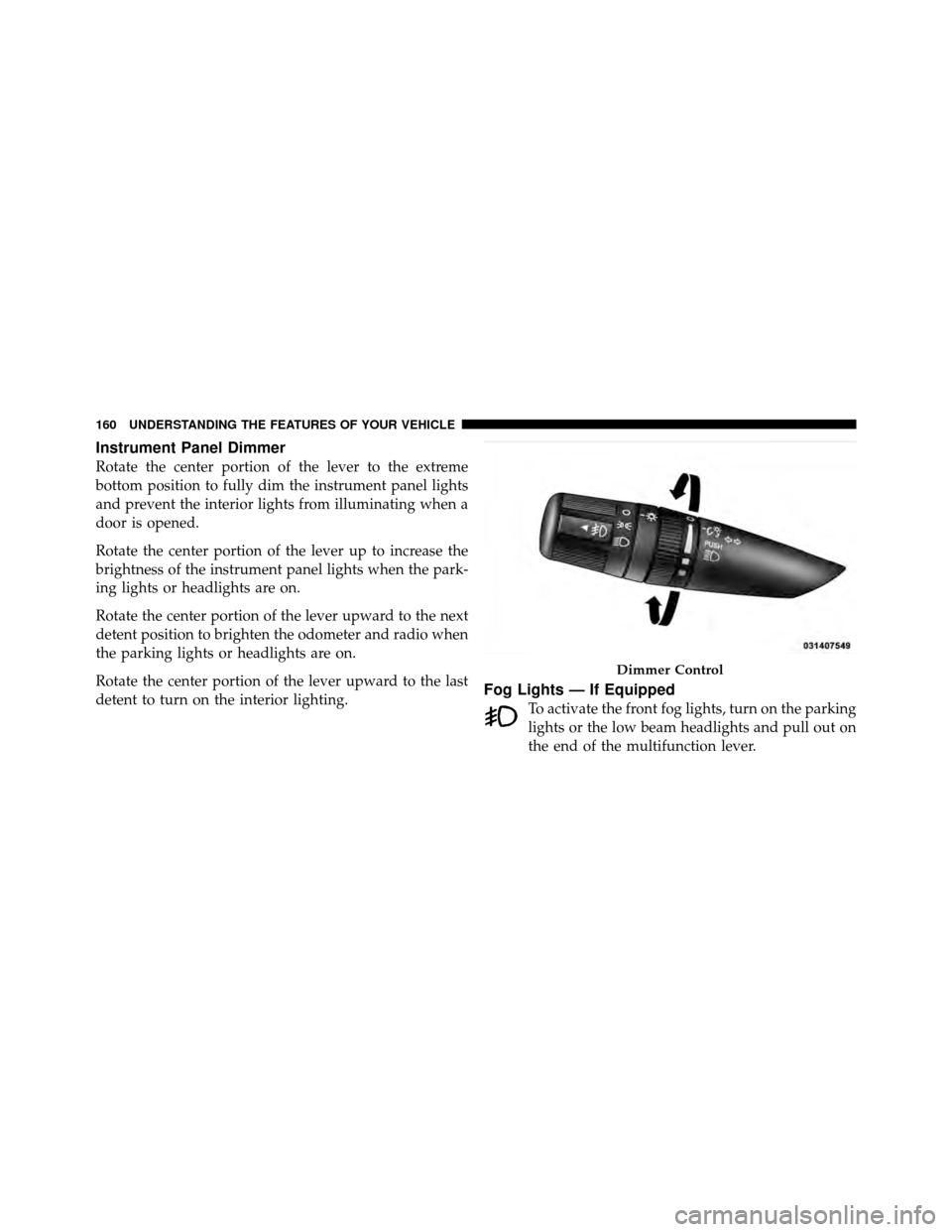
Instrument Panel Dimmer
Rotate the center portion of the lever to the extreme
bottom position to fully dim the instrument panel lights
and prevent the interior lights from illuminating when a
door is opened.
Rotate the center portion of the lever up to increase the
brightness of the instrument panel lights when the park-
ing lights or headlights are on.
Rotate the center portion of the lever upward to the next
detent position to brighten the odometer and radio when
the parking lights or headlights are on.
Rotate the center portion of the lever upward to the last
detent to turn on the interior lighting.
Fog Lights — If Equipped
To activate the front fog lights, turn on the parking
lights or the low beam headlights and pull out on
the end of the multifunction lever.
Dimmer Control
160 UNDERSTANDING THE FEATURES OF YOUR VEHICLE
Page 180 of 505

General Information
This device complies with FCC rules Part 15 and Industry
Canada RSS-210. Operation is subject to the following
two conditions:
1. This device may not cause harmful interference.
2. This device must accept any interference that may be
received including interference that may cause undesired
operation.
NOTE:
•The transmitter has been tested and it complies with
FCC and IC rules. Changes or modifications not
expressly approved by the party responsible for com-
pliance could void the user ’s authority to operate the
device.
•The term IC before the certification/registration num-
ber only signifies that Industry Canada technical
specifications were met.
ELECTRICAL POWER OUTLETS
There are two 12 Volt (13 Amp) electrical power outlets
on this vehicle. Both of the power outlets are protected by
a fuse.
NOTE:Do not exceed the maximum power of 160 Watts
(13 Amps) at 12 Volts. If the 160 Watt (13 Amp) power
rating is exceeded the fuse protecting the system will
need to be replaced.
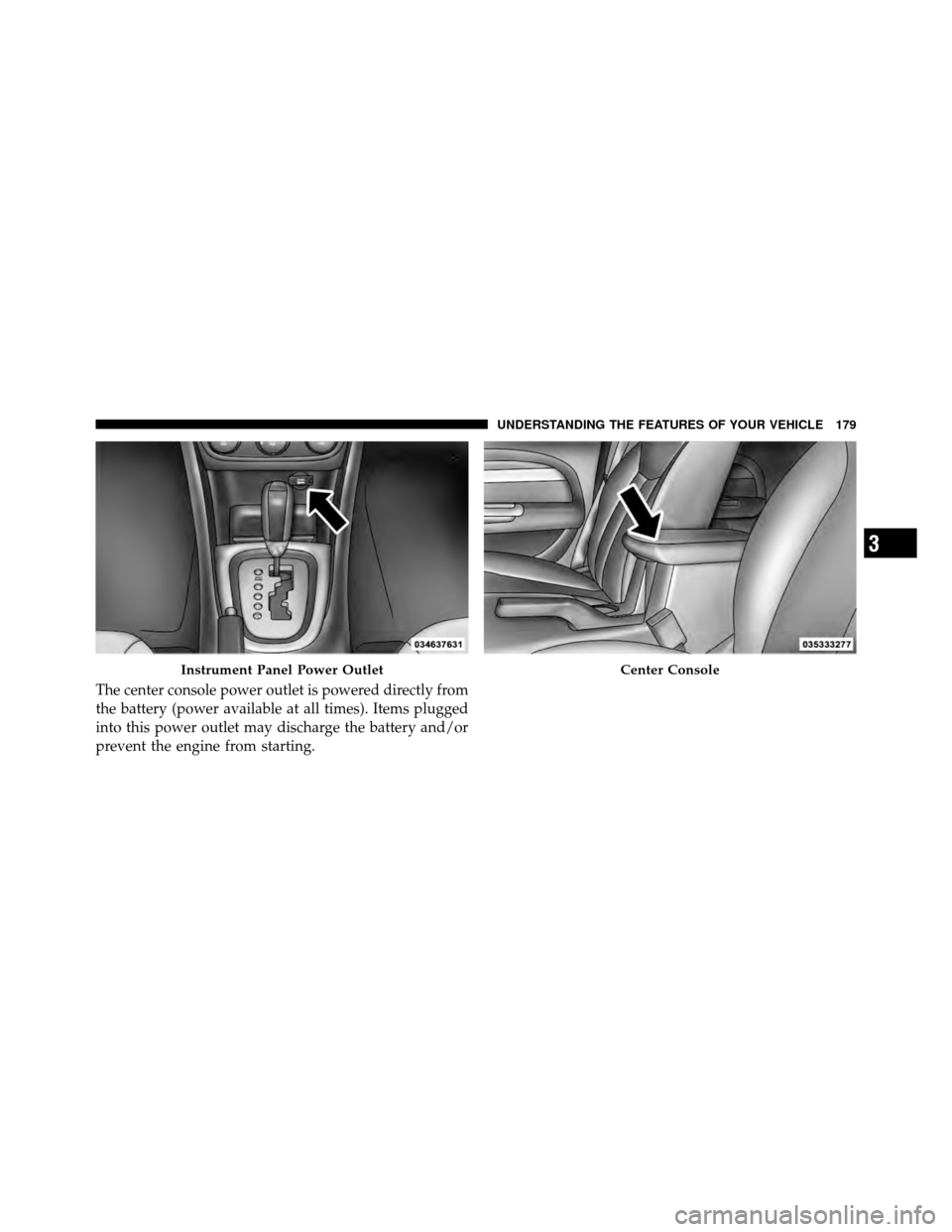
The instrument panel power outlet, located below the
climate control knobs, has power available only when the
ignition is ON. This power outlet will also operate a
conventional cigar lighter unit.
NOTE: If desired, the instrument panel power outlet
can be converted by your authorized dealer to provide
power with the ignition switch while in the LOCK
position.
178 UNDERSTANDING THE FEATURES OF YOUR VEHICLE
Page 181 of 505
The center console power outlet is powered directly from
the battery (power available at all times). Items plugged
into this power outlet may discharge the battery and/or
prevent the engine from starting.
Instrument Panel Power OutletCenter Console
3
UNDERSTANDING THE FEATURES OF YOUR VEHICLE 179
Page 182 of 505
WARNING!
To avoid serious injury or death:
•Only devices designed for use in this type of
outlet should be inserted into any 12 Volt outlet.
•Do not touch with wet hands.
•Close the lid when not in use and while driving
the vehicle.
•If this outlet is mishandled, it may cause an
electric shock and failure.
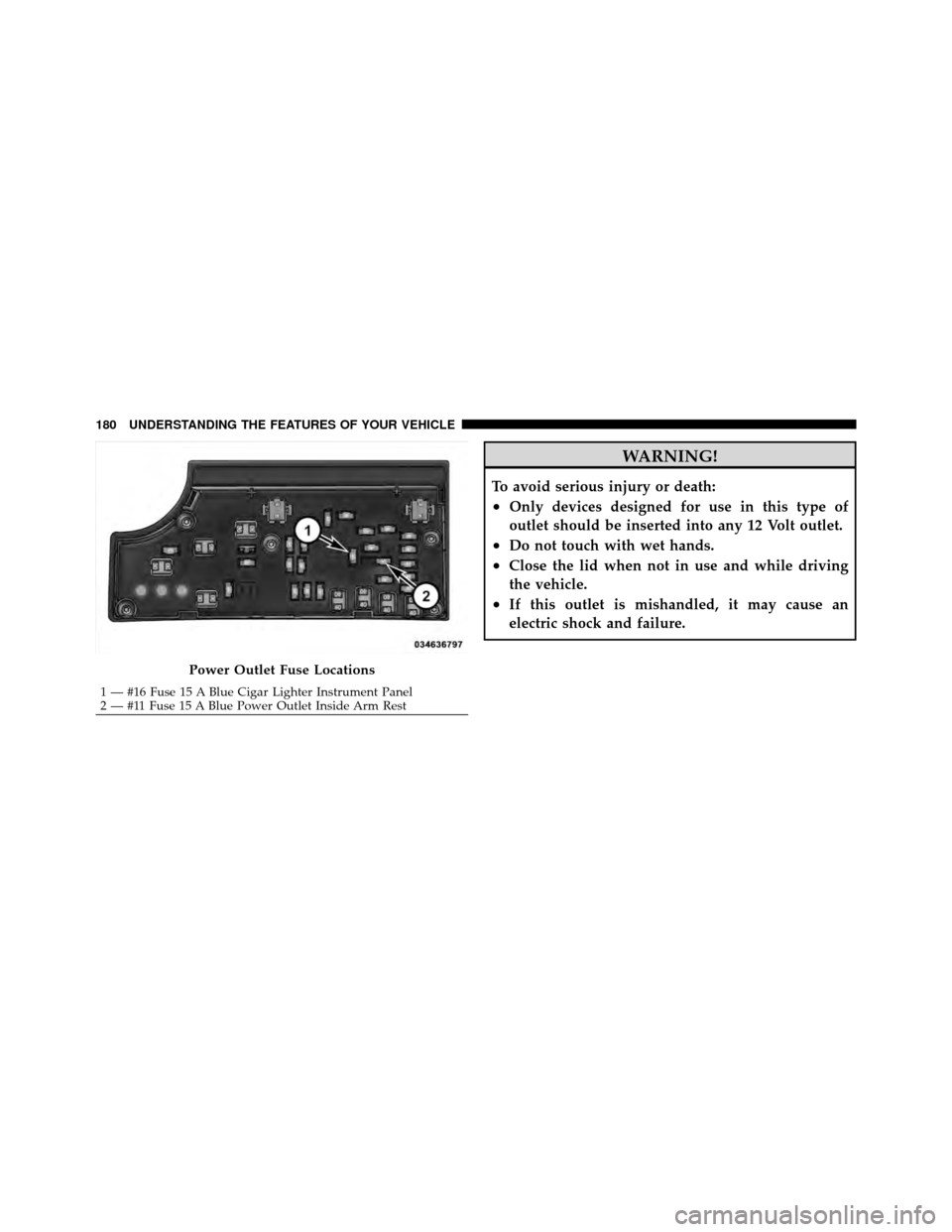
Power Outlet Fuse Locations
1 — #16 Fuse 15 A Blue Cigar Lighter Instrument Panel
2 — #11 Fuse 15 A Blue Power Outlet Inside Arm Rest
180 UNDERSTANDING THE FEATURES OF YOUR VEHICLE
Page 185 of 505
WARNING!
If containers of hot liquid are place in the cupholder,
they can spill when the door is closed, burning the
occupants. Be careful when closing the doors to avoid
injury.
STORAGE
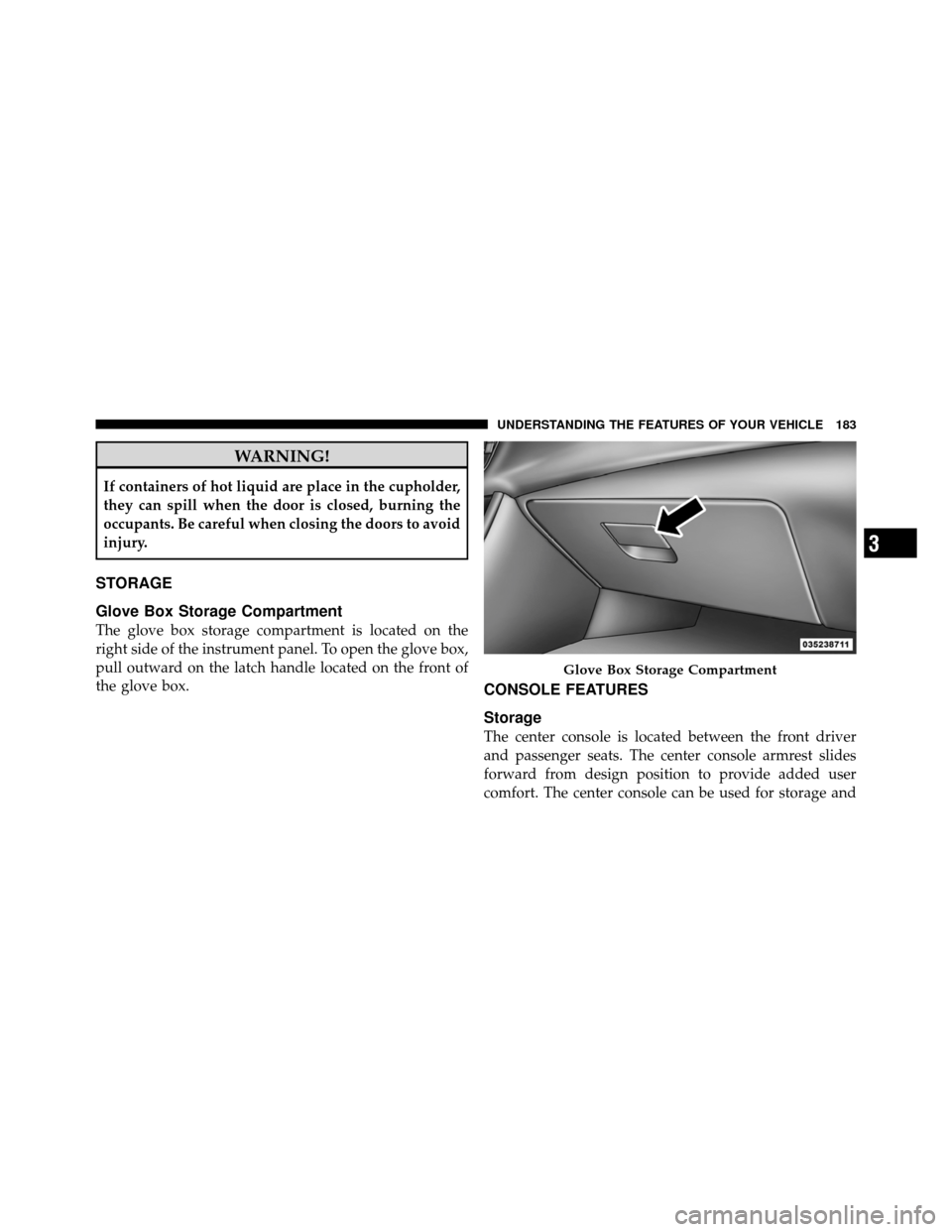
Glove Box Storage Compartment
The glove box storage compartment is located on the
right side of the instrument panel. To open the glove box,
pull outward on the latch handle located on the front of
the glove box.
CONSOLE FEATURES
Storage
The center console is located between the front driver
and passenger seats. The center console armrest slides
forward from design position to provide added user
comfort. The center console can be used for storage and
Glove Box Storage Compartment
3
UNDERSTANDING THE FEATURES OF YOUR VEHICLE 183
Page 191 of 505
UNDERSTANDING YOUR INSTRUMENT PANEL
CONTENTS
�Instrument Panel Features ............... 192
� Instrument Cluster .................... 193
� Instrument Cluster Descriptions ........... 194
� Mini-Trip Computer — If Equipped ........ 208
▫ Control Buttons ..................... 209
� Electronic Vehicle Information Center (EVIC) –
If Equipped .......................... 210
▫ Electronic Vehicle Information Center (EVIC)
Displays ........................... 212
▫ Oil Change Required — If Equipped ...... 213▫
Trip Functions ...................... 214
▫ Compass Display .................... 216
▫ Personal Settings
(Customer-Programmable Features) ....... 218
� Setting The Analog Clock ................ 221
� Media Center 230 (REQ) — AM/FM Stereo
Radio And 6–Disc CD/DVD Changer
(MP3/WMA AUX Jack) .................. 222
▫ Operating Instructions - Radio Mode ...... 222
4
Page 192 of 505
▫Operation Instructions - (Disc Mode For CD
And MP3/WMA Audio Play, DVD-Video) . . . 230
▫ Notes On Playing MP3/WMA Files ....... 232
▫ List Button
(Disc Mode For MP3/WMA Play) ......... 235
▫ Info Button
(Disc Mode For MP3/WMA Play) ......... 235
▫ Uconnect™ Multimedia (Satellite Radio) —
If Equipped ........................ 237
� Media Center 730N/430/430N (RHR/RER/
RBZ/RHB) CD/DVD/HDD/NAV —
If Equipped .......................... 241
▫ Operating Instructions (Voice Command
System) — If Equipped ................ 241
▫ Operating Instructions
(Uconnect™ Phone) — If Equipped ....... 241�
Media Center 130 (Sales Code RES) ......... 242
▫ Operating Instructions — Radio Mode ..... 242
▫ Operation Instructions — CD Mode For CD
And MP3 Audio Play ................. 245
▫ Notes On Playing MP3 Files ............ 247
▫ Operation Instructions - Auxiliary Mode .... 250
� Media Center 130 With Satellite Radio
(Sales Code RES+RSC) ................... 250
▫ Operating Instructions — Radio Mode ..... 251
▫ Operation Instructions — CD Mode For CD
And MP3 Audio Play ................. 256
▫ Notes On Playing MP3 Files ............ 259
▫ List Button (CD Mode For MP3 Play) ...... 261
▫ Info Button (CD Mode For MP3 Play) ...... 261
190 UNDERSTANDING YOUR INSTRUMENT PANEL