2011 CHEVROLET VOLT brake
[x] Cancel search: brakePage 146 of 516

Black plate (26,1)Chevrolet Volt Owner Manual - 2011
5-26 Instruments and Controls
Antilock Brake System
(ABS) Warning Light
This light should come on briefly
when the vehicle is in ON/RUN. If it
does not come on, have the vehicle
serviced by your dealer.
If the ABS warning light stays on
longer than a few seconds after the
vehicle is in ON/RUN, or comes
on and stays on while driving, try
resetting the system. To reset the
system:
1. While driving, pull over when it issafe to do so.
2. Place the vehicle in P (Park).
3. Turn the vehicle off.
4. Restart the vehicle. If the ABS warning light remains on
after resetting the system or comes
on again while driving, the vehicle
needs service. If the ABS warning
light is on, but the regular brake
system warning light is not on, the
antilock brakes are not working
properly, but the regular brakes are
still functioning. Have the vehicle
serviced right away. If both brake
lights are on, the vehicle does not
have antilock brakes, and there is
a problem with the regular brakes
as well. Have the vehicle towed for
service. See
Towing the Vehicle on
page 10‑84.
Sport Mode Light
This light comes on when Sport
Mode is selected. See “Sport Mode”
in Driver Selected Operating Modes
on page 9‑26 for more information.
Mountain Mode Light
This light comes on when Mountain
Mode is selected. See “Mountain
Mode” inDriver Selected Operating
Modes on page 9‑26 for more
information.
Page 166 of 516

Black plate (46,1)Chevrolet Volt Owner Manual - 2011
5-46 Instruments and Controls
SERVICE HIGH VOLTAGE
CHARGING SYSTEM
This message displays when there
is a problem with the high voltage
charging system. See your dealer
for service.
Brake System Messages
BRAKE FLUID LOW
This message displays when the
brake fluid level is low. SeeBrake
Fluid on page 10‑26.
RELEASE PARKING BRAKE
This message displays if the electric
parking brake is on while the vehicle
is in motion. Release it before
attempting to drive. See Electric
Parking Brake on page 9‑35 for
more information.
SERVICE BRAKE ASSIST
This message displays when there
is a problem with the brake boost
assist system. When this message
displays, the brake boost assist
motor might be heard operating
and a pulsation may be felt in the
brake pedal. Take the vehicle to
your dealer for service.
SERVICE PARKING BRAKE
This message displays when there
is a problem with the parking brake.
Take the vehicle to your dealer for
service.
STEP ON BRAKE TO
RELEASE PARK BRAKE
This message displays when
attempting to release the electric
parking brake without the brake
pedal applied. See Electric Parking
Brake on page 9‑35 for more
information.
Cruise Control Messages
CRUISE SET TO XXX
This message displays when the
cruise control is set and shows the
speed it was set to. See Cruise
Control on page 9‑40 for more
information.
Door Ajar Messages
DOOR(S) OPEN, HOOD OPEN,
HATCH OPEN
A symbol will appear on the display
showing the area that is open.
See Door, Hood, or Hatch Open
Light on page 5‑30.
Page 169 of 516

Black plate (49,1)Chevrolet Volt Owner Manual - 2011
Instruments and Controls 5-49
NO REMOTE DETECTED
This message displays when the
RKE transmitter is not detected
while attempting to start the vehicle.
The transmitter battery may be
weak. See“Starting the Vehicle
with a Low Transmitter Battery”
under Remote Keyless Entry (RKE)
System Operation on page 2‑3 for
more information.
NO REMOTE DETECTED,
PRESS BRAKE TO RESTART
This message displays if the RKE
transmitter is no longer detected
in the vehicle. Press the brake
pedal and the POWER
Obutton
to restart the vehicle, or press the
POWER
Obutton without pressing
the brake pedal to turn the vehicle
off. If the vehicle is turned off and
a valid transmitter is not available,
the vehicle will not restart.
REMINDER: KEY LEFT IN
VEHICLE
This message displays when
leaving the vehicle with the RKE
transmitter still inside.
REPLACE BATTERY IN
REMOTE KEY
This message displays when the
battery in the RKE transmitter needs
to be replaced.
SERVICE KEYLESS START
SYSTEM
This message displays when the
keyless start system needs service.
Take the vehicle to your dealer.
Lamp Messages
AUTOMATIC LIGHT CONTROL
ON OR OFF
A message will display when the
automatic light control has been
turned on or off.
CHECK LAMP or LAMP
FAILURE
Depending on the lamp, one of
these messages may display.
See Bulb Replacement on
page 10‑34.
TURN SIGNAL ON
This message displays if the turn
signal has been left on. Turn off the
turn signal.
Object Detection System
Messages
PARK ASSIST OFF
This message displays when the
park assist system has been turned
off. See Ultrasonic Parking Assist
on page 9‑43.
SERVICE PARKING ASSIST
This message displays if there is a
problem with the park assist system.
Take the vehicle to your dealer for
service.
Page 170 of 516

Black plate (50,1)Chevrolet Volt Owner Manual - 2011
5-50 Instruments and Controls
Propulsion Power
Messages
PROPULSION POWER IS
REDUCED
This message displays when the
propulsion power is reduced and
can affect the ability to accelerate.
If this message is on, but there
is no reduction in performance,
proceed to your destination.
The performance may be reduced
the next time the vehicle is driven.
The vehicle may be driven at a
reduced speed while this message
is on, but maximum acceleration
and speed may be reduced.
If this message stays on when
the malfunction indicator lamp is
on, the vehicle should be taken to
your dealer for service as soon as
possible.This message can display when
driving in mountainous terrain
without using Mountain Mode or by
not entering Mountain Mode soon
enough to build a sufficient battery
charge reserve before climbing
steep grades. This is normal
operation to protect the high
voltage battery. Only if both
the PROPULSION POWER IS
REDUCED message and the
malfunction indicator lamp are
on should the vehicle be taken
to the dealer for service.
While climbing the grade with this
message displayed, the vehicle
speed may be reduced until the
engine can recover the battery
state of charge to a normal level.
See
“Mountain Mode” underDriver
Selected Operating Modes on
page 9‑26.
Ride Control System
Messages
LOW TRACTION
This message displays when the
Antilock Brake System (ABS) is
active and is working to assist the
driver with control of the vehicle in
difficult driving conditions.
SERVICE STABILITRAK
This message displays when
there is a problem detected with
the StabiliTrak system. The vehicle
is safe to drive, but the StabiliTrak
system is not operational.
See Electronic Stability Control
(ESC) on page 9‑39 for information
on resetting the system.
Page 172 of 516

Black plate (52,1)Chevrolet Volt Owner Manual - 2011
5-52 Instruments and Controls
SERVICE POWER STEERING
This message displays if there is a
problem with the power steering
system. Take the vehicle to your
dealer for service.
SERVICE VEHICLE SOON
This message displays if there is a
problem with the vehicle. Take the
vehicle to your dealer for service.
Depending on the severity of a
crash, this message may come
on along with the airbag readiness
light.
Starting the Vehicle
Messages
PRESS BRAKE TO START
VEHICLE
This message displays when
attempting to start the vehicle
without first pressing the brake
pedal.
PRESS BUTTON AGAIN TO
TURN OFF
This message displays as a
reminder to press the POWER
O
button to turn the vehicle off when
an attempt is made to turn off the
vehicle while it is in motion.
Tire Messages
SERVICE TIRE MONITOR
SYSTEM
This message displays if there is
a problem with the Tire Pressure
Monitor System (TPMS). SeeTire
Pressure Monitor Operation on
page 10‑57 for more information.
TIRE LEARNING ACTIVE
This message displays when
the system is learning new tires.
SeeTire Pressure Monitor
Operation on page 10‑57 for
more information.
TIRE LOW ADD AIR TO TIRE
This message displays when the
pressure in one or more of the tires
is low.
This message also displays
LEFT FRONT, RIGHT FRONT,
LEFT REAR, or RIGHT REAR to
indicate the location of the low tire.
The low tire pressure warning
light will also come on. See Tire
Pressure Light on page 5‑27.
If a tire pressure message appears
on the DIC, stop as soon as you
can. Inflate the tires by adding air
until the tire pressure is equal to
the values shown on the Tire and
Loading Information label. See Tires
on page 10‑48, Vehicle Load Limits
on page 9‑14, and Tire Pressure on
page 10‑54.
You can receive more than one
tire pressure message at a time.
The DIC also shows the tire
pressure values. See Driver
Information Center (DIC) on
page 5‑43.
Page 211 of 516

Black plate (21,1)Chevrolet Volt Owner Manual - 2011
Infotainment System 7-21
Playing an Audio and
Video DVD
To view the DVD video, the vehicle
must be in P (Park) or the parking
brake must be engaged.
After the DVD is loaded, the menu
options display on the DVD screen.
The menu options time out and
a full screen appears after about
10 seconds. Press anywhere on
the navigation system screen or
press the FAV, HDD/DVD/AUX,
or
}BACK button to view the
menu screen again.
Use the preset keys or press screen
buttons to operate the DVD options. There are two pages of DVD
options. Press the arrow screen
button, in the bottom right corner
of the screen, to access the other
page. Only the highlighted functions
are available for use. Some menu
options are only available when the
disc is not playing.
DVD Options
Full Screen:
1. Press to hide the DVD options
and display the full video image.
2. Press anywhere on the navigation system screen or
press the FAV, HDD/DVD/AUX,
or
}BACK button to display the
source screen buttons over the
video image.
Cursor: Press this button
to access the Cursor menu.
The arrows and other cursor
options allow navigation of the
DVD menu options. The Cursor
menu options are only available
if a DVD has a menu.
q,Q,r,R(Arrow Buttons):
Use these arrow screen buttons to
navigate through the DVD menu.
k(Play/Pause): Use to start,
pause, or resume play.
SEEK
[:
1. Press to seek to the next chapter.
2. Press more than once to continue moving forward through
the disc.
3. Press and hold to fast forward through a disc. When fast
forward is active, press again
to change the speed. Elapsed
time displays.
4. Press
kto resume playing.
Page 303 of 516
Black plate (1,1)Chevrolet Volt Owner Manual - 2011
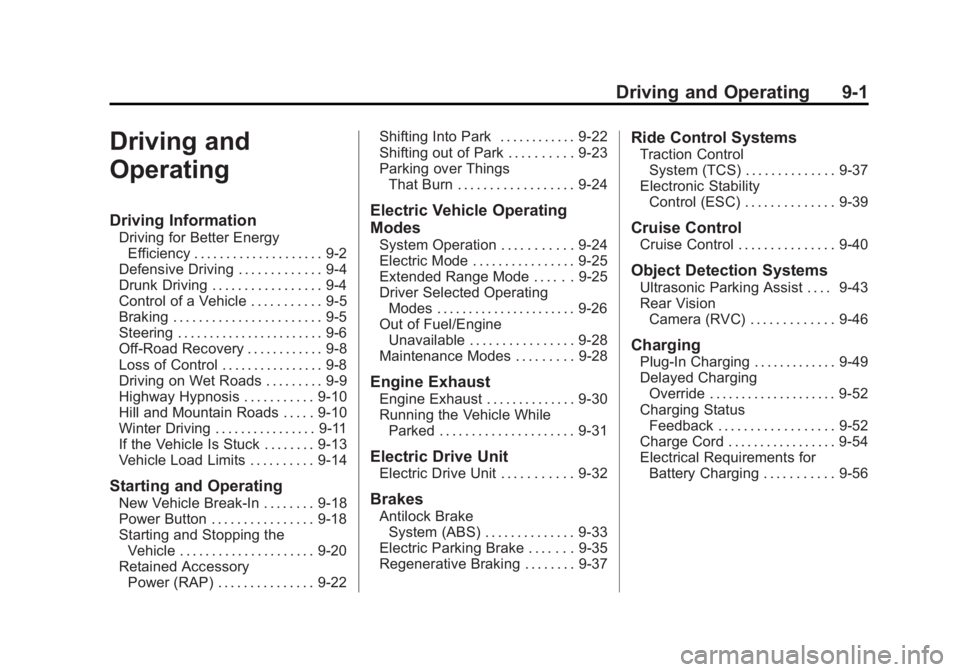
Driving and Operating 9-1
Driving and
Operating
Driving Information
Driving for Better EnergyEfficiency . . . . . . . . . . . . . . . . . . . . 9-2
Defensive Driving . . . . . . . . . . . . . 9-4
Drunk Driving . . . . . . . . . . . . . . . . . 9-4
Control of a Vehicle . . . . . . . . . . . 9-5
Braking . . . . . . . . . . . . . . . . . . . . . . . 9-5
Steering . . . . . . . . . . . . . . . . . . . . . . . 9-6
Off-Road Recovery . . . . . . . . . . . . 9-8
Loss of Control . . . . . . . . . . . . . . . . 9-8
Driving on Wet Roads . . . . . . . . . 9-9
Highway Hypnosis . . . . . . . . . . . 9-10
Hill and Mountain Roads . . . . . 9-10
Winter Driving . . . . . . . . . . . . . . . . 9-11
If the Vehicle Is Stuck . . . . . . . . 9-13
Vehicle Load Limits . . . . . . . . . . 9-14
Starting and Operating
New Vehicle Break-In . . . . . . . . 9-18
Power Button . . . . . . . . . . . . . . . . 9-18
Starting and Stopping the Vehicle . . . . . . . . . . . . . . . . . . . . . 9-20
Retained Accessory Power (RAP) . . . . . . . . . . . . . . . 9-22 Shifting Into Park . . . . . . . . . . . . 9-22
Shifting out of Park . . . . . . . . . . 9-23
Parking over Things
That Burn . . . . . . . . . . . . . . . . . . 9-24
Electric Vehicle Operating
Modes
System Operation . . . . . . . . . . . 9-24
Electric Mode . . . . . . . . . . . . . . . . 9-25
Extended Range Mode . . . . . . 9-25
Driver Selected OperatingModes . . . . . . . . . . . . . . . . . . . . . . 9-26
Out of Fuel/Engine Unavailable . . . . . . . . . . . . . . . . 9-28
Maintenance Modes . . . . . . . . . 9-28
Engine Exhaust
Engine Exhaust . . . . . . . . . . . . . . 9-30
Running the Vehicle While Parked . . . . . . . . . . . . . . . . . . . . . 9-31
Electric Drive Unit
Electric Drive Unit . . . . . . . . . . . 9-32
Brakes
Antilock BrakeSystem (ABS) . . . . . . . . . . . . . . 9-33
Electric Parking Brake . . . . . . . 9-35
Regenerative Braking . . . . . . . . 9-37
Ride Control Systems
Traction Control System (TCS) . . . . . . . . . . . . . . 9-37
Electronic Stability Control (ESC) . . . . . . . . . . . . . . 9-39
Cruise Control
Cruise Control . . . . . . . . . . . . . . . 9-40
Object Detection Systems
Ultrasonic Parking Assist . . . . 9-43
Rear VisionCamera (RVC) . . . . . . . . . . . . . 9-46
Charging
Plug-In Charging . . . . . . . . . . . . . 9-49
Delayed ChargingOverride . . . . . . . . . . . . . . . . . . . . 9-52
Charging Status Feedback . . . . . . . . . . . . . . . . . . 9-52
Charge Cord . . . . . . . . . . . . . . . . . 9-54
Electrical Requirements for Battery Charging . . . . . . . . . . . 9-56
Page 305 of 516

Black plate (3,1)Chevrolet Volt Owner Manual - 2011
Driving and Operating 9-3
Drive Mode and PRNDL Selection
Use Normal Mode when possible.
Sport Mode provides more
responsive acceleration than
Normal Mode but can reduce
efficiency.
Use Mountain Mode prior to
climbing long, steep grades in
mountainous areas. Be sure to
engage Mountain Mode before
starting to climb. Mountain Mode
reduces electric range and power
but may be needed to maintain
speeds above 96 km/h (60 mph)
when climbing grades of 5% or
greater.
Use L (Low) in heavy stop‐and‐go
traffic or when traveling downhill.
L (Low) requires less brake
pedal application and provides
a controlled, efficient way to
slow the vehicle down.Climate Setting
Using the heat and air conditioning
systems decreases the energy
available for electric driving.
Optimal energy efficiency is
achieved with the heat, air
conditioning, and fan turned off.
Less energy is used at low fan
speeds. When using the fan:
.Fan Only is the most energy
efficient climate setting as long
as
0is not selected.
.ECO is for moderate air
conditioning and heater
operation and is the next
most energy efficient setting as
long as
0is not selected.
.Comfort provides the most
comfort but is the least energy
efficient.
Use the auto heated seat feature
instead of climate settings. Heating
the seat uses less energy than
heating the vehicle interior. Use remote start to heat or cool the
interior when the vehicle is plugged
in to maximize the electric range by
utilizing electricity from the electrical
outlet.
In hot weather, avoid parking in
direct sunlight or use sunshades
inside the vehicle.
Turn off the front and rear window
defog/defrost when they are no
longer needed.
Avoid driving with the windows open
at highway speeds.
Vehicle Charging/Maintenance
Charging
Keep the vehicle plugged in, even
when fully charged, to keep the
battery temperature ready for the
next drive. This is important when
outside temperatures are extremely
hot or cold.