2011 CHEVROLET VOLT radio
[x] Cancel search: radioPage 126 of 516
Black plate (6,1)Chevrolet Volt Owner Manual - 2011
5-6 Instruments and Controls
Controls
Steering Wheel
Adjustment
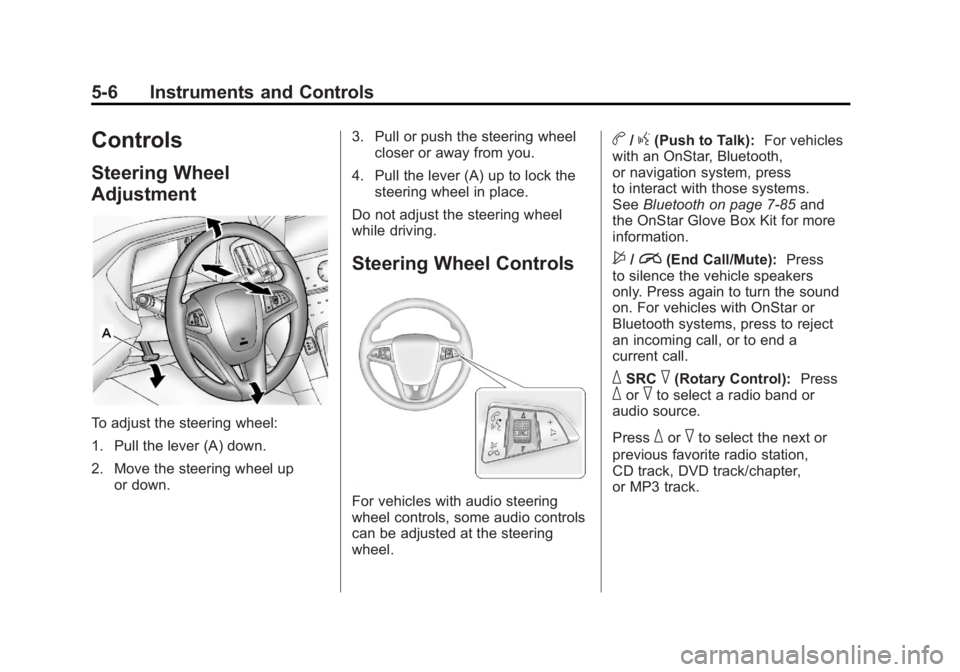
To adjust the steering wheel:
1. Pull the lever (A) down.
2. Move the steering wheel upor down. 3. Pull or push the steering wheel
closer or away from you.
4. Pull the lever (A) up to lock the steering wheel in place.
Do not adjust the steering wheel
while driving.
Steering Wheel Controls
For vehicles with audio steering
wheel controls, some audio controls
can be adjusted at the steering
wheel.
b/g(Push to Talk): For vehicles
with an OnStar, Bluetooth,
or navigation system, press
to interact with those systems.
See Bluetooth on page 7‑85 and
the OnStar Glove Box Kit for more
information.
$/i(End Call/Mute): Press
to silence the vehicle speakers
only. Press again to turn the sound
on. For vehicles with OnStar or
Bluetooth systems, press to reject
an incoming call, or to end a
current call.
_SRC^(Rotary Control): Press_or^to select a radio band or
audio source.
Press
_or^to select the next or
previous favorite radio station,
CD track, DVD track/chapter,
or MP3 track.
Page 127 of 516

Black plate (7,1)Chevrolet Volt Owner Manual - 2011
Instruments and Controls 5-7
Press SRC to change between
radio and CD or DVD.
+x−(Volume): Press + to
increase the volume; press −to
decrease the volume.
Horn
Press near the horn symbols to
sound the horn.
The Pedestrian Friendly Alert
provides momentary soft‐note
horn sound. See Pedestrian
Friendly Alert on page 6‑2 for
more information.
Windshield Wiper/Washer
The windshield wiper lever is on
the side of the steering column.
With the vehicle on, move the
windshield wiper lever to select
the wiper speed.
2: Move the lever up to 2 for fast
wipes.
1: Move the lever up to 1 for slow
wipes.
G(Adjustable Interval Wipes):
Move the lever up to
Gfor
adjustable interval wipes, then turn
the band up for more frequent wipes
or down for less frequent wipes.
9(Off): Use to turn the windshield
wipers off.
3(Mist): For a single wipe,
briefly move the wiper lever down.
For several wipes, hold the wiper
lever down.
Page 141 of 516

Black plate (21,1)Chevrolet Volt Owner Manual - 2011
Instruments and Controls 5-21
If, after several seconds, both
status indicator lights remain on,
or if there are no lights at all, there
may be a problem with the lights
or the passenger sensing system.
See your dealer for service.
{WARNING
If the airbag readiness light ever
comes on and stays on, it means
that something may be wrong
with the airbag system. To help
avoid injury to yourself or others,
have the vehicle serviced right
away. SeeAirbag Readiness
Light on page 5‑19 for more
information, including important
safety information.
Charging System Light
(12-Volt Battery)
The charging system light comes
on briefly when the vehicle is in
ON/RUN, as a check to show the
light is working.
If the light stays on, or comes on
while driving, there could be a
problem with the electrical charging
system. Have it checked by your
dealer. Driving while this light is
on could drain the 12‐volt battery.
If a short distance must be driven
with the light on, be sure to turn off
all accessories, such as the radio.
Malfunction
Indicator Lamp
A computer system called OBD II
(On-Board Diagnostics-Second
Generation) monitors operation
of the fuel, ignition, and emission
control systems. It ensures that
emissions are at acceptable levels
for the life of the vehicle, helping
to produce a cleaner environment.
This light comes on when the
vehicle is placed in Service Only
Mode, as a check to show it is
working. If it does not, have the
vehicle serviced by your dealer.
See Power Button on page 9‑18
for more information.
Page 180 of 516

Black plate (60,1)Chevrolet Volt Owner Manual - 2011
5-60 Instruments and Controls
Remote Left in Vehicle Reminder
When on, the horn will chirp rapidly
three times if an RKE transmitter is
left in the vehicle.
To turn the remote left in vehicle
reminder feature on or off:
1. Press the Vehicle menu.
2. Select Remote Locking,Unlocking, Starting.
3. Turn the remote left in vehicle reminder feature on or off.
4. Press Back to return to the previous menu.
Return to Factory Settings
This returns all of the vehicle
personalization settings to the
factory settings.
1. Press the Vehicle menu.
2. Select Return to FactorySettings.
3. Select Yes or No.
4. Press Back to return to the previous menu.
Universal Remote
System
See Radio Frequency
Statement on page 13‑28 for
information regarding Part 15
of the Federal Communications
Commission (FCC) rules and
Industry Canada Standards
RSS-210/220/310.
Universal Remote System
Programming
If the vehicle has this feature, you
will see these buttons with one
LED indicator next to them in the
overhead console. This system provides a way to
replace up to three remote control
transmitters used to activate
devices such as garage door
openers, security systems, and
home automation devices.
Do not use the Universal Remote
system with any garage door opener
that does not have the stop and
reverse feature. This includes
any garage door opener model
manufactured before April 1,1982.
Read the instructions completely
before attempting to program
the Universal Remote system.
Because of the steps involved, it
may be helpful to have another
person available to assist with
programming the Universal
Remote system.
Page 181 of 516

Black plate (61,1)Chevrolet Volt Owner Manual - 2011
Instruments and Controls 5-61
Keep the original hand-held
transmitter for use in other vehicles
as well as for future Universal
Remote system programming.
It is also recommended that
upon the sale of the vehicle, the
programmed Universal Remote
system buttons be erased for
security purposes. See“Erasing
Universal Remote System Buttons”
later in this section.
When programming a garage door,
park outside of the garage. Park
directly in line with and facing the
garage door opener motor-head
or gate motor-head. Be sure that
people and objects are clear of
the garage door or gate being
programmed.
It is recommended that a new
battery be installed in the hand-held
transmitter for quicker and more
accurate transmission of the
radio-frequency signal.Programming the Universal
Remote System
For questions or help programming
the Universal Remote system,
call 1‐800‐355‐3515 or go to
www.homelink.com.
Programming a garage door opener
involves time-sensitive actions, so
read the entire procedure before
starting. Otherwise, the device will
time out and the procedure will have
to be repeated.
To program up to three devices:
1. Hold the end of the hand-held transmitter about 3 to 8 cm
(1 to 3 in) away from the
Universal Remote system
buttons while keeping
the indicator light in view.
The hand-held transmitter was
supplied by the manufacturer
of the garage door opener
receiver (motor-head unit). 2. At the same time, press
and hold both the hand-held
transmitter button and one
of the three Universal Remote
system buttons to be used to
operate the garage door. Do not
release the Universal Remote
system button or the hand-held
transmitter button until the
indicator light changes from a
slowly to a rapidly flashing light.
You now may release both
buttons.
Some entry gates and garage
door openers may require
substitution of Step 2 with
the procedure noted in “Gate
Operator and Canadian
Programming” later in this
section.
Page 183 of 516

Black plate (63,1)Chevrolet Volt Owner Manual - 2011
Instruments and Controls 5-63
Gate Operator and Canadian
Programming
If you have questions or need help
programming the Universal Remote
system, call 1‐800‐355‐3515 or go
to www.homelink.com.
Canadian radio-frequency laws
require transmitter signals to time
out or quit after several seconds of
transmission. This may not be long
enough for the Universal Remote
system to pick up the signal during
programming. Similarly, some U.S.
gate operators are manufactured to
time out in the same manner.If you live in Canada, or you are
having difficulty programming a
gate operator or garage door
opener by using the
“Programming
the Universal Remote System”
procedures, regardless of where
you live, replace Step 2 under
“Programming the Universal Remote
System” with the following:
Continue to press and hold
the Universal Remote system
button while you press and
release every two seconds (cycle)
the hand-held transmitter button
until the frequency signal has
been successfully accepted by
the Universal Remote system.
The Universal Remote system
indicator light will flash slowly at
first and then rapidly. Proceed with
Step 3 under “Programming the
Universal Remote System” to
complete.
Universal Remote System
Operation
Using the Universal Remote
System
Press and hold the appropriate
Universal Remote system
button for at least half of a second.
The indicator light will come on
while the signal is being transmitted.
Erasing Universal Remote
System Buttons
All programmed buttons should be
erased when the vehicle is sold or
the lease ends.
To erase all programmed buttons
on the Universal Remote system
device:
1. Press and hold down the two outside buttons until the
indicator light begins to flash.
This should take about
10 seconds.
2. Release both buttons.
Page 191 of 516
Black plate (1,1)Chevrolet Volt Owner Manual - 2011
Infotainment System 7-1
Infotainment
System
Introduction
Infotainment . . . . . . . . . . . . . . . . . . . 7-2
Theft-Deterrent Feature . . . . . . . 7-3
Overview . . . . . . . . . . . . . . . . . . . . . . 7-3
Radio
AM-FM Radio . . . . . . . . . . . . . . . . 7-10
Satellite Radio . . . . . . . . . . . . . . . 7-16
Radio Reception . . . . . . . . . . . . . 7-17
Multi-Band Antenna . . . . . . . . . . 7-18
Audio Players
CD/DVD Player . . . . . . . . . . . . . . 7-18
MP3 . . . . . . . . . . . . . . . . . . . . . . . . . 7-23
Hard Drive Device (HDD) . . . . 7-26
Auxiliary Devices . . . . . . . . . . . . 7-38
Navigation
Using the NavigationSystem . . . . . . . . . . . . . . . . . . . . . 7-39
Maps . . . . . . . . . . . . . . . . . . . . . . . . 7-44
Navigation Symbols . . . . . . . . . 7-47
Destination . . . . . . . . . . . . . . . . . . 7-51
OnStar
®Destination
Download . . . . . . . . . . . . . . . . . . 7-64
Configure Menu . . . . . . . . . . . . . 7-66
Global Positioning System (GPS) . . . . . . . . . . . . . . 7-74 Vehicle Positioning . . . . . . . . . . 7-75
Problems with Route
Guidance . . . . . . . . . . . . . . . . . . . 7-76
If the System Needs Service . . . . . . . . . . . . . . . . . . . . . 7-76
Ordering Map DVDs . . . . . . . . . 7-76
Database Coverage Explanations . . . . . . . . . . . . . . . 7-77
Voice Recognition
Voice Recognition . . . . . . . . . . . 7-77
Phone
Bluetooth . . . . . . . . . . . . . . . . . . . . 7-85
Page 192 of 516
Black plate (2,1)Chevrolet Volt Owner Manual - 2011
7-2 Infotainment System
Introduction
Infotainment
The vehicle has a navigation system
with an AM-FM radio. Read the
following pages to become familiar
with its features.
{WARNING
Taking your eyes off the road
for extended periods could
cause a crash resulting in
injury or death to you or others.
Do not give extended attention to
entertainment tasks while driving.This system provides access to
many audio and non‐audio listings.
To minimize taking your eyes off the
road while driving, do the following
while the vehicle is parked:
.Become familiar with the
operation and controls of
the audio system.
.Set up the tone, speaker
adjustments, and preset
radio stations.
For more information, see Defensive
Driving on page 9‑4. Notice:
Contact your dealer
before adding any equipment.
Adding audio or communication
equipment could interfere with
the operation of the engine,
radio, or other systems, and
could damage them. Follow
federal rules covering mobile
radio and telephone equipment.
The vehicle has Retained
Accessory Power (RAP). With RAP,
the audio system can be played
even after the vehicle is turned off.
See Retained Accessory Power
(RAP) on page 9‑22 for more
information.