2011 CHEVROLET SUBURBAN seat memory
[x] Cancel search: seat memoryPage 7 of 542

Black plate (1,1)Chevrolet Tahoe/Suburban Owner Manual - 2011
In Brief 1-1
In Brief
Instrument Panel
Instrument Panel Overview . . . . 1-2
Initial Drive Information
Initial Drive Information . . . . . . . . 1-4
Remote Keyless Entry (RKE)System . . . . . . . . . . . . . . . . . . . . . . 1-4
Remote Vehicle Start . . . . . . . . . 1-5
Door Locks . . . . . . . . . . . . . . . . . . . 1-5
Liftgate . . . . . . . . . . . . . . . . . . . . . . . . 1-6
Windows . . . . . . . . . . . . . . . . . . . . . . 1-6
Seat Adjustment . . . . . . . . . . . . . . 1-7
Memory Features . . . . . . . . . . . . . 1-9
Second Row Seats . . . . . . . . . . 1-10
Third Row Seats . . . . . . . . . . . . . 1-10
Heated Seats . . . . . . . . . . . . . . . . 1-11
Head Restraint Adjustment . . . . . . . . . . . . . . . . . 1-11
Safety Belts . . . . . . . . . . . . . . . . . . 1-12
Sensing System for Passenger Airbag . . . . . . . . . . 1-12
Mirror Adjustment . . . . . . . . . . . . 1-13
Steering Wheel Adjustment . . . . . . . . . . . . . . . . . 1-14
Throttle and Brake Pedal Adjustment . . . . . . . . . . . . . . . . . 1-14 Interior Lighting . . . . . . . . . . . . . . 1-15
Exterior Lighting . . . . . . . . . . . . . 1-16
Windshield Wiper/Washer . . . . 1-16
Climate Controls . . . . . . . . . . . . . 1-17
Transmission . . . . . . . . . . . . . . . . 1-18
Four-Wheel Drive . . . . . . . . . . . . 1-19Vehicle Features
Radio(s) . . . . . . . . . . . . . . . . . . . . . 1-20
Satellite Radio . . . . . . . . . . . . . . . 1-22
Portable Audio Devices . . . . . . 1-22
Bluetooth
®. . . . . . . . . . . . . . . . . . . 1-22
Steering Wheel Controls . . . . . 1-23
Cruise Control . . . . . . . . . . . . . . . 1-23
Navigation System . . . . . . . . . . . 1-24
Side Blind Zone Alert (SBZA) . . . . . . . . . . . . . . . 1-24
Rear Vision Camera (RVC) . . . . . . . . . . . . . 1-24
Ultrasonic Parking Assist . . . . 1-25
Power Outlets . . . . . . . . . . . . . . . 1-25
Universal Remote System . . . 1-25
Sunroof . . . . . . . . . . . . . . . . . . . . . . 1-26
Performance and Maintenance
StabiliTrak®System . . . . . . . . . 1-26
Tire Pressure Monitor . . . . . . . . 1-27
Engine Oil Life System . . . . . . 1-27
Fuel E85 (85% Ethanol) . . . . . 1-28 Driving for Better Fuel
Economy . . . . . . . . . . . . . . . . . . . 1-28
Roadside Assistance Program . . . . . . . . . . . . . . . . . . . . 1-28
OnStar
®. . . . . . . . . . . . . . . . . . . . . 1-29
Page 15 of 542
Black plate (9,1)Chevrolet Tahoe/Suburban Owner Manual - 2011
In Brief 1-9
To return the seatback to the upright
position:
1. Lift the lever fully withoutapplying pressure to the
seatback, and the seatback will
return to the upright position.
2. Push and pull on the seatback to make sure it is locked.
See Reclining Seatbacks on
page 3‑7 for more information. Power Reclining Seatbacks
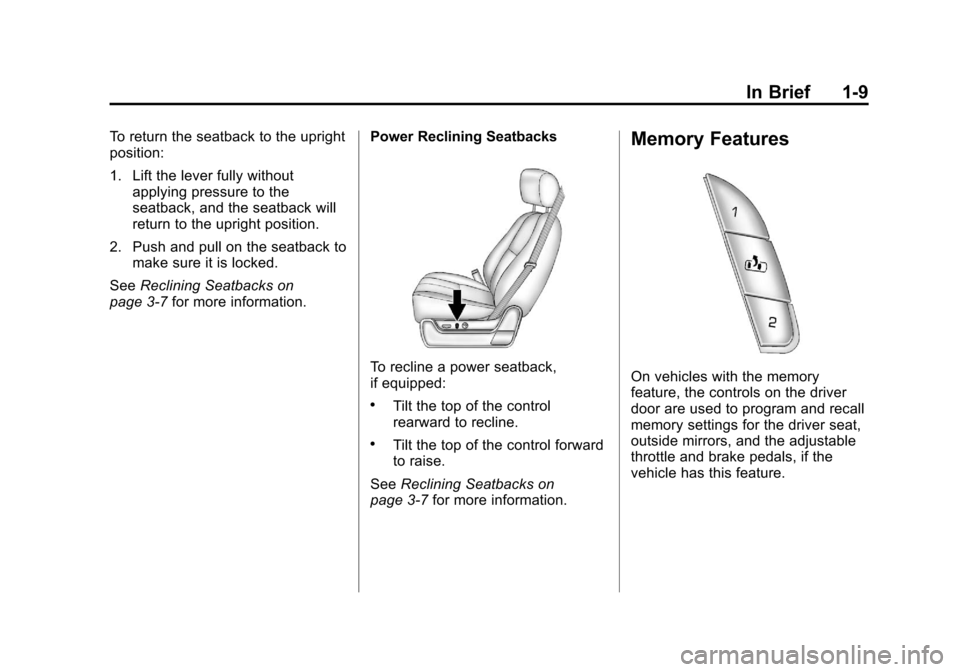
To recline a power seatback,
if equipped:
.Tilt the top of the control
rearward to recline.
.Tilt the top of the control forward
to raise.
See Reclining Seatbacks on
page 3‑7 for more information.
Memory Features
On vehicles with the memory
feature, the controls on the driver
door are used to program and recall
memory settings for the driver seat,
outside mirrors, and the adjustable
throttle and brake pedals, if the
vehicle has this feature.
Page 16 of 542
Black plate (10,1)Chevrolet Tahoe/Suburban Owner Manual - 2011
1-10 In Brief
Storing Memory Positions
To save into memory:
1. Adjust the driver seat andseatback recliner, both outside
mirrors, and the throttle and
brake pedals, if available.
See Power Mirrors on page 2‑18
and Adjustable Throttle and
Brake Pedal on page 9‑29 for
more information.
Not all mirrors and adjustable
throttles and brake pedals will
have the ability to save and
recall their positions.
2. Press and hold “1”until
two beeps sound.
3. Repeat for a second driver position using “2.” To recall, press and release
“1”or
“2.” The vehicle must be in P (Park).
A single beep will sound. The seat,
outside mirrors, and adjustable
throttle and brake pedals,
if available, will move to the position
previously stored for the identified
driver.
See “Memory Seat, Mirrors, and
Pedals” underPower Seat
Adjustment on page 3‑4 andVehicle
Personalization (With DIC Buttons)
on page 5‑49 for more information.
Easy Exit Driver Seat
This feature can move the seat
rearward to allow extra room to exit
the vehicle.
B: Press to recall the easy exit
seat position. The vehicle must be
in P (Park).
See “Memory Seat, Mirrors, and
Pedals” underPower Seat
Adjustment on page 3‑4 andVehicle
Personalization (With DIC Buttons)
on page 5‑49 for more information.
Second Row Seats
On vehicles with a 60/40 split bench
or buckets seats, the seatbacks can
be folded for additional cargo space,
or the seats can be folded and
tumbled for easy entry/exit to the
third row seats, if equipped. On
vehicles with bucket seats, the
seatbacks also recline.
SeeSecond Row Seats (60/40 Split
Bench Seat) on page 3‑11 or
Second Row Seats (Bucket Seats)
on page 3‑15 for more information.
Third Row Seats
On vehicles with third row seats, the
seatbacks can be folded, and the
entire seat can be tumbled or
removed from the vehicle.
For detailed instructions, see Third
Row Seats on page 3‑20.
Page 19 of 542
Black plate (13,1)Chevrolet Tahoe/Suburban Owner Manual - 2011
In Brief 1-13
Mirror Adjustment
Exterior Mirrors
Vehicles with manual outside
mirrors can be adjusted so that the
side of the vehicle and the area
behind are seen.
SeeManual Mirrors on page 2‑18
If the vehicle has towing mirrors,
they can be adjusted for a clearer
view of the objects behind you.
Manually pull out the mirror head to
extend it for better visibility when
towing a trailer. See Trailer-Tow
Mirrors on page 2‑18. Power Mirrors
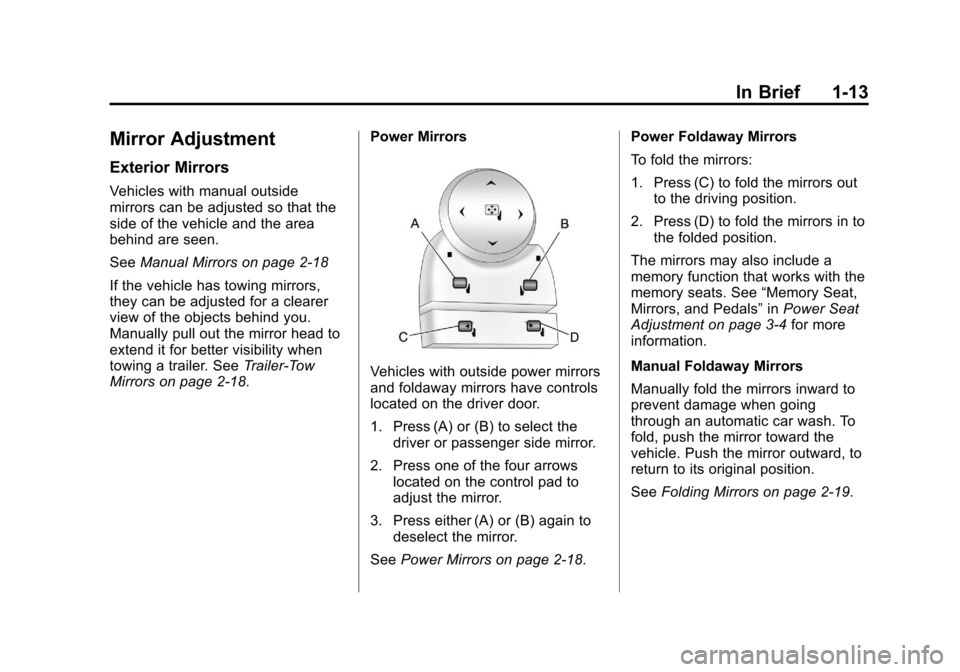
Vehicles with outside power mirrors
and foldaway mirrors have controls
located on the driver door.
1. Press (A) or (B) to select the
driver or passenger side mirror.
2. Press one of the four arrows located on the control pad to
adjust the mirror.
3. Press either (A) or (B) again to deselect the mirror.
See Power Mirrors on page 2‑18. Power Foldaway Mirrors
To fold the mirrors:
1. Press (C) to fold the mirrors out
to the driving position.
2. Press (D) to fold the mirrors in to the folded position.
The mirrors may also include a
memory function that works with the
memory seats. See “Memory Seat,
Mirrors, and Pedals” inPower Seat
Adjustment on page 3‑4 for more
information.
Manual Foldaway Mirrors
Manually fold the mirrors inward to
prevent damage when going
through an automatic car wash. To
fold, push the mirror toward the
vehicle. Push the mirror outward, to
return to its original position.
See Folding Mirrors on page 2‑19.
Page 42 of 542
Black plate (4,1)Chevrolet Tahoe/Suburban Owner Manual - 2011
2-4 Keys, Doors and Windows
If enabled through the Driver
Information Center (DIC), the turn
signal lamps flash once to indicate
locking has occurred. If enabled
through the DIC, the horn chirps
when the lock button is pressed
again within three seconds. See
Vehicle Personalization (With DIC
Buttons) on page 5‑49for additional
information.
Pressing
Qarms the content
theft‐deterrent system. See
Anti-Theft Alarm System on
page 2‑14.
K(Unlock): Press once to unlock
only the driver door. If
Kis pressed
again within three seconds, all
remaining doors unlock. The interior
lamps may come on and stay on for
20 seconds or until the ignition is
turned on. If enabled through the DIC, the turn
signal lamps flash twice to indicate
unlocking has occurred. See
Vehicle
Personalization (With DIC Buttons)
on page 5‑49. If enabled through
the DIC, the exterior lights turn on
briefly if it is dark enough outside.
See “Approach Lighting” under
Vehicle Personalization (With DIC
Buttons) on page 5‑49.
Pressing
Kon the RKE transmitter
disarms the content theft‐deterrent
system. See Anti-Theft Alarm
System on page 2‑14.
m(Liftglass): Press and hold to
unlock the liftglass.
&(Power Liftgate): Press and
hold to open and close the liftgate.
The taillamps flash and a chime
sounds to indicate when the liftgate
is opening and closing.
L(Vehicle Locator/Panic
Alarm): Press and release to
locate the vehicle. The turn signal
lamps flash and the horn sounds
three times. Press and hold
Lfor more than
two seconds to activate the panic
alarm. The turn signal lamps flash
and the horn sounds repeatedly for
30 seconds. The alarm turns off
when the ignition is moved to ON/
RUN or
Lis pressed again. The
ignition must be in LOCK/OFF for
the panic alarm to work.
The vehicle comes with two
transmitters. Each transmitter will
have a number on it, “1”or“2”.
These numbers correspond to the
driver of the vehicle. For example,
the memory seat position for driver
1 will be recalled when using the
transmitter labeled “1”, if enabled
through the DIC. See “Memory
Seat, Mirrors, and Pedals” under
Power Seat Adjustment on page 3‑4
and Vehicle Personalization (With
DIC Buttons) on page 5‑49 for more
information.
Page 57 of 542
Black plate (19,1)Chevrolet Tahoe/Suburban Owner Manual - 2011
Keys, Doors and Windows 2-19
3. Adjust each outside mirror sothat a little of the vehicle and the
area behind it can be seen.
4. Press either (A) or (B) again to deselect the mirror.
The mirrors may also include a
memory function that works with the
memory seats. See “Memory Seat,
Mirrors, and Pedals” underPower
Seat Adjustment on page 3‑4 for
more information.Folding Mirrors
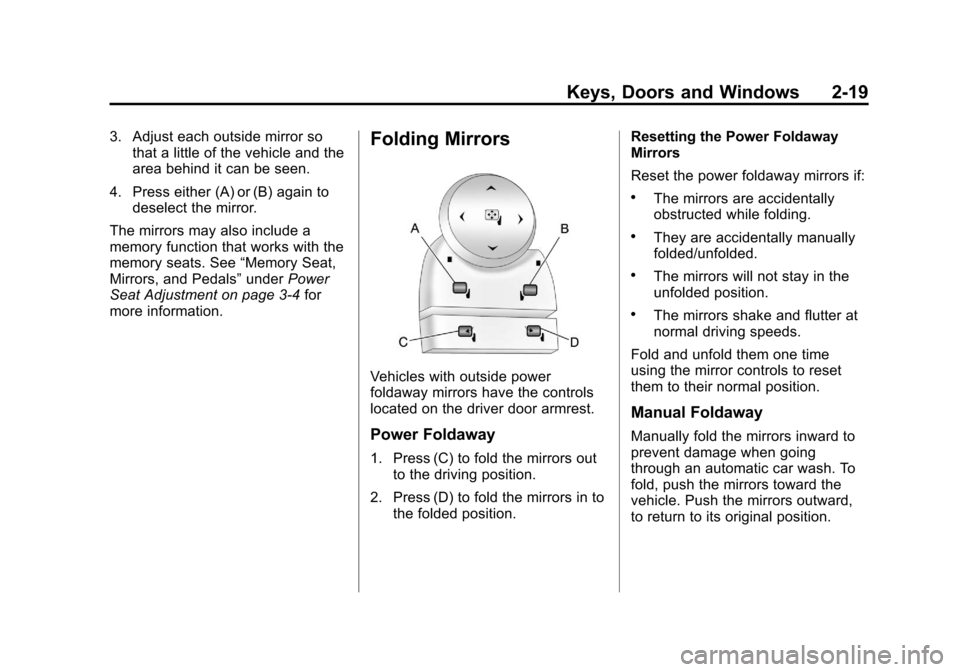
Vehicles with outside power
foldaway mirrors have the controls
located on the driver door armrest.
Power Foldaway
1. Press (C) to fold the mirrors out to the driving position.
2. Press (D) to fold the mirrors in to the folded position. Resetting the Power Foldaway
Mirrors
Reset the power foldaway mirrors if:
.The mirrors are accidentally
obstructed while folding.
.They are accidentally manually
folded/unfolded.
.The mirrors will not stay in the
unfolded position.
.The mirrors shake and flutter at
normal driving speeds.
Fold and unfold them one time
using the mirror controls to reset
them to their normal position.
Manual Foldaway
Manually fold the mirrors inward to
prevent damage when going
through an automatic car wash. To
fold, push the mirrors toward the
vehicle. Push the mirrors outward,
to return to its original position.
Page 68 of 542

Black plate (4,1)Chevrolet Tahoe/Suburban Owner Manual - 2011
3-4 Seats and Restraints
Center Seat
If equipped, the center front
seatback doubles as an armrest and
cupholder/storage area for the driver
and passenger when the center
front seat is not used. Do not use it
as a seating position when the
seatback is folded down.
Power Seat Adjustment
To adjust a power seat, if equipped:
.Move the seat forward or
rearward by sliding the control
forward or rearward.
.If available, raise or lower the
front or rear part of the seat
cushion by moving the front or
rear of the control up or down.
.If available, raise or lower the
entire seat by moving the entire
control up or down.
To adjust the seatback, see “Power
Reclining Seatbacks” under
Reclining Seatbacks on page 3‑7.
Memory Seat, Mirrors, and
Pedals
On vehicles with the memory
feature, the controls on the driver
door are used to program and recall
memory settings for the driver seat,
outside mirrors, and the adjustable
throttle and brake pedals,
if equipped.
Page 69 of 542
Black plate (5,1)Chevrolet Tahoe/Suburban Owner Manual - 2011
Seats and Restraints 3-5
Storing Memory Positions
To save into memory:
1. Adjust the driver seat, seatbackrecliner, both outside mirrors,
and the throttle and brake
pedals, if available.
See Power Mirrors on page 2‑18
and Adjustable Throttle and
Brake Pedal on page 9‑29 for
more information.
Not all mirrors and adjustable
throttles and brake pedals will
have the ability to save and
recall their positions.
2. Press and hold “1”until
two beeps sound.
3. Repeat for a second driver position using “2.”
To recall, press and release “1”or
“2.” The vehicle must be in P (Park).
A single beep will sound. The seat,
outside mirrors, and adjustable
throttle and brake pedals will move
to the position previously stored for
the identified driver. Memory Remote Recall
The memory feature can recall the
driver seat, outside mirrors, and
pedals, if available, to stored
positions when entering the vehicle.
To activate, unlock the driver
door with the Remote Keyless
Entry (RKE) transmitter. The driver
seat, outside mirrors, and adjustable
pedals, if available, will move to the
memory position associated with the
transmitter used to unlock the
vehicle.
This feature can be turned on or off
using the vehicle personalization
menu. See
“Memory Seat Recall”
under Vehicle Personalization (With
DIC Buttons) on page 5‑49 for more
information.
To stop recall movement, press one
of the power seat controls, memory
buttons, or power mirror buttons,
or the adjustable pedal switch. If something has blocked the driver
seat and/or the adjustable pedals
while recalling a memory position,
the recall may stop. Remove the
obstruction; then press and hold the
appropriate manual control for the
memory item that is not recalling for
two seconds. Try recalling the
memory position again by pressing
the appropriate memory button.
If the memory position is still not
recalling, see your dealer for
service.
Easy Exit Driver Seat
This feature can move the seat
rearward to allow extra room to exit
the vehicle.
B(Easy Exit Driver Seat):
Press
to recall the easy exit seat position.
The vehicle must be in P (Park).
If the easy exit seat feature is
programmed on in the vehicle
personalization menu, automatic
seat movement occurs when the
ignition key is removed.