Black plate (45,1)Chevrolet Tahoe/Suburban Owner Manual - 2011
Instruments and Controls 5-45
STABILITRAK OFF
If your vehicle has StabiliTrak, this
message displays when you turn off
StabiliTrak, or when the stability
control has been automatically
disabled. To limit wheel spin and
realize the full benefits of the
stability enhancement system, you
should normally leave StabiliTrak
on. However, you should turn
StabiliTrak off if your vehicle gets
stuck in sand, mud, ice, or snow
and you want to rock your vehicle to
attempt to free it, or if you are
driving in extreme off-road
conditions and require more wheel
spin. SeeIf the Vehicle is Stuck on
page 9‑22. To turn the StabiliTrak
system on or off, see StabiliTrak
®
System on page 9‑55. There are several conditions that
can cause this message to appear.
.One condition is overheating,
which could occur if StabiliTrak
activates continuously for an
extended period of time.
.The message also displays if the
brake system warning light is on.
See
Brake System Warning
Light on page 5‑24.
.The message could display if the
stability system takes longer
than usual to complete its
diagnostic checks due to driving
conditions.
.The message displays if an
engine or vehicle related
problem has been detected and
the vehicle needs service. See
your dealer.
.The message also displays if
the vehicle is shifted into 4LO
(Two Speed Transfer
Case Only). The message turns off as soon as
the conditions that caused the
message to be displayed are no
longer present.
TRACTION CONTROL OFF
If your vehicle has StabiliTrak, this
message displays when the Traction
Control System (TCS) is turned off.
Adjust your driving accordingly. See
StabiliTrak
®System on page 9‑55
for more information.
Airbag System Messages
SERVICE AIR BAG
This message displays if there is a
problem with the airbag system.
Have your dealer inspect the
system for problems. See Airbag
Readiness Light on page 5‑19 and
Airbag System on page 3‑41 for
more information.
Black plate (30,1)Chevrolet Tahoe/Suburban Owner Manual - 2011
9-30 Driving and Operating
Press the bottom of the control to
move the pedals closer. Press the
top of the control to move the
pedals away.
Before you start driving, fully press
the brake pedal to confirm the
adjustment is right for you. While
driving, make only small
adjustments.
The vehicle may have a memory
function which lets pedal settings be
saved and recalled. SeePower
Seat Adjustment on page 3‑4 for
more information.Ignition Positions
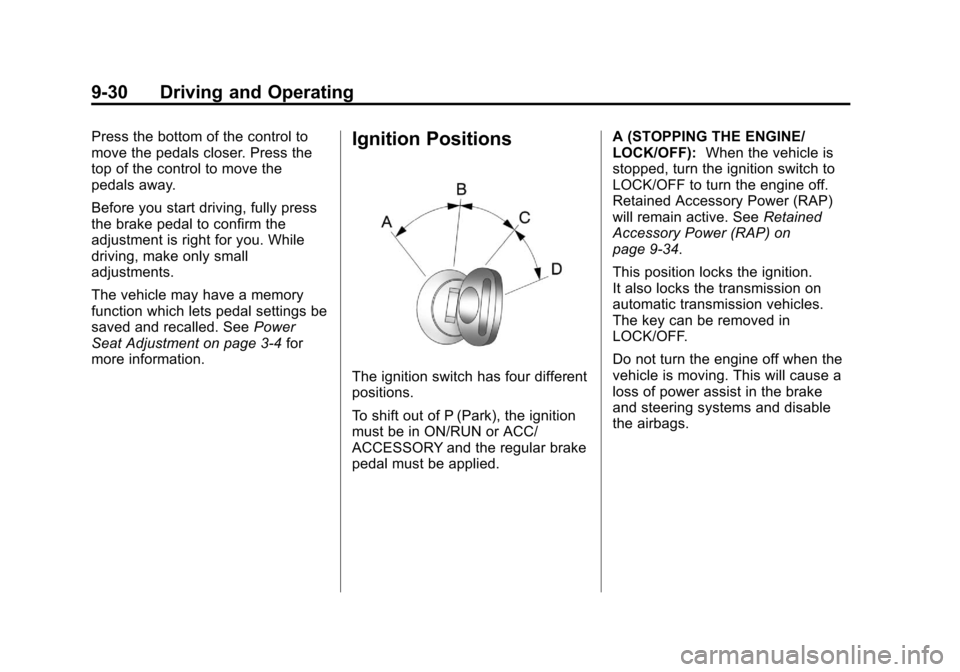
The ignition switch has four different
positions.
To shift out of P (Park), the ignition
must be in ON/RUN or ACC/
ACCESSORY and the regular brake
pedal must be applied. A (STOPPING THE ENGINE/
LOCK/OFF):
When the vehicle is
stopped, turn the ignition switch to
LOCK/OFF to turn the engine off.
Retained Accessory Power (RAP)
will remain active. See Retained
Accessory Power (RAP) on
page 9‑34.
This position locks the ignition.
It also locks the transmission on
automatic transmission vehicles.
The key can be removed in
LOCK/OFF.
Do not turn the engine off when the
vehicle is moving. This will cause a
loss of power assist in the brake
and steering systems and disable
the airbags.