2011 CHEVROLET SUBURBAN change time
[x] Cancel search: change timePage 281 of 542

Black plate (7,1)Chevrolet Tahoe/Suburban Owner Manual - 2011
Climate Controls 8-7
6(Floor):Air is directed to the
floor outlets, with some to the
windshield, side window outlets, and
second row floor outlets. In this
mode, the system automatically
selects outside air.
-(Defog): This mode clears the
windows of fog or moisture. Air is
directed to the windshield, floor
outlets, and side window vents. In
this mode, the system turns off
recirculation and runs the air
conditioning compressor unless the
outside temperature is close to
freezing. The recirculation mode
cannot be selected while in the
defog mode.
0(Defrost): This mode removes
fog or frost from the windshield
more quickly. Air is directed to the
windshield and side window vents,
with some directed to the floor
vents. In this mode, the system
automatically forces outside air into
the vehicle and runs the air
conditioning compressor unless the
outside temperature is close to freezing. The recirculation mode
cannot be selected while in the
defrost mode.
The passenger temperature control
cannot be activated while in defrost
mode. If the PASS button is
pressed, the button indicator flashes
three times and will not work. If the
passenger temperature buttons are
adjusted, the driver temperature
indicator changes. The passenger
temperature will not be displayed.
If vent, bi-level, or floor mode is
selected again, the climate control
system displays the previous
temperature settings.
Do not drive the vehicle until all the
windows are clear.
#(Air Conditioning):
Press to
turn the air conditioning (A/C)
compressor on and off. An indicator
light comes on to show that the air
conditioning is on.
If this button is pressed when the air
conditioning compressor is
unavailable, the indicator flashes
three times and then turns off. If the
air conditioning is on and the
outside temperature drops below a
temperature which is too cool for air
conditioning to be effective, the air
conditioning light turns off to show
that the air conditioning mode has
been canceled.
On hot days, open the windows long
enough to let hot inside air escape.
This helps to reduce the time it
takes for the vehicle to cool down.
It also helps the system to operate
more efficiently.
Page 284 of 542
Black plate (10,1)Chevrolet Tahoe/Suburban Owner Manual - 2011
8-10 Climate Controls
Rear Climate Control System (Rear Climate
Control Only)
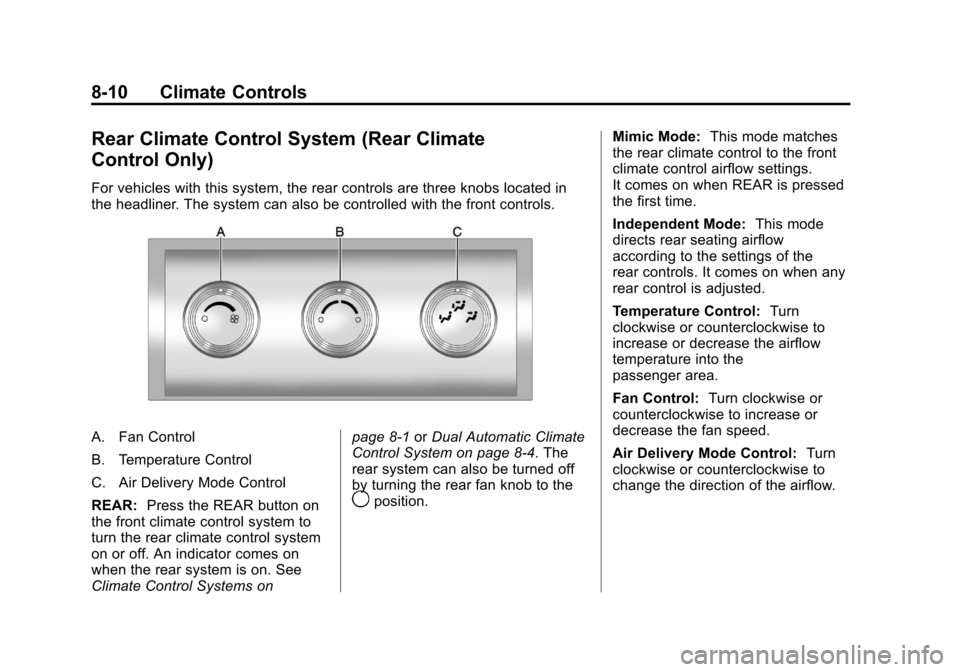
For vehicles with this system, the rear controls are three knobs located in
the headliner. The system can also be controlled with the front controls.
A. Fan Control
B. Temperature Control
C. Air Delivery Mode Control
REAR:Press the REAR button on
the front climate control system to
turn the rear climate control system
on or off. An indicator comes on
when the rear system is on. See
Climate Control Systems on page 8‑1
orDual Automatic Climate
Control System on page 8‑4. The
rear system can also be turned off
by turning the rear fan knob to the
9position. Mimic Mode:
This mode matches
the rear climate control to the front
climate control airflow settings.
It comes on when REAR is pressed
the first time.
Independent Mode: This mode
directs rear seating airflow
according to the settings of the
rear controls. It comes on when any
rear control is adjusted.
Temperature Control: Turn
clockwise or counterclockwise to
increase or decrease the airflow
temperature into the
passenger area.
Fan Control: Turn clockwise or
counterclockwise to increase or
decrease the fan speed.
Air Delivery Mode Control: Turn
clockwise or counterclockwise to
change the direction of the airflow.
Page 286 of 542
Black plate (12,1)Chevrolet Tahoe/Suburban Owner Manual - 2011
8-12 Climate Controls
The rear climate control system can
also be turned off by pressing and
holding the
Cbutton. To turn the
system on from the rear seats,
press any rear climate control
button, except the
Cbutton.
Mimic Mode: This mode matches
the rear climate control to the front
climate control airflow settings.
It comes on when REAR is pressed
the first time.
Independent Mode: This mode
directs rear seating airflow
according to the settings of the rear
controls.
To turn the system on from the rear,
press any rear climate control
button, except the
Cbutton.
Automatic Operation, If
Equipped
AUTO: Press the air delivery mode
button until this setting is selected to
control the inside temperature, air
delivery, and fan speed. AUTO
appears in the display when
automatic operation is active.
+/−(Increase/Decrease
Temperature): Press the +
or −buttons to increase or decrease
the cabin temperature. The rear
control temperature display will
show the temperature setting
increasing or decreasing.
The display only indicates climate
control functions when the system is
in rear independent mode.
Manual Operation
D C(Fan Control): Press these
buttons on the rear seat audio
control panel to increase or
decrease the airflow. Pressing the
fan up button when the system is off
will turn the system on. The air
delivery mode will remain under
automatic control.
+/−(Temperature Control): Press
these buttons to adjust the
temperature of the air flowing
into the passenger area. Press the
+ button for warmer air and press
the −button for cooler air.
N(Air Delivery Mode Control):
Press the mode button to change
the direction of the airflow in the
vehicle. Repeatedly press the
button until the desired mode
appears on the display. Multiple
presses will cycle through the
delivery selections.
Page 298 of 542
Black plate (10,1)Chevrolet Tahoe/Suburban Owner Manual - 2011
9-10 Driving and Operating
Controlling the vehicle is the key to
successful off-road driving. One of
the best ways to control the vehicle
is to control the speed. At higher
speeds:
.You approach things faster and
have less time to react.
.There is less time to scan the
terrain for obstacles.
.The vehicle has more bounce
when driving over obstacles.
.More braking distance is
needed, especially on an
unpaved surface.
{WARNING
When you are driving off-road,
bouncing and quick changes in
direction can easily throw you out
of position. This could cause you
to lose control and crash. So,
whether you are driving on
or off the road, you and your
passengers should wear safety
belts.
Scanning the Terrain
Off-road driving can take you over
many different kinds of terrain. Be
familiar with the terrain and its many
different features.
Surface Conditions:Off-roading
surfaces can be hard-packed dirt,
gravel, rocks, grass, sand, mud,
snow, or ice. Each of these surfaces
affects the vehicle's steering,
acceleration, and braking in different
ways. Depending on the surface,
slipping, sliding, wheel spinning,
delayed acceleration, poor traction,
and longer braking distances can
occur.
Surface Obstacles: Unseen or
hidden obstacles can be hazardous.
A rock, log, hole, rut, or bump can
startle you if you are not prepared
for them. Often these obstacles are
hidden by grass, bushes, snow,
or even the rise and fall of the
terrain itself. Some things to consider:.Is the path ahead clear?
.Will the surface texture change
abruptly up ahead?
.Does the travel take you uphill or
downhill?
.Will you have to stop suddenly
or change direction quickly?
When driving over obstacles or
rough terrain, keep a firm grip on
the steering wheel. Ruts, troughs,
or other surface features can jerk
the wheel out of your hands.
When driving over bumps, rocks,
or other obstacles, the wheels can
leave the ground. If this happens,
even with one or two wheels, you
cannot control the vehicle as well or
at all.
Because you will be on an unpaved
surface, it is especially important to
avoid sudden acceleration, sudden
turns, or sudden braking.
Page 317 of 542

Black plate (29,1)Chevrolet Tahoe/Suburban Owner Manual - 2011
Driving and Operating 9-29
Starting and
Operating
New Vehicle Break-In
Notice:The vehicle does not
need an elaborate break-in. But it
will perform better in the long run
if you follow these guidelines:
.Keep your speed at 88 km/h
(55 mph) or less for the first
805 km (500 miles).
.Do not drive at any one
constant speed, fast or
slow, for the first 805 km
(500 miles). Do not make
full-throttle starts. Avoid
downshifting to brake or
slow the vehicle.
.Avoid making hard stops for
the first 322 km (200 miles) or
so. During this time the new
brake linings are not yet
broken in. Hard stops with
new linings can mean
premature wear and earlier
replacement. Follow this
breaking-in guideline every
time you get new brake
linings.
.Do not tow a trailer during
break-in. See Trailer Towing
on page 9‑82 for the trailer
towing capabilities of the
vehicle and more
information.
Following break‐in, engine speed
and load can be gradually
increased.
Adjustable Throttle and
Brake Pedal
On vehicles with this feature, you
can change the position of the
throttle and brake pedals.
No adjustment to the pedals can be
made when the vehicle is in
R (Reverse) or while using cruise
control.
The control used to adjust the
pedals is located on the instrument
panel below the climate control
system.
Page 321 of 542
Black plate (33,1)Chevrolet Tahoe/Suburban Owner Manual - 2011
Driving and Operating 9-33
If the vehicle starts briefly but
then stops again, repeat these
steps. This clears the extra
gasoline from the engine. Do not
race the engine immediately
after starting it. Operate the
engine and transmission gently
until the oil warms up and
lubricates all moving parts.
Notice: The engine is designed to
work with the electronics in the
vehicle. If you add electrical parts
or accessories, you could change
the way the engine operates.
Before adding electrical
equipment, check with your
dealer. If you do not, the engine
might not perform properly. Any
resulting damage would not be
covered by the vehicle warranty.
Engine Heater
The engine coolant heater can
provide easier starting and better
fuel economy during engine
warm-up in cold weather conditions
at or below −18°C (0°F). Vehicles with an engine heater should be
plugged in at least four hours before
starting. An internal thermostat in
the plug-end of the cord may exist
which will prevent engine coolant
heater operation at temperatures
above
−18°C (0°F).
To Use the Engine Coolant
Heater
1. Turn off the engine.
2. Open the hood and unwrap the
electrical cord. The cord is
secured to the Engine
Compartment Fuse Block with a
clip. Carefully remove the wire
tie which secures the electrical
cord. Do not cut the
electrical cord.
3. Plug the cord into a normal, grounded 110-volt AC outlet.
{WARNING
Plugging the cord into an
ungrounded outlet could cause an
electrical shock. Also, the wrong
kind of extension cord could
overheat and cause a fire. You
could be seriously injured. Plug
the cord into a properly grounded
three-prong 110-volt AC outlet.
If the cord will not reach, use a
heavy-duty three-prong extension
cord rated for at least 15 amps.
4. Before starting the engine, be sure to unplug and store the
cord as it was before to keep it
away from moving engine parts.
If you do not, it could be
damaged.
The length of time the heater should
remain plugged in depends on
several factors. Ask a dealer in the
area where you will be parking the
vehicle for the best advice on this.
Page 341 of 542
Black plate (53,1)Chevrolet Tahoe/Suburban Owner Manual - 2011
Driving and Operating 9-53
Brakes
Antilock Brake
System (ABS)
This vehicle has the Antilock Brake
System (ABS), an advanced
electronic braking system that helps
prevent a braking skid.
When the engine is started and the
vehicle begins to drive away, ABS
checks itself. A momentary motor or
clicking noise might be heard while
this test is going on, and it might
even be noticed that the brake
pedal moves a little. This is normal.
If there is a problem with ABS, this
warning light stays on. SeeAntilock
Brake System (ABS) Warning Light
on page 5‑25. If driving safely on a wet road and it
becomes necessary to slam on the
brakes and continue braking to
avoid a sudden obstacle, a
computer senses that the wheels
are slowing down. If one of the
wheels is about to stop rolling, the
computer will separately work the
brakes at each wheel.
ABS can change the brake pressure
to each wheel, as required, faster
than any driver could. This can help
the driver steer around the obstacle
while braking hard.
As the brakes are applied, the
computer keeps receiving updates
on wheel speed and controls
braking pressure accordingly.
Remember: ABS does not change
the time needed to get a foot up to
the brake pedal or always decrease
stopping distance. If you get too
close to the vehicle in front of you,
there will not be enough time to
apply the brakes if that vehicle
suddenly slows or stops. Always
leave enough room up ahead to
stop, even with ABS.
Using ABS
Do not pump the brakes. Just hold
the brake pedal down firmly and let
ABS work. You might hear the ABS
pump or motor operating and feel
the brake pedal pulsate, but this is
normal.
Braking in Emergencies
ABS allows the driver to steer and
brake at the same time. In many
emergencies, steering can help
more than even the very best
braking.
Page 358 of 542

Black plate (70,1)Chevrolet Tahoe/Suburban Owner Manual - 2011
9-70 Driving and Operating
When the System Does Not
Seem To Work Properly
The rear vision camera system
might not work properly or display a
clear image if:
.The RVC is turned off. See
“Turning the Rear Camera
System On or Off”earlier in this
section.
.It is dark.
.The sun or the beam of
headlights is shining directly into
the camera lens.
.Ice, snow, mud, or anything else
builds up on the camera lens.
Clean the lens, rinse it with
water, and wipe it with a soft
cloth.
.The back of the vehicle is in an
accident, the position and
mounting angle of the camera
can change or the camera can
be affected. Be sure to have the
camera and its position and
mounting angle checked at your
dealer.
The rear vision camera system
display in the rearview mirror may
turn off or not appear as expected
due to one of the following
conditions. If this occurs the left
indicator light on the mirror will
flash.
.A slow flash may indicate a loss
of video signal, or no video
signal present during the reverse
cycle.
.A fast flash may indicate that the
display has been on for the
maximum allowable time during
a reverse cycle, or the display
has reached an Over
Temperature limit. The fast flash conditions are
used to protect the video device
from high temperature
conditions. Once conditions
return to normal the device will
reset and the green indicator will
stop flashing.
During any of these fault conditions,
the display will be blank and the
indicator will continue to flash as
long as the vehicle is in R (Reverse)
or until the conditions return to
normal.
Pressing and holding
zwhen the
left indicator light is flashing will turn
off the video display along with the
left indicator light.