2011 CHEVROLET SUBURBAN turn signal
[x] Cancel search: turn signalPage 233 of 542
Black plate (13,1)Chevrolet Tahoe/Suburban Owner Manual - 2011
Infotainment System 7-13
Check XM Receivr:If this
message does not clear within a
short period of time, the receiver
could have a fault. Consult with your
dealer.
XM Not Available: If this message
does not clear within a short period
of time, the receiver could have a
fault. Consult with your dealer.
No Subscription Please Renew:
The XM subscription needs to be
reactivated. Contact XM at
www.xmradio.com or call
1-800-929-2100.
Radio Reception
Frequency interference and static
can occur during normal radio
reception if items such as cell phone
chargers, vehicle convenience
accessories, and external electronic
devices are plugged into the
accessory power outlet. If there is
interference or static, unplug the
item from the accessory power
outlet.
AM
The range for most AM stations is
greater than for FM, especially at
night. The longer range can cause
station frequencies to interfere with
each other. For better radio
reception, most AM radio stations
boost the power levels during the
day, and then reduce these levels
during the night. Static can also
occur when things like storms and
power lines interfere with radio
reception. When this happens, try
reducing the treble on the radio.
FM Stereo
FM signals only reach about
16 to 65 km (10 to 40 miles).
Although the radio has a built-in
electronic circuit that automatically
works to reduce interference, some
static can occur, especially around
tall buildings or hills, causing the
sound to fade in and out.
XM™ Satellite Radio Service
XM Satellite Radio Service gives
digital radio reception from coast to
coast in the 48 contiguous United
States, and in Canada. Just as with
FM, tall buildings or hills can
interfere with satellite radio signals,
causing the sound to fade in and
out. In addition, traveling or standing
under heavy foliage, bridges,
garages, or tunnels may cause loss
of the XM signal for a period of time.
Cellular Phone Usage
Cellular phone usage may cause
interference with the vehicle's radio.
This interference may occur when
making or receiving phone calls,
charging the phone's battery,
or simply having the phone on. This
interference causes an increased
level of static while listening to the
radio. If static is received while
listening to the radio, unplug the
cellular phone and turn it off.
Page 257 of 542
Black plate (37,1)Chevrolet Tahoe/Suburban Owner Manual - 2011
Infotainment System 7-37
Headphones
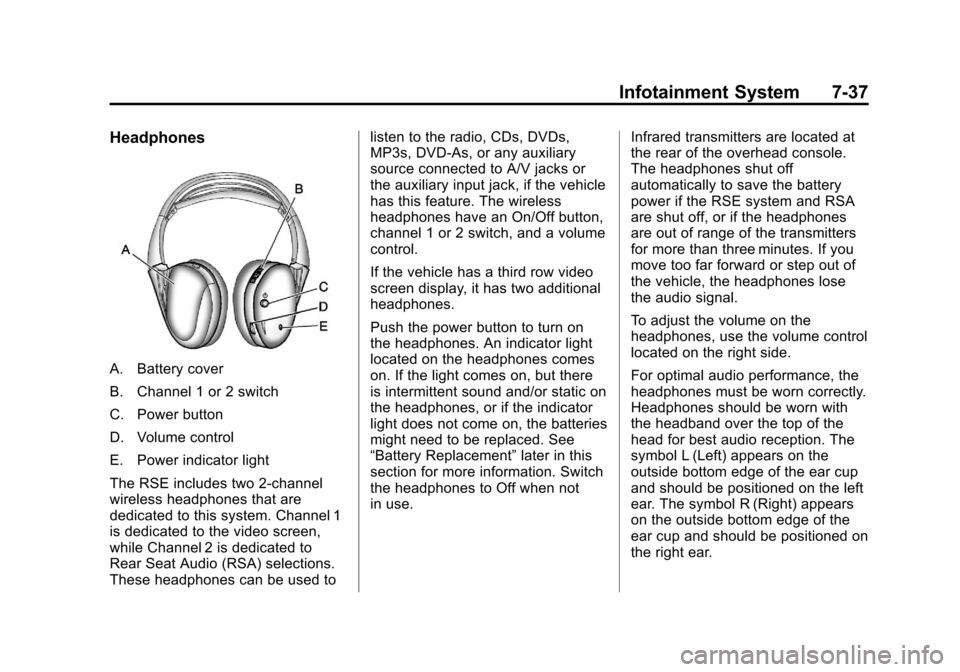
A. Battery cover
B. Channel 1 or 2 switch
C. Power button
D. Volume control
E. Power indicator light
The RSE includes two 2-channel
wireless headphones that are
dedicated to this system. Channel 1
is dedicated to the video screen,
while Channel 2 is dedicated to
Rear Seat Audio (RSA) selections.
These headphones can be used tolisten to the radio, CDs, DVDs,
MP3s, DVD‐As, or any auxiliary
source connected to A/V jacks or
the auxiliary input jack, if the vehicle
has this feature. The wireless
headphones have an On/Off button,
channel 1 or 2 switch, and a volume
control.
If the vehicle has a third row video
screen display, it has two additional
headphones.
Push the power button to turn on
the headphones. An indicator light
located on the headphones comes
on. If the light comes on, but there
is intermittent sound and/or static on
the headphones, or if the indicator
light does not come on, the batteries
might need to be replaced. See
“Battery Replacement”
later in this
section for more information. Switch
the headphones to Off when not
in use. Infrared transmitters are located at
the rear of the overhead console.
The headphones shut off
automatically to save the battery
power if the RSE system and RSA
are shut off, or if the headphones
are out of range of the transmitters
for more than three minutes. If you
move too far forward or step out of
the vehicle, the headphones lose
the audio signal.
To adjust the volume on the
headphones, use the volume control
located on the right side.
For optimal audio performance, the
headphones must be worn correctly.
Headphones should be worn with
the headband over the top of the
head for best audio reception. The
symbol L (Left) appears on the
outside bottom edge of the ear cup
and should be positioned on the left
ear. The symbol R (Right) appears
on the outside bottom edge of the
ear cup and should be positioned on
the right ear.
Page 258 of 542
Black plate (38,1)Chevrolet Tahoe/Suburban Owner Manual - 2011
7-38 Infotainment System
Notice:Do not store the
headphones in heat or direct
sunlight. This could damage the
headphones and repairs will not
be covered by the warranty.
Storage in extreme cold can
weaken the batteries. Keep the
headphones stored in a cool, dry
place.
If the foam ear pads attached to the
headphones become worn or
damaged, the pads can be replaced
separately from the headphone set.
To purchase replacement ear pads,
call 1‐888‐293‐3332, then prompt
zero (0), or contact your dealer. Battery Replacement
To change the batteries on the
headphones:
1. Turn the screw to loosen the
battery door located on the left
side of the headphones. Slide
the battery door open.
2. Replace the two batteries in the compartment. Make sure that
they are installed correctly, using
the diagram on the inside of the
battery compartment.
3. Replace the battery door and tighten the door screw.
If the headphones are to be stored
for a long period of time, remove the
batteries and keep them in a cool,
dry place.Audio/Video (A/V) Jacks
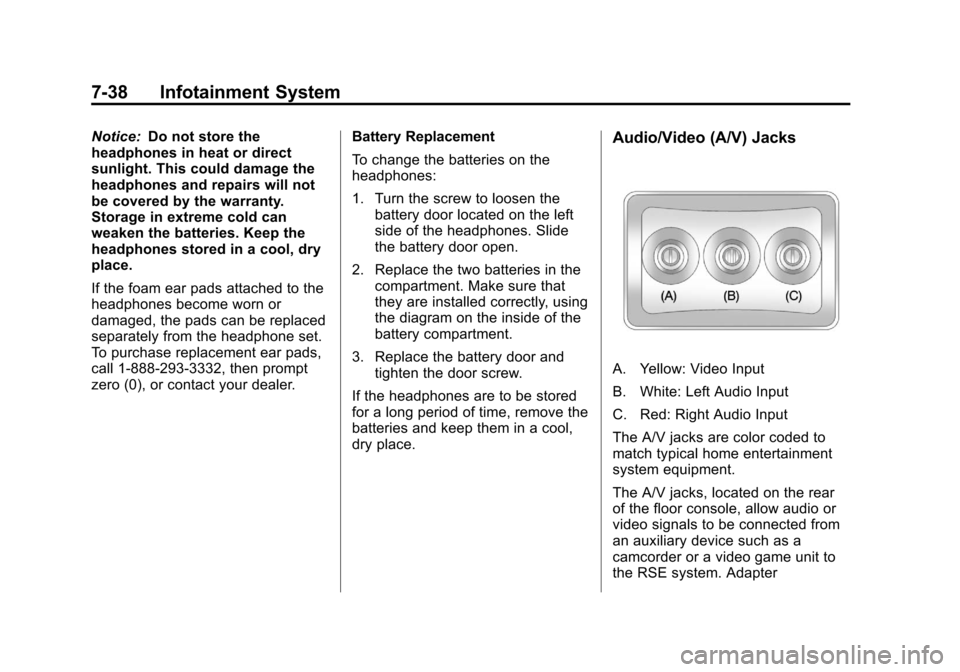
A. Yellow: Video Input
B. White: Left Audio Input
C. Red: Right Audio Input
The A/V jacks are color coded to
match typical home entertainment
system equipment.
The A/V jacks, located on the rear
of the floor console, allow audio or
video signals to be connected from
an auxiliary device such as a
camcorder or a video game unit to
the RSE system. Adapter
Page 259 of 542
Black plate (39,1)Chevrolet Tahoe/Suburban Owner Manual - 2011
Infotainment System 7-39
connectors or cables (not included)
may be required to connect the
auxiliary device to the A/V jacks.
Refer to the manufacturer’s
instructions for proper usage.
Power for auxiliary devices is not
supplied by the radio system.
To use the auxiliary inputs of the
RSE system, connect an external
auxiliary device to the color-coded
A/V jacks and turn both the auxiliary
device and the video screen power
on. If the video screen is in the DVD
player mode, pressing the AUX
(auxiliary) button on the remote
control switches the video screen
from the DVD player mode to the
auxiliary device. The audio of the
connected source can be listened to
over the speakers by sourcing the
radio to the auxiliary device or by
sourcing the RSA to the Rear Aux
and listening with the wireless
headphones on Channel 2 or with
the wired headphones. See “Using
the Auxiliary Input Jack” underAuxiliary Devices on page 7‑31
for
more information about changing
the source.
How to Change the RSE Video
Screen Settings
The screen display mode (normal,
full, and zoom), screen brightness,
and setup menu language can be
changed from the on screen setup
menu. To change any feature:
1. Press the
z(display menu)
button on the remote control.
2. Use the remote control
n,q,
p,o(navigation) arrows and
the
r(enter) button to use the
setup menu.
3. Press the
zbutton again to
remove the setup menu from the
screen.
Audio Output
Audio from the DVD player or
auxiliary inputs can be heard
through the following possible
sources:
.Wireless headphones
.Vehicle speakers
.Vehicle‐wired headphone jacks
on the RSA system, if the
vehicle has this feature.
The RSE system always transmits
the audio signal to the wireless
headphones, if there is audio
available. See “Headphones” earlier
in this section for more information.
The DVD player is capable of
outputting audio to the wired
headphone jacks on the RSA
system, if the vehicle has this
feature. The DVD player can be
selected as an audio source on the
RSA system. See Rear Seat Audio
(RSA) System on page 7‑46 for
more information.
Page 260 of 542
Black plate (40,1)Chevrolet Tahoe/Suburban Owner Manual - 2011
7-40 Infotainment System
When a device is connected to the
A/V jacks, or the radio's auxiliary
input jack if the vehicle has this
feature, the rear seat passengers
are able to hear audio from the
auxiliary device through the wireless
or wired headphones. The front seat
passengers are able to listen to
playback from this device through
the vehicle speakers by selecting
AUX as the source on the radio.
Video Screen(s)
The video screen(s) are located in
the overhead console.
To use the video screen(s):
1. Push the release button locatedon the overhead console.
2. Move the screen to the desired position.
When the video screen is not in
use, push it up into its locked
position. If a DVD is playing and the screen
is raised to its locked position, the
screen remains on. This is normal,
and the DVD continues to play
through the previous audio source.
Use the remote control power button
or eject the disc to turn off the
screen.
The overhead console contains the
infrared transmitters for the wireless
headphones and the infrared
receivers for the remote control.
They are located at the rear of the
console.
Notice:
Avoid directly touching
the video screen, as damage may
occur. See “Cleaning the Video
Screen” later in this section for
more information.
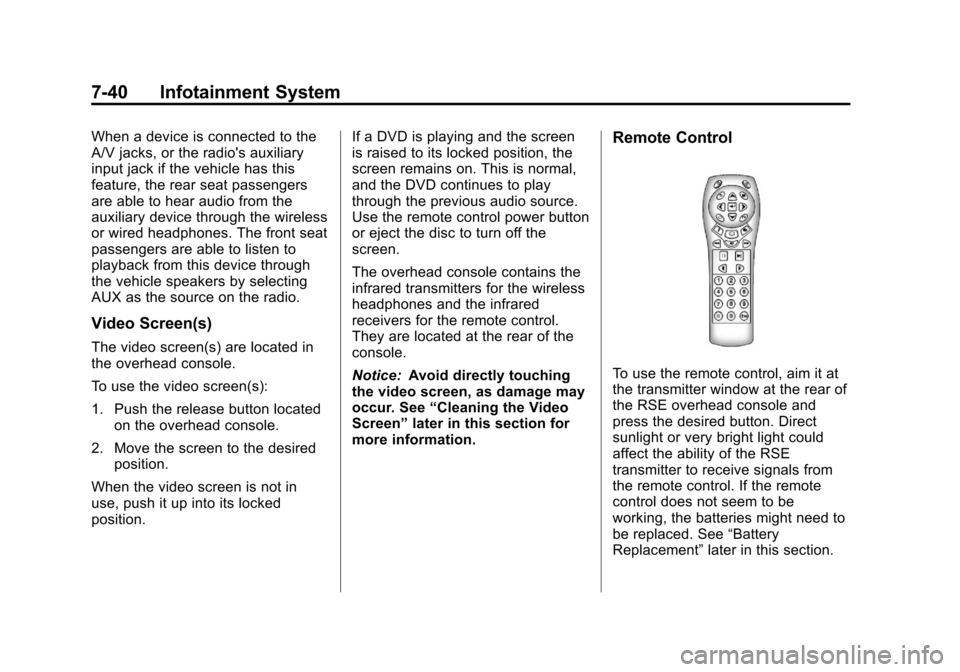
Remote Control
To use the remote control, aim it at
the transmitter window at the rear of
the RSE overhead console and
press the desired button. Direct
sunlight or very bright light could
affect the ability of the RSE
transmitter to receive signals from
the remote control. If the remote
control does not seem to be
working, the batteries might need to
be replaced. See “Battery
Replacement” later in this section.
Page 299 of 542
Black plate (11,1)Chevrolet Tahoe/Suburban Owner Manual - 2011
Driving and Operating 9-11
Off-roading requires a different kind
of alertness from driving on paved
roads and highways. There are no
road signs, posted speed limits,
or signal lights. Use good judgment
about what is safe and what is not.
Driving on Hills
Off-road driving often takes you up,
down, or across a hill. Driving safely
on hills requires good judgment and
an understanding of what the
vehicle can and cannot do. There
are some hills that simply cannot be
driven, no matter how well built the
vehicle.
{WARNING
Many hills are simply too steep
for any vehicle. If you drive up
them, you will stall. If you drive
down them, you cannot control
your speed. If you drive across
them, you will roll over. You could(Continued)
WARNING (Continued)
be seriously injured or killed.
If you have any doubt about the
steepness, do not drive the hill.
Approaching a Hill
When you approach a hill, decide if
it is too steep to climb, descend,
or cross. Steepness can be hard to
judge. On a very small hill, for
example, there may be a smooth,
constant incline with only a small
change in elevation where you can
easily see all the way to the top. On
a large hill, the incline may get
steeper as you near the top, but you
might not see this because the crest
of the hill is hidden by bushes,
grass, or shrubs. Consider this as you approach a hill:
.Is there a constant incline,
or does the hill get sharply
steeper in places?
.Is there good traction on the
hillside, or will the surface cause
tire slipping?
.Is there a straight path up or
down the hill so you will not
have to make turning
maneuvers?
.Are there obstructions on the hill
that can block your path, such
as boulders, trees, logs, or ruts?
.What is beyond the hill? Is there
a cliff, an embankment, a
drop-off, a fence? Get out and
walk the hill if you do not know.
It is the smart way to find out.
.Is the hill simply too rough?
Steep hills often have ruts,
gullies, troughs, and exposed
rocks because they are more
susceptible to the effects of
erosion.
Page 345 of 542
Black plate (57,1)Chevrolet Tahoe/Suburban Owner Manual - 2011
Driving and Operating 9-57
Notice:If the wheel(s) of one axle
is allowed to spin excessively
while the StabiliTrak
®, ABS, brake
warning lights, and any relevant
DIC messages are displayed, the
transfer case could be damaged.
The repairs would not be covered
by the vehicle warranty. Reduce
engine power and do not spin the
wheel(s) excessively while these
lights and messages are
displayed.
The traction control system may
activate on dry or rough roads or
under conditions such as heavy
acceleration while turning or
abrupt upshifts/downshifts of the
transmission. When this happens, a
reduction in acceleration may be
noticed, or a noise or vibration may
be heard. This is normal. If cruise control is being used when
the system activates, the StabiliTrak
light will flash and cruise control will
automatically disengage. Cruise
control may be reengaged when
road conditions allow. See
Cruise
Control on page 9‑58.
StabiliTrak may also turn off
automatically if it determines that a
problem exists with the system.
If the problem does not clear itself
after restarting the vehicle, see your
dealer for service.
Locking Rear Axle
Vehicles with a locking rear axle can
give more traction on snow, mud,
ice, sand, or gravel. It works like a
standard axle most of the time, but
when traction is low, this feature will
allow the rear wheel with the most
traction to move the vehicle.
Continuous Damping
Control (CDC)
This vehicle may have a continuous
damping control system called
Autoride
®. With this feature,
improved vehicle ride and handling
is provided under a variety of
passenger and loading conditions.
Autoride is fully automatic and
uses a computer controller to
continuously monitor vehicle speed,
wheel to body position, lift/dive, and
steering position of the vehicle. The
controller then sends signals to
each shock absorber to
independently adjust the damping
level to provide the optimum
vehicle ride.
Page 351 of 542
Black plate (63,1)Chevrolet Tahoe/Suburban Owner Manual - 2011
Driving and Operating 9-63
Side Blind Zone
Alert (SBZA)
The vehicle may have a Side Blind
Zone Alert (SBZA) system. Read
this entire section before using the
system.
{WARNING
SBZA is only a lane changing aid
and does not replace driver
vision. SBZA does not detect:
.Vehicles outside the side
blind zones which may be
rapidly approaching.
.Pedestrians, bicyclists,
or animals.(Continued)
WARNING (Continued)
Failure to use proper care when
changing lanes may result in
damage to the vehicle, injury,
or death. Always check the
outside and rearview mirrors,
glance over your shoulder, and
use the turn signal before
changing lanes.
When the system detects a vehicle
in the side blind zone, amber SBZA
displays light up in the side mirrors.
This indicates that it may be unsafe
to change lanes. Before making a
lane change, always check the
SBZA display, check the outside
and rearview mirrors, look over your
shoulder for vehicles and hazards,
and use the turn signal.
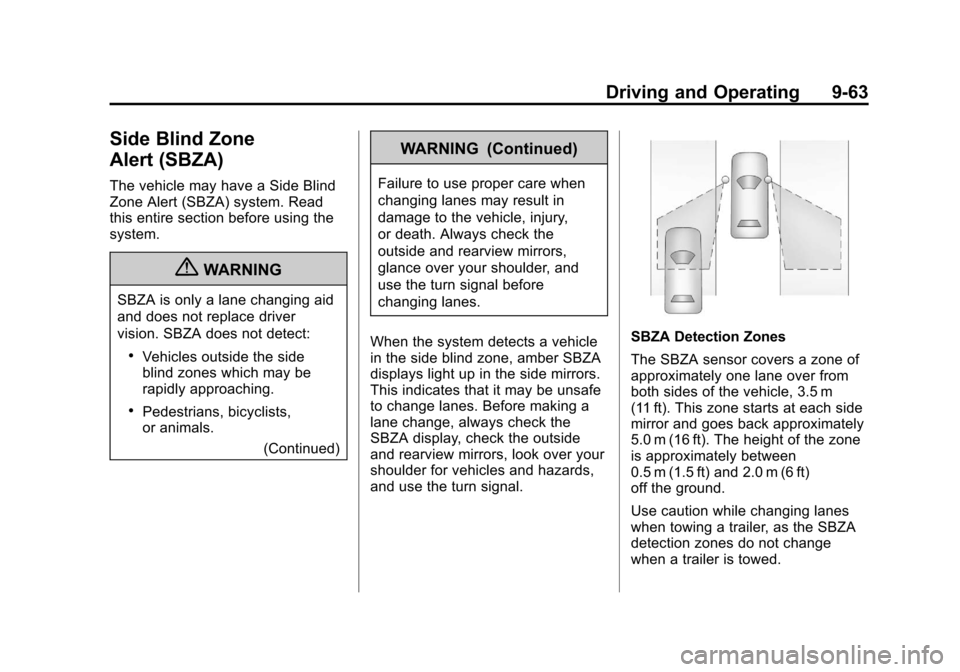
SBZA Detection Zones
The SBZA sensor covers a zone of
approximately one lane over from
both sides of the vehicle, 3.5 m
(11 ft). This zone starts at each side
mirror and goes back approximately
5.0 m (16 ft). The height of the zone
is approximately between
0.5 m (1.5 ft) and 2.0 m (6 ft)
off the ground.
Use caution while changing lanes
when towing a trailer, as the SBZA
detection zones do not change
when a trailer is towed.