2011 CHEVROLET SUBURBAN ad blue
[x] Cancel search: ad bluePage 270 of 542

Black plate (50,1)Chevrolet Tahoe/Suburban Owner Manual - 2011
7-50 Infotainment System
Listing All Paired and Connected
Phones
The system can list all cell phones
paired to it. If a paired cell phone is
also connected to the vehicle, the
system responds with“is connected”
after that phone name.
1. Press and hold
b gfor
two seconds.
2. Say “Bluetooth.”
3. Say “List.”
Deleting a Paired Phone
If the phone name you want to
delete is unknown, see “Listing All
Paired and Connected Phones.”
1. Press and hold
b gfor
two seconds.
2. Say “Bluetooth.”
3. Say “Delete.” The system asks
which phone to delete.
4. Say the name of the phone you want to delete. Connecting to a Different Phone
To connect to a different cell phone,
the Bluetooth system looks for the
next available cell phone in the
order in which all the available cell
phones were paired. Depending on
which cell phone you want to
connect to, you may have to use
this command several times.
1. Press and hold
b
gfor
two seconds.
2. Say “Bluetooth.”
3. Say “Change phone.”
.If another cell phone is
found, the response will be
“
connected.”
.If another cell phone is not
found, the original phone
remains connected.
Storing and Deleting Phone
Numbers
The system can store up to
30 phone numbers as name tags in
the Hands‐Free Directory that is
shared between the Bluetooth and
OnStar systems, if equipped.
The following commands are used
to delete and store phone numbers.
Store:This command will store a
phone number, or a group of
numbers as a name tag.
Digit Store: This command allows
a phone number to be stored as a
name tag by entering the digits one
at a time.
Delete: This command is used to
delete individual name tags.
Delete All Name Tags: This
command deletes all stored name
tags in the Hands‐Free Calling
Directory and the OnStar
Turn‐by‐Turn Destinations Directory,
if equipped.
Page 273 of 542
Black plate (53,1)Chevrolet Tahoe/Suburban Owner Manual - 2011
Infotainment System 7-53
Call Waiting
Call waiting must be supported on
the cell phone and enabled by the
wireless service carrier.
.Pressbgto answer an
incoming call when another call
is active. The original call is
placed on hold.
.Pressb gagain to return to the
original call.
.To ignore the incoming call, no
action is required.
.Pressc xto disconnect the
current call and switch to the call
on hold.
Three‐Way Calling
Three‐way calling must be
supported on the cell phone and
enabled by the wireless service
carrier.
1. While on a call, press
b g.
2. Say “Three‐way call.” 3. Use the dial or call command to
dial the number of the third party
to be called.
4. Once the call is connected, press
bgto link all callers
together.
Ending a Call
Pressc xto end a call.
Muting a Call
During a call, all sounds from inside
the vehicle can be muted so that the
person on the other end of the call
cannot hear them.
.To mute a call, pressbg, and
then say “Mute call.”
.To cancel mute, pressbg, and
then say “Un‐mute call.”
Transferring a Call
Audio can be transferred between
the Bluetooth system and the cell
phone.
The cell phone must be paired and
connected with the Bluetooth
system before a call can be
transferred. The connection process
can take up to two minutes after the
ignition is turned to ON/RUN.
Transferring Audio from the
Bluetooth System to a Cell Phone
During a call with the audio in the
vehicle:
1. Press
bg.
2. Say “Transfer Call.”
Page 274 of 542
Black plate (54,1)Chevrolet Tahoe/Suburban Owner Manual - 2011
7-54 Infotainment System
Transferring Audio to the
Bluetooth System from a Cell
Phone
During a call with the audio on the
cell phone, press
bg. The audio
transfers to the vehicle. If the audio
does not transfer to the vehicle, use
the audio transfer feature on the cell
phone. See your cell phone
manufacturer's user guide for more
information.
Voice Pass-Thru
Voice pass‐thru allows access to the
voice recognition commands on the
cell phone. See your cell phone
manufacturer's user guide to see if
the cell phone supports this feature.
To access contacts stored in the cell
phone:
1. Press and hold
b gfor
two seconds.
2. Say “Bluetooth.” The system
responds “Bluetooth ready,”
followed by a tone. 3. Say
“Voice.” The system
responds “OK, accessing
The cell phone's normal prompt
messages will go through their cycle
according to the phone's operating
instructions.
Dual Tone Multi-Frequency
(DTMF) Tones
The Bluetooth system can send
numbers and the numbers stored as
name tags during a call. You can
use this feature when calling a
menu‐driven phone system.
Account numbers can also be
stored for use.
Sending a Number or Name Tag
During a Call
1. Press
b g. The system
responds “Ready,”followed by
a tone.
2. Say “Dial.”
3. Say the number or name tag to send.
Clearing the System
Unless information is deleted out of
the in‐vehicle Bluetooth system, it
will be retained indefinitely. This
includes all saved name tags in the
phone book and phone pairing
information. For information on how
to delete this information, see the
previous section “Deleting a Paired
Phone” and the previous sections
on deleting name tags.
Other Information
The Bluetooth®word mark and
logos are owned by the Bluetooth®
SIG, Inc. and any use of such marks
by General Motors is under license.
Other trademarks and trade names
are those of their respective owners.
Page 377 of 542
Black plate (89,1)Chevrolet Tahoe/Suburban Owner Manual - 2011
Driving and Operating 9-89
The seven-wire harness contains
the following trailer circuits:
.Yellow: Left Stop/Turn Signal
.Dark Green: Right Stop/Turn
Signal
.Brown: Taillamps
.White: Ground
.Light Green: Back-up Lamps
.Red: Battery Feed*
.Dark Blue: Trailer Brake*
*The fuses for these two circuits are
installed in the underhood electrical
center, but the wires are not
connected. They should be
connected by your dealer or a
qualified service center. Heavy-Duty Trailer Wiring Harness
Package
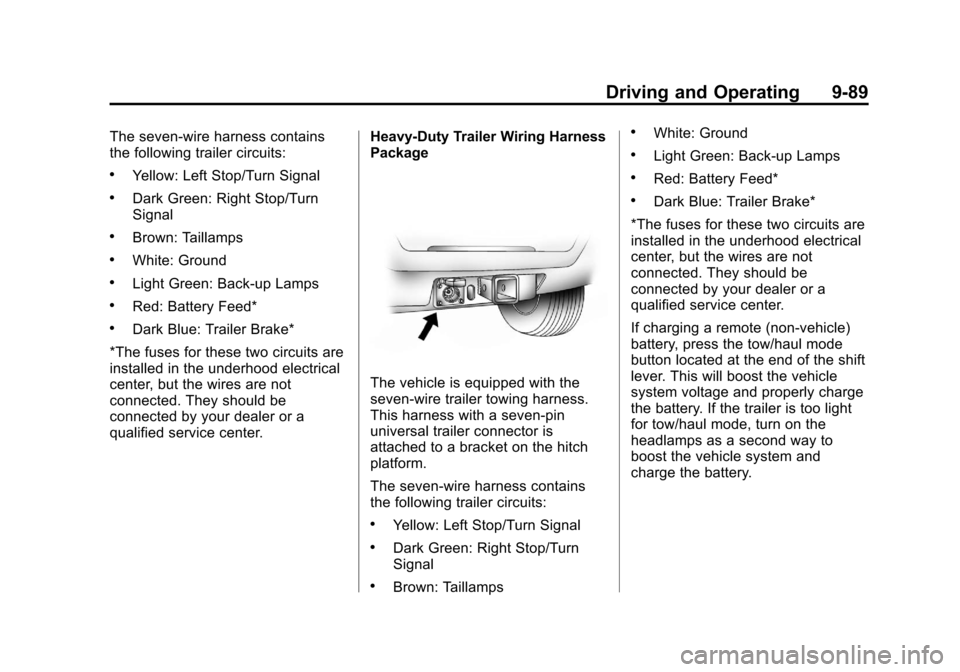
The vehicle is equipped with the
seven-wire trailer towing harness.
This harness with a seven-pin
universal trailer connector is
attached to a bracket on the hitch
platform.
The seven-wire harness contains
the following trailer circuits:
.Yellow: Left Stop/Turn Signal
.Dark Green: Right Stop/Turn
Signal
.Brown: Taillamps
.White: Ground
.Light Green: Back-up Lamps
.Red: Battery Feed*
.Dark Blue: Trailer Brake*
*The fuses for these two circuits are
installed in the underhood electrical
center, but the wires are not
connected. They should be
connected by your dealer or a
qualified service center.
If charging a remote (non-vehicle)
battery, press the tow/haul mode
button located at the end of the shift
lever. This will boost the vehicle
system voltage and properly charge
the battery. If the trailer is too light
for tow/haul mode, turn on the
headlamps as a second way to
boost the vehicle system and
charge the battery.
Page 378 of 542
Black plate (90,1)Chevrolet Tahoe/Suburban Owner Manual - 2011
9-90 Driving and Operating
Electric Brake Control Wiring
Provisions
These wiring provisions are
included with the vehicle as part of
the trailer wiring package. These
provisions are for an electric brake
controller. The instrument panel
contains blunt cut wires near the
data link connector for the trailer
brake controller. The harness
contains the following wires:
.Dark Blue: Brake Signal to
Trailer Connector
.Red/Black: Battery
.Light Blue/White: Brake Switch
.White: Ground
It should be installed by your dealer
or a qualified service center.
If the vehicle is equipped with an
ITBC, the blunt cuts exist, but are
not connected further in the
harness. If an aftermarket trailer
brake controller is installed, the
ITBC must be disconnected. Do not power both ITBC and aftermarket
controllers to control the trailer
brakes at the same time.
Tow/Haul Mode
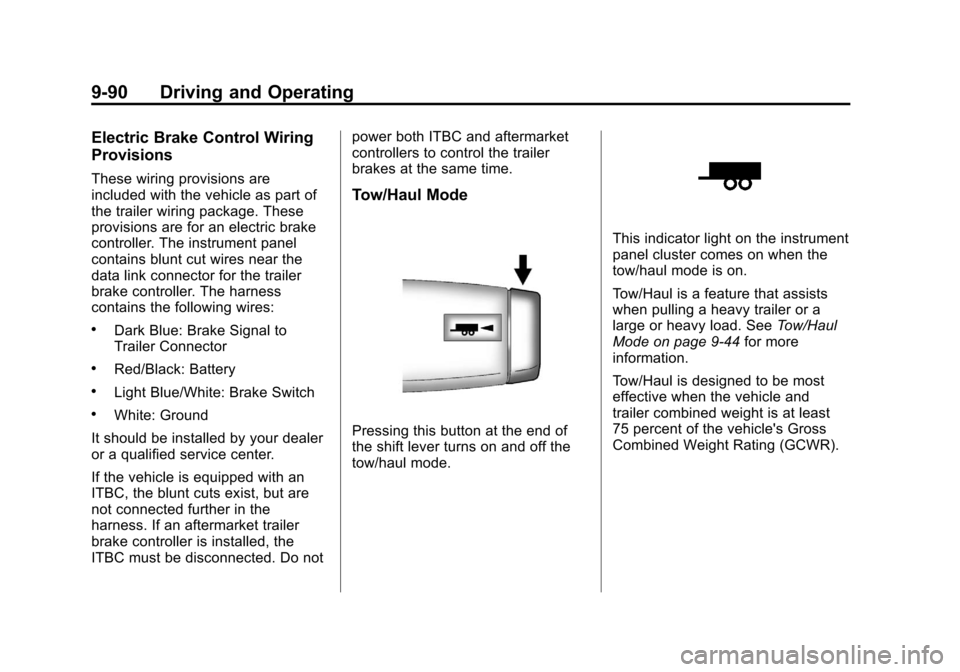
Pressing this button at the end of
the shift lever turns on and off the
tow/haul mode.
This indicator light on the instrument
panel cluster comes on when the
tow/haul mode is on.
Tow/Haul is a feature that assists
when pulling a heavy trailer or a
large or heavy load. See
Tow/Haul
Mode on page 9‑44 for more
information.
Tow/Haul is designed to be most
effective when the vehicle and
trailer combined weight is at least
75 percent of the vehicle's Gross
Combined Weight Rating (GCWR).
Page 532 of 542

Black plate (2,1)Chevrolet Tahoe/Suburban Owner Manual - 2011
i-2 INDEX
Auxiliary Devices . . . . . . . . . . . . . . 7-31
Axle, Front . . . . . . . . . . . . . . . . . . . . 10-30
Axle, Rear . . . . . . . . . . . . . . . . . . . . 10-31
B
Battery . . . . . . . . . . . . . . . . . . . . . . . 10-29Jump Starting . . . . . . . . . . . . . . . 10-88
Load Management . . . . . . . . . . . . . 6-8
Power Protection . . . . . . . . . . . . . . 6-9
Voltage and ChargingMessages . . . . . . . . . . . . . . . . . . . 5-38
Blade Replacement, Wiper . . . 10-34
Bluetooth . . . . . . . . . . . . . . . . . . . . . . 7-48
Brake Pedal and AdjustableThrottle . . . . . . . . . . . . . . . . . . . . . . 9-29
Brake System Warning Light . . . 5-24
Brakes . . . . . . . . . . . . . . . . . . . . . . . . 10-26 Antilock . . . . . . . . . . . . . . . . . . . . . . . 9-53
Assist . . . . . . . . . . . . . . . . . . . . . . . . . 9-54
Fluid . . . . . . . . . . . . . . . . . . . . . . . . 10-27
Parking . . . . . . . . . . . . . . . . . . . . . . . 9-54
System Messages . . . . . . . . . . . . 5-39
Braking . . . . . . . . . . . . . . . . . . . . . . . . . 9-3
Break-In, New Vehicle . . . . . . . . . 9-29 Bulb Replacement . . . . . . . . . . . . 10-40
Fog Lamps . . . . . . . . . . . . . . . . . . . . 6-6
Halogen Bulbs . . . . . . . . . . . . . . 10-38
Headlamp Aiming . . . . . . . . . . . 10-36
Headlamps . . . . . . . . . . . . . . . . . 10-38
License Plate Lamps . . . . . . . 10-39
Taillamps, Turn Signal,
Stoplamps, and
Back-Up Lamps . . . . . . . . . . . 10-38
Buying New Tires . . . . . . . . . . . . . 10-65
C
Calibration . . . . . . . . . . . . . . . . . . . . . . 5-7
California Fuel Requirements . . . . . . . . . . . 9-72
Perchlorate MaterialsRequirements . . . . . . . . . . . . . . . 10-3
Warning . . . . . . . . . . . . . . . . . . . . . . 10-3
Camera, Rear Vision . . . . . . . . . . 9-66
Canadian Vehicle Owners . . . . . . . . iii
Capacities and Specifications . . . . . . . . . . . . . . . . 12-2
Carbon Monoxide
Engine Exhaust . . . . . . . . . . . . . . . 9-37
Liftgate . . . . . . . . . . . . . . . . . 2-10, 2-12
Winter Driving . . . . . . . . . . . . . . . . 9-20 Cargo
Cover . . . . . . . . . . . . . . . . . . . . . . . . . . 4-2
Cautions, Danger, and Warnings . . . . . . . . . . . . . . . . . . . . . . . . iv
CD DVD Player . . . . . . . . . . . . . . . . . . . 7-20
CD Player . . . . . . . . . . . . . . . . . . . . . 7-15
Center Console Storage . . . . . . . . 4-2
Center Seat . . . . . . . . . . . . . . . . . . . . 3-4
Chains, Tire . . . . . . . . . . . . . . . . . . 10-70
Charging System Light . . . . . . . . 5-21
Check
Engine Light . . . . . . . . . . . . . . . . . . 5-22
IgnitionTransmission Lock . . . . . . . . 10-33
Child Restraints
Infants and YoungChildren . . . . . . . . . . . . . . . . . . . . . 3-59
Lower Anchors and Tethers for Children . . . . . . . . . 3-65
Older Children . . . . . . . . . . . . . . . . 3-57
Securing . . . . . . . . . . . . . . . . 3-74, 3-77
Systems . . . . . . . . . . . . . . . . . . . . . . 3-61
Circuit Breakers . . . . . . . . . . . . . . 10-41
Page 538 of 542

Black plate (8,1)Chevrolet Tahoe/Suburban Owner Manual - 2011
i-8 INDEX
N
Navigation SystemVehicle Data Recordingand Privacy . . . . . . . . . . . . . . . 13-18
New Vehicle Break-In . . . . . . . . . . 9-29
O
Object Detection System Messages . . . . . . . . . . . . . . . . . . . . 5-43
Object Detection, Side Blind Zone Alert (SBZA) . . . . . . . . . . . 9-63
Odometer . . . . . . . . . . . . . . . . . . . . . . 5-14 Trip . . . . . . . . . . . . . . . . . . . . . . . . . . . 5-14
Off-Road . . . . . . . . . . . . . . . . . . . . . . . 9-6 Driving . . . . . . . . . . . . . . . . . . . . . . . . . 9-6
Recovery . . . . . . . . . . . . . . . . . . . . . . 9-5
Oil Engine . . . . . . . . . . . . . . . . . . . . . . . . 10-7
Engine Oil Life System . . . . . .10-11
Engine Oil Pressure
Gauge . . . . . . . . . . . . . . . . . . . . . . 5-16
Messages . . . . . . . . . . . . . . . . . . . . 5-41
Pressure Light . . . . . . . . . . . . . . . . 5-27
Older Children, Restraints . . . . . 3-57 Online Owner Center . . . . . . . . . . 13-6
OnStar
®System . . . . . . . . . . . . . . . 1-29
Operation, Infotainment System . . . . . . . . . . . . . . . . . . . . . . . . 7-3
Outlets Power . . . . . . . . . . . . . . . . . . . . . . . . 5-10
Overheated Engine
Protection
Operating Mode . . . . . . . . . . . . . 10-23
Overheating, Engine . . . . . . . . . . 10-21
P
Park Shifting Into . . . . . . . . . . . . . . . . . . . 9-34
Shifting Out of . . . . . . . . . . . . . . . . 9-36
Park Tilt Mirrors . . . . . . . . . . . . . . . . 2-20
Parking Assist, Ultrasonic . . . . . . . . . . . . . 9-61
Brake . . . . . . . . . . . . . . . . . . . . . . . . . 9-54
Brake and P (Park)
Mechanism Check . . . . . . . . 10-34
Over Things That Burn . . . . . . . 9-36
Passenger Airbag Status
Indicator . . . . . . . . . . . . . . . . . . . . . 5-20
Passenger Sensing System . . . 3-49 Perchlorate Materials
Requirements, California . . . . . 10-3
Phone Bluetooth . . . . . . . . . . . . . . . . . . . . . 7-48
Power Door Locks . . . . . . . . . . . . . . . . . . . . 2-8
Mirrors . . . . . . . . . . . . . . . . . . . . . . . . 2-18
Outlets . . . . . . . . . . . . . . . . . . . . . . . 5-10
Protection, Battery . . . . . . . . . . . . . 6-9
Retained Accessory (RAP) . . . 9-34
Seat Adjustment . . . . . . . . . . . . . . . 3-4
Steering Fluid . . . . . . . . . . . . . . . 10-24
Windows . . . . . . . . . . . . . . . . . . . . . 2-22
Power Assist Steps . . . . . . . . . . . . 2-14
Pregnancy, Using Safety Belts . . . . . . . . . . . . . . . . . . . . . . . . . 3-38
Privacy Radio FrequencyIdentification (RFID) . . . . . . . 13-18
Program Courtesy Transportation . . . . 13-10
Proposition 65 Warning, California . . . . . . . . . . . . . . . . . . . . . 10-3