2011 CHEVROLET IMPALA four wheel drive
[x] Cancel search: four wheel drivePage 173 of 376
Black plate (7,1)Chevrolet Impala Owner Manual - 2011
Infotainment System 7-7
.To scan preset stations in the
selected band, press and hold
©SEEK for four seconds until a
double beep sounds. The radio
goes to a stored preset, plays
for a few seconds, then goes
to the next stored preset. Press
©SEEK again to stop scanning
preset stations.
¨SEEK: Press to seek or scan
stations with a strong signal in the
selected band.
.To seek stations, press and
release
¨SEEK to go to the
next station and stay there.
.To scan stations, press and hold¨SEEK for a few seconds until
the radio beeps once. The radio
goes to a station, plays for a
few seconds, then goes to the
next station. Press
¨SEEK
again to stop scanning.
.To scan preset stations in the
selected band, press and
hold
¨SEEK for four seconds
until a double beep sounds. The radio goes to a stored
preset, plays for a few seconds,
then goes to the next stored
preset. Press
¨SEEK again to
stop scanning preset stations.
Storing Radio Stations
Drivers are encouraged to store
radio station while the vehicle is
parked, See Defensive Driving on
page 9‑2. Tune to stored radio
stations using the presets, favorites
button, and steering wheel controls,
if the vehicle has this feature.
Radios that have a FAV button store
radio stations as favorites, up to
36 stations can be programmed as
favorites using the 6 softkeys below
the radio station frequency tabs and
by using the FAV button. Press the
FAV button to go through up to
6 pages of favorites, each having
6 favorite stations available per
page. Each page of favorites can
contain any combination of AM, FM,
or XM, if equipped, stations. Radios that do not have a
FAV button store radio stations
as presets, up to 18 stations
(6 FM1, 6 FM2, and 6 AM), can be
programmed on the 6 numbered
pushbuttons.
Storing a Radio Station as a
Preset, Radio with CD (Base)
Radios that have numbered
pushbuttons store radio stations
as presets.
Up to 18 stations (6 FM1, 6 FM2,
and 6 AM), can be programmed on
the six numbered buttons.
To store preset stations:
1. Tune to a radio station.
2. Press and hold one of the
6 numbered pushbuttons for
3 seconds until a beep sounds.
3. Repeat Steps 1 and 2 to store additional radio stations.
Page 295 of 376

Black plate (49,1)Chevrolet Impala Owner Manual - 2011
Vehicle Care 10-49
.The TPMS sensor matching
process was started but not
completed or not completed
successfully after rotating the
vehicle's tires. The DIC message
and TPMS malfunction light
should go off once the TPMS
sensor matching process is
performed successfully. See
“TPMS Sensor Matching
Process”later in this section.
.One or more TPMS sensors are
missing or damaged. The DIC
message and the TPMS
malfunction light should go off
when the TPMS sensors are
installed and the sensor
matching process is performed
successfully. See your dealer
for service.
.Replacement tires or wheels do
not match your vehicle's original
equipment tires or wheels. Tires
and wheels other than those
recommended for your vehicle
could prevent the TPMS from
functioning properly. See Buying
New Tires on page 10‑53.
.Operating electronic devices or
being near facilities using radio
wave frequencies similar to
the TPMS could cause the
TPMS sensors to malfunction.
If the TPMS is not functioning it
cannot detect or signal a low tire
condition. See your dealer for
service if the TPMS malfunction
light and DIC message come on
and stay on.
TPMS Sensor Matching
Process
Each TPMS sensor has a unique
identification code. Any time you
rotate your vehicle's tires or replace
one or more of the TPMS sensors,
the identification codes will need to
be matched to the new tire/wheel
position. The sensors are matched
to the tire/wheel positions in the
following order: driver side front tire,
passenger side front tire, passenger
side rear tire, and driver side rear
tire using a TPMS diagnostic tool.
See your dealer for service. The TPMS sensors can also be
matched to each tire/wheel position
by increasing or decreasing the
tire's air pressure. If increasing the
tire's air pressure, do not exceed
the maximum inflation pressure
indicated on the tire's sidewall.
To decrease air pressure out of a
tire you can use the pointed end of
the valve cap, a pencil-style air
pressure gauge, or a key.
You have two minutes to match the
first tire/wheel position, and
five minutes overall to match all four
tire/wheel positions. If it takes longer
than two minutes to match the first
tire and wheel, or more than
five minutes to match all four tire
and wheel positions, the matching
process stops and you need to
start over.
Page 296 of 376

Black plate (50,1)Chevrolet Impala Owner Manual - 2011
10-50 Vehicle Care
The TPMS sensor matching process
is outlined below:
1. Set the parking brake.
2. Turn the ignition switch to ON/RUN with the engine off.
3. Press the Remote Keyless Entry (RKE) transmitter's lock and
unlock buttons at the same time
for approximately five seconds.
The horn sounds twice to signal
the receiver is in relearn mode
and the TIRE LEARNING
ACTIVE message displays on
the DIC screen.
4. Start with the driver side front tire. 5. Remove the valve cap from the
valve cap stem. Activate the
TPMS sensor by increasing or
decreasing the tire's air pressure
for five seconds, or until a
horn chirp sounds. The horn
chirp, which may take up to
30 seconds to sound, confirms
that the sensor identification
code has been matched to this
tire and wheel position.
6. Proceed to the passenger side front tire, and repeat the
procedure in Step 5.
7. Proceed to the passenger side rear tire, and repeat the
procedure in Step 5. 8. Proceed to the driver side rear
tire, and repeat the procedure
in Step 5. The horn sounds
two times to indicate the sensor
identification code has been
matched to the driver side rear
tire, and the TPMS sensor
matching process is no longer
active. The TIRE LEARNING
ACTIVE message on the
DIC display screen goes off.
9. Turn the ignition switch to LOCK/OFF.
10. Set all four tires to the recommended air pressure
level as indicated on the Tire
and Loading Information label.
11. Put the valve caps back on the valve stems.
Page 300 of 376
Black plate (54,1)Chevrolet Impala Owner Manual - 2011
10-54 Vehicle Care
GM recommends replacing tires
in sets of four. This is because
uniform tread depth on all tires
will help keep your vehicle
performing most like it did when
the tires were new. Replacing
less than a full set of tires can
affect the braking and handling
performance of your vehicle.
SeeTire Inspection on
page 10‑51 andTire Rotation on
page 10‑51 for information on
proper tire rotation.
{WARNING
Tires could explode during
improper service. You or others
could be injured or killed if you
attempt to mount or dismount a
tire. Only your dealer or an
authorized tire service center
should mount and dismount
the tires.
{WARNING
Mixing tires could cause you
to lose control while driving.
If you mix tires of different
sizes, brands, or types (radial
and bias-belted tires), the
vehicle may not handle
properly, and you could have
a crash. Using tires of different
sizes, brands, or types may
also cause damage to your
vehicle. Be sure to use the
correct size, brand, and type
of tires on all wheels. It is all
right to drive with your
compact spare temporarily, as
it was developed for use on
your vehicle. See Compact
Spare Tire on page 10‑68.{WARNING
If you use bias-ply tires on the
vehicle, the wheel rim flanges
could develop cracks after
many miles of driving. A tire
and/or wheel could fail
suddenly, causing a crash.
Use only radial-ply tires with
the wheels on the vehicle.
If you must replace your
vehicle's tires with those that do
not have a TPC Spec number,
make sure they are the same
size, load range, speed rating,
and construction type (radial and
bias‐belted tires) as your
vehicle's original tires.
Vehicles that have a tire
pressure monitoring system
could give an inaccurate
low‐pressure warning if
non‐TPC Spec rated tires are
installed on your vehicle.
Page 321 of 376
Black plate (75,1)Chevrolet Impala Owner Manual - 2011
Vehicle Care 10-75
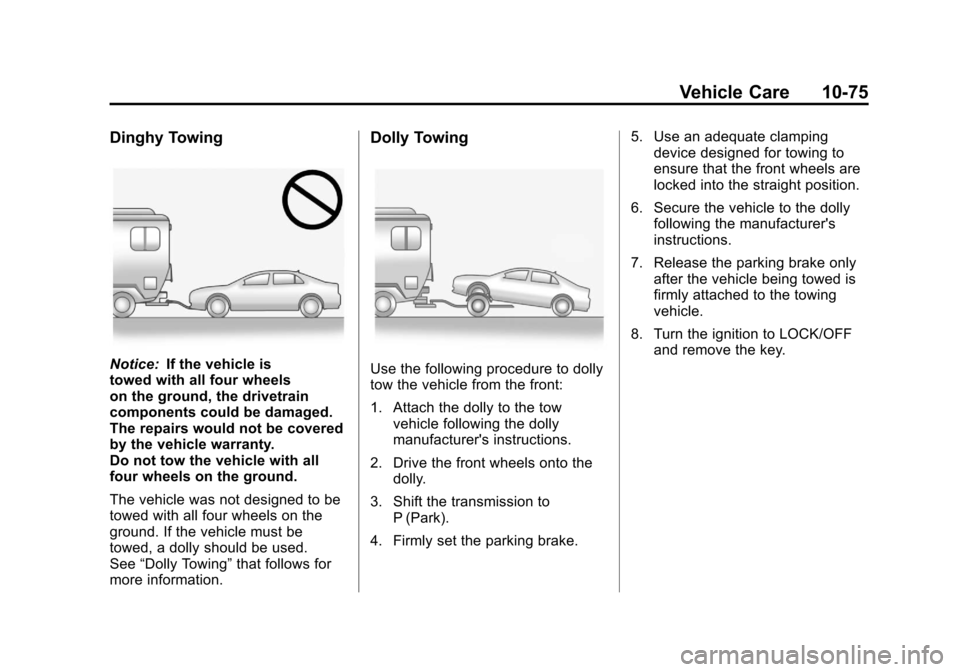
Dinghy Towing
Notice:If the vehicle is
towed with all four wheels
on the ground, the drivetrain
components could be damaged.
The repairs would not be covered
by the vehicle warranty.
Do not tow the vehicle with all
four wheels on the ground.
The vehicle was not designed to be
towed with all four wheels on the
ground. If the vehicle must be
towed, a dolly should be used.
See “Dolly Towing” that follows for
more information.
Dolly Towing
Use the following procedure to dolly
tow the vehicle from the front:
1. Attach the dolly to the tow vehicle following the dolly
manufacturer's instructions.
2. Drive the front wheels onto the dolly.
3. Shift the transmission to P (Park).
4. Firmly set the parking brake. 5. Use an adequate clamping
device designed for towing to
ensure that the front wheels are
locked into the straight position.
6. Secure the vehicle to the dolly following the manufacturer's
instructions.
7. Release the parking brake only after the vehicle being towed is
firmly attached to the towing
vehicle.
8. Turn the ignition to LOCK/OFF and remove the key.