Page 149 of 430
Black plate (43,1)Chevrolet HHR Owner Manual - 2011
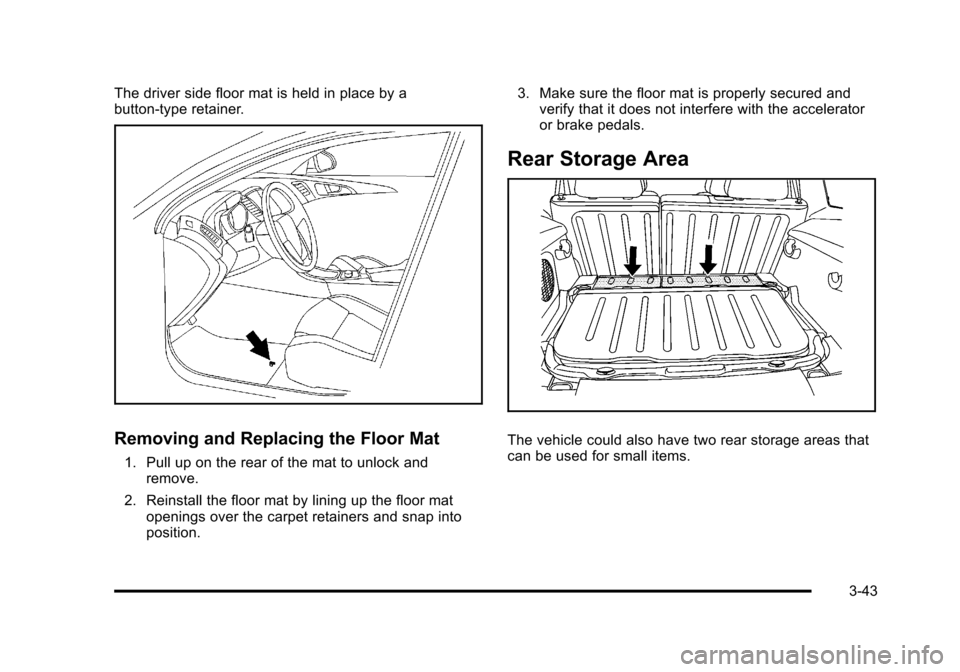
The driver side floor mat is held in place by a
button-type retainer.
Removing and Replacing the Floor Mat
1. Pull up on the rear of the mat to unlock andremove.
2. Reinstall the floor mat by lining up the floor mat openings over the carpet retainers and snap into
position. 3. Make sure the floor mat is properly secured and
verify that it does not interfere with the accelerator
or brake pedals.
Rear Storage Area
The vehicle could also have two rear storage areas that
can be used for small items.
3-43
Page 150 of 430
Black plate (44,1)Chevrolet HHR Owner Manual - 2011
Rear Compartment Storage Panel/
Cover
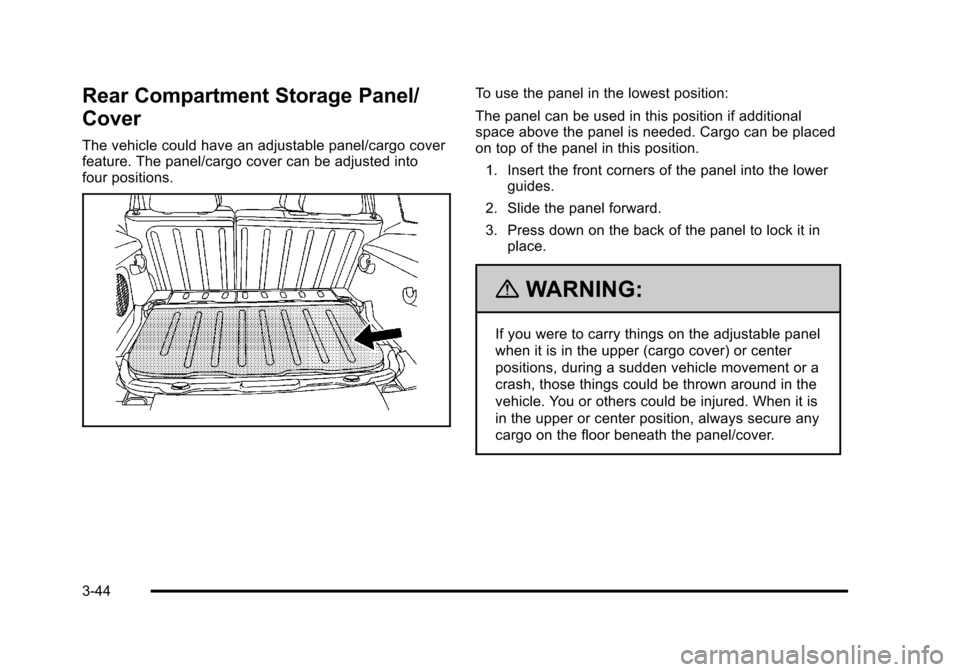
The vehicle could have an adjustable panel/cargo cover
feature. The panel/cargo cover can be adjusted into
four positions.
To use the panel in the lowest position:
The panel can be used in this position if additional
space above the panel is needed. Cargo can be placed
on top of the panel in this position.1. Insert the front corners of the panel into the lower guides.
2. Slide the panel forward.
3. Press down on the back of the panel to lock it in place.
{WARNING:
If you were to carry things on the adjustable panel
when it is in the upper (cargo cover) or center
positions, during a sudden vehicle movement or a
crash, those things could be thrown around in the
vehicle. You or others could be injured. When it is
in the upper or center position, always secure any
cargo on the floor beneath the panel/cover.
3-44
Page 151 of 430
Black plate (45,1)Chevrolet HHR Owner Manual - 2011
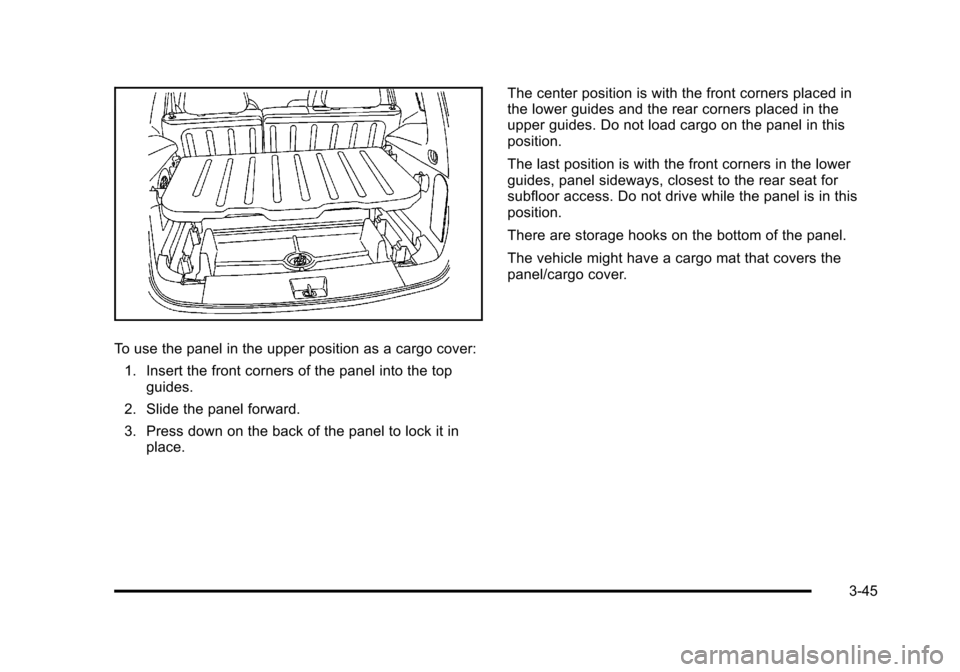
To use the panel in the upper position as a cargo cover:1. Insert the front corners of the panel into the top guides.
2. Slide the panel forward.
3. Press down on the back of the panel to lock it in place. The center position is with the front corners placed in
the lower guides and the rear corners placed in the
upper guides. Do not load cargo on the panel in this
position.
The last position is with the front corners in the lower
guides, panel sideways, closest to the rear seat for
subfloor access. Do not drive while the panel is in this
position.
There are storage hooks on the bottom of the panel.
The vehicle might have a cargo mat that covers the
panel/cargo cover.
3-45
Page 153 of 430
Black plate (47,1)Chevrolet HHR Owner Manual - 2011
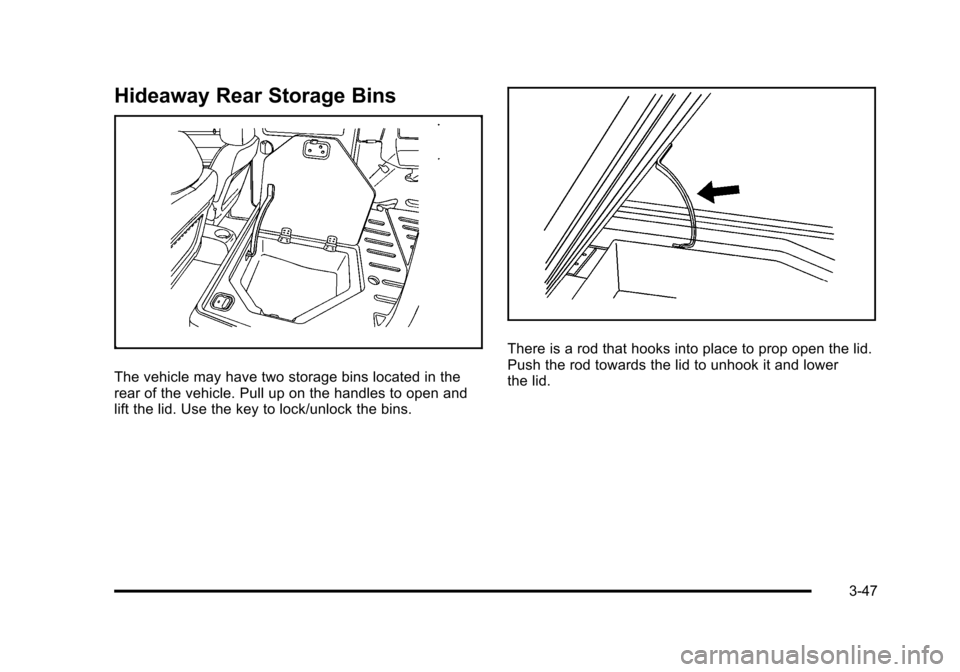
Hideaway Rear Storage Bins
The vehicle may have two storage bins located in the
rear of the vehicle. Pull up on the handles to open and
lift the lid. Use the key to lock/unlock the bins.
There is a rod that hooks into place to prop open the lid.
Push the rod towards the lid to unhook it and lower
the lid.
3-47
Page 157 of 430
Black plate (1,1)Chevrolet HHR Owner Manual - 2011
Section 4 Instrument Panel
Instrument Panel Overview. . . . . . . . . . . . . . . . . . . . . . . .4-3
Hazard Warning Flashers . . . . . . . . . . . . . . . . . . . . . . . 4-3
Horn . . . . . . . . . . . . . . . . . . . . . . . . . . . . . . . . . . . . . . . . . . . . 4-3
Tilt Wheel . . . . . . . . . . . . . . . . . . . . . . . . . . . . . . . . . . . . . . . 4-3
Turn Signal/Multifunction Lever . . . . . . . . . . . . . . . . . . 4-4
Turn and Lane-Change Signals . . . . . . . . . . . . . . . . . 4-4
Headlamp High/Low-Beam Changer . . . . . . . . . . . . 4-5
Flash-to-Pass . . . . . . . . . . . . . . . . . . . . . . . . . . . . . . . . . . . 4-5
Windshield Wipers . . . . . . . . . . . . . . . . . . . . . . . . . . . . . . 4-5
Windshield Washer . . . . . . . . . . . . . . . . . . . . . . . . . . . . . 4-6
Rear Window Wiper/Washer . . . . . . . . . . . . . . . . . . . . 4-7
Cruise Control . . . . . . . . . . . . . . . . . . . . . . . . . . . . . . . . . . 4-8
Headlamps . . . . . . . . . . . . . . . . . . . . . . . . . . . . . . . . . . . . 4-11
Wiper Activated Headlamps . . . . . . . . . . . . . . . . . . . 4-12
Headlamps on Reminder . . . . . . . . . . . . . . . . . . . . . . 4-12
Daytime Running Lamps (DRL) . . . . . . . . . . . . . . . . 4-12
Automatic Headlamp System . . . . . . . . . . . . . . . . . . 4-13
Fog Lamps . . . . . . . . . . . . . . . . . . . . . . . . . . . . . . . . . . . . 4-13
Instrument Panel Brightness . . . . . . . . . . . . . . . . . . . 4-14
Dome Lamp . . . . . . . . . . . . . . . . . . . . . . . . . . . . . . . . . . . 4-14
Entry/Exit Lighting . . . . . . . . . . . . . . . . . . . . . . . . . . . . . 4-14
Reading Lamps . . . . . . . . . . . . . . . . . . . . . . . . . . . . . . . . 4-14
Electric Power Management . . . . . . . . . . . . . . . . . . . 4-15
Battery Run-Down Protection . . . . . . . . . . . . . . . . . . 4-15
Accessory Power Outlet(s) . . . . . . . . . . . . . . . . . . . . . 4-15
Ashtray(s) and Cigarette Lighter . . . . . . . . . . . . . . . 4-17 Climate Controls
. . . . . . . . . . . . . . . . . . . . . . . . . . . . . . . . . . 4-18
Climate Control System . . . . . . . . . . . . . . . . . . . . . . . . 4-18
Outlet Adjustment . . . . . . . . . . . . . . . . . . . . . . . . . . . . . . 4-20
Passenger Compartment Air Filter . . . . . . . . . . . . . 4-21
Warning Lights, Gauges, and Indicators . . . . . . . .4-22
Instrument Panel Cluster . . . . . . . . . . . . . . . . . . . . . . . 4-23
Speedometer and Odometer . . . . . . . . . . . . . . . . . . . 4-24
Tachometer . . . . . . . . . . . . . . . . . . . . . . . . . . . . . . . . . . . . 4-24
Safety Belt Reminders . . . . . . . . . . . . . . . . . . . . . . . . . 4-25
Airbag Readiness Light . . . . . . . . . . . . . . . . . . . . . . . . 4-26
Passenger Airbag Status Indicator . . . . . . . . . . . . . 4-27
Charging System Light . . . . . . . . . . . . . . . . . . . . . . . . 4-28
Up-Shift Light . . . . . . . . . . . . . . . . . . . . . . . . . . . . . . . . . . 4-28
Brake System Warning Light . . . . . . . . . . . . . . . . . . . 4-29
Antilock Brake System (ABS) Warning Light . . . 4-30
Enhanced Traction System (ETS) Indicator/ Warning Light . . . . . . . . . . . . . . . . . . . . . . . . . . . . . . . . 4-30
Electronic Stability Control (ESC)/Traction Control System (TCS) Indicator/Warning
Light . . . . . . . . . . . . . . . . . . . . . . . . . . . . . . . . . . . . . . . . . 4-31
Engine Coolant Temperature Warning Light . . . . 4-32
Engine Coolant Temperature Gauge . . . . . . . . . . . 4-32
Tire Pressure Light . . . . . . . . . . . . . . . . . . . . . . . . . . . . 4-33
Malfunction Indicator Lamp . . . . . . . . . . . . . . . . . . . . 4-33
Oil Pressure Light . . . . . . . . . . . . . . . . . . . . . . . . . . . . . 4-36
Security Light . . . . . . . . . . . . . . . . . . . . . . . . . . . . . . . . . . 4-36
4-1
Page 158 of 430
Black plate (2,1)Chevrolet HHR Owner Manual - 2011
Section 4 Instrument Panel
Front Fog Lamp Light . . . . . . . . . . . . . . . . . . . . . . . . . . 4-36
Highbeam On Light . . . . . . . . . . . . . . . . . . . . . . . . . . . . 4-37
Fuel Gauge . . . . . . . . . . . . . . . . . . . . . . . . . . . . . . . . . . . . 4-37
Driver Information Center (DIC) . . . . . . . . . . . . . . . . . .4-38
DIC Operation and Displays . . . . . . . . . . . . . . . . . . . 4-38
DIC Warnings and Messages . . . . . . . . . . . . . . . . . . 4-40
DIC Vehicle Personalization . . . . . . . . . . . . . . . . . . . 4-45
Audio System(s) . . . . . . . . . . . . . . . . . . . . . . . . . . . . . . . . . . 4-50
Setting the Clock . . . . . . . . . . . . . . . . . . . . . . . . . . . . . . 4-51
Radio(s) . . . . . . . . . . . . . . . . . . . . . . . . . . . . . . . . . . . . . . . 4-53 Using an MP3 . . . . . . . . . . . . . . . . . . . . . . . . . . . . . . . . . 4-63
XM Radio Messages . . . . . . . . . . . . . . . . . . . . . . . . . . . 4-70
Bluetooth
®. . . . . . . . . . . . . . . . . . . . . . . . . . . . . . . . . . . . . 4-71
Theft-Deterrent Feature . . . . . . . . . . . . . . . . . . . . . . . . 4-79
Audio Steering Wheel Controls . . . . . . . . . . . . . . . . 4-79
Radio Reception . . . . . . . . . . . . . . . . . . . . . . . . . . . . . . . 4-80
Fixed Mast Antenna . . . . . . . . . . . . . . . . . . . . . . . . . . . 4-81
XM™ Satellite Radio Antenna System . . . . . . . . . 4-81
Chime Level Adjustment . . . . . . . . . . . . . . . . . . . . . . . 4-81
4-2
Page 159 of 430
Black plate (3,1)Chevrolet HHR Owner Manual - 2011
Instrument Panel Overview
Hazard Warning Flashers
|(Hazard Warning Flasher):Press this button
located on the instrument panel, to make the front and
rear turn signal lamps flash on and off. This warns
others that you are having trouble.
Press
|again to turn the flashers off.
Horn
To sound the horn, press the horn symbols located on
the steering wheel.
Tilt Wheel
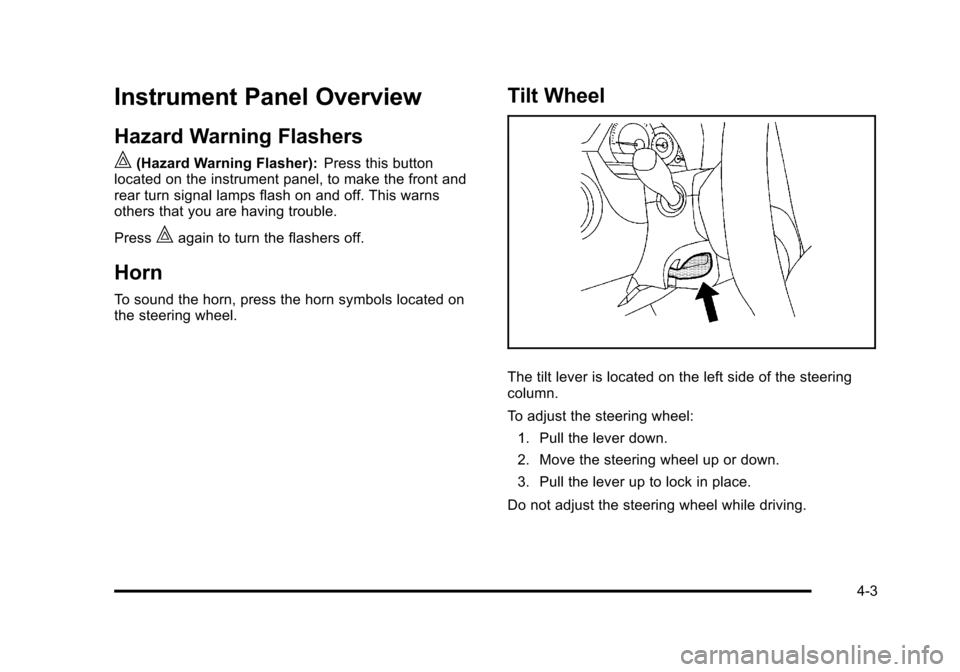
The tilt lever is located on the left side of the steering
column.
To adjust the steering wheel:
1. Pull the lever down.
2. Move the steering wheel up or down.
3. Pull the lever up to lock in place.
Do not adjust the steering wheel while driving.
4-3
Page 162 of 430
Black plate (6,1)Chevrolet HHR Owner Manual - 2011
9(Off): Turns the windshield wipers off.
8 (Mist): Single wipe, move the lever to
zand then
release it. Several wipes, hold lever on
zlonger.
As an added safety feature, if the wipers are on for
more than 15 seconds, the vehicle's headlamps turn on
automatically. They turn off 15 seconds after the wipers
are turned off.
Clear snow and ice from the wiper blades before using
them. If frozen to the windshield, carefully loosen or
thaw them. Damaged wiper blades should be replaced.
See Windshield Wiper Blade Replacement
on
page 6‑46.
Heavy snow or ice can overload the wiper motor.
A circuit breaker will stop the motor until it cools down.
Windshield Washer
To wash the windshield, press the button at the end of
the lever until the washers begin.
{WARNING:
In freezing weather, do not use your washer until
the windshield is warmed. Otherwise the washer
fluid can form ice on the windshield, blocking your
vision.
When the button is released, the washers will stop, but
the wipers will continue to wipe for about three times or
will resume the speed being used before.
4-6