2011 CHEVROLET HHR climate control
[x] Cancel search: climate controlPage 112 of 430
Black plate (6,1)Chevrolet HHR Owner Manual - 2011
Battery Replacement
Replace the battery if the KEY FOB BATT LOW
message displays in the DIC. See“KEY FOB BATT
LOW” underDIC Warnings and Messages
on
page 4‑40for additional information.
Notice: When replacing the battery, do not touch
any of the circuitry on the transmitter. Static from
your body could damage the transmitter.
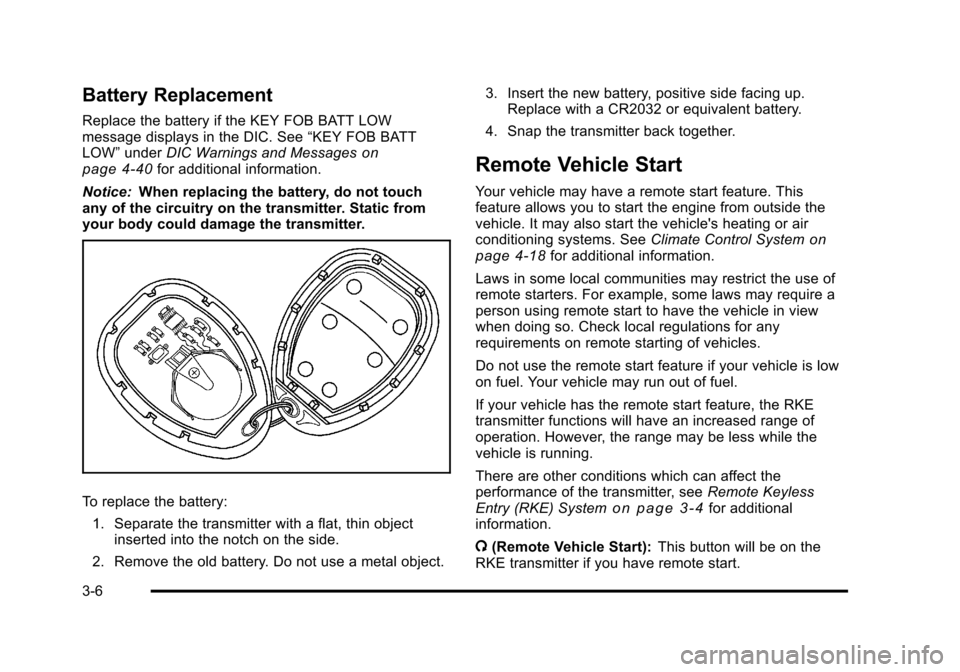
To replace the battery:
1. Separate the transmitter with a flat, thin object inserted into the notch on the side.
2. Remove the old battery. Do not use a metal object. 3. Insert the new battery, positive side facing up.
Replace with a CR2032 or equivalent battery.
4. Snap the transmitter back together.
Remote Vehicle Start
Your vehicle may have a remote start feature. This
feature allows you to start the engine from outside the
vehicle. It may also start the vehicle's heating or air
conditioning systems. See Climate Control System
on
page 4‑18for additional information.
Laws in some local communities may restrict the use of
remote starters. For example, some laws may require a
person using remote start to have the vehicle in view
when doing so. Check local regulations for any
requirements on remote starting of vehicles.
Do not use the remote start feature if your vehicle is low
on fuel. Your vehicle may run out of fuel.
If your vehicle has the remote start feature, the RKE
transmitter functions will have an increased range of
operation. However, the range may be less while the
vehicle is running.
There are other conditions which can affect the
performance of the transmitter, see Remote Keyless
Entry (RKE) System
on page 3‑4for additional
information.
/ (Remote Vehicle Start): This button will be on the
RKE transmitter if you have remote start.
3-6
Page 118 of 430
Black plate (12,1)Chevrolet HHR Owner Manual - 2011
Open the liftgate by pressing the touchpad located in
the handle above the license plate. Once slightly
opened, the liftgate will rise by itself. Lamps in the rear
of the vehicle will come on, illuminating the rear cargo
area, unless the dome lamp lever is in the off position.
For more information, seeDome Lamp on page 4‑14.
Notice: If you open the liftgate without checking for
overhead obstructions such as a garage door, you
could damage the liftgate or the liftgate glass.
Always check to make sure the area above and
behind the liftgate is clear before opening it.
{WARNING:
Exhaust gases can enter the vehicle if it is driven
with the liftgate, trunk/hatch open, or with any
objects that pass through the seal between the
body and the trunk/hatch or liftgate. Engine
exhaust contains Carbon Monoxide (CO) which
cannot be seen or smelled. It can cause
unconsciousness and even death.
(Continued)
WARNING: (Continued)
If the vehicle must be driven with the liftgate,
or trunk/hatch open:
.Close all of the windows.
.Fully open the air outlets on or under the
instrument panel.
.Adjust the Climate Control system to a setting
that brings in only outside air and set the fan
speed to the highest setting. See Climate
Control System in the Index.
.If the vehicle is equipped with a power liftgate,
disable the power liftgate function.
For more information about carbon monoxide, see
Engine Exhaust on page 3‑34.
3-12
Page 157 of 430
Black plate (1,1)Chevrolet HHR Owner Manual - 2011
Section 4 Instrument Panel
Instrument Panel Overview. . . . . . . . . . . . . . . . . . . . . . . .4-3
Hazard Warning Flashers . . . . . . . . . . . . . . . . . . . . . . . 4-3
Horn . . . . . . . . . . . . . . . . . . . . . . . . . . . . . . . . . . . . . . . . . . . . 4-3
Tilt Wheel . . . . . . . . . . . . . . . . . . . . . . . . . . . . . . . . . . . . . . . 4-3
Turn Signal/Multifunction Lever . . . . . . . . . . . . . . . . . . 4-4
Turn and Lane-Change Signals . . . . . . . . . . . . . . . . . 4-4
Headlamp High/Low-Beam Changer . . . . . . . . . . . . 4-5
Flash-to-Pass . . . . . . . . . . . . . . . . . . . . . . . . . . . . . . . . . . . 4-5
Windshield Wipers . . . . . . . . . . . . . . . . . . . . . . . . . . . . . . 4-5
Windshield Washer . . . . . . . . . . . . . . . . . . . . . . . . . . . . . 4-6
Rear Window Wiper/Washer . . . . . . . . . . . . . . . . . . . . 4-7
Cruise Control . . . . . . . . . . . . . . . . . . . . . . . . . . . . . . . . . . 4-8
Headlamps . . . . . . . . . . . . . . . . . . . . . . . . . . . . . . . . . . . . 4-11
Wiper Activated Headlamps . . . . . . . . . . . . . . . . . . . 4-12
Headlamps on Reminder . . . . . . . . . . . . . . . . . . . . . . 4-12
Daytime Running Lamps (DRL) . . . . . . . . . . . . . . . . 4-12
Automatic Headlamp System . . . . . . . . . . . . . . . . . . 4-13
Fog Lamps . . . . . . . . . . . . . . . . . . . . . . . . . . . . . . . . . . . . 4-13
Instrument Panel Brightness . . . . . . . . . . . . . . . . . . . 4-14
Dome Lamp . . . . . . . . . . . . . . . . . . . . . . . . . . . . . . . . . . . 4-14
Entry/Exit Lighting . . . . . . . . . . . . . . . . . . . . . . . . . . . . . 4-14
Reading Lamps . . . . . . . . . . . . . . . . . . . . . . . . . . . . . . . . 4-14
Electric Power Management . . . . . . . . . . . . . . . . . . . 4-15
Battery Run-Down Protection . . . . . . . . . . . . . . . . . . 4-15
Accessory Power Outlet(s) . . . . . . . . . . . . . . . . . . . . . 4-15
Ashtray(s) and Cigarette Lighter . . . . . . . . . . . . . . . 4-17 Climate Controls
. . . . . . . . . . . . . . . . . . . . . . . . . . . . . . . . . . 4-18
Climate Control System . . . . . . . . . . . . . . . . . . . . . . . . 4-18
Outlet Adjustment . . . . . . . . . . . . . . . . . . . . . . . . . . . . . . 4-20
Passenger Compartment Air Filter . . . . . . . . . . . . . 4-21
Warning Lights, Gauges, and Indicators . . . . . . . .4-22
Instrument Panel Cluster . . . . . . . . . . . . . . . . . . . . . . . 4-23
Speedometer and Odometer . . . . . . . . . . . . . . . . . . . 4-24
Tachometer . . . . . . . . . . . . . . . . . . . . . . . . . . . . . . . . . . . . 4-24
Safety Belt Reminders . . . . . . . . . . . . . . . . . . . . . . . . . 4-25
Airbag Readiness Light . . . . . . . . . . . . . . . . . . . . . . . . 4-26
Passenger Airbag Status Indicator . . . . . . . . . . . . . 4-27
Charging System Light . . . . . . . . . . . . . . . . . . . . . . . . 4-28
Up-Shift Light . . . . . . . . . . . . . . . . . . . . . . . . . . . . . . . . . . 4-28
Brake System Warning Light . . . . . . . . . . . . . . . . . . . 4-29
Antilock Brake System (ABS) Warning Light . . . 4-30
Enhanced Traction System (ETS) Indicator/ Warning Light . . . . . . . . . . . . . . . . . . . . . . . . . . . . . . . . 4-30
Electronic Stability Control (ESC)/Traction Control System (TCS) Indicator/Warning
Light . . . . . . . . . . . . . . . . . . . . . . . . . . . . . . . . . . . . . . . . . 4-31
Engine Coolant Temperature Warning Light . . . . 4-32
Engine Coolant Temperature Gauge . . . . . . . . . . . 4-32
Tire Pressure Light . . . . . . . . . . . . . . . . . . . . . . . . . . . . 4-33
Malfunction Indicator Lamp . . . . . . . . . . . . . . . . . . . . 4-33
Oil Pressure Light . . . . . . . . . . . . . . . . . . . . . . . . . . . . . 4-36
Security Light . . . . . . . . . . . . . . . . . . . . . . . . . . . . . . . . . . 4-36
4-1
Page 163 of 430
Black plate (7,1)Chevrolet HHR Owner Manual - 2011
Rear Window Wiper/Washer
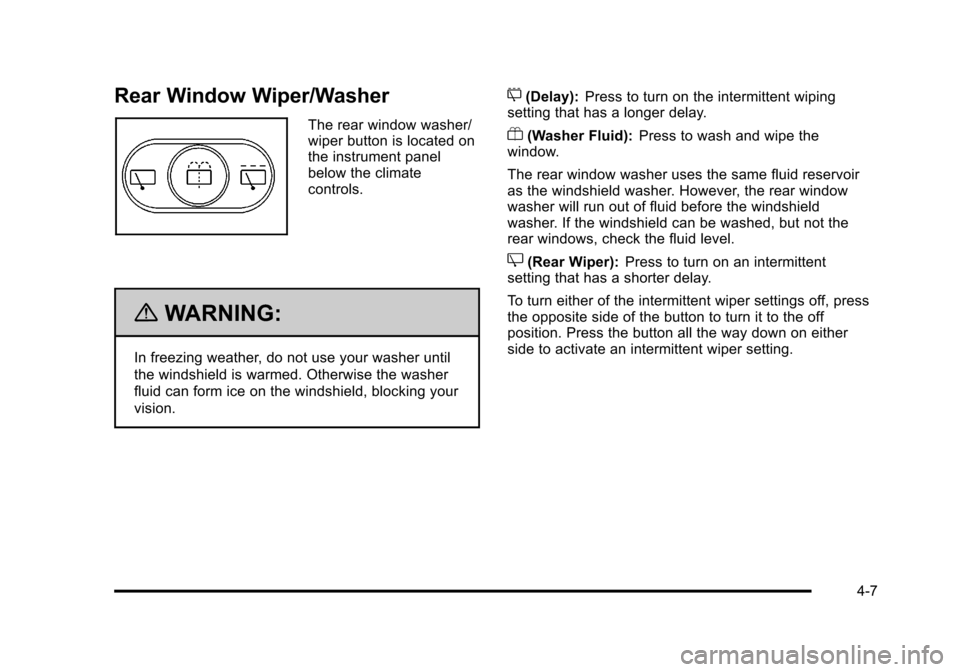
The rear window washer/
wiper button is located on
the instrument panel
below the climate
controls.
{WARNING:
In freezing weather, do not use your washer until
the windshield is warmed. Otherwise the washer
fluid can form ice on the windshield, blocking your
vision.
5(Delay):Press to turn on the intermittent wiping
setting that has a longer delay.
Y(Washer Fluid): Press to wash and wipe the
window.
The rear window washer uses the same fluid reservoir
as the windshield washer. However, the rear window
washer will run out of fluid before the windshield
washer. If the windshield can be washed, but not the
rear windows, check the fluid level.
Z(Rear Wiper): Press to turn on an intermittent
setting that has a shorter delay.
To turn either of the intermittent wiper settings off, press
the opposite side of the button to turn it to the off
position. Press the button all the way down on either
side to activate an intermittent wiper setting.
4-7
Page 171 of 430
Black plate (15,1)Chevrolet HHR Owner Manual - 2011
Electric Power Management
This vehicle has Electric Power Management (EPM), an
advanced control system. It estimates the battery's
temperature and state of charge and then adjusts the
voltage for best performance and extended life of the
battery.
When the battery's state of charge is low, the voltage is
raised slightly to quickly put the charge back in. When
the state of charge is high, the voltage is lowered
slightly to prevent overcharging. If the vehicle has a
voltmeter gauge or voltage display on the Driver
Information Center (DIC), you may see the voltage
move up or down. This is normal. If there is a problem,
an alert will be displayed.
The battery can be discharged at idle if the electrical
loads are very high. This is true for all vehicles. This is
because the generator (alternator) may not be spinning
fast enough at idle to produce all the power that is
needed for very high electrical loads.
A high electrical load occurs when several of the
following loads are on: headlamps, high beams, fog
lamps, rear window defogger, climate control fan at high
speed, heated seats, engine cooling fans, trailer loads,
and loads plugged into accessory power outlets.
EPM works to prevent excessive discharge of the
battery. It does this by balancing the generator's output
and the vehicle's electrical needs. It can increaseengine idle speed to generate more power, whenever
needed. It can temporarily reduce the power demands
of some accessories.
Normally, these actions occur in steps or levels, without
being noticeable. In rare cases at the highest levels of
corrective action, this action may be noticeable to the
driver.
Battery Run-Down Protection
The vehicle has a battery saver feature designed to
protect the vehicle's battery.
When any interior lamp is left on and the ignition is
turned off, the battery rundown protection system
automatically turns the lamp off after 20 minutes. This
prevents draining of the battery.
Accessory Power Outlet(s)
Accessory power outlets can be used to connect
electrical equipment, such as a cell phone or
MP3 player.
The accessory power outlets are located on the
instrument panel below the climate controls and at the
rear of the center console. There may be an outlet in
the rear cargo area on the passenger side.
Remove the cover to access and replace when not
in use.
4-15
Page 173 of 430
Black plate (17,1)Chevrolet HHR Owner Manual - 2011
This plug can be used to supply power to commercial
converters and contains four different circuits. The
functions of these circuits are as follows; a 40 Amp
battery service, a 10 Amp Accessory or Run service, a
15 Amp Delayed Accessory service and a Ground
circuit.
{WARNING:
Power is always supplied to the outlets. Do not
leave electrical equipment plugged in when the
vehicle is not in use because the vehicle could
catch fire and cause injury or death.
Notice: Leaving electrical equipment plugged in for
an extended period of time while the vehicle is off
will drain the battery. Power is always supplied to
the outlets. Always unplug electrical equipment
when not in use and do not plug in equipment that
exceeds the maximum 40 ampere rating.
When adding electrical equipment, be sure to follow the
installation instructions included with the equipment.
See Add-On Electrical Equipment on page 6‑100. Notice:
Hanging heavy equipment from the power
outlet can cause damage not covered by the vehicle
warranty. The power outlets are designed for
accessory power plugs only, such as cell phone
charge cords.
Ashtray(s) and Cigarette Lighter
The vehicle may have an ashtray and cigarette lighter.
To use the lighter, located on the instrument panel
below the climate controls, push it in all the way and let
go. When it is ready, it will pop back out by itself.
Notice: Holding a cigarette lighter in while it is
heating will not allow the lighter to back away from
the heating element when it is hot. Damage from
overheating may occur to the lighter or heating
element, or a fuse could be blown. Do not hold a
cigarette lighter in while it is heating. Do not use
equipment exceeding maximum amperage rating of
15 amperes.
To clean the center console ashtray, remove the entire
ashtray and empty it.
Notice: If papers, pins, or other flammable items are
put in the ashtray, hot cigarettes or other smoking
materials could ignite them and possibly damage
the vehicle. Never put flammable items in the
ashtray.
4-17
Page 174 of 430
Black plate (18,1)Chevrolet HHR Owner Manual - 2011
Climate Controls
Climate Control System
The heating, cooling, and ventilation for the vehicle can
be controlled with this system.
For vehicles with remote start, the climate control
system comes on and uses the prior temperature
settings selected before exiting the vehicle.
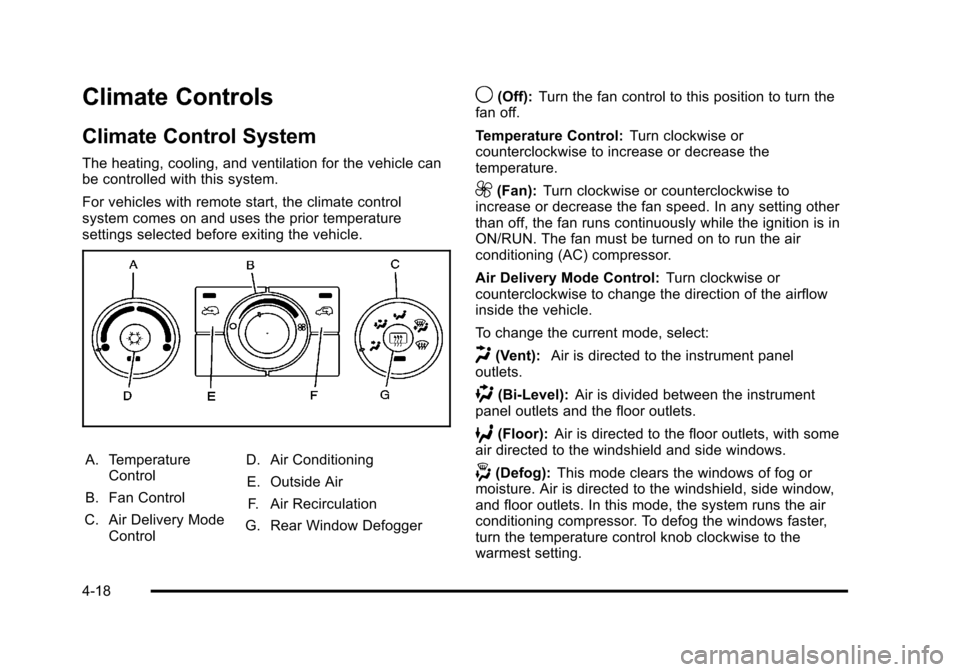
A. TemperatureControl
B. Fan Control
C. Air Delivery Mode Control D. Air Conditioning
E. Outside Air F. Air Recirculation
G. Rear Window Defogger
9(Off): Turn the fan control to this position to turn the
fan off.
Temperature Control: Turn clockwise or
counterclockwise to increase or decrease the
temperature.
9(Fan): Turn clockwise or counterclockwise to
increase or decrease the fan speed. In any setting other
than off, the fan runs continuously while the ignition is in
ON/RUN. The fan must be turned on to run the air
conditioning (AC) compressor.
Air Delivery Mode Control: Turn clockwise or
counterclockwise to change the direction of the airflow
inside the vehicle.
To change the current mode, select:
H(Vent): Air is directed to the instrument panel
outlets.
)(Bi-Level): Air is divided between the instrument
panel outlets and the floor outlets.
6(Floor): Air is directed to the floor outlets, with some
air directed to the windshield and side windows.
-(Defog): This mode clears the windows of fog or
moisture. Air is directed to the windshield, side window,
and floor outlets. In this mode, the system runs the air
conditioning compressor. To defog the windows faster,
turn the temperature control knob clockwise to the
warmest setting.
4-18
Page 258 of 430
Black plate (20,1)Chevrolet HHR Owner Manual - 2011
Blizzard Conditions
Being stuck in snow can be in a serious situation. Stay
with the vehicle unless there is help nearby. If possible,
use theRoadside Assistance Program
on page 8‑6.
To get help and keep everyone in the vehicle safe:
.Turn on the Hazard Warning Flasherson
page 4‑3.
.Tie a red cloth to an outside mirror.
{WARNING:
Snow can trap engine exhaust under the vehicle.
This may cause exhaust gases to get inside.
Engine exhaust contains carbon monoxide (CO)
which cannot be seen or smelled. It can cause
unconsciousness and even death.
If the vehicle is stuck in the snow:
.Clear away snow from around the base of
your vehicle, especially any that is blocking
the exhaust pipe.
.Check again from time to time to be sure
snow does not collect there.
(Continued)
WARNING: (Continued)
.Open a window about 5 cm (two inches) on
the side of the vehicle that is away from the
wind to bring in fresh air.
.Fully open the air outlets on or under the
instrument panel.
.Adjust the Climate Control system to a setting
that circulates the air inside the vehicle and
set the fan speed to the highest setting. See
Climate Control System in the Index.
For more information about carbon monoxide, see
Engine Exhaust on page 3‑34.
Snow can trap exhaust gases under your vehicle.
This can cause deadly CO (carbon monoxide) gas
to get inside. CO could overcome you and kill you.
You cannot see it or smell it, so you might not
know it is in your vehicle. Clear away snow from
around the base of your vehicle, especially any
that is blocking the exhaust.
Run the engine for short periods only as needed to
keep warm, but be careful.
5-20